Typography as geometry — a string becomes contours
Field can turn a string into geometry by reading the font's Bézier outlines. You can extrude, march, sample, cluster or animate a word like any other shape. Every function used below is listed, with its documentation, in the Graphics reference.
| what you want | where it is |
|---|---|
| a font at a size; a glyph's rings; a laid-out string with per-glyph handles | typography.kt — Typeface, Glyph, GlyphContour, TextLayout, PlacedGlyph |
| text on a curve, word wrap, measuring | typography.kt — TextLayout.onCurve, textCircle, wrapText, textWidth |
letters → FLine, TriMesh, ScalarField3D, Img, point clouds |
typography_field.kt |
| a figure in a box output | typography_field.kt — Box.showText, Box.showTextGrid, TextLayout.metricsFLines |
Hello, legibility
Load a face, lay out a word, and fill its outlines into an image:
:::static
val face = typeface("SansSerif", 140.0)
val word = layoutText("Handgloves", face)

// rasterizeText is a scanline fill over the contours this family extracted. Not drawString.
showImgGrid(
    "Handgloves — %d contours, %d of them counters, %.0f units wide"
        .format(word.contourCount, word.holeCount, word.advanceWidth) to rasterizeText(word, 1600, 380),
    columns = 1,
    cellSide = 900,
)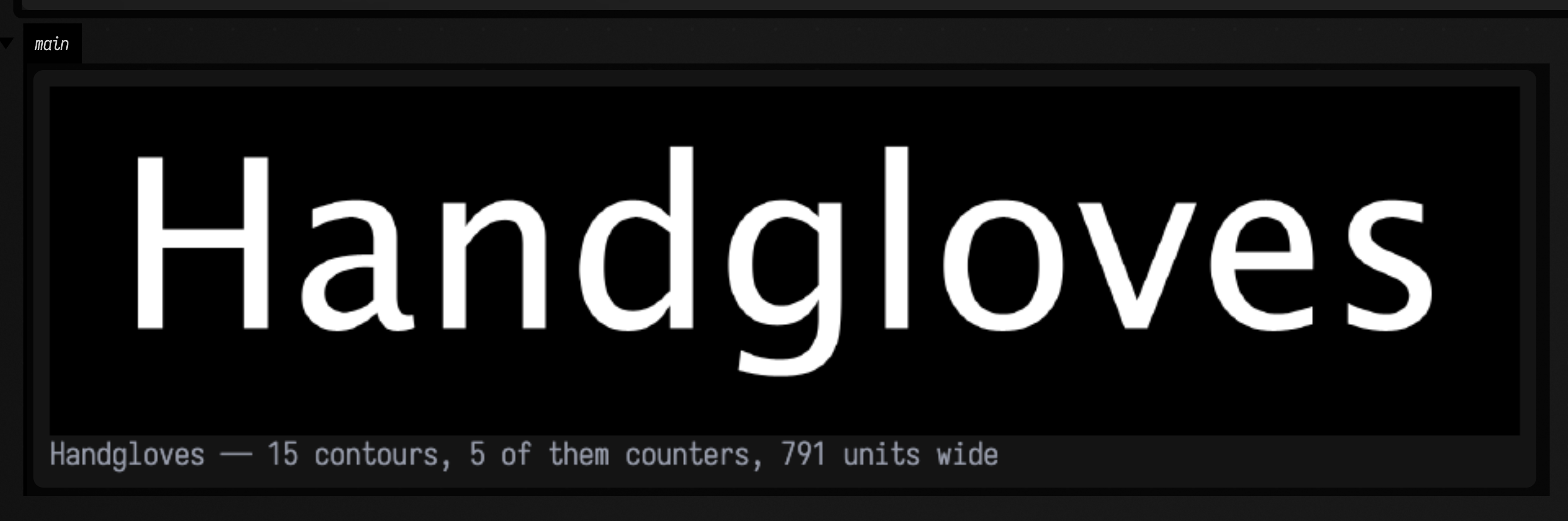
rasterizeText fills the word's contours itself rather than asking the system to draw text, so the
image is exactly the geometry the rest of this page works with.
The winding convention, and the control arm
A counter (the hole in o, e, a, B) is only a hole if something says so. Field's text
contours follow one rule:
A ring's signed area is \( \tfrac{1}{2}\sum_i (x_i y_{i+1} - x_{i+1} y_i) \) in text space. Outer contours are positive; holes are negative. Nesting depth, how many other rings of the same glyph contain this one, is authoritative: even depth is an outer ring, odd depth is a hole. A ring whose area sign disagrees with its depth is reversed on the way out.
Skia and Java2D both fill non-zero, so a counter survives exactly because its ring runs the other way and cancels its bowl. Take the convention away and the letters fill in. Below: identical filler, identical fill rule, identical rings, with the hole rings reversed in the middle cell.
:::static
:::fold one face, one window, so the three cells are strictly comparable
val face = typeface("SansSerif", 220.0)
val layout = layoutText("open", face)
val window = layout.bounds
:::endfold

// The control arm is one argument. Same filler, same NON_ZERO rule, same rings — only their
// direction differs, and NON_ZERO cancels a +1 outer against a −1 hole to leave a counter.
val withConvention = rasterizeText(
    layout,
    900,
    460,
    window = window,
    fillRule = TextFillRule.NON_ZERO,
    rings = layout.toContours(honourHoles = true),
)
val withoutConvention = rasterizeText(
    layout,
    900,
    460,
    window = window,
    fillRule = TextFillRule.NON_ZERO,
    rings = layout.toContours(honourHoles = false),
)

// EVEN_ODD counts crossings and ignores direction, depending on nesting parity instead. Over
// correct rings it must produce the IDENTICAL raster — two independent rules agreeing.
val evenOdd = rasterizeText(layout, 900, 460, window = window, fillRule = TextFillRule.EVEN_ODD)

:::fold measure the ink and the worst per-pixel disagreement, then draw the three cells
var worst = 0.0
for (y in 0 until withConvention.height) for (x in 0 until withConvention.width) {
    worst = maxOf(worst, kotlin.math.abs(withConvention.at(x, y, 0) - evenOdd.at(x, y, 0)).toDouble())
}
// Captions are drawn by montage's own 5x7 bitmap table and are clipped to the cell, so keep
// them short enough to survive.
showImgGrid(
    "convention on — %.1f%% ink".format(100 * withConvention.inkFraction()) to withConvention,
    "convention off — %.1f%% ink".format(100 * withoutConvention.inkFraction()) to withoutConvention,
    "EVEN_ODD: max diff %.5f".format(worst) to evenOdd,
    columns = 3,
    cellSide = 380,
)
:::endfold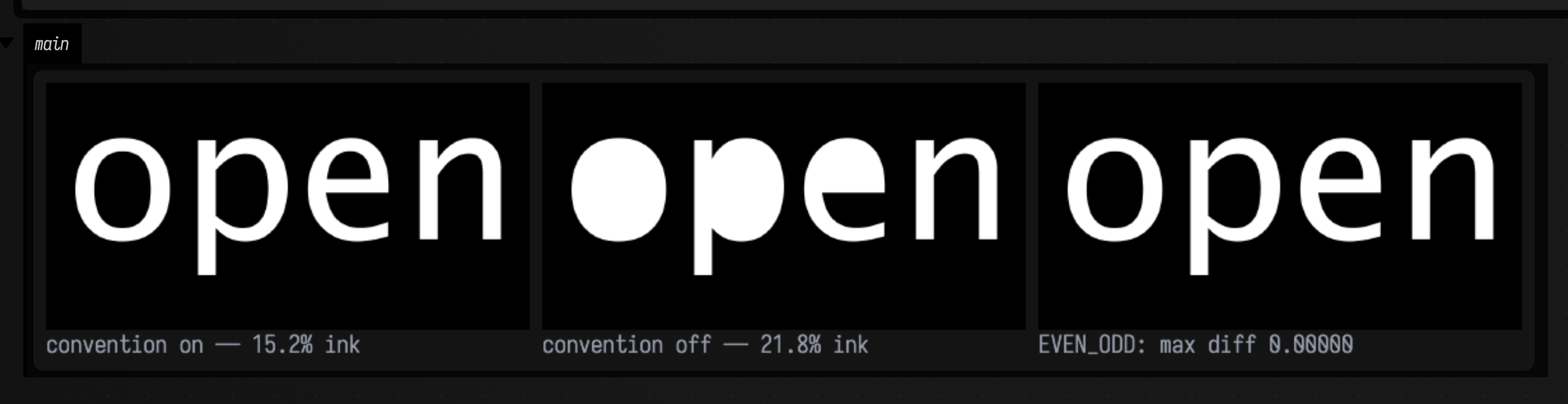
The counters of o and p close up in the middle cell and the ink fraction rises to prove it. The
e survives in both, because its aperture is open to the outside: it was never a closed ring, so
there is nothing for a winding rule to get wrong.
The third cell is the cross-check. EVEN_ODD ignores direction entirely, so over correct rings it
must produce the identical raster, and the worst per-pixel difference printed in its caption is
0.00000. Reverse the hole rings and the two rules diverge, which makes EVEN_ODD a quick check on
rings you have built yourself.
The rings themselves
This box draws the outer rings and the hole rings of aeg separately, then together, then filled:
:::static
val layout = layoutText("aeg", typeface("Serif", 240.0))

// Every ring of the layout, still classified: depth is containment, isHole is depth parity,
// signedArea is the direction that classification forced.
val rings = layout.toContours()

:::fold one closed FLine per ring, tinted by classification
val lines = rings.map { ring ->
    fline {
        data("m l+", ring.points)
        lineTo(ring.points[0].x, ring.points[0].y)
        color = if (ring.isHole) vec(1.0, 0.55, 0.28, 0.95) else vec(0.5, 0.82, 1.0, 0.95)
        thickness = 1.8
    } to ring.isHole
}
val signs = rings.joinToString(" ") { if (it.signedArea > 0) "+" else "−" }
showPlaneGrid(
    "outer rings — depth even, area positive (${rings.count { !it.isHole }})" to
        lines.filter { !it.second }.map { it.first },
    "hole rings — depth odd, area negative (${rings.count { it.isHole }})" to
        lines.filter { it.second }.map { it.first },
    "all ${rings.size} rings, signs $signs" to lines.map { it.first },
    "the same layout, filled" to layout.toFLines(filled = true, stroked = false, thickness = 1.0),
    columns = 2,
    cellWidth = 460,
    cellHeight = 250,
    window = layout.bounds,
)
:::endfold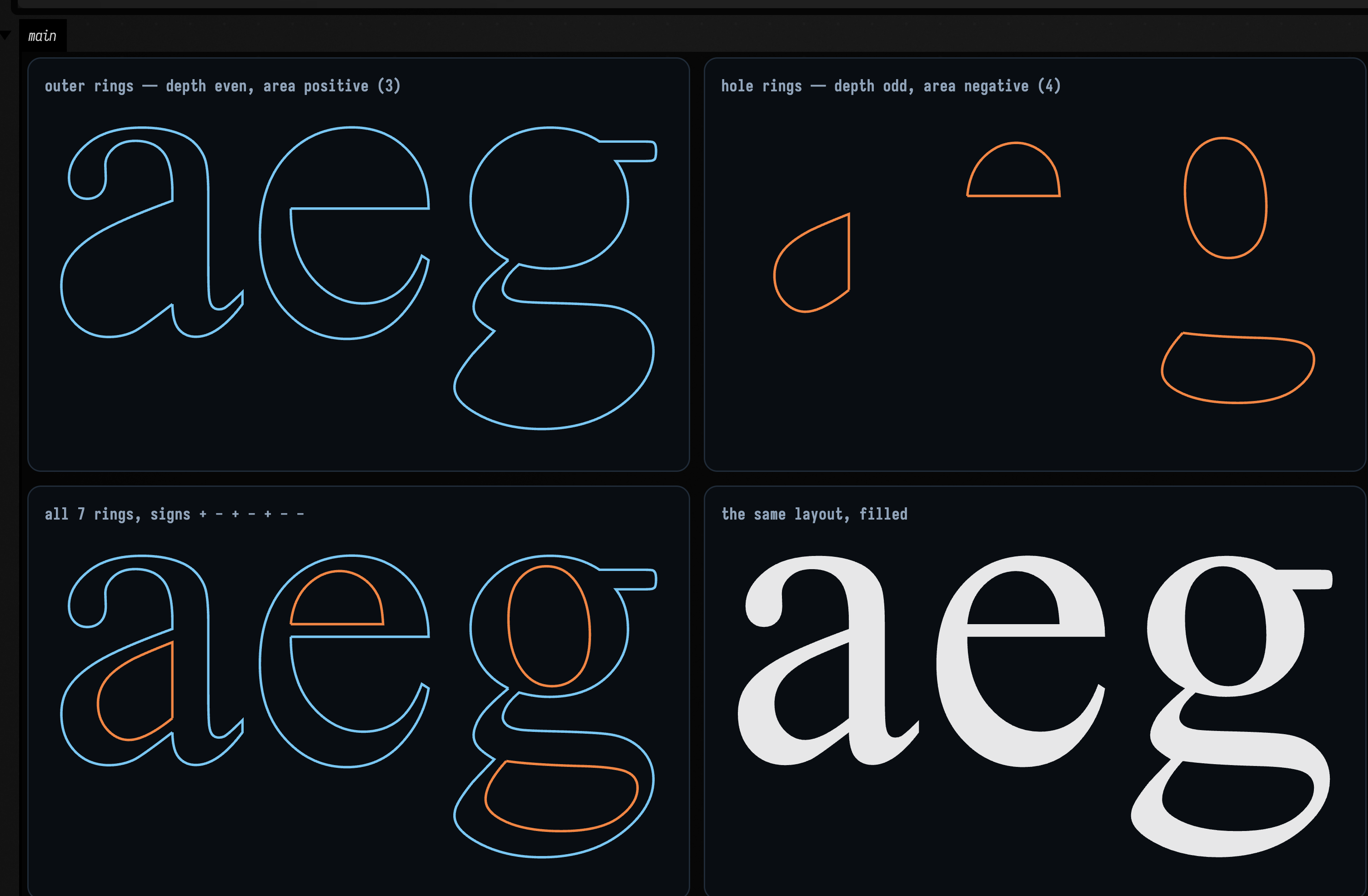
Seven rings for aeg: three outer and four holes, because the double-storey g contributes two. In
the hole panel those four little loops float in space exactly where the counters are. A letter is a
ring system, and that panel is the system with its outer rings taken away.
What layout decided
layoutText takes AWT's advances and kerning pairs and adds the things AWT does not do: \n,
letter-spacing, alignment, and a mutable transform handle per glyph.
:::static
:::fold one face, and prose to wrap
val face = typeface("SansSerif", 120.0)
val prose = wrapText(
    "Type is geometry that happens to be legible, and legibility is the one test " +
        "a plausible looking picture cannot pass.",
    face.atSize(44.0),
    maxWidth = 620.0,
)
:::endfold

// Identity one: kerning off, no tracking — the line is the sum of its advances. Two different
// AWT paths (accumulated pen positions vs per-glyph metrics) that have to agree.
val plain = layoutText("minimum", face.withKerning(false))
val drift = plain.advanceWidth - plain.glyphs.sumOf { it.glyph.advance }

// Identity two: tracking adds one gap per INTER-GLYPH space, not one per glyph. The trailing gap
// nobody asked for is the classic off-by-one, and the advance boxes below show where it went.
val t = 0.16 * face.size
val tight = layoutText("TYPE", face)
val loose = layoutText("TYPE", face, tracking = t)

:::fold draw the metrics diagram, then the same wrapped paragraph in all three alignments
// Two figures, so two CHANNELS: a second display on the same channel replaces the first.
showPlaneGrid(
    "tracking 0 — %.0f units; advanceWidth − Σadvances = %.1e".format(tight.advanceWidth, drift) to
        (tight.metricsFLines() + tight.advanceBoxFLines() + tight.toFLines(thickness = 1.0)),
    "tracking 0.16em — %.0f units, i.e. exactly %d gaps × %.1f wider"
        .format(loose.advanceWidth, tight.glyphs.size - 1, t) to
        (loose.metricsFLines() + loose.advanceBoxFLines() + loose.toFLines(thickness = 1.0)),
    channel = "metrics",
    columns = 1,
    cellWidth = 880,
    cellHeight = 240,
    window = afield.app.protocol.Rect(-20.0, -face.ascent - 20, loose.advanceWidth + 40, face.lineHeight + 40),
)
showImgGrid(
    *TextAlign.entries
        .map { a ->
            a.name.lowercase() to
                rasterizeText(layoutText(prose, face.atSize(44.0), align = a, lineSpacing = 1.12), 700, 380)
        }
        .toTypedArray(),
    channel = "alignment",
    columns = 3,
    cellSide = 290,
)
:::endfold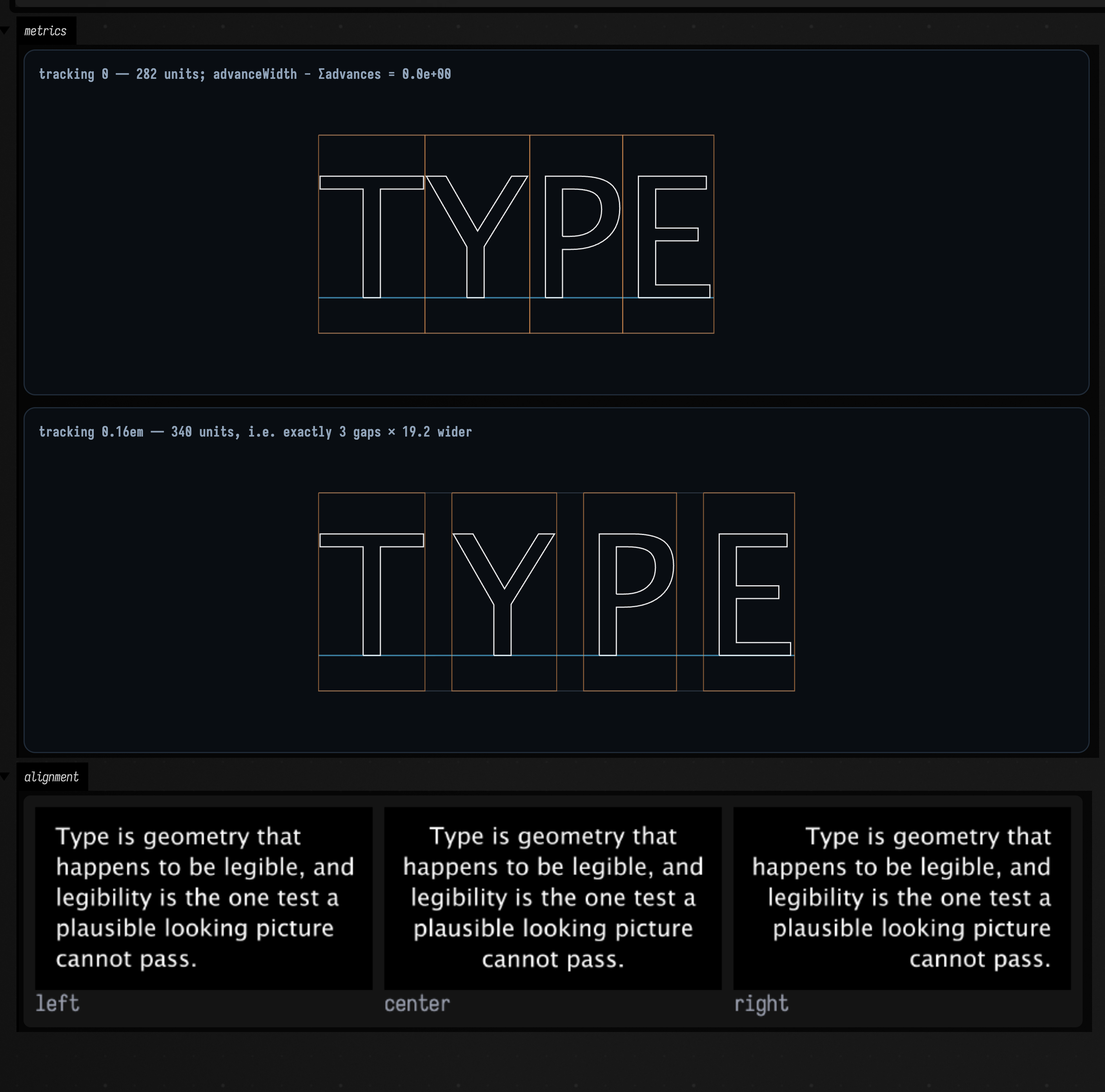
The first two panels diagram the decisions rather than the letters: metricsFLines() draws
baseline, ascent and descent, and advanceBoxFLines() draws one box per glyph, including for a
space, which has no glyph to draw and is why the boxes are useful. Compare the two rows and the
extra space is visibly between the letters and not after the last one.
Word wrap measures with the real layout, so it is correct for the tracking and kerning you are actually going to use, and all three alignments come off the same wrapped string.
Text on a curve
onCurve does not distort a glyph. It looks the glyph's advance-box centre up at that distance
along the path, using FLine.cursor()'s arc-length table (the same machinery sampleByDistance and
byDashing use), and then sets that glyph's rotation and pivot. So the letters stay letters, the
spacing is even in distance rather than in curve parameter, and a multi-line layout follows the curve
in bands instead of collapsing onto it.
:::static
:::fold a face, a string, and a cubic to bend the second one along
val face = typeface("SansSerif", 78.0)
val ring = layoutText("AROUND AND AROUND", face, tracking = 7.0)
val wave = fline {
    moveTo(0.0, 0.0)
    cubicTo(300.0, -240.0, 720.0, 240.0, 1020.0, 0.0)
}
:::endfold

// Size the circle to the text rather than the text to the circle: a circumference equal to the
// layout's width means the string closes exactly, with no gap and no overlap at the seam.
val circle = textCircle(radius = ring.advanceWidth / (2 * Math.PI))
val onCircle = ring.onCurve(circle, align = TextAlign.CENTER)
val onWave = layoutText("a rolling line of type", face, tracking = 2.0).onCurve(wave, align = TextAlign.CENTER)

:::fold the filled rasters, then the paths they sit on
// Two figures, two CHANNELS: a second display on one channel replaces the first.
showImgGrid(
    "circumference %.1f vs width %.1f".format(circle.arcLength(), ring.advanceWidth) to
        rasterizeText(onCircle, 620, 620),
    "%d of %d glyphs turned".format(onWave.glyphs.count { kotlin.math.abs(it.rotation) > 0.05 }, onWave.glyphs.size) to
        rasterizeText(onWave, 620, 620),
    channel = "rasters",
    columns = 2,
    cellSide = 420,
)
showPlaneGrid(
    "the circle it sits on — original untouched: ${ring.glyphs.all { it.isUntransformed }}" to
        ([
            circle.copy {
                color = vec(0.4, 0.6, 0.8, 0.6)
                thickness = 1.0
            },
        ] + onCircle.toFLines(thickness = 1.0)),
    "the cubic it sits on" to
        ([
            wave.copy {
                color = vec(0.4, 0.6, 0.8, 0.6)
                thickness = 1.0
            },
        ] + onWave.toFLines(thickness = 1.0)),
    channel = "paths",
    columns = 2,
    cellWidth = 430,
    cellHeight = 430,
)
:::endfold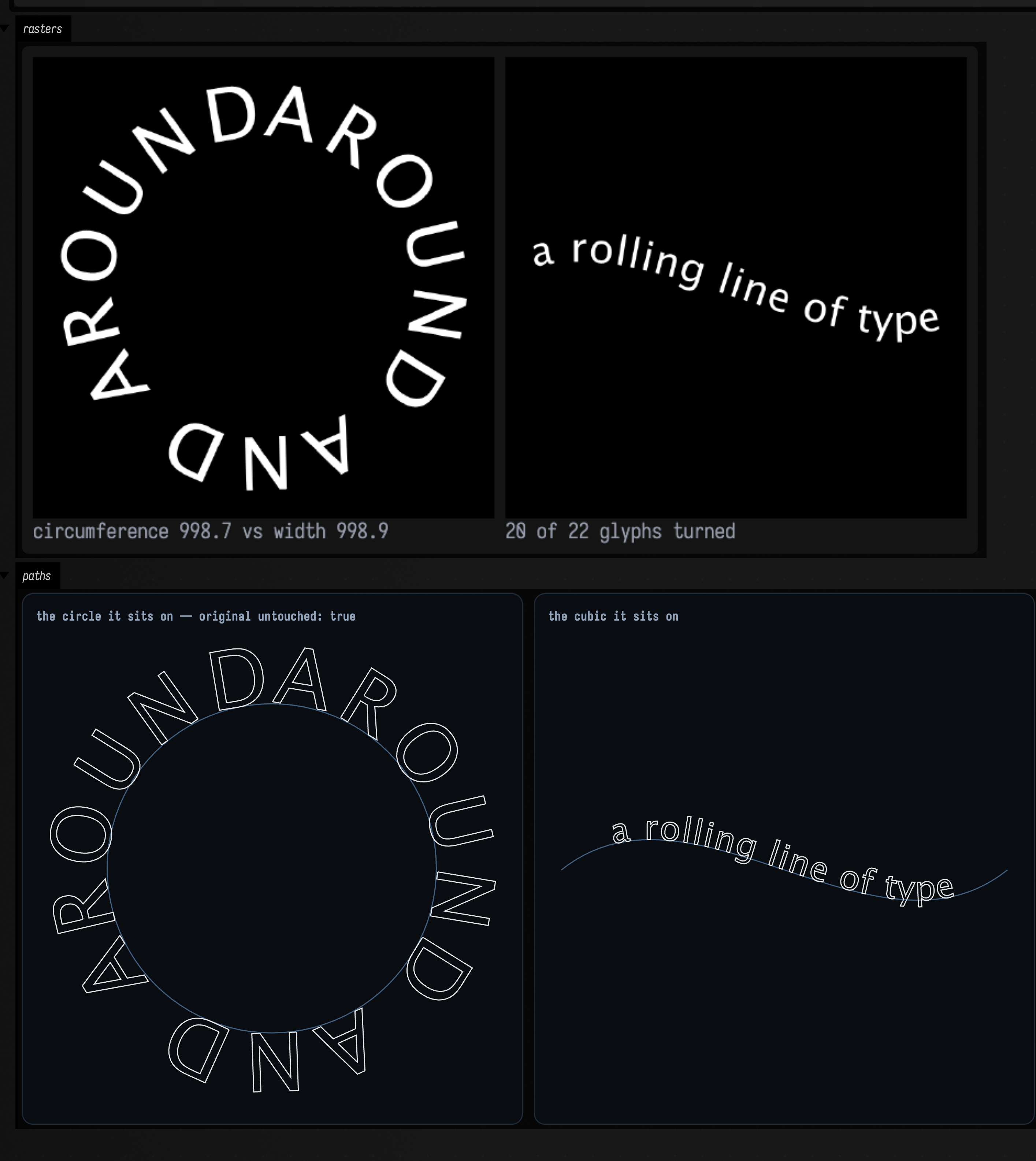
The first caption gives 998.7 of circumference against 998.9 of layout width. Two tenths of a
unit over a thousand is what "closes exactly" costs, and it is the reason to size the circle from the
text rather than the other way round. The lower row is the paths themselves with the letters as
outlines on them, and its caption records that onCurve returned a copy, so the straight layout
is still straight and can be bent along something else.
Kinetic typography
Every PlacedGlyph carries offset, rotation, scale and pivot, and the pivot defaults to the
glyph's own visual centre, so a bare rotation = 0.3 spins each letter about itself and looks like
what you meant. One layout, computed once, and a function of elapsed seconds written into it.
(animate { } and the AnimationClock it reads are Field's frame model; if you want to know what a
frame actually is, and what stops one, see Frames and the animation loop.)
:::static
:::fold the face, the layout, and a window fixed from the widest the wave will ever get
val face = typeface("SansSerif", 150.0)
val layout = layoutText("KINETIC", face, tracking = 16.0)
// A FIXED frame, not fit-to-contents: left to rescale to each frame's own bounds the letters would
// move and the picture would stand still. Probe both extremes of the wave and union them.
val window = run {
    val probe = layoutText("KINETIC", face, tracking = 16.0)
    probe.eachGlyph { i ->
        rotation = 0.5
        scale = vec(1.3, 1.3)
        offset = vec(0.0, 34.0)
    }
    val a = probe.bounds
    probe.eachGlyph { i ->
        rotation = -0.5
        scale = vec(1.3, 1.3)
        offset = vec(0.0, -34.0)
    }
    a.union(probe.bounds)
}
val started = AnimationClock.nowSeconds()

:::endfold

// The line you would change: elapsed seconds and a glyph index in, a travelling wave out. During
// offline capture AnimationClock derives elapsed time exactly from frame index / fps.
fun waveAt(elapsed: Double, i: Int): Double = 1.7 * elapsed + i * 0.7

animate {
    val elapsed = AnimationClock.nowSeconds() - started
    layout.eachGlyph { i ->
        val w = waveAt(elapsed, i)
        rotation = 0.42 * kotlin.math.sin(w)
        val s = 1.0 + 0.22 * kotlin.math.cos(w)
        scale = vec(s, s)
        offset = vec(0.0, 30.0 * kotlin.math.sin(w * 1.3))
    }
    showImgGrid(
        "t = %.1fs".format(elapsed) to rasterizeText(layout, 1100, 420, window = window),
        columns = 1,
        cellSide = 820,
    )
}
Three handles per letter and one wave function is the whole animation. Note the fixed window:
without it the frame rescales to whatever the letters are doing and no motion is legible.
Extrusion, counters and all
toMesh extrudes a layout into a closed solid, holes included. (The general extrudeMesh cannot,
because its caps do not support holes.) The caps are triangulated with their counters punched out,
and the walls are built from the same vertices as the caps, so every wall meets a cap on a shared
edge and the surface closes. That makes genus() a meaningful question to ask about a letter.
:::static
:::fold three extrusions off the same contour extractor
val face = typeface("SansSerif", 170.0)
val o = layoutText("o", face).toMesh(depth = 46.0, centre = true)
val l = layoutText("l", face).toMesh(depth = 46.0, centre = true)
val word = layoutText("mesh", typeface("SansSerif", 130.0)).toMesh(depth = 36.0, centre = true)
:::endfold

/*
A 2D count against a 3D one. The hole count comes from ring nesting in the plane; the genus comes
from counting the mesh's vertices, edges and faces. They have no reason to agree unless the
extruder is right.
*/
val holesIn2D = layoutText("o", face).holeCount

// A 2D area against a 3D volume: a shoelace sum times the depth, against the divergence theorem
// over the triangles. A dropped cap triangle or a wall wound the wrong way breaks it.
val expected = layoutText("o", face).glyphs.sumOf { it.glyph.inkArea } * 46.0
val measured = layoutText("o", face).toMesh(depth = 46.0, yUp = false).volume()

:::fold draw them — note what is NOT here: flatShaded()
/*
flatShaded() un-welds every triangle, and the genus in these labels is topology() over whatever
you hand it — so a flat-shaded copy would label itself "genus null, watertight false" while
looking identical. The `word` panel below goes further: single-mesh showMesh writes its own fact
line, and that line would read "open (N boundary loop(s))". Unnecessary as well: both renderers
apply shadedNormals to a mesh that arrives without normals for you.
*/
showMeshGrid(
    "o — genus ${o.genus()}, 2D hole count $holesIn2D, watertight ${o.isWatertight()}" to o,
    "l — genus ${l.genus()}, watertight ${l.isWatertight()}" to l,
    channel = "letters",
    columns = 2,
    cellWidth = 420,
    view = MeshView(yawDegrees = 26.0, pitchDegrees = 16.0, distance = 3.2),
)
showMesh(
    word,
    channel = "word",
    view = MeshView(yawDegrees = 22.0, pitchDegrees = 14.0, distance = 2.6, width = 820, height = 340),
    title = "extruded from the same contours the raster filled",
    caption =
        "'o': ink area × depth = %.0f, mesh volume %.0f, relative difference %.2e"
            .format(expected, measured, kotlin.math.abs(expected - measured) / expected),
)
:::endfold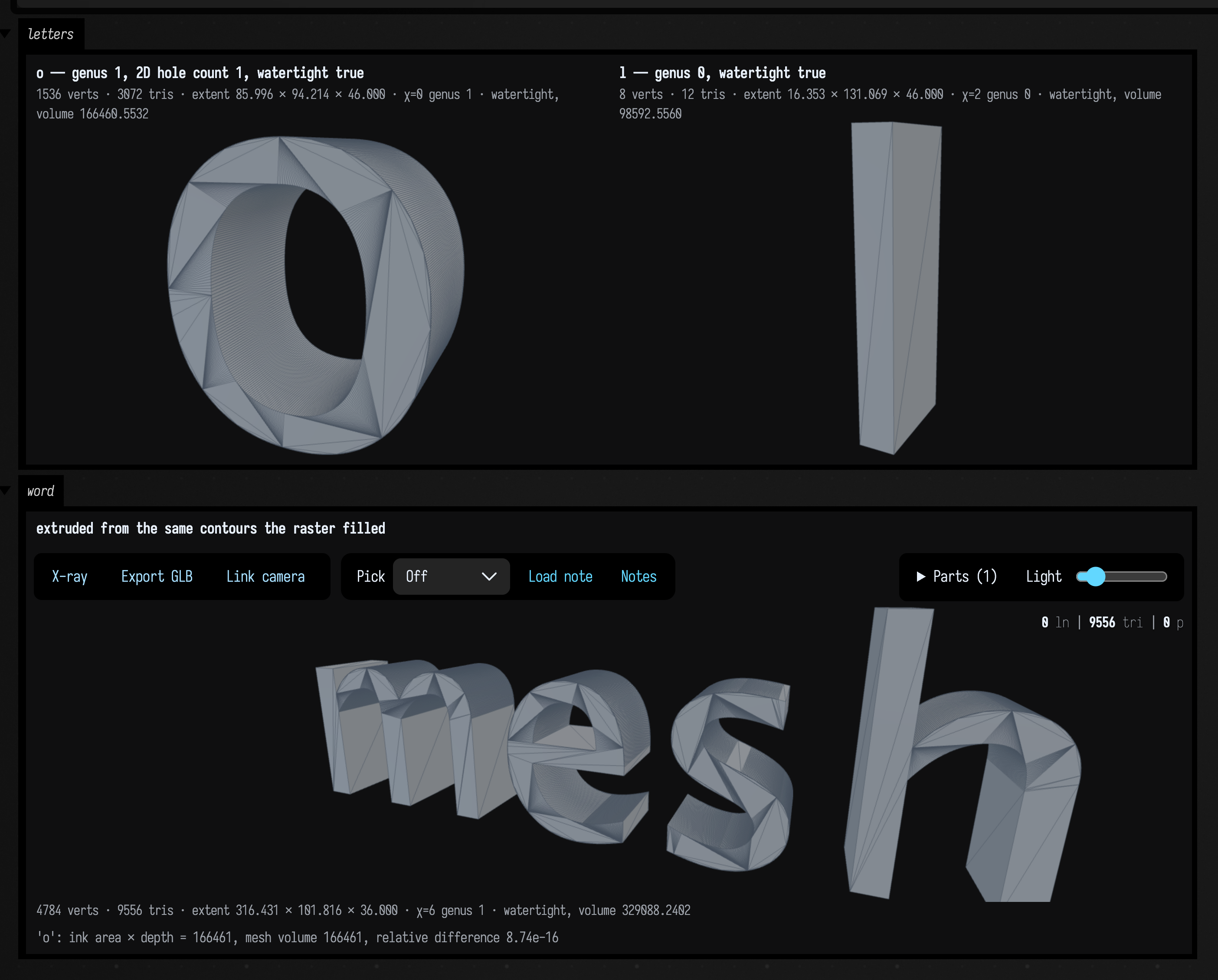
Genus 1 for o and 0 for l: a 2D count — rings nested at odd depth — agreeing with a 3D one,
χ over the mesh's vertices, edges and faces. The extruded volume agrees with the ink area times the
depth in the same way. Either identity breaks on a dropped cap triangle, a wall wound the wrong way
or an unpunched counter, so they are a quick check on any mesh you build from text.
Back faces are culled in this render, so an inside-out wall would show up as a missing wall rather
than as odd shading. The line of facts under the word panel is computed by showMesh from the
mesh it was given (Field's 3D output).
Letters in the SDF family
toSdf builds a 2D signed-distance grid over the layout, samples it bilinearly and extrudes it in z.
From there a word is just another ScalarField3D.
:::static
val layout = layoutText("SDF", typeface("SansSerif", 170.0))
val sdf = layout.toSdf(depth = 0.24, gridResolution = 340)

// Once the letters are a field, the whole SDF family applies to them unchanged — which is the
// entire reason for this bridge existing.
val marched = sdf.march(resolution = 130)
val melted = marchingCubes(sdfSmoothUnion(sdf.field, sdfSphere(0.6, vec(0.0, 0.0, 0.0)), 0.18), sdf.bounds, 130)
val hollow = marchingCubes(sdf.field.shell(0.02), sdf.bounds, 150)
val wrung = marchingCubes(sdf.field.twisted(0.5), sdf.bounds, 130)

:::fold draw the grid and the four surfaces
val grid = sdf.distanceField
/*
showImgGrid rather than showImg: showImg sends its caption as a separate output message,
which the image then replaces, so the caption never survives to the page. montage only ever
scales a tile DOWN, so upscale the grid first or it lands as a 340px thumbnail.
*/
showImgGrid(
    "signed distance field, %dx%d grid, deepest %.0f".format(grid.nx, grid.ny, grid.deepestInside()) to
        grid.toImg().upscaleNearest(2),
    channel = "grid",
    columns = 1,
    cellSide = 880,
)
showMeshGrid(
    "marchingCubes on the letters — ${marched.triangleCount} triangles, genus ${marched.genus()}" to marched,
    "sdfSmoothUnion with a sphere — ${melted.triangleCount}" to melted,
    "field.shell(0.02) — ${hollow.triangleCount}" to hollow,
    "field.twisted(0.5) — ${wrung.triangleCount}" to wrung,
    channel = "surfaces",
    columns = 2,
    cellWidth = 420,
    view = MeshView(yawDegrees = 18.0, pitchDegrees = 12.0, distance = 2.6),
)
:::endfold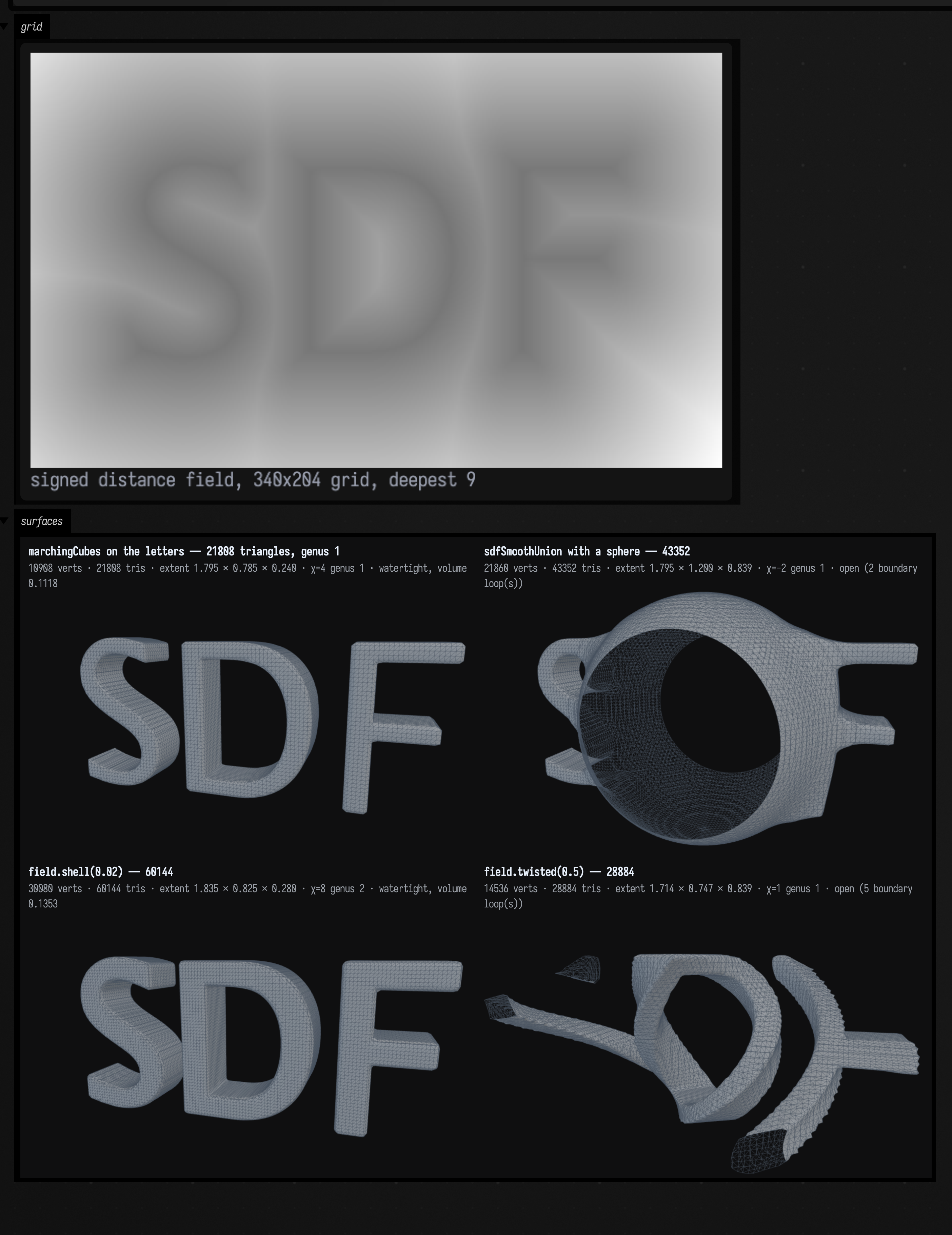
The grid is what limits how crisp a serif can be, rather than the marching resolution. The sign
convention is mesh_sdf.kt's, negative inside, the opposite of GlyphContour.signedArea's: an
area's sign says which way a ring runs, a distance's sign says which side of the ink you are on.
Letters as point clouds
The plainest bridge is even-by-arc-length samples along the outlines. Once a word is points, every point-consuming family in the stdlib works on letters.
:::static
val layout = layoutText("field", typeface("SansSerif", 200.0))

// Even by ARC LENGTH, so halving the spacing twice roughly quadruples the count. That ratio is the
// a real check that the resampler walks the curve rather than emitting one point per stored vertex.
val coarse = layout.samplePoints(spacing = 18.0)
val fine = layout.samplePoints(spacing = 4.5)

// And now every point-consuming family in the stdlib eats a word.
val graph = vec2DelaunayGraph(coarse)
val km = vec2KMedoids(coarse, k = 6, options = KMedoidsOptions(randomSeed = 11L))

:::fold four views of the same word, all sharing one window
val layer = ClusterLayer("outline strokes", km.labels)
showPlaneGrid(
    "outline samples — ${coarse.size} at spacing 18, ${fine.size} at 4.5 (%.2fx for 4x finer)"
        .format(fine.size.toDouble() / coarse.size) to [layout.toPointFLine(spacing = 18.0, pointSize = 1.1)],
    "vec2DelaunayGraph over those samples — ${graph.edges.size} edges" to
        [graph.toFLine(coarse, thickness = 0.8), layout.toPointFLine(spacing = 18.0, pointSize = 0.9)],
    "vec2KMedoids, k = 6 — distortion %.1f, converged ${km.converged}".format(km.distortion) to
        layer.toFLines(coarse, centers = km.medoids, drawSpokes = false),
    "the outlines the samples came from" to layout.toFLines(thickness = 1.2),
    columns = 2,
    cellWidth = 420,
    cellHeight = 250,
    window = layout.bounds,
)
:::endfold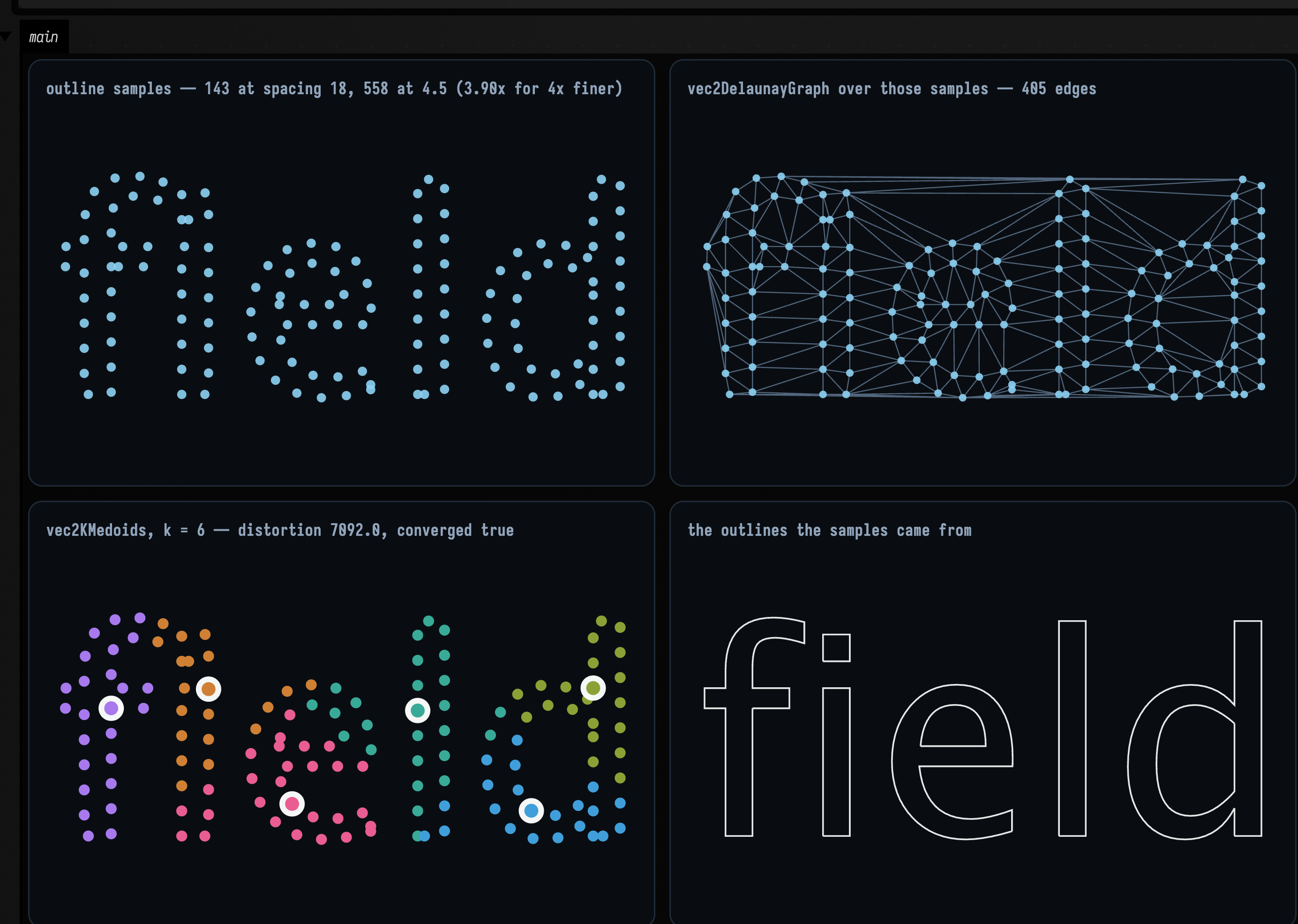
Halving the spacing twice roughly quadruples the count, as the first panel's caption reports: near
enough to linear that the resampler is walking arc length and not emitting one point per stored
vertex. From here vec2KMedoids finds the strokes, vec2DelaunayGraph triangulates a word, and the
agents in Spatial Artificial Life will happily eat a headline.
Loading a font
The examples above use the logical families SansSerif and Serif, which every machine has. To
ask for a particular font, or load one from a file:
typeface("SansSerif", 64.0) // logical family: always resolves
Typefaces.named("Futura", 64.0, strict = true) // throws instead of substituting silently
Typefaces.firstAvailable("Futura", "Avenir", size = 64) // the first one this machine actually has
Typefaces.fromFile("/path/to/Whatever.ttf", 64.0) // Font.createFont, not registered globally
Typefaces.available() lists the installed families.
SansSerif and Serif map to different real fonts on different machines, so the pictures may look
different on yours. Glyph shapes can change ring counts and genus; the winding convention remains
the same.
Run it yourself
The page's boxes are also the typography_worked_example
starting point, a document you can open and edit.