OSC and TUIO
Open Sound Control is the small UDP protocol that
TouchOSC, Max, SuperCollider, Sonic Pi and most show-control software use to talk to each other. A
message is an address such as /mixer/3/gain followed by a few typed arguments. Field has one
function for each direction: osc(port) listens, and oscClient(host, port) sends.
TUIO is OSC with a fixed vocabulary for fingers and tagged objects on a
touch table, and TuioReceiver turns it into one frame per tracker update.
Every figure on this page is a box that sends OSC to itself over the loopback interface and shows what arrived, so each example runs as it is, with no other program.
Receiving a message
This box listens on a port, sends itself one message, and shows what arrived.
:::static
osc(57301).on("/fader/1") { m ->
    gather<OscServer.Message> {
        markdown("main", "`${m.address}` ${m.arguments}")
    }
}

oscClient("127.0.0.1", 57301).send("/fader/1", 0.75f)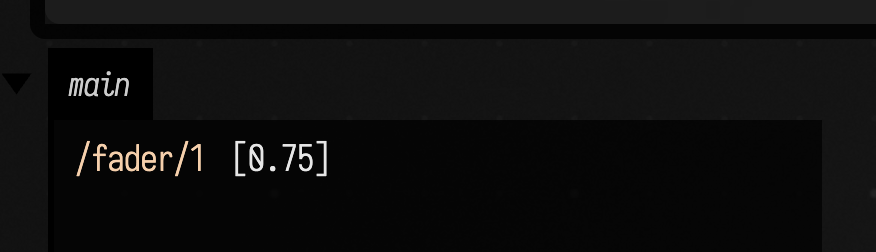
osc(57301) binds UDP port 57301 on every network interface and starts listening. A phone on the
same network reaches it at the computer's address. The server is cached by port, so running the box
again hands back the same socket rather than trying to bind a second one. If another program
(TouchOSC Bridge, Max, a second Field) already has the port, osc(port) fails with an error that
names it.
on(pattern) { m -> … } registers a handler for an address pattern. m.address is the address the
message was sent to, and m.arguments is its argument list. The handler returns a generator, and
gather<OscServer.Message> { … } is the way to write one. The next section explains why it is a
generator rather than a plain function.
The last line sends the message that the handler receives. oscClient(host, port) is cached by host
and port in the same way as osc, and opens its socket on the first send.
osc() with no argument listens on 9000.
Where handler code runs
A handler has two halves, and they run in different places.
:::static
val server = osc(57302)
server.debug = false
val report = mutableListOf<String>()

server.on("/step") { m ->
    report += "the handler lambda runs on `${Thread.currentThread().name}`"
    gather<OscServer.Message> {
        report += "the generator starts on `${Thread.currentThread().name}`"
        val again = yield()
        report += "its first yield hands back the same message: **${again === m}**"
        val t0 = System.nanoTime()
        var passes = 0
        while (System.nanoTime() - t0 < 1_000_000_000L) {
            yield()
            passes++
        }
        report += "it was resumed **$passes** times in the next second"
        markdown("main", report.joinToString("\n") { "- $it" })
    }
}

oscClient("127.0.0.1", 57302).send("/step")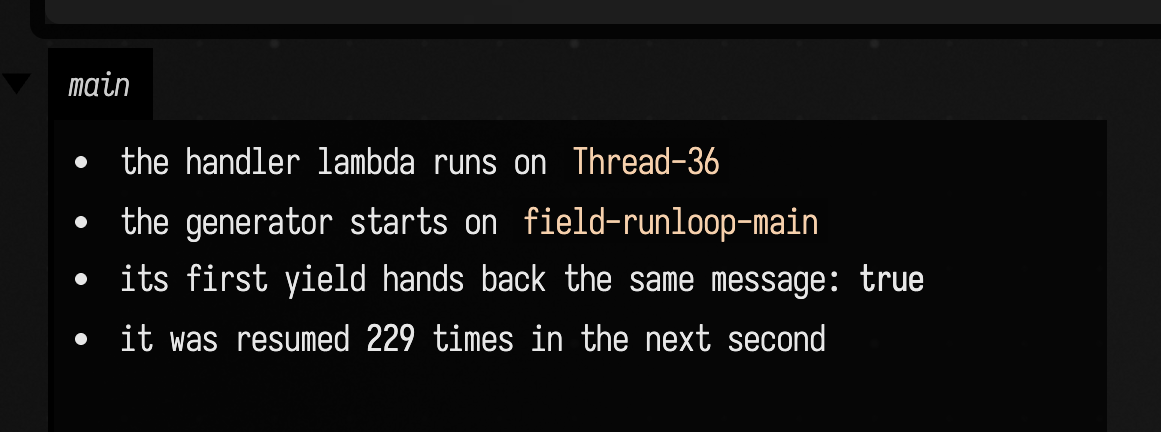
The lambda you pass to on runs on the socket's receive thread, the moment the message arrives. Its
job is to build the generator, and it can also note a value cheaply. It must not touch drawing or
the box graph, which belong to the main thread.
The generator runs on field-runloop-main, Field's main thread, which is where a launched box's
animation also runs. It starts on the next pass of the main loop and is resumed once in that same
pass, so code up to the second yield() runs straight through. After that it is resumed once per
pass until it finishes. A pass is not a display frame: the loop runs whenever it has work, and the
figure counts a few hundred passes a second. Count time, not yield()s, when a handler has to span
an interval. Every yield() hands back the message that started the generator.
That is what the generator is for. A handler can span passes, easing a value toward the fader over
half a second for instance, without a thread of its own, and whatever it changes it changes on the
same thread as the rest of the box. So do the work a message causes inside the generator. An empty
gather<OscServer.Message> { } is fine when the lambda has already done everything.
A fader that drives a drawing
The shape most controller code takes: a handler stores the latest value, and an animation reads it.
:::static
// Stop/rerun removes this handler; the cached OSC server stays available.
var level = 0f // the fader, as last received

osc(57308).on("/1/fader1", runOwned = true) { m ->
    gather<OscServer.Message> { level = (m.arguments[0] as Number).toFloat() }
}

// a stand-in for the phone: sweep its fader up and down
val phone = oscClient("127.0.0.1", 57308)
var t = 0.0

animate {
    t += 1 / 60.0
    phone.send("/1/fader1", (0.5 + 0.5 * kotlin.math.sin(t * 2)).toFloat())
    val track = fline {
        rect(0.0, 0.0, 400.0, 24.0)
        stroked = true
        color = vec(0.6, 0.6, 0.6, 1.0)
    }
    val bar = fline {
        rect(0.0, 0.0, level * 400.0, 24.0)
        filled = true
        stroked = false
        color = vec(0.91, 0.69, 0.29, 1.0)
    }
    lines(track, bar, channel = "main")
    markdown("value", "/1/fader1 = ${level.f2}")
}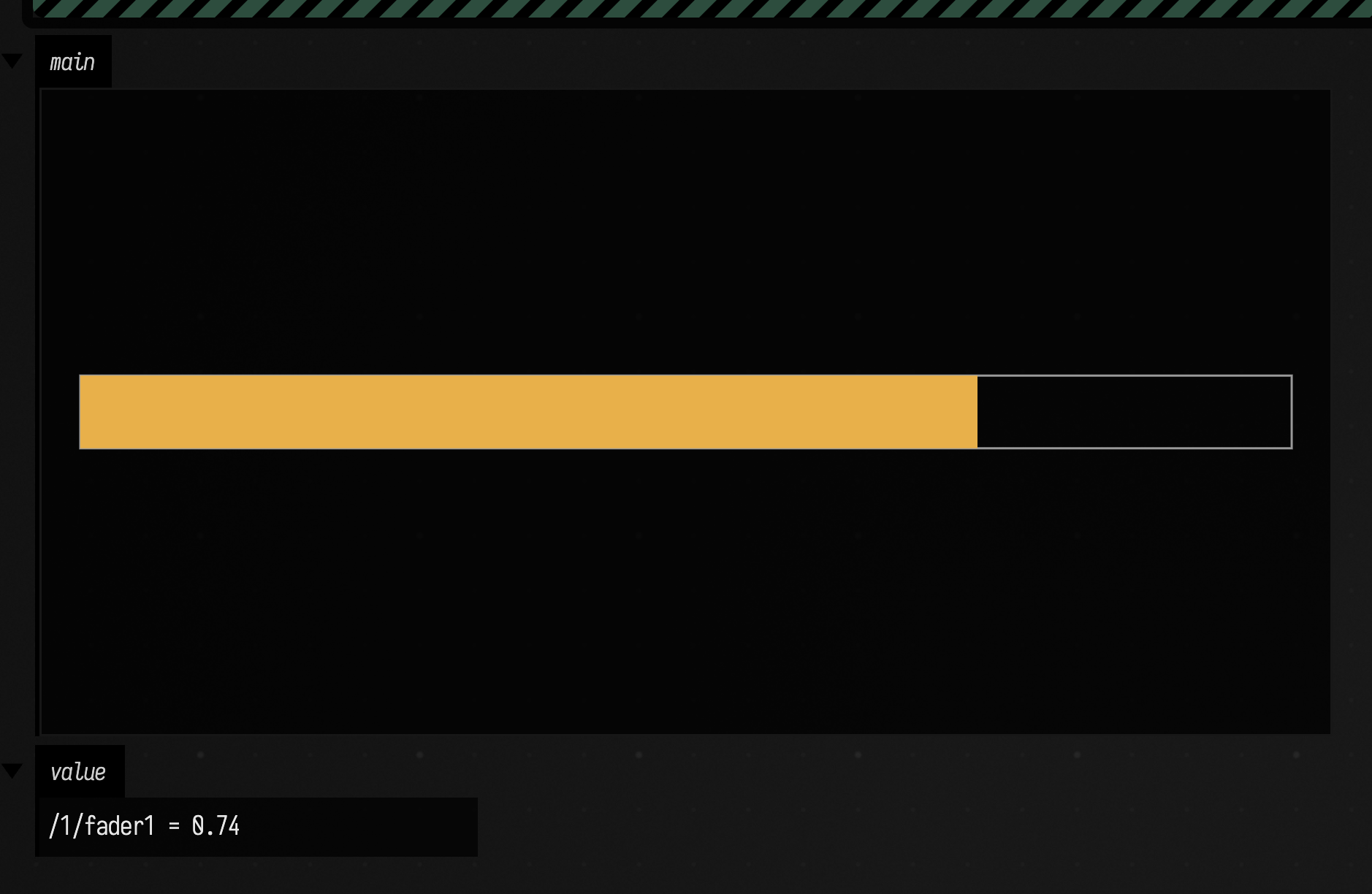
level is written by the generator and read by animate, both on the main thread, so the value the
bar draws is always one the handler finished writing. Delete the stand-in, the lines that mention
phone and t, and point a real control surface at port 57308 to drive it by hand.
runOwned = true ties the handler to this run of the box: stopping the box removes it along with the
animation, and running the box again registers a fresh one, so no stopped run's level keeps being
written. The server on port 57308 keeps listening either way, because it belongs to the port. Without
runOwned, a handler stays registered across stops, which is what the rest of this page's examples
use; Handlers outlive a stop explains that default.
server.debug = false turns off the line OSC: /step = … that every server prints for every
message it receives. That line goes to the console Field was started from, not to the box, so it is
most useful when a message you expected never shows up.
A handler that throws, in its lambda or in its generator, is caught by the server and shown as an error on the box that registered it, naming the address, the pattern and the exception. The generator is dropped; the handler stays registered and runs again for the next message. A handler that fails the same way on every message shows the error once, and running the box again, which registers the handler again, clears that memory.
What arrives: argument types
This box sends one message carrying one argument of each Kotlin type and tabulates how each one travels and what it arrives as.
:::static
val server = osc(57303)
server.debug = false
val sent = listOf<Any?>(1, 0.5f, 0.5, 2L, true, "text", null, byteArrayOf(1, 2, 3), 9)

server.on("/types") { m ->
    val tags = m.event.message.info.argumentTypeTags
    val rows =
        m.arguments.indices.joinToString("\n") { i ->
            val out = sent[i]?.javaClass?.simpleName ?: "null"
            val back = m.arguments[i]?.javaClass?.simpleName ?: "null"
            "| $out | `${tags[i]}` | $back |"
        }
    gather<OscServer.Message> {
        markdown(
            "main",
            """
            | sent as | OSC tag | arrives as |
            |---|---|---|
            $rows

            the Int after the blob arrives as **${m.arguments.last()}**
        """,
        )
    }
}

oscClient("127.0.0.1", 57303).send("/types", sent)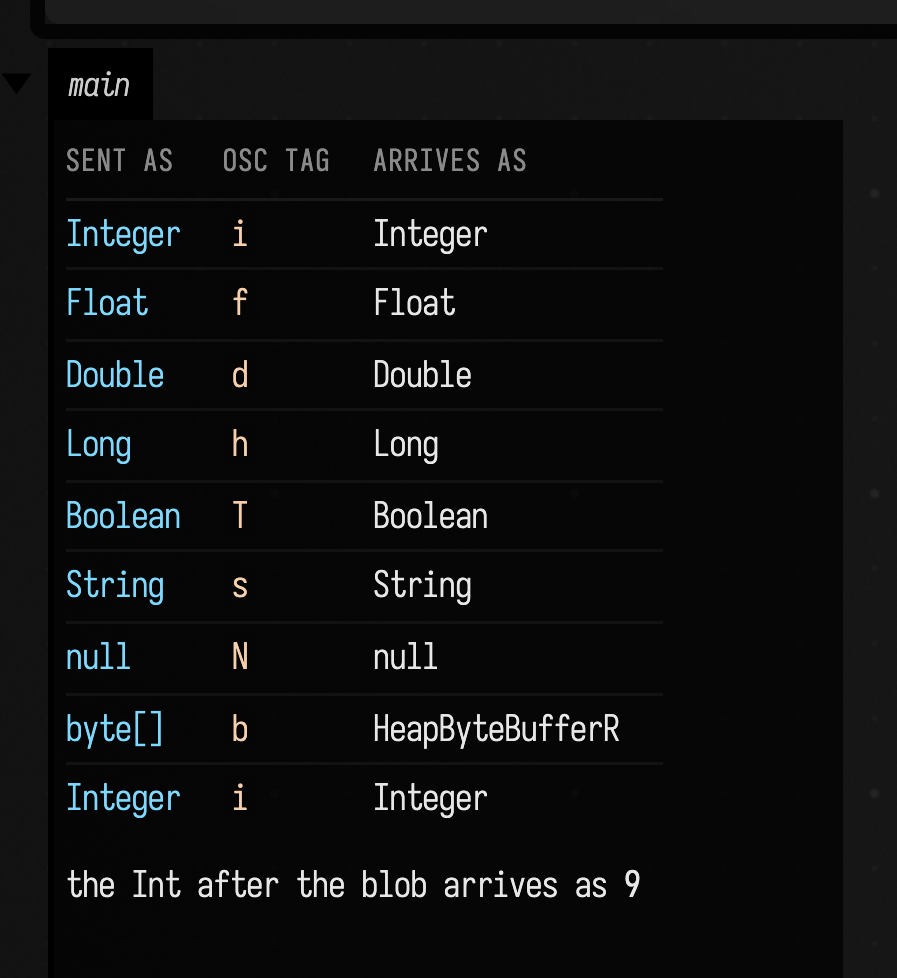
The values carry OSC type tags. Most of the types in this example come back as the same Kotlin
type; a blob sent as a ByteArray arrives as a read-only java.nio.ByteBuffer. m.event.message.info.argumentTypeTags
is the type tag string itself, which is the first thing to look at when a peer's numbers arrive as
the wrong type.
Three details decide whether another program can read what you send:
- Write
0.5f, not0.5. A bare Kotlin decimal is aDouble, and goes out asd.fis one of the four types OSC 1.0 requires every receiver to understand.d,h(Long),T/FandNare among the optional types, and the specification tells a receiver that does not know a tag to discard the whole message. SuperCollider 3.12 readsd, but it does not readh: aLongarrives there as a character, and every argument after it arrives wrong. - A
Listis the argument list.send("/types", sent)sends nine arguments, not one array. Thevarargformsend("/fader/1", 0.75f)is the same call spelled differently. Chargoes out asc, which python-osc does not decode at all. Send a one-letterString.
Numbers from other programs arrive as whatever they sent. SuperCollider's sendMsg sends every
decimal as f and python-osc sends a Python float as f, so a handler that expects either
Float or Double should read (m.arguments[0] as Number).toFloat().
Address patterns
The string you give on is an OSC address pattern, and one message can match several of them.
:::static
val server = osc(57304)
server.debug = false
val patterns = [
    "/fader/1",
    "/fader/*",
    "/fader/?",
    "/fader/[1-3]",
    "/fader/{1,2}",
    "/fader/{1,10}",
    "//volume",
]
val hits = java.util.concurrent.ConcurrentHashMap<String, MutableList<String>>()

for (p in patterns) server.on(p) { m ->
    hits.computeIfAbsent(m.address) { java.util.Collections.synchronizedList(mutableListOf()) } += p
    gather<OscServer.Message> {}
}

val addresses = ["/fader/1", "/fader/2", "/fader/10", "/mixer/strip/volume"]
val out = oscClient("127.0.0.1", 57304)
for (a in addresses) out.send(a, 1f)
Thread.sleep(300)

fun fired(a: String) = patterns.filter { it in (hits[a] ?: emptyList<String>()) }
markdown(
    "main",
    """
    | address | count | patterns that fired |
    |---|---|---|
    ${addresses.joinToString("\n") { a ->
        "| `$a` | ${fired(a).size} of ${patterns.size} | ${fired(a).joinToString(" ") { "`$it`" }} |"
    }}
""",
    width = 860,
)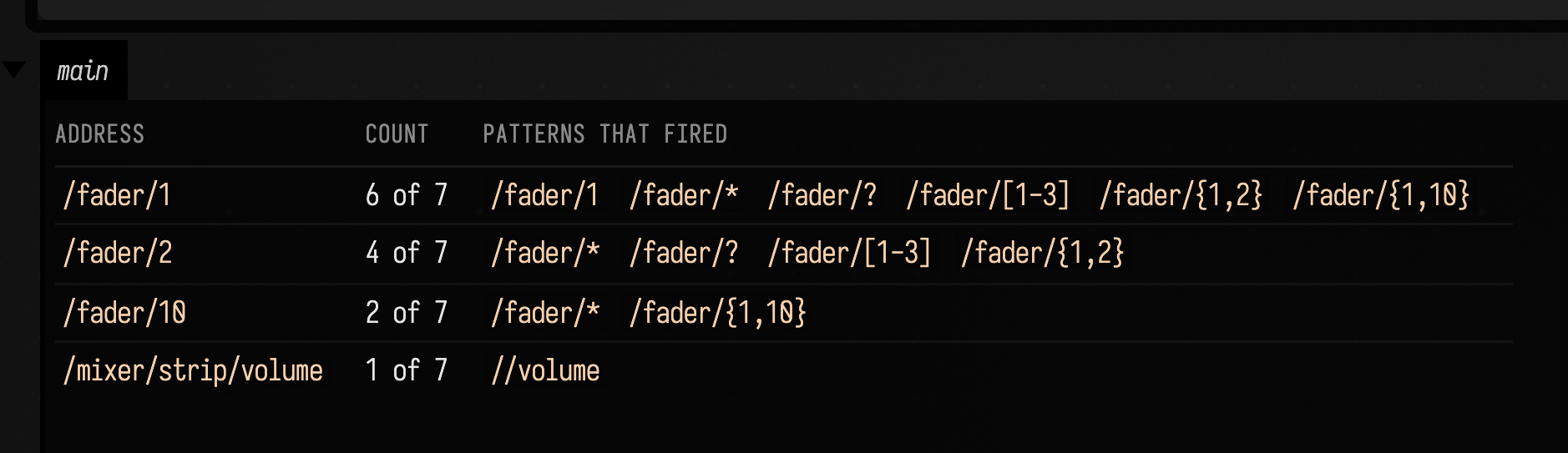
* matches any run of characters within one part of the address, ? one character, [1-3] one
character from a set, and {1,2} one of a list of alternatives. Field expands the alternatives
before matching, so /fader/{1,10} answers both /fader/1 and /fader/10. // matches across any number of
parts, so //volume catches a volume at any depth. Every handler whose pattern matches runs, in
no promised order.
This box reads the table from the handler lambdas and displays it from the box itself, after a short sleep. That works because the lambdas run on the receive thread, independently of the box. A generator would not get its first pass until the box had finished running.
Handlers outlive a stop
This is the default, for a handler registered without runOwned = true. The server belongs to the
port, not to any box, and each handler belongs to the box that registered it. Stopping the box or
running it again leaves its handlers in place, still calling the code they were registered with.
Deleting the box or closing its document removes them.
:::static
val server = osc(57305)
server.debug = false
val fired = java.util.Collections.synchronizedList(mutableListOf<String>())
val out = oscClient("127.0.0.1", 57305)
fun sendBoth(): List<String> {
    fired.clear()
    out.send("/old")
    out.send("/new")
    Thread.sleep(200)
    return fired.sorted()
}

// what this box registered before its code was edited ...
server.on("/old") { _ ->
    fired += "/old"
    gather<OscServer.Message> {}
}
server.on("/new") { _ ->
    fired += "/new"
    gather<OscServer.Message> {}
}
// ... and what the edited code registers: /new again, and no /old
server.on("/new") { _ ->
    fired += "/new (edited)"
    gather<OscServer.Message> {}
}
val beforeRemove = sendBoth()

server.remove("/old")
val afterRemove = sendBoth()

server.close()
val fresh = osc(57305)

markdown(
    "main",
    """
    - before any removal: `${beforeRemove.joinToString(", ", "[", "]")}` fire
    - after `remove("/old")`: `${afterRemove.joinToString(", ", "[", "]")}` fires
    - after `close()`, `osc(57305)` is a new server: **${fresh !== server}**,
      listening: **${fresh.isListening}**
""",
)
fresh.close()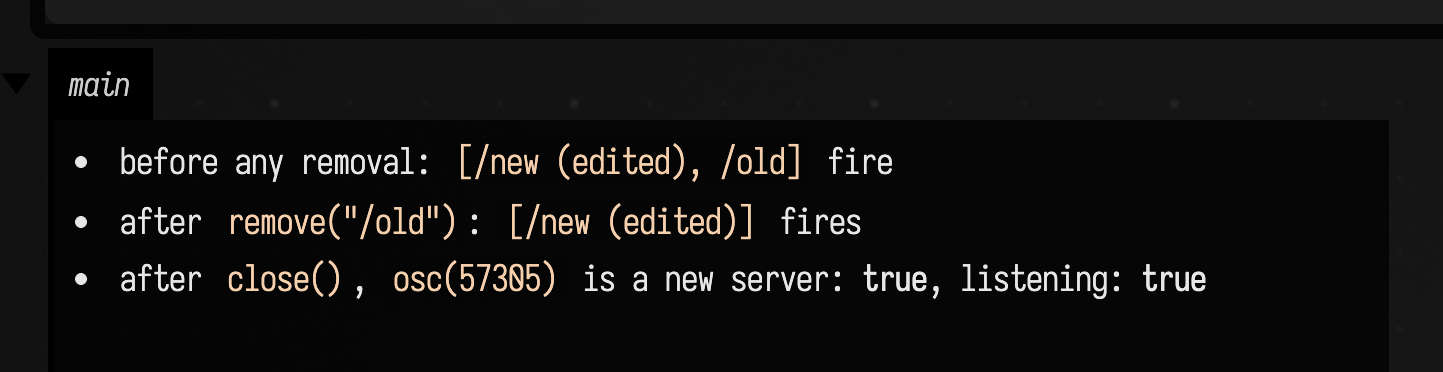
The box stands in for two runs of one box. The first run registered /old and /new; the edited
code registers /new again and no longer mentions /old. Registering a pattern again replaces its
handler, which is why the edited /new is the only one that answers. A pattern the new code does not
mention is not replaced by anything, so /old goes on firing until remove("/old").
The same keying applies across boxes. Two boxes that register the same pattern on the same port share one slot, and whichever ran last owns it. Give each box its own addresses, or its own port.
close() releases the port and turns the server off for good, and osc(port) afterwards opens a
new one. That makes close() the reset when a document's handlers have got into a state you can no
longer reason about: close the server, then run the boxes that should be listening again.
Sending
oscClient(host, port).send(address, arguments…) sends one message. The client is cached by host and
port, so calling oscClient(...) inside a loop costs a map lookup rather than a socket.
:::static
val sc = oscClient("127.0.0.1", 57120) // SuperCollider's language, on its default port
sc.send("/field/hello", 1, 0.5f, "text")

val phone = oscClient("192.168.1.40", 9000) // a tablet running a control surface
phone.send("/1/fader1", 0.25f)
A failed send, to a host name that does not resolve for instance, prints OSC send failed: … to the
console Field was started from and does not throw, so a box that sends every frame keeps running
while a peer is away. UDP gives no acknowledgement, so nothing tells you that a
peer is not listening. Send to an address that a peer echoes, or watch the peer's own log.
Bundles and timetags
A bundle is a group of messages with a timetag, the time at which the receiver should act on them.
Controllers such as TouchOSC and SuperCollider's sendBundle send them. Field unpacks a bundle and
runs each message's handlers as if the messages had arrived one by one, in order. A bundle whose
timetag is in the future waits until that time.
:::static
import com.illposed.osc.OSCMessage

val server = osc(57306)
server.debug = false
val arrivals = java.util.Collections.synchronizedList(mutableListOf<String>())
val t0 = System.currentTimeMillis()
server.on("/when") { m ->
    arrivals += "${m.arguments[0]} arrived after **${System.currentTimeMillis() - t0} ms**"
    gather<OscServer.Message> {}
}

val out = oscClient("127.0.0.1", 57306)
out.sendIn(500, "/when", "stamped 500 ms ahead")
out.sendBundle([OSCMessage("/when", ["stamped immediate"])])
Thread.sleep(900)

markdown("main", arrivals.joinToString("\n") { "- $it" })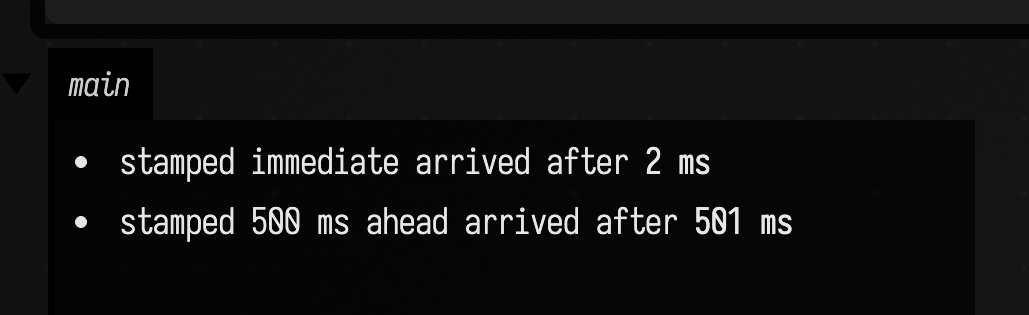
The bundle stamped 500 ms ahead was sent first and arrived second, about 500 ms later. The timing is
as good as the two machines' clocks agree, which on one computer means within a millisecond or two,
and across a network means whatever NTP has made of them. sendIn(ms, address, …) sends one
message stamped that far ahead; sendBundle(messages, atMillis) sends several stamped for one
wall-clock time, or for at once when atMillis is left out.
TUIO: touches and tagged objects
A TUIO tracker, such as reacTIVision, a touch-table driver or a phone app, sends OSC to port 3333 by
default. TuioReceiver listens for the two TUIO 1.1 profiles that carry nearly all of that traffic:
/tuio/2Dcur for fingers (cursors) and /tuio/2Dobj for tagged objects (fiducials). For each tracker
frame it hands your listener one Frame that holds the full state and what changed.
:::static
import com.illposed.osc.OSCBundle
import com.illposed.osc.OSCMessage
import com.illposed.osc.OSCPacket
import com.illposed.osc.transport.OSCPortOutBuilder
import java.net.InetSocketAddress

val rows = java.util.Collections.synchronizedList(mutableListOf<String>())
fun ids(cursors: List<TuioReceiver.TuioCursor>) = cursors.joinToString(" ") { "${it.sessionId}" }

val tuio =
    TuioReceiver(57307) { f ->
        val alive = f.cursors.joinToString(" ") { "${it.sessionId} (${it.x}, ${it.y})" }
        rows += "| ${f.fseq} | ${ids(f.cursorAdded)} | ${ids(f.cursorUpdated)} | ${ids(f.cursorRemoved)} | $alive |"
    }
tuio.start()

// a stand-in tracker: the four frames a two-finger touch produces, as TUIO 1.1 bundles
val tracker = OSCPortOutBuilder().setRemoteSocketAddress(InetSocketAddress("127.0.0.1", 57307)).build()
fun frame(fseq: Int, alive: List<Int>, vararg set: List<Any>) {
    val packets = mutableListOf<OSCPacket>(OSCMessage("/tuio/2Dcur", listOf<Any>("alive") + alive))
    for (s in set) packets += OSCMessage("/tuio/2Dcur", listOf<Any>("set") + s)
    packets += OSCMessage("/tuio/2Dcur", ["fseq", fseq])
    tracker.send(OSCBundle(packets))
}
frame(1, [11], [11, 0.25f, 0.5f, 0f, 0f, 0f])
frame(2, [11, 12], [11, 0.3f, 0.5f, 0f, 0f, 0f], [12, 0.75f, 0.25f, 0f, 0f, 0f])
frame(3, [12], [12, 0.75f, 0.3f, 0f, 0f, 0f])
frame(4, listOf())
Thread.sleep(300)
tracker.close()
tuio.close()

markdown(
    "main",
    """
    | fseq | added | updated | removed | alive after |
    |---|---|---|---|---|
    ${rows.joinToString("\n")}
""",
)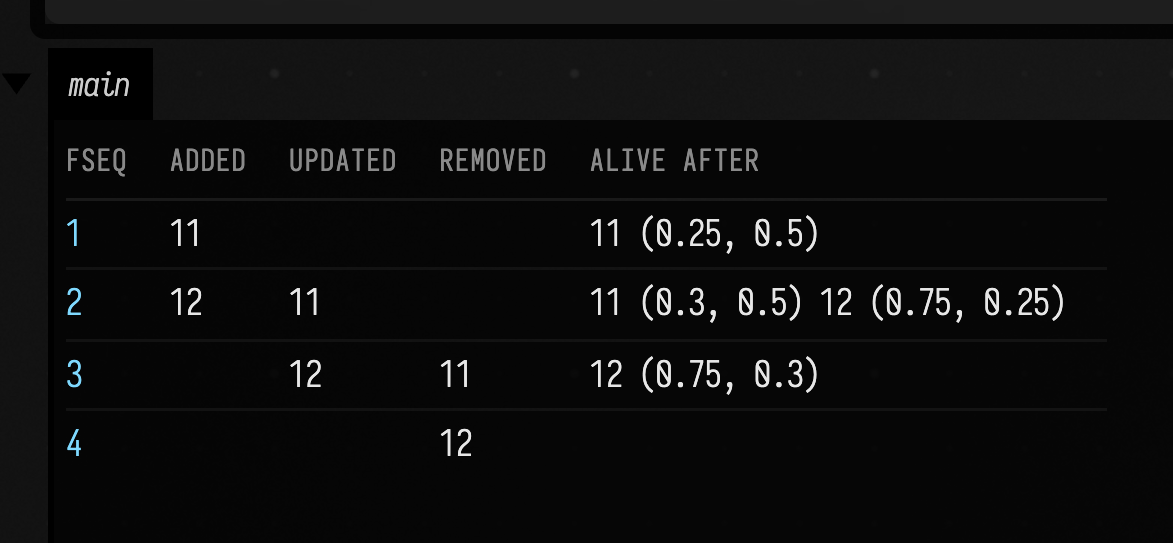
A TUIO frame is an alive message listing every session id still present, a set message for each
one that moved, and an fseq message that closes the frame. TuioReceiver works out additions and
removals by comparing successive alive lists, and calls the listener on fseq. A session id that
appears for the first time is reported as added only, not also as updated. f.cursors and
f.objects are the full state after the frame. Positions are normalised to 0–1 with the origin at the
top left, as the TUIO specification defines them, and a cursor also carries its velocity and
acceleration; an object carries its class id, angle and angular velocity.
Three things to know when using it from a box:
- The listener runs on the receive thread, like an OSC handler's lambda. Copy what you need into your own state there, and draw from it on the main thread.
- Starting a receiver closes the receiver previously started on its port, so a box can build a
new
TuioReceiverevery time it runs. - Each profile's
fseqproduces a frame. A tracker that sends both cursors and objects produces two frames per tracker frame, each carrying the full state of both.
TuioReceiver does not handle the /tuio/2Dblb blob profile, the 2.5D and 3D profiles, or TUIO 2.0,
whose messages begin /tuio2/. For those, register handlers with osc(3333).on("/tuio2/*") { … }
and read the arguments yourself.
Talking to other programs
The Field side of each of these is what the sections above teach: a server on a port that you choose, and a client aimed at the other program's port.
SuperCollider. The language, sclang, listens on port 57120 by default. Receive in SuperCollider
with an OSCdef, and send to Field with a NetAddr:
OSCdef(\fromField, { |msg| msg.postln }, '/field/hello');
NetAddr("127.0.0.1", 57301).sendMsg("/fader/1", 0.75);
SuperCollider sends a decimal as f, so it arrives in Field as a Float. In the other direction,
send Int, Float and String, since SuperCollider 3.12 misreads a Long and the arguments
that follow it.
A phone or tablet control surface, such as TouchOSC. Set the app's host to the computer's
address on the local network and its outgoing port to the one your box listens on. Listen on the
address pattern the app sends, for example osc(57301).on("/1/fader*") { … }. To move the app's
controls from Field, aim an oscClient at the phone's address and the app's incoming port. On
macOS, the first time Field listens on a port the firewall may ask whether to accept incoming
connections, and a refusal looks exactly like a handler that never fires.
Max. A [udpsend 127.0.0.1 57301] object sends to a Field box, and [udpreceive 7400] receives
from a Field oscClient("127.0.0.1", 7400). Messages go into udpsend as /fader/1 0.75.
Sonic Pi. Field starts and owns the Sonic Pi server itself, and SonicPi.cue(address, args) sends
to Sonic Pi's cue port, where sync "/osc*/your/address" waits for it. That is covered on the
Sonic Pi page. A Sonic Pi you started yourself also accepts cues, since the cue port
needs no token.
Field's own OSC editor
Separately from anything a box does, Field can listen for OSC itself and use it to edit code. The
OSC editor section of the welcome page enables it. With it on, a message to the float address
(/field/float by default) replaces the number under the editor's cursor with the message's last
numeric argument and, after a short pause, runs the box being edited again, so a physical fader can
scrub a constant in your code. The launch and stop addresses (/field/launch, /field/stop)
launch and stop the box being edited. It listens on 9001 by default, one up from osc()'s 9000.
See also: Field from your phone, whose Pad drives this same number-under-the-cursor editing from a browser, plus OSCQuery and Sonic Pi.
Which peers were run while writing this page
The Field side of every exchange here was run against python-osc 1.10.2, an OSC implementation
that shares no code with JavaOSC, and against SuperCollider 3.12.2's sclang run headless.
The commands and their output are in dev_docs/OSC_TUIO_MEASUREMENTS.md, together with the
defects they found. TouchOSC and Max are GUI programs, which the docs build cannot drive; the
settings described for them are the programs' own, and were not exercised here.