Shape-aware ASCII
Most ASCII art picks each character by brightness alone: a dark cell gets a space, a bright one
@, and everything between comes from a ramp of characters sorted by how much ink they hold. The
picture's tones come through but its edges do not, because a ramp cannot tell a cell lit along its
top from one lit along its bottom. ShapeAscii picks characters by where the light falls in
each cell as well, following Alex Harri's essay
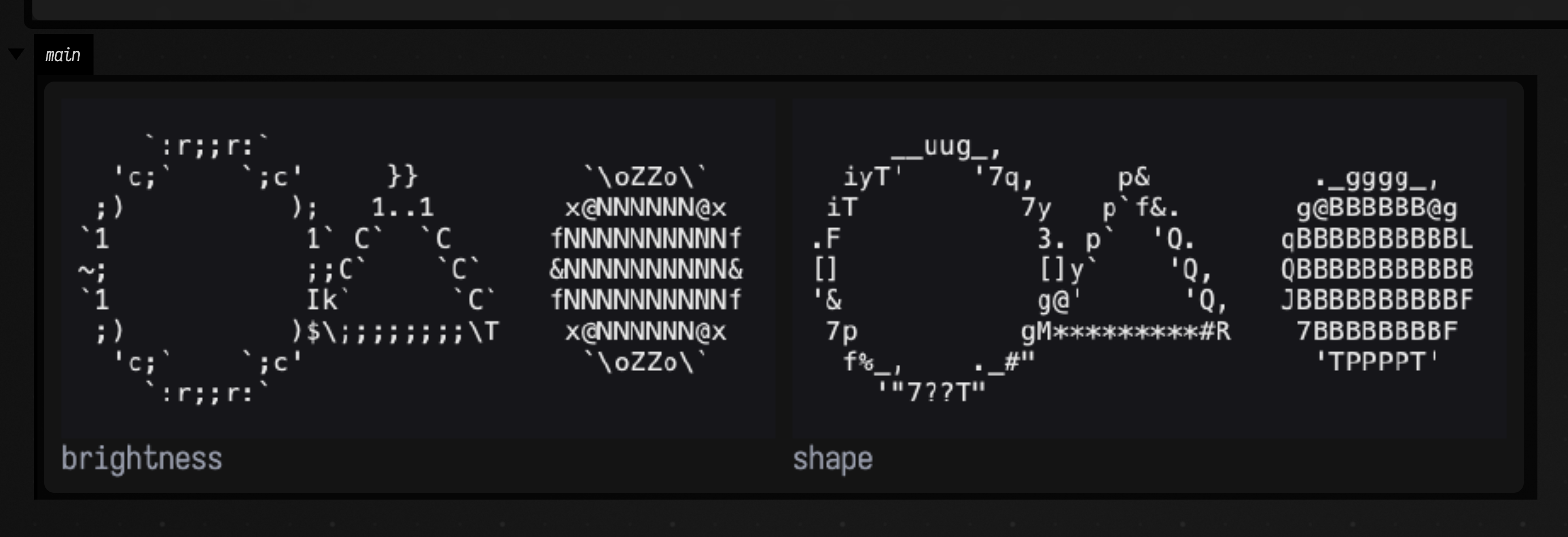
ASCII characters are not pixels, so a circle's rim
comes out as _, /, ' and [ running along the curve.
This box draws a ring, a triangle and a disc as FLines into an Img, then turns the same image
into 44 columns of characters twice, once by brightness and once by shape:
// Three outlines and a filled disc, drawn white on black.
fun ring(cx: Double, cy: Double, r: Double, sides: Int, turn: Double = 0.0) = fline {
    for (i in 0..sides) {
        val a = turn + 2 * PI * i / sides
        if (i == 0) moveTo(cx + r * cos(a), cy + r * sin(a)) else lineTo(cx + r * cos(a), cy + r * sin(a))
    }
    thickness = 6.0
}
val disc = ring(360.0, 100.0, 55.0, 64).apply { filled = true }
val drawing =
    Img.zeros(440, 200, 3)
        .drawFLines(
            [ring(90.0, 100.0, 70.0, 64), ring(210.0, 105.0, 65.0, 3, -PI / 2), disc],
            color = Vec4(1f, 1f, 1f, 1f),
        )
val ascii = ShapeAscii()
showAscii(
    "brightness" to ascii.convert(drawing, 44, shape = false),
    "shape" to ascii.convert(drawing, 44),
)
ShapeAscii() rasterises the printable ASCII characters in a monospaced font once; keep it in a
val and call convert(img, cols) as often as you like. convert reads bright pixels as ink,
the right way round for light characters on a dark panel; pass invert = true for a dark drawing
on white. shape = false gives the brightness ramp. showAscii draws each result in the font it
was matched against, side by side. The result is an AsciiFrame: frame.text() gives it as
lines of text, and inside a charGrid block drawAscii(frame) writes it into the grid (below).
Six circles per cell
Each cell is summarised by six numbers: the mean brightness inside six circles, two columns of three, with the right column set a little higher than the left so that together they cover the cell's height. Every character is drawn into a cell of the same size and summarised the same way, so choosing a character is finding the one whose six numbers are closest to the cell's. Here are five characters as the matcher sees them, with their circles over them:
// Five glyphs as the matcher sees them, 10x up: the cell in gray, its six circles in orange,
// and the six just outside it in blue.
val ascii = ShapeAscii()
val k = 10.0
fun circle(cx: Double, cy: Double, r: Double) = fline {
    for (i in 0..48) {
        val a = 2 * PI * i / 48
        if (i == 0) moveTo(cx + r * cos(a), cy + r * sin(a)) else lineTo(cx + r * cos(a), cy + r * sin(a))
    }
}
val circles = ascii.samplingCircles()
val panels =
    "TL/o@"
        .map { ch ->
            val i = ascii.glyphs.indexOf(ch)
            // pad the cell so the outer circles fit, then draw the circles over it
            val pad = ascii.cellWidth
            val cell = ascii.glyphImg(i).pad(pad, Border.ZERO)
            val inner =
                circles.take(6).map { (x, y, r) ->
                    circle(x + pad, y + pad, r).apply { color = Vec4(1f, 0.55f, 0.1f, 1f) }
                }
            val outer =
                circles.drop(6).map { (x, y, r) ->
                    circle(x + pad, y + pad, r).apply { color = Vec4(0.3f, 0.6f, 1f, 1f) }
                }
            val w = ascii.cellWidth.toDouble()
            val h = ascii.cellHeight.toDouble()
            val box = fline {
                moveTo(pad, pad)
                lineTo(pad + w, pad)
                lineTo(pad + w, pad + h)
                lineTo(pad, pad + h)
                lineTo(pad, pad)
            }
            box.color = Vec4(0.5f, 0.5f, 0.5f, 1f)
            "'$ch'" to cell.drawFLines(inner + outer + box, scale = k, thickness = 2.0)
        }
showImgGrid(*panels.toTypedArray(), columns = 5, cellSide = 200)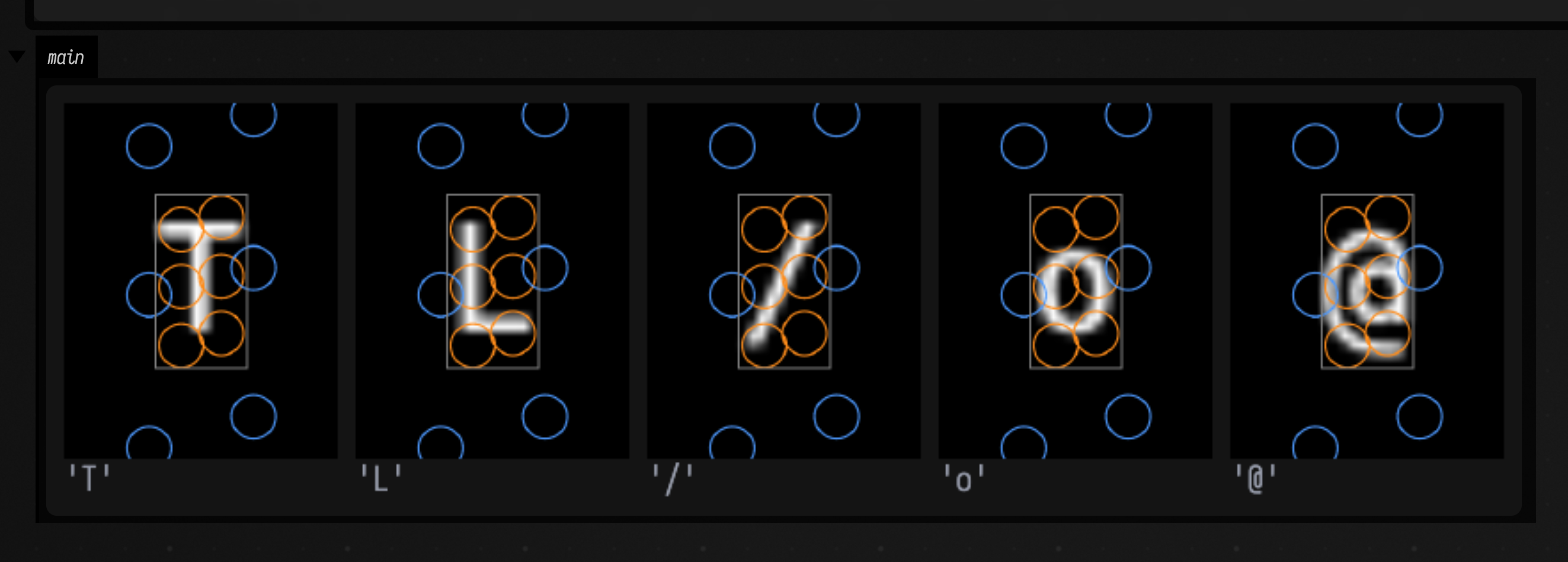
T fills its top two circles and leaves the bottom ones dark; L fills the left column and the
bottom right; / fills the circles along its diagonal; o the middle and bottom; @ nearly
all six. Those differences are what a brightness ramp throws away. glyphVector(i) gives a
character's six numbers, scaled so the largest over the whole charset is 1, and
samplingCircles() the circles themselves. The blue circles belong to directional contrast,
further down.
Shading works too. A sphere lit from the upper left, shaded by hand into an Img:
// A lit sphere on black, shaded by hand: brightness is the cosine between the surface normal and a light.
val scene =
    Img.generate(300, 240) { x, y ->
        val nx = (x - 150) / 100.0
        val ny = (y - 120) / 100.0
        val r2 = nx * nx + ny * ny
        if (r2 < 1) {
            val nz = sqrt(1 - r2)
            (-0.5 * nx - 0.6 * ny + 0.62 * nz).coerceAtLeast(0.0).toFloat()
        } else 0f
    }
val ascii = ShapeAscii()
showAscii(
    "brightness" to ascii.convert(scene, 40, shape = false),
    "shape, contrast 2" to ascii.convert(scene, 40, contrast = 2.0),
    cellSide = 420,
)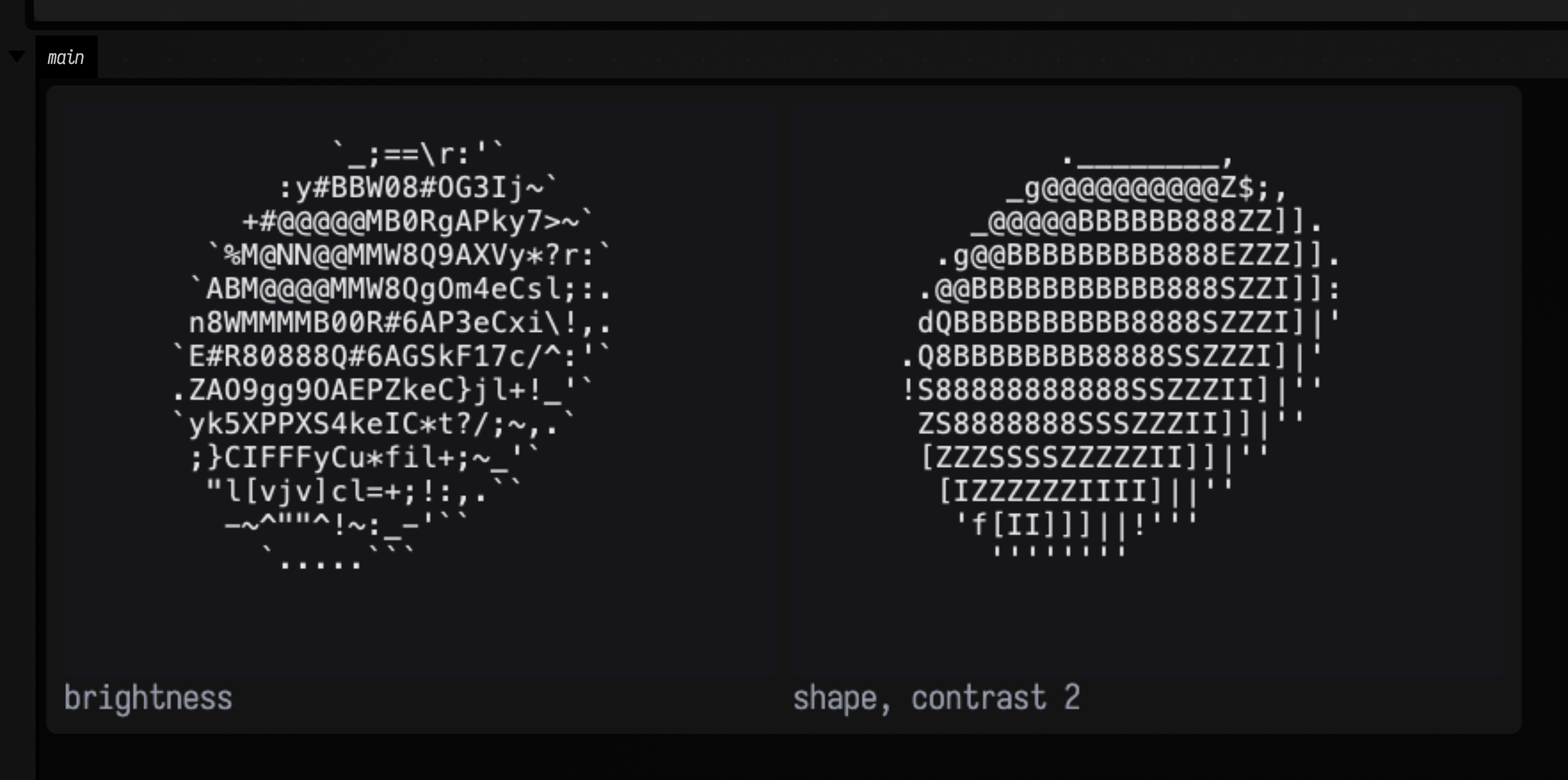
The brightness version picks a different letter in almost every cell, because many characters hold about the same amount of ink. The shape version settles on runs of the same character where the shading is even, and its rim follows the outline.
Note
The method suits light marks on a dark ground: lines, outlines and lit objects. A large even
gray area matches whichever character is most even across its six circles, so a gray
photograph or a screenshot of a window fills with rows of one letter (S or Z). Use the
brightness ramp for those, or take edges first.
Sharpening edges
A cell that an edge only grazes still has some light in every circle, and the nearest character is then a blurry, all-over one. Two steps push the cell's numbers apart before the search.
Contrast (contrast = 3.0) divides each of the cell's six numbers by the largest of them,
raises it to that power, and multiplies back: the brightest circle stays where it is and the dim
ones fall towards zero, so the cell reads as "light in this corner" rather than "a little light
everywhere". Directional contrast (directional = 3.0) does the same per circle, against the
blue circle outside the cell in the same direction: where the neighbouring cell is brighter, the
inner circle is darkened, which stops a character from bleeding towards an edge that belongs to
the next cell. Both are exponents, and 1 turns a step off. The three rows below are the same
drawing with neither, contrast alone, and both:
// Three outlines and a filled disc, drawn white on black.
fun ring(cx: Double, cy: Double, r: Double, sides: Int, turn: Double = 0.0) = fline {
    for (i in 0..sides) {
        val a = turn + 2 * PI * i / sides
        if (i == 0) moveTo(cx + r * cos(a), cy + r * sin(a)) else lineTo(cx + r * cos(a), cy + r * sin(a))
    }
    thickness = 6.0
}
val disc = ring(360.0, 100.0, 55.0, 64).apply { filled = true }
val drawing =
    Img.zeros(440, 200, 3)
        .drawFLines(
            [ring(90.0, 100.0, 70.0, 64), ring(210.0, 105.0, 65.0, 3, -PI / 2), disc],
            color = Vec4(1f, 1f, 1f, 1f),
        )
val ascii = ShapeAscii()
showAscii(
    "contrast 1" to ascii.convert(drawing, 44),
    "contrast 3" to ascii.convert(drawing, 44, contrast = 3.0),
    "contrast 3, directional 3" to ascii.convert(drawing, 44, contrast = 3.0, directional = 3.0),
    columns = 1,
    cellSide = 600,
)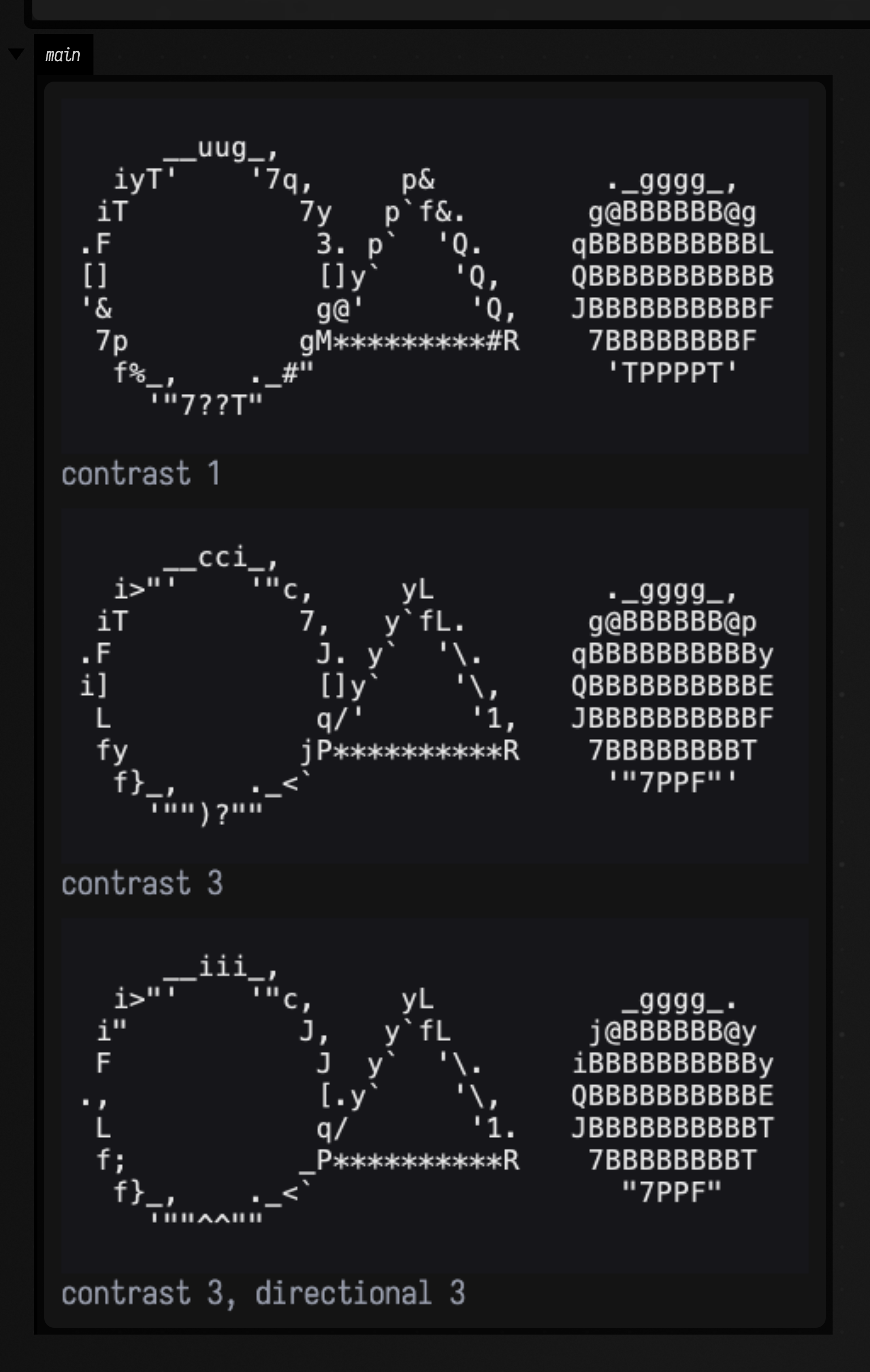
Contrast does most of the work on lines: the triangle's right side turns into backslashes. Directional contrast matters most along the boundary of a filled shape, where it trims the disc's rim; on thin lines it can thin a stroke so far that a character drops out (the ring's left side), so treat both as dials and look.
Live, in a char grid
drawAscii writes a frame into a charGrid panel, so anything you can draw into an
Img each tick becomes live text. This box spins a wireframe cube, projects its edges into an
FLine drawing every tick, and matches it by shape. Pass the charset to charGrid with
glyphs = ascii.glyphs so every character the matcher picks exists in the grid:
// A wireframe cube turning about two axes, drawn into an Img each tick and matched by shape.
val ascii = ShapeAscii()
// Corner i has x, y, z = ±1 from its three bits; an edge joins corners one bit apart.
val corners =
    (0 until 8).map { i ->
        Triple(if (i and 1 == 0) -1.0 else 1.0, if (i and 2 == 0) -1.0 else 1.0, if (i and 4 == 0) -1.0 else 1.0)
    }
val edges = (0 until 8).flatMap { i -> [1, 2, 4].filter { i and it == 0 }.map { i to (i or it) } }

charGrid(cols = 60, rows = 26, glyphs = ascii.glyphs) {
    val a = frame * 0.03
    fun project(p: Triple<Double, Double, Double>): Pair<Double, Double> {
        val (px, py, pz) = p
        val x1 = px * cos(a) - pz * sin(a)
        val z1 = px * sin(a) + pz * cos(a)
        val y1 = py * cos(a * 0.7) - z1 * sin(a * 0.7)
        val z2 = py * sin(a * 0.7) + z1 * cos(a * 0.7)
        val s = 150.0 / (z2 + 4.0)
        return (240 + x1 * s) to (130 + y1 * s)
    }
    val lines = edges.map { (i, j) ->
        fline {
            moveTo(project(corners[i]).first, project(corners[i]).second)
            lineTo(project(corners[j]).first, project(corners[j]).second)
            thickness = 5.0
        }
    }
    val img = Img.zeros(480, 260, 3).drawFLines(lines, color = Vec4(1f, 1f, 1f, 1f))
    drawAscii(ascii.convert(img, COLS, contrast = 3.0, rows = ROWS))
}
convert remembers the character it chose for each cell pattern it has met (the six numbers
rounded to 32 levels), so a moving scene costs a table lookup for most cells after the first few
ticks. Stop the box to stop the cube.
On the GPU, over a live scene
You can run the same matcher over a live scene on the GPU, with one shader invocation per
character cell. It takes three boxes beneath a renderer box: one draws the scene, one picks a glyph
for each cell, and one draws those glyphs into the window. A fourth, optional box checks the GPU's
choices against convert. Each shader is its box's fragment property, so you can edit it and run
the box again with ⌥+R. Here the scene is a lit torus knot, turning, with the scene itself in
the corner:
The boxes are in the starting-point document ascii_shape (the transcript gallery
opens it), laid out renderer, scene, match, draw, each the child of the one before. Launch them in
that order.
The scene
The scene box draws into an offscreen target rather than into the window. The target is exactly
128 x 48 cells of the charset's font, here 10 x 19 pixels each, so every character of the grid
covers one block of the target's pixels. prop publishes ascii and scene to the boxes beneath:
import org.lwjgl.vulkan.VK10.*

// The font the characters are matched in, and an offscreen target exactly 128 x 48 of its cells.
// The boxes beneath this one read both.
prop<ShapeAscii>(ascii) = ShapeAscii()
prop<RenderToTexture>(scene) = RenderToTexture {
    width = 128 * ascii.cellWidth
    height = 48 * ascii.cellHeight
    // Plain 8-bit, not sRGB, so a shader reading it and the CPU reading it back see the same numbers.
    format = VK_FORMAT_R8G8B8A8_UNORM
    colorFormats = [VK_FORMAT_R8G8B8A8_UNORM]
    useDepth = true
}
renderer.renderList += "scene" to scene

// The knot is drawn into the scene, not into the window.
var module = moduleHere { +scene }
var knot = Mesh()
module += "knot" to knot
scene += "knot" to module

// The vertex shader turns the knot by `time` and projects it at the scene's shape.
var time = 0f
knot.time = {
    time += 1f / 60
    time
}
knot.aspect = { scene.parameters.width.toFloat() / scene.parameters.height }

// A (2, 3) torus knot: a tube of radius 0.16 around a centre line, 240 steps along it and 16 around.
fun centre(a: Double) =
    vec(0.42 * (2 + cos(3 * a)) * cos(2 * a), 0.42 * (2 + cos(3 * a)) * sin(2 * a), -0.42 * sin(3 * a))
knot.set(240 * 16, 240 * 16 * 2) {
    for (i in 0 until 240) for (j in 0 until 16) {
        val a = 2 * PI * i / 240
        val along = (centre(a + 1e-4) - centre(a - 1e-4)).normalize()
        val side = vec(along.y, -along.x, 0).normalize()
        val up = vec(side.y * along.z, -side.x * along.z, side.x * along.y - side.y * along.x)
        val w = 2 * PI * j / 16
        val out = side * cos(w).toFloat() + up * sin(w).toFloat()
        val p = centre(a) + out * 0.16f
        pos.add(p.x, p.y, p.z)
        normal.add(out.x, out.y, out.z)
        val next = (i + 1) % 240
        tri.add(i * 16 + j, next * 16 + j, next * 16 + (j + 1) % 16)
        tri.add(i * 16 + j, next * 16 + (j + 1) % 16, i * 16 + (j + 1) % 16)
    }
}
Its vertex shader turns the knot by time and projects it, and its fragment shader lights it from
the upper left:
#version 450
layout(location = 0) in vec3 pos;
layout(location = 1) in vec3 normal;
layout(location = 0) out vec3 fnormal;

layout(push_constant) uniform Push {
    float time;
    float aspect;
} pc;

void main() {
    // turn about y, then x
    float a = pc.time * 0.7;
    float b = pc.time * 0.45;
    mat3 ry = mat3(cos(a), 0.0, -sin(a), 0.0, 1.0, 0.0, sin(a), 0.0, cos(a));
    mat3 rx = mat3(1.0, 0.0, 0.0, 0.0, cos(b), sin(b), 0.0, -sin(b), cos(b));
    vec3 p = rx * ry * pos;
    fnormal = rx * ry * normal;
    // a camera 5 units back looking along +z; +y is up, since Field flips its viewports;
    // depth runs 0..1 from z = 1 to z = 8
    float z = p.z + 5.0;
    gl_Position = vec4(p.x * 2.4 / pc.aspect, p.y * 2.4, (z - 1.0) / 7.0 * z, z);
}
#version 450
layout(location = 0) in vec3 fnormal;
layout(location = 0) out vec4 outColor;
void main() {
// a light up and to the left of the camera
vec3 l = normalize(vec3(-0.5, 0.6, -0.65));
float d = max(dot(normalize(fnormal), l), 0.0);
outColor = vec4(vec3(0.04 + 0.96 * d), 1.0);
}Picking a glyph for each cell
The match box draws into cells, a target with one pixel per character cell. Its mesh is a single
triangle that covers the target, so its fragment shader runs once for each cell. The shader reads
two textures, bound by publishing them under the names it declares: the scene, and
ascii.glyphVectorTexture(), which holds the six numbers glyphVector(i) gives for every glyph,
two texels per glyph:
import org.lwjgl.vulkan.VK10.*

// One texel per character cell; the fragment shader writes the chosen glyph's index into red.
prop<RenderToTexture>(cells) = RenderToTexture {
    width = scene.parameters.width / ascii.cellWidth
    height = scene.parameters.height / ascii.cellHeight
    format = VK_FORMAT_R8G8B8A8_UNORM
    colorFormats = [VK_FORMAT_R8G8B8A8_UNORM]
    useDepth = false
}
// Rendered after the scene it reads, even when the scene box runs again.
renderer.renderList += "cells" to cells.after(scene)

// The shader's two textures, bound by the names it gives them: the scene, and every glyph's six numbers.
prop<RenderToTexture>(sceneTex) = scene
prop<LoadedTexture>(glyphVectors) = ascii.glyphVectorTexture()

var module = moduleHere { +cells }
var m = Mesh()
module += "match" to m
cells += "match" to module

// The shader's push constants: a cell's size in pixels, and the two contrast exponents.
m.cell = { vec(ascii.cellWidth, ascii.cellHeight) }
m.contrast = { 3f }
m.directional = { 3f }

// One triangle covering the whole target, so the fragment shader runs once per texel: once per cell.
m.set(3, 1) {
    pos.add(-1, -1, 0, 3, -1, 0, -1, 3, 0)
    tri.add(0, 1, 2)
}
The vertex shader is the same for this box and the next. It passes the triangle through and hands
on uv, which runs from 0 to 1 across the target:
#version 450
layout(location = 0) in vec3 pos;
layout(location = 0) out vec2 uv;

void main() {
    // uv runs from 0 to 1 across the target. Field flips its viewports so that +y is up,
    // so uv.y = 0 is the bottom edge.
    uv = pos.xy * 0.5 + 0.5;
    gl_Position = vec4(pos, 1.0);
}
The fragment shader does what convert does for one cell, in the same order. circle averages the
scene's brightness over the pixels whose centres fall inside one circle; CENTRES, RADIUS and
OUTER_PUSH are the circles drawn in orange and blue above. Then come the
two contrast steps from Sharpening edges, and a search through every glyph for
the nearest six numbers. The winner's index is written to the red channel of an 8-bit target, as
index / 255:
#version 450
// The scene, and every glyph's six numbers: texel (g, 0) holds glyph g's first four, (g, 1) its
// last two.
layout(set = 0, binding = 0) uniform sampler2D sceneTex;
layout(set = 0, binding = 1) uniform sampler2D glyphVectors;

layout(push_constant) uniform Push {
    vec2 cell;
    float contrast;
    float directional;
} pc;

layout(location = 0) out vec4 outColor;

// The six sampling circles, in cell units: two columns of three, the right one a little higher.
// The glyph vectors were measured with these circles, so change them together.
const vec2 CENTRES[6] = vec2[6](
vec2(0.28, 0.20), vec2(0.72, 0.13),
vec2(0.28, 0.53), vec2(0.72, 0.47),
vec2(0.28, 0.87), vec2(0.72, 0.80)
);
// The circles' radius, as a share of the cell's width.
const float RADIUS = 0.24;
// The outer circles sit this many times further from the cell's centre than the inner ones.
const float OUTER_PUSH = 2.6;

// The mean brightness of the scene inside the circle centred at c (cell units) in the cell whose
// top-left pixel is origin. A pixel counts if its centre lies inside the circle.
float circle(ivec2 origin, vec2 c, ivec2 cell, ivec2 size) {
    float r = RADIUS * float(cell.x);
    vec2 centre = c * vec2(cell);
    float sum = 0.0;
    int n = 0;
    for (int y = int(floor(centre.y - r)) - 1; y <= int(centre.y + r) + 1; y++) {
        for (int x = int(floor(centre.x - r)) - 1; x <= int(centre.x + r) + 1; x++) {
            vec2 d = vec2(x, y) + 0.5 - centre;
            if (dot(d, d) <= r * r) {
                vec3 s = texelFetch(sceneTex, clamp(origin + ivec2(x, y), ivec2(0), size - 1), 0).rgb;
                sum += clamp((s.r + s.g + s.b) / 3.0, 0.0, 1.0);
                n++;
            }
        }
    }
    return sum / float(n);
}

void main() {
    // One fragment per cell: this cell's pixels in the scene start here.
    ivec2 cell = ivec2(pc.cell);
    ivec2 size = textureSize(sceneTex, 0);
    ivec2 origin = ivec2(gl_FragCoord.xy) * cell;

    float v[6];
    for (int k = 0; k < 6; k++) v[k] = circle(origin, CENTRES[k], cell, size);

    // Directional contrast: where the circle just outside the cell, in the same direction, is
    // brighter, darken this one.
    if (pc.directional != 1.0) {
        for (int k = 0; k < 6; k++) {
            float outside = circle(origin, 0.5 + (CENTRES[k] - 0.5) * OUTER_PUSH, cell, size);
            float m = max(v[k], outside);
            if (m > 0.0 && v[k] > 0.0) v[k] = pow(v[k] / m, pc.directional) * m;
        }
    }

    // Contrast: the brightest circle stays, the others fall towards zero.
    if (pc.contrast != 1.0) {
        float m = 0.0;
        for (int k = 0; k < 6; k++) m = max(m, v[k]);
        for (int k = 0; k < 6; k++) if (m > 0.0 && v[k] > 0.0) v[k] = pow(v[k] / m, pc.contrast) * m;
    }

    // The glyph whose six numbers are nearest, by squared distance; the first one wins a tie.
    int best = 0;
    float bestDistance = 1e30;
    for (int g = 0; g < textureSize(glyphVectors, 0).x; g++) {
        vec4 a = texelFetch(glyphVectors, ivec2(g, 0), 0);
        vec4 b = texelFetch(glyphVectors, ivec2(g, 1), 0);
        vec4 da = a - vec4(v[0], v[1], v[2], v[3]);
        vec2 db = b.xy - vec2(v[4], v[5]);
        float d = dot(da, da) + dot(db, db);
        if (d < bestDistance) {
            bestDistance = d;
            best = g;
        }
    }
    // The glyph's index, stored in an 8-bit channel.
    outColor = vec4(float(best) / 255.0, 0.0, 0.0, 1.0);
}
The glyph vectors were measured with ShapeAscii's circles. Moving CENTRES here changes what a
cell is compared with but not what the glyphs are compared as, so the two stop matching. The
contrast steps, the distance and the search are free to change: run the box again and the window
follows. The contrast exponents are the push constants m.contrast and m.directional in the box's
code.
Drawing the glyphs
The draw box covers the window with one triangle. For each pixel, its fragment shader finds the
cell, reads the index the match pass wrote there, and takes the pixel's ink from
ascii.glyphAtlasTexture(), every glyph side by side one cell wide, the same images glyphImg(i)
returns. sceneTex comes from the match box above, and the shader uses it to draw the scene into
the lower right corner:
// The glyph chosen for each cell, and every glyph's pixels, bound by the shader's names for them.
// `sceneTex`, for the corner, is the match box's.
prop<RenderToTexture>(cellsTex) = cells
prop<LoadedTexture>(atlasTex) = ascii.glyphAtlasTexture()

var module = moduleHere()
var m = Mesh()
module += "characters" to m
renderer += "characters" to module

m.cell = { vec(ascii.cellWidth, ascii.cellHeight) }
// Field's window is sRGB, which brightens these to #E6E6E6 on #161619.
m.ink = { vec(0.79, 0.79, 0.79, 1) }
m.background = { vec(0.008, 0.008, 0.01, 1) }

// One triangle covering the window.
m.set(3, 1) {
    pos.add(-1, -1, 0, 3, -1, 0, -1, 3, 0)
    tri.add(0, 1, 2)
}
#version 450
// The chosen glyph for each cell, every glyph's pixels side by side, and the scene itself.
layout(set = 0, binding = 0) uniform sampler2D cellsTex;
layout(set = 0, binding = 1) uniform sampler2D atlasTex;
layout(set = 0, binding = 2) uniform sampler2D sceneTex;
layout(push_constant) uniform Push {
vec4 ink;
vec4 background;
vec2 cell;
} pc;
layout(location = 0) in vec2 uv;
layout(location = 0) out vec4 outColor;
void main() {
// uv.y runs up the window; the cells and the atlas keep their top row first.
vec2 p = vec2(uv.x, 1.0 - uv.y);
// The scene, small, in the lower right corner.
if (p.x > 0.76 && p.y > 0.76) {
outColor = vec4(texture(sceneTex, (p - 0.76) / 0.24).rgb, 1.0);
return;
}
// Which cell this pixel is in, and which glyph the match pass chose for it.
vec2 grid = vec2(textureSize(cellsTex, 0));
vec2 g = p * grid;
float glyph = floor(texelFetch(cellsTex, ivec2(g), 0).r * 255.0 + 0.5);
// Where this pixel falls in that glyph's cell of the atlas; kept half a pixel inside the cell
// so filtering does not pull in the neighbouring glyph.
vec2 inCell = clamp(fract(g) * pc.cell, vec2(0.5), pc.cell - 0.5);
vec2 atlas = vec2(textureSize(atlasTex, 0));
float ink = texture(atlasTex, (vec2(glyph * pc.cell.x, 0.0) + inCell) / atlas).r;
outColor = mix(pc.background, pc.ink, ink);
}Field flips its viewports so that +y is up, so uv.y is 0 at the bottom of the window. The cells,
the atlas and the scene all keep their top row first, which is why the shader starts from
1.0 - uv.y. The ink and background colours are written as they are, and Field's window is sRGB,
so it brightens them: 0.79 shows as #E6E6E6.
The same characters as the CPU
ascii.readCells(scene, cells) reads back one frame's scene together with the glyphs the match
shader chose for it, so the CPU can convert the same pixels. This box, beneath the draw box,
compares the two:
// Twice a second: read back one frame's scene with the glyphs the match pass chose for it, convert
// the same pixels on the CPU, exhaustively and through the cache, and count the cells that agree.
frames {
    while (true) {
        val readback = ascii.readCells(scene, cells)
        while (!readback.isDone) frame()
        val (picture, chars) = readback.get()
        // the match box's contrast and directional
        val exact =
            ascii.convert(picture, chars.cols, contrast = 3.0, directional = 3.0, rows = chars.rows, exact = true)
        val cached = ascii.convert(picture, chars.cols, contrast = 3.0, directional = 3.0, rows = chars.rows)
        display(
            "agreement",
            "GPU = CPU exact on ${(100 * chars.agreement(exact)).f2}% of cells, " +
                "= CPU cached on ${(100 * chars.agreement(cached)).f2}%",
        )
        repeat(30) { frame() }
    }
}
Over five frames of the turning knot, each at three settings (no contrast, contrast = 3, and
contrast = 3, directional = 3), the shader picked the same glyph as convert(..., exact = true)
in every cell of every frame, 6,144 cells a frame. The default convert agrees with it on 99.6 to
99.7 % of cells. The difference is the CPU's cache: convert rounds each cell's six numbers to 32
levels and answers every vector that rounds the same way with the glyph nearest the first such
vector it met, so a few cells in a thousand get a near neighbour instead of the nearest glyph.
exact = true searches all 95 glyphs for every cell, as the shader does.
Here is the match pass's time, from GPU timestamp queries, beside one CPU convert of the same
frame. Both use contrast = 3, directional = 3; each figure is the median of three runs on an
Apple-silicon Mac:
| Grid | Scene pixels | GPU match pass | CPU, exact = true |
CPU, cached |
|---|---|---|---|---|
| 64 x 24 | 640 x 456 | 2.4 ms | 2.1 ms | 2.0 ms |
| 128 x 48 | 1280 x 912 | 2.5 ms | 7.6 ms | 6.9 ms |
| 256 x 96 | 2560 x 1824 | 2.6 ms | 31 ms | 27 ms |
| 512 x 192 | 5120 x 3648 | 5.2 ms | 120 ms | 108 ms |
Most of the GPU's time is fixed cost: it hardly changes until the largest grid, and at 64 x 24 the CPU is as quick. The CPU's time grows with the number of pixels it averages, and past 128 columns it no longer fits in a 60 Hz frame.
Where the GPU numbers come from
The smoke test ascii.shape-gpu.smoke (ShapeAsciiGpuSmoke.kt) reads the scene, match and draw
shaders out of the ascii_shape transcript, so it runs what a reader edits, and wires them as the
boxes do. It reads back five frames per setting with readCells, converts each on the CPU both
ways, and fails if any frame's exact agreement falls below 99.5 %; every run so far has given
100.00 %. It also checks that an empty scene comes out as spaces, and that a scene lit in its top
half has ink in the top rows. That second check is there because an early version drew every row
and every glyph upside down, having taken uv.y = 0 for the top of the window. The GPU time is the
median over 240 frames and the CPU time the median of five conversions, on an Apple-silicon Mac
shared with other Field sessions. The GPU medians stayed within 0.1 ms of each
other across the runs except at 512 x 192 (3.4 to 5.6 ms); the cached CPU figure at 64 x 24 ranged
from 1.7 to 5.6 ms.
Reference
| Call | What it does |
|---|---|
ShapeAscii(glyphs, fontSize, fontName) |
Rasterise a charset (default printable ASCII, 16 pt monospaced). |
convert(img, cols, shape, contrast, directional, invert, rows, exact) |
Turn an Img into an AsciiFrame; rows defaults to the image's aspect at this font's cell shape; exact = true searches every glyph instead of the cache. |
frame.text(), frame.char(x, y) |
The result as lines, or one character. |
frame.toImg() |
Draw the result in the matched font. |
showAscii("label" to frame, ...) |
Show frames side by side, captioned. |
drawAscii(frame) |
Inside charGrid { }: write the frame into the grid. |
frame.agreement(other) |
The share of cells holding the same character in two frames of one size. |
glyphVector(i), glyphCoverage(i), samplingCircles(), circlePixels(k), glyphImg(i) |
What the matcher compares. |
ascii.glyphVectorTexture() |
Every glyph's six numbers as a float texture, two texels per glyph, for a match shader. |
ascii.glyphAtlasTexture() |
Every glyph's pixels side by side, one cell each, for a draw shader. |
ascii.readCells(scene, cells) |
A future of the next frame's scene and the glyphs a match shader wrote for it, read back together. |
target.after(first) |
renderer.renderList += "cells" to cells.after(scene): render a pass after the target it reads. |
The method, the staggered circles and both contrast steps are Alex Harri's; read his essay for interactive versions of every step and for the GPU implementation he uses for real-time 3-D scenes. Field's, as boxes you can edit, is above.
See also
Visualizers & Controls shows other ways to display values in a box.