Multi-instrument transcription with MuScriptor
MuScriptor turns a mixed recording into a list of notes, each labelled with an instrument, and a MIDI file. Field shows the notes as a piano roll that plays in step with the recording, and hands them to your code as ordinary values. MuScriptor runs in its own Python environment, started separately from Field.
To run the examples on this page, open the audio_ai_muscriptor starting point.
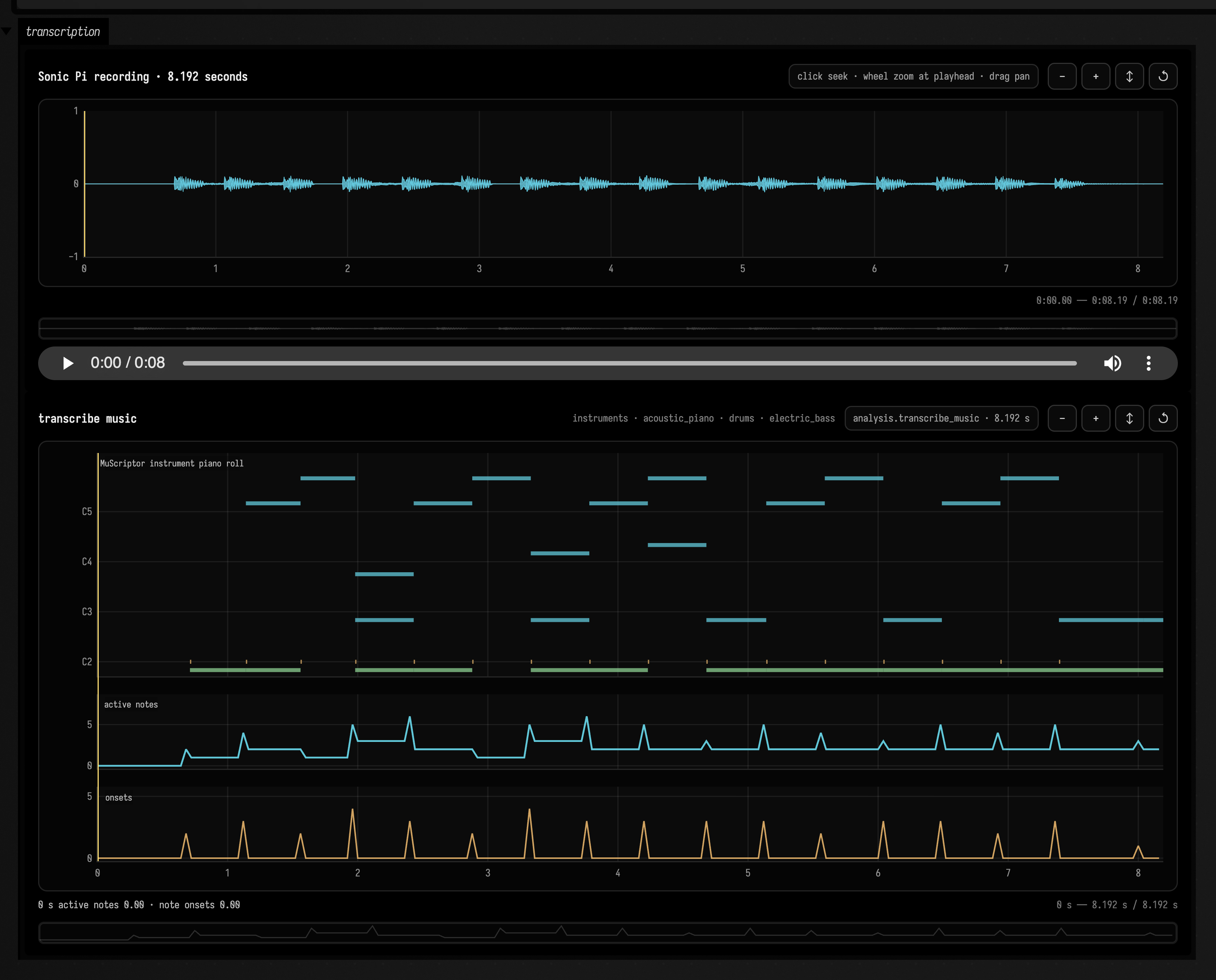
Listen to the recording whose notes are shown above.
The notes above are MuScriptor Small's reading of an eight-second Sonic Pi recording. Instrument colours are the model's guesses; they do not establish which instruments produced the sound.
The operation is analysis.transcribe_music, served by any of three model sizes:
| Field backend | Upstream scale | Good starting point |
|---|---|---|
analysis.muscriptor.small |
about 100M parameters | quick experiments and lower-resource machines |
analysis.muscriptor.medium |
about 300M parameters | the upstream quality/footprint compromise |
analysis.muscriptor.large |
about 1.4B parameters | highest accuracy when GPU memory permits |
All three revisions are pinned in the service. What comes back is a set of model hypotheses rather than a score; Limits of a transcription says how far to trust one.
Install and start the worker
MuScriptor's source code is MIT licensed. The model weights are gated under CC BY-NC 4.0, with
additional access terms requiring the operator to have the necessary rights to the input and output.
Accept the terms for the model size you intend to use on Hugging Face, then authenticate locally and
start the worker. These scripts run from services/field-audio-ai in the Field checkout:
uvx hf auth login
./scripts/run-muscriptor-worker.sh
The first request downloads the model. To check the worker, run its test script; with --model
it also downloads and runs a real model:
./scripts/test-muscriptor-worker.sh
./scripts/test-muscriptor-worker.sh --model small
Start the ordinary API separately with ./scripts/run-api.sh. That script points
FIELD_AUDIO_MUSCRIPTOR_URL at http://127.0.0.1:8769. Device, dtype, cache location, local
checkpoint overrides, and revision override variables are documented in the
worker README.
Transcribing a recording
Never block Field's runloop with .get() while a transcription is running. Use a box-owned coroutine and trackAnalysis for progress and the durable result.
Stop or rerun cancels this run’s subscriptions and pending local futures; the durable service job remains:
import kotlinx.coroutines.*
import kotlinx.coroutines.future.await

val client = cached { FieldAudioClient() }
val sourcePattern = "*sonic-pi-study*" // use audio you have the rights to transcribe
val sync = "muscriptor-example"

prop<AnalysisResult>(transcriptionResult)
go {
    try {
        val source = client.assetByFilename(sourcePattern).await()
        val audio =
            source.representations.firstOrNull { it.role == "canonical_project" }
                ?: source.representations.first { it.mediaType in setOf("audio/wav", "audio/x-wav") }
        val duration = requireNotNull(audio.durationSeconds)
        val region = AssetRegion(source.id, 0.0, duration)

        display(
            "source",
            audio.audioVisualizerHtml(
                label = sourcePattern,
                options = AudioVisualizerOptions(
                    width = 1100,
                    waveformHeight = 145,
                    initialDurationSeconds = minOf(20.0, duration),
                    syncGroup = sync,
                ),
            ),
        )
        val result =
            client
                .trackAnalysis(
                    musicTranscriptionAnalysis(
                        region,
                        backend = MuscriptorBackend.SMALL,
                        instruments = emptyList(), // or hard-constrain the expected instrument groups
                        tempoDetection = MuscriptorTempoDetection.BEST_EFFORT,
                        requestedBy = "field:my-document/transcription",
                    ),
                    onAccepted = { display("job", fieldAudioJobStatusHtml(it)) },
                    onProgress = { job, event -> display("job", fieldAudioJobStatusHtml(job, event)) },
                    onCompleted = { display("job", fieldAudioJobStatusHtml(it)) },
                    onError = {}, // Report failure once through the surrounding coroutine.
                )
                .await()
        display("score", analysisVisualizationHtml(result, width = 1100, height = 420, syncGroup = sync))
        transcriptionResult = result
        val performanceMidi = result.musicTranscriptionMidi()
        val quantizedMidi = result.musicTranscriptionQuantizedMidiOrNull()
        display(
            "artifacts",
            "performance MIDI: ${performanceMidi.id}; quantized: ${quantizedMidi?.id ?: "not produced"}",
        )
    } catch (cancelled: CancellationException) {
        throw cancelled
    } catch (failure: Throwable) {
        markdown("MuScriptor error", "Operation failed: ${(failure.message ?: failure.toString()).md}")
    }
}
The waveform and piano roll share Field's general time bus. Playback moves the score cursor; hover, click-to-seek, wheel zoom, and drag pan work in either view and are reflected in the other. Notes are coloured by instrument group, and the lower lane shows active polyphony against onset count.
To use the notes in code, run the next fragment in the same box after transcription finishes.
The transcriptionResult property retains the result; client.musicTranscription(transcriptionResult)
downloads it and returns MusicTranscriptionNote values. You can filter, group and transform these,
or pass them to another music system:
import kotlinx.coroutines.*
import kotlinx.coroutines.future.await

go {
    try {
        val transcription = client.musicTranscription(transcriptionResult).await()
        val cello = transcription.notes.filter { it.instrument == "cello" }
        display("cello notes", cello.joinToString("<br>"))
    } catch (cancelled: CancellationException) {
        throw cancelled
    } catch (failure: Throwable) {
        markdown("MuScriptor error", "Operation failed: ${(failure.message ?: failure.toString()).md}")
    }
}
Controls that change the transcription
instruments: a hard allow-list of typedMuscriptorInstrumentvalues. It often improves stable attribution when the ensemble is known, and Field completion exposes the full vocabulary. For example,listOf(MuscriptorInstrument.CELLO, MuscriptorInstrument.FRENCH_HORN)forbids every other instrument group.useSampling,temperature, andcfgCoefficient: decoding controls. Greedy decoding is the deterministic default.beamSize: beam search width; one is the default.preludeForcing: carries unfinished notes across each five-second chunk boundary. Leave it on unless you are trading continuity for batched throughput.batchSize: values above one requirepreludeForcing = false.tempoDetection: required, best effort, or off. When a grid is found, its measured model-onset correction is applied to the source-relative note timeline.strictEos: turn a chunk that exhausts its token budget into a failed job rather than a warning.
What a completed result carries
- exact source asset and time range;
- onset, offset, MIDI pitch, and MuScriptor instrument group for every note;
- 25 Hz active-note and onset-count trajectories;
- a versioned
field.audio.music-transcription.v1MessagePack document; - performance-timed Standard MIDI;
- an optional quantized-MIDI handle for future workers (not emitted by MuScriptor 0.3.0);
- package, worker, model revision, checkpoint SHA-256, preprocessing, parameters, and license metadata.
The note timeline is source-relative. MuScriptor's measured onset lag is removed from the NPZ and MessagePack times before Field draws them, while the correction remains recorded in result metadata. The MIDI writer applies the same correction through MuScriptor's beat-grid path, so moving the shared playhead between waveform and score does not introduce the model's small systematic lag.
Limits of a transcription
A transcription is a set of model hypotheses, not a score. Read it against the synchronized waveform and piano roll before you treat it as one. Expect the timing and many pitches to be useful, and the whole to need correcting.
The instrument labels are hypotheses too. "Piano" and "bass" on an electronic source describe what
the model heard, not what made the sound, and the instruments allow-list is the way to say so up
front.
MuScriptor does not infer velocity, so Field draws these notes at uniform opacity rather than inventing dynamics. Its tokenizer cannot represent two simultaneous notes with the same pitch and instrument. MuScriptor 0.3.0 does not expose beat quantization at all, which is why the quantized artifact above is a handle rather than a file. And the upstream authors caution that dense mixes, unusual timbres, processed recordings, and exact offsets remain difficult.
See also: Audio AI analysis for beats and pitch, and Short-time spectral spaces.
Upstream references: MuScriptor repository and small-model card.