PostScript in a Box
PostScript is the page-description language from Adobe's laser printers: a stack language, like
Forth, whose programs draw. In Field you can run it in a box, draw into its postscript panel and
work with the result as Field lines (FLines). Running a selection keeps the stack and page;
running the whole box clears them. Definitions in the box's interpreter persist between runs.
The interpreter follows John Earnest's Let's Write a PostScript Interpreter for the language: tokens, stacks, procedures, arrays and control flow. Field adds the graphics state and path operators so the programs can draw.
Making a PostScript box
Set a box's Main Language to PostScript (the command palette's Set Main Language: PostScript) and the boxes connected under it are PostScript boxes. The root itself stays Kotlin.
Running the whole box starts from an empty stack and an empty page. Running a selection keeps
both, so after a run that defined double, selecting 3 double and running it answers 6. A run
that finishes cleanly ends with ok and the stack it left, the top value in bold:
% This is a line comment
/double {2 mul} def
3 double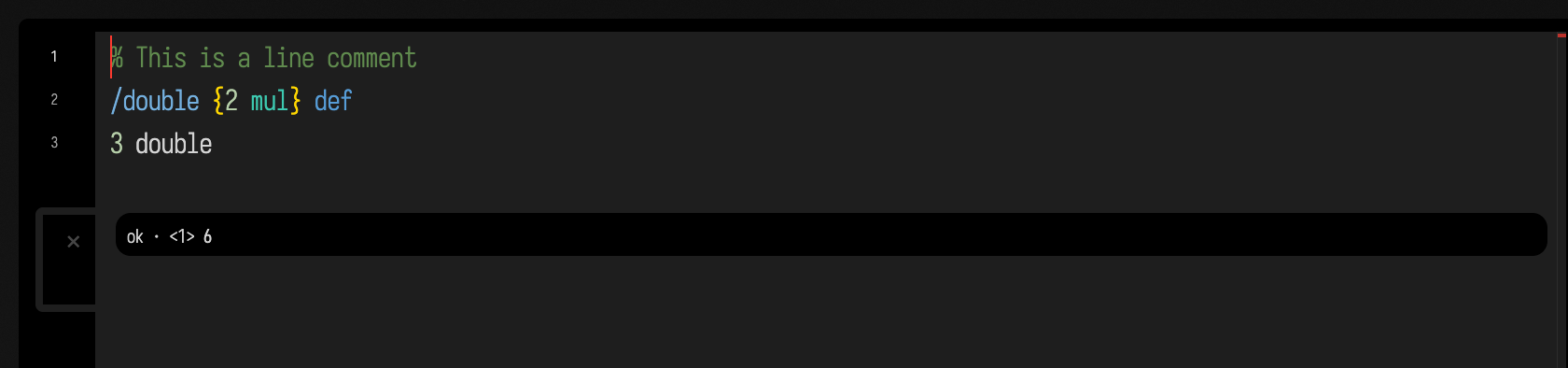
/double pushes a name without running it, {2 mul} is a procedure collected but not run, and
def binds one to the other in the current dictionary. 3 double then pushes 3 and runs the
procedure.
The language
Tokens are separated by whitespace, and [ ] { } stand alone, so [[1 2][3 4]] needs no spaces.
% starts a comment that runs to the end of the line, /name is a literal name, and (text) is a
string, with nested parentheses and backslash escapes. Numbers are integers or reals; 16#FF is
hexadecimal.
[ pushes a mark and ] collects everything above it into an array, so code inside the brackets
runs: [2 3 add] is [5]. == prints a value the way it would be written, and = prints a string
without its parentheses.
/fib {dup 2 ge {1 sub dup 1 sub fib exch fib add} {} ifelse} def
[0 1 10 {fib} for] ==
[0 1 9 {2 copy add} repeat] ==

/reverse {[exch dup length 1 sub -1 0 {1 index exch get exch} for pop]} def
[11 22 33] reverse ==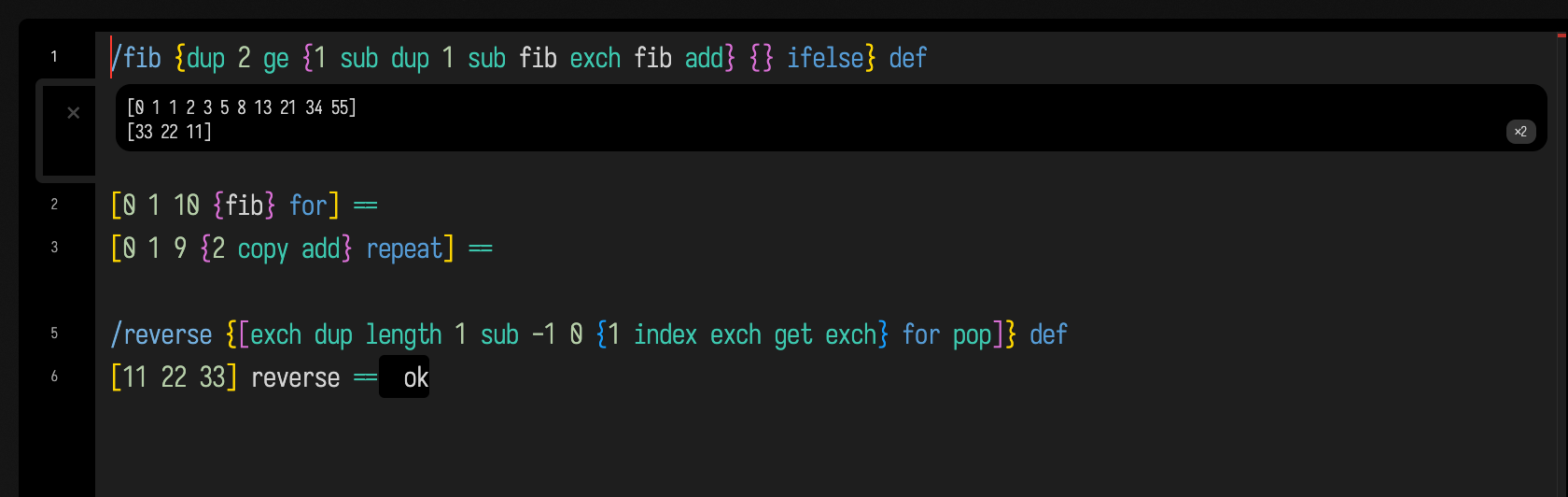
These examples come from Earnest's post; Field's tests check their results against it.
The operators:
| Kind | Operators |
|---|---|
| Stack | pop exch dup copy index roll clear count mark [ ] cleartomark counttomark |
| Arithmetic | add sub mul div idiv mod neg abs floor ceiling round truncate sqrt sin cos atan exp ln log rand srand cvi cvr |
| Comparison and logic | eq ne gt ge lt le and or xor not true false |
| Control | exec if ifelse for repeat loop exit forall bind cvx cvlit type |
| Dictionaries | def load store dict begin end currentdict known where |
| Arrays and strings | array length get put aload astore getinterval cvs |
| Output | = == print pstack stack |
Angles are in degrees, as everywhere in PostScript. loop runs until exit, and a run that takes
more than twenty million steps is stopped rather than left to hang Field, with a message saying so.
Drawing
The graphics operators work on a current path in a coordinate system set by a transformation matrix.
moveto, lineto, curveto and arc add to the path in the current coordinates; rlineto,
rmoveto and rcurveto are relative to the current point. stroke draws the path as a line,
fill fills it, and either one then starts a new path. translate, rotate and scale move the
coordinate system, and gsave / grestore save and restore it along with the colour, line width
and path.
| Kind | Operators |
|---|---|
| Path | newpath moveto rmoveto lineto rlineto curveto rcurveto arc arcn closepath currentpoint |
| Painting | stroke fill eofill showpage |
| Coordinates | translate rotate scale initmatrix gsave grestore |
| Style | setlinewidth currentlinewidth setgray setrgbcolor sethsbcolor |
PostScript's y axis points up, and Field's canvas points down, so the drawing is flipped on the way out and reads the way it would on paper. Line width scales with the coordinate system, as it does on a printer. PostScript's default colour is black, which vanishes against Field's dark panel, so the examples here set a colour first.
Recursion is where PostScript drawing earns its keep. branch draws a line, moves to its end, and
calls itself twice, once rotated each way, inside gsave / grestore so that each call returns to
where it started:
/branch { % length depth branch
  dup 0 gt {
    exch dup 0 0 moveto 0 exch lineto stroke
    dup 0 exch translate
    0.7 mul exch 1 sub
    gsave 25 rotate 2 copy branch grestore
    gsave -25 rotate branch grestore
  } { pop pop } ifelse
} def

0.55 0.85 0.4 setrgbcolor
2 setlinewidth
300 50 translate
100 8 branch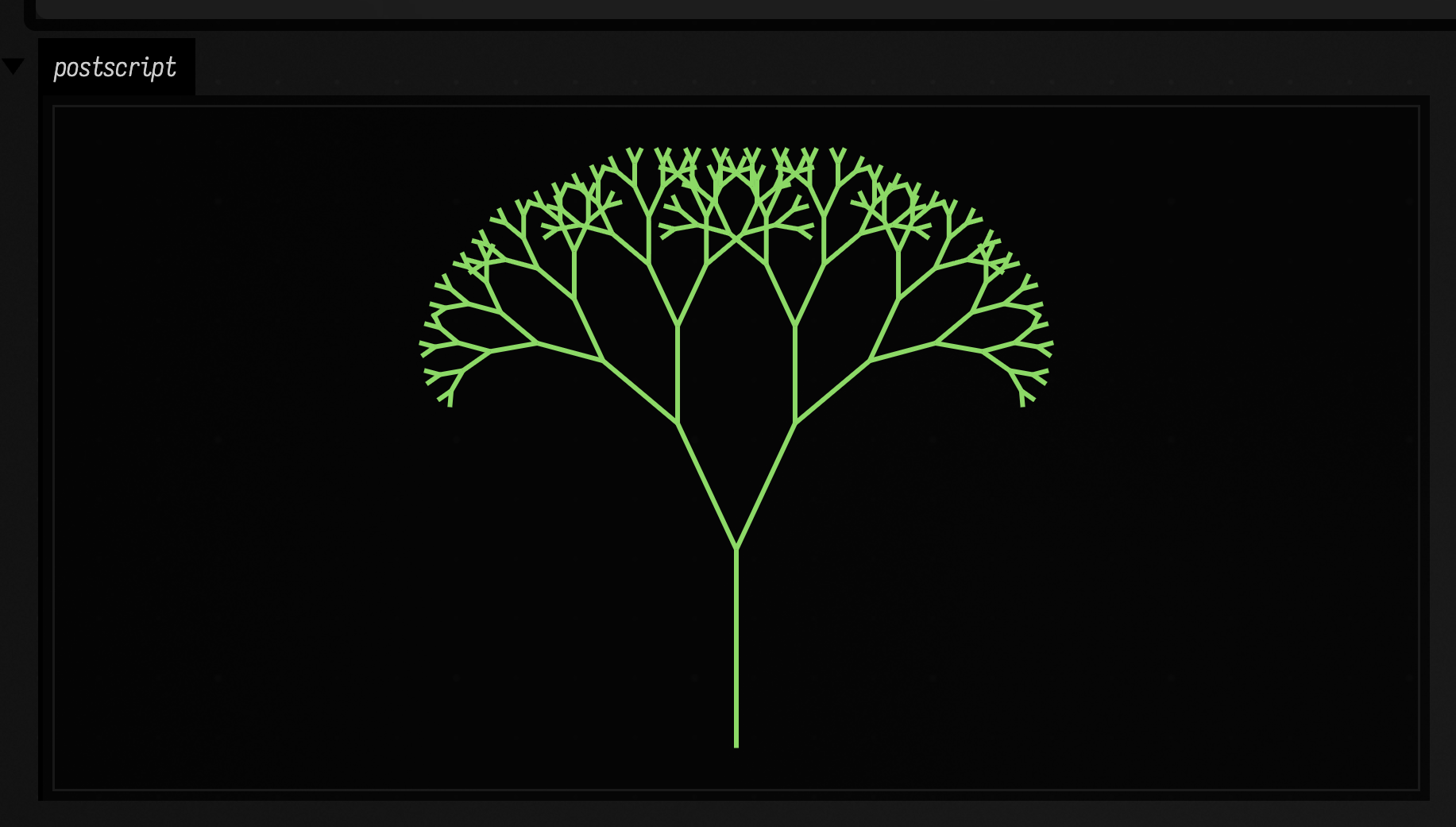
Ghostscript (gs) draws the same program to the same place: a test runs both and compares their
bounding boxes, which agree to within a point once Ghostscript's allowance for line width is taken
into account. The test is skipped where Ghostscript is not installed.
A rosette is one curve drawn again after each turn of the coordinate system. repeat runs the
procedure 36 times, and rotate accumulates, so each petal is ten degrees on from the last; the
colour turns with it through sethsbcolor:
200 200 translate
1.5 setlinewidth
0 1 35 {
  36 div 1 1 sethsbcolor
  newpath 0 0 moveto 120 0 60 40 0 60 curveto stroke
  10 rotate
} for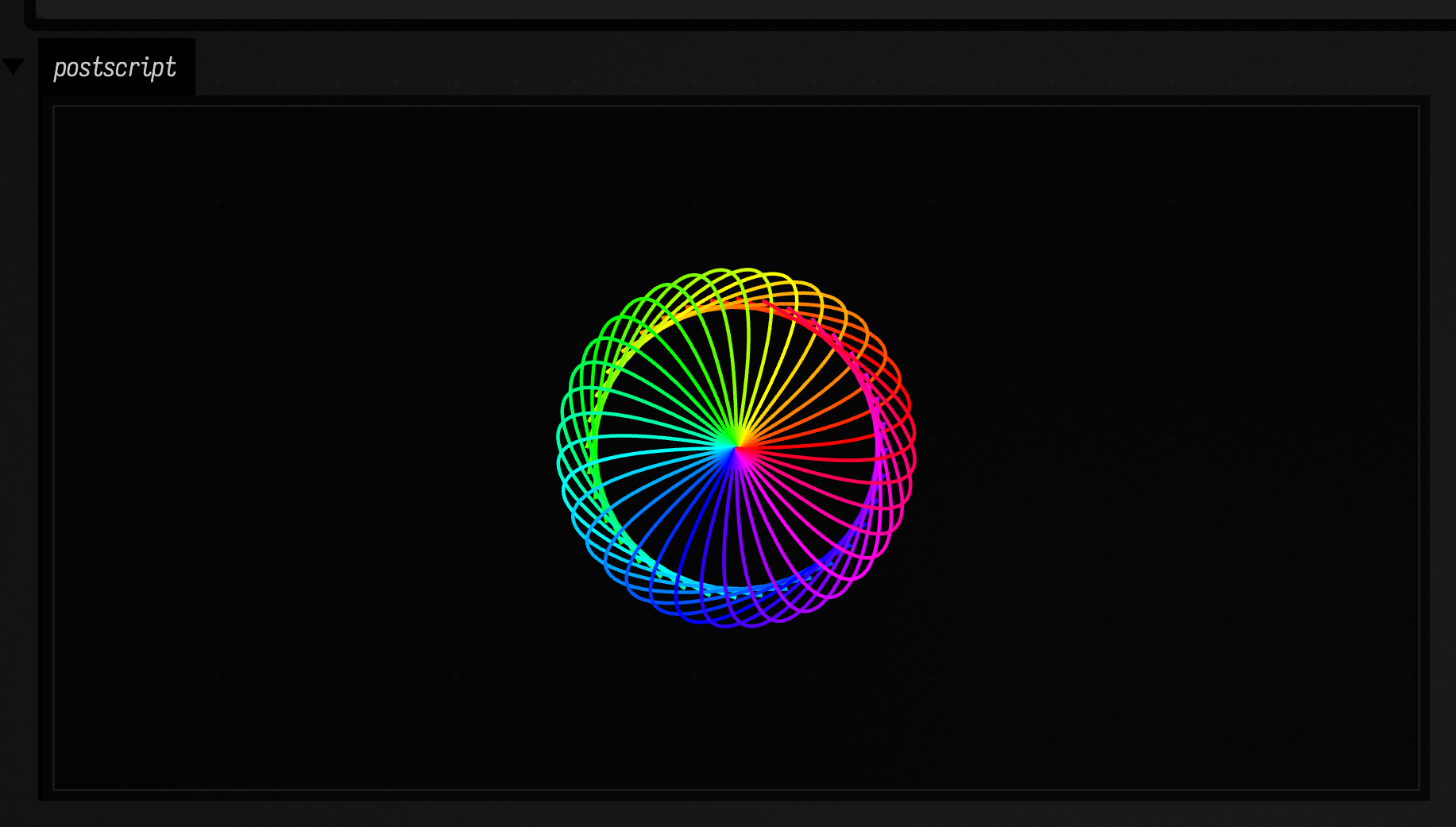
Errors
An error is marked on the line of the token that raised it, with PostScript's own name for it where
there is one (stack underflow, undefined, nocurrentpoint). What the box drew before the error
is still drawn.
newpath
10 10 lineto
stroke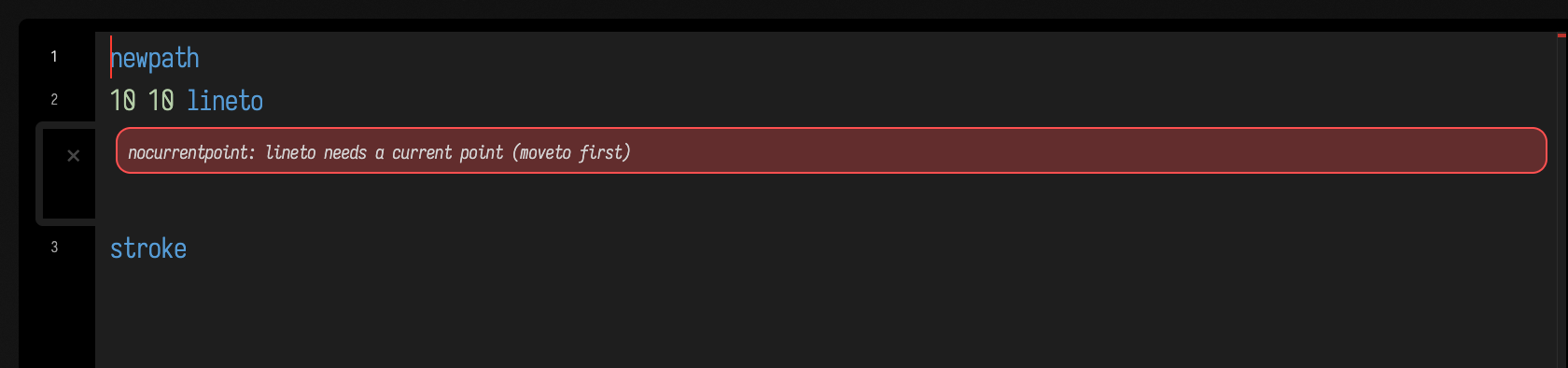
Ideas for extensions
- Text.
findfont scalefont setfontandshoware not here yet. Field already lays text out as FLines (layoutText), soshowcould draw outlines that stroke, fill and transform like any other path. - Clipping and dashes.
clip,setdash,arctoand the rest of the path operators, using FLine's boolean operations for the clip. - The Blue Book, whole. Run the programs from the PostScript Language Tutorial and Cookbook and compare each against Ghostscript's rendering, the way the tests already compare the tree.
- Live parameters. Bind a Field slider to a PostScript name, so
/angle 30 defbecomes a knob and the recursive tree moves as you drag it. - Draw on the renderer. Send the box's FLines to the Vulkan renderer as well as the panel, so a PostScript program can drive a 3D scene or an animation frame by frame.
Where to go next
- Open the PostScript starting point to try these examples in their own boxes.
- Let's Write a PostScript Interpreter, John Earnest's post, which this interpreter follows for the language.
- The PostScript Language Reference, Adobe's third edition, for what each operator does on a real printer.
- Forth Examples, Field's other stack language, which runs every frame and plays steps.
- Lua in a Box, whose
lines(...)draws into the same kind of panel.