A Drawn Score, Heard
Draw a score on Field's canvas and turn it into sound. Here the score is made of rectangles, a
pen stroke and a level line. notation.space reads the drawing with time across and pitch up; a
dozen lines of box code decide what the marks mean and build a pattern to play.
We'll render that pattern to a .wav, then analyse its onsets and pitches and put them next to
the original drawing.
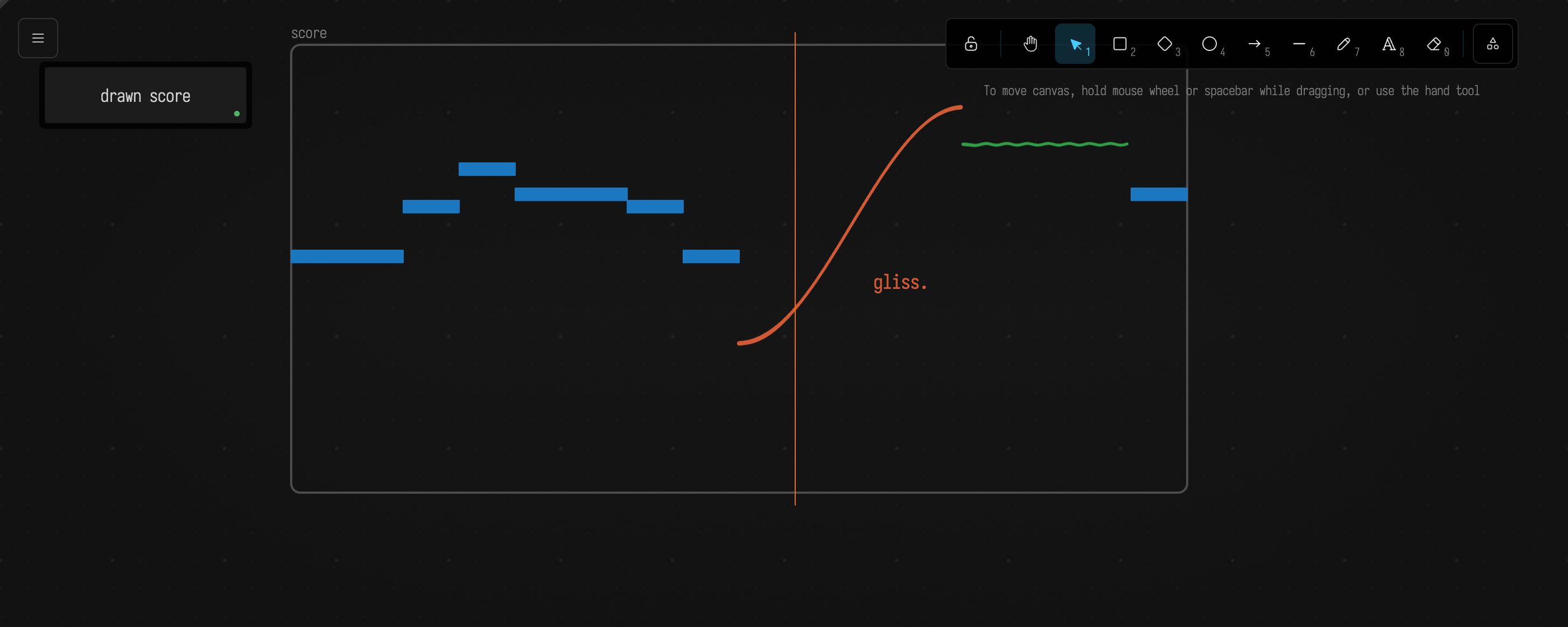
The score on this page is drawn by code, but a rectangle you draw by hand in the same frame is read the same way. Here is the score in Field with the drawing layer switched on:
The score, and a playhead through it
drawnScore() draws a frame named "score", seven blue rectangles as a piano roll, a red glissando
rising over two beats, a green held note with a hand's wobble in it, and a text label. The box then
declares the frame a score, eight beats across and MIDI 84 down to 48, and cuts it with a vertical
line at beat 4½, in the middle of the glissando:
notation { drawnScore() }
val score = notation.space("score", x = 0.0..8.0, y = 84.0..48.0) // eight beats; MIDI 84 at the top
val playhead = 4.5
notation("playhead") {
    stroke = "#f08c00"
    line([score.toWorld(playhead, 85.0), score.toWorld(playhead, 47.0)])
}

:::fold what the playhead cuts, and every note the score reads as
val cut = score.vertical(playhead).filter { !it.isSpan }
val notes = score.notes()
val from = { kind: MarkType -> notes.count { it.event.mark.kind == kind } }
markdown(
    "reading",
    (cut.map { "at beat $playhead: ${it.mark.name}  \nMIDI %.2f, rising %.1f/beat".format(it.value, it.slope) } +
            "${notes.size} notes: ${from(MarkType.RECTANGLE)} from  \nrectangles, ${from(MarkType.STROKE)} from strokes")
        .joinToString("  \n"),
)
:::endfold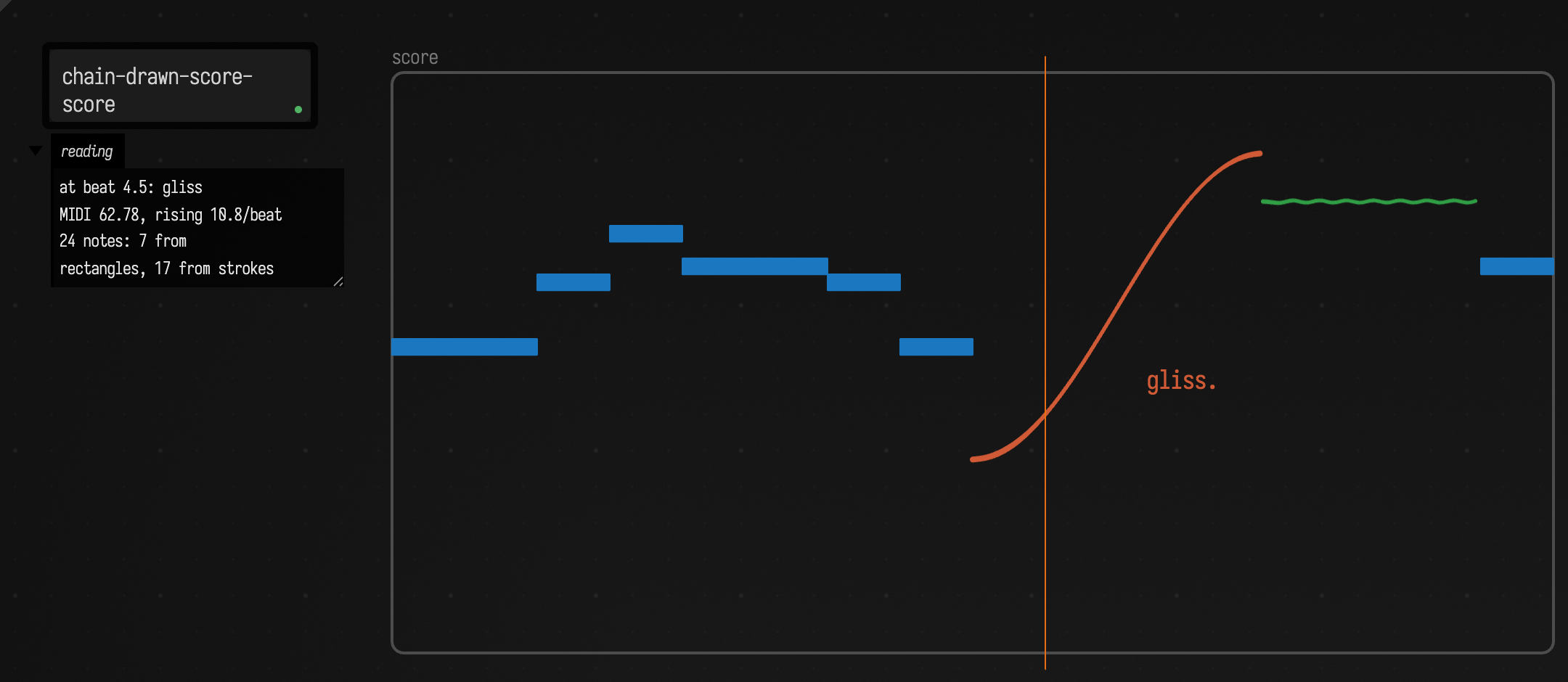
A cut returns a hit per crossing, with the pitch there and the slope, in semitones per beat. The playhead crosses the glissando and nothing else: the rectangles either side of it end at beat 4 and start at 6, and the playhead does not cross itself.
From a reading to a pattern
score.events gives every mark in the frame, where it starts and ends in beats, and the pitch
at each end. The box decides what those marks mean as music, and you can change its interpretation.
This reading makes three decisions:
- A rectangle, or a stroke that stays level, is one note: from its left edge to its right, at its pitch. "Level" is its two ends within half a semitone, so the held note's wobble does not make it a glissando.
- A stroke that moves is cut with
score.vertical(t)every eighth of a beat, and the pitch at each cut sounds until the next. The voice holds one pitch per note, so the drawn glissando plays as a run of short notes. Pen pressure at the cut, where the stroke recorded any, is the note's gain. - Text, frames and arrows are labels, not notes. The "gliss." inside the score is an event, and it is skipped.
patTimed turns the notes into a pattern. The whole x range is one cycle, so cps is the tempo:
eight beats at a quarter of a cycle a second is 120 beats a minute.
notation { drawnScore() }
val score = notation.space("score", x = 0.0..8.0, y = 84.0..48.0) // eight beats; MIDI 84 at the top
val glideStep = 0.125 // how finely a moving stroke is read

val notes = mutableListOf<TimedNote>()
for (e in score.events) {
    val kind = e.mark.kind
    if (kind == MarkType.TEXT || kind == MarkType.FRAME || kind == MarkType.ARROW) continue // labels, not notes
    if (e.end <= e.start) continue // no width, no time
    val moving = (kind == MarkType.STROKE || kind == MarkType.LINE) && kotlin.math.abs(e.endValue - e.value) > 0.5
    if (!moving) { // a rectangle, or a level line: one note
        notes += TimedNote(e.start, e.end, e.value)
        continue
    }
    var t = e.start // a glissando: cut it every glideStep
    while (t < e.end - 1e-9) {
        val hit = score.vertical(t).firstOrNull { it.mark.id == e.mark.id && !it.isSpan }
        if (hit != null) notes += TimedNote(t, minOf(t + glideStep, e.end), hit.value, hit.pressure ?: 1.0)
        t += glideStep
    }
}
val tune = patTimed(notes, beats = 8.0)
showPatRollOf("read" to tune, title = "the score, read", subtitle = "${notes.size} notes", cycles = 1, pitched = true)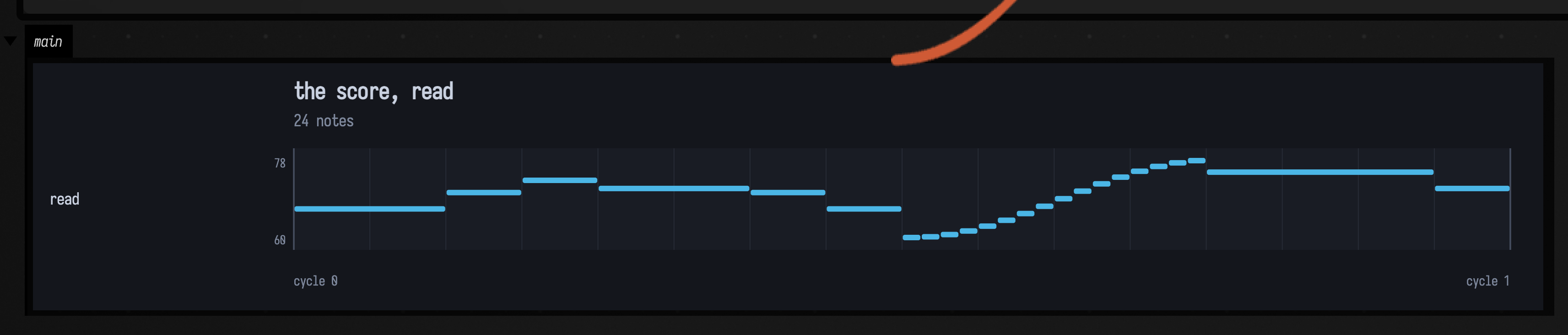
It plays through patVoice, a simple synth voice (one triangle oscillator, an envelope and a
lowpass):
val voice = patVoice(wave = PatWave.TRIANGLE, decay = 0.004, sustain = 0.4)
val audio = patRenderStereo(tune, cycles = 2, cps = 0.25, voice = voice)
The voice is short and detached: each note holds for 40% of its length and its tail is gone 16 ms later, so the glissando's steps are separate strikes you can count, and so the onset detector further down can find each one. Two cycles:
DrawnScoreDocs.interpret is the same loop, which the later boxes on this page call. The same
reading also ships as score.toPattern(), for when its defaults are what you want.
The same drawing, read another way
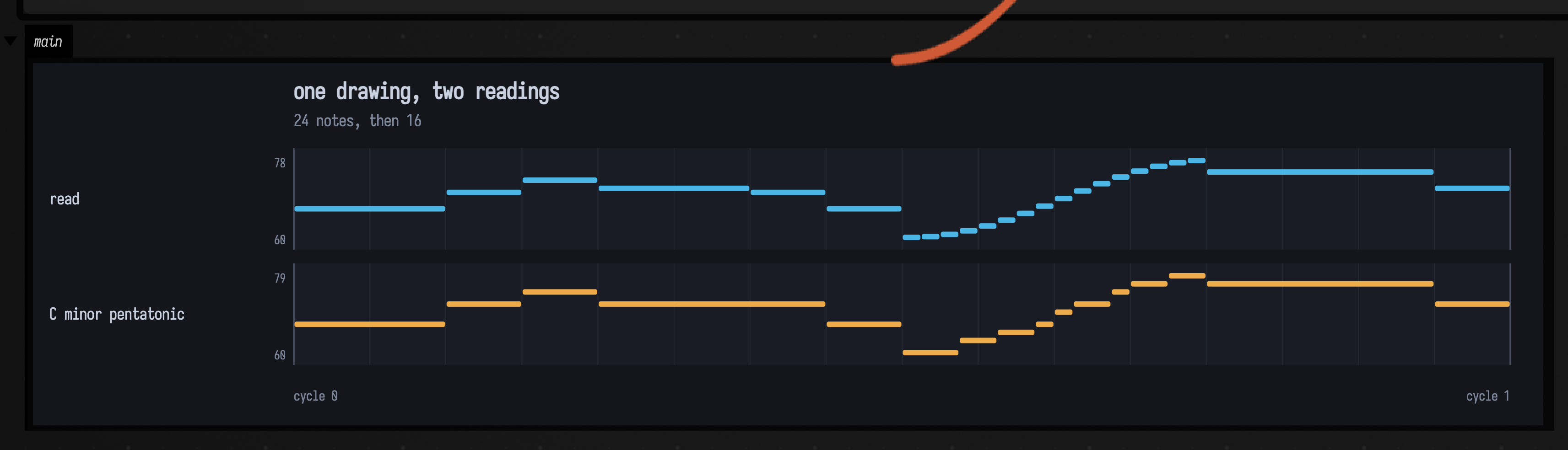
Nothing in the drawing says the y axis is continuous MIDI. Snap every note to C minor pentatonic and the glissando stops being a chromatic smear and becomes a run through the scale. A step that lands on the pitch the last one did is held rather than struck again:
notation { drawnScore() }
val notes = DrawnScoreDocs.interpret(notation.space("score", x = 0.0..8.0, y = 84.0..48.0)) // the loop above

val minorPentatonic = setOf(0, 3, 5, 7, 10) // C Eb F G Bb
val inScale = (24..108).filter { it % 12 in minorPentatonic }
val snap = { midi: Double -> inScale.minBy { kotlin.math.abs(it - midi) }.toDouble() }
val tuned = mutableListOf<TimedNote>()
for (n in notes.map { it.copy(note = snap(it.note)) }) {
    val last = tuned.lastOrNull()
    if (last != null && last.note == n.note && last.end == n.start)
        tuned[tuned.size - 1] = last.copy(end = n.end) // same pitch: hold it
    else tuned += n
}
showPatRollOf(
    "read" to patTimed(notes, beats = 8.0),
    "C minor pentatonic" to patTimed(tuned, beats = 8.0),
    title = "one drawing, two readings",
    subtitle = "${notes.size} notes, then ${tuned.size}",
    cycles = 1,
    pitched = true,
)
The pentatonic reading, two cycles:
Other readings are as short. Rectangle height could be loudness, or the size of a chord; the slope
at a cut could be articulation, a steep line struck hard; a mark's stroke colour could pick the
voice. Each is a change to the loop, not to the drawing.
Listening back
The box below plays the first reading again from its own drawing, then takes the audio apart.
PatSoundDocs.onsetPeaks finds the strikes without being told where they are. YIN finds the pitch
of every note over the part of it that is held. The plot is YIN's pitch against the pitch of the
note drawn at that instant, frame by frame. The steps of the glissando are the staircase in the
middle, and the table is the measurement:
notation { drawnScore() }
val notes = DrawnScoreDocs.interpret(notation.space("score", x = 0.0..8.0, y = 84.0..48.0)) // the loop above
val voice = patVoice(wave = PatWave.TRIANGLE, decay = 0.004, sustain = 0.4)
val audio = patRenderStereo(patTimed(notes, beats = 8.0), cycles = 2, cps = 0.25, voice = voice)
val heard = DrawnScoreDocs.listen(audio, notes)
notation.clear() // read and played: take the marks down so they do not lie over the plot

:::fold plot it, and compare it with the published clip's reading
val trace = heard.trace()
showSignals(
    "drawn" to trace.map { it.third },
    "heard" to trace.map { it.second },
    x = trace.map { it.first },
    title = "pitch, drawn and heard",
    xTitle = "seconds",
    yTitle = "MIDI",
    channel = "pitch",
)
// The .wav above is rendered from a document the renderer draws for itself; this is the same reading.
val same = DrawnScoreDocs.sceneNotes("drawn-score") == notes
markdown(
    "measured",
    """
| | |
|---|---|
| notes scheduled, two cycles | ${heard.scheduled} |
| onsets detected, not told where | ${heard.onsetsDetected} |
| onsets within 30 ms of a note | ${heard.matchedOnsets} |
| worst onset error | ${heard.maxOnsetErrorMs.f1} ms |
| notes with a voiced pitch | ${heard.pitched} |
| worst pitch error | ${heard.maxPitchError.f3} semitones |
| the published clip reads the same notes | $same |
""",
    width = 1000,
)
:::endfold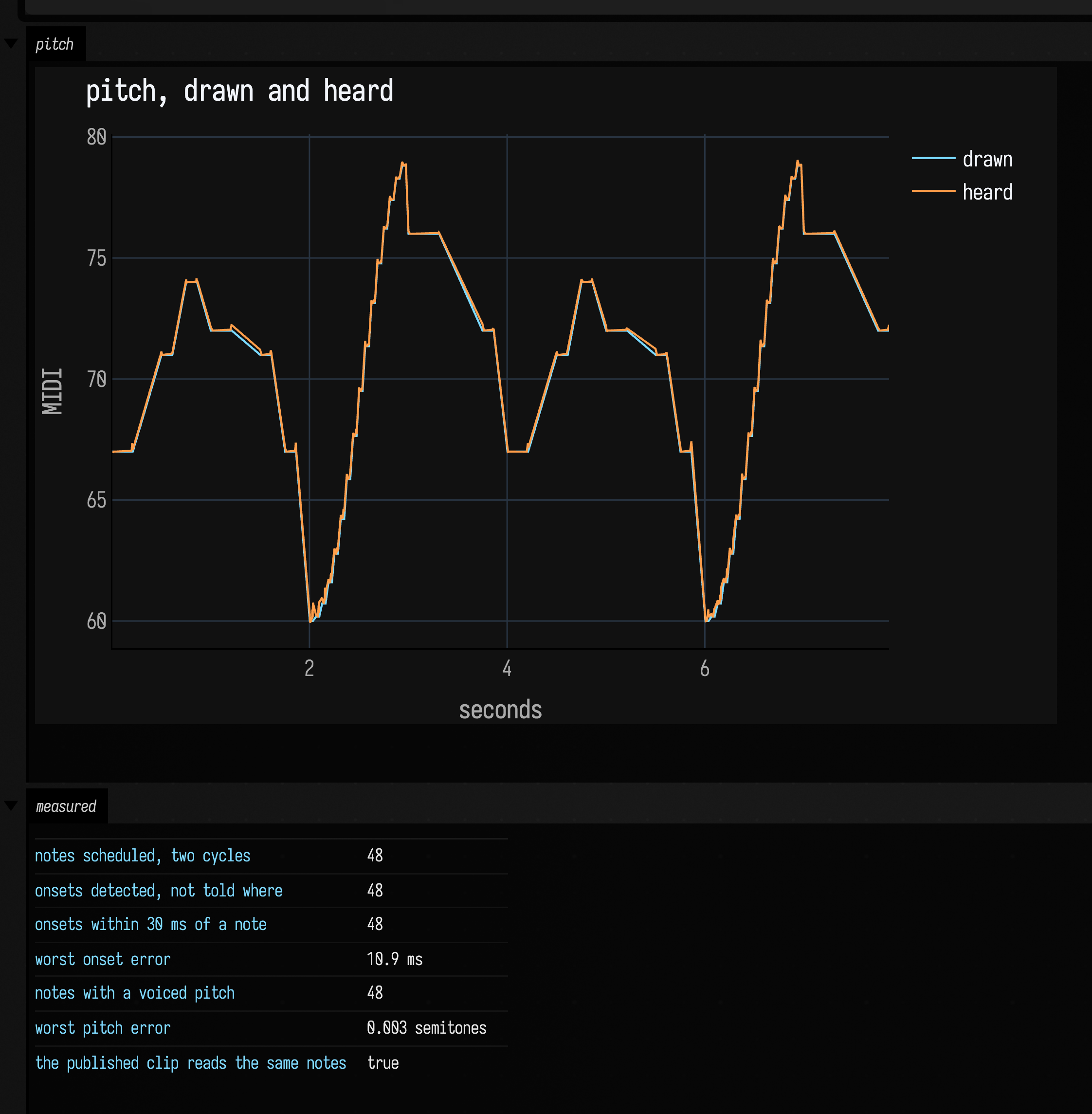
Every note is found and every pitch is where the reading put it, including the glissando's steps,
whose pitches fall between semitones. The pentatonic reading measures the same way. The onset
error comes from the detector: onsetPeaks reports the start of the 12 ms window that first rises,
and that window starts before the strike.
Leave silence between strikes you want detected
onsetPeaks re-arms only when the level falls below half the level of the window that
triggered it. That window sits low on the attack, so a legato voice whose notes barely dip
between steps can hide most of a glissando's strikes. A detached voice, with true silence
between notes, is found every time.
Drawing your own
Open drawn_score from the welcome screen's starting points: score, read, play,
pentatonic and listen back, run in that order. play holds the reading loop from this page, so
that is the box to change. Then press alt/option-d and draw into the frame: r for a rectangle (a note),
p for a pen stroke (a glissando if it moves, a held note if it does not). Run the boxes after
score again, and they read what you drew along with what the code drew.
A frame you make yourself with Excalidraw's frame tool works too, once you rename it "score".
Where each piece is documented
- Drawing and Notation for the drawing layer,
notation { }, and reading by intersection. - Patterns & Rhythm for the event model the score becomes.
- A Cellular Automaton You Can Hear is the nearest chain: a different thing upstream of the same pattern and the same voice.
- A Function, Played and Read Back for the pitch detector, and the delay in how it reports time.