Studies
A study lets you develop something that draws and keep a history of the changes. Its source might be a StackSL program, a RectSL scene, or three numbers in a box property. Each accepted change becomes a checked revision, and you can see pictures of the result as you work.
You can work on a study with AI4: try the conversations about a function, a shader, a scene, or the StackSL in your shader. Here we'll look at the operations those studies share, and how to turn a box in your own document into a study.
Everything here is in afield.study.source: LiveStudy and registerStudyTools in LiveStudy.kt,
SourceFramesStudy in SourceFramesStudy.kt.
The ten verbs
A study offers some or all of these. LiveStudy has one method per verb, and a verb a study does
not implement refuses with a message saying so.
| Verb | LiveStudy method |
What it does | Publishes |
|---|---|---|---|
| Inspect | inspect |
Read the checked source, whether the box holds an unchecked edit, the history, the knobs, held variants | no |
| Edit | edit |
Replace the whole source; it is checked, then made current | yes |
| Patch | patch |
Exact, unique, non-overlapping replacements in the live source | yes |
| SetNumbers | setNumbers |
Rewrite knobs (numbers, by index) in place | yes |
| Observe | observe |
Frames of a revision at chosen times, with measurements, optionally over another revision and a difference | no |
| Compare | compare |
Before, after and difference per time, and whether everything outside an allowed region stayed within one 8-bit level | no |
| Sweep | sweep |
One knob at 2 to 9 values, side by side | no |
| TryVariants | tryVariants |
Check and draw 1 to 8 candidates beside the current source, and hold them | no |
| AdoptVariant | adoptVariant |
Publish a held candidate by label | yes |
| Restore | restore |
Make an earlier revision current again, as a new revision | yes |
Every verb that publishes takes the revision and the source hash its caller last read from Inspect, and refuses if either has moved since: the box's text may have been edited by a person, or by another turn of the conversation. A candidate that does not draw is refused too, and nothing is written. History is only appended to: Restore adds a revision rather than rewinding.
A study in a dozen lines
sourceFramesStudy(property, frames) makes a study of one property of the box. The frames are
whatever you can draw: studyFrames(description) { source, width, height, seconds -> … } wraps one
function that returns a CpuRaster of linear RGBA. Here the property rings holds three numbers,
and the function reads them as a ring count, the brightness of the dark bands, and a warmth that
moves the light bands from blue to orange. The numbers are found by StudyKnobs.plainNumbers, which
is also the default for the study's knobs, so the painter and the study agree on what the numbers
are.
registerStudyTools("Rings", rings) then gives this document's AI4 chat the ten verbs as tools,
named after the prefix. The rest of the block does by hand what a model's first two calls would
do: make the first revision against empty, then look at it at three times.
:::static
prop<String>(rings)
rings = "7 rings 0.05 ink 0.8 warmth"

val ringsStudy = sourceFramesStudy(
    "rings",
    studyFrames("rings, drawn on the CPU") { source: String, w: Int, h: Int, t: Double ->
        val (count, ink, warmth) = StudyKnobs.plainNumbers(source).map { it.value.toFloat() }
        val px = FloatArray(w * h * 4)
        for (y in 0 until h) for (x in 0 until w) {
            val d = Math.hypot(x + 0.5 - w / 2.0, y + 0.5 - h / 2.0) / w
            val v = (0.5 + 0.5 * Math.cos(d * count * 12.0 - t * 2.0)).toFloat()
            val i = (y * w + x) * 4
            px[i] = v * warmth + ink * (1 - v)
            px[i + 1] = v * 0.5f + ink * (1 - v)
            px[i + 2] = v * (1 - warmth) + ink * (1 - v)
            px[i + 3] = 1f
        }
        afield.lang.stacksl.cpu.CpuRaster(w, h, px)
    },
)

val tools = registerStudyTools(
    "Rings",
    ringsStudy,
    about = "The source is three numbers: ring count, ink brightness, warmth 0..1.",
)

val empty = ringsStudy.inspect(StudyCall.Inspect())
val first = ringsStudy.edit(
    StudyCall.Edit(
        "empty",
        empty.facts["liveSourceHash"] as String,
        "7 rings 0.05 ink 0.8 warmth",
        "seven warm rings",
    ),
)
val seen = ringsStudy.observe(StudyCall.Observe(seconds = [0.0, 0.5, 1.0]))

markdown(
    "main",
    tools.values.joinToString(" · ") { "`${it.name}`" } +
        "\n\n`${first.revision}`: ${first.facts["message"]}\n\n" +
        seen.h,
)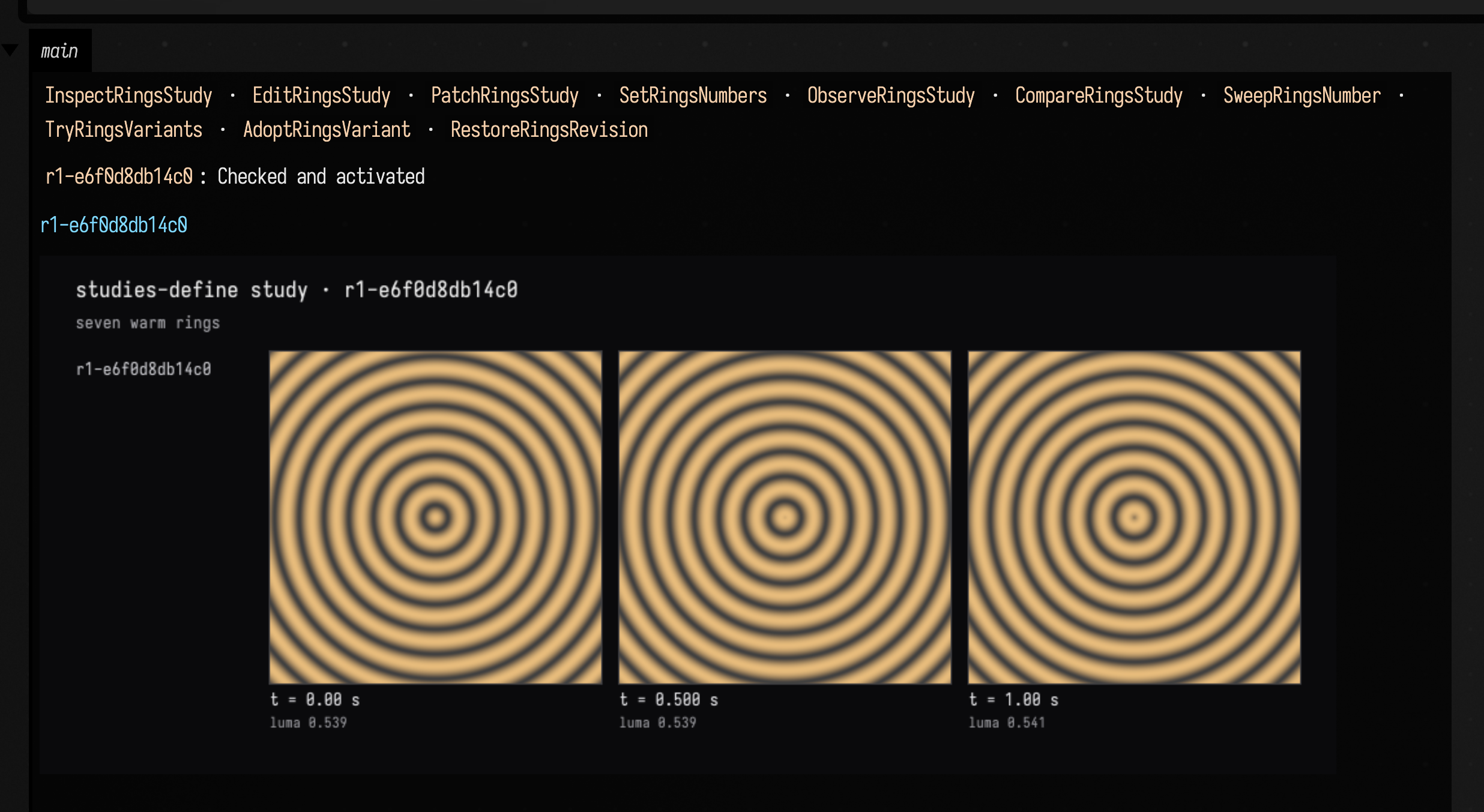
The revision is named r1- and the first twelve hex digits of its source's hash, so the same source
always gets the same name. The sheet is the picture a model receives from Observe, as an image
rather than as text; the numbers beside it (mean luma, clipping, detail, palette, motion between
frames) come back in the report's facts. The study keeps its revisions in the document, under
studies/<box id>/rings, and the sheet is saved there too. sourceFramesStudy("rings", …) also
registers rings as a saved property, so the box's text is written to the document with them.
Changing it
SetNumbers rewrites a knob in the box's own text and publishes the result, and its report carries a preview: the new revision, its parent, and their difference. The block also tries an Edit with the revision and hash it read before the change, which is what a stale model turn looks like, and asks Compare whether the change kept brightness.
:::static
prop<String>(rings)
rings = "7 rings 0.05 ink 0.8 warmth"

val ringsStudy = sourceFramesStudy(
    "rings",
    studyFrames("rings, drawn on the CPU") { source: String, w: Int, h: Int, t: Double ->
        val (count, ink, warmth) = StudyKnobs.plainNumbers(source).map { it.value.toFloat() }
        val px = FloatArray(w * h * 4)
        for (y in 0 until h) for (x in 0 until w) {
            val d = Math.hypot(x + 0.5 - w / 2.0, y + 0.5 - h / 2.0) / w
            val v = (0.5 + 0.5 * Math.cos(d * count * 12.0 - t * 2.0)).toFloat()
            val i = (y * w + x) * 4
            px[i] = v * warmth + ink * (1 - v)
            px[i + 1] = v * 0.5f + ink * (1 - v)
            px[i + 2] = v * (1 - warmth) + ink * (1 - v)
            px[i + 3] = 1f
        }
        afield.lang.stacksl.cpu.CpuRaster(w, h, px)
    },
)

val first = ringsStudy.edit(
    StudyCall.Edit(
        "empty",
        ringsStudy.inspect(StudyCall.Inspect()).facts["liveSourceHash"] as String,
        "7 rings 0.05 ink 0.8 warmth",
        "seven warm rings",
    ),
)
val hash = ringsStudy.inspect(StudyCall.Inspect()).facts["liveSourceHash"] as String

val cooler =
    ringsStudy.setNumbers(StudyCall.SetNumbers(first.revision, hash, [StudyCall.Number(2, 0.2)], "cooler rings"))
val late = runCatching {
    ringsStudy.edit(StudyCall.Edit(first.revision, hash, "3 rings 0.5 ink 0.5 warmth", "an edit from a stale read"))
}
val kept = ringsStudy.compare(StudyCall.Compare(first.revision, cooler.revision, mode = "luma"))

markdown(
    "main",
    "The box holds `${rings}`. The stale edit: ${late.exceptionOrNull()?.message} " +
        "Luma preserved: ${kept.facts["preservedOutsideRegion"]}.\n\n" +
        cooler.h,
)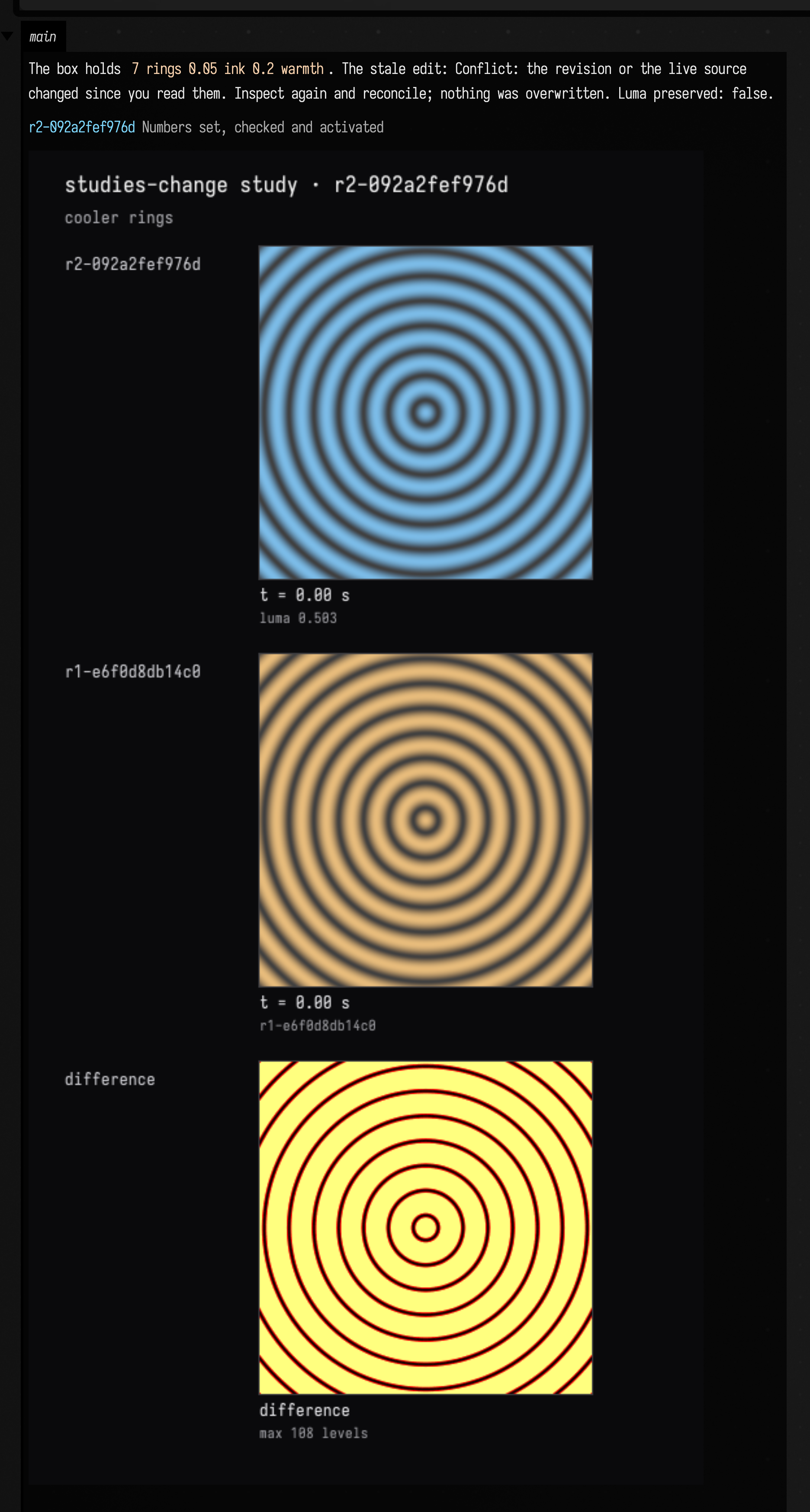
Knob 2 is the third number, 0.8, and the box's property now reads 0.2 in its place. The stale
edit changed nothing. Compare in luma mode reports false because the warm and cool colours do
not have the same brightness; with an allowedRegion of [u0, v0, u1, v1] it would instead ask
whether everything outside that rectangle held still, which is how a model checks that an edit to
one part of a picture left the rest alone.
Trying things without publishing
Sweep and TryVariants draw candidates beside what is current and publish nothing. Sweep takes one knob and a list of values. TryVariants takes whole sources or replacements, checks each one, draws the ones that pass and holds them under their labels; AdoptVariant then publishes one of them. The third candidate here is missing two of its numbers, so the painter throws and the study refuses it.
:::static
prop<String>(rings)
rings = "7 rings 0.05 ink 0.8 warmth"

val ringsStudy = sourceFramesStudy(
    "rings",
    studyFrames("rings, drawn on the CPU") { source: String, w: Int, h: Int, t: Double ->
        val (count, ink, warmth) = StudyKnobs.plainNumbers(source).map { it.value.toFloat() }
        val px = FloatArray(w * h * 4)
        for (y in 0 until h) for (x in 0 until w) {
            val d = Math.hypot(x + 0.5 - w / 2.0, y + 0.5 - h / 2.0) / w
            val v = (0.5 + 0.5 * Math.cos(d * count * 12.0 - t * 2.0)).toFloat()
            val i = (y * w + x) * 4
            px[i] = v * warmth + ink * (1 - v)
            px[i + 1] = v * 0.5f + ink * (1 - v)
            px[i + 2] = v * (1 - warmth) + ink * (1 - v)
            px[i + 3] = 1f
        }
        afield.lang.stacksl.cpu.CpuRaster(w, h, px)
    },
)

val first = ringsStudy.edit(
    StudyCall.Edit(
        "empty",
        ringsStudy.inspect(StudyCall.Inspect()).facts["liveSourceHash"] as String,
        "7 rings 0.05 ink 0.8 warmth",
        "seven warm rings",
    ),
)

val swept = ringsStudy.sweep(StudyCall.Sweep(knob = 0, values = [3.0, 5.0, 7.0, 11.0, 15.0]))
val tried = ringsStudy.tryVariants(
    StudyCall.TryVariants(
        [
            StudyCall.Variant("tight", source = "15 rings 0.05 ink 0.8 warmth", note = "twice the rings"),
            StudyCall.Variant("cold", edits = [StudySourceEdit("0.8 warmth", "0.1 warmth")]),
            StudyCall.Variant("short", source = "7 rings"),
        ],
    ),
)

val now = ringsStudy.inspect(StudyCall.Inspect())
val adopted = ringsStudy.adoptVariant(StudyCall.Adopt(now.revision, now.facts["liveSourceHash"] as String, "cold"))

markdown(
    "main",
    (tried.facts["variants"] as List<*>).joinToString("\n") { "- $it" } +
        "\n\nAdopted `${adopted.revision}`; the box holds `${rings}`.\n\n" +
        swept.h +
        "\n\n" +
        tried.h,
)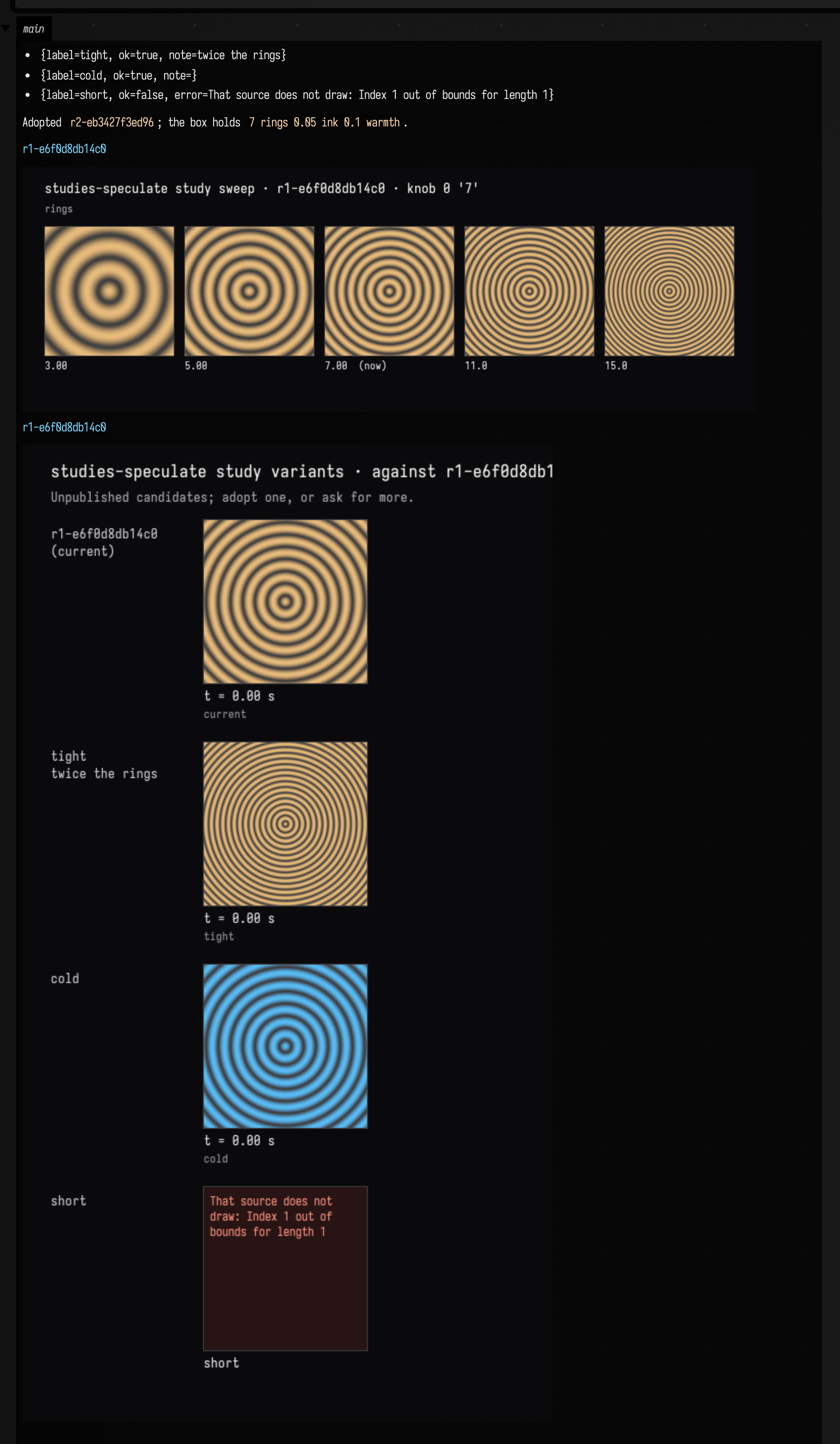
A refused candidate still has a row on the sheet, with the reason in place of a frame, so a model sees what it got wrong in the same picture as what worked.
A study of your own
SourceFramesStudy implements all ten verbs, but LiveStudy asks only for inspect. A study that
implements less offers less, and registerStudyTools takes a verbs set to register only some of
the tools.
:::static
val lookOnly = object : LiveStudy {
    override fun inspect(q: StudyRequest.Inspect) =
        StudyReport("current", mapOf("source" to "nothing to edit here"))
}
val tools = registerStudyTools("Look", lookOnly, verbs = setOf(StudyVerb.INSPECT, StudyVerb.OBSERVE))

val read = lookOnly.inspect(StudyCall.Inspect())
val look = runCatching { lookOnly.observe(StudyCall.Observe(seconds = [0.0])) }

markdown(
    "main",
    "Tools: ${tools.values.joinToString { "`${it.name}`" }}. Inspect: ${read.facts}. " +
        "Observe: ${look.exceptionOrNull()?.message}.",
)
The refusal is a StudyRejection (an IllegalArgumentException), thrown by LiveStudy's default
method for every verb the study leaves out.
What a report carries
Every verb answers with a StudyReport: the revision it is about, a map of facts, and
toolImages. The facts are serialised as the tool's JSON output. The images travel separately,
through CarriesToolImages, as real images the model can look at; the section
Returning something the model can read — and see
explains why an image inside the JSON would be wasted. The same class comes back from the function,
StackSL, RectSL and stack.auto studies, so a result reads the same whichever produced it.
Build derived results without blocking edits
Some results take longer than an edit: a checked mesh, an export, or an analysis that consumes
another stage's output. StudyBuilds gives these operations a persistent attempt history and an
explicit Build button. The editable source stays in its existing study.
For an existing SourceStudy named design, this small stage writes a report from the exact
source it captured when the build started:
:::fold a SourceStudy called design, over one property of this box
prop<String>(rings)
rings = "7 rings 0.05 ink 0.8 warmth"
val design = sourceFramesStudy(
    "rings",
    studyFrames("rings, drawn on the CPU") { source: String, w: Int, h: Int, t: Double ->
        afield.lang.stacksl.cpu.CpuRaster(w, h, FloatArray(w * h * 4) { 1f })
    },
).revisions

:::endfold
val builds = studyBuilds(
    "reports",
    [
        StudyBuildStage("summary", "Source report", "report-v1", setOf("source")) { context ->
            val source = context.inputs.getValue("source")
            context.progress(0.5, "Writing the report")
            context.file("summary.txt").writeText("${source.lines().size} source lines")
            StudyBuildProduct(["summary.txt"])
        },
    ],
) {
    mapOf("source" to design.liveSource())
}
showStudyBuilds("reports")

:::fold press Build once, and wait for the attempt to finish
val stage = builds.stages().single()
val done = builds.await(builds.start("summary", stage.fingerprint!!).id, 60.0)
println("${done.status}: " + builds.currentFile("summary", "summary.txt").readText())

:::endfold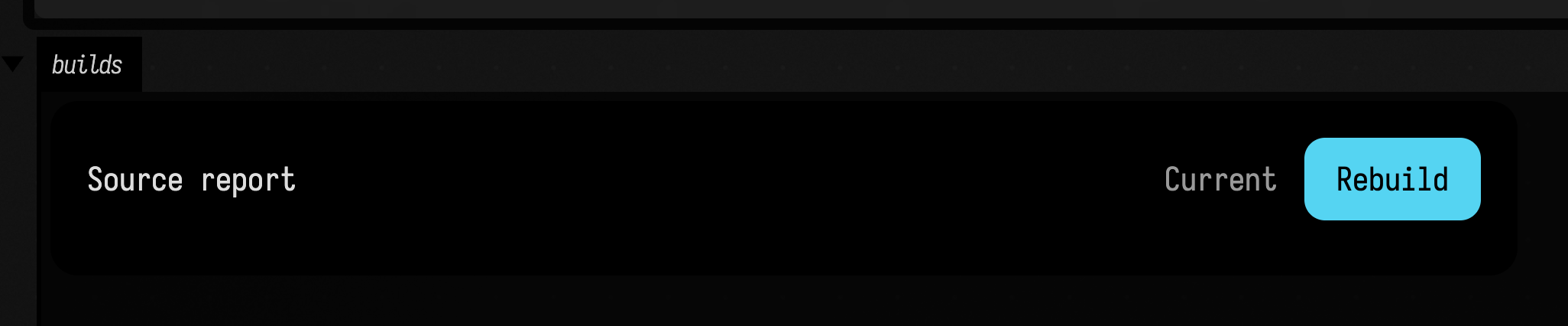
The fold at the end presses Build from code and waits for the attempt, so the card above shows the stage after one successful build: Current, with the button now reading Rebuild.
The card lives in this box's output. It shows progress, elapsed time, cancellation and selectable
error text. Progress reflects the worker's completed work; it is not a time estimate. While a build
is queued or running the card updates twice a second. Otherwise it updates as soon as any build of
this runner, or of a runner it depends on, starts or ends, and within about five seconds of an edit
to the design.
An agent's geometry findings
join this card when their runId matches the build's job ID. Each link opens the
existing review thread in its Field output, with evidence and replies. Open errors
are red, open warnings amber and decisions cyan; closed discussions are grey and say
resolved. Closing a discussion never changes the build verdict.
Findings whose review source has not been launched are still listed, with a note that the source
must run before its viewer can open.
When an edit changes a stage's inputs, its latest attempt describes an earlier design. Its findings collapse to one grey line, such as "2 findings from an attempt with earlier inputs; rebuild to recheck", and none of them count as open. A failure from that attempt is set aside the same way: the stage says Needs rebuilding, and the saved diagnostic says the failure may no longer apply. Build again to check the current design. Undo the edit and the attempt matches the inputs again, so its findings and failure come back.
AI4 can discover the same runner with ListStudyBuildsRequest, inspect it with
InspectStudyBuildsRequest, and start it with StartStudyBuildRequest, quoting the stage's current
fingerprint. Starting returns a job ID immediately. WaitStudyBuildRequest follows that job for
up to 900 seconds and streams its progress into the chat. For long work an agent can pass
waitSeconds=600 and leave afterUpdated empty: the wait returns when the build completes, so
progress costs no extra model turns. To return at the next progress change instead, pass the
afterUpdated value from a previous response. A wait that times out leaves the build running;
wait again with the same job ID. Stopping a wait does not cancel the build. After completion,
inspect the stage to check that its result is still current: Queued does not mean built,
and an earlier successful build may no longer be current. AI4 sees what the card shows:
an attempt against earlier inputs is marked fromEarlierInputs, and its findings are left out of
openFindings, so the agent does not report them as current errors. The geometry notes behind
those findings carry the same mark when the agent reads them with ReadGeometryReviewsRequest.
A build that takes longer than a few minutes is better left to Field. In a box's AI4 chat the agent
can end its turn with AwaitStudyBuildsRequest; Field watches the job without the model and resumes
the conversation with its outcome when it finishes. See
Let AI4 Wait for Long Builds.
When a stage follows a rule that an agent may improve, such as a placement recipe or a fallback, keep the rule as a qualified source: a change is replayed on the real cases the rule has already handled before it applies. See Change a Rule Without Breaking What Already Works.
Name upstream stages in dependencies. The worker reads their captured files through
context.dependencyFile(stage, path). Until those stages have current results, the dependent stage
cannot start. inputKeys selects the authored inputs that affect this stage, so an unrelated edit
can leave its result current. The input reader must return one coherent, immutable snapshot and
be safe to call from a worker thread.
For an optional stage, explain who supplies its inputs with
inputHelp = StudyBuildInputHelp("Idle", "No candidate is being tested. Ask the agent to prepare a recipe change.").
The card and agent inspection expose this explanation while required inputs are absent.
It changes neither readiness nor build identity: the stage still cannot start until every input
and dependency is present. Once configured, normal progress, failure and currency reporting take over.
A completed analysis may still have unresolved findings. Give the stage a resultNotes adapter
over its saved StudyBuildRecord.facts, for example:
resultNotes = { result ->
    val count = (result.facts["unresolved"] as? Number)?.toInt() ?: 0
    if (count > 0) [StudyBuildNotice("$count findings remain. Inspect the retained report.")] else emptyList()
}
Warnings show Current · Needs review; StudyBuildNoticeKind.ERROR shows
Current · Needs correction, with red explanatory text. INFO supplies context without
implying a problem. The same notes appear in native agent inspection and the completion stream.
The adapter must be fast and pure: read the supplied record's retained facts, never the live
design, and perform no build work.
A note can also name a picture of the result: StudyBuildNotice(message, view = StudyBuildView(box, caption) { draw() }).
box is the box (uid or name) that shows it, and draw displays the result there; nothing runs while
the notes are read. An AI4 chat that waited for the build is shown the
picture when it resumes: Field runs draw, captures the box's output and attaches it to the
message. Notes also work over existing attempt history. A formatter failure shows a review notice and keeps the result. Notes only explain: they do not change
fingerprints, acceptance, or whether downstream stages can use the result. A requirement a result
must meet belongs in the recipe or in a gate. A stale result
drops its notes from the current-result view; inspecting that attempt still shows them.
resultNotes explains successes only. To explain a failure as well, give the stage a failureNotes
adapter: it takes the failed StudyBuildRecord, usually reads its problem.details, and returns
notes under the same rules. A route stage that fails because some routes were held can name a view
of them, so a chat that waited for the build resumes with a close-up of the held routes:
failureNotes = { failed ->
    val held = failed.problem?.details?.get("held") as? List<*>
    if (held.isNullOrEmpty()) emptyList()
    else
        [
            StudyBuildNotice(
                "${held.size} routes were held.",
                StudyBuildNoticeKind.ERROR,
                StudyBuildView("Held routes", "each held route, close up") { showHeld(held) },
            ),
        ]
}
The card shows these notes under the failure, agent inspection and the completion stream carry them, and a resumed chat gets their pictures, as it would a success's. A failed attempt is never current: its notes are not the current result's, and they leave the card once the inputs change.
An edit during a build leaves the old attempt available for inspection, marked obsolete.
It cannot become the current result. Changing a dependency result or recipeVersion also
invalidates downstream results. Use builds.currentFile(stage, path) when a viewer or export
needs a current result; it refuses stale, missing or changed artifacts. A result file is checked
against the SHA-256 recorded when it was built. Field reads the whole file again only when its size,
timestamps or inode have changed since the last check, so a card over gigabytes of
results costs almost nothing while it sits idle.
Throw StudyBuildFailure(StudyBuildProblem(...)) for an actionable failure with a code, message,
suggestions and structured details.
When a failure has a place in the geometry, draw that geometry in red in a box's output and name
the box in details["geometryView"]. Here the box that owns the stage draws the clash itself:
throw StudyBuildFailure(
    StudyBuildProblem(
        "stair-clash",
        "Wall W3 crosses the stair opening",
        ["Move the stair or shorten W3"],
        details = mapOf("geometryView" to mapOf("box" to thisBox.id, "caption" to "W3 and the stair opening")),
    ),
)
Under the failure message, the card adds a red Show where it fails… link followed by the
caption. The link opens that box's output and brings it into view, leaving your selection as it
was. "box" is required. "caption" is optional, and so is "viewId", which names a geometry view
in that output for the link to scroll to. AI4's inspection reports the same box, with its name, as
geometryView, so the agent can send you there or inspect the view, and the build's progress card
in the chat links to the same box. Both links appear only while the attempt matches the current
inputs.
A failed retry preserves the previous result if that result
still matches the current inputs. Cancellation is cooperative: call context.checkCancelled()
during long work. The card continues to say Cancelling until the worker has actually returned.
Attempts persist under the document's studies directory. Re-running or stopping the owner box
revokes unfinished publication; reopening records interrupted work and waits for an explicit retry.
Change recipeVersion whenever the recipe or its relevant runtime changes. The runner checks
provenance and lifecycle; the recipe remains responsible for checking its own result.
Wait until a measurement passes
A stage can wait for an earlier result to pass a check. For example, loot placement might wait
until every loot point can be reached. A StudyBuildGate turns that check
into an input. The check reads the current results of the stages the gate names, and returns null
when the waiting stage may run, or a sentence saying what is still wrong. A stage waits on the gate
by listing its name in inputKeys.
Here paths measures how far each loot point is from the spawn, and the gate reachable loot
holds place until no point is more than 30 steps away:
:::static
// Each loot point, and how many steps it is from the spawn.
prop<String>(loot)
loot = "L1 12, L3 41, L7 30"

val reachable =
    StudyBuildGate("reachable loot", dependencies = ["paths"]) { evidence ->
        val far = evidence.facts("paths")["outOfReach"] as List<*>
        if (far.isEmpty()) null else "Out of reach (more than 30 steps): ${far.joinToString()}."
    }
val builds = studyBuilds(
    "loot",
    [
        StudyBuildStage("paths", "Measure paths", "paths-v1", setOf("loot")) { c ->
            val steps = c.inputs.getValue("loot").split(", ").associate {
                it.substringBefore(' ') to it.substringAfter(' ').toInt()
            }
            c.file("steps.txt").writeText(steps.toString())
            StudyBuildProduct(["steps.txt"], mapOf("outOfReach" to steps.filterValues { it > 30 }.keys.toList()))
        },
        StudyBuildStage("place", "Place loot", "place-v1", setOf("reachable loot"), ["paths"]) { c ->
            c.file("placed.txt").writeText("loot placed along " + c.dependencyFile("paths", "steps.txt").readText())
            StudyBuildProduct(["placed.txt"])
        },
    ],
    gates = [reachable],
) {
        mapOf("loot" to loot)
    }

builds.await(builds.start("paths", builds.stages().first { it.id == "paths" }.fingerprint!!).id)
showStudyBuilds("loot")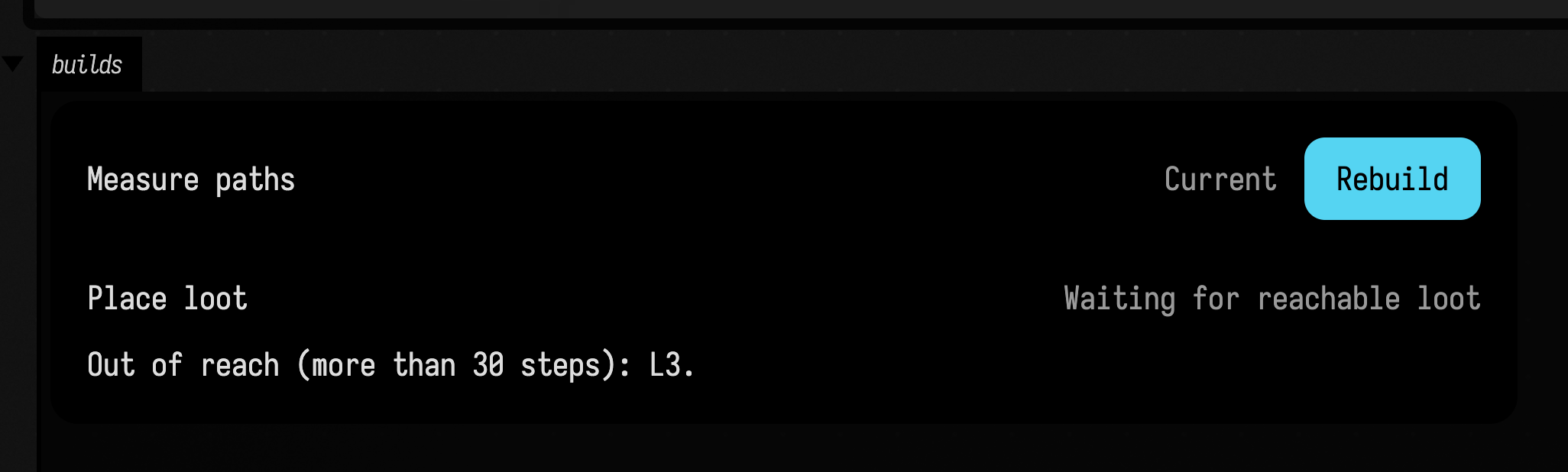
The card shows the gate's sentence under Place loot, and agent inspection returns the same text
as the stage's inputHelp. Set loot so that L3 is 30 steps or fewer, rebuild Measure paths,
and Place loot becomes ready to build. While the gate is open its value is a hash of the results
it judged, so rebuilding paths makes an earlier placement stale even when the check still passes.
A queued build checks its gates again when it starts; if one has closed meanwhile, the attempt fails
with the gate's sentence and its recipe does not run.
The check runs every time the card or an agent reads the stages, so keep it quick and read only
what it is given: evidence.facts(stage), evidence.file(stage, path), which is checked against the
result's recorded hash, and evidence.inputs for the gate's own inputKeys. A check that throws
keeps the gate closed and shows the error as the reason.
Ask one attempt for more
Some choices belong to one attempt rather than to the design: how long a search may run, or which
earlier attempt to continue from. Pass them to start as a request, and the worker reads them as
context.request. This stage searches for ten seconds unless the request asks for longer:
:::static
val builds = studyBuilds(
    "search",
    [
        StudyBuildStage("route", "Search for routes", "route-v1", setOf("rooms")) { c ->
            val budget = (c.request["budgetSeconds"] as? Number)?.toInt() ?: 10
            c.progress(0.5, "Searching for $budget s")
            c.file("route.txt").writeText("${c.inputs.getValue("rooms")} rooms searched for $budget s")
            StudyBuildProduct(["route.txt"], mapOf("budgetSeconds" to budget))
        },
    ],
) {
        mapOf("rooms" to "6")
    }

builds.start("route", builds.stages().single().fingerprint!!, mapOf("budgetSeconds" to 60))
showStudyBuilds("search")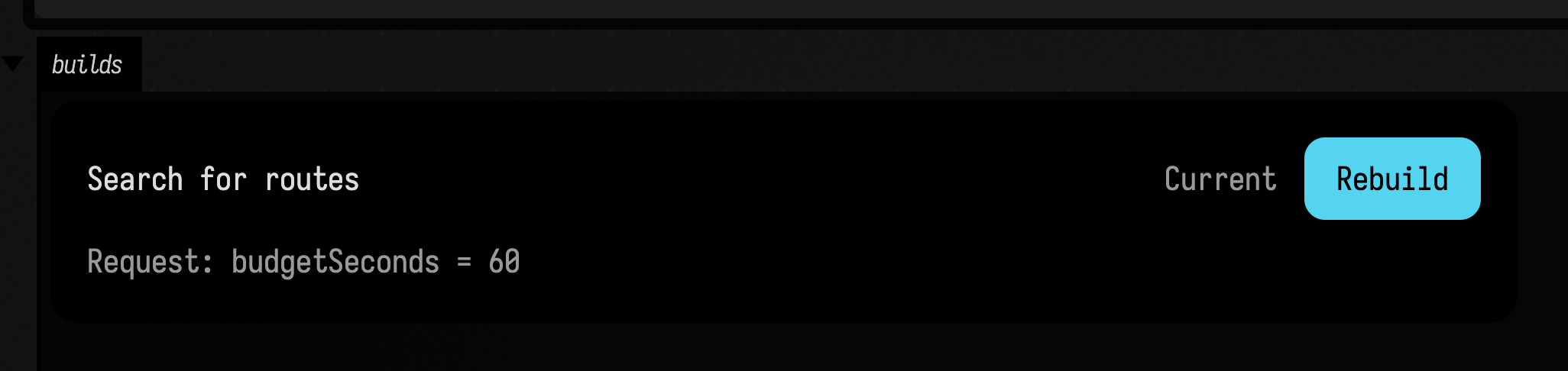
The request is kept with the attempt and shown on its card. It is also part of the attempt's
fingerprint, so a stage that uses this result records which request produced it. The result is
current like any other, because the stage's own fingerprint covers only the design. A later start,
including the card's Rebuild, has no request unless it is given one again, so a request is never
left behind for the next build to pick up. Values must survive a JSON round trip. An agent passes a
request as request in StartStudyBuildRequest, a string holding a JSON object such as
{"budgetSeconds": 60}. The worker reads its values as JSON types, so this stage sees a number.
Depend on another runner's stage
A stage can depend on a stage of another runner in the same document, written
dependsOn(runner, stage). The runner is found by name, so it can belong to any box in the
document. To keep the example short, one box holds both runners here: level blocks out the walls,
and loot reads them.
:::static
prop<String>(plan)
plan = "four rooms, two doors"

val level = studyBuilds(
    "level",
    [
        StudyBuildStage("blockout", "Block out walls", "blockout-v1", setOf("plan")) { c ->
            c.file("walls.txt").writeText("walls for " + c.inputs.getValue("plan"))
            StudyBuildProduct(["walls.txt"])
        },
    ],
) {
        mapOf("plan" to plan)
    }

val loot = studyBuilds(
    "loot",
    [
        StudyBuildStage("place", "Place loot", "place-v1", dependencies = [dependsOn("level", "blockout")]) { c ->
            val walls = c.dependencyFile(dependsOn("level", "blockout"), "walls.txt").readText()
            c.file("loot.txt").writeText("loot placed inside $walls")
            StudyBuildProduct(["loot.txt"])
        },
    ],
) {
        emptyMap()
    }

level.await(level.start("blockout", level.stages().single().fingerprint!!).id)
showStudyBuilds("loot")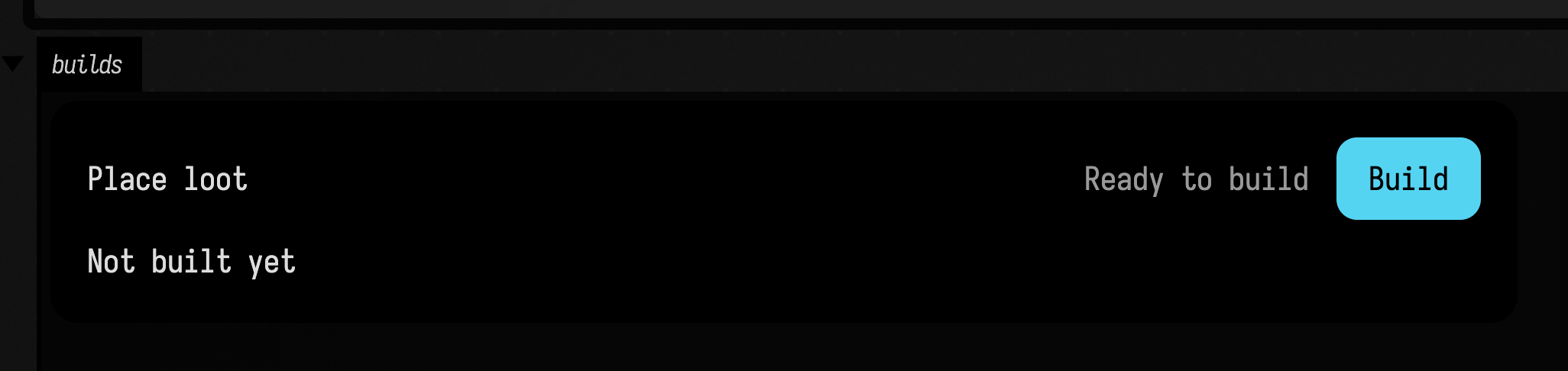
Until Block out walls has a current result, Place loot waits with "Complete level/blockout
first"; here the walls are already built, so it is ready. The worker reads the upstream file with
context.dependencyFile(dependsOn("level", "blockout"), "walls.txt"), checked against its hash. The
upstream attempt is part of the downstream fingerprint, so editing plan makes the placement stale
until both stages are rebuilt. showStudyBuilds("level") would show the walls' own card. A gate can
judge another runner's result the same way, by naming dependsOn(runner, stage) in its
dependencies. A cycle of dependencies across runners is refused with an error on the card.
Continue from an earlier attempt
A long search can stop at its time budget and leave a checkpoint behind. The next attempt should
continue from it rather than start again. Name the earlier attempt in the request, and copy its
files in with context.resumeFrom(jobId, paths). This stage adds 100 passes to whatever checkpoint
it continues from; the box runs it once, then again from the first attempt:
:::static
val builds = studyBuilds(
    "relax",
    [
        StudyBuildStage("relax", "Relax the route", "relax-v1", setOf("route")) { c ->
            (c.request["resume"] as? String)?.let { c.resumeFrom(it, ["checkpoint.txt"]) }
            val checkpoint = c.file("checkpoint.txt")
            val passes = (if (checkpoint.isFile) checkpoint.readText().toInt() else 0) + 100
            checkpoint.writeText("$passes")
            StudyBuildProduct(["checkpoint.txt"], mapOf("passes" to passes))
        },
    ],
) {
        mapOf("route" to "spawn to L7")
    }

val fingerprint = builds.stages().single().fingerprint!!
val first = builds.await(builds.start("relax", fingerprint).id)
builds.await(builds.start("relax", fingerprint, mapOf("resume" to first.id)).id)
showStudyBuilds("relax")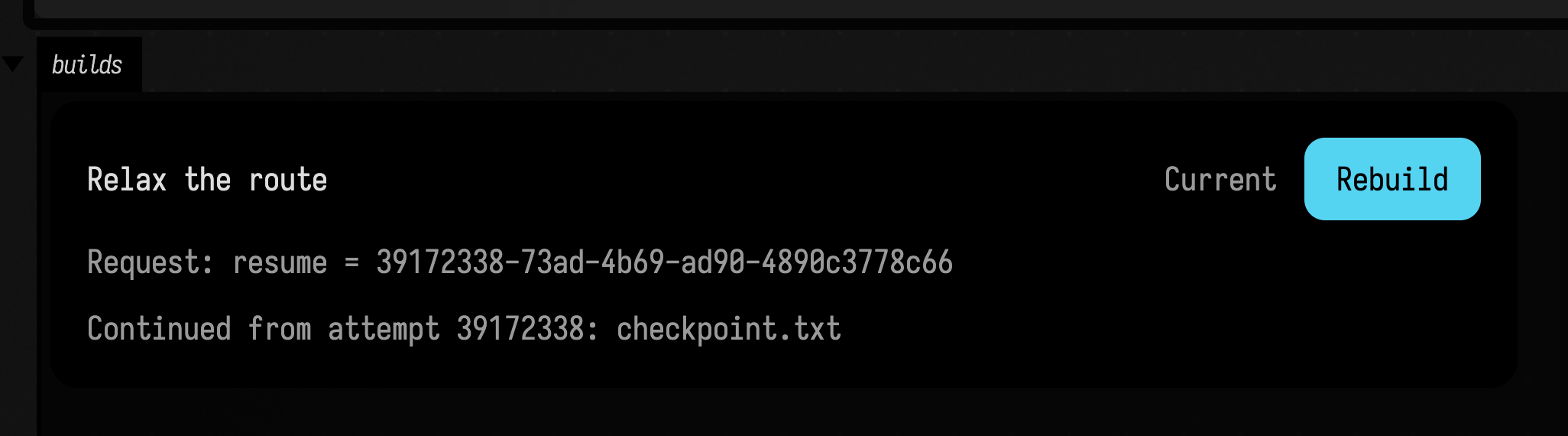
The earlier attempt can be any finished one: a success, a failure or a cancellation keeps its files.
Each copy is checked against its source, a file that was one of that attempt's results must still
match its recorded hash, and the attempt records what it copied with the hashes
(StudyBuildRecord.resumedFrom); the card names it. A path can be a directory, which copies
everything under it. By default the earlier attempt must have built the same inputs and dependency
results with the same recipe, so an agent cannot continue from a checkpoint of a design it has since
replaced. Pass sameDesign = false when an earlier design is a deliberate starting point. An agent
names the attempt the same way, with request set to {"resume": "<jobId>"} in
StartStudyBuildRequest.
builds.await(jobId) blocks until an attempt finishes, which suits a box that runs stages in order
like this one. For a long build, let the card or AI4 follow it instead.
Run an external program
Many builds hand the real work to another program: a solver, a Python script, a mesher. Start it
with context.runProcess(command). It runs in the attempt's directory with its output kept in
process.log, and a progress file the program rewrites, such as
{"fraction": 0.5, "message": "pass 2 of 4"}, becomes the card's progress. The program is stopped,
with every process it started, when the build is cancelled, when deadline passes, or when stall
passes with no change to its progress. Here a short Python script stands in for the solver:
:::static
import kotlin.time.Duration.Companion.minutes
import kotlin.time.Duration.Companion.seconds

val script = "%document/relax.py".file
script.writeText(
    """
import json, time
for n in range(1, 5):
    json.dump({"fraction": n / 4, "message": f"pass {n} of 4"}, open("progress.json", "w"))
    time.sleep(3)
open("relaxed.txt", "w").write("relaxed in 4 passes")
"""
        .trimStart(),
)

val builds = studyBuilds(
    "external",
    [
        StudyBuildStage("relax", "Relax in Python", "relax-" + fileIdentity(script), setOf("route")) { c ->
            c.runProcess(
                ["python3", script.path],
                progressFile = "progress.json",
                stall = 30.seconds,
                deadline = 10.minutes,
            )
            StudyBuildProduct(["relaxed.txt", "process.log"])
        },
    ],
) {
        mapOf("route" to "spawn to L7")
    }

builds.start("relax", builds.stages().single().fingerprint!!)
showStudyBuilds("external")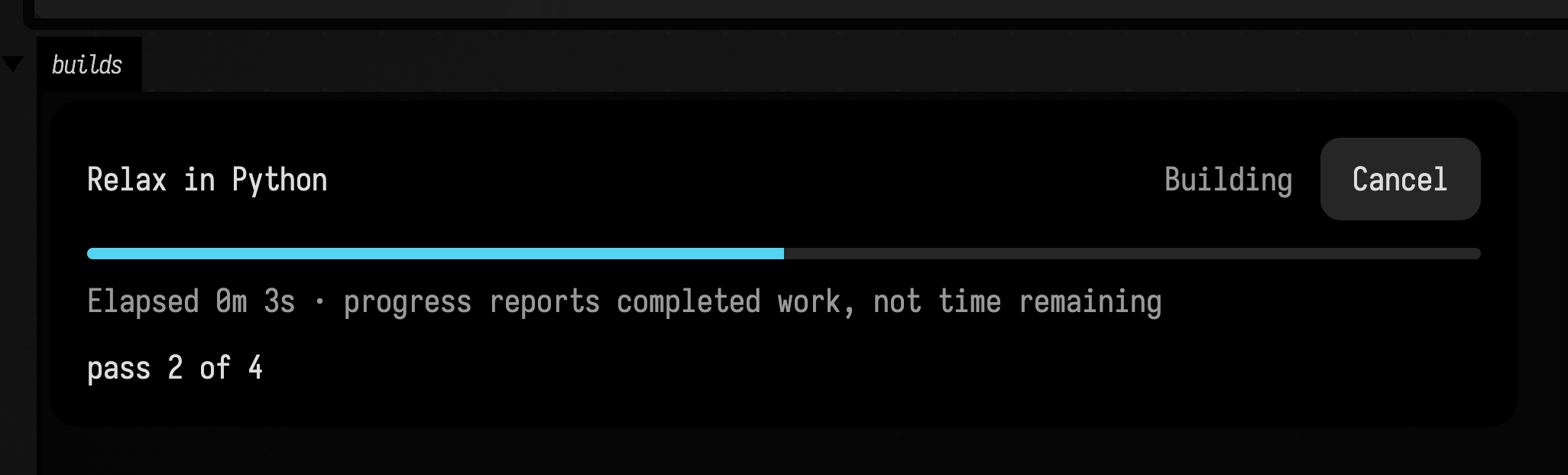
A stop, or a non-zero exit, fails the attempt with a message that names the log, such as
"python3 made no progress for 30s (last: pass 2 of 4), so it was stopped." Pass check = false to
read the exit code yourself, and progressSpan = 0.0..0.8 to leave room for checking the program's
output afterwards. Without a progress file, stall watches for new output in the log.
The recipe version includes fileIdentity(script), a hash of the script's contents, so editing the
script makes earlier results stale and editing anything else in the document does not.
classIdentity(SomeRecipe::class) does the same for compiled code. Name the files and classes that
do the build's work rather than a whole provider: a hash of a whole provider changes whenever any
part of it is edited, and every result goes stale with it.
When stages share something only one of them can use at a time, such as a GPU, a licence or a
scratch directory, pass exclusive = true to studyBuilds. The runner then builds one stage at a
time and refuses a start while another build runs, and the card says which build the others are
waiting for.
Delete attempts you no longer need
Every attempt keeps its files, so a stage that is rebuilt often fills the disk. builds.prune()
deletes the attempts nothing needs any more. It keeps each stage's current result, its latest
attempt and its latest success, every build still running, the attempts you pin, and every attempt
those name: what they were built from, what their gates judged, and what they continued from. This
box builds five versions of a level, pins the first, and prunes the rest:
:::static
prop<String>(rooms, "2")

val builds = studyBuilds(
    "walls",
    [
        StudyBuildStage("mesh", "Mesh the walls", "mesh-v1", setOf("rooms")) { c ->
            c.file("walls.obj").writeText("v 0 0 0\n".repeat(20_000 * c.inputs.getValue("rooms").toInt()))
            StudyBuildProduct(["walls.obj"])
        },
    ],
) {
        mapOf("rooms" to rooms)
    }

// Five versions of the level, each built once.
val built =
    (2..6).map { roomCount ->
        rooms = "$roomCount"
        builds.await(builds.start("mesh", builds.stages().single().fingerprint!!).id)
    }
val preview = builds.prune(pins = setOf(built.first().id), dryRun = true)
val pruned = builds.prune(pins = setOf(built.first().id))
markdown(
    "main",
    "A dry run would delete ${preview.deleted.size} attempts. Pruning deleted ${pruned.deleted.size} " +
        "and freed ${pruned.freedBytes / 1000} kB, keeping ${pruned.kept.size}: the current walls and the pinned first version.",
)
A dry run (dryRun = true) reports what would go and deletes nothing. A deleted attempt is gone
from the history with its files, so it can no longer be inspected or continued from; pin anything
you want to compare against later. Runners that depend on each other's results are pruned together
with StudyBuilds.prune(listOf(level, loot)), so the walls a current placement was built from are
kept even after the level has been rebuilt. AI4 prunes every runner in the document with
PruneStudyBuildsRequest: with apply=false, the default, it reports what would be deleted, and
with apply=true it deletes it.
The library's studies
StackSL, RectSL and stack.auto are built from the same pieces a SourceFramesStudy is, and the
function study keeps its revisions through the first of them:
| Piece | What it does |
|---|---|
SourceStudy |
Revisions on disk, the revision-and-hash guard, compare-and-swap publication into the box |
StudyBuilds |
Asynchronous derived stages, frozen inputs, gates, per-attempt requests, dependency invalidation across runners, resuming, external programs, progress, retained diagnostics and pruning |
StudyFrames |
Where frames come from: a CPU reference, or the GPU of a running window |
StudyEvidence |
Measurements and the sheets the pictures are laid out on |
StudyCompare |
Before/after/difference and sweeps |
StudyVariants |
Held candidates and adoption |
Each library study keeps its own request classes, because their names are the tool names a model
has been shown (InspectStackSLStudy, SweepRectSLNumber, …), and each implements the matching
StudyRequest interface. An adapter such as StackSLLiveStudy turns the study into a LiveStudy,
and one call, registerStudyTools(scope, gate, studyOf, StudyToolClasses(…)), registers all of its
standard tools. What is left in its *StudyTools.kt file is what only that language has: StackSL's
stage traces and knob sensitivities, RectSL's timeline, the exports. The function study keeps its
own Edit, Patch, Observe and Compare, because its frames are time windows of a signal rather than
pictures.
The starting point studies_rings (in the agent transcript gallery, and
on the welcome screen's starting points) is this page as a document: rings defines the study, and
two boxes under it, change it and try things, drive its verbs. Open it and run the three boxes
in order, or read it in the offline viewer ↗
without starting Field.
Agents: tests and design notes
study.document.registrar (src/jvmMain/kotlin/afield/examples/ai/DocumentStudySmokeTest.kt)
drives all ten verbs on a document's study through the same tool registry an agent calls, with
no model. The design notes are in
dev_docs/ai/AGENT_TOOL_EXTENSIONS.md, under "Studies: one
registrar for the standard verbs".