Pure Data
Pure Data is Miller Puckette's visual patching language: boxes wired to
boxes, audio and messages flowing down the wires. Field runs Pd patches through
libpd, Pd's engine with the GUI removed. A patch plays through the
same audio engine as Faust and patSynth, Field sends messages to its [r] objects, and whatever its
[s] objects send comes back to Kotlin.
A Pd patch is plain text. You can write one straight into a box or open a .pd file made in Pd
itself.
Building libpd
libpd is a C library, and Field does not ship a binary of it. Build it once:
./gradlew buildLibpdNativeThat needs cmake, git, and the network the first time. It clones libpd 0.16.1 (Pd 0.56-5) and
checks it against a pinned commit, then builds into build/field-libpd/. The source is cached per
user, so other checkouts and worktrees reuse it. Until it is built, the calls on this page fail with
an error that says how to build it.
The demo document, to follow along
Everything on this page is also in one Field document: a Kotlin root with three Pd boxes under it, and four Kotlin boxes that drive patches from Kotlin. Browse it here, read-only, box by box. To run it, open pure_data_demo from the welcome screen's starting points.
A patch in a Kotlin box
val patch = pd(
    """
#X obj 20 20 r freq;
#X obj 20 60 osc~ 220;
#X obj 20 100 *~ 0.1;
#X obj 20 140 dac~;
#X connect 0 0 1 0;
#X connect 1 0 2 0;
#X connect 2 0 3 0;
#X connect 2 0 3 1;
""",
)
controlGroup { slider("freq", 100.0, 1000.0, initialValue = 220.0) { patch.send("freq", it) } }
patch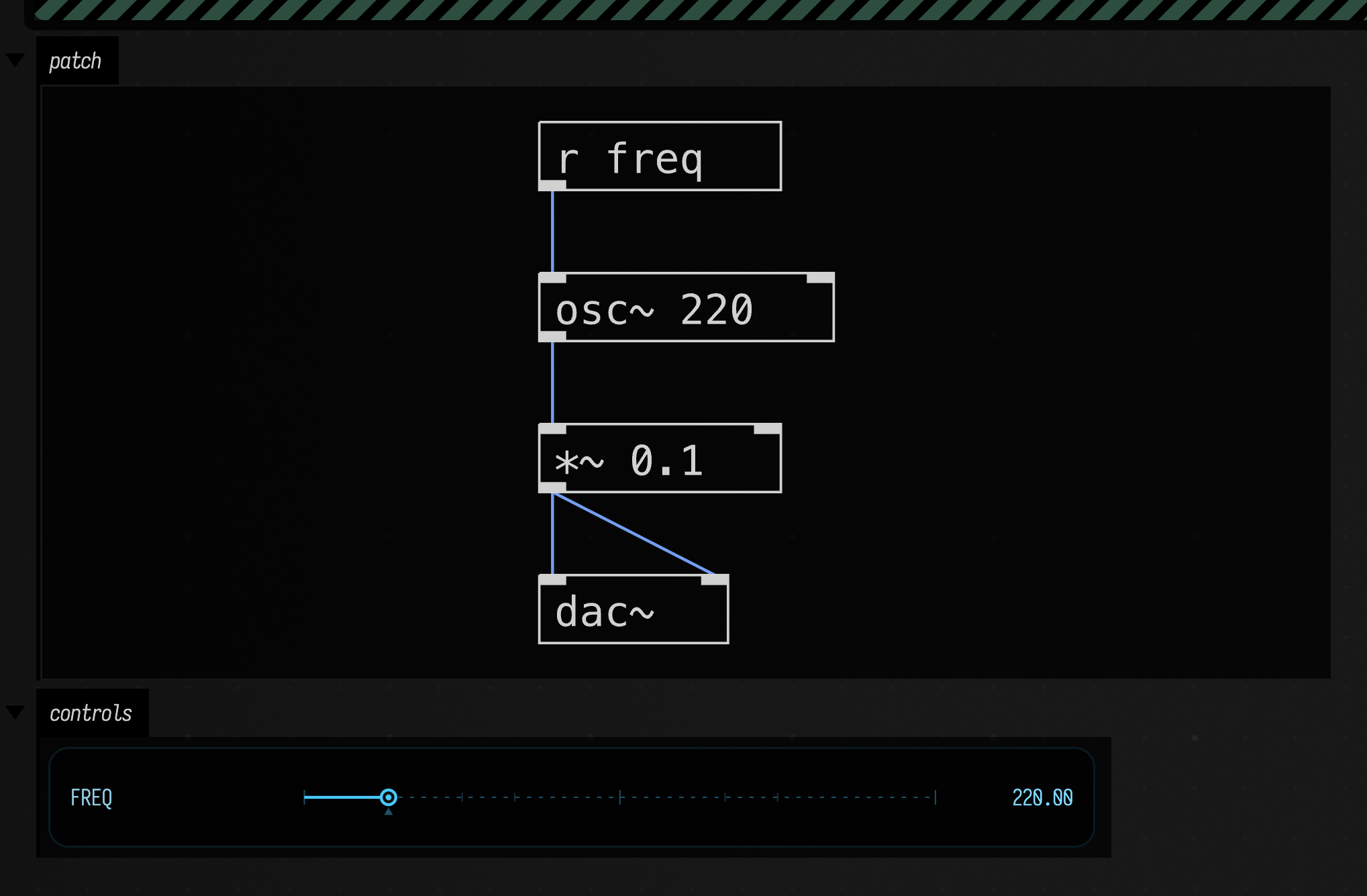
pd opens the text as a patch and returns a PdLaunch. Returning the launch as the box's last
expression makes it sound; stopping the box stops the sound and frees the Pd. The #N canvas
header is optional and the text may be indented.
The box's output shows the patch as Pd would lay it out, in a patch output, above the slider the
controlGroup made. The drawing reads the patch text alone, so it appears whether or not anything
has been sent yet; drawPatch = false leaves it out. The returned PdLaunch itself draws nothing:
it is what keeps the box lit and the Pd playing until the box stops.
Each launch gets a Pd of its own, so two boxes that both use [r freq] do not hear each other. The
patch's $0 is patch.dollarZero if you need names that are local to one copy.
pd(File("…/my.pd")) opens a file instead. Abstractions next to it are found, the way they are in Pd.
A patch as an effect
Pass input and the patch's [adc~] hears a Field signal, left and right, so the patch processes
sound instead of making it:
val fx = pd(
    """
#X obj 20 20 adc~;
#X obj 20 60 lop~ 600;
#X obj 20 100 *~ 0.5;
#X obj 20 140 dac~;
#X obj 160 100 env~ 8192;
#X obj 160 140 s level;
#X connect 0 0 1 0;
#X connect 1 0 2 0;
#X connect 2 0 3 0;
#X connect 2 0 3 1;
#X connect 2 0 4 0;
#X connect 4 0 5 0;
""",
    input = SawOsc(Param(110f)).pan(),
)

// [env~] reports the level of what leaves the lowpass, in dB with 100 at full scale.
fx.receive("level") { m ->
    display("level", "<div style='padding:8px'>after the lowpass: ${(m.float ?: 0f).f1} dB</div>")
}
fx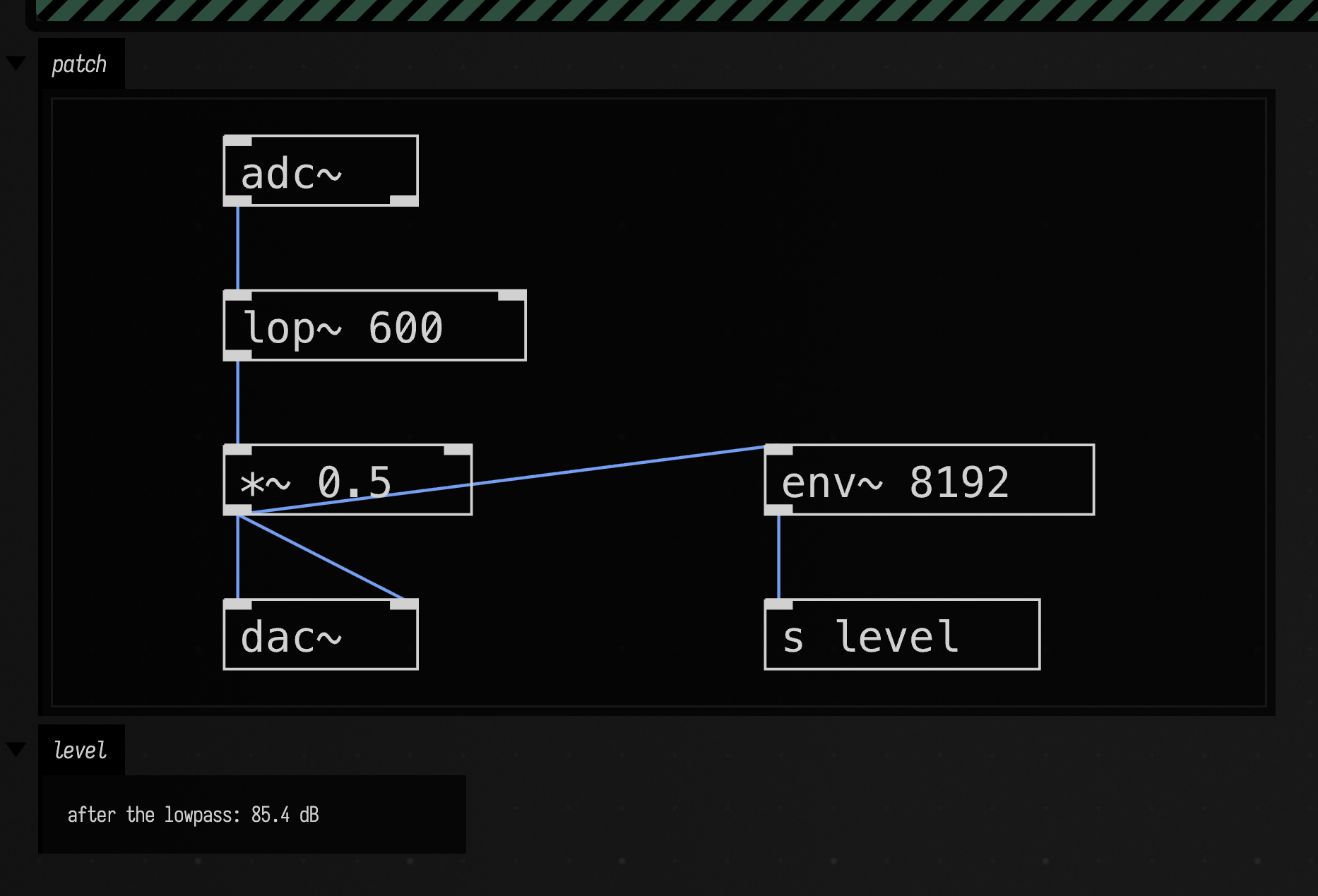
What goes in on a block comes out on the same block; libpd adds no latency of its own. The level is
measured by Pd, inside the patch, and read back through [s level]: an unfiltered saw at this gain
would read higher.
Messages both ways
send, bang, symbol, list and message reach [r name], and receive goes the other way: the
patch sends to [s out], and Field calls the lambda. This box does all of them, and lists what
arrived back:
val patch = pd(
    """
#X obj 20 20 r in;
#X obj 20 60 + 1;
#X obj 20 100 s out;
#X obj 160 20 r words;
#X obj 160 60 s out;
#X obj 300 20 r trigger;
#X obj 300 60 s out;
#X connect 0 0 1 0;
#X connect 1 0 2 0;
#X connect 3 0 4 0;
#X connect 5 0 6 0;
""",
)

val arrived = mutableListOf<String>()
patch.receive("out") { m ->
    arrived += "${m.selector} ${m.args.joinToString(" ")}".trim()
    display("arrived", "<pre style='margin:8px'>" + arrived.joinToString("\n") + "</pre>")
}

patch.send("in", 41) // [+ 1] makes it 42
patch.bang("trigger")
patch.symbol("words", "hello")
patch.list("words", 0.2, 0.8)
patch.message("words", "set", 3)
patch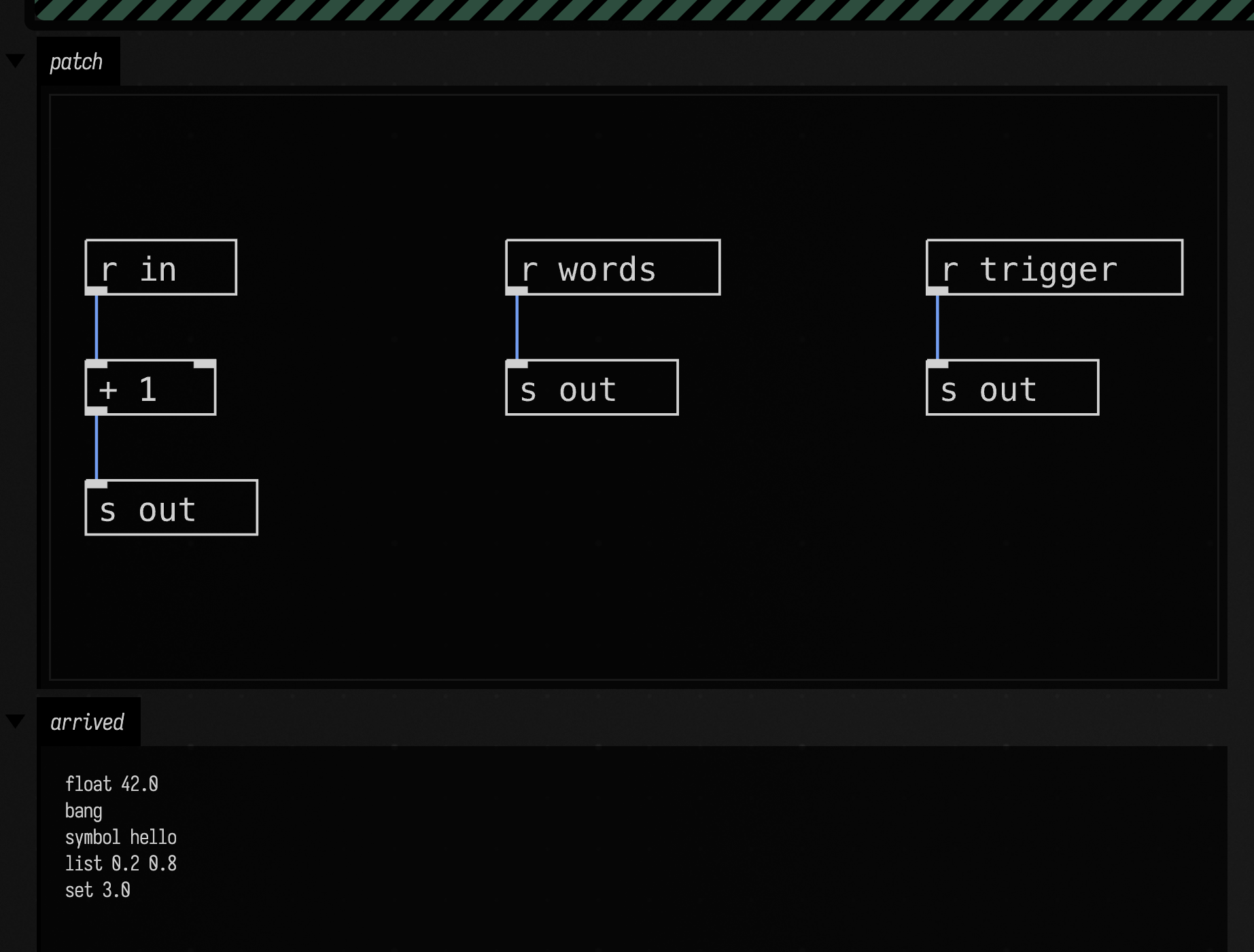
The lambda runs on Field's main thread, so it can touch the box. It does not run on the audio thread.
patch.lastValue("out") gives the last message on a received name without a callback.
Everything the patch prints (a [print], a Pd error) goes to the box's output with Pd: in front.
If Pd cannot create an object, [osc 440] where [osc~ 440] was meant, the error is marked on the
box line that holds it, with a suggestion; see An object Pd cannot create.
PdLaunch has the same writeArray, readArray, arraySize, noteOn, controlChange and
onMidi as the Pd underneath it, and patch.pd is that PdInstance when you need the rest.
Channels are counted from 0 ([noteout 1] is channel 0). launch.connectMidi(input = "Launchkey",
output = "IAC") wires a hardware port to [notein]/[ctlin] and [noteout]/[ctlout] to another.
The patch's own sliders
A patch drawn in Pd usually has its own hsl, vsl, tgl and nbx objects. pdControls(patch)
turns each one that has a receive name into a Field control with the range and label from the patch,
and each control sends to that receive name. The Pd slider moves with it and its outlet fires as if it
had been dragged. That is the same idea as faustControls.
val patch = pd(
    """
#X obj 20 20 hsl 128 15 40 80 0 0 pitchOut pitch Pitch -2 -8 0 10 #fcfcfc #000000 #000000 0 1;
#X obj 20 60 tgl 15 0 gateOut gate Gate 17 7 0 10 #fcfcfc #000000 #000000 0 1;
#X obj 20 110 r pitchOut;
#X obj 20 150 mtof;
#X obj 20 190 osc~;
#X obj 20 230 *~ 0.1;
#X obj 160 110 r gateOut;
#X obj 20 270 *~;
#X obj 20 310 dac~;
#X connect 2 0 3 0;
#X connect 3 0 4 0;
#X connect 4 0 5 0;
#X connect 5 0 7 0;
#X connect 6 0 7 1;
#X connect 7 0 8 0;
#X connect 7 0 8 1;
""",
)
println("${pdControls(patch)} controls from the patch's own GUI objects")
patch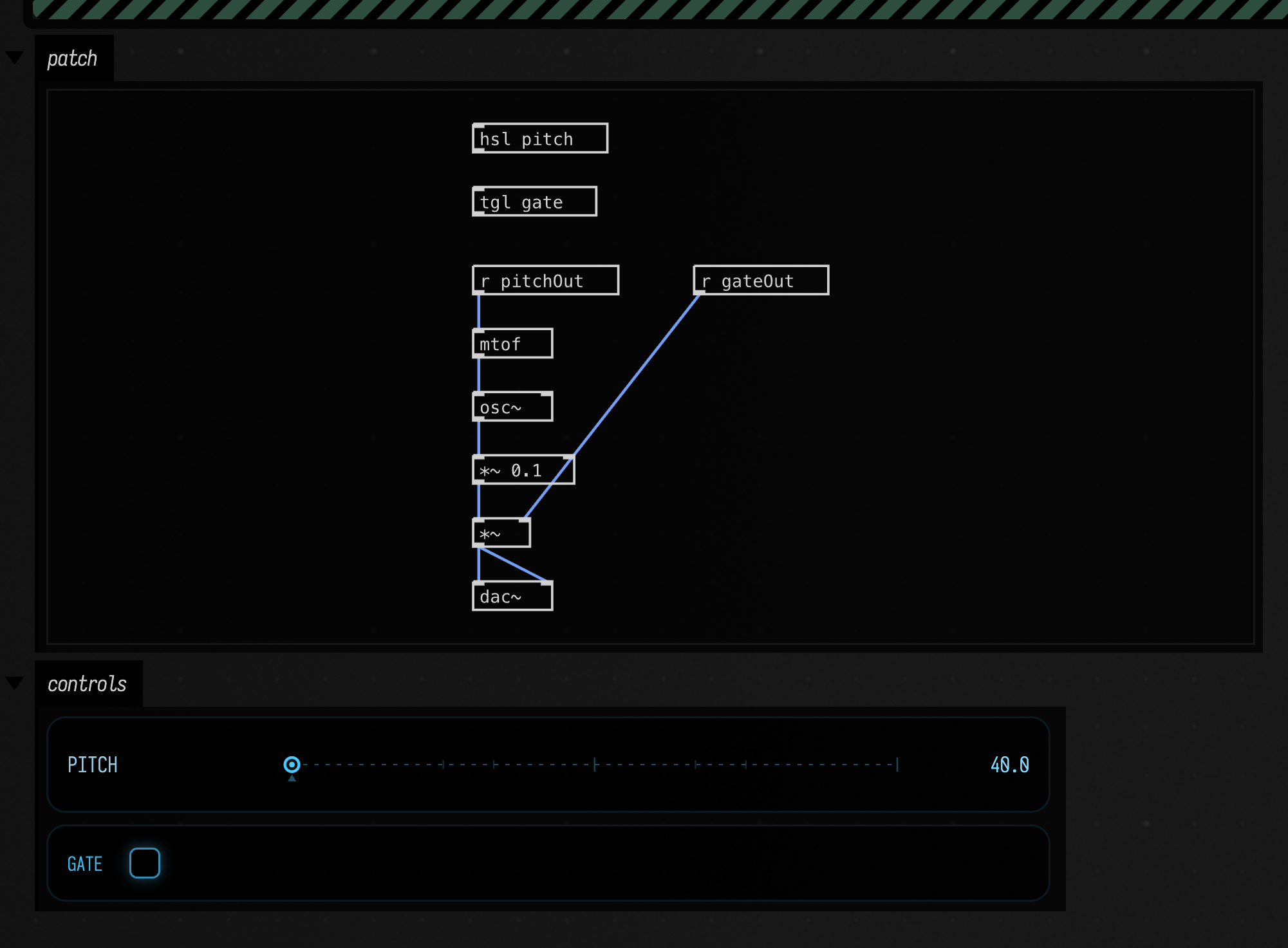
The slider's range, 40 to 80, and the labels "Pitch" and "Gate" are the patch's own.
Arrays
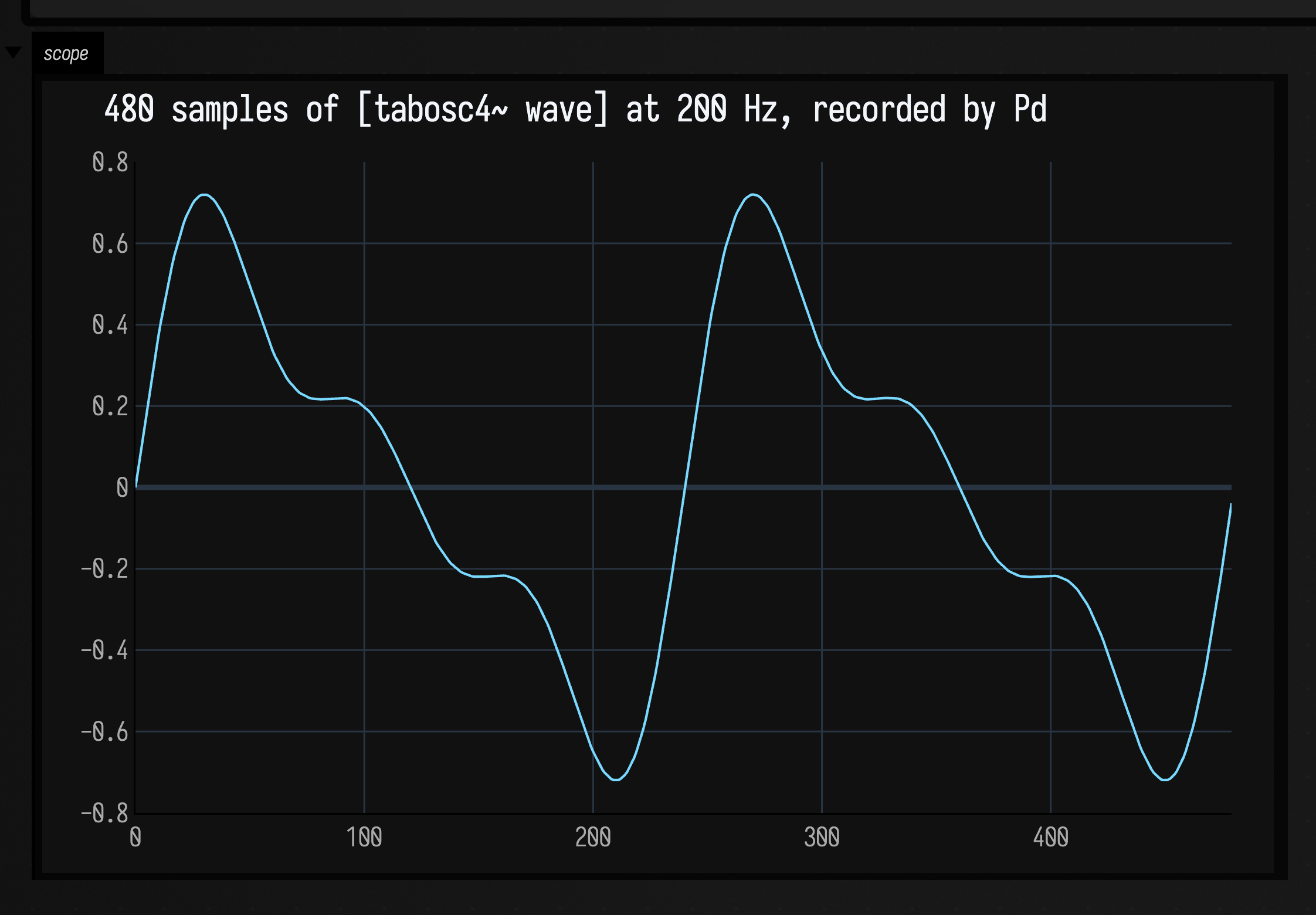
writeArray, readArray and arraySize work on any Pd array, [table name] or #X array, and
PdLaunch and PdInstance both have them. Here Field writes a wavetable, [tabosc4~] plays it, and
[tabwrite~ scope] records the result for Field to read back. It is rendered offline, with no audio
device, so the recording is the same every time:
val pd = afield.audio.pd.PdInstance(sampleRate = 48000)
pd.openPatchText(
    """
#X obj 20 20 table wave 2051;
#X obj 200 20 table scope 480;
#X obj 20 60 loadbang;
#X msg 20 90 200;
#X obj 20 120 tabosc4~ wave;
#X obj 20 160 tabwrite~ scope;
#X connect 2 0 3 0;
#X connect 3 0 4 0;
#X connect 4 0 5 0;
#X connect 2 0 5 0;
""",
)

// A wavetable for [tabosc4~ wave]: 2048 points plus the three guard points it wants.
// Three partials, so what comes back is plainly not a sine.
val partials = [1.0, 0.5, 0.33]
pd.writeArray(
    "wave",
    FloatArray(2051) { i ->
        val phase = 2 * PI * (i - 1) / 2048
        (partials.withIndex().sumOf { (k, a) -> a * sin((k + 1) * phase) } * 0.5).toFloat()
    },
)
pd.renderOffline(0.02)
val recorded = pd.readArray("scope") // what [tabwrite~ scope] captured
pd.close()

showSignals(
    "[table scope]" to recorded.toList(),
    channel = "scope",
    title = "${recorded.size} samples of [tabosc4~ wave] at 200 Hz, recorded by Pd",
)
Rendering without an audio device
PdInstance is the Pd underneath a launch, and it can be used directly. renderOffline pulls
samples out of it without opening an audio device. This box renders one second of a 440 Hz sine and
measures it:
val pd = afield.audio.pd.PdInstance(sampleRate = 48000)
pd.openPatchText(
    "#X obj 20 20 osc~ 440;\n#X obj 20 60 *~ 0.25;\n#X obj 20 100 dac~;\n" +
        "#X connect 0 0 1 0;\n#X connect 1 0 2 0;\n#X connect 1 0 2 1;",
)
val (left, right) = pd.renderOffline(1.0)
pd.close()

val ups = (1 until left.size).count { left[it - 1] < 0f && left[it] >= 0f }
val peak = left.maxOf { abs(it) }
display(
    "measured",
    "<pre style='margin:8px'>${left.size} samples, $ups upward zero crossings, " +
        "peak ${peak.f4}, left == right: ${left.contentEquals(right)}</pre>",
)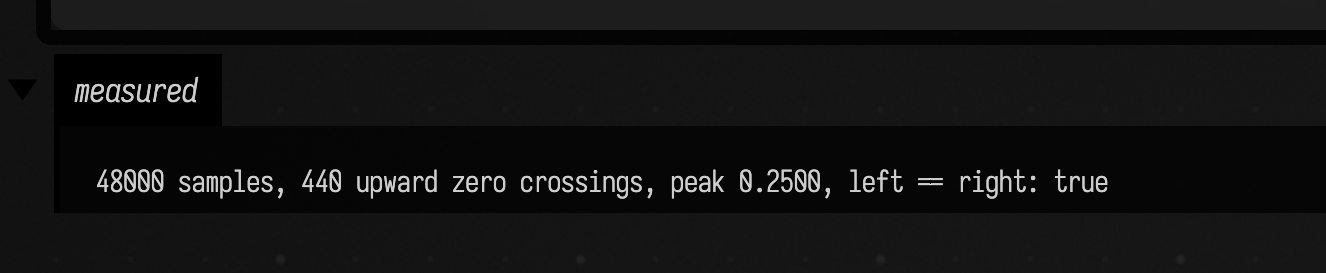
The sine gives 440 upward zero crossings in that second, and a peak of the amplitude it was given.
renderPdWav(file, patchText, seconds) writes the same thing to a 16-bit stereo .wav, and
pdWaveform(patchText) plots a few milliseconds in the box.
Here is pdWaveform on a sawtooth, drawn with its patch. The patch runs in libpd, and no audio
device is opened:
val saw =
    """
#X obj 20 20 phasor~ 220;
#X obj 20 60 -~ 0.5;
#X obj 20 100 lop~ 1500;
#X obj 20 140 *~ 0.8;
#X obj 20 180 dac~;
#X connect 0 0 1 0;
#X connect 1 0 2 0;
#X connect 2 0 3 0;
#X connect 3 0 4 0;
#X connect 3 0 4 1;
"""
pdWaveform(saw, seconds = 0.02)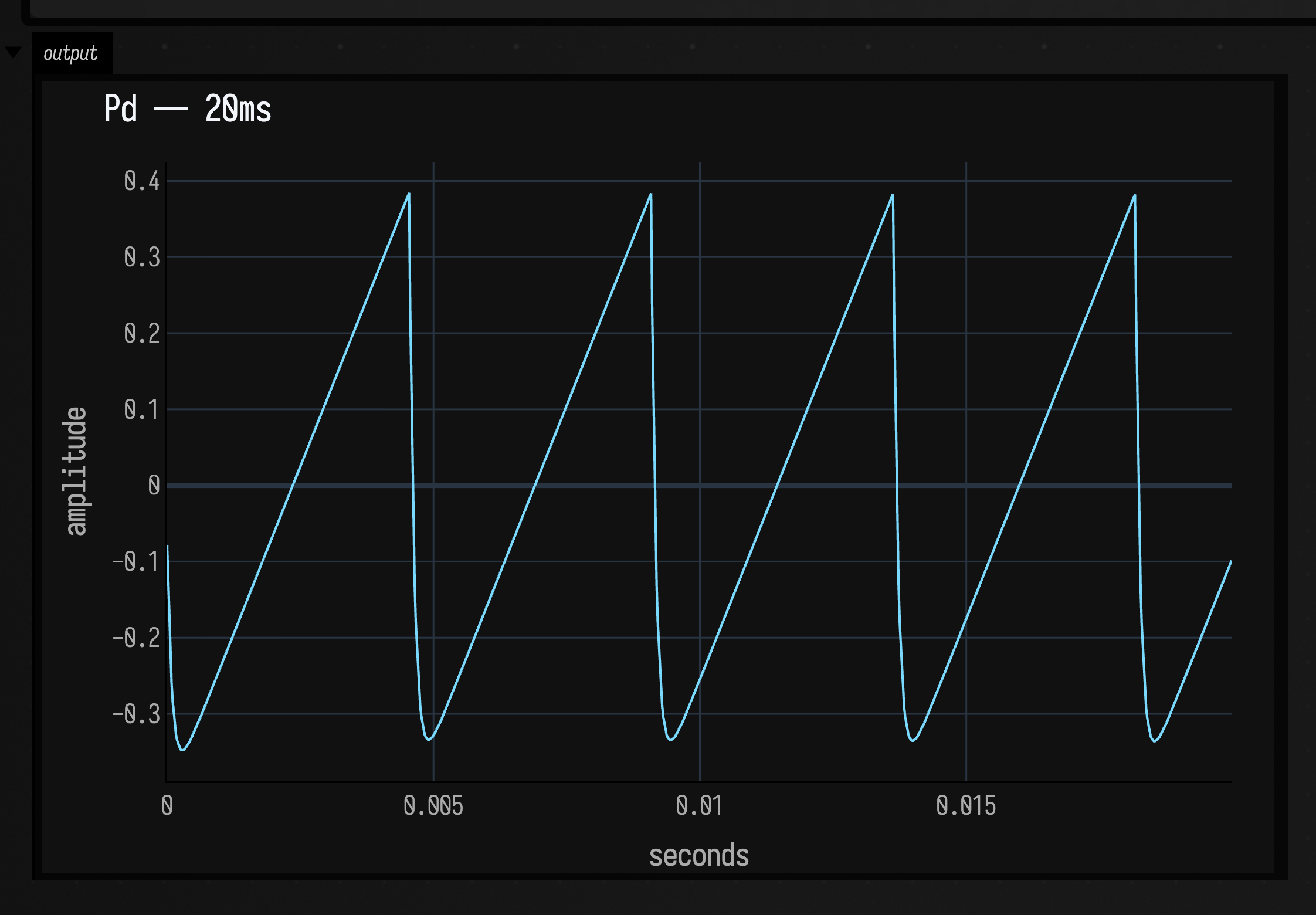
Messages sent while nothing is rendering wait for the next block. pd.flush() delivers them at once
and hands Pd's replies to their callbacks, so a message round trip can be checked with no audio at all.
Pd as a box language
Set a box's Main Language to Pure Data (the command palette has "Set Main Language: Pure Data") and the boxes connected under it hold patches instead of Kotlin. Such a box's text is the patch:
:::static
// Launch the box, then select one of these lines and run it on its own:
freq 330
cutoff 3000
#N canvas 0 0 500 320 12;
#X obj 20 20 r freq;
#X obj 20 60 phasor~;
#X obj 20 100 lop~ 1200;
#X obj 140 60 r cutoff;
#X obj 20 140 *~ 0.08;
#X obj 20 180 dac~;
#X connect 0 0 1 0;
#X connect 1 0 2 0;
#X connect 3 0 2 1;
#X connect 2 0 4 0;
#X connect 4 0 5 0;
#X connect 4 0 5 1;
Running or launching the box opens the patch, draws it in the box's patch output, and plays it
until the box stops. Running it again replaces the patch. A line that does not start with # is a
message, written as a Pd message box writes one after a ;: the receiver, then the value.
freq 330 sends 330 to [r freq], go bangs [r go], voice set 3 sends set 3. Those lines and
// comments are removed before Pd reads the patch, and selecting one and running it sends it.
The drawing is PdPatchGraph.toFLines(), which reads the text alone and needs no libpd. Inlets
and outlets are spread across each box as Pd spaces them, so a wire into a right inlet ends at the
right-hand end of the box. How many a box has comes from a table of common vanilla classes
(PdPatchGraph.KNOWN_PORTS) and from what the patch wires. This is the drone patch above:
val drone =
    """
#N canvas 0 0 500 320 12;
#X obj 20 20 r freq;
#X obj 20 60 phasor~;
#X obj 20 100 lop~ 1200;
#X obj 140 60 r cutoff;
#X obj 20 140 *~ 0.08;
#X obj 20 180 dac~;
#X connect 0 0 1 0;
#X connect 1 0 2 0;
#X connect 3 0 2 1;
#X connect 2 0 4 0;
#X connect 4 0 5 0;
#X connect 4 0 5 1;
"""
lines(afield.audio.pd.PdPatchGraph.parse(drone).toFLines(), channel = "patch", w = 460.0, h = 230.0, fitToSize = true)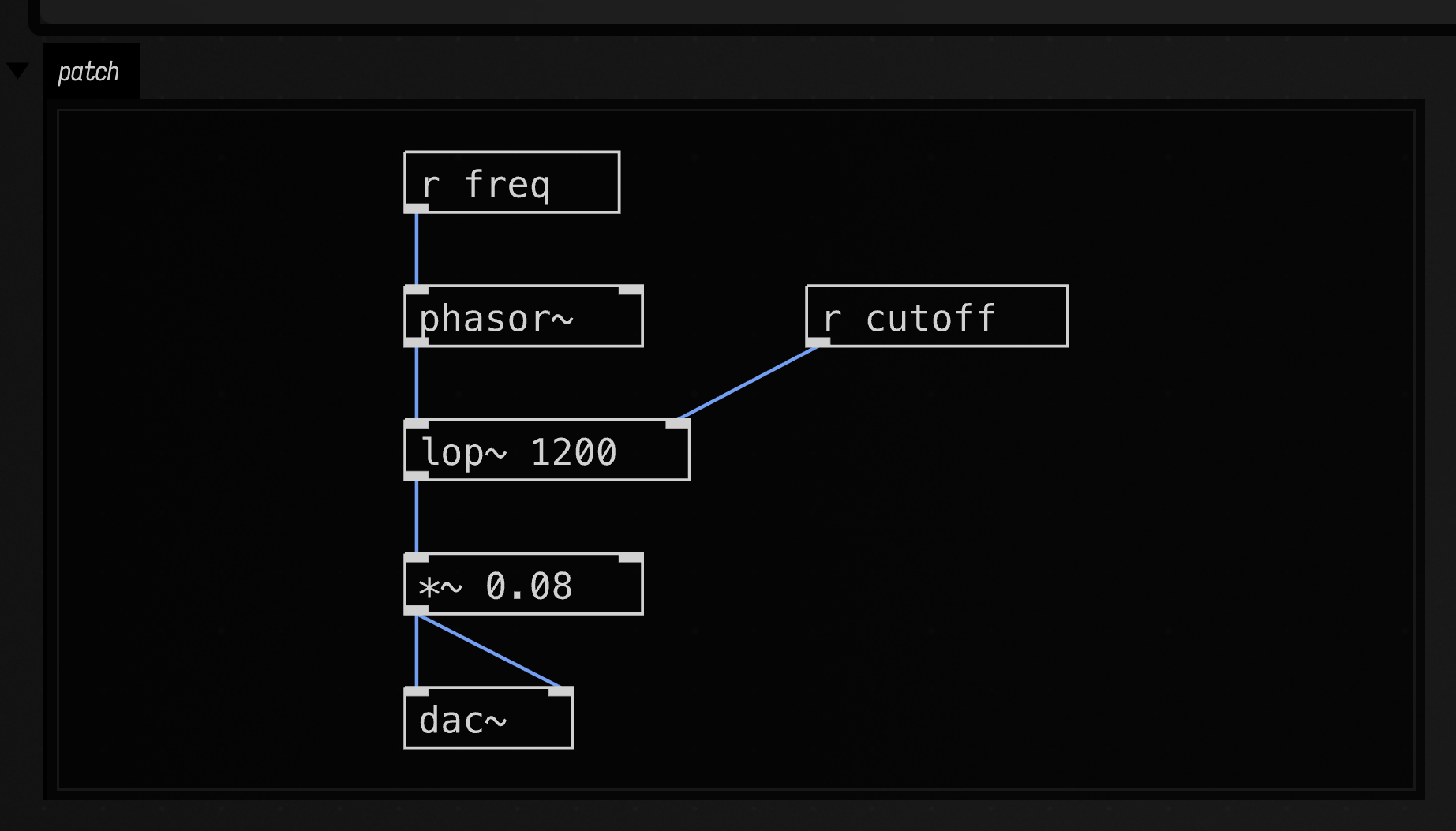
The editor's line notes say what the object on a line is wired to, with the objects it meets in bold.
On an [s] or [r] the note is instead the last value that went through that name, live from the
playing patch, and it says so when the box is not playing. Here the round-trip patch has been launched
and its line in 41 run; the cursor is on [s out]:
:::static
// Launch, then run the line below: [+ 1] sends 42 to [s out].
in 41
#N canvas 0 0 400 250 12;
#X obj 20 20 r in;
#X obj 20 60 + 1;
#X obj 20 100 s out;
#X obj 120 100 print out;
#X connect 0 0 1 0;
#X connect 1 0 2 0;
#X connect 1 0 3 0;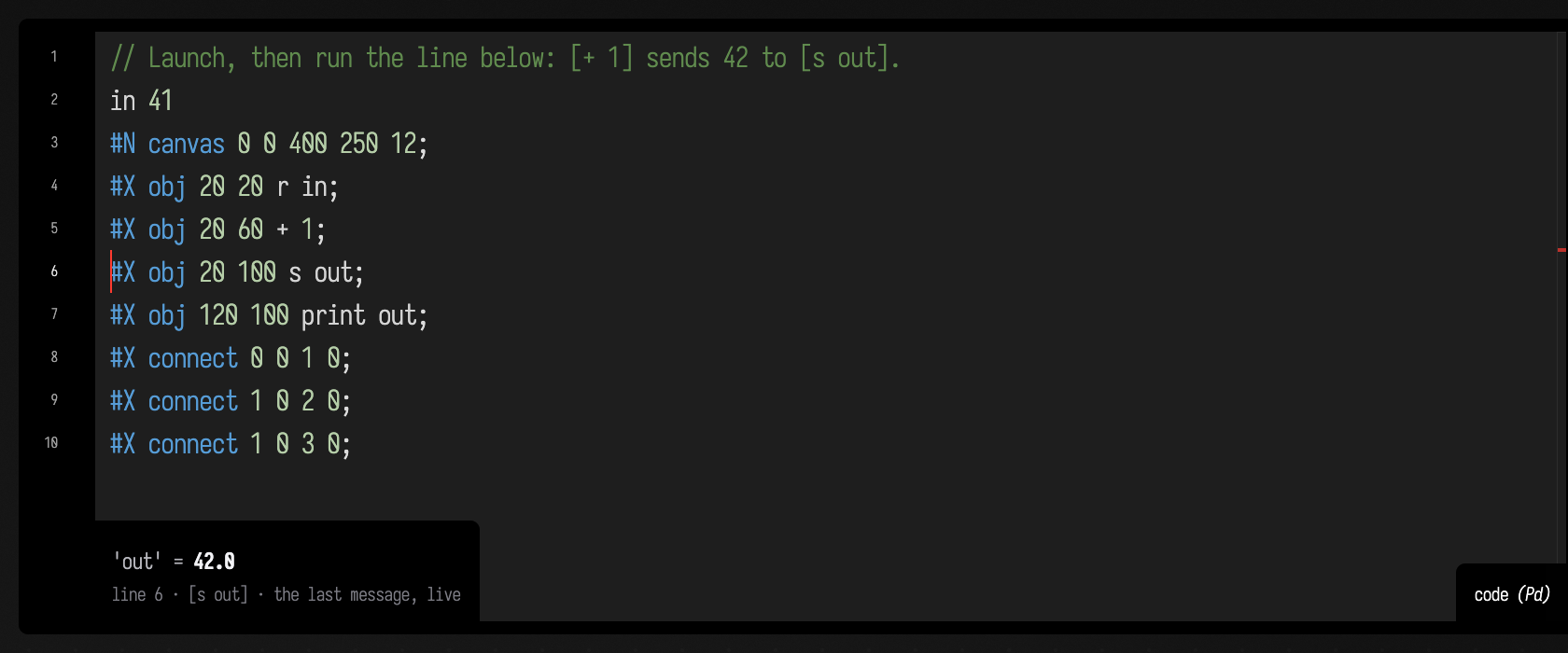
Sending to a Pd box from Kotlin
A Kotlin box can reach the patch a Pd box is playing. pdBox finds the box by name, and pdSend
sends to an [r] in its patch, just as running the line freq 330 in the Pd box does:
:::static
pdBox("drone").pdSend("freq", 330)

// Launched, this plays an arpeggio into [r freq] until the box stops.
val drone = pdBox("drone")
val notes = [110, 165, 220, 330, 440, 330, 220, 165]
var i = 0
loop {
    drone.pdSend("freq", notes[i++ % notes.size])
    delay(250)
}
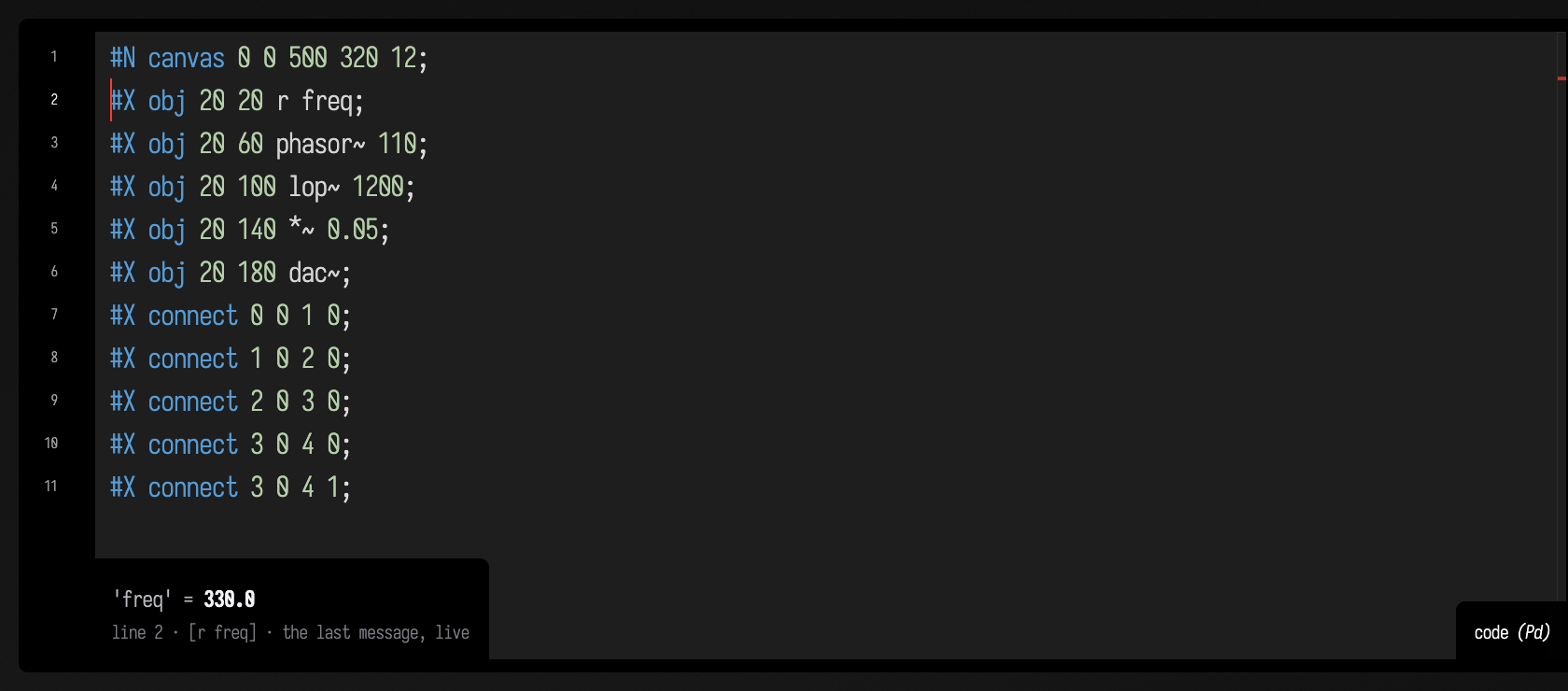
Here a Pd box named "drone" is playing a patch that starts with [r freq], and a Kotlin box beside
it has run pdBox("drone").pdSend("freq", 330). With the cursor on the drone's [r freq] line,
the line note shows what arrived:
Any number works, and an Int arrives as a Pd float. pdSend("go") with nothing after the name is
a bang, several numbers are a list, and a string first is a selector, so pdSend("voice", "set", 3)
sends set 3. The Pd box has to be playing. If it is not, pdSend throws and says so, and a launched
loop stops on that line.
An object Pd cannot create
Pd reports a misspelt object on its console and leaves it out of the patch. Field marks the line it
is on and suggests what was probably meant. This Pd box was launched with [osc 440] on line 3:
// [osc 440] is not a Pd object; [osc~ 440] is.
#N canvas 0 0 400 250 12;
#X obj 20 20 osc 440;
#X obj 20 60 dac~;
#X connect 0 0 1 0;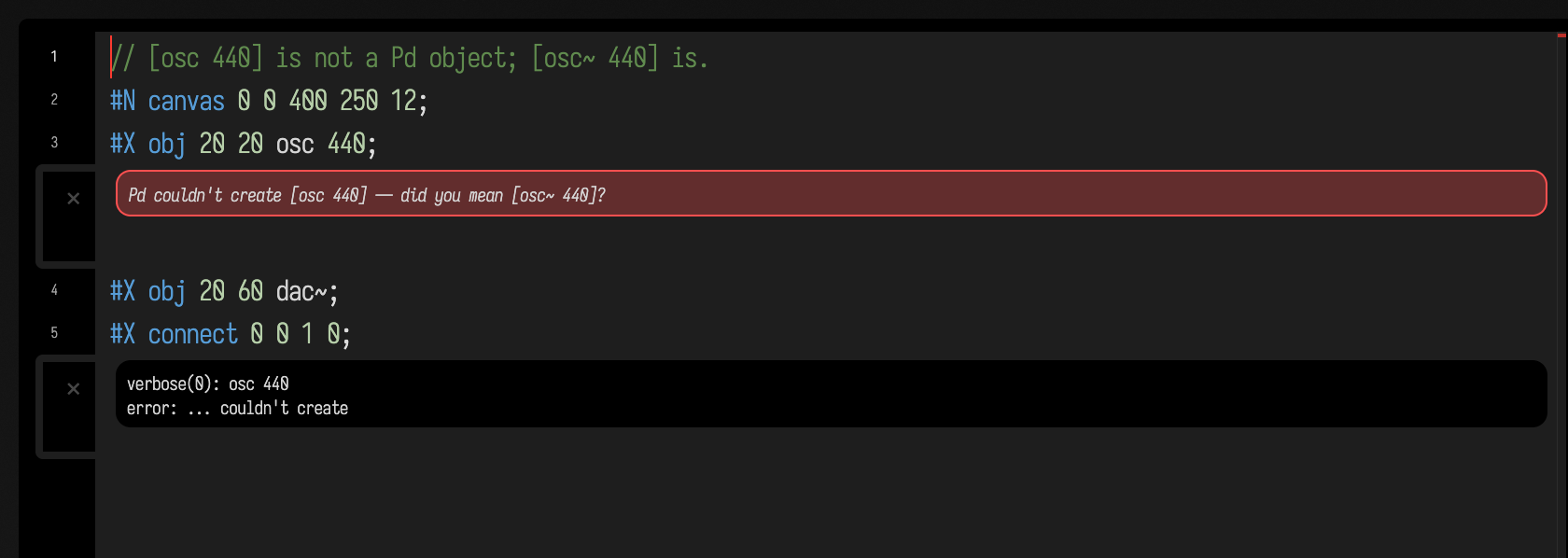
The same message, and the same mark on the box's own line, come from pd("""…""") in a Kotlin box.
The suggestions are drawn from the objects this build of Pd actually has, so a suggestion is always
something it can make. The signal or control twin comes first (osc~ for osc, metro for
metro~), then a difference of case, then the nearest names within two edits.
What is not here
- Pd's GUI. libpd has none. A patch opened here cannot be edited by dragging; edit the text, or draw it in Pd and open the file.
- Externals beyond Pd's
extra.bonk~,fiddle~,sigmund~and the other objects in Pd's ownextrafolder are built in. Compiled externals from Deken are not loaded. - One output per launch. Every patch opened in one Pd sums into that Pd's
[dac~]; the launch'sgainapplies to the sum.
Agents: how the figures are made
Every figure is captured by running the code on the docs build machine; all but the patch
drawing need libpd there (./gradlew buildDocsNativePrerequisites builds it). The two line-note
figures need a playing patch and the cursor on a given line, so each has a setup transcript in
dev_docs/agents/transcripts/docs_capture/. The numbers on the page are also checked by
PdTest, and the demo document is built from dev_docs/agents/transcripts/pure_data_demo.yaml.
See also: Faust, Sonic Pi, and Making a Sound, Every Path There Is for where Pd sits among Field's other ways of making a sound.