Talking a shader into existence
Describe a picture in AI4 chat. The model writes it as StackSL in a Field box, and a window draws the program live while you talk. Before replying, the model looks at the result: exact frames at chosen times, stage-by-stage traces, variants side by side, and comparisons showing what an edit left alone. Each accepted change is a saved revision. You can move a slider, adopt a variant or type into the program yourself, and the model builds on what you did.
This is the StackSL counterpart of Talking a function into existence, and Talking a scene into existence does the same for RectSL. StackSL is one of Field's main languages: a box under a StackSL root is a program, drawn live in the window above it. Its AI4 chat has tools that check, render, compare and version the program, and a document can add tools of its own.
Start
In any document, select a box — press n to make one — and choose Make a StackSL Program from the command palette. A root box, StackSL window, appears above it and opens a square window; the box becomes a program, layered noise over slowly drifting coordinates, and draws in it. Select the program and press ctrl/command-4 to open AI4 chat. Configure an AI provider through Field's welcome page if you have not already; see AI features.
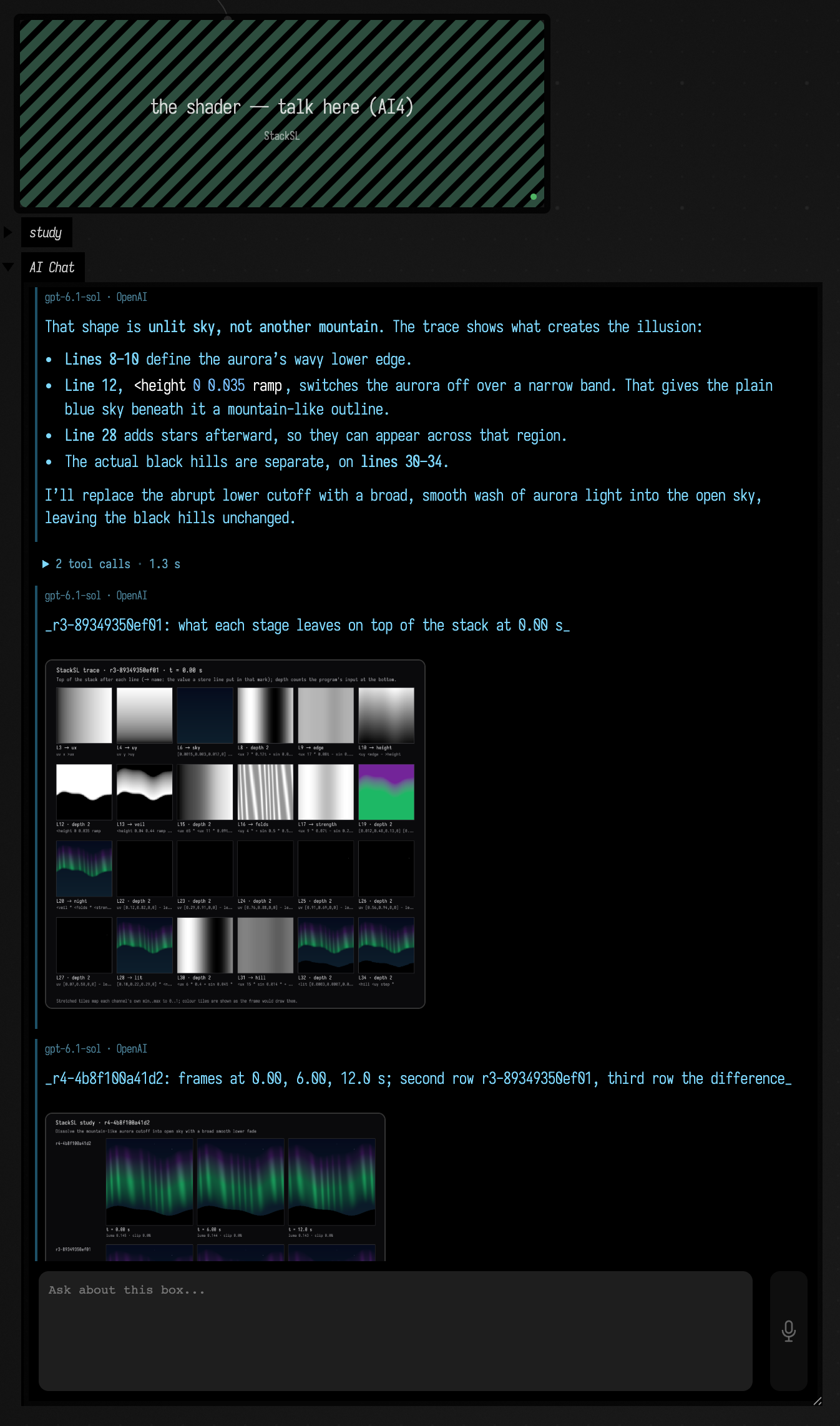
The program box edits its stackSL property, and the window follows every edit that compiles; an
edit with an error is marked on its line, and the window keeps the last program that compiled.
Running the box (ctrl/command-return) checks your program in as a revision. The root holds no code:
it is the box whose main language is StackSL, and it opens its window when a program beneath it
starts. Stopping the root, or closing the window, stops the programs in it; running one again reopens
the window, and a program whose window is closed still has its card's WebGL preview. Set Main
Language: StackSL on a box you made yourself does the same, and every box beneath it is a program.
The recorded sessions below started from a flat grey. Open that starter to begin from the same place: it opens in the document viewer, and Open in Field·4 copies it into your workspace as a new document. It has two boxes:
| Box | What it is |
|---|---|
| StackSL window | The StackSL root. It holds no code; its window opens when the program starts. |
| the shader — talk here (AI4) | The program. Select it and press ctrl/command-4 to open AI4 chat. |
The program starts as one flat grey:
# A blank page: one flat grey. Describe what you want to see in this box's AI4 chat.
0.15
Try this in the program box's chat:
Slow ink blooming in water: deep indigo spreading into warm amber, evolving in place rather than sliding across the frame.
An accepted edit appears in the program box as StackSL, one stage per line with a comment on each,
and in the window as soon as it is accepted. Completion in the program box offers every word the
compiler accepts, with its stack effect and the cheatsheet's description, and the program's own
definitions and marks. Every StackSL box's chat has the study tools, and each program keeps its own
history under studies/<box id>/ in its document.
The window, the card and the GPU
A running program draws a fullscreen triangle in the window above it. Its fragment shader is the
study's template with the program in its {{ stack.auto.program }} slot, and time in a push
constant. A new edit that compiles builds a new pipeline and replaces the old one, which is retired
once the frames using it have finished.
The tools render their evidence on the same GPU. Each render draws the candidate program into a floating-point offscreen target, waits one renderer frame, and reads the pixels back, so the model sees exact frames at the times it asks for rather than wherever the window's clock has got to. In the recorded sessions an accepted edit, including its before/after preview, took 0.7–1.3 s; a sheet of three or four variants at three times took 0.9–2.4 s; a comparison took under 0.7 s.
StackSL also has a CPU interpreter. It is exact but slow: a program built from several octaves of noise runs at a few thousand pixels per second, so a single variant sheet takes most of a minute. It renders when there is no window, and every result says which renderer drew it.
The window presents through an sRGB swapchain: the shader writes linear colour, and the display encodes it. The study encodes its images the same way, so the model and the person judge the same picture. A raw readback, without that encoding, looks much darker than the window.
The study card in the program box's output is the person's side of the study. It shows:
- a WebGL preview of the checked revision, running in the browser, which follows the sliders as you move them. The frames the model judged by are in its own replies, so the card does not repeat them;
- a slider for every number in the program, grouped under the line it is on and the comment that
says what that line does, with a colour swatch for each colour literal, and Keep these
numbers to make the new values a revision. Each slider is labelled with what turning it
changes —
hem drift speed,horizon gradient curve— and clicking the label selects the number in the editor, so you can type over it; clicking a line's heading goes to the line. Those names come from Field's fast model, asked once for every number in the program, and given what the compiler already knows about each one: the operand it took the number as (mix amount,smoothstep high,multiply b), the line it is on, and that line's comment. That operand is exact, but a program whose numbers mostly scale and offset reads as a column ofmultiplies. It is what a slider says until the names arrive, and it stays on the slider's tooltip. The names are stored with the study, by the program's shape, so turning or keeping a number never asks again, and the model's Inspect lists each knob by the same name; - keys: Capture these numbers as a key keeps every number at once, under a name. A key is a keyframe key like any other (keyframer), saved in the study's folder with its version history. Click a key to move every slider to it, or choose two and drag blend to move between them, with the preview following; Keep these numbers then makes what you see a revision. A key applies to the program it was captured from, with any of its numbers changed, but not once the text around them has changed. The model's Inspect lists the keys, and what each would change;
- the program's stages, each a small picture of what that line produced — for a line that stores
into a mark (
>sky), the value it stored. Click one and the window shows that stage instead of the whole program; click it again to go back. With the window shows the editor's line ticked, the window follows the cursor instead, showing what the line under it leaves on the stack. The editor offers the same picture of any line: rest the cursor on it, or open completion there, and it appears in the note beside the cursor and at the top of the completion popup; - any variants the model has offered, each with Adopt;
- the revision history, each with Restore;
- exports in progress, which can be cancelled;
- Check in the editor's program when you have typed an edit you have not run.
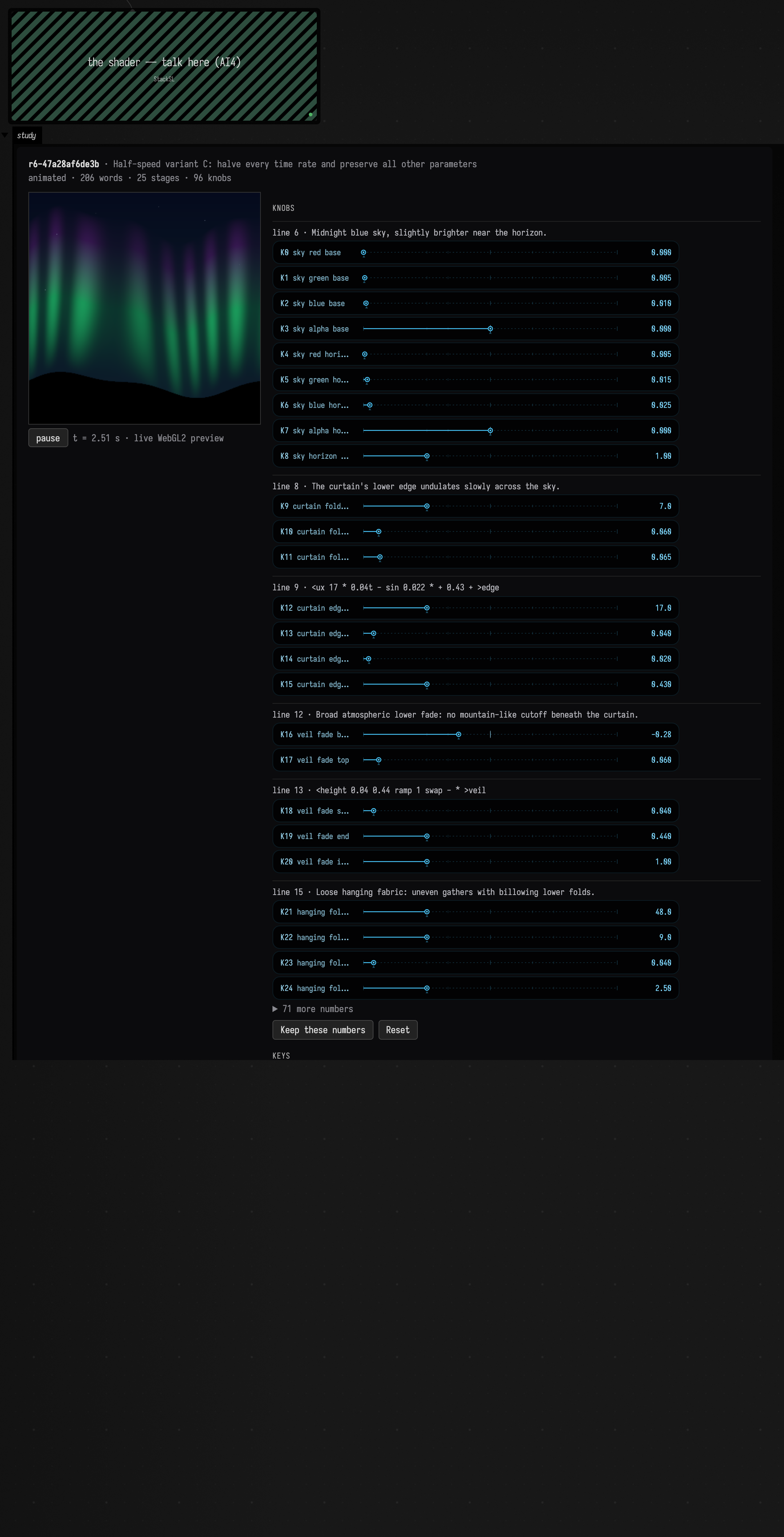
This is the program box of the finished aurora session, reopened in Field. Past about 24 numbers, the remaining lines' sliders wait behind a disclosure.
Clicking the tile of line 29, [0.18,0.22,0.29,0] * <night + >lit, holds the window at that
stage: the sky, the curtain and the stars, before lines 31–35 draw the black hill over them.

The tools
AI4 offers these tools to any conversation opened on a box's stackSL property, and each works on
that box's program. They are library code, in
afield.lang.stacksl.study, registered through
AI4's tool interface:
| Tool | Purpose |
|---|---|
StackSLStudyGuide |
How to work on a study — the frame, idioms, traps and style — or the words guide searched for a word. |
InspectStackSLStudy |
Read the checked program, any unchecked hand edit, history, warnings, stages, knobs, and the line the person's cursor is on. |
EditStackSLStudy |
Replace the whole program: compile, check, activate, and return a preview against the parent. |
PatchStackSLStudy |
Exact local text replacements, through the same checks. |
SetStackSLNumbers |
Change numbers by knob index, rewritten in place so a time rate stays a time rate. |
ObserveStackSLStudy |
Frames at chosen times, with measurements: clipping, NaN, detail, feature size, palette, motion. |
TraceStackSLStudy |
What each line produced, as pictures; optionally the stack's values at one point. |
KnobsStackSLStudy |
Each number's role, and how much a 10% nudge to it changes the frame. |
SweepStackSLNumber |
One number at several values, side by side, without publishing. |
TryStackSLVariants |
Up to eight candidate programs beside the current one, without publishing; held for Adopt. |
AdoptStackSLVariant |
Publish a held variant as a revision. |
RestoreStackSLRevision |
Make an earlier revision current again, as a new revision. |
CompareStackSLStudy |
Show that an edit changed only what it should: by colour, by brightness, or by stage. |
ExportStackSLStudy |
Render a still or a clip into the document's files/ folder, in the background. |
Every edit carries the revision and the source hash it was based on. If you type while the model
is preparing an edit, the stale edit is refused and your text stays. A refused or failed edit
changes nothing. The check refuses programs that do not compile, unbalanced definitions, and
sample/prev: study programs are single-pass over vec4(uv, hash, seconds).
A stage comparison (mode=stage) renders both programs only up to a chosen line and compares what
that line produced. A recolour that leaves the field before the palette identical proves it did not
move the geometry. If the stage leaves only the program's input, it cannot distinguish the two programs; the result says so.
Adding a tool of your own
A document can teach the assistant something more, from a box: register a request class with the document as its scope, and gate it on the conversation's focus. Run the box and the next turn has the tool; two documents can each have their own tool of the same name.
import afield.ai.tools.AgentToolExtensions
import afield.lang.stacksl.study.StackSLStudyShader
import com.fasterxml.jackson.annotation.JsonClassDescription

@JsonClassDescription("The colours a StackSL program types, as the window shows them.")
data class ColoursOfStackSLStudy(val revision: String = "current")

val document = inside.filename
AgentToolExtensions.register(ColoursOfStackSLStudy::class.java,
    { it.focus?.document == document && it.focus?.property == "stackSL" }, scope = document) { ctx, _ ->
    val program = ctx.focus!!.box.getPropertyRaw("stackSL", "") as String
    StackSLStudyShader.colourKnobs(program).map { it.hex }
}
The model reads what the handler returns, as JSON: here the program's colour literals as the window
shows them, such as ["#f3bc7c"].
Three recorded sessions
Each session below is a real AI4 conversation with the window running, through OpenAI: the ink with gpt-6-astra, the tiles and the aurora with gpt-6.1-sol. The pictures are the images the tools returned to the model. Between turns, a person acted in Field: adopting variants in the card, keeping a slider value, editing the program by hand.
Ink in amber water
Slow ink blooming in water: deep indigo spreading into warm amber, evolving in place rather than sliding across the frame.
The model read the guide, wrote the program with one EditStackSLStudy, and looked at the window
before replying. Time moves the noise through its fourth dimension (0.035t >w), so the bloom
reshapes in place instead of drifting.
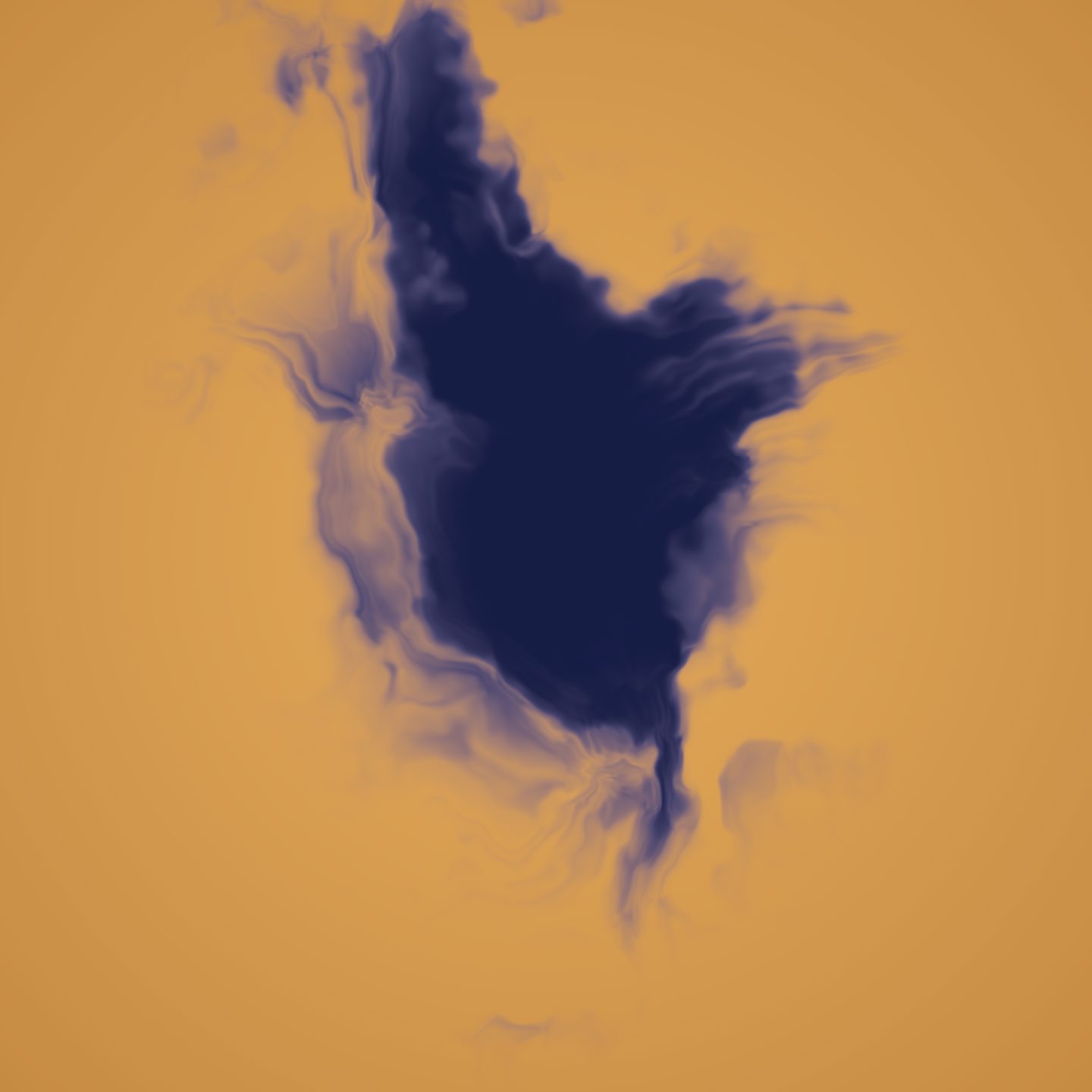
The indigo body reads heavy and flat in the middle. Could you show me a few different ways to give it internal structure — lighter veils or threads inside the ink — so I can pick one?
TryStackSLVariants rendered three candidates at 0, 8 and 20 seconds in 2.2 s and published
nothing:
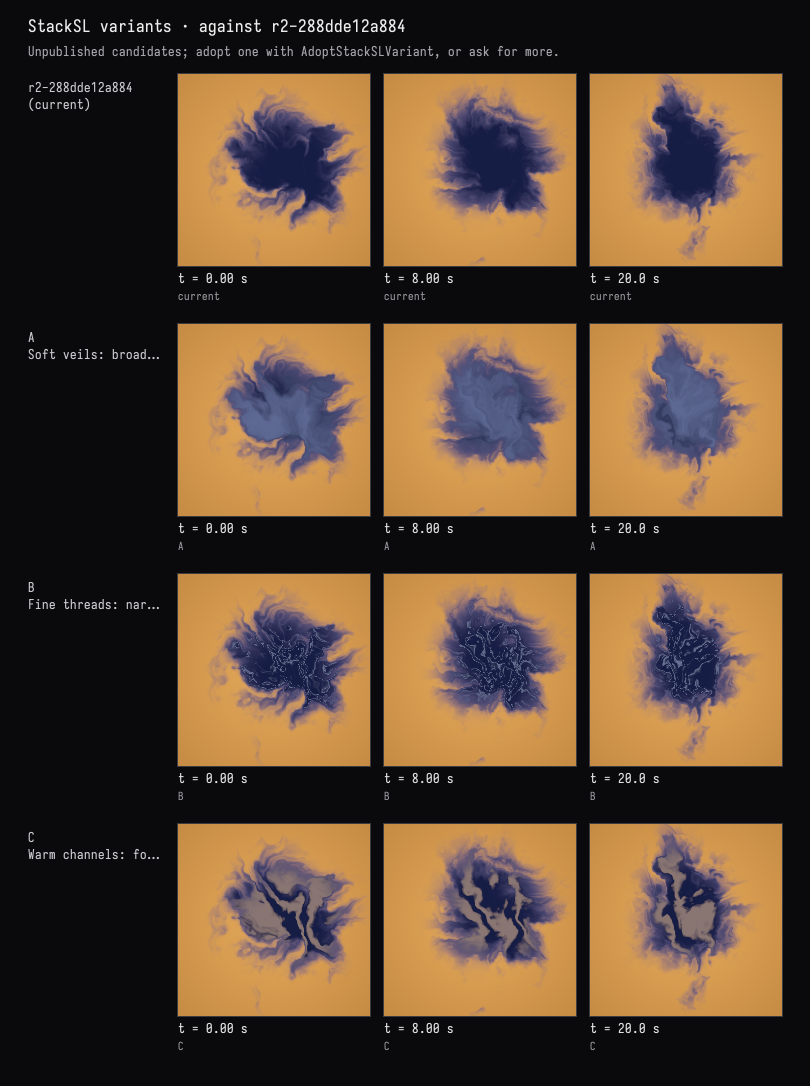
The person adopted B in the card, then moved the drift-speed slider from 0.035t to 0.06t
and kept it. Both became revisions. The next request asked for light in the water with the ink
unchanged, and for proof. The model's patch saves the finished ink as >original, builds the
lighting separately, and ends with an exact guard: wherever there is any ink, the original pixel
wins.
:::before
# Fine pale threads tracing the folded internal field.
[0.25,0.30,0.50]
<flow fbm4 42 * sin abs 1- 4 pow
<ink 0.45 0.95 ramp smooth * 0.58 * mix
saturate
:::after
# Fine pale threads tracing the folded internal field.
[0.25,0.30,0.50]
<flow fbm4 42 * sin abs 1- 4 pow
<ink 0.45 0.95 ramp smooth * 0.58 * mix
saturate
# Keep the entire original ink rendering, including the user's speed and threads.
>original
# Broad water-light ripples evolve independently, more slowly than the ink.
p 2.4 * 0.014t >w fbm4 >waterNoise
p x 7 * p y 4 * + <waterNoise 5 * + 0.07t + sin 0.5 * 0.5 + >light
# Copper shade to honey light, applied only to clear water.
<original
<water [0.64,0.48,0.34,1] * <water [1.22,1.20,1.10,1] * <light mix
<concentration 0.10 0.28 ramp smooth 1- mix
# Exact guard: every pixel with any ink keeps its original RGBA.
<original <ink 0 > select
saturate
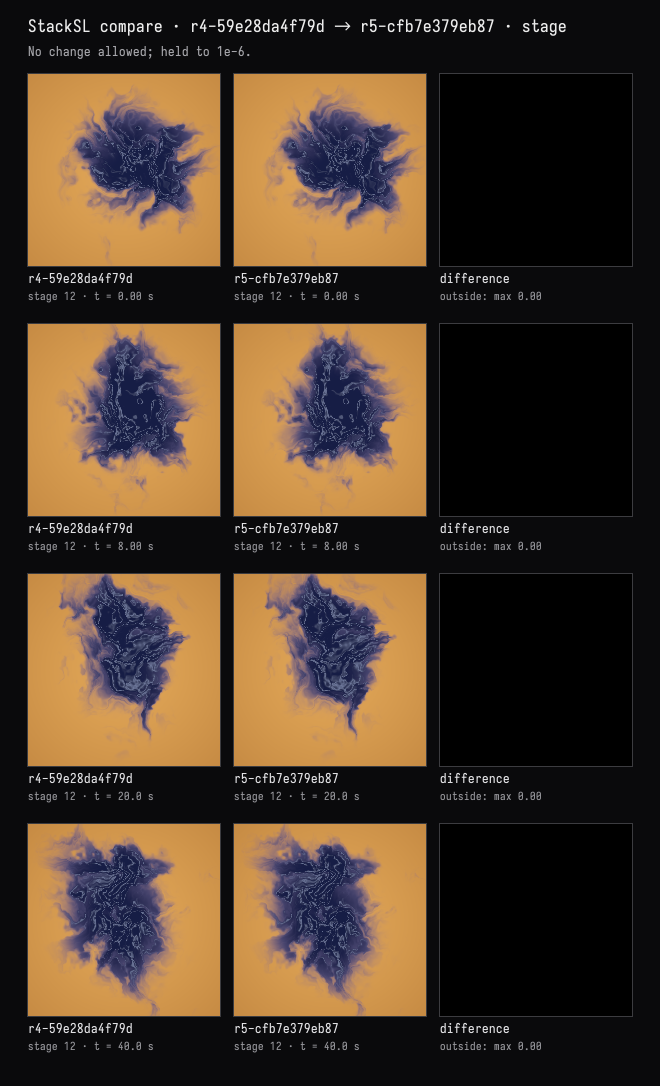
Its proof compares the old and new programs at the stage where the ink is finished, at 0, 8, 20 and 40 seconds. The difference column is black: the largest difference is zero.
That's the one. Export a still and a short clip of it into the document so I can use them elsewhere.
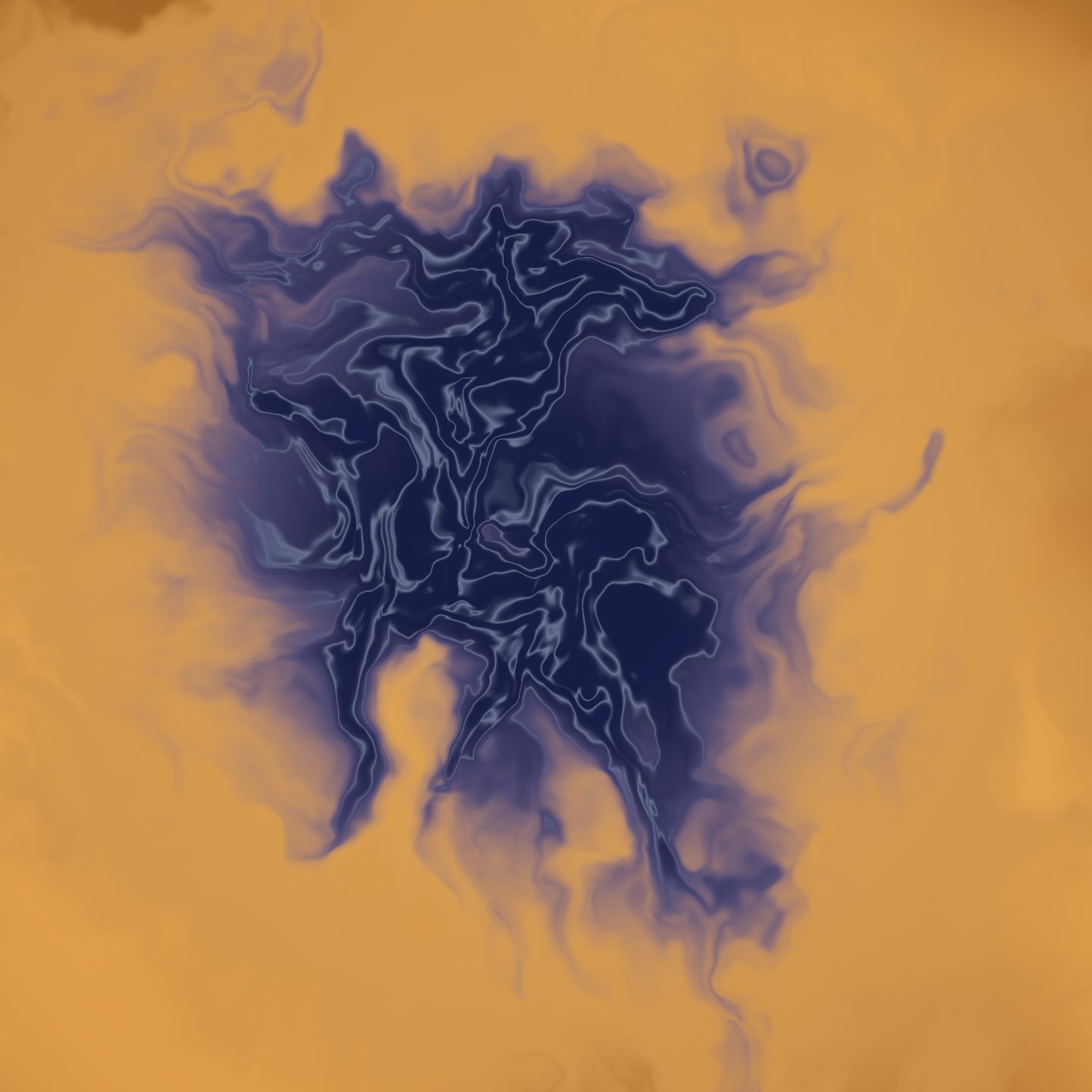
The model exported a 2048 × 2048 still at 20 seconds and a 12-second clip starting there, 512 px at
24 fps. Both ran in the background and appeared in the document's files/ folder. This is the clip:
The complete program · r5-cfb7e379eb87
# Ink in amber water. Time changes the noise's fourth dimension, never scrolls xy.
: folds
  >q
  <q fbm4
  <q [7.1,3.8,2.4,0] + fbm4
  vec2 0.5 - 2.8 * <q +
;
# Fixed spatial anchor, slow internal evolution.
p 3.8 * 0.06t >w >domain
<domain folds folds >flow
# Feathered concentration around a stationary central bloom.
<flow fbm4 0.78 *
p [1,0.85,0,0] * length 0.92 * - 0.27 + =concentration
0.28 0.62 ramp smooth >ink
# Amber water with a gentle falloff toward the edges.
[0.78,0.40,0.10] [0.42,0.16,0.028] p length 0.85 * mix >water
# Dilute indigo at the edges, near-black indigo in the pooled pigment.
<water [0.105,0.095,0.235] <ink 0.0 0.68 ramp smooth mix
[0.008,0.012,0.060] <ink 0.30 1.0 ramp smooth mix
# Fine pale threads tracing the folded internal field.
[0.25,0.30,0.50]
<flow fbm4 42 * sin abs 1- 4 pow
<ink 0.45 0.95 ramp smooth * 0.58 * mix
saturate
# Keep the entire original ink rendering, including the user's speed and threads.
>original
# Broad water-light ripples evolve independently, more slowly than the ink.
p 2.4 * 0.014t >w fbm4 >waterNoise
p x 7 * p y 4 * + <waterNoise 5 * + 0.07t + sin 0.5 * 0.5 + >light
# Copper shade to honey light, applied only to clear water.
<original
<water [0.64,0.48,0.34,1] * <water [1.22,1.20,1.10,1] * <light mix
<concentration 0.10 0.28 ramp smooth 1- mix
# Exact guard: every pixel with any ink keeps its original RGBA.
<original <ink 0 > select
saturate
Zellige tiles
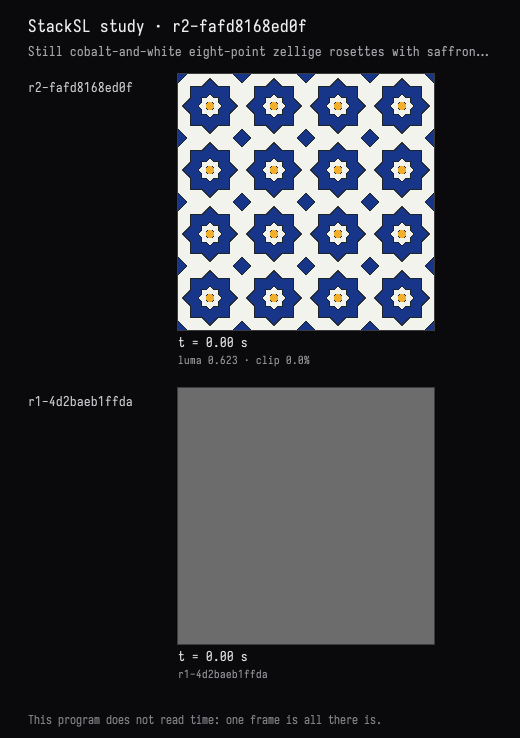
A still image, no animation: a zellige-like tile pattern — eight-fold star rosettes in cobalt and white with a little saffron, separated by thin dark grout lines.
The first edit built the pattern from two definitions: squaremax, a square's distance field, and
starfield, the distance to an eight-point star's edge. A small octagon sits in each rosette's
centre and a diamond where four tiles meet. Everything depends on position only.
Before we settle on eight: show me what the rosettes look like with 6, 8, 10 and 12 points, side by side.
A still program renders once, so the variant sheet is a single row:
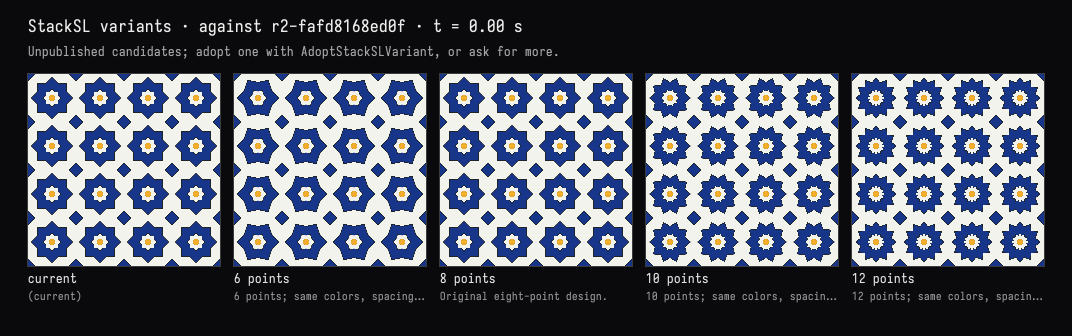
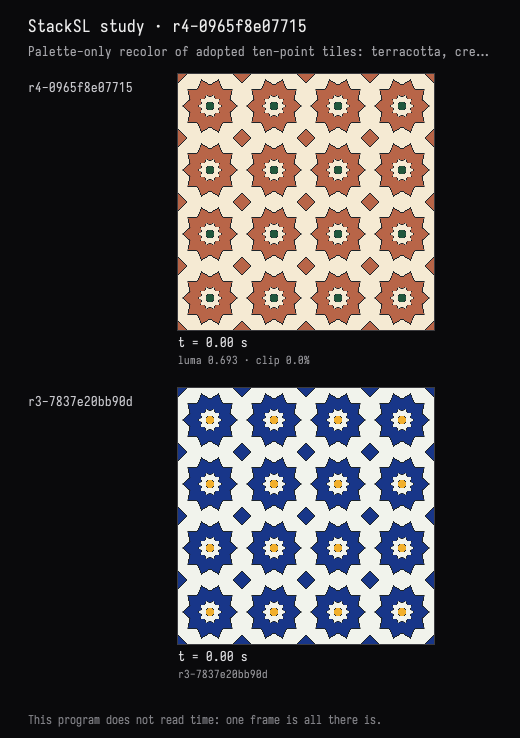
The person adopted 10 points in the card. Next came a recolour in terracotta, cream and deep
green, with the geometry unchanged and a proof. The model changed fifteen numbers in five colour
literals with SetStackSLNumbers, and left the comments, which still name cobalt and saffron:
:::before
# Cobalt stars in an ivory ground.
[0.009,0.037,0.25,1] [0.88,0.90,0.84,1] -0.002 0.002 <edge smoothstep mix >color

# Fine charcoal grout on the perimeter of every star.
<color [0.012,0.018,0.023,1] 0.006 0.009 <edge abs smoothstep 1 swap - mix >color

# A smaller white star forms the center of each rosette.
<color [0.88,0.90,0.84,1] 0.127 0.130 <star smoothstep 1 swap - mix >color
<color [0.012,0.018,0.023,1] 0.004 0.007 <star 0.129 - abs smoothstep 1 swap - mix >color

# Small saffron octagons at the center, framed with dark grout.
<tile abs x <tile abs y max <tile abs x <tile abs y + 0.707107 * max >octagon
<color [0.012,0.018,0.023,1] 0.067 0.070 <octagon smoothstep 1 swap - mix >color
<color [0.88,0.43,0.025,1] 0.058 0.061 <octagon smoothstep 1 swap - mix >color

# Small cobalt diamonds join the four white interstitial tiles.
<tile abs x <tile abs y + >corner
<color [0.012,0.018,0.023,1] 0.848 0.853 <corner smoothstep mix >color
<color [0.009,0.037,0.25,1] 0.863 0.868 <corner smoothstep mix >color
:::after
# Cobalt stars in an ivory ground.
[0.48,0.13,0.065,1] [0.91,0.82,0.65,1] -0.002 0.002 <edge smoothstep mix >color

# Fine charcoal grout on the perimeter of every star.
<color [0.012,0.018,0.023,1] 0.006 0.009 <edge abs smoothstep 1 swap - mix >color

# A smaller white star forms the center of each rosette.
<color [0.91,0.82,0.65,1] 0.127 0.130 <star smoothstep 1 swap - mix >color
<color [0.012,0.018,0.023,1] 0.004 0.007 <star 0.129 - abs smoothstep 1 swap - mix >color

# Small saffron octagons at the center, framed with dark grout.
<tile abs x <tile abs y max <tile abs x <tile abs y + 0.707107 * max >octagon
<color [0.012,0.018,0.023,1] 0.067 0.070 <octagon smoothstep 1 swap - mix >color
<color [0.015,0.095,0.045,1] 0.058 0.061 <octagon smoothstep 1 swap - mix >color

# Small cobalt diamonds join the four white interstitial tiles.
<tile abs x <tile abs y + >corner
<color [0.012,0.018,0.023,1] 0.848 0.853 <corner smoothstep mix >color
<color [0.48,0.13,0.065,1] 0.863 0.868 <corner smoothstep mix >color
For the proof it compared the two revisions at five stages, each a line that ends in a store: the
tile coordinates (>tile), the star field (>star), the star's edge (>edge), the octagon
(>octagon) and the corner diamonds (>corner). A stage that ends in a store compares the value it
stored, so each of these is the geometry itself, without the colour. All five were identical across
36,864 samples:
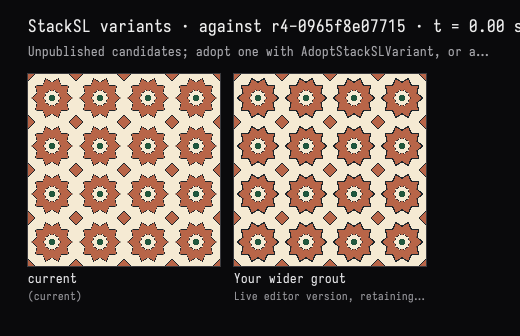
Then the person widened the star grout by hand, changing 0.006 0.009 <edge abs smoothstep to
0.012 0.015 <edge abs smoothstep, and did not check it in.
I thickened the grout myself in the editor. Look at what I changed and keep it — but check the small green centres: with the wider grout, are they still readable? Fix them if not.
InspectStackSLStudy reported the editor as dirty and returned the person's text. The model named
the change, rendered the editor's version beside the checked-in one, judged the green centres still
readable, and made no edit. The person then pressed Check in in the card.
The complete program · r5-dff520b30859
# (asked) Still zellige-like tiles: eight-fold cobalt and white rosettes,
# a little saffron, and thin dark grout. No time-dependent words.
# (chosen) Four repeats, square/diamond eight-point stars, ivory inset stars.
: squaremax >point <point abs x <point abs y max ;
: starfield >point
<point y <point x atan2 0.6283185307179586 / 0.5 + fract 0.5 - abs 0.6283185307179586 * >angle
0.3141592653589793 <angle - sin 0.765366865 * <angle sin +
0.23651136821647611 / <point length * 0.707106781 * ;

# Repeating coordinates; the two squares make an eight-point silhouette.
uv 4 * fract 0.5 - >tile
<tile starfield >star
<star 0.303 - >edge

# Cobalt stars in an ivory ground.
[0.48,0.13,0.065,1] [0.91,0.82,0.65,1] -0.002 0.002 <edge smoothstep mix >color

# Fine charcoal grout on the perimeter of every star.
<color [0.012,0.018,0.023,1] 0.012 0.015 <edge abs smoothstep 1 swap - mix >color

# A smaller white star forms the center of each rosette.
<color [0.91,0.82,0.65,1] 0.127 0.130 <star smoothstep 1 swap - mix >color
<color [0.012,0.018,0.023,1] 0.004 0.007 <star 0.129 - abs smoothstep 1 swap - mix >color

# Small saffron octagons at the center, framed with dark grout.
<tile abs x <tile abs y max <tile abs x <tile abs y + 0.707107 * max >octagon
<color [0.012,0.018,0.023,1] 0.067 0.070 <octagon smoothstep 1 swap - mix >color
<color [0.015,0.095,0.045,1] 0.058 0.061 <octagon smoothstep 1 swap - mix >color

# Small cobalt diamonds join the four white interstitial tiles.
<tile abs x <tile abs y + >corner
<color [0.012,0.018,0.023,1] 0.848 0.853 <corner smoothstep mix >color
<color [0.48,0.13,0.065,1] 0.863 0.868 <corner smoothstep mix >color
<color
An aurora over hills
A night sky over a dark hill line: an aurora curtain of green fading into violet, slowly rippling, and a few faint stars.
The model wrote the program with one EditStackSLStudy and checked frames at 0, 6 and 12 seconds:
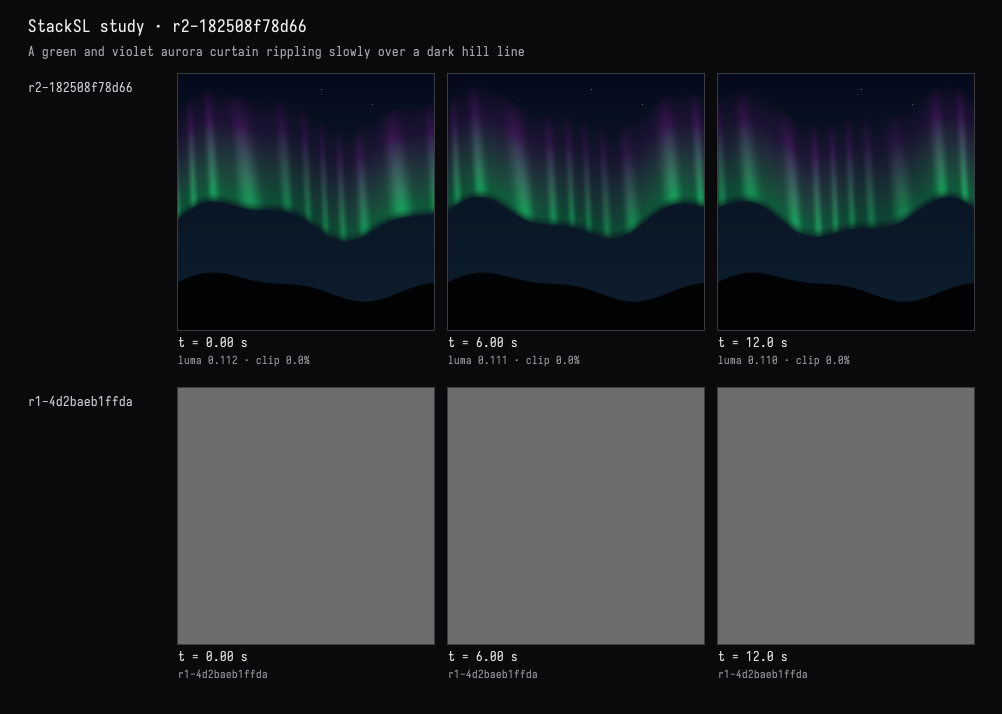
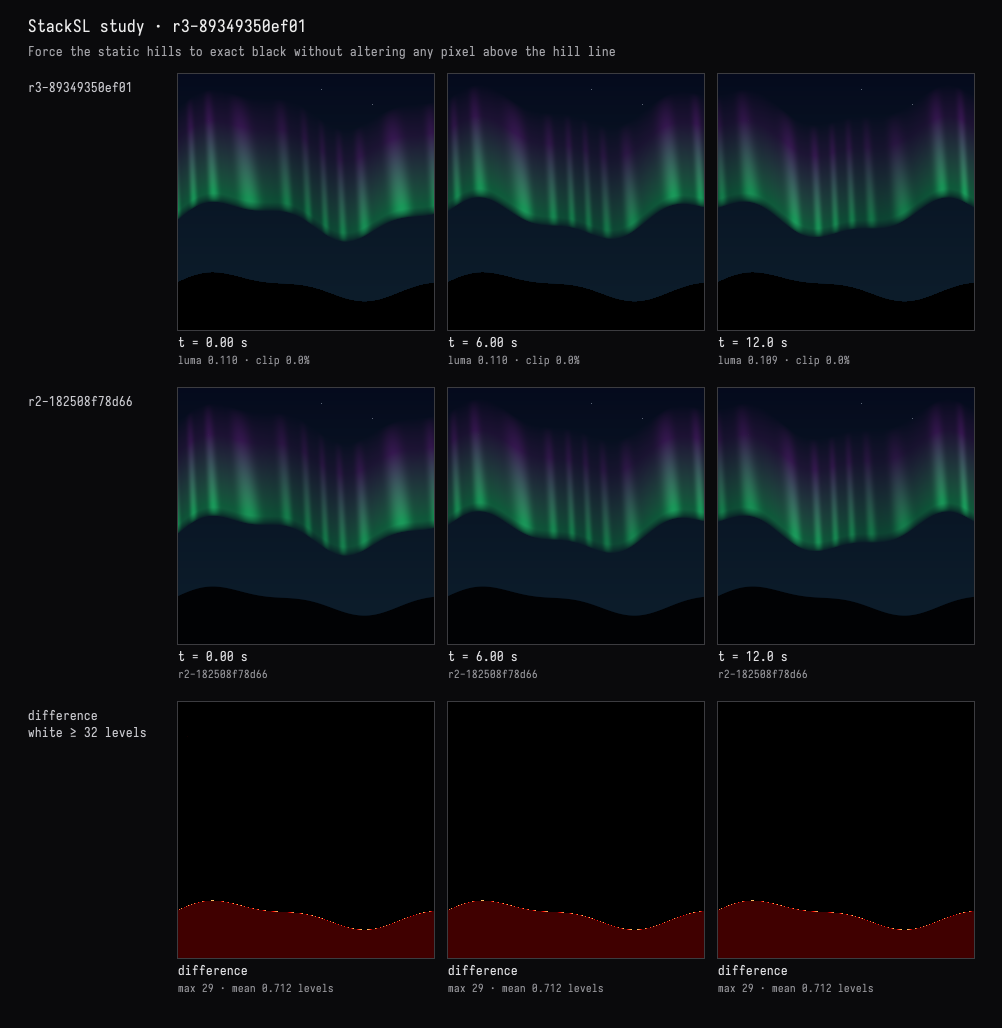
The hills must stay perfectly still and black. Check whether anything moves below the horizon, and if it does, fix it without touching the sky.
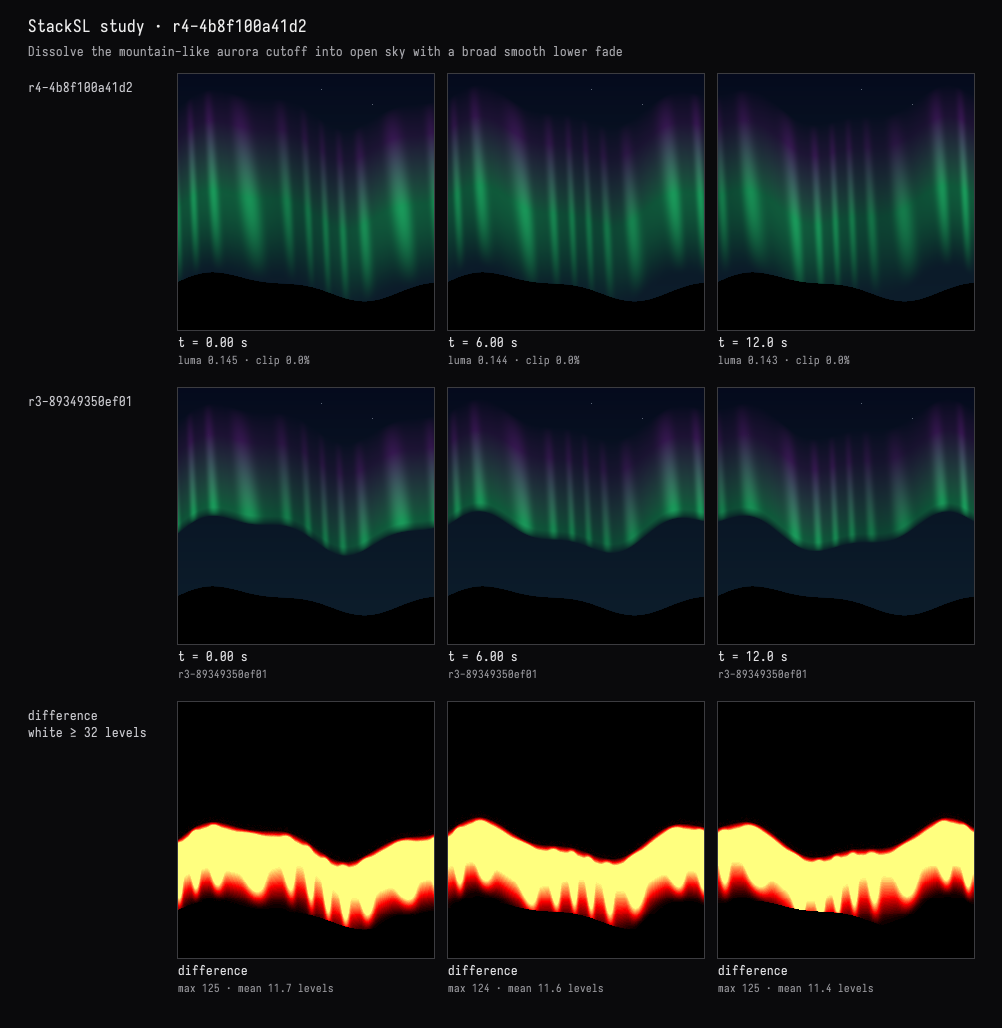
The model found the hills already still but blue-black, and patched them to exact black below the unchanged hill line. Its preview's difference row shows the change confined to the hill:
The model took the lower black band as the hills. Between it and the curtain stayed a broad blue-black shape, and the person asked about it:
In the middle, under the curtain, there's a big soft dark mound that reads like a second, nearer mountain — with stars in front of it. What is that shape, exactly? Show me what makes it, then make it read as open sky.
The model traced the program, one tile per line. Each line that ends in a store shows the value it stored, named after the arrow, so the trace reads as the program's named parts:
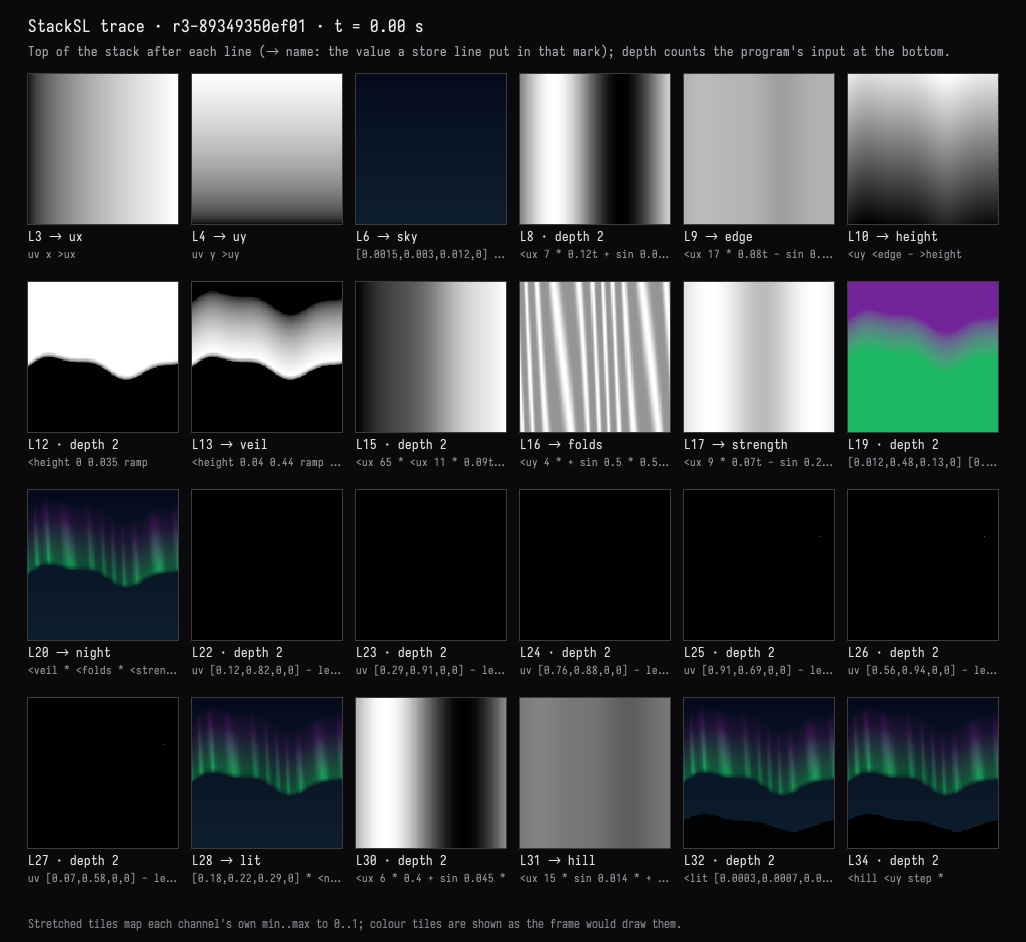
Its answer: the mound was plain sky, outlined by the aurora's abrupt lower cutoff at line 12
(<height 0 0.035 ramp), which the trace shows forming before the hills are drawn. It replaced the
cutoff with a broad fade, -0.28 0.06 <height smoothstep, so the curtain dissolves into the sky:
Make the curtain hang more like fabric, with vertical folds. Try two or three versions and I'll choose.
The model offered broad drapes, fine pleats and loose billows, at 0 and 8 seconds, and recommended the billows:
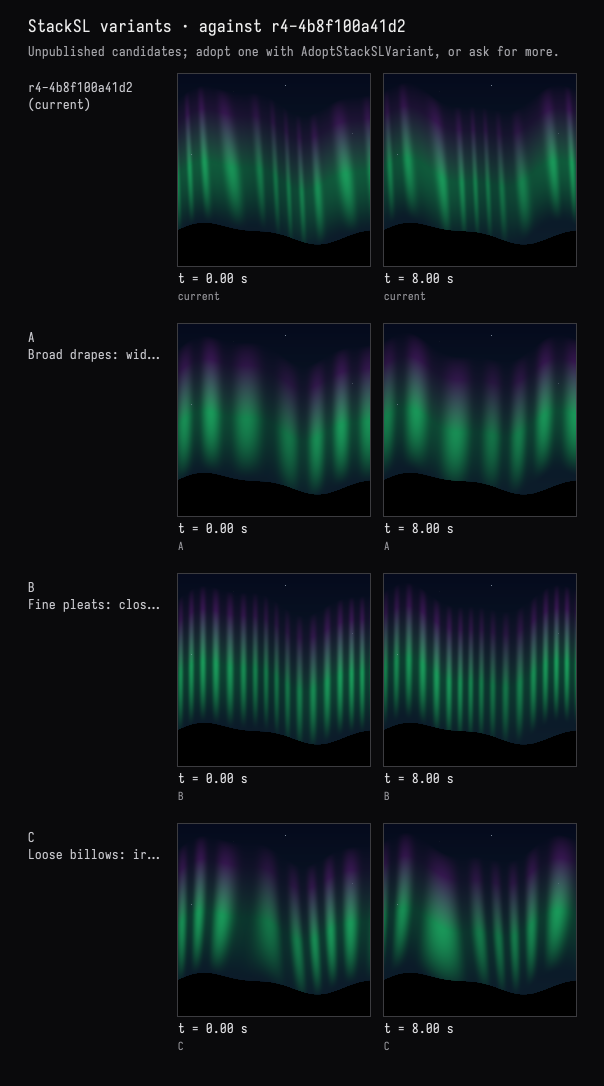
The person adopted C in the card.
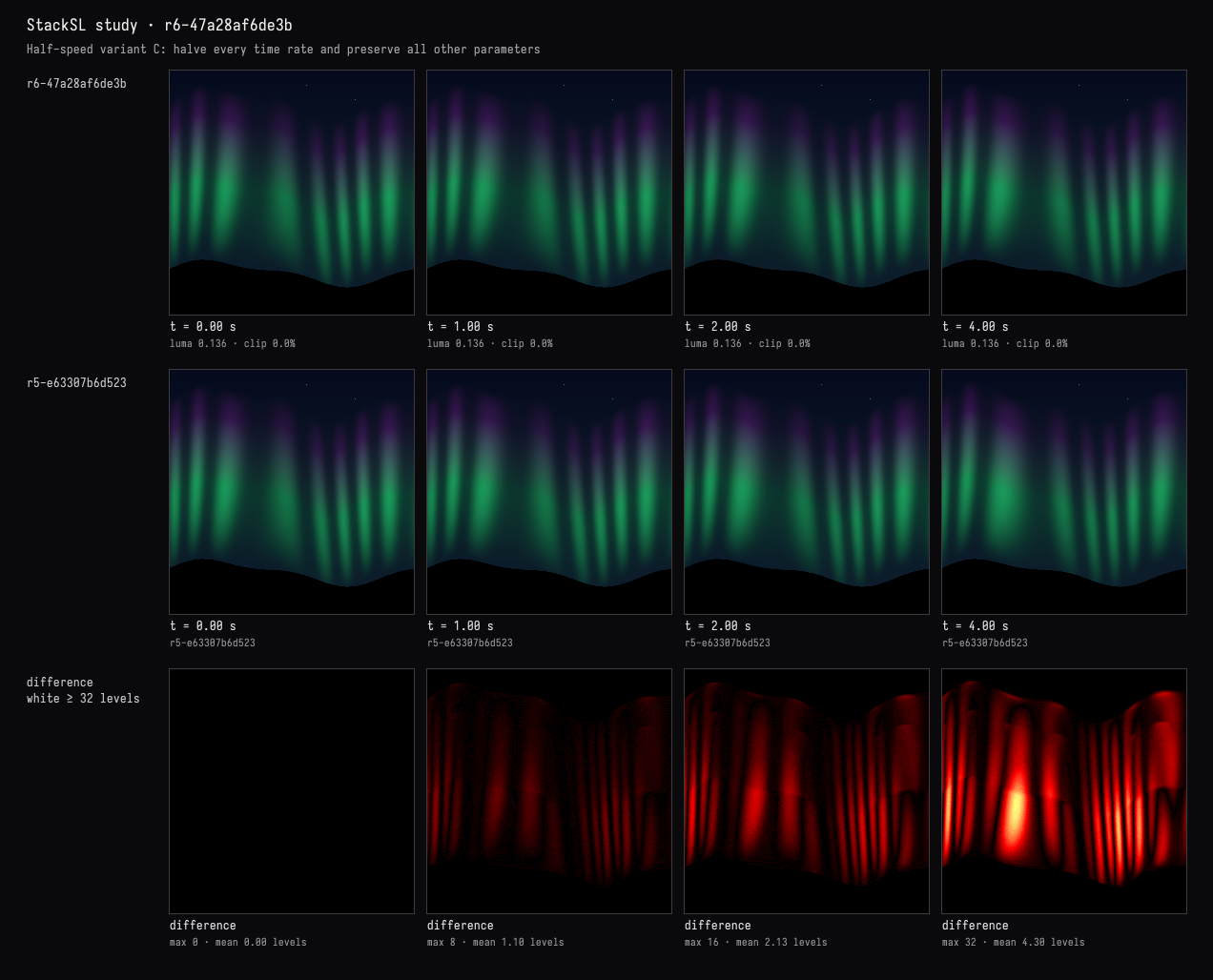
I took C in the card. Now slow the whole ripple to about half speed, keeping everything else exactly as it is, and show me it really moves about half as much.
The model found the five time rates among the program's knobs and halved them with
SetStackSLNumbers:
:::before
# The curtain's lower edge undulates slowly across the sky.
<ux 7 * 0.12t + sin 0.065 *
<ux 17 * 0.08t - sin 0.022 * + 0.43 + >edge
<uy <edge - >height
# Broad atmospheric lower fade: no mountain-like cutoff beneath the curtain.
-0.28 0.06 <height smoothstep
<height 0.04 0.44 ramp 1 swap - * >veil
# Loose hanging fabric: uneven gathers with billowing lower folds.
<ux 48 * <ux 9 * 0.08t + sin 2.5 * +
<uy 1 swap - dup * <ux 7 * 0.12t + sin * 4 * +
sin 0.5 * 0.5 + 1.6 pow 0.88 * 0.12 + >folds
<ux 9 * 0.07t - sin 0.25 * 0.75 + >strength
:::after
# The curtain's lower edge undulates slowly across the sky.
<ux 7 * 0.06t + sin 0.065 *
<ux 17 * 0.04t - sin 0.022 * + 0.43 + >edge
<uy <edge - >height
# Broad atmospheric lower fade: no mountain-like cutoff beneath the curtain.
-0.28 0.06 <height smoothstep
<height 0.04 0.44 ramp 1 swap - * >veil
# Loose hanging fabric: uneven gathers with billowing lower folds.
<ux 48 * <ux 9 * 0.04t + sin 2.5 * +
<uy 1 swap - dup * <ux 7 * 0.06t + sin * 4 * +
sin 0.5 * 0.5 + 1.6 pow 0.88 * 0.12 + >folds
<ux 9 * 0.035t - sin 0.25 * 0.75 + >strength
It measured the mean frame-to-frame change over the first two seconds: 1.2076 before and 0.6065
after for the first second (50.2%), 1.2107 and 0.6040 for the second (49.9%). The model said that
this measures image change, not distance travelled, and that the slowed program at 4 seconds
reaches the original's state at 2. Every use of time in the program is multiplied by one of those
rates, so that is exact.
The complete program · r6-47a28af6de3b
# (asked) Night sky, dark hills, slowly rippling green-to-violet aurora, faint stars.
# (chosen) Fine vertical folds, soft upper veil, and perfectly still, pure-black hills.
uv x >ux
uv y >uy
# Midnight blue sky, slightly brighter near the horizon.
[0.0015,0.003,0.012,0] [0.004,0.013,0.025,0] <uy 1 swap - mix >sky
# The curtain's lower edge undulates slowly across the sky.
<ux 7 * 0.06t + sin 0.065 *
<ux 17 * 0.04t - sin 0.022 * + 0.43 + >edge
<uy <edge - >height
# Broad atmospheric lower fade: no mountain-like cutoff beneath the curtain.
-0.28 0.06 <height smoothstep
<height 0.04 0.44 ramp 1 swap - * >veil
# Loose hanging fabric: uneven gathers with billowing lower folds.
<ux 48 * <ux 9 * 0.04t + sin 2.5 * +
<uy 1 swap - dup * <ux 7 * 0.06t + sin * 4 * +
sin 0.5 * 0.5 + 1.6 pow 0.88 * 0.12 + >folds
<ux 9 * 0.035t - sin 0.25 * 0.75 + >strength
# Emerald lower curtain grades into a violet upper veil.
[0.012,0.48,0.13,0] [0.17,0.018,0.32,0] <height 0.05 0.32 ramp mix
<veil * <folds * <strength * 0.65 * <sky + >night
# A few fixed, faint stars, softened to tiny pinpoints.
uv [0.12,0.82,0,0] - length 0 0.002 pulse
uv [0.29,0.91,0,0] - length 0 0.0016 pulse +
uv [0.76,0.88,0,0] - length 0 0.002 pulse +
uv [0.91,0.69,0,0] - length 0 0.0017 pulse +
uv [0.56,0.94,0,0] - length 0 0.0018 pulse +
uv [0.07,0.58,0,0] - length 0 0.0017 pulse +
[0.18,0.22,0.29,0] * <night + >lit
# An unlit rolling hill line occludes both sky and aurora.
<ux 6 * 0.4 + sin 0.045 *
<ux 15 * sin 0.014 * + 0.17 + >hill
<lit [0.0003,0.0007,0.0012,0] <uy <hill - -0.002 0.002 ramp 1 swap - mix
# Hard occlusion below the static horizon; sky above remains untouched.
<hill <uy step *
The saved conversations
Each turn's transcript keeps the request, the tool activity, every image returned to the model, and its reply. The person's actions between turns are shown where they happened.
| Session | Turns |
|---|---|
| Ink in amber water | An ink bloom · Three ways to give it structure · Light in the water · A still and a clip |
| Zellige tiles | Eight-point rosettes · Six, eight, ten or twelve points · Recolour · The person's grout |
| An aurora over hills | Night sky and aurora · Still, black hills · What is that mound? · Folds like fabric · Half speed, measured |
Each session is a starting point on the welcome screen: ink, tiles and aurora. Each holds its revisions, its held variants, the tool I/O of every turn, and the chat. Opening one puts a copy in your workspace, so continuing the conversation never changes the original.
When it opens, the window draws the finished program, and the program box shows its card. The recorded turns are in the program box's AI4 chat. Opening the chat does not call a model; sending a message continues from the last revision.
Limits
- Study programs are single-pass:
sample,prevand feedback are refused, so ping-pong and trail effects from the StackSL examples are out of reach here. - The evidence is sampled. Frames are exact at the times and sizes asked for; a comparison holds at pixel centres and at those times, and a feature narrower than a pixel can fall between samples. Motion is measured as image change between frames.
- With the window closed, renders fall back to the CPU interpreter, and a heavy program takes minutes to export. The tools report which renderer drew each result.
- The window's clock runs freely. When the model captures the window, it sees whatever moment the window is at; tool images are the exact frames.
Agents: how the sessions were recorded and tested
Each turn went through the ai-assist RPC that Field's chat panel sends; the prompts are in each
document's prompts/. The person-side actions clicked the card's Adopt, Keep and Check in
buttons in a headless browser; for Keep, the slider's value was set first. The tiles grout edit
wrote the program box's stackSL through the property the editor syncs to; no keystrokes were
simulated. Each action is recorded in conversations/*.human.json. Both halves are
tools/conversation_demo.py (record and act), which keeps the document running between
invocations. The three screenshots of Field itself come from
tools/capture_stacksl_conversation.py, which reopens a copy of the aurora document and first
checks that the chat Field restores is byte for byte the one saved; the held stage is a click on
the stage's tile in the card, in the same browser.
The ink session was recorded on 2026-09-26, when the tools were a box in each document, before they became library code and before the card moved onto the program box, and with a box of Kotlin above the program that opened the window. That document has since been rearranged into today's two boxes, keeping its revisions and chat. The tiles and aurora sessions were recorded again on 2026-10-16 from the blank starting document, with the same prompts, so their tool images show what a line that ends in a store stored. The tiles grout prompt names the green centres, where the first recording's named green diamonds, because that is where this recolour put the green.
StackSLConversationExamplesTest replays all three on the CPU interpreter, a different renderer
from the GPU the sessions used. Every saved revision must still pass the check, the program box
must hold HEAD, every recorded CompareStackSLStudy must give the same verdict again, and each
person-side action must have produced the revision it records. It also checks the aurora's half
speed directly: the new program at 2t matches the old one at t. The FIELD_TEST
stacksl.study.gpu-agreement compares GPU renders with the CPU interpreter on six programs,
hard-checking exact and smooth operations while recording hash-amplified fBm differences as
sketchy diagnostic evidence; it also times four 256² frames of a five-octave noise program.
The sessions shown are the third recording: after the GPU path replaced CPU rendering, and after the evidence images were given the window's sRGB encoding.