ForthField examples
ForthField is Field's Forth: a data stack and a dictionary of words that push and pop it. A
whole definition can fit on one line (: sqr dup * ;), and you can rewrite the dictionary while
the box is running. There are words for control flow, vec2 helpers and FLine drawing, plus a
reflection bridge for calling methods on JVM objects.
To get a ForthField box, run Set Main Language: ForthField on a parent box; its children then run ForthField rather than Kotlin. Every example below is ForthField you can paste into such a box.
A tiny stack language
Every word transforms the stack. Read stack comments from left to right and the code becomes much easier to follow.
:::static
: sqr ( n -- n2 ) dup * ;
: hypot2 ( x y -- d2 ) sqr swap sqr + ;

s"hypot^2 = " 3 4 hypot2 str str+ println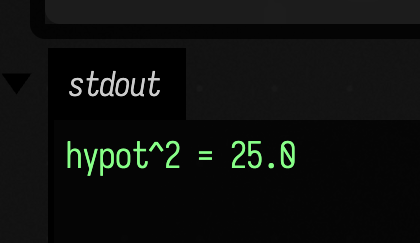
: sqr ... ; defines a new word. dup copies the top stack item, * multiplies the top two numbers, and swap flips the top pair so hypot2 can reuse sqr on both inputs.
What each line left on the stack
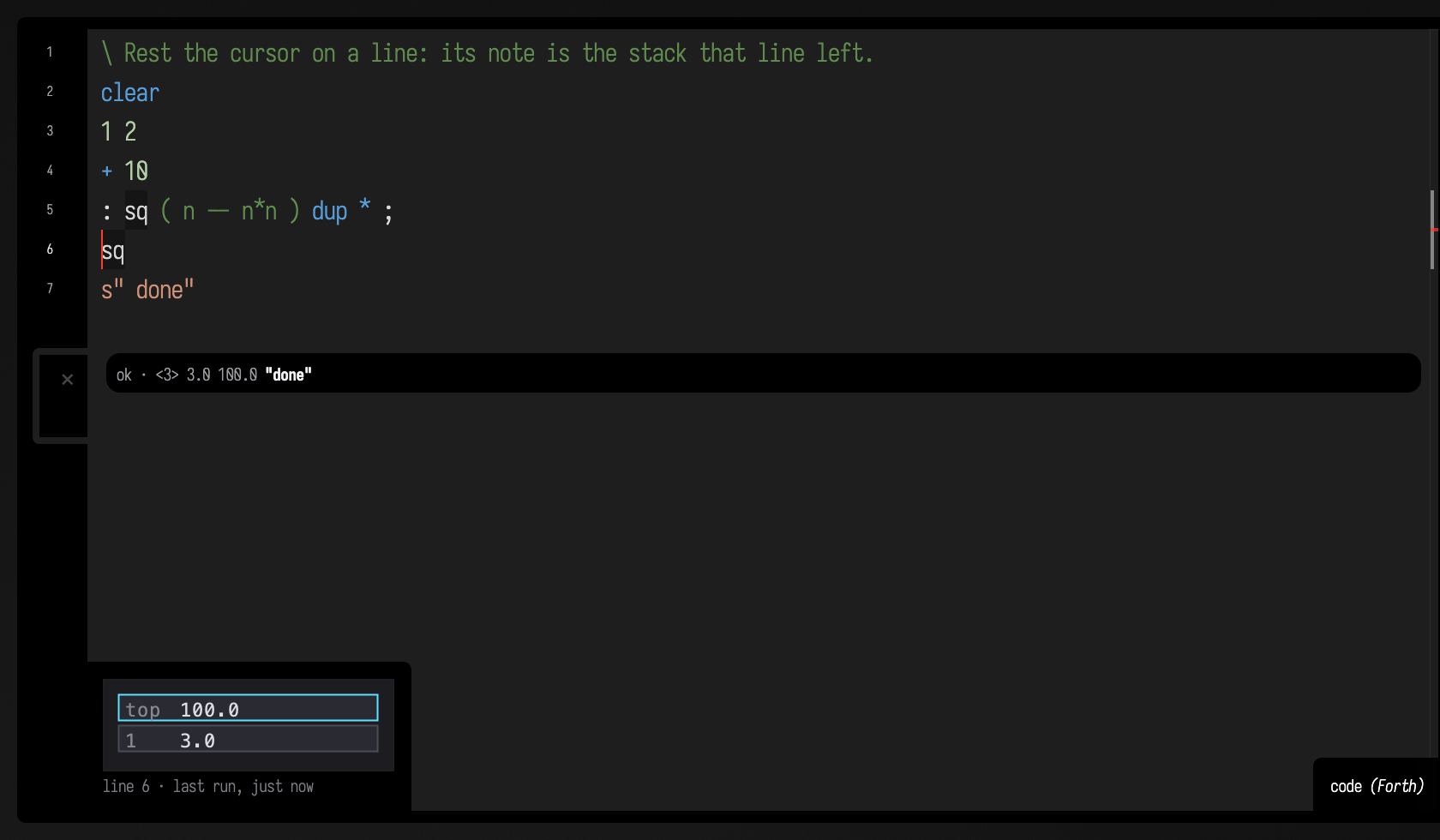
The editor keeps a record of what each line did the last time the box ran. Rest the cursor on a line
and the note beside it draws the data stack as that line left it, top uppermost, and names the words the
line defined; a run that failed marks the line it stopped on and the lines
it never reached. The note reads that record — resting on a line never runs it. The stack outlives a
run, so a box that wants a fresh one starts with clear. See
Line notes.
A run that finishes cleanly and prints nothing says what it left behind, rather than a bare ok: the
depth of the stack and its top values, the topmost in bold. An empty stack gets a plain ok. Both are
in this figure — the box has just been run, the strip under its last line is what the whole run left, and
the note is what line 6, sq, left, with sq having squared the 10 above it:
Variables, strings, and output channels
ForthField variables are named storage cells. They are enough for counters, state machines, and launch-time animation state.
:::static
variable count
0 count !

1 count +!
2 count +!
3 count +!

s"ForthField writes straight into a Field output area." display
s"count = " count @ str str+ s"debug" display-channel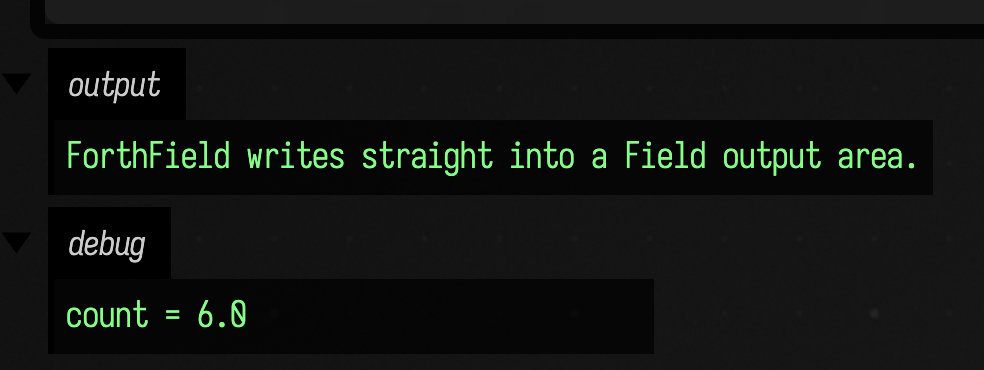
display writes to the default output channel. display-channel names the disclosure panel explicitly, which is enough to keep pretty output and debug output apart.
Building an FLine directly
This is the smallest complete drawing workflow: make an FLine, add segments, style it, and leave it on the stack.
:::static
: stroke-ribbon ( -- f )
  fline
  0   0   moveto
  120 20  lineto
  160 90  210 90  260 20 cubicto
  320 0   lineto
  true  fline-stroked
  false fline-filled
  1.0 0.55 0.2 1.0 fline-color
  2.5 fline-thickness ;

stroke-ribbon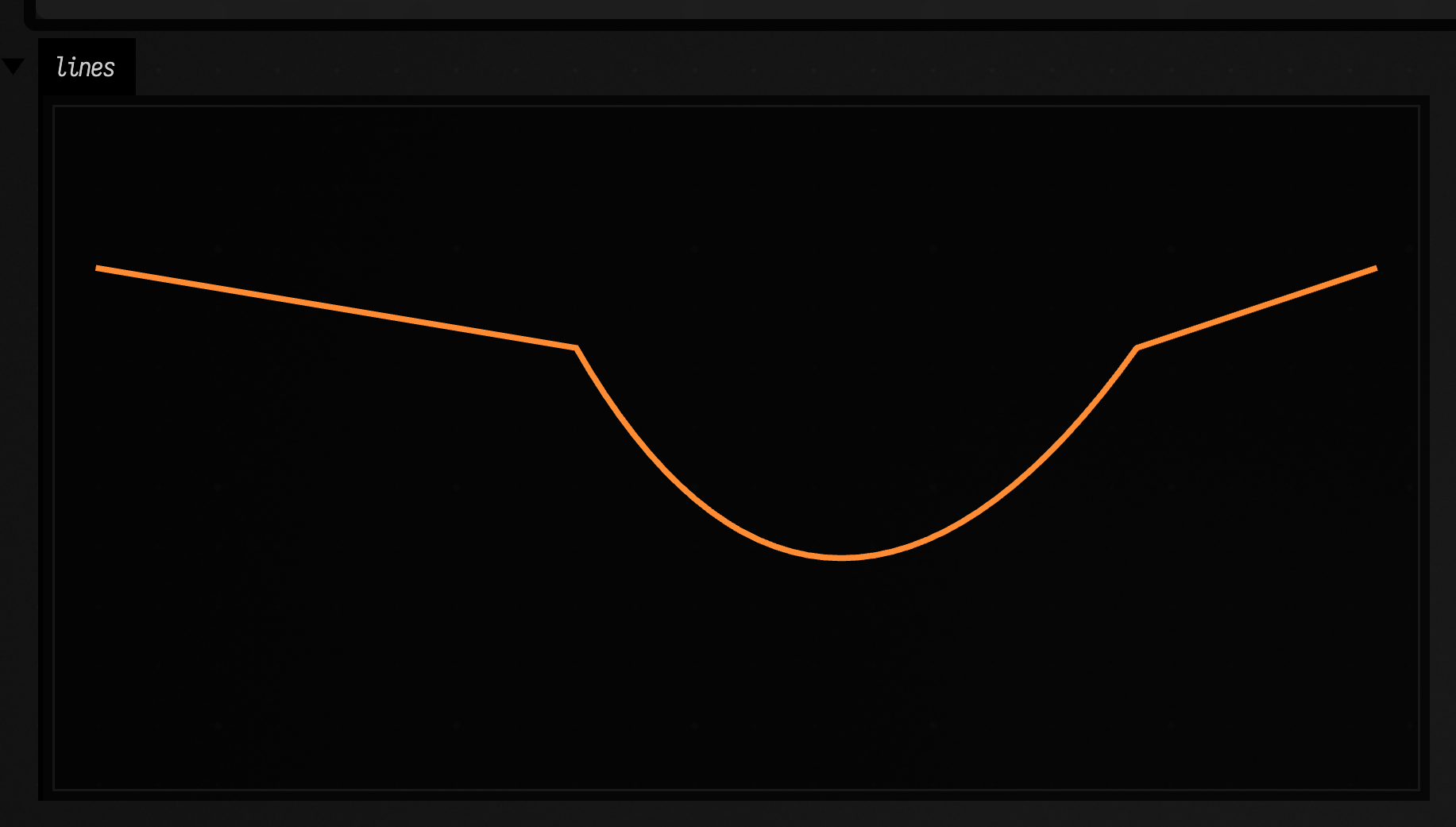
This example is close to SVG path construction. moveto, lineto, and cubicto build the geometry. The later fline-* words mutate style properties on the same object and push it back so the chain can continue.
Vec2 helpers: geometry that arrives as points
The vector helpers are useful when geometry is already arriving as points rather than loose coordinates.
:::static
: zig ( -- f )
  fline
  0    0 vec2 fline-moveto-v2
  40  20 vec2 fline-lineto-v2
  80 -10 vec2 fline-lineto-v2
  120 25 vec2 fline-lineto-v2
  160 -5 vec2 fline-lineto-v2
  true  fline-stroked
  false fline-filled
  0.2 0.85 1.0 1.0 fline-color
  4.0 fline-thickness
  1.0 0.4 0.2 1.0 fline-node-color ;

zig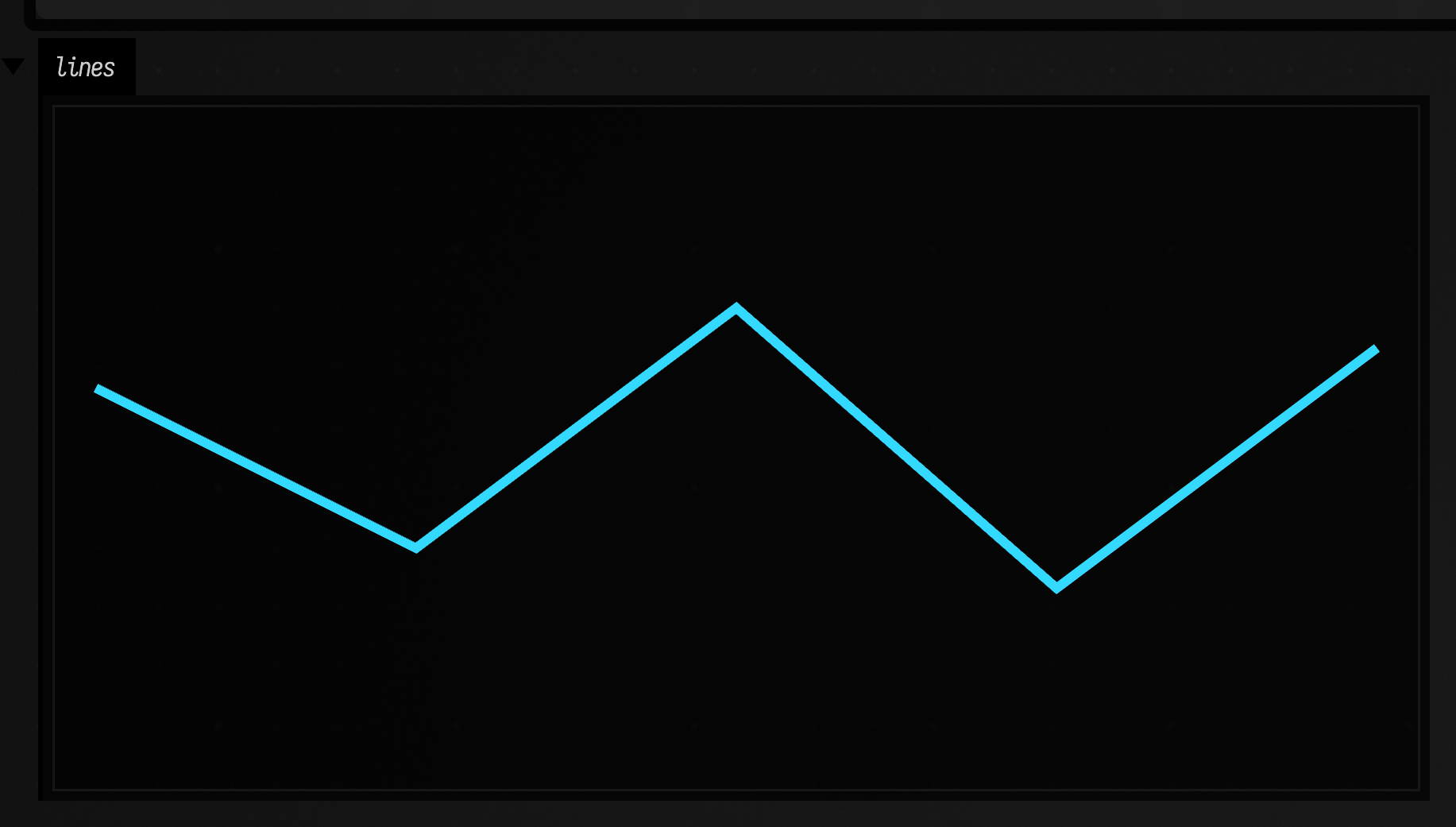
fline-node-color styles the current node rather than the whole line. Use it to mark a control point, an endpoint, or the last place a computation landed.
Reflection: reaching a JVM class by name
The reflection bridge resolves a class by name, constructs it, and calls methods without leaving ForthField, which is how ForthField reaches anything the fline-* words do not already cover.
:::static
variable f
s"FLine" class-for @? newInstance f !

f @ 0   0   0   3 @?! moveTo drop
f @ 120 30  0   3 @?! lineTo drop
f @ 220 10  0   3 @?! lineTo drop
f @ 260 80  0  320 80  0  380 20  0  9 @?! cubicTo drop

f @ @? properties s"thickness" 3.0 2 @?! put
f @ @? properties s"color" 0.95 0.95 1.0 1.0 vec4 2 @?! put

f @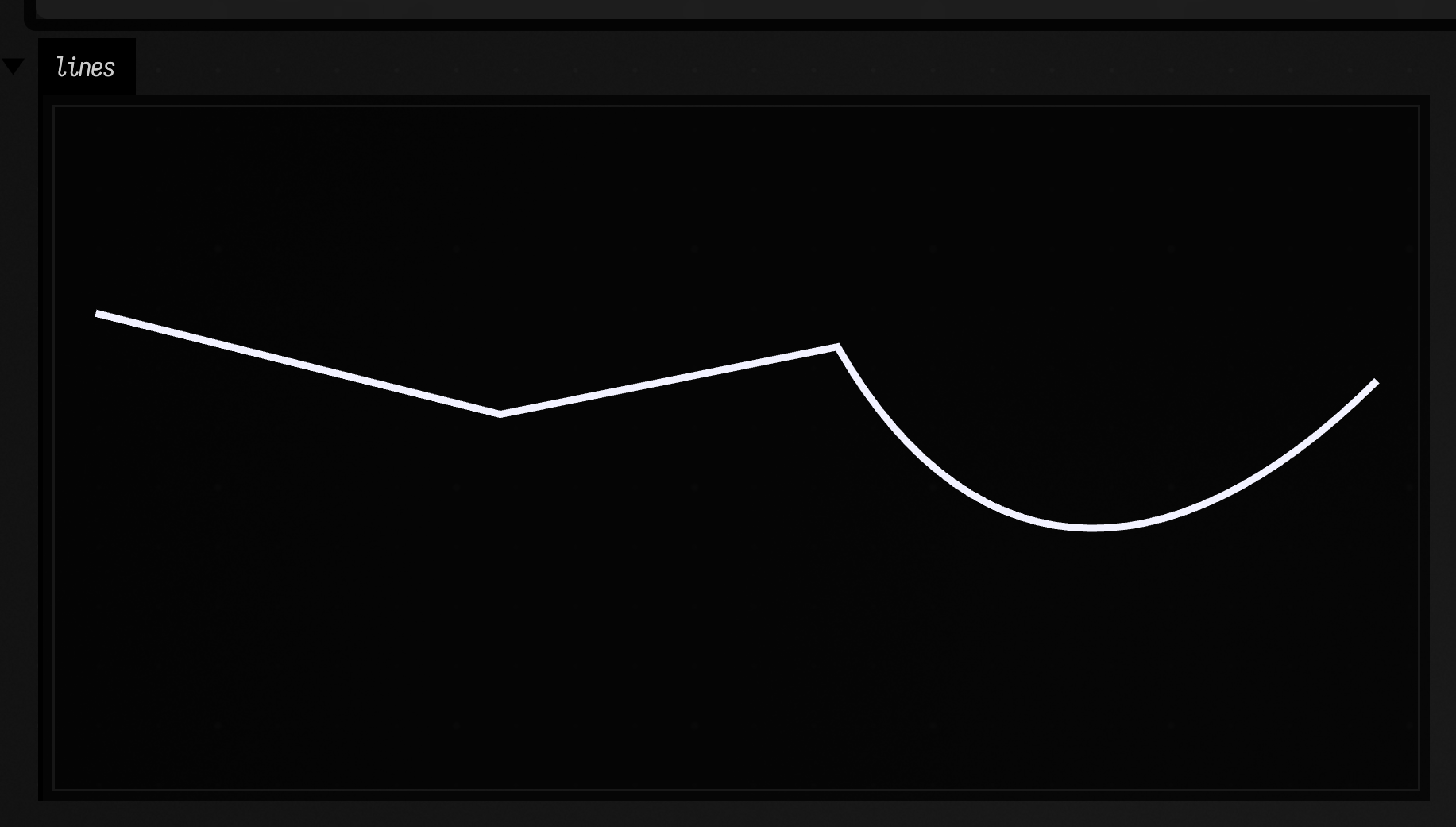
@? guesses what you mean. It looks for a public field of that name first, then for a method, preferring one with no arguments and otherwise taking the first whose argument count fits what is on the stack. So it can pick a different overload depending on how deep the stack is. A field holding null pushes nothing, which leaves the stack one shorter than you might expect. On a Class, new and newInstance construct an instance. When @? picks the wrong overload, use @?!, which takes the object and then the argument count from the top of the stack.
For styling, numeric and vector values are a good fit for reflected properties.put(...). Boolean style toggles are better expressed with the dedicated fline-* words.
The class helpers are useful on their own:
s"FLine" class-for @? getName println
s"Vec3" class-for @? getName println
s"Fli" class-matches println
class-for takes a fully-qualified or a simple class name. If a simple name matches more than one class, the error lists candidates to choose from. class-matches takes a prefix and returns the fully-qualified names that start with it, which is how you find what a class is called; class-help prints a shorter version of the same list.
Dictionary tools, recursion, and temporary stack storage
words shows the dictionary, see name prints a definition, and forget name removes a user-defined word when an experiment has gone stale.
: sqr dup * ;
words
see sqr
forget sqr
recurse means "run the word I am currently inside." Here it makes a small factorial. The base case leaves 1; the recursive case keeps a copy of n, computes (n-1)!, then multiplies.
: fact ( n -- n! )
  dup 1 <= if
    drop 1
  else
    dup 1- recurse *
  then ;

5 fact println
The return stack is a second, temporary stack. Use it sparingly, mostly to park a value while the data stack is doing something else. >r moves to the return stack, r@ copies back, and r> moves back.
: add-twice ( a b -- a+b+b )
  >r        \ save b away from the data stack
  r@ +      \ add a copy of b
  r> + ;    \ restore b and add it again

10 3 add-twice printlnagain, diagnostics, and display helpers
begin ... again loops forever. In a launched box that is what you want, as long as the loop calls frame to hand each tick back to Field. In a box that runs once, leave the loop with leave.
variable n
0 n !

: count3
  begin
    1 n +!
    n @ 3 >= if leave then
  again ;

count3
n @ println
When something fails, ForthField errors include the current token, a stack snapshot, and the word call stack. For example:
: inner nope ;
: outer 10 inner ;
outer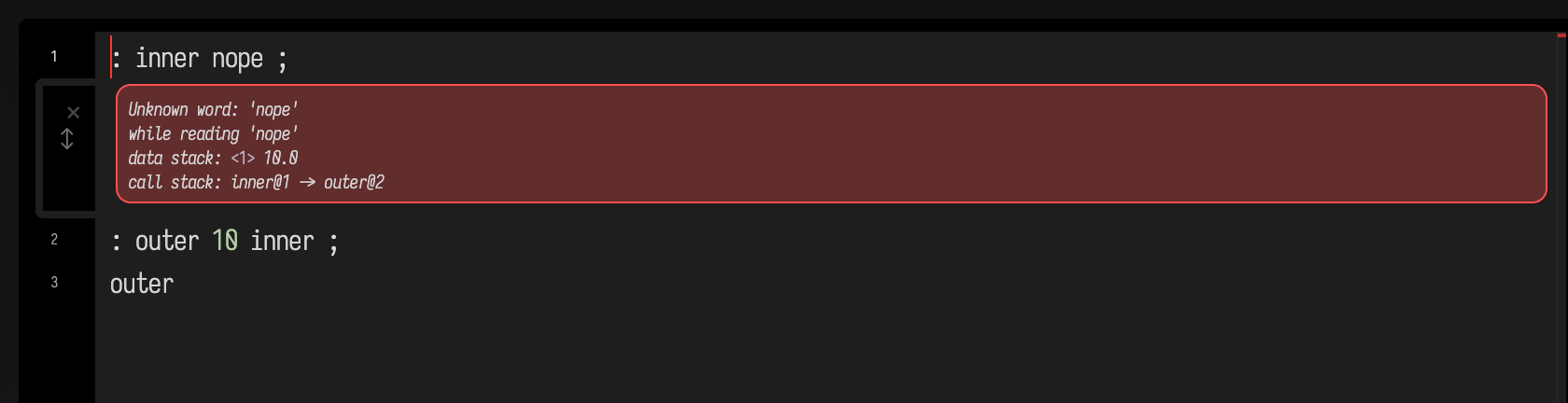
The error names the unknown word, shows that 10 was still on the data stack, and shows the path through outer into inner.
The small display vocabulary gives ForthField direct access to Field output areas without going through Kotlin:
:::static
s"<b>Hello from raw ForthField HTML.</b>" html

0.72 1.0 s"progress" bar
42 s"answer" watch

1 4 9 16
stack-display
plot-stack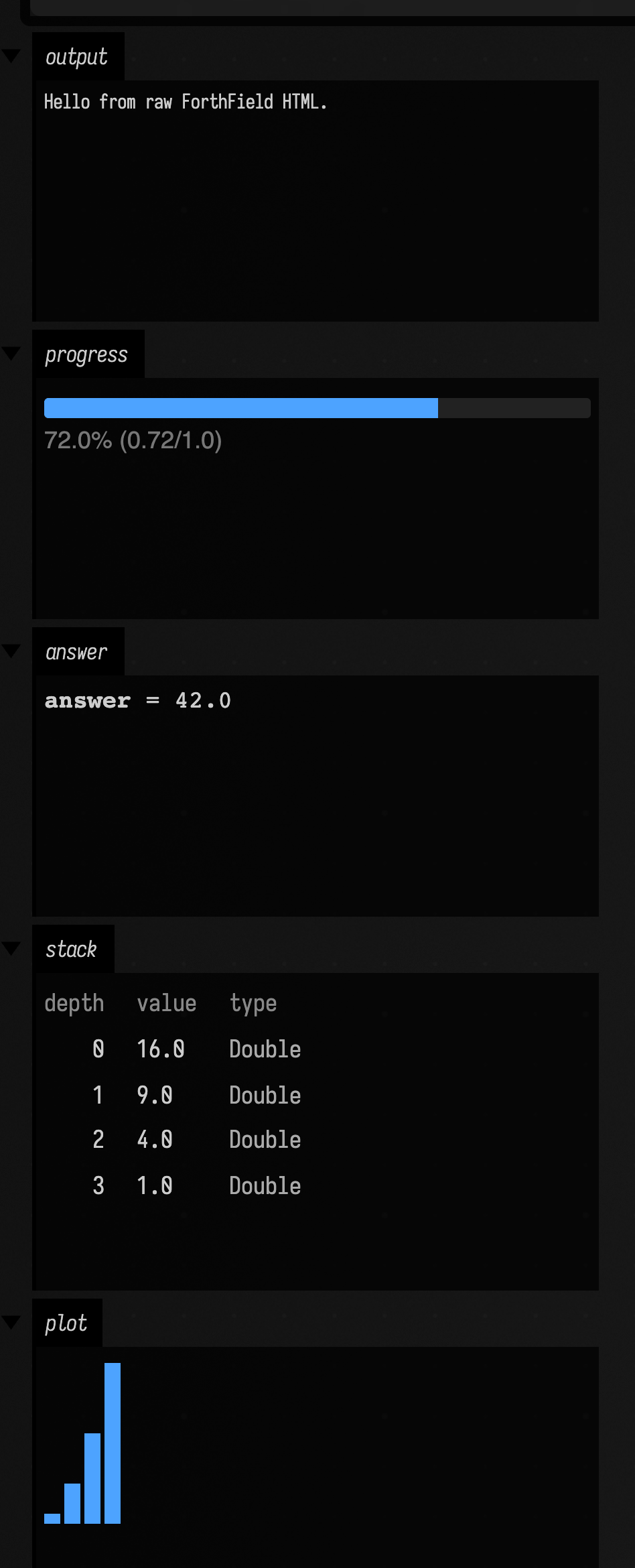
html and html-channel send raw HTML. watch gives a named value its own output channel. stack-display shows the current stack as a table, and plot-stack turns numeric stack values into a quick bar chart.
Extending the dictionary from Kotlin
The host bridge goes the other direction too. Kotlin can inject new words when ForthField should drive a renderer, a buffer, or some other JVM-side subsystem.
:::static
import afield.lang.forth.ForthInterpreter

val forth = ForthInterpreter()

forth.defineWord("append-vec4", "( buf x y z w -- buf )") {
    val w = popNum().toFloat()
    val z = popNum().toFloat()
    val y = popNum().toFloat()
    val x = popNum().toFloat()
    val buf = pop() as DynamicallyWriteable

    buf.append {
        put(Vec4(x, y, z, w))
    }

    push(buf)
}
With a real buffer object on the ForthField stack, the call site stays tiny:
0.0 1.0 0.0 1.0 append-vec4
1.0 0.0 0.0 1.0 append-vec4
0.0 0.0 1.0 1.0 append-vec4
The host keeps hold of the resource; ForthField only names it.
Launch mode and frame
frame animates a launched ForthField box. The word below draws a line that turns a little each tick, and shows the tick count in a debug channel:
variable tick
variable line
0 tick !

: spinner ( -- )
  s"FLine" class-for @? newInstance line !

  line @ 0 0 0 3 @?! moveTo drop

  line @
  tick @ 0.05 * dup cos 120 *          ( x )
             swap sin 120 *            ( x y )
  0 3 @?! lineTo drop

  line @ @? properties s"thickness" 2.0 2 @?! put
  line @ @? properties s"stroked" true 2 @?! put
  line @ s"geom" display-channel

  s"tick=" tick @ str str+ s"debug" display-channel

  1 tick +!
  frame
;

spinner
Above is the box launched for six seconds. The geom panel scales each tick's line to fit, so the
turn shows as a changing slope, and the debug panel counts the ticks.
frame hands control back to Field, and the word starts again on the next tick, so keep anything that must last between ticks in variables, not on the stack.
When a definition misbehaves
Use see name to check that the word running is the definition you think it is, and read the error before adding prints: it already names the failing token, the stack and the chain of word calls.
Builtins and your own words share one dictionary, so : dup ... ; replaces the real dup for the rest of the run, with a warning in the output; forget dup brings the builtin back.