Frames and the animation loop
To animate something from a box, end the box with a loop { }. The code above it runs once, when
you run the box. The block runs again every frame, until you stop the box or run it again:
Try launching this with alt/option-Up, then stop it with alt/option-Down. Open the main
output panel to see it count while the box is running. The first moving drawing
uses the same idea to keep lines in motion.
var n = 0 // runs once

loop { // runs every frame
    n++
    display("main", "<h2>$n</h2>")
    delay(100) // wait 100 ms; this counts as the pass's frame
}
The loop { } has to be the box's last expression, because what Field launches is the value the box
returns. Put anything after it and nothing animates:
loop { n++ } // not the last expression …
println("set up") // … so this is the box's value, and nothing runs
Here's a longer animation: a disc that slides along a track, and a row of ticks below it that grows
by one every four frames. The disc's position comes from AnimationClock.nowSeconds(), the time in
seconds (Time in seconds). After four and a half seconds the loop calls end()
to stop itself, and the .end { } block chained onto it redraws the last state in red
(What happens when you stop). Everything then stays still.
:::static
:::fold the fixed frame and the two shapes — geometry only, no animation in here
val W = 980.0
val H = 300.0
val FRAMES = 160 // frames in the clip: 8 s at 20 fps. The tick row is scaled to fill it.

/*
A border drawn every frame. Without a fixed extent, fitToSize rescales the view to whatever the
dot is doing and the motion cancels itself out — the lesson rasterizeFLinesFramed in
alife_animate.kt records, and it applies to lines() just as much.
*/
fun border(rgba: Vec4) = fline {
    rect(6.0, 6.0, W - 12.0, H - 12.0)
    color = rgba
    thickness = 1.4
    stroked = true
    filled = false
}

fun disc(cx: Double, cy: Double, r: Double, rgba: Vec4) = fline {
    circle(cx, cy, r, segments = 28)
    color = rgba
    filled = true
    stroked = false
}

:::endfold

val started = AnimationClock.nowSeconds()
val stopAfter = 4.5

// The line worth reading: elapsed seconds in, a position along the track out. Written against the
// clock, not against frameNumber, so it means the same thing live and under capture.
fun dotX(elapsed: Double) = 110.0 + 760.0 * (0.5 - 0.5 * kotlin.math.cos(elapsed * 0.9))

fun draw(elapsed: Double, frames: Int, stopped: Boolean) {
    val accent = if (stopped) vec(1.0, 0.28, 0.30, 1.0) else vec(0.48, 0.85, 1.0, 1.0)
    val quiet = if (stopped) vec(1.0, 0.28, 0.30, 0.55) else vec(0.55, 0.62, 0.72, 0.7)
    val track = fline {
        moveTo(110.0, 105.0)
        lineTo(870.0, 105.0)
        color = quiet
        thickness = 1.4
    }
    // One tick per four frames reached. The row grows with frameNumber; the disc moves with the
    // clock. Every fourth, not every one: at this scale 160 adjacent ticks merge into a solid bar.
    val tickRow = fline {
        for (i in 0 until frames.coerceAtMost(FRAMES) step 4) {
            val x = 110.0 + 760.0 * (i.toDouble() / FRAMES)
            moveTo(x, 190.0)
            lineTo(x, 250.0)
        }
        color = accent
        thickness = 2.4
    }
    lines(
        border(quiet),
        track,
        tickRow,
        disc(dotX(elapsed), 105.0, 15.0, accent),
        channel = "main",
        w = W,
        h = H,
        fitToSize = true,
    )
}

loop {
    val elapsed = AnimationClock.nowSeconds() - started
    draw(elapsed, frameNumber, false)
    if (elapsed >= stopAfter) end()
}
    .end {
        // Runs on cancellation, in a NonCancellable scope that still carries the box context — so it can
        // still draw, and still get frames. Two of them, so the stopped state is definitely painted.
        repeat(2) {
            draw(AnimationClock.nowSeconds() - started, frameNumber, true)
            frame()
        }
    }
Two useful habits appear here: use the clock to control motion, and put the wind-down in
.end { }. We'll look at time and stopping
in more detail below.
loop { }, forever { } and frames { } all build the same kind of object: something Field runs a
little of once per frame. Much of Field works this way, including the renderer and a subprocess
streaming its output into a panel. The sections below cover the other ways to build one, how they
stop, a physics solver in the loop, and generators: step-by-step code you advance by hand instead of
once a frame. Inside the loop, at the bottom,
is how the machinery works, for when an animation does something you did not expect.
This page picks up where Running code in a box stops: that page ends when the last fragment finishes evaluating, and this one starts with what Field does to the value it produced. When the question turns to why mine takes longer than 16 milliseconds, Holding a frame budget is the page for it.
loop, forever and frames
Three builders cover almost everything.
loop { } is the one to reach for. It runs the body, then waits for the next frame, unless the
body already waited by calling frame() or delay(ms) itself. So the delay(100) in the first
example paces the loop at ten passes a second, and the loop adds no extra frame of its own.
forever { } is loop { } for a body that knows when it is finished: the body returns a
Boolean, and false ends the animation.
var x = 0.0
forever {
    x += 0.01
    display("main", "<h2>%.2f</h2>".format(x))
    x < 1.0 // false ends it
}
frames { } is the building block the others are made from. Its body runs once, and it moves
from frame to frame only when it calls frame() or delay(ms) itself, which makes it the one for
a sequence of steps. It ends when the block does:
frames {
    display("main", "<h2>ready</h2>")
    delay(1000)
    display("main", "<h2>set</h2>")
    delay(1000)
    display("main", "<h2>go</h2>")
}
You will also see animate { } in older examples. It waits for the frame before each pass
rather than after, and for a body that never calls frame() or delay that is the only difference.
A body that does call one inside animate { } spends two frames a pass instead of one.
The builders side by side has the counts.
Time in seconds
Field's loop has no fixed rate. There is no 60 Hz, no vsync and no fixed timestep: it runs the next
frame as soon as the last one is done. frameNumber counts how many frames your animation has
reached, and two Field sessions on two machines will not agree on how many of those fit in a second.
Motion written as a function of frameNumber runs at a different speed on a different machine, and
at a different speed again while a shader is compiling. Write it against
AnimationClock.nowSeconds() instead.
Live, AnimationClock.nowSeconds() is wall-clock time. When you record a video, it advances by
exactly 1 / fps per recorded frame, however long each frame takes to capture, so motion written
against it plays back at the right speed in the video, and comes out the same every time.
Live, the rate is whatever the machine can manage. Here is a frame body that does nothing but stamp the clock, for two seconds, with the gaps between the stamps plotted:
/*
One wall-clock reading per frame for two seconds, then plot the gaps between them. Nothing here
is frame-indexed: a screenshot capture leaves AnimationClock on monotonic real time, unlike the
frame-synchronous video recorder.
*/
val t0 = AnimationClock.nowSeconds()
val stamps = ArrayList<Double>(400_000)

loop {
    val now = AnimationClock.nowSeconds()
    stamps += now
    if (now - t0 >= 2.0) end()
}
    .end {
        val gapsUs = (1 until stamps.size).map { (stamps[it] - stamps[it - 1]) * 1_000_000.0 }
        val elapsed = stamps.last() - stamps.first()

        // A 100-frame running mean, so the trend is readable under the spikes.
        val window = 100
        val smooth =
            gapsUs.indices.map { i ->
                val lo = maxOf(0, i - window + 1)
                gapsUs.subList(lo, i + 1).average()
            }

        val perSecond = gapsUs.size / elapsed
        val sorted = gapsUs.sorted()
        val median = sorted[sorted.size / 2]

        // Cap the axis at three times the 99th percentile, so one long stall does not flatten the
        // band; the title says how many gaps went over and how long the worst one was.
        val cap = sorted[(sorted.size * 0.99).toInt()] * 3.0
        val over = gapsUs.count { it > cap }
        showSignals(
            "gap between frames (µs), capped at %,.0f".format(cap) to gapsUs.map { minOf(it, cap) },
            "100-frame running mean" to smooth,
            channel = "main",
            title =
                "%,d frames in %.2f s, %,.0f a second · median gap %,.0f µs · %d over the cap, worst %,.0f µs"
                    .format(
                        gapsUs.size,
                        elapsed,
                        perSecond,
                        median,
                        over,
                        sorted.last(),
                    ),
            xTitle = "frame",
            yTitle = "µs",
            width = 1000,
            height = 420,
            floatingLegend = true,
        )
    }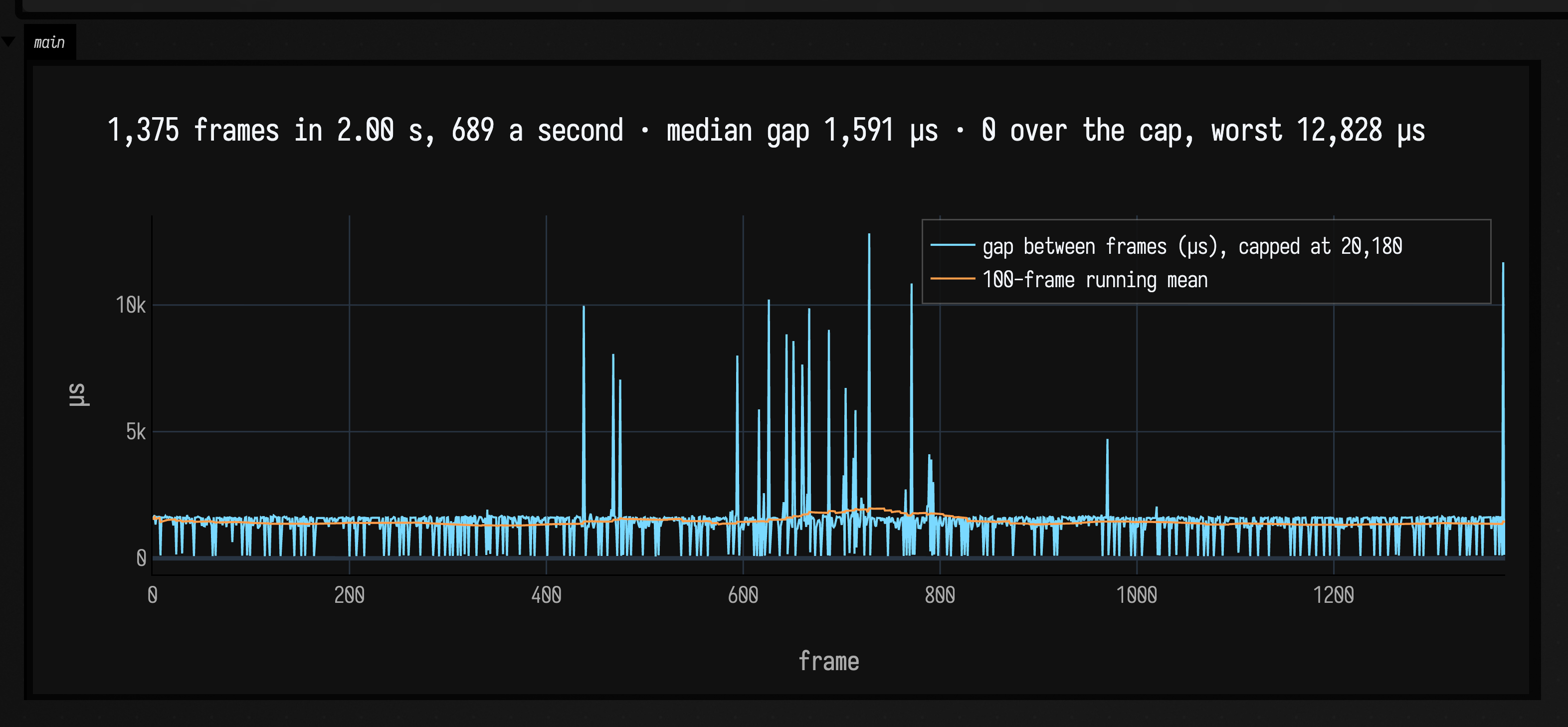
Run it yourself and the count in the title will be different, and different again the second time.
There is no frame rate in that plot to schedule against, which is why motion goes on the clock.
Box 3 of the frames_lifecycle starting point prints the
same rate live while it animates, so you can watch it change from run to run.
What happens when you stop
A running animation stops when:
- you run the box again. The old animation stops at its next frame and the new one takes over.
- you press stop (or call
Box.stop). The animation is cancelled on the spot. - the body calls
end(). - the body finishes. A
frames { }block runs off its end, orforever { }returnsfalse. - the body throws. The error is logged and reported on the box.
end() is how an animation stops itself:
val started = AnimationClock.nowSeconds()

loop {
    val t = AnimationClock.nowSeconds() - started
    display("main", "<h2>%.1f s</h2>".format(t))
    if (t > 5.0) end() // stop after five seconds
}
end() does not jump out of the body: the rest of the current pass still runs, and then the body is
not called again.
The .end { } block
Chain .end { } onto an animation to say what happens when it is stopped. This leaves x at 20,
though not until the frame after you press stop:
var x = 0
loop {
    x++
}
    .end {
        x = 20
    }
The end block is a frame body in its own right, so it can take frames of its own. Here
10 { ... } runs its block ten times, with it counting the pass from 0 to 9, and each pass
waits a frame:
var x = 0
loop {
    x++
}
    .end {
        x = 20
        10 {
            frame()
            x = 30 + it
        }
    }
which stops at x == 39, eleven frames after the button. Draw from there rather than only
assigning: the end phase is where the wind-down goes, and the disc animation at the top of this page
spends two frames of it repainting the stopped state in red.
.end { } runs when the animation is cancelled: by the stop button, by a re-run, or by end().
It does not run when the body finishes by itself or throws. For cleanup that has to happen whichever
way the animation ends, such as closing a file, use a Kotlin try/finally inside the body:
frames {
    val out = java.io.File("/tmp/frames.txt").printWriter()
    try {
        while (frame()) out.println(frameNumber)
    } finally {
        out.close()
    }
}
When both are present and the animation is cancelled, .end { } runs first and the finally after
it.
A physics system in the loop
A physics simulation is the exception to putting motion on the clock. This cloth sheet calls
cloth.step(dt = 1f / 60f, ...) once a frame with a fixed dt, so each frame is one step of
physics.
The solver needs that. Its stiffness and damping depend on dt, so a dt that followed the frame rate
would make the sheet stiffer or floppier from frame to frame, and a large enough dt makes it blow up
(at dt = 1/60, stiffness 60 with 16 iterations settles and 150 diverges). The price is that
the sheet runs in simulation time rather than wall-clock time: recorded at 20 fps below, it moves
more slowly than it does live. Anything that pushes on the simulation goes on the simulation's
clock too, which is why the drag here is driven by the step count and not by nowSeconds().
:::static
import afield.simulation.physics.*

// The physics system. State3 is the SoA particle store; the simulation owns it and grows it as
// things are added, so it starts empty.
val sim = SimdVerlet(SimdVerlet.State3.empty())

/*
20 wide, 10 tall. addCloth appends the particles to whatever is already in `sim`, wires the
four-slot distance constraints, pins what `pinned` selects, and registers the curvature force.

The plane view has y growing DOWN the screen, so the sheet hangs from row 0 and gravity is +y.
Every fourth column of that row is a nail; the rest of it swings.
*/
val cloth = sim.addCloth(
    width = 20,
    height = 10,
    spacing = 0.5f,
    stiffness = 60f,
    curvatureStrength = 100f,
    pinned = { col, row -> row == 0 && col % 4 == 0 },
)

// Grab the free bottom-right corner. This is a PID position controller on that one particle, so the
// drag pulls *through* the constraint solve rather than teleporting a particle out of the sheet.
cloth.grabNearest(cloth.position(19, 9).x, cloth.position(19, 9).y)

// One window for every frame. Without it the view re-fits to whatever the cloth happens to occupy,
// and the sheet looks still while the world shrinks around it.
val view = Rect(-1.5, -1.0, 13.5, 9.0)

var frames = 0
loop {
    /*
    One frame of physics for the whole simulation: gravity, the per-particle force generators,
    the registered bulk forces (the cloth's curvature pass), then `iterations` passes of the
    constraint solve, then Verlet integration.
    */
    cloth.step(dt = 1f / 60f, damping = 0.99f, gravity = 2f, iterations = 16)
    frames++

    // Simulation seconds, not wall-clock seconds: the drag is part of the simulation, so putting it
    // on nowSeconds() would change its shape whenever the frame rate did — including under capture.
    val t = frames / 60.0
    cloth.moveGrabbed(
        (9.5 + 2.2 * sin(t * 2.0)).toFloat(),
        (4.5 + 1.8 * (1.0 - cos(t * 1.3))).toFloat(),
    )

    // What the solver holds, not what the scene means: a segment per distance constraint, a dot per
    // particle, the pins in red, a whisker per particle's velocity.
    showPlane(
        sim.debugLines(velocityScale = 30f),
        window = view,
        width = 900,
        height = 600,
        title = "20 x 10 cloth — SimdVerlet, 4-slot distance constraints",
        caption = "frame $frames · cyan: constraints · green: velocity · red: pinned",
    )
}
Everything above except the grab and the two lines that drive it is
the cloth_simdverlet_start starting point: open it from the welcome screen
and the sheet is already hanging. addCloth builds a Cloth, a grid of particles inside the
SimdVerlet you already have, and SimdVerlet.debugLines() draws the solver's own state, so a mis-wired constraint
or a missing pin is easy to see.
See also Particles, Cloth & Constraints, the page about the solver itself. It explains
why iterations behaves as a stiffness multiplier: 16 iterations at stiffness k feel the same as
one at stiffness 16·k.
The generator layer
Sometimes you want code that remembers its state from one step to the next, but steps when you
say, not once a frame. A Generator does that. Its body is ordinary code with local variables;
start() runs it until its first yield, where it pauses, and each next(input) hands it a value
and runs it on to the next yield. The locals are still there when it resumes.
The physics solver uses this for its per-particle forces. One example is a PID controller, which steers a value toward a target using the current error, the error summed over time, and how fast the error is changing. Written as a generator, that running sum and the previous error are plain local variables, with no state object to declare:
/*
The same shape SimdVerlet.addPidPositionController uses, reduced to one axis so it plots.
Everything the controller remembers — position, velocity, the error integral, the previous error
— is a local. `yield` hands out the current position and hands back the next target.
*/
data class Tick(val target: Double, val dt: Double)

fun controller(kp: Double, ki: Double, kd: Double) = generator2<Tick, Double> {
    var x = 0.0
    var v = 0.0
    var integral = 0.0
    var previousError = 0.0
    while (true) {
        val tick = yield(x)
        val error = tick.target - x
        integral += error * tick.dt
        val derivative = (error - previousError) / tick.dt
        previousError = error
        v = (v + (kp * error + ki * integral + kd * derivative) * tick.dt) * 0.94
        x += v * tick.dt
    }
}

val steps = 420
val dt = 1.0 / 60.0
fun targetAt(i: Int) = if ((i / 140) % 2 == 0) 1.0 else 0.35

val tuned = linkedMapOf(
    "kp 40, ki 0, kd 0 — rings" to controller(40.0, 0.0, 0.0),
    "kp 40, ki 6, kd 12 — settles" to controller(40.0, 6.0, 12.0),
    "kp 12, ki 2, kd 9 — lags" to controller(12.0, 2.0, 9.0),
)

val target = mutableListOf<Number>()
val traces = tuned.keys.associateWith { mutableListOf<Number>() }
tuned.forEach { (name, g) -> traces.getValue(name) += g.start()!! }
for (i in 0 until steps) {
    val t = targetAt(i)
    target += t
    tuned.forEach { (name, g) -> traces.getValue(name) += g.next(Tick(t, dt))!! }
}

showSignals(
    "target" to target,
    *traces.map { (name, values) -> name to values.take(steps).toList() }.toTypedArray(),
    channel = "main",
    title = "three PID generators chasing a square wave",
    xTitle = "step",
)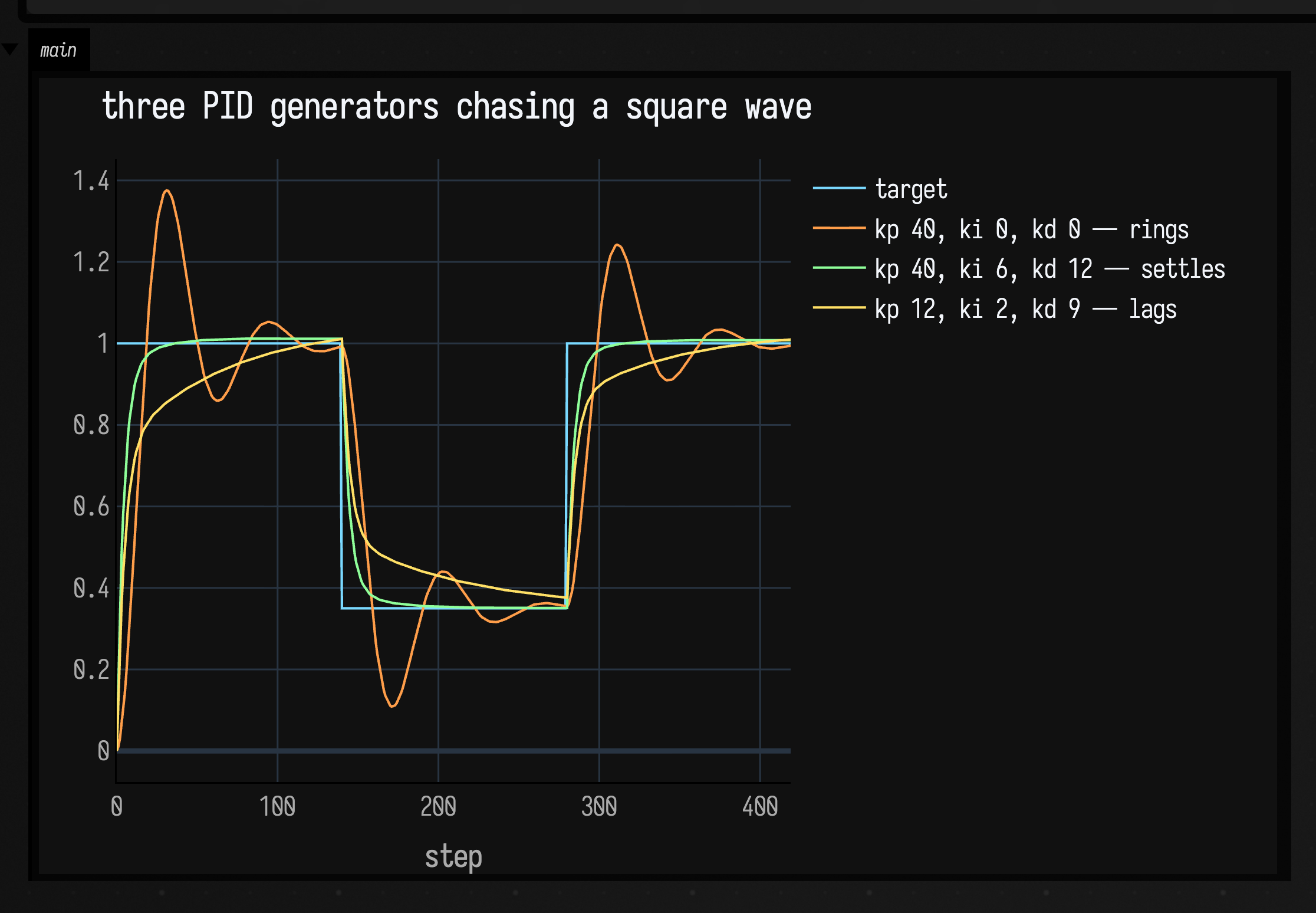
Three controllers, three sets of gains, and none of them declares a state class. yield(x) suspends
in the middle of the while (true), so integral and previousError are simply still there when
next(tick) resumes it.
Composing them
You can combine generators into a pipeline. Here are three combinators building one signal in four stages, each stage derived from the one before:
/*
`generator { }` is the output-only shape: the input type is Unit, so `yield(v)` returns Unit.
This one climbs from `from` to `to` over n steps and then simply returns — a generator that
completes rather than running forever.
*/
fun ramp(from: Double, to: Double, n: Int) = generator<Double> {
    for (i in 0 until n) yield(from + (to - from) * i / (n - 1.0))
}

// `+` is sequential: drive the left to completion, then the right. An attack, then a decay.
fun envelope() = ramp(0.0, 1.0, 90) + ramp(1.0, 0.15, 210)

// `map` transforms the output values as they come past.
fun shaped() = envelope().map { it * it }

/*
`pipe` feeds one generator's output in as another's input. A one-pole smoother is the natural
thing to put on the right: it needs the previous output, which is exactly the state a generator
keeps for free.
*/
fun smoother(alpha: Double) = generator2<Double, Double> {
    var y = 0.0
    var x = yield(0.0)
    while (true) {
        y += alpha * (x - y)
        x = yield(y)
    }
}

// Drive any Unit-input generator by hand until it says it is finished by returning null.
fun drive(g: Generator<Unit, Double>, cap: Int): List<Number> {
    val out = mutableListOf<Number>()
    var v = g.start()
    while (v != null && out.size < cap) {
        out += v
        v = g.next(Unit)
    }
    return out
}

val cap = 300
/*
The bare `ramp(0 -> 1, 90)` is deliberately not plotted: it is pixel-identical to the first 90
steps of `a + b`, so drawing it only puts an invisible series in the legend. Its length is the
interesting part, and you can read that off where the orange trace turns.
*/
showSignals(
    "a + b — attack then decay" to drive(envelope(), cap),
    ".map { it * it }" to drive(shaped(), cap),
    "pipe smoother(0.06)" to drive(shaped() pipe smoother(0.06), cap),
    channel = "main",
    title = "one signal in three stages: +, map, pipe",
    xTitle = "step",
)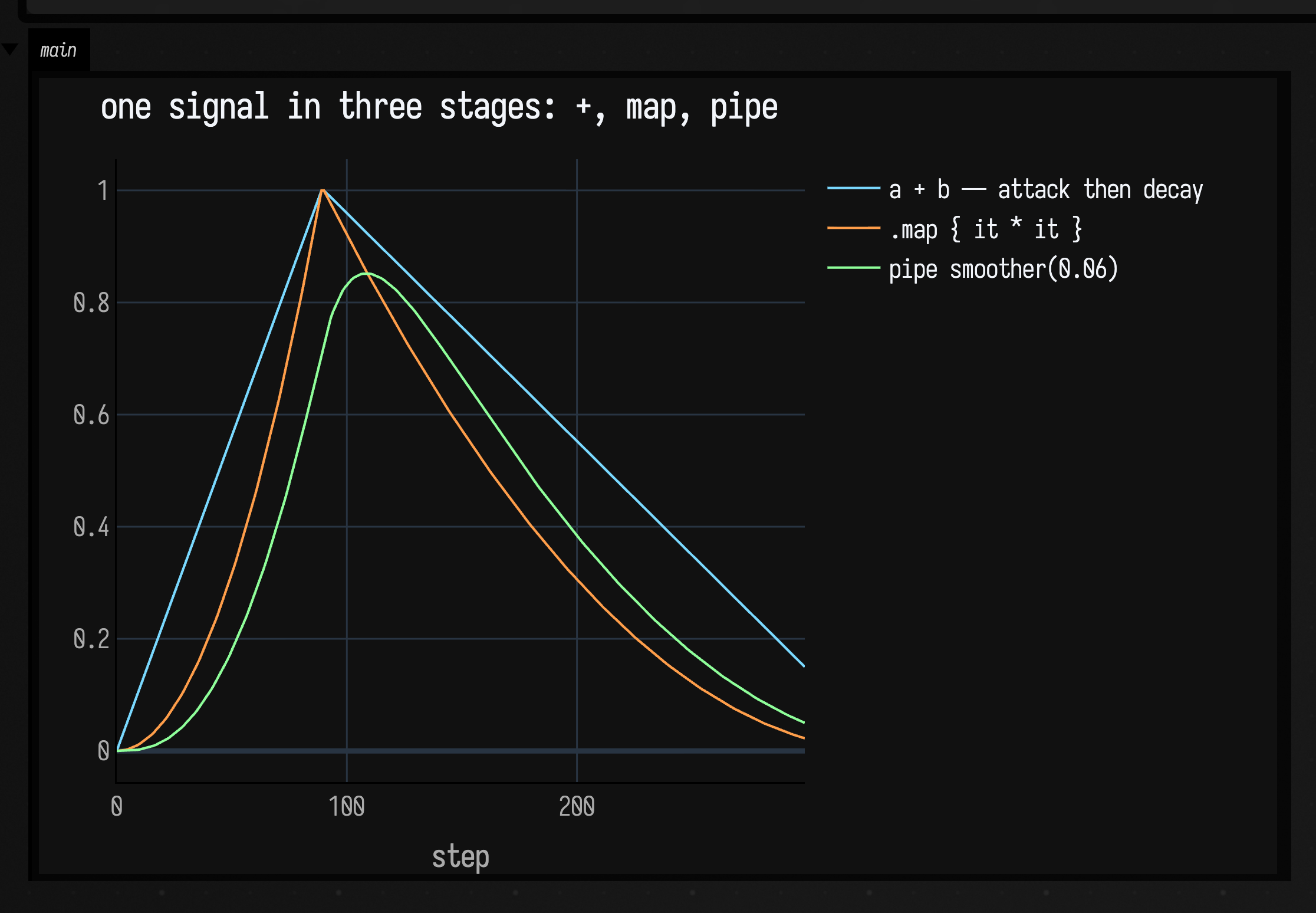
The sharp turn at step 90 is + handing over from the attack to the decay: the left generator
completed there, which is what + waits for. The bowed slopes are map. The rounded peak and the
lag are the smoother on the right of pipe. Each of those is a value you can pass around and
re-compose.
The two remaining shapes are about consuming. % runs two generators in lockstep on the same
input and yields their outputs as a Pair, stopping when either does. gather { } is the
consume-only form: output type Boolean, for a generator you drive for its effect rather than its
value, where the no-argument yield() just hands back true:
// Two estimators over the same noisy input, in lockstep.
val mean = generator2<Double, Double> {
    var sum = 0.0
    var n = 0
    var x = yield(0.0)
    while (true) {
        sum += x
        n++
        x = yield(sum / n)
    }
}
val peak = generator2<Double, Double> {
    var highest = Double.NEGATIVE_INFINITY
    var x = yield(0.0)
    while (true) {
        if (x > highest) highest = x
        x = yield(highest)
    }
}

// `%` — one input in, a Pair of outputs out, until either side finishes.
val both = mean % peak

val random = java.util.Random(7)
val input = List(240) { i -> kotlin.math.sin(i * 0.05) + random.nextGaussian() * 0.25 }

val means = mutableListOf<Number>()
val peaks = mutableListOf<Number>()
var pair = both.start()
var i = 0
while (i < input.size) {
    // Into a local first: at a box's top level `pair` is a property, not a local, so Kotlin
    // will not smart-cast it to non-null however obviously the loop guard proves it.
    val step = pair ?: break
    means += step.first
    peaks += step.second
    pair = both.next(input[i])
    i++
}

// `gather { }` consumes and reports nothing useful — the work is the side effect. Note the bare
// yield(): the no-argument overload exists exactly for this shape.
var crossings = 0
val countCrossings = gather<Double> {
    var previous = 0.0
    while (true) {
        val x = yield()
        if (previous <= 0.0 && x > 0.0) crossings++
        previous = x
    }
}
countCrossings.start()
input.forEach { countCrossings.next(it) }

showSignals(
    "input (sine + noise)" to input.map { it as Number },
    "running mean — left of %" to means,
    "running peak — right of %" to peaks,
    channel = "main",
    title = "%% in lockstep — gather { } counted %d crossings".format(crossings),
    xTitle = "step",
)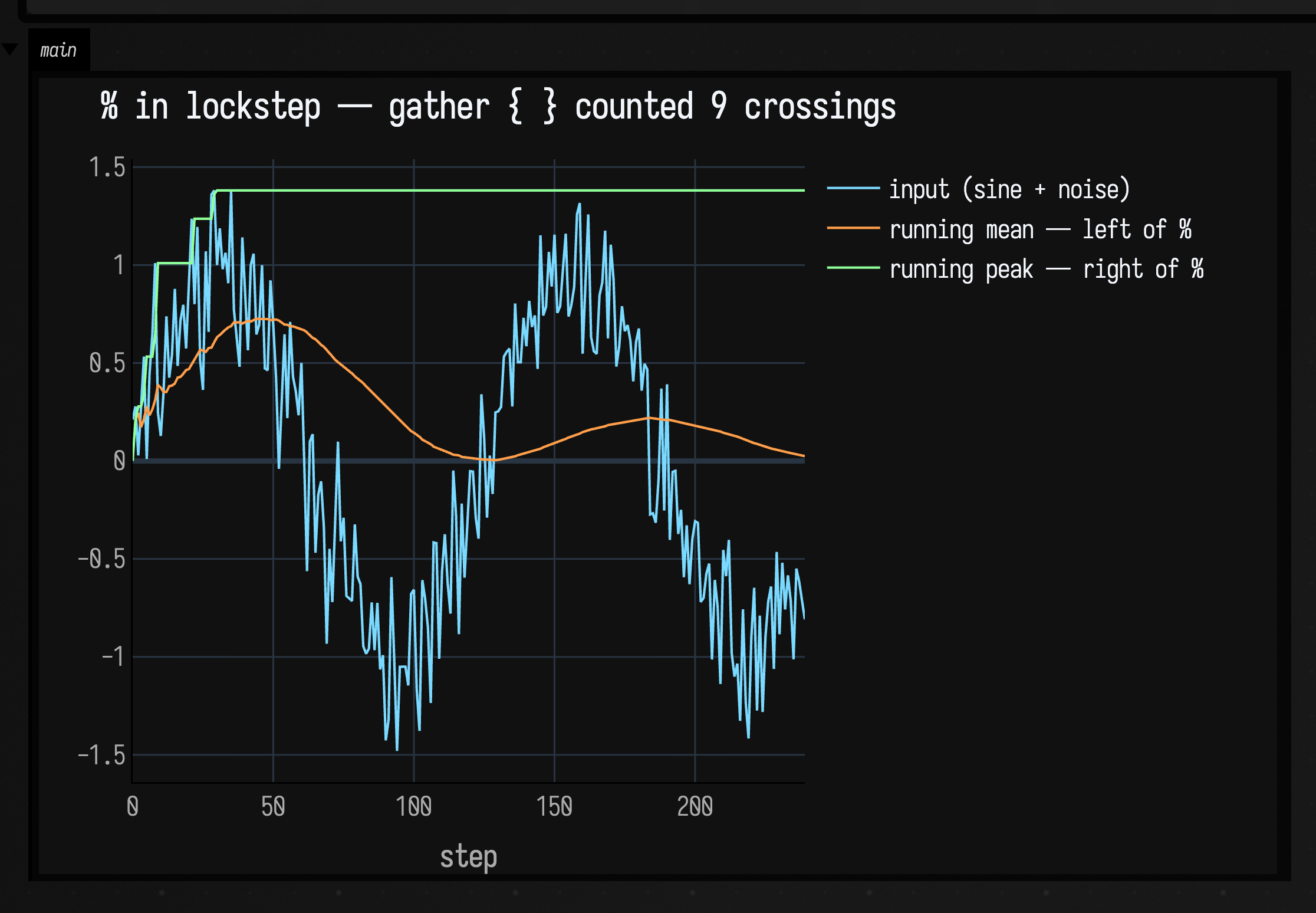
The peak trace only ever climbs, because it is a running maximum, and each step in the staircase is
a new high. The mean settles towards the sine's own average. Both came out of one next(x) call per
step on the composed generator, and the crossing count in the title came from a third generator that
never yielded a value anyone read.
Inside the loop
The rest of this page is how the machinery works: the loop itself, how a returned Frames gets
launched, the builders compared pump by pump, and exactly what a stop does. None of it is needed to
write an animation.
The Runloop
Runloop.start(), in src/jvmMain/kotlin/afield/runtime/lifecycle/Runloop.kt, is the whole scheduler:
while (true) {
    preRun.update()
    main.frame() // ← every Frames in the document advances here
    postRun.update()
    frame++
    if (shouldSleep) schedulingState.idle()
    shouldSleep = true
}
It runs on one thread, named field-runloop-main. idle() is 64 Thread.onSpinWait()s followed by
a 50 µs LockSupport.parkNanos by default, tunable with AFIELD_RUNLOOP_IDLE and friends. Nothing
here waits for a display, which is why a frame is a unit of work rather than of time.
The main loop keeps a queue of work, and one frame runs everything in the queue. (main is a
Framer, Field's coroutine dispatcher.) Scheduling work appends it to the queue; frame() swaps in
a fresh queue and runs everything that was in the old one, to completion:
fun frame(): Int {
    val currentList = synchronized(queueLock) {
        val current = nextList; nextList = LinkedTransferQueue(); current
    }
    var n = currentList.poll()
    while (n != null) { … n.second.run() … ; n = currentList.poll() }
    return c
}
That swap is the frame boundary. A coroutine that suspends during the drain re-dispatches onto the new queue, so it resumes on the next call and not this one. A frame is one drain of the dispatcher's queue, and it is also the unit all of Field's exact profiling counters in Holding a frame budget are measured over.
How a returned Frames is launched
A Frames is inert. Building one runs no code and schedules nothing. What starts it is returning it
as the value of your box. ReturnValueRegistry.registerFramesReturnValue sees a Frames come back,
dispatches frames.body() onto Runloop.runLoop.main inside Box.withBoxContext(box), registers
the coroutine in box.jobs, and starts reporting is-running for the box.
None of the builders is syntax or a rewrite. animate is three lines in stdlib_execution.kt:
fun animate(block: suspend Frames.() -> Unit): Frames = eachFrame(block)There is a second way in, Box.launchFrames(frames), which launches without going through the
return value. It exists for fire-and-forget work (streamProcessFireAndForget is its only caller
in the tree) and it differs in one respect: it composes onto any shouldend already installed,
where the return-value path replaces it.
The builders side by side
The builders differ only in who calls frame(). A Framer is an ordinary dispatcher, so you can
stand in for the Runloop: make a private one, run each builder's body on it, drain it by hand, and
count body calls per pump.
import kotlinx.coroutines.CoroutineScope
import kotlinx.coroutines.launch

// One pump == one Runloop tick. Nothing here needs a window, a document or a wall clock.
fun trace(pumps: Int, build: (() -> Unit) -> Frames): Pair<List<Int>, Int> {
    var calls = 0
    val f = build { calls++ }
    val framer = Framer()
    val job = CoroutineScope(framer).launch { runCatching { f.body() } }
    val perPump = mutableListOf<Int>()
    repeat(pumps) {
        framer.frame()
        perPump += calls
    }
    job.cancel()
    return perPump to f.frameNumber
}

val pumps = 8
val builders = [
    "frames { while (frame()) … }" to trace(pumps) { body -> frames { while (frame()) body() } },
    "eachFrame { } — and so animate { }" to trace(pumps) { body -> eachFrame { body() } },
    "loop { }" to trace(pumps) { body -> loop { body() } },
    "forever { … ; true }" to
        trace(pumps) { body ->
            forever {
                body()
                true
            }
        },
]

/*
The claim this figure makes is `expect`, not the footnote: a frameNumber that broke it would
colour itself and the footnote would count it, rather than waiting for a reader to check the
arithmetic by eye.
*/
val figure = showTable(
    Table(
        ["after pump #"] + (1..pumps).map { "$it" } + "frameNumber",
        note = "cells are cumulative body calls",
    ).rows(builders.map { (label, r) -> [label] + r.first + r.second })
        .accent("frameNumber")
        .expect("frameNumber", because = "one frame per pump") { it == pumps - 1 },
    channel = "main",
)

// And the same claim as a build failure, so a regression in the builders cannot ship a
// figure that contradicts the paragraph under it.
check(figure.deviations.isEmpty()) { "a builder no longer advances one frame per pump" }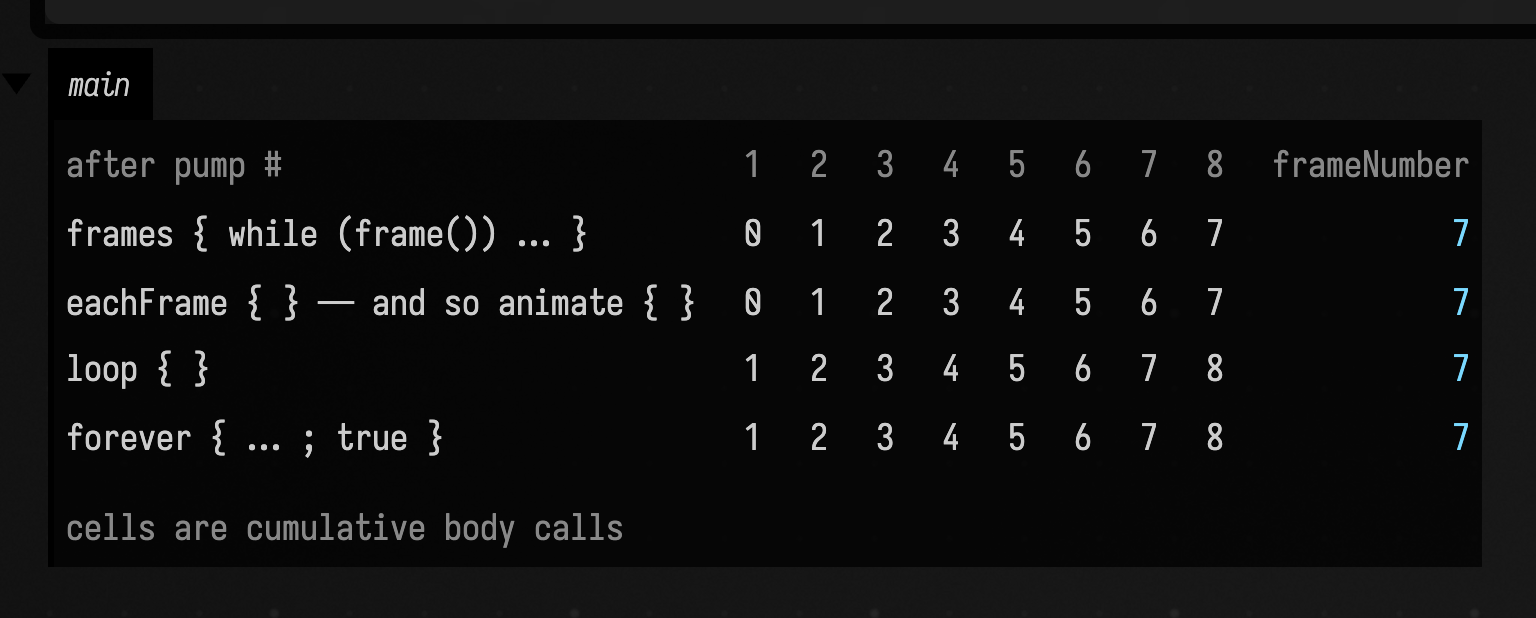
All four advance exactly one frame per pump: the last column is 7 in every row. What differs is
when the body runs relative to the boundary:
| builder | contract |
|---|---|
loop { } |
Run the body, then advance, but only if the body did not advance already. |
forever { } |
loop { }, except the body returns a Boolean and returning false ends it. |
frames { } |
The body runs once and is responsible for calling frame() itself. Everything else is built on it. |
eachFrame { } |
frames { while (frame()) { block() } }: advance, then run the body. animate { } is this. |
loop's body runs from pump 1, eachFrame's from pump 2. That one pump is the difference between
"run, then advance" and "advance, then run", for a body that does not advance itself.
A body that does advance itself pulls them further apart. eachFrame spends a frame of its own
before every body call, so a body that also calls frame() or delay(ms) costs two frames a pass
and runs half as often. loop does not add a second advance to a pass that already advanced. Over
eight pumps:
| Builder | body calls | frames |
|---|---|---|
loop { } |
8 | 7 |
loop { …; frame() } |
8 | 7 |
animate { } |
7 | 7 |
animate { …; frame() } |
4 | 7 |
One frame per pump throughout: the frame rate is the Runloop's, never the builder's.
frame() returns true, or throws
eachFrame is while (frame()) and loop is while (true), which looks like a second
difference and is not. Every route that stops a frame body cancels the job before the
yield() that frame() is suspended on, so the yield throws and frame() does not return at
all. loop gives up nothing by ignoring the value, and forever { }'s own Boolean is the
only return-based way to end a frame program.
The throw is what runs your .end { }: the end phase lives in that catch, so a body that
left through a false return would skip it. dev_docs/frames_stop_end_phase.md has the three
stop routes side by side.
Running two frame programs at once with a + b
A launcher installs its stop fences (shouldend, onAtEndStart, onAtEndFinish,
shouldCancelAtEnd) on the Frames it was handed, which for a + b is the combined one, and
the children are reached only through body(). plus forwards all four down to them, lazily,
so a child is fenced exactly as the parent is and a re-run stops each child in its own right
rather than only via the parent's finally.
All three end phases of (a.end + b.end).end route through the same hook pair, and the launcher
counts them, so the box reports "ending" once per stop.
dev_docs/frames_stop_end_phase.md records the rest.
How a stop reaches the body
Every way of stopping lands in the same place: Frames.frame(), the only suspension point a
well-behaved frame body has.
suspend fun frame(): Boolean {
    job = coroutineContext[Job]
    if (stillborn && job != null) { job?.cancel(); … }
    if ((if (inEndPhase) shouldCancelAtEnd() else shouldend()) && job != null) { job?.cancel(); … }
    try { yield(); frameNumber++; return r }
    catch (t: Throwable) { …run atEnd in a NonCancellable scope…; throw t }
}| how it stops | what actually happens |
|---|---|
| You re-run the box. | The launch bumps runGeneration[strand]. The old Frames's shouldend closes over the old generation, sees the mismatch at the top of its next frame(), and cancels. |
Box.stop / the stop button. |
stopTrackedJobs() is a barrier: it bumps launchEpoch, bumps every strand's generation, and cancels every job in box.jobs outright. The .end { } block still runs, but after stop has returned. |
end() from inside the body. |
Cancels the job directly. Called before the launch has a job, it sets stillborn and the animation is cancelled at its first frame instead. |
| The body returns. | A frames { } block runs off the end. Normal completion. |
forever { } returns false. |
Normal completion, same as above. |
| The body throws. | Caught by the launcher, logged, and reported on the box as an error. |
| A stale launch epoch. | If a stop landed between preparing the launch and dispatching it, registerLaunchJob refuses and the body never runs at all. |
Two of those differ by exactly one body call, and you can measure it:
import kotlinx.coroutines.CoroutineScope
import kotlinx.coroutines.launch

class Result(val how: String, val extraBodyCalls: Int, val endBlockRan: Boolean, val note: String)

/*
Each probe runs a frame body for three pumps, requests a stop, then pumps six more times and
reports what the body did afterwards. These are the stops box code can stage for itself; the
`Box.stop` case needs the box's launch epoch, which is internal to Field — see below.
*/
fun probe(
    how: String,
    note: String,
    build: (counter: () -> Unit) -> Frames,
    request: (Frames, kotlinx.coroutines.Job) -> Unit,
): Result {
    var calls = 0
    var cleaned = false
    val f = build { calls++ }.end { cleaned = true }
    val framer = Framer()
    val job = CoroutineScope(framer).launch { runCatching { f.body() } }
    f.job = job
    repeat(3) { framer.frame() }
    val atRequest = calls
    request(f, job)
    repeat(6) { framer.frame() }
    return Result(how, calls - atRequest, cleaned, note)
}

val results = [
    probe(
        "shouldend flips — what re-running does",
        "the generation fence is read at the top of frame()",
        { c -> eachFrame { c() } },
        { f, _ -> f.shouldend = { true } },
    ),
    probe(
        "the Job is cancelled directly",
        "the pending yield() throws immediately",
        { c -> eachFrame { c() } },
        { _, job -> job.cancel() },
    ),
    probe(
        "end() from inside the body",
        "requested during a body call, so nothing follows it",
        { c ->
            eachFrame {
                c()
                end()
            }
        },
        { _, _ -> },
    ),
    // `throw`, not `error("boom")`: in a box the script's implicit Box receiver is still in scope,
    // so `error(...)` resolves to Box.error and reports a box error instead of throwing.
    probe(
        "the body throws",
        ".end { } is not a finally",
        { c ->
            eachFrame {
                c()
                throw IllegalStateException("boom")
            }
        },
        { _, _ -> },
    ),
    probe(
        "the body returns normally",
        "there is no cancellation to catch",
        { c ->
            frames {
                repeat(2) {
                    c()
                    frame()
                }
            }
        },
        { _, _ -> },
    ),
]

// `roleBy` rather than a hex literal: OK/BAD are the same `--field-*` tokens `markdown()`'s
// `{ok:…}` spans use, so this column agrees with every other "ran / did not run" in the docs.
showTable(
    Table(["how the Frames stopped", "further body calls", ".end { } ran", "why"])
        .rows(results.map { [it.how, it.extraBodyCalls, it.endBlockRan, it.note] })
        .accent("further body calls")
        .color("why", TABLE_MUTED)
        // WARN, not BAD: two of these rows are correct completion behaviour, not errors — the
        // figure wants a reader to notice them, not to read them as a failure.
        .roleBy(".end { } ran") { if (it == true) CellRole.OK else CellRole.WARN }
        .format(".end { } ran") { if (it == true) "yes" else "no" },
    channel = "main",
)

// The two claims the paragraphs below make, as assertions rather than as prose a reader has to
// check against the figure by eye.
check(results.count { it.extraBodyCalls > 0 } == 1) { "only shouldend should cost a further body call" }
check(results.count { it.endBlockRan } == 3) { ".end { } should run for the three cancellation cases" }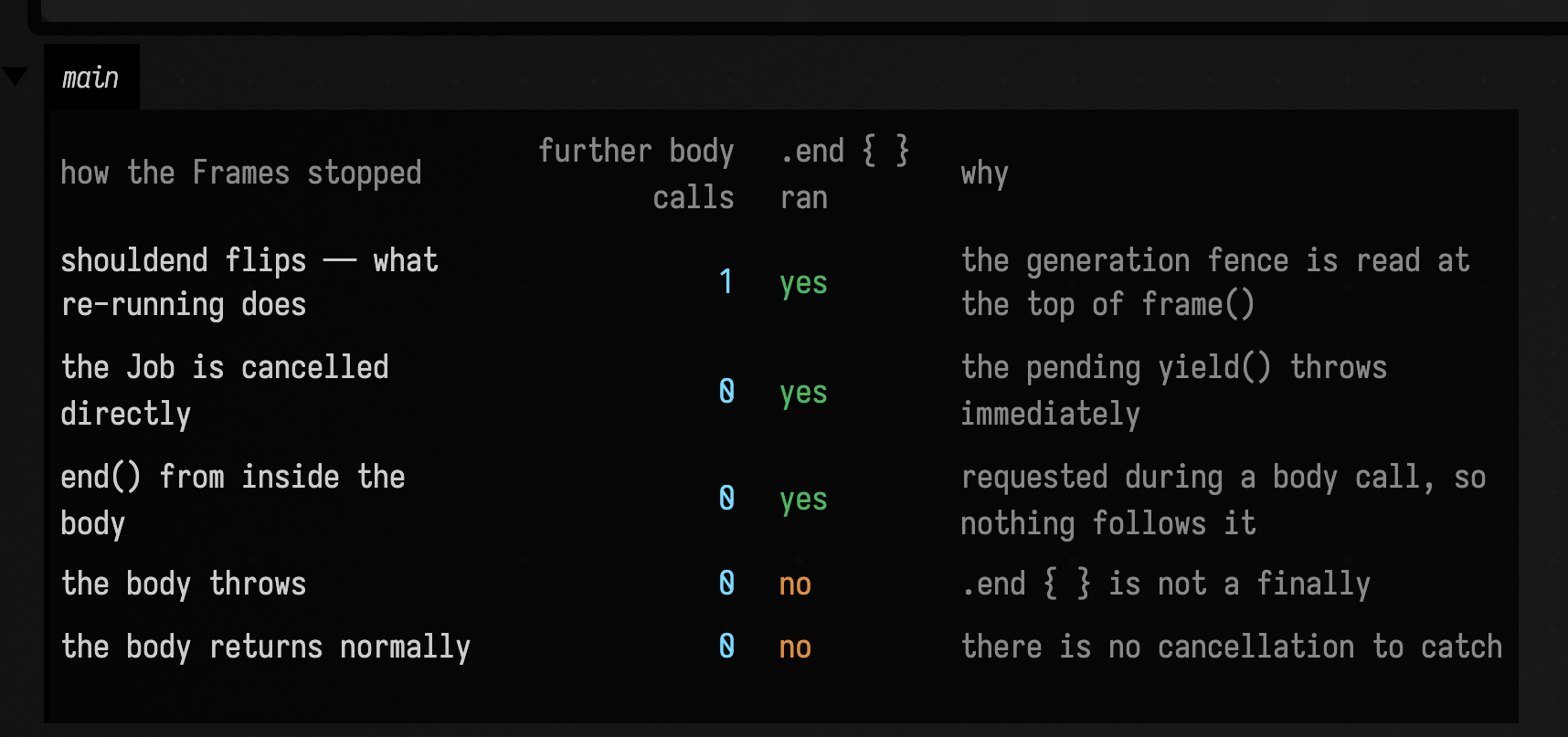
Re-running a box costs one more body call; stopping it costs none. shouldend is read at the
top of frame(). A body suspended inside frame() is halfway through a call that has already
decided to return true: it resumes, returns true, and the loop runs the body one final time
before the next frame() looks at the flag. Cancelling the Job, which is what Box.stop does,
makes the pending yield() throw instead, so nothing more runs. If your animation holds a resource
that must not be touched after a re-run, one extra pass is the window you have to survive.
.end { } runs only on cancellation. atEnd is invoked from exactly one place: frame()'s
catch, reached only when the pending yield() throws a cancellation. A body that throws its own
exception does not go through that path, and neither does one that simply returns.
When both are present and a cancellation arrives, .end { } runs before the body's finally:
frame() calls it from inside its own catch, before rethrowing, so the cancellation has not yet
unwound the body.
Agents: what pins this order
FramesSemanticsTest.theEndBlockRunsBeforeTheBodysOwnFinally holds the .end { }-before-finally
order in place; change the two together.
When atEnd does run, frame() re-enters through withContext(NonCancellable) on a fresh Job
that inherits the dispatcher and the box context, so the end block still gets frames and can still
draw. The one case the figure above cannot stage, because it needs the box's launch epoch, is the
stop button.
Box.stop and the end block
stopTrackedJobs() increments the box's launchEpoch before it cancels anything, and everywhere
else a job arriving with a stale epoch is cancelled on sight. The end phase is the one piece of work
that legitimately belongs to a launch stop has already invalidated, because it is stop's own
cancellation that creates it, so Box.registerEndPhaseJob registers it against the epoch as it
stands now rather than against the one the launch captured. The rest of the barrier is unchanged:
the end job still goes into box.jobs, so a second press of stop cancels it, and
shouldCancelAtEnd still fences it against the generation as it stood when the end phase began. A
runaway end block cannot ignore the stop button.
What stop gives up is being synchronous. The body is suspended in yield() when stop arrives;
cancelling its job resumes it, and that resumption is dispatched, so the throw, and therefore the
end phase, happens on a later Runloop tick, after stop has returned.
For Field's own code that holds an OS resource, that is too late, so boxes also carry stopHooks: a
short, synchronous teardown list, registered with the internal Box.registerStopHook, that
stopTrackedJobs drains before it returns. Box.streamProcess, the one place in Field's own
source that installs an atEnd, registers its kill in both, so an external command dies whether it
was still running at stop or had already exited. The epoch mechanism and the caller sweep are in
dev_docs/frames_stop_end_phase.md.
Every name in Phased.kt
Every public name in Phased.kt, grouped by what it is for.
The types
| Name | What it is |
|---|---|
type Frames |
A frame-based animation: a suspend body, a frameNumber, and the hooks a launcher installs on it. |
type Framer |
The CoroutineDispatcher whose queue-drain is the frame boundary. Runloop.runLoop.main is one. |
type GeneratorScope |
The receiver inside generator { } — it exists to provide yield. |
type Generator |
A pull-driven coroutine: start(), then next(input) per step. |
Frames — the members in scope inside a frame body
| Name | What it is |
|---|---|
Frames.frame() |
Advance one frame: check the stop conditions, suspend until the next queue drain, increment frameNumber. Returns true; when the animation is stopping it throws instead. |
Frames.delay() |
Suspend for ms milliseconds of real time, then frame(). |
Frames.wait() |
while (!cancelled) frame() — park here, advancing, until something stops us. |
Frames.end() |
Ask to stop. Cancels the job, or marks the animation stillborn if it has not launched yet. |
Frames.frameNumber |
Frames completed so far. Counts work, not time. |
Frames.job |
The coroutine running body, once there is one. |
Frames.body |
The suspend lambda a builder assembled. Inert until something launches it. |
Frames.atEnd |
The cleanup chain, run on cancellation only — including the stop button. Frames.end { } appends to it. |
Frames.shouldend |
Polled at the top of every frame(). This is where a launcher installs its generation fence. |
Frames.toString() |
"(frames)" — what a box shows when you evaluate one without returning it. |
The builders
| Name | What it is |
|---|---|
frames |
The lowest level: the body runs once and calls frame() itself. |
eachFrame |
Advance, then run the body, while frame() returns true. animate { } is an alias for this. |
loop |
Run the body, then advance — unless the body advanced already. |
forever |
loop, but the body returns a Boolean and false ends it. |
Frames.end |
Chain a cleanup block onto atEnd. Written .end { }, and distinct from the end() member. |
Frames.plus |
Run two frame programs in parallel under one parent, forwarding the parent's stop fences to both children. |
Box.launchFrames |
Launch a Frames on the Runloop against a box, without returning it. Two overloads. |
then |
Sequence two plain suspend lambdas into one. |
The generator layer
| Name | What it is |
|---|---|
generator2 |
Build a generator with both an input and an output type. |
generator |
Output only — the input type is Unit. |
gather |
Input only — the output type is Boolean. |
Generator.start() |
Run to the first yield and return what it yielded, or null if it finished first. |
Generator.next() |
Resume with an input, run to the next yield, return it — or null once finished. Throws if the generator is not parked at a yield. |
Generator.isCompleted |
True once the body has returned without failing. |
GeneratorScope.yield() |
Emit a value and suspend; resumes with the next input. The no-argument overload yields true. |
Generator.plus |
Sequential composition: drive the left to completion, then the right. |
Generator.rem |
Lockstep composition (%): same input to both, yields a Pair, stops when either does. |
Generator.pipe |
Feed this generator's output into another as its input. |
Generator.map |
Transform the output values. |
Generator.Companion.isMain |
Set by Framer.frame() while it drains, so code can tell it is on the Runloop thread. |
The dispatcher
| Name | What it is |
|---|---|
Framer.dispatch() |
CoroutineDispatcher's hook — queue the runnable for the next frame. |
Framer.frame() |
Swap the queue and run everything in it. One call is one frame. |
Where this lives
| what | file |
|---|---|
Frames, the builders, Framer, the generator layer |
src/jvmMain/kotlin/afield/runtime/lifecycle/Phased.kt |
the Runloop and AnimationClock |
src/jvmMain/kotlin/afield/runtime/lifecycle/Runloop.kt |
animate, start |
src/jvmMain/kotlin/afield/runtime/execution/stdlib_execution.kt — listed in Workspace |
what happens when a box returns a Frames |
src/jvmMain/kotlin/afield/runtime/execution/ReturnValueRegistry.kt |
| stop, generations and launch epochs | src/jvmMain/kotlin/afield/document/graph/Boxes.kt |
| the non-coroutine per-frame layers | src/jvmMain/kotlin/afield/graphics/vulkan/util/MapOfSequences.kt |
| the behaviour on this page, as tests | src/jvmTest/kotlin/afield/runtime/lifecycle/FramesSemanticsTest.kt |
The codebase reference lists every declaration in Phased.kt under
Workspace; this page explains how they fit together.
To see it running, open the frames_lifecycle starting
point from the welcome screen. Its four boxes start, stop, re-run and clean up a frame loop.
Next on the Tour, Drawing with FLines builds the lines and shapes a loop like these can move.