Kotlin in the head (running Kotlin in a browser or Vision Pro)
Most Field boxes run their Kotlin on the JVM, right next to the renderer. But Field can also take a box's Kotlin, compile it to JavaScript in-process, and ship it over a WebSocket to run somewhere else entirely, into a head: a browser tab showing a THREE.js/WebXR scene, an Apple Vision Pro running a native Metal shader, or a Tone.js computer-music engine. We call this "Kotlin in the head".
You can use Kotlin's data classes, operator fun and standard library, with compile-time errors
reported on the corresponding source line. Operator overloading works in the head too, so you can
write vector and matrix math in the same style.
If Kotlin itself is new to you, read the Kotlin Syntax Overview first. This
page assumes you can read a data class and a lambda.
What you can see on this page
Pixels moving in WebXR and audio actually playing need a real browser or Vision Pro, and for audio a user gesture, so neither of those appears here. The JavaScript further down is real compiler output.
Agents: regenerating the emitted JavaScript
The JavaScript listing is regenerated by afield.examples.KotlinInTheHeadEvidence (a
jvm-main smoke, id docs.kotlin-in-the-head.emitted-js); do not hand-edit it.
Turning a box into a Kotlin/JS box
A normal box's main language is JVM-Kotlin. To make a box (and everything nested under it) a
"Kotlin in the head" box, set its main language to Kotlin → head (the kotlinjs runtime). From
then on:
- The box's editor uses Kotlin syntax highlighting.
- On Execute / Launch, the box's Kotlin is compiled K2 → JavaScript in-process as a single
self-contained, tree-shaken
plainmodule, so a small program compiles to a few KB. - That module is shipped over the same WebSocket transport Field already uses to drive remote
JavaScript, and the head runs it with a plain
eval.
You don't have to write fun main(): if your box has no top-level main, Field wraps your code in a
synthesized one (hoisting import/package/external declarations to file scope first), exactly the
way a script-style box works elsewhere in Field.
Choosing a head: the profile marker
One Kotlin/JS runtime can talk to several kinds of head, and each head installs a different set of globals (THREE, Tone, the Metal uniform bridge). You choose which one by putting a profile marker on the first non-blank line of the box:
| First line | Head | What's bound |
|---|---|---|
| (no marker) | legacy RemoteJS | the original raw-JS broadcast behavior |
// {{ remoteAR }} |
browser THREE.js / WebXR | THREE.*, scene, camera, vec, stage, FLine, … |
// {{ tone }} |
Tone.js computer-music engine | Tone.* — synths, effects, Transport, scheduling |
// {{ visionmetal }} |
Apple Vision Pro native Metal | uniform(...), geometry { … }, the compositor frame clock |
The marker line is kept (blanked) so your compile-error line numbers still line up with what you typed. An unknown marker is a hard error rather than a silent fallback to the wrong head. A head that doesn't install the globals your code references would compile and then fail at runtime, so Field refuses to guess.
All three profiles share a small lifecycle surface (from RemoteLifecycleKotlinJs):
:::static
onStart { /* runs once when a Launch reaches the head */ }
onFrame { frame -> // runs on the head's own render clock
    frame.time // seconds since start (Double)
    frame.deltaTime // seconds since previous frame
    frame.frameNumber // Int
    frame.predictedDisplayTime // Double? — set on Vision Pro, null in a browser
}
onStop { /* runs exactly once on relaunch / Stop / error */ }
keepAlive() // ask the head to keep ticking framesonStart/onFrame/onStop/keepAlive are inert during a plain Execute; they come alive on
Launch, and the head runs registered onStop callbacks exactly once on relaunch or Stop.
Printing, errors, display and controls
The browser profiles (remoteAR, tone, and no marker) give a box the same output a Kotlin box on
the JVM has. println and console.log print beside the line that called them. An exception
puts the red marker on the line of your code it came from, and a run with no head connected is an
error on the box. display, slider and checkbox draw into the box's output area, and their
callbacks run in the head:
// {{ remoteAR }}
var freq = 3.0

fun redraw() = display("main", "<b>sine</b> at $freq Hz")

slider("frequency", min = 1.0, max = 10.0, step = 0.1, initialValue = 3.0) {
    freq = it
    redraw()
}
checkbox("square wave") { println("square: $it") }
setTimeout({ println("half a second later") }, 500)
redraw()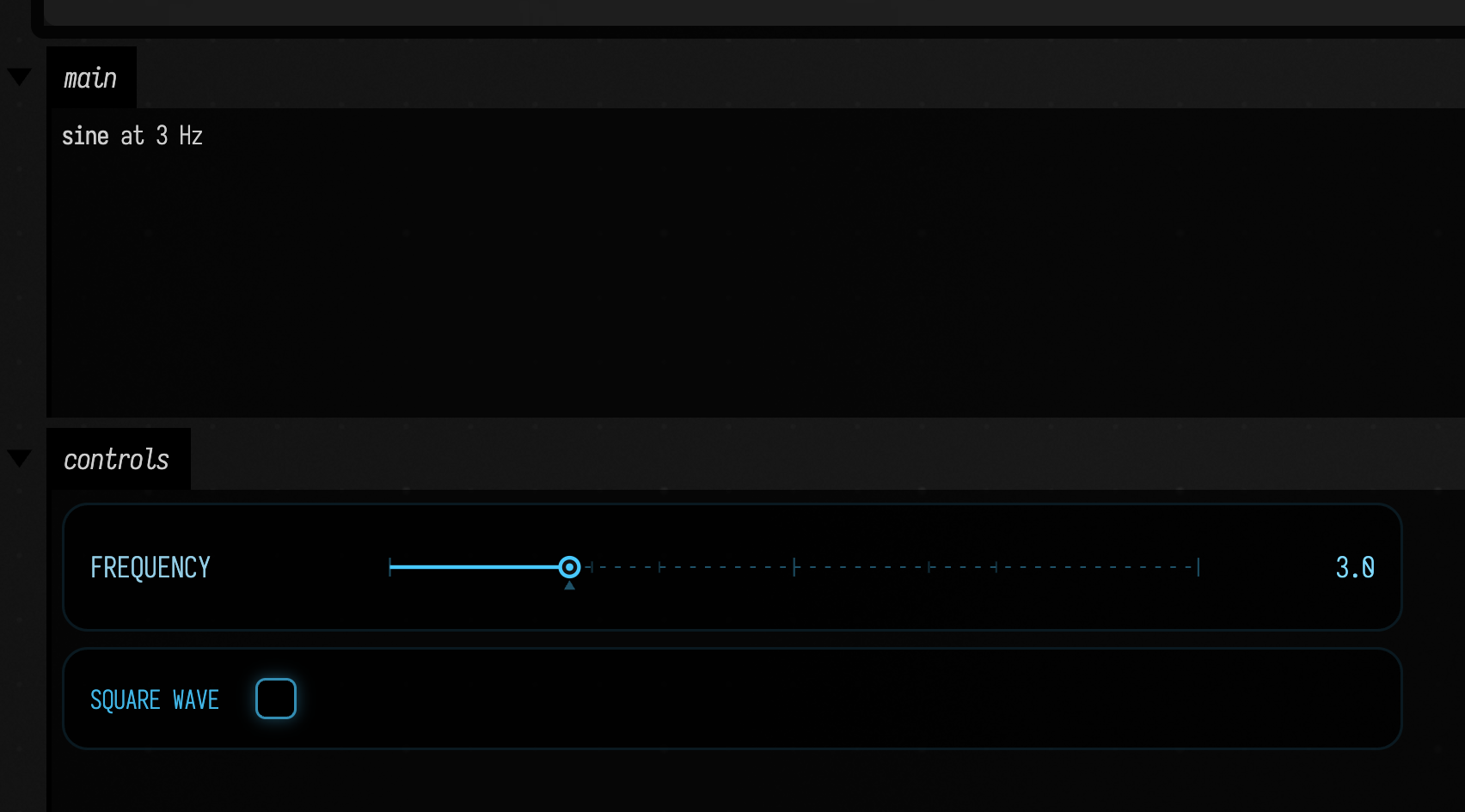
setTimeout is the browser's timer; what it prints still reaches the box. An exception thrown
inside an inline standard-library function such as reduce is marked on the line that called the
function it was inlined into. The Javascript page shows the same sketch for a
Javascript box.
A vector type with operators
The smallest box that shows the whole idea. This one is remoteAR, and it declares a Kotlin
data class with two operator funs and uses them:
:::static
// {{ remoteAR }}
data class V(val x: Double, val y: Double) {
    operator fun plus(o: V) = V(x + o.x, y + o.y)

    operator fun times(k: Double) = V(x * k, y * k)
}

val a = V(1.0, 2.0)
val b = V(10.0, 20.0)
log("sum = ${a + b}") // sum = V(x=11.0, y=22.0)
log("scaled = ${a * 3.0}") // scaled = V(x=3.0, y=6.0)
log(...) is the head's console, and its output comes back over the transport to the box. V(x=11.0,
y=22.0) is the toString() that data class generated for you, running in the head. It is ordinary
Kotlin, compiled to JavaScript.
Field's compiler (afield.lang.remotejs.KotlinToJsCompiler) turns the Kotlin above into this JavaScript,
with only the ~4 KB Kotlin/JS stdlib runtime prelude elided, as marked. Your data class V became
function main$V, its operator fun plus/times became prototype methods with Kotlin's mangled JS
names (plus_…_k$ / times_…_k$), and the string template "sum = ${a + b}" was lowered to a call
to .plus_…_k$(b).toString():
:::static
var vectors = function (_) {
  'use strict';
  // ...Kotlin/JS stdlib runtime prelude (initMetadata…, Unit, protoOf, …) — elided; DCE keeps it tiny...
  function main() {
    var a = new main$V(1.0, 2.0);
    var b = new main$V(10.0, 20.0);
    log_0('sum = ' + a.plus_oi8stp_k$(b).toString());
    log_0('scaled = ' + a.times_qz1dds_k$(3.0).toString());
  }
  function log_0(value) {
    return log(value);
  }
  function main$V(x, y) {
    this.x_1 = x;
    this.y_1 = y;
  }
  protoOf(main$V).plus_oi8stp_k$ = function (o) {
    return new main$V(this.x_1 + o.x_1, this.y_1 + o.y_1);
  };
  protoOf(main$V).times_qz1dds_k$ = function (k) {
    return new main$V(this.x_1 * k, this.y_1 * k);
  };
  protoOf(main$V).toString = function () {
    return 'V(x=' + this.x_1 + ', y=' + this.y_1 + ')';
  };
  function mainWrapper() {
    main();
  }
  mainWrapper();
  return _;
}(typeof vectors === 'undefined' ? {} : vectors);
A data class also generates equals, hashCode, copy, and component1/component2, but this
box never calls them, so whole-program dead-code elimination dropped them: what is above is the
whole module, not an excerpt of a larger one.
An animated ring of THREE boxes
The remoteAR head installs the THREE.js scene graph. The vector types carry Kotlin operator
overloads (+, -, *), and Field adds scene helpers (vec, addBox, scene, clearAll). This
box builds a ring of little boxes and spins each one on the head's frame clock:
// {{ remoteAR }}
clearAll()
val n = 12
val ring =
    (0 until n).map { i ->
        val theta = i.toDouble() / n * 2.0 * kotlin.math.PI
        // four units in front of the head's camera, which looks down -z from the origin
        val here = vec(kotlin.math.cos(theta) * 2.0, kotlin.math.sin(theta) * 2.0, -4.0)
        val box = addBox("ring-$i", 0.5).mesh
        box.position.set(here.x, here.y, here.z)
        box
    }
onFrame { frame ->
    ring.forEachIndexed { i, box ->
        box.rotation.y = frame.time * 2.0 + i.toDouble() * 0.5
    }
}
log("ring installed: ${ring.size} boxes")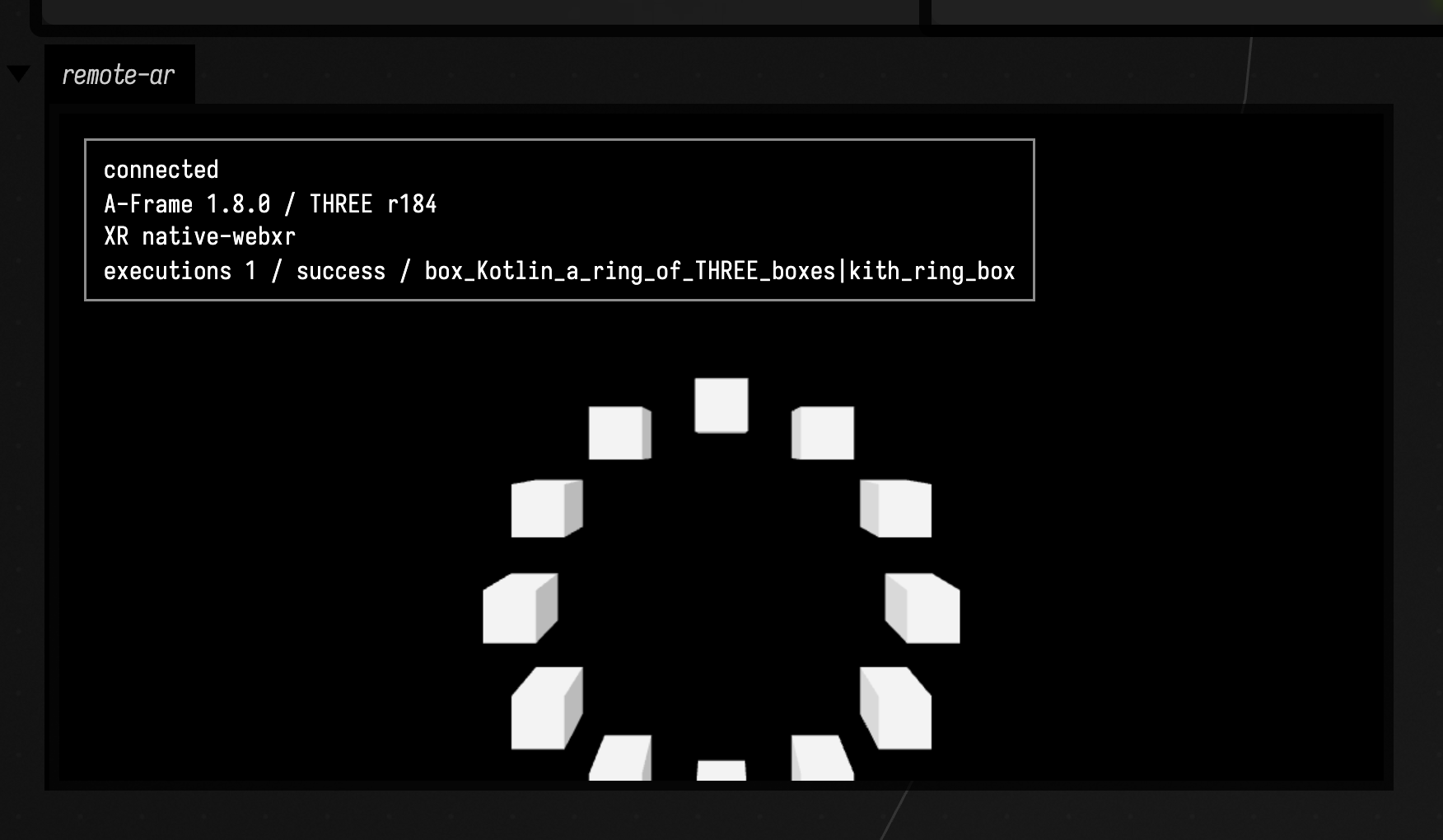
vec(x, y, z) returns a THREE.Vector3; addBox(name, size) places a mesh and returns it;
box.position is a THREE.Vector3 with .set(...); box.rotation is a THREE.Euler with a
mutable .y. To see the ring turn, open this box with a browser WebXR head connected.
The overloads reach THREE's own vector types too, so this compiles and runs:
:::static
// {{ remoteAR }}
val origin = THREE.Vector3(1.0, 2.0, 3.0)
val shifted = origin + THREE.Vector3(10.0, 0.0, 0.0) // operator fun plus
val doubled = shifted * 2.0 // operator fun times
log("$shifted then $doubled")
Bells with Tone.js
// {{ tone }} routes to a head that has Tone.js loaded. The bound
surface covers the synth family, core effects, the Param value type, and Transport scheduling.
This box schedules a four-note arpeggio:
:::static
// {{ tone }}
onStart {
    val synth = Tone.PolySynth()
    val reverb = Tone.Reverb(3.0)
    reverb.toDestination()
    synth.connect(reverb)

    val notes = ["C4", "E4", "G4", "B4"]
    val transport = Tone.getTransport()
    transport.bpm.value = 96.0

    var step = 0
    val loop = transport.scheduleRepeat(
        { time ->
            synth.triggerAttackRelease(notes[step % notes.size], "8n", time)
            step += 1
        },
        "8n",
    )

    Tone.start()
    transport.start()

    onStop {
        transport.clear(loop)
        transport.stop()
        synth.dispose()
        reverb.dispose()
    }
}Tone.PolySynth(), Tone.Reverb(decay), connect/toDestination/dispose, getTransport(),
transport.bpm.value, scheduleRepeat(callback, "8n") and triggerAttackRelease(note, duration,
time) are the names that box uses. The onStop block is the part to copy: it cancels the scheduled
event and disposes the audio nodes, so a relaunch doesn't stack a second arpeggio on top.
Audio needs a real head and a gesture
Web audio will not start without a user gesture. Run this example in a browser head and click to hear it.
Native Metal on Vision Pro
The visionmetal head is Field4Vision's tiny JavaScriptCore runtime driving a live Metal shader on
the Vision Pro's own compositor thread. A program has three explicit parts, and your Kotlin owns two
of them: it builds the geometry and feeds the uniforms, on the compositor's frame clock.
:::static
// {{ visionmetal uniforms=phase,amount,tint }}
onStart {
    geometry {
        color(1.0, 0.35, 0.15)
        cube(0.18, cx = 0.45, cz = -1.2, tintFaces = true)
    }
    uniform("amount", 0.025)
    uniform("tint", 0.1, 0.8, 1.0, 0.35) // a vec4 uniform
    onFrame { frame ->
        uniform("phase", frame.time * 3.0)
        log("frame ${frame.predictedDisplayTime}")
    }
}
geometry { … } builds an indexed triangle mesh in the headset and hands the whole thing to Metal
in one call, so nothing per-vertex crosses the network or the JS bridge at frame rate. vertex(x, y, z)
returns an index and picks up the current normal(), color(), uv() state; triangle()/quad()
supply indices. On top of those: cube, plane, sphere, and tube, which sweeps a polygon along a
polyline so a line drawn in Kotlin has real thickness in the headset. Call it again, even from
onFrame, to replace the mesh; the swap happens at a frame boundary, so a rebuild never tears.
Building geometry in the headset is the full tour.
uniform(name, x) through uniform(name, x, y, z, w) write the named slots the marker declares. The
shader reads them by name, because the head generates #define u_phase frame.user[0] and so on
ahead of your source. frame.predictedDisplayTime is the compositor's predicted present time (it's
null in a browser head, which is why it's a Double?).
The third part is the shader itself, which lives in the box's msl property. That is Metal
Shading Language, with both entry points (field_vertex and field_fragment) in one property,
because Metal compiles them from one translation unit. It has its own highlighting and completion, and its own
Reload MSL command (alt r): editing the shader recompiles on the headset while your Kotlin, your
geometry, and the frame clock all keep running.
The compile pipeline
A Kotlin/JS box compiles in two K2 phases, entirely in-process:
source.kt  --( -Xir-produce-klib-file )-->  <module>.klib
<module>.klib  --( -Xir-produce-js, -Xinclude, -Xir-dce )-->  <module>.js  (plain, tree-shaken)
Because the compiler runs in the same JVM as the Field REPL, edits recompile without launching a
fresh toolchain. Whole-program dead-code elimination (-Xir-dce) shrinks the output from the full
stdlib to just what your box uses. The profile's external declarations (the typed view of THREE,
Tone, or the Metal bridge) are appended to your source after the implicit-main wrapping, so your
diagnostic line numbers stay stable. Each profile's declarations, and the parallel model that powers
completion, are generated from a single binding description, so what completion offers matches what the
compiler accepts.
Further reading
- Kotlin Syntax Overview — the language these boxes are written in.
- Running code in a box — the box execution model this plugs into.
- Field on Apple Vision Pro — the native head the
visionmetalprofile targets. - Building geometry in the headset — the
visionmetalgeometry builder in full. - Automating Field — driving boxes over the transport.