ORCA
ORCA is Hundred Rabbits' livecoding sequencer: a grid of
letters where every letter is an operator, every operator runs once a frame, and a * passing
next to one sets it off. orca() puts ORCA in a box's output. You type into it exactly as you
would into ORCA, and whatever it would send to a synthesizer arrives in your Kotlin instead.
This box plays a melody and a bass line through one of Field's small built-in synthesizers, and shows the last note it heard:
val synth = PatSynthBank()
val o = orca(
    rows = 12,
    grid =
        """
    #.ORCA.IN.FIELD.#
    .
    .2C8
    D2.8TCDEGAGED
    .:04
    .
    D8
    .:12C
""",
)
o.onNote("sound") {
    synth.play(it)
    markdown("heard", "`${it.note}${it.octave}` on channel ${it.channel}, MIDI ${it.midi}")
}
displayOpen("heard")
synth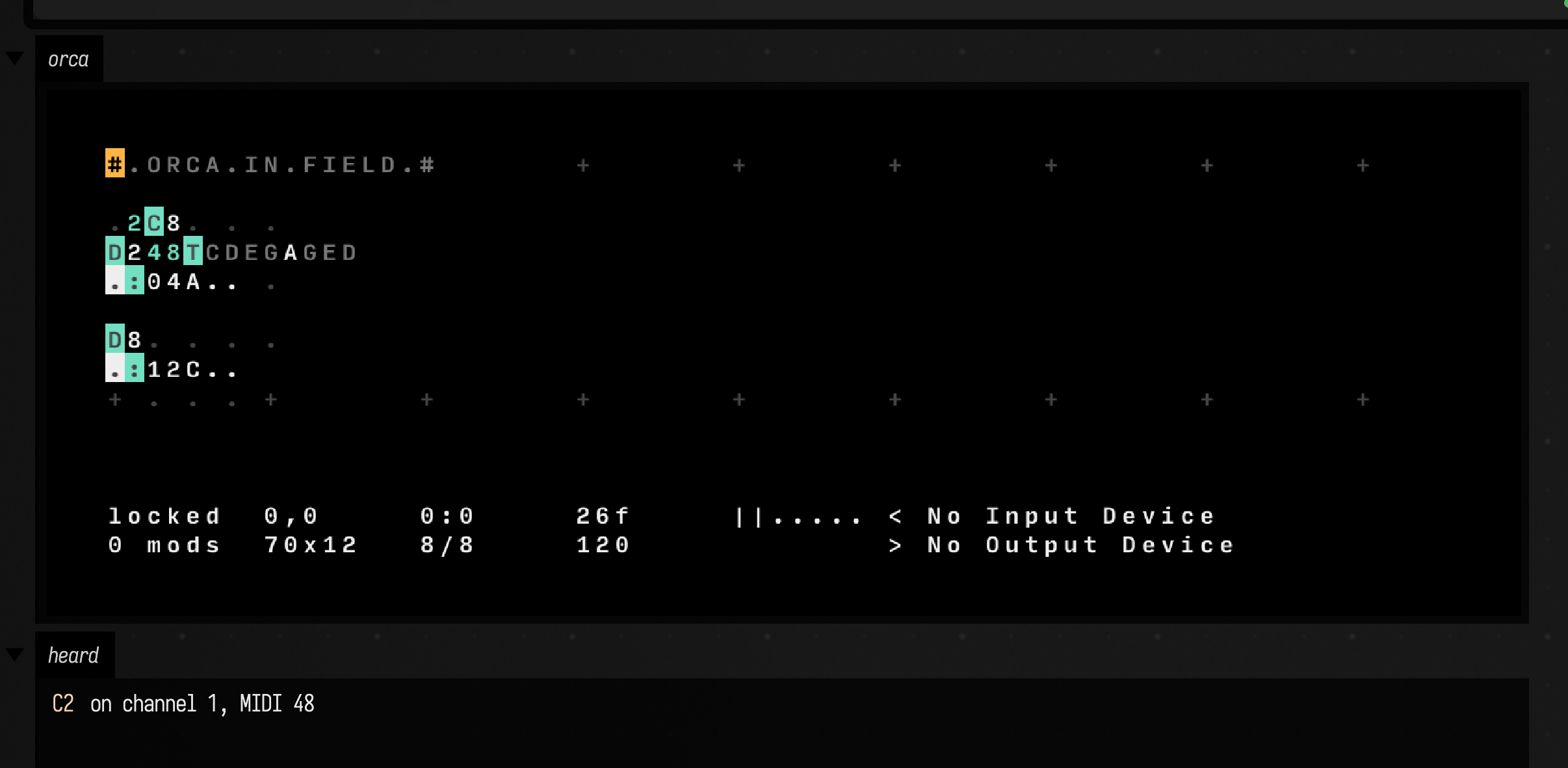
Returning synth from the box is what makes it sound: PatSynthBank plays through
Field's audio engine for as long as the box runs. Stop the box and ORCA stops with it. This is
eight seconds of it:
Open the ORCA starting point ↗ to have this box in a document of your own.
Click the grid to give ORCA the keyboard: arrows move, letters write, Space plays and pauses, Escape puts the cursor back, ctrl/command-K opens ORCA's command line, and ctrl/command-G shows its guide to every operator. ORCA's README lists the operators too.
What comes back
Each operator that talks to the outside world has a callback. They run once per frame, in the
order ORCA played them, with the box in context, so they can display, print and change box state.
| ORCA | Kotlin | you get |
|---|---|---|
: MIDI note |
onNote { } |
OrcaNote: channel, octave, note as ORCA writes it, midi, hz, velocity (0 to 1), frames and seconds long |
% mono note |
onNote { } |
the same, with mono true |
! control change |
onCC { } |
OrcaCC: channel, knob, value (0 to 127) |
? pitch bend |
onBend { } |
OrcaBend: channel, lsb, msb |
; UDP |
onUdp { } |
the text after the ; |
= OSC |
onOsc { } |
OrcaOsc: path, and args as the values of the glyphs after it |
| any cell changing | onChange { }, onCell(x, y) { } |
OrcaCell: x, y, before, after; or the new glyph |
| every frame | onFrame { } |
the Orca: grid, frame, bpm, playing, variables, cursor |
ORCA's MIDI output still goes to a MIDI device if the browser has one, as it does in ORCA itself.
Writing to it
write(x, y, text) puts glyphs on the grid with their top
left at (x, y); a newline in text starts the next row back at x. Setting grid replaces the
whole thing. command(...) runs anything ORCA's command line takes, and play(), stop() and
bpm are there by name. Added to the first example, these three lines speed it up, put a third
voice under it, and pick a new melody each time the bass plays:
o.bpm = 140
o.write(0, 9, "D4\n.:03C")
o.onNote("choose melody") { if (it.channel == 1) o.write(5, 3, ["CDEGAGED", "EGBDBGEB"].random()) }
Named callbacks replace the previous callback with the same name on that ORCA. Stop or rerun of the registering box removes them. Give independent parts different names. Unnamed callbacks remain registered for the lifetime of their ORCA.
A change reaches ORCA at its next frame. Inside a coroutine, o.sync() waits until ORCA has applied everything sent so far and
reported back, so o.grid shows the result.
Playing a part in the grid
A box can also work cell by cell, as one more operator. o[x, y] reads a glyph and
o[x, y] = 'C' writes one; bang(x, y) writes a *, which fires the operators beside it next
frame. onChange { cell -> } reports every cell that changed since the last frame, whoever changed
it, and onCell(x, y) { glyph -> } watches one. In the first example the track operator puts each
melody note at (4, 4) and the bass's note sits at (4, 7), so one line makes the bass follow the
harmony:
o.onCell(4, 4, "bass harmony") { note -> o[4, 7] = if (note == 'G' || note == 'A') 'F' else 'C' }With that line the bass moves to F under the G and A of the melody and back to C:
variable(name, value) holds an ORCA variable every frame, so a V on the grid reads it as if
another V had written it. o.variable('o', '5') makes a Vo output 5; give null to let it go.
A Field slider that calls variable is a knob on the grid.
A grid passed to orca(grid = ...) is loaded every time the box runs. Leave it out and the box
reopens the grid as it was when you last edited it, which is saved with the document.
Patching ORCA itself
ORCA is JavaScript, and a box can run JavaScript in its page. o.eval(js) runs it there, beside
ORCA's own client and library, and suspends until the value comes back as JSON; o.js(js)
runs it without waiting. With those, ORCA is yours to rewrite while it plays. This recolours its
highlights and turns every : into a drone on G, whatever note the grid gives it:
go {
    println(o.eval("client.orca.w + ' x ' + client.orca.h"))
    o.js("client.theme.set('b_med', '#ff4fa0')")
    o.js(
        """
        const Midi = library[':']
        library[':'] = function (orca, x, y, passive) {
          Midi.call(this, orca, x, y, passive)
          const listen = this.listen
          this.listen = (port, value) => port === this.ports.note ? 'G' : listen.call(this, port, value)
        }
    """,
    )
}
Eight seconds of the first grid with that patch in place: the melody and the bass both drone on G.
eval is a suspending call, so it goes in a coroutine (go { }). A JavaScript error comes back as
an exception carrying the page's stack trace. Each ORCA operator is a constructor in library,
keyed by its lowercase glyph, and client holds the grid (client.orca), the clock, the theme and
the IO objects; ORCA's source
is short enough to read in an evening. Everything else on this page keeps working, because it
listens to ORCA's IO objects rather than to its operators.
Two ORCAs, and Kotlin between them
A box can hold more than one ORCA, and Kotlin can sit between them. Here lead plays a tune two
frames to a note. A frames { } loop copies the last eight notes lead played into the track of
echo, which plays them back three frames to a note, an octave up, so the same tune runs at two
speeds against itself. Every eighth note echo plays, the loop moves one note of lead's tune a
step up the scale, so the tune changes slowly as it goes. The bass follows it.
/*
Two ORCAs and Kotlin in between. Lead plays a tune in twos; Kotlin hands each note to
Echo, which plays the last eight back in threes, an octave up; every eighth note Echo
plays, Kotlin moves one note of Lead's tune a step up the scale. Click a grid to join in.
*/
val synth = PatSynthBank()
val lead = orca(
    "lead",
    cols = 40,
    rows = 10,
    grid =
        """
    #.LEAD.#
    .
    .2C8
    D2.8TCDEGAGED
    .:04
    .
    D8
    .:12C
""",
)
val echo = orca(
    "echo",
    cols = 40,
    rows = 10,
    grid =
        """
    #.ECHO.#
    .
    .3C8
    D3.8TCCCCCCCC
    .:25
""",
)
val up = mapOf('C' to 'D', 'D' to 'E', 'E' to 'G', 'G' to 'A', 'A' to 'C')
val heard = ArrayDeque("CCCCCCCC".toList())
var echoes = 0
var nudged = "none yet"

lead.onNote("remember lead") {
    if (it.channel == 0) {
        heard.addLast(it.note[0])
        heard.removeFirst()
    }
    synth.play(it, pan = 0.35, wave = if (it.channel == 1) PatWave.SINE else PatWave.TRIANGLE)
}
echo.onNote("voice echo") {
    echoes++
    synth.play(it, pan = 0.7, wave = PatWave.SQUARE, gain = 0.35, cutoffHz = 2400.0)
}

displayOpen("between")
// The go-between. A box launches what it ends with: here the synth, and this loop beside it.
synth +
    frames {
        var seen = -1
        while (frame()) {
            if (lead.frame == seen) continue
            seen = lead.frame
            // Lead to Echo: Echo's track is always the last eight notes Lead played.
            heard.forEachIndexed { i, note -> echo[5 + i, 3] = note }
            // Echo to Lead: every eighth echo moves one note of Lead's tune up the scale.
            if (echoes >= 8) {
                echoes = 0
                val x = 5 + seen % 8
                val note = up[lead[x, 3]] ?: 'C'
                nudged = "lead[$x, 3] ${lead[x, 3]} → $note"
                lead[x, 3] = note
            }
            // The bass follows the tune: F under G and A, C under the rest.
            lead[4, 7] = if (lead[4, 4] in "GA") 'F' else 'C'
            markdown("between", "heard `${heard.joinToString("")}` · last nudge `$nudged`")
        }
    }
The box ends with synth + frames { ... }: a box launches what its last expression is, and +
launches the synthesizer and the loop together. Launch it rather than run it. The loop wakes many
times a frame, so it does its work only when lead.frame has moved on. Every change it makes is a
single cell, echo[5 + i, 3] = note or lead[x, 3] = ..., which ORCA picks up at its next frame.
Sixteen seconds of the duet:
Open the duet starting point ↗
and type into either grid while it plays: change lead's tune and echo takes it up eight notes
later.
How the clips are made
The video is the box above, launched by the docs build in a real browser and recorded as it
runs. A browser recording carries no sound, so the clips are rendered separately by
OrcaSoundDocs, which runs the same grids through OrcaHeadless: ORCA's unmodified operators
in the JVM, one frame at a time, with the exchange from the box run after every frame, and each
note voiced by the same PatSynthBank and placed on the sample its frame falls on.
OrcaHeadlessTest fails if the renderer's grids or exchange drift from the starting point's.
GPT jams ORCA
exposeTools() hands the ORCA to the document's AI chat, AI4, as an instrument. It gets tools to
look at the board (orca_look: the picture ORCA has drawn in the playing page, and the grid as
text), read it with what it last played (orca_read), write cells while it plays (orca_write),
replace the grid (orca_load), command it (orca_command) and run JavaScript in its page
(orca_js). The board and the tempo are in its context every turn, with ORCA's operator reference,
and /orca shows the board in the chat. about tells it what the grid cannot:
o.exposeTools(about = "Channel 0 is a soft triangle lead, 1 a sine bass, 2 a noise hi-hat, 3 a bright square.")The jam starting point ↗ is
that: a four-note arpeggio, four voiced channels, and AI4 on the board. Run it, open its AI Chat
with ctrl/command-4, and ask it to play. This is the request, and the first 45 seconds after it, with
gpt-6.1-sol as the model:
Jam with this. Add a bassline on channel 1, a hi-hat on channel 2 on the off-beats, and an answering melody on channel 3. Keep it in C, and keep it playing.
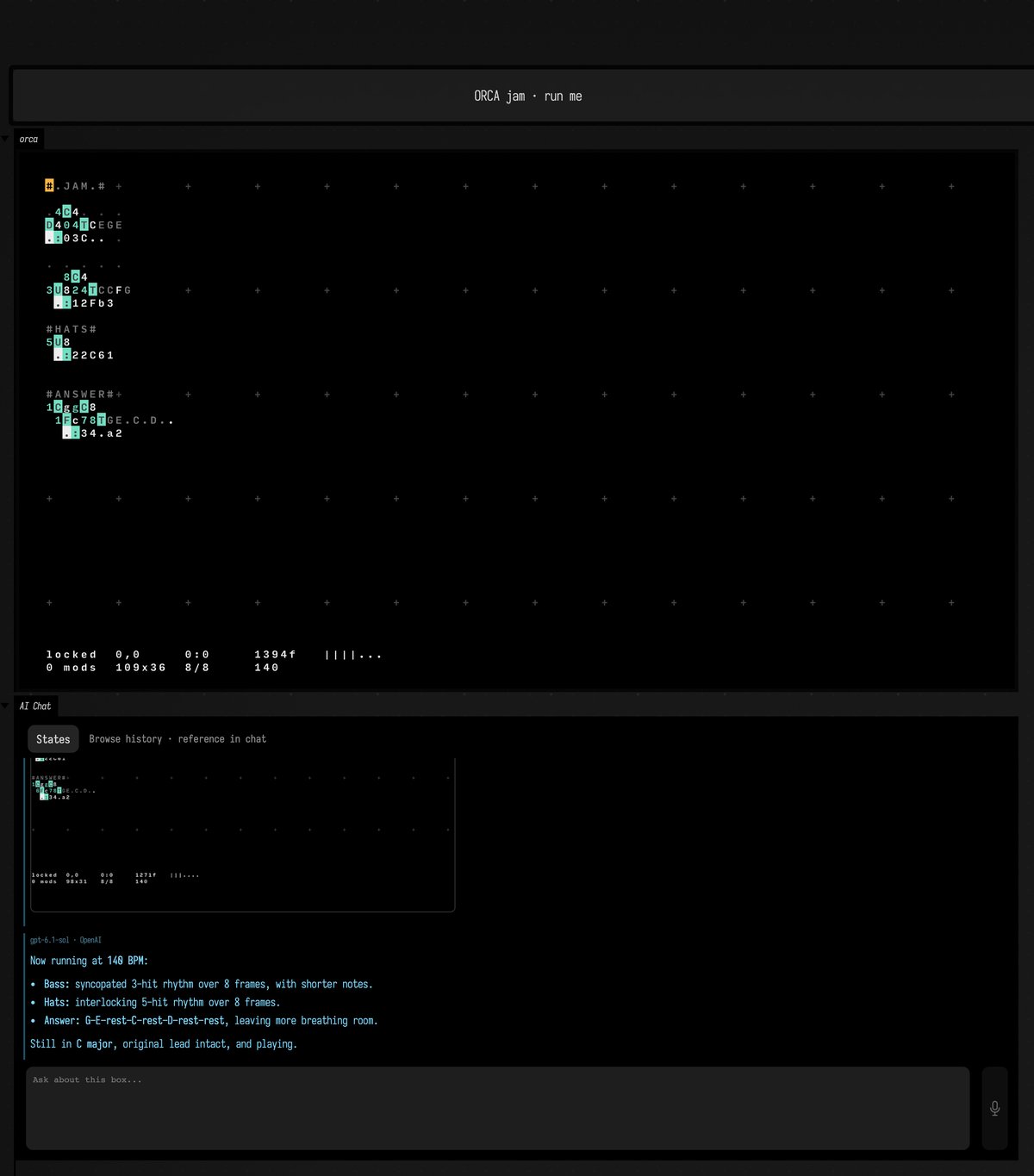
AI4 reads the board, writes a bass line, a #HATS# section and an #ANSWER# section beside the
arpeggio, takes a look, checks that all three channels are sending notes, and leaves it playing.
Every write returns the grid as text, so it sees what it did and can correct a cell it overwrote.
It never touches the box's code, and the music does not stop while it works. The second request, "Now make
it more syncopated, push the tempo to 140, and give the answer a few rests", it answered with
ORCA's euclidean operator, U, driving the bass and the hats, and rests written into the answer's
track:
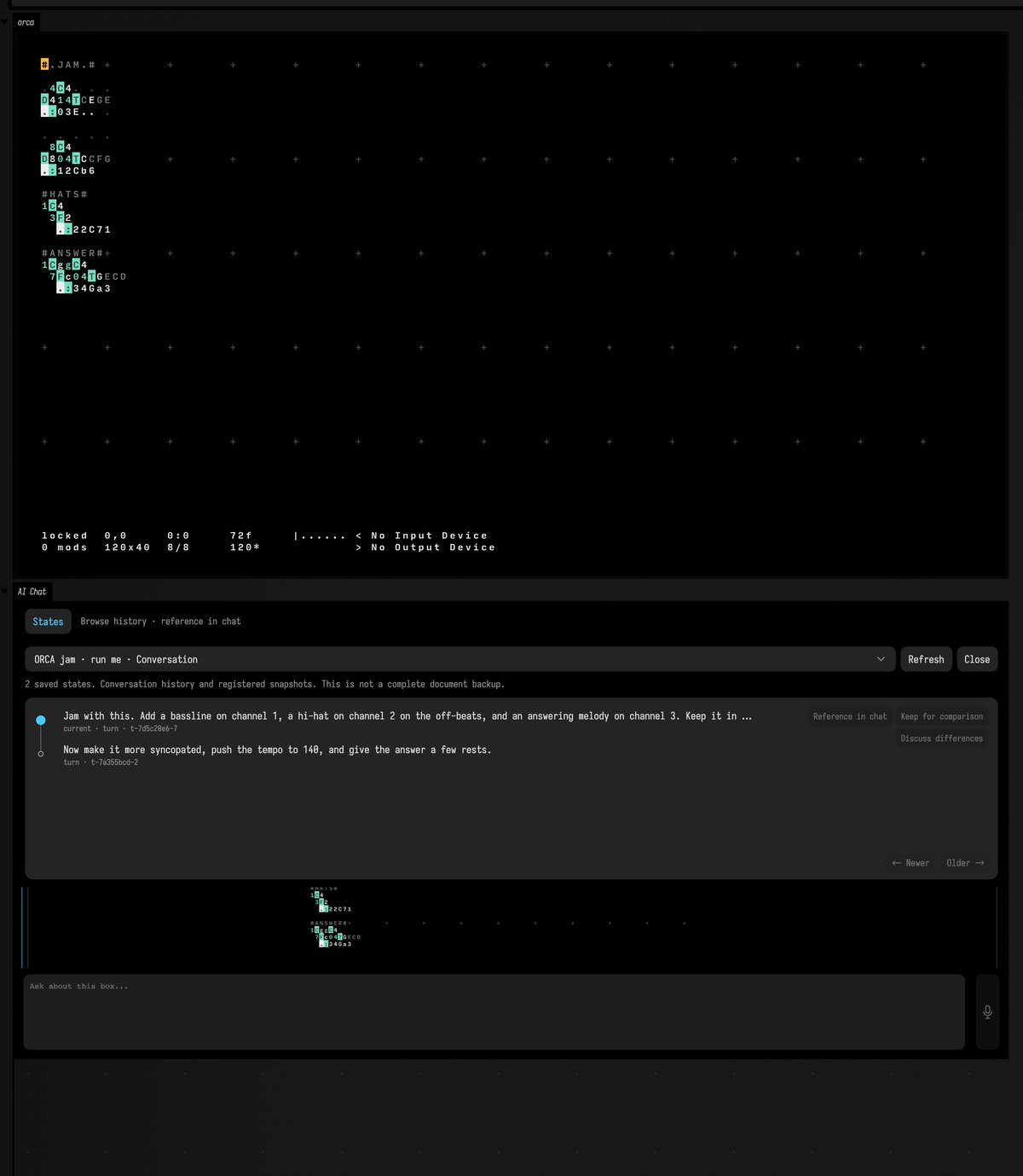
The board belongs to the conversation. Every request saves it, with the tempo, so rewinding the chat
to before the second request put the board back as the first left it, at 120 bpm, while it kept
playing. The chat's States tab shows the saved boards as a tree, one node per request, with the
current one marked; the second request is kept as a branch you can go back to with /branch:
Ask for something the grid cannot do and AI4 goes to the box instead. Given the first example and "add a hi-hat on channel 2", it saw that a hi-hat needs a noise voice, which is Kotlin, so it edited the box to give channel 2 one, put the hat in the grid there, and ran the box again.
How the jam was recorded
One live session on 2026-10-08, OpenAI gpt-6.1-sol, on the orca_jam starting point opened as
a document. The two requests were typed into the box's AI Chat panel, and the rewind sent as the
panel sends it (ai-chat-history with rewindTo), from tools/field_backdoor.py. The video is
record-box running while the first request was answered; the pictures are screenshot-box
after each request and after the rewind. A model run cannot be repeated, so the docs build keeps
these files rather than remaking them.
Details
orca(channel, grid, bpm, cols, rows, guide):channelnames the output ("orca"),colsandrowssize it in ORCA cells,bpmsets the tempo when it starts, andguide = trueopens ORCA's operator guide. ORCA fits its grid to the output, and refits it if you resize the panel.- Notes arrive a little after ORCA plays them.
OrcaNote.timeputs each one back on ORCA's clock pluso.latency(50 ms), andPatSynthBank.playschedules it for then, so the rhythm stays even. Give a largerlatencyon a slow machine. exposeTools(iframeTools = true)adds the live-iframe tools as well, in the Field app.o.pageis the output's iframe, for that bridge'sevaluate,cdpandscreenshotin the Field app.o.evalreaches the same page through ORCA's own connection instead, so it also works in a plain browser. Inside the iframe,window.fieldOrcaholdsgrid(),write,load,command,recent()and ORCA's ownclient.OrcaHeadless(grid)runs ORCA with no page: its own operators in the JVM, a frame perstep(), as fast as you call it. Itsorcais the sameOrcaa box gets, callbacks, cells and all, so an ORCA program can be rendered to a file or checked in a test.evaluate(js)runs JavaScript in it at once.- ORCA is Hundred Rabbits' code, unmodified, under the MIT licence.