Paint and pencil from FLines
PaintCanvas turns any FLine into a brushstroke of simulated oil paint, a
pencil line, hatching, a stippled area or a hand-drawn outline. The
simulation is the paint crate from claude-paint,
by alice (@aliceisjustplaying), MIT licensed. It models
a brush as individual bristles that carry paint and run out. Paint mixes on the canvas like pigment,
so blue into yellow makes green. Each stroke stays wet, stiffening and drying over simulated minutes.
The same canvas can be a sheet of paper for watercolour and ink, and its
brushes can have hairs that move.
Field calls it through a small native library, which you build once (see
Building the library). The examples below are also in the
paint_canvas starting point, and the classes they use
(PaintCanvas, PaintBrush, Pencil, Tubes, in afield.graphics.paint) each have their own KDoc.
Here is a canvas, a brush and three strokes. The brush is loaded before the first stroke and again before the second. The third stroke is a zigzag with no reload, so the brush runs dry along it.
:::static
val canvas = PaintCanvas(900, aspect = 1.6)
val brush = canvas.brush(BrushKind.Filbert, width = 45.0)

brush.load(rgb(0.15, 0.3, 0.65))
canvas.stroke(FLine().moveTo(80, 140).cubicTo(330, 40, 630, 240, 920, 120), brush)

brush.load(rgb(0.95, 0.7, 0.15))
canvas.stroke(FLine().moveTo(80, 330).cubicTo(330, 230, 630, 430, 920, 310), brush)

// no reload: three more passes, and the brush runs out along the way
val zigzag = FLine().moveTo(80, 470)
for (i in 1..3) zigzag.lineTo(if (i % 2 == 1) 920 else 80, 470 + i * 40)
canvas.stroke(zigzag, brush)

display("main", canvas.png())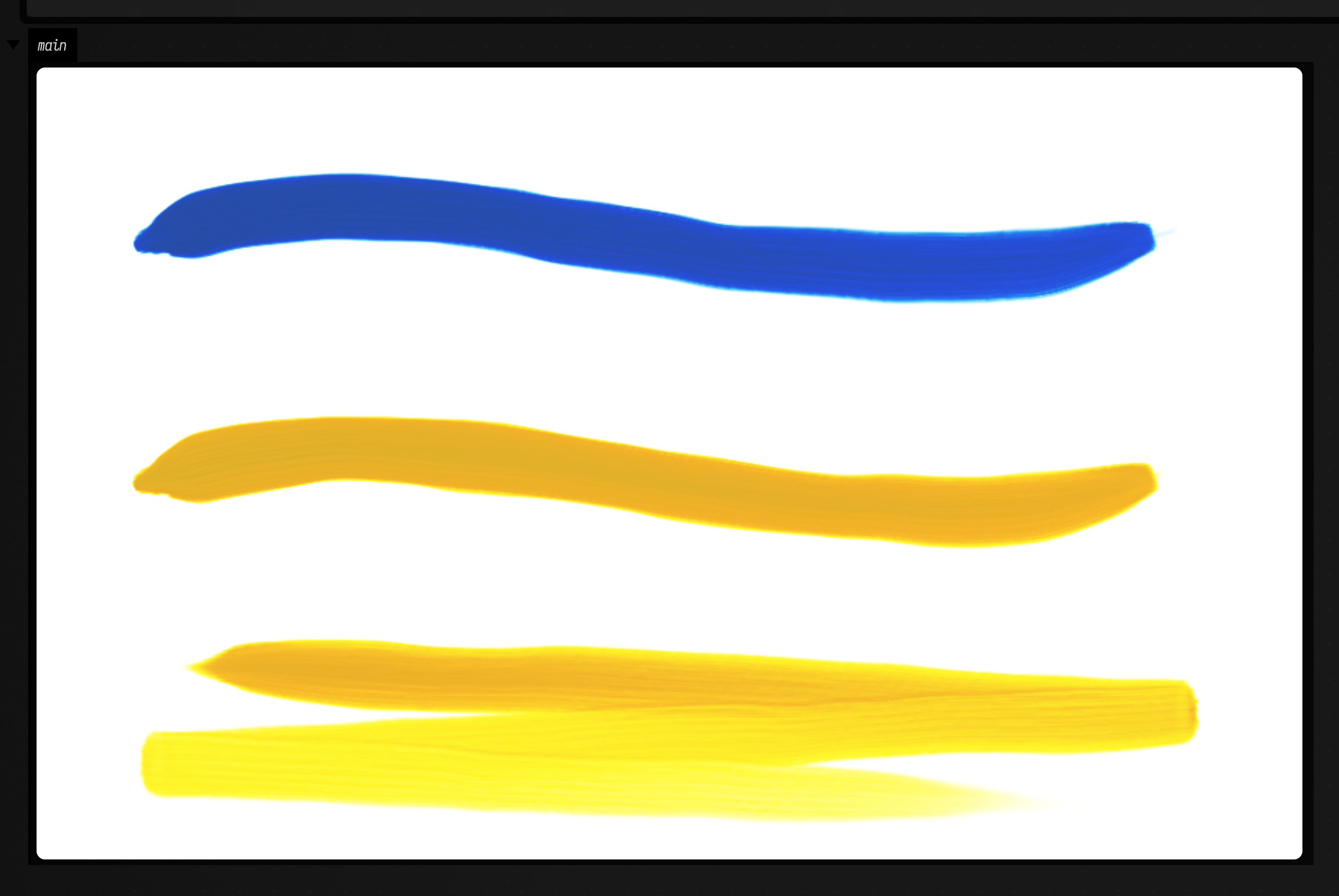
A few things in that box apply everywhere on this page:
- Coordinates. The canvas is always 1000 units wide and
1000 / aspectunits tall, with y growing downwards, whatever its pixel width.PaintCanvas(900, aspect = 1.6)is 900 by 563 pixels and 1000 by 625 units. To paint lines you drew somewhere else, passview = Rect(...): that rectangle of FLine coordinates is stretched over the whole canvas. - One stroke per subpath. Each
moveTostarts a new movement of the hand. The brush is not reloaded between subpaths, so a line with many pieces uses up its paint the way a real brush would. - Colours are
rgb(...)values, the same sRGB colours as everywhere else in Field. png()renders the canvas and encodes it, anddisplayshows the bytes as an image. Itsreliefargument (0.6 by default) lights the thickness of the paint from the upper left, which is what makes the bristle ridges visible.
Brushes
BrushKind has six brushes. Below, each one draws the same curve, loaded with the same dark paint.
From left to right: Round, HogFlat, Filbert, Fan, Rigger and Badger.
:::static
val canvas = PaintCanvas(900, aspect = 2.0)
BrushKind.entries.forEachIndexed { i, kind ->
    val x = 110.0 + i * 155
    val brush = canvas.brush(kind, width = 40.0).load(rgb(0.12, 0.12, 0.18))
    canvas.stroke(FLine().moveTo(x, 70).cubicTo(x + 60, 200, x - 60, 300, x, 430), brush)
}
display("main", canvas.png())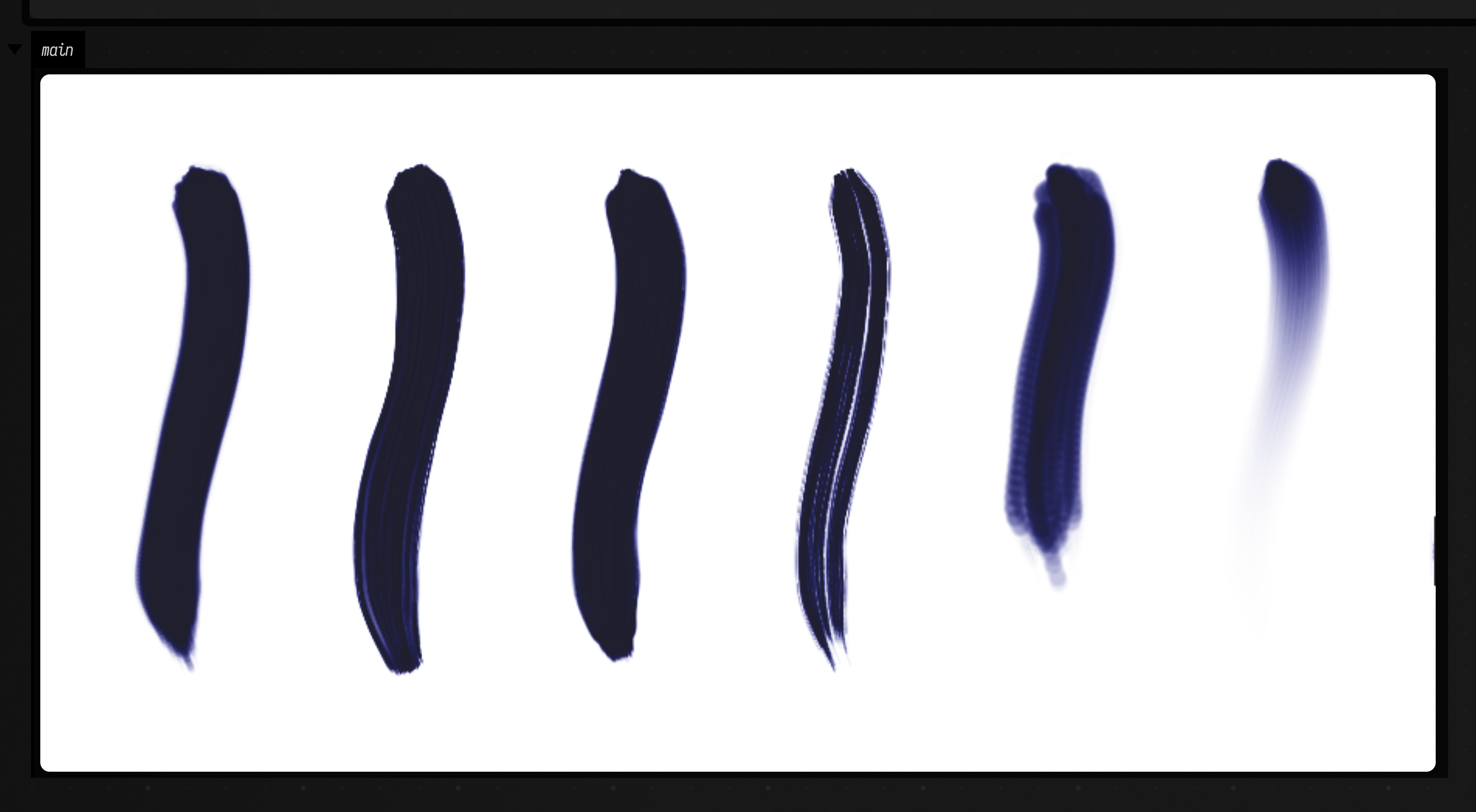
width is the brush's width at full pressure, in canvas units. A brush gets wider when pressed
harder, so stroke(..., pressure = 0.3..0.9) gives a stroke that starts thin and swells.
point = 1.0 gives a round or rigger brush a fine tip. Pressed lightly, only the tip touches, and
the mark draws down to a point as the brush lifts.
Paint, and paint over paint
load takes the paint's colour and three properties that change how strokes look:
hiding: how much one coat covers what is underneath. About 0.05 is a transparent glaze, 0.5 a scumble, and the default 0.92 is opaque body colour.stiff: 0 is fluid paint that levels out as it dries. 1 is stiff paint straight from the tube, which keeps its brush marks.wipe: how much of the paint already in the brush is wiped off first. The default is 0.85, so a little of the previous colour always comes along. Usewipe = 1.0for a clean brush, or something like 0.4 to blend each colour into the last.
On the left below, a dark band is dried and then crossed by white at hiding 0.05, 0.5 and 0.92. On
the right, a blue stroke crosses a yellow one twice. At the top the yellow is still wet, and the blue
drags through it and mixes into green. At the bottom the yellow was dried first with dry(), so the
blue sits on top of it.
:::static
val canvas = PaintCanvas(900, aspect = 2.0)
val dark = canvas.brush(BrushKind.HogFlat, width = 70.0)
val light = canvas.brush(BrushKind.HogFlat, width = 70.0)

// a dark band, dried, then white over it at three hiding powers
dark.load(rgb(0.1, 0.1, 0.12))
canvas.stroke(FLine().moveTo(40, 250).lineTo(470, 250), dark, shake = 0.3)
canvas.dry()
[0.05, 0.5, 0.92].forEachIndexed { i, hiding ->
    val x = 110.0 + i * 140
    light.load(rgb(0.97, 0.96, 0.93), hiding = hiding)
    canvas.stroke(FLine().moveTo(x, 80).lineTo(x, 420), light, shake = 0.3)
}

// yellow, then blue across it: wet into wet above, over dried yellow below
val yellow = canvas.brush(BrushKind.HogFlat, width = 70.0)
val blue = canvas.brush(BrushKind.HogFlat, width = 70.0)
canvas.stroke(FLine().moveTo(540, 140).lineTo(960, 140), yellow.load(rgb(0.95, 0.8, 0.1)), shake = 0.3)
canvas.stroke(FLine().moveTo(750, 60).lineTo(750, 220), blue.load(rgb(0.1, 0.25, 0.7)), shake = 0.3)
canvas.stroke(FLine().moveTo(540, 360).lineTo(960, 360), yellow.load(rgb(0.95, 0.8, 0.1)), shake = 0.3)
canvas.dry()
canvas.stroke(FLine().moveTo(750, 280).lineTo(750, 440), blue.load(rgb(0.1, 0.25, 0.7)), shake = 0.3)

display("main", canvas.png())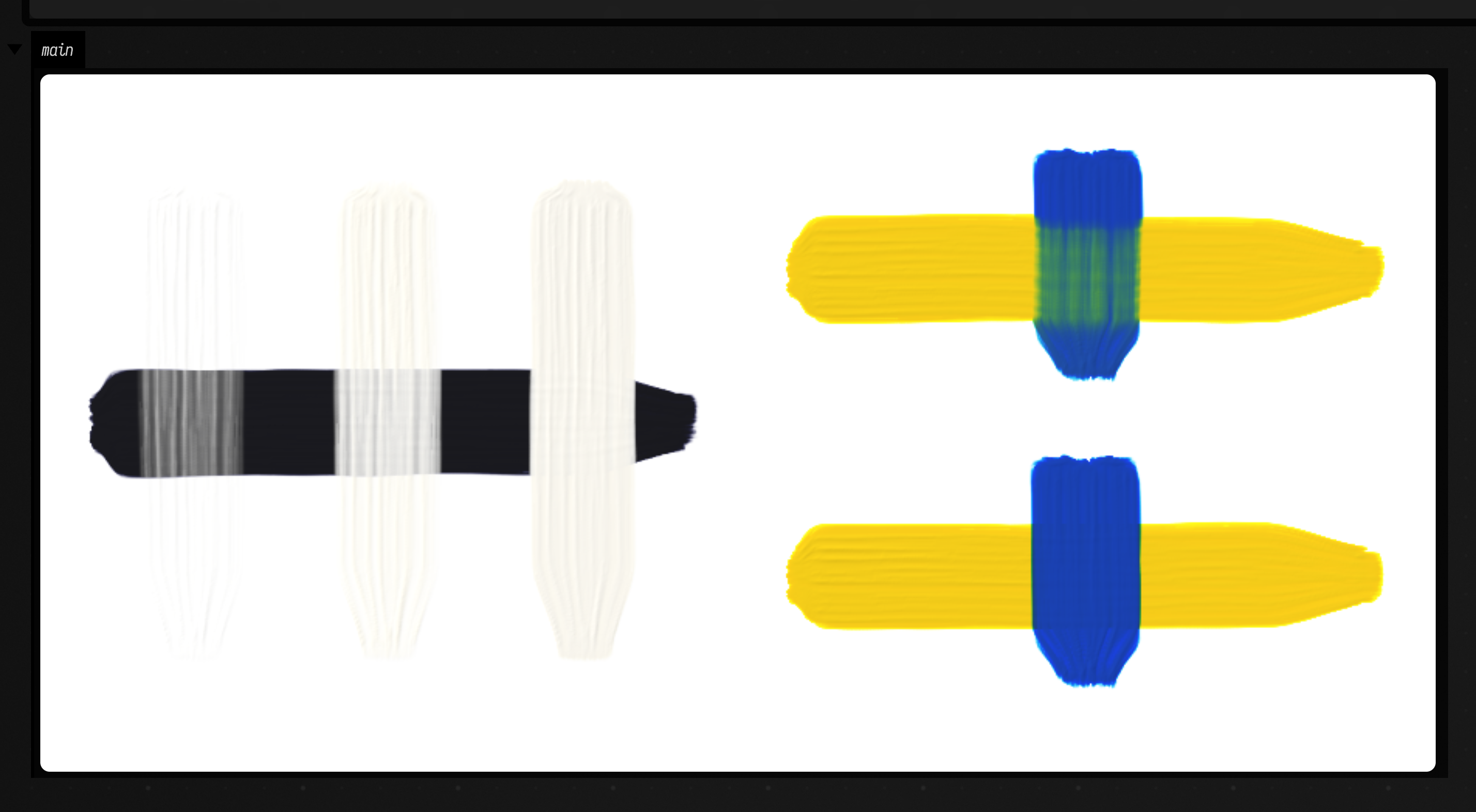
wait(minutes) lets simulated time pass without drying everything. Paint keeps stiffening for as
long as you wait, and how fast depends on its thickness and its drying rate. dry() waits until
every stroke is touch-dry. Neither rendering nor png() changes the canvas: they show a dried copy,
and the strokes you have laid stay wet for the next one.
Strokes from any FLine
A stroke can come from anything that makes an FLine. This box follows a flow field. Each stroke
starts at a random point and takes 30 short steps in the field's direction. Before each stroke the
brush is reloaded with a colour that depends on where the stroke ends, using wipe = 0.4, so every
stroke carries some of the last one's colour and neighbouring strokes blend.
:::static
import kotlin.random.Random

val canvas = PaintCanvas(900, aspect = 1.4, seed = 4)
val brush = canvas.brush(BrushKind.Filbert, width = 16.0)
val rnd = Random(4)

// the direction of the field at (x, y)
fun angle(x: Double, y: Double) = sin(x * 0.006) * 2.0 + cos(y * 0.008 + x * 0.002) * 1.5

repeat(260) {
    var x = rnd.nextDouble(0.0, 1000.0)
    var y = rnd.nextDouble(0.0, canvas.heightUnits)
    val line = FLine().moveTo(x, y)
    repeat(30) {
        val a = angle(x, y)
        x += cos(a) * 6
        y += sin(a) * 6
        line.lineTo(x, y)
    }
    val t = y / canvas.heightUnits
    brush.load(rgb(0.9 - 0.6 * t, 0.4 + 0.3 * sin(x * 0.01), 0.2 + 0.6 * t), stiff = 0.9, wipe = 0.4)
    canvas.stroke(line, brush, pressure = 0.5..0.9)
}
display("main", canvas.png(relief = 0.8))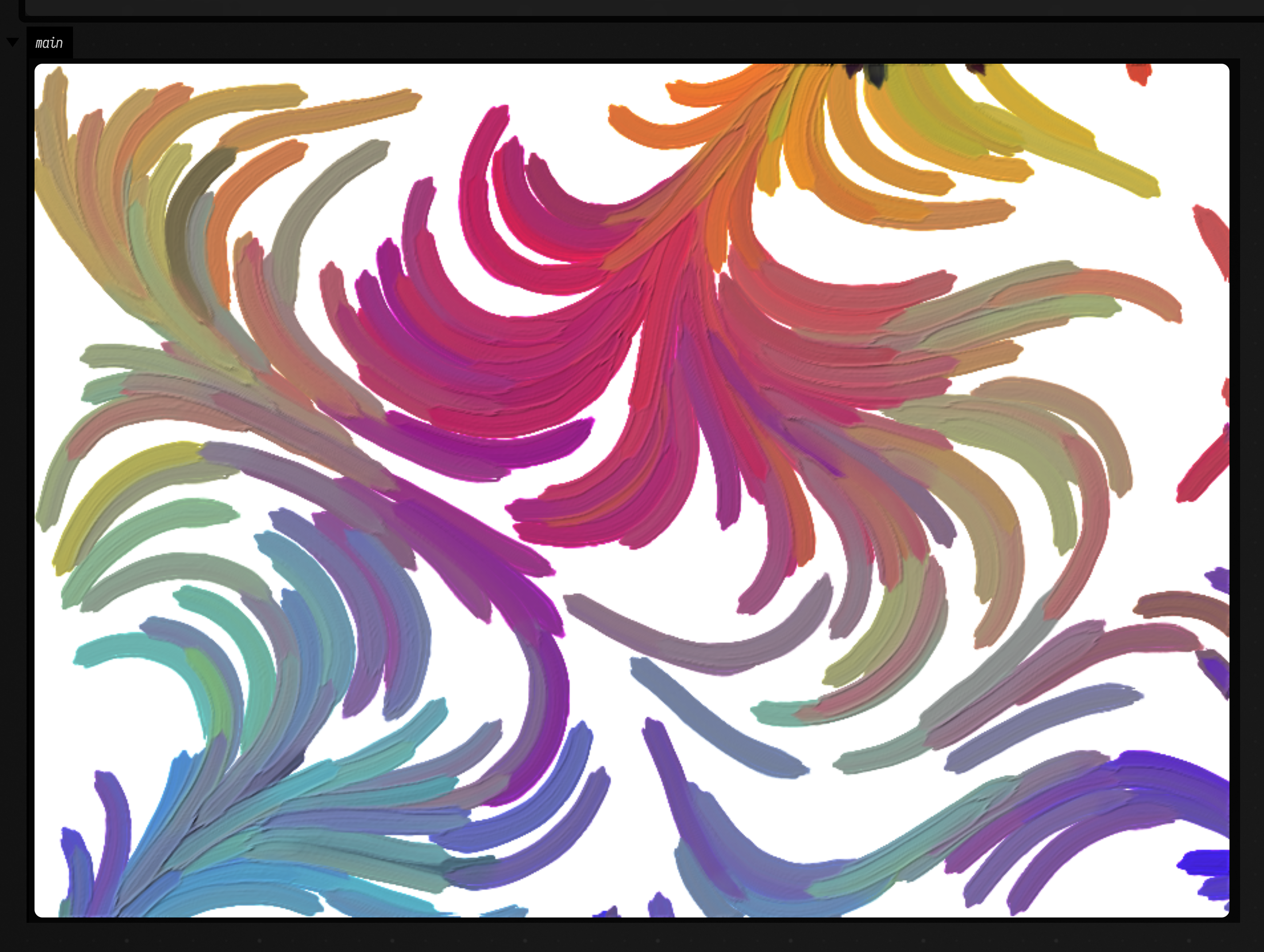
Pencil and chalk
The same canvas takes graphite and chalk. canvas.pencil("2B") is a pencil of that grade, from
"9H" to "9B", and canvas.chalk() is a stick of black chalk. There are three ways to draw with
them:
draw(line, pencil, pressure)draws each subpath as one line, smoothed and wavering slightly. Passruler = truefor a straight, ruled line.sketch(line, pencil, passes = 3)makes several light, broken passes along a line, each wandering a little off it.hatch(region, pencil, angle, spacing)fills a closed FLine with short parallel strokes.
A pencil wears as it draws, so its line widens; pencil.sharpen() starts it fresh.
Every mark has a real physical size: a pencil point is about 0.3 mm. On the default 700 mm canvas
that is a fifth of a pixel at 900 pixels wide, so for drawing, give the canvas a smaller sheet with
sizeMm. This one is 20 cm wide.
:::static
val canvas = PaintCanvas(900, aspect = 1.5, sizeMm = 200.0)

val vase =
    FLine()
        .moveTo(420, 120)
        .cubicTo(330, 220, 300, 420, 380, 560)
        .lineTo(620, 560)
        .cubicTo(700, 420, 670, 220, 580, 120)
canvas.sketch(vase, canvas.pencil("2B"), pressure = 0.5, passes = 3)

// hatch the shadow side with a softer pencil
val shadow =
    FLine()
        .moveTo(560, 140)
        .cubicTo(650, 240, 680, 420, 610, 550)
        .lineTo(540, 550)
        .cubicTo(600, 420, 590, 240, 520, 140)
        .lineTo(560, 140)
canvas.hatch(shadow, canvas.pencil("4B"), angle = 1.0, spacing = 7.0, length = 50.0)

// the table edge, ruled in chalk
canvas.draw(FLine().moveTo(80, 560).lineTo(920, 560), canvas.chalk(), pressure = 0.7, ruler = true)

display("main", canvas.png(relief = 0.0))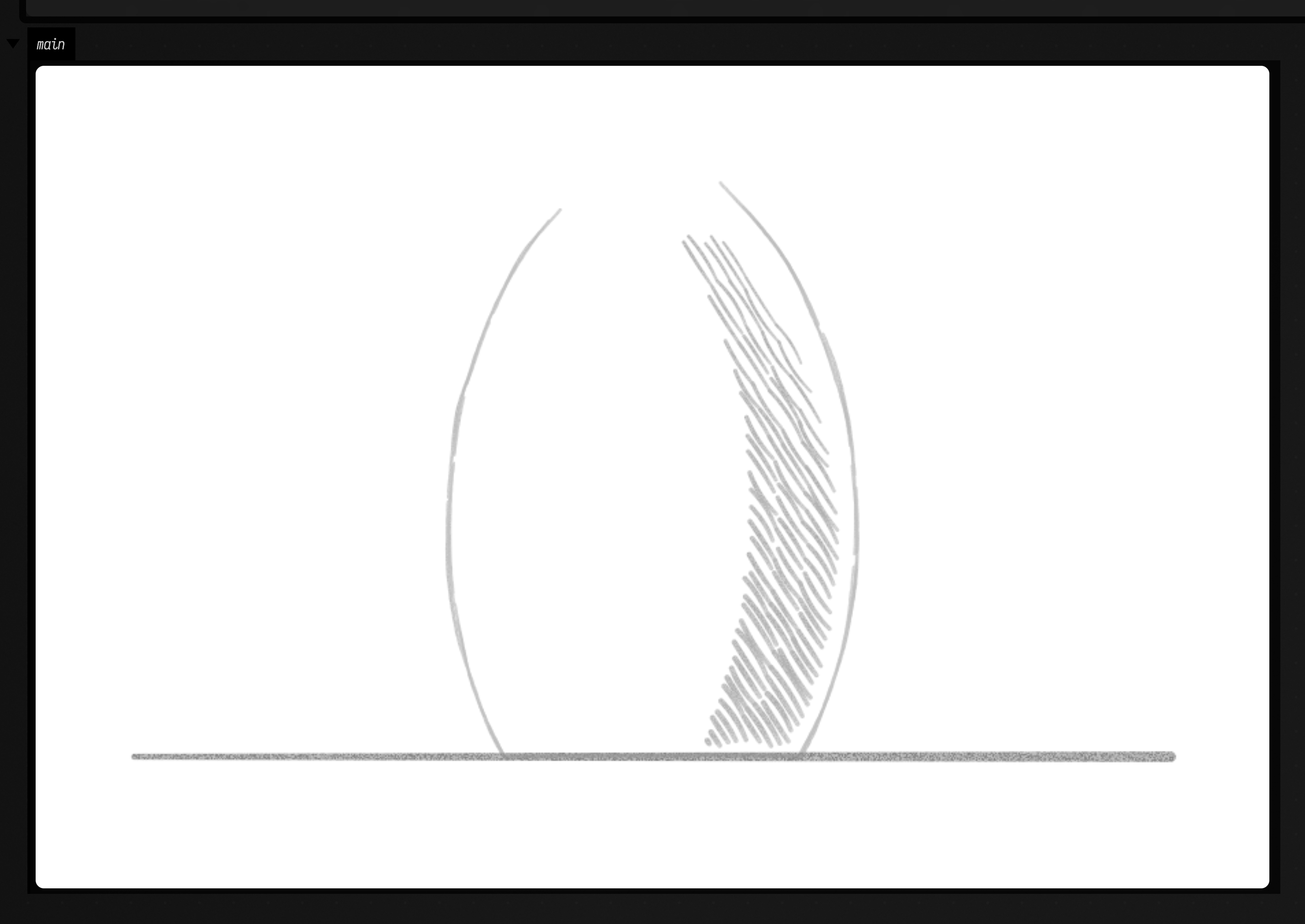
Graphite stays loose until something seals it. erase(region, strength) lifts it the way a
kneaded eraser does: more from the tops of the paper's grain than from the hollows, and never quite
all of it. fixDrawing() sprays fixative, after which the eraser no longer lifts it. Paint laid over
graphite seals it into the picture, and graphite does not take on wet paint.
Areas: worked, stippled, outlined
Three methods fill or bound a whole area at once. Each one takes a region: a closed FLine, where a ring inside another ring makes a hole.
work(region, color, handling)paints the region with many strokes, planned the way the crate's painters block in an area: stroke length and direction, curvature, broken and restated strokes, and trips back to the palette.Handlingpicks the kind of strokes:Broad,Body,Detail,Hatch,Glaze,Scumble, orBlend, a clean blender that only softens wet paint already there. You can override the angle, length, coverage and brush width.stipple(region, color, size, coverage)covers the region with separate touches of an upright brush.featherthins them out towards the edge.outline(line, brush, character)turns a few rough points into the line a hand would draw: it lifts and starts again, overshoots corners and restates stretches. The character isFirm,Searching,BrokenorSoft. It returns the strokes as an FLine, so you can draw them elsewhere too, and withbrush = nullit paints nothing and only returns them.
From left to right below: a region worked in blue Body strokes, then its top half worked again
with Broad strokes of a pale colour while the blue is still wet; a feathered stipple; and a
triangle from four rough points, drawn by a Searching hand.
:::static
val canvas = PaintCanvas(900, aspect = 2.0, sizeMm = 300.0)

canvas.work(FLine().rect(40.0, 60.0, 280.0, 380.0), rgb(0.2, 0.4, 0.6), Handling.Body, angle = 0.5)
canvas.work(FLine().rect(40.0, 60.0, 280.0, 180.0), rgb(0.85, 0.75, 0.5), Handling.Broad, angle = 0.0)

canvas.stipple(FLine().rect(370.0, 80.0, 260.0, 340.0), rgb(0.7, 0.2, 0.15), size = 6.0, coverage = 1.2, feather = 40.0)

val pen = canvas.brush(BrushKind.Round, 7.0, point = 1.0).load(rgb(0.08, 0.06, 0.05))
canvas.outline(
    FLine().moveTo(700, 420).lineTo(820, 90).lineTo(950, 420).lineTo(700, 420),
    pen,
    OutlineCharacter.Searching,
)

display("main", canvas.png())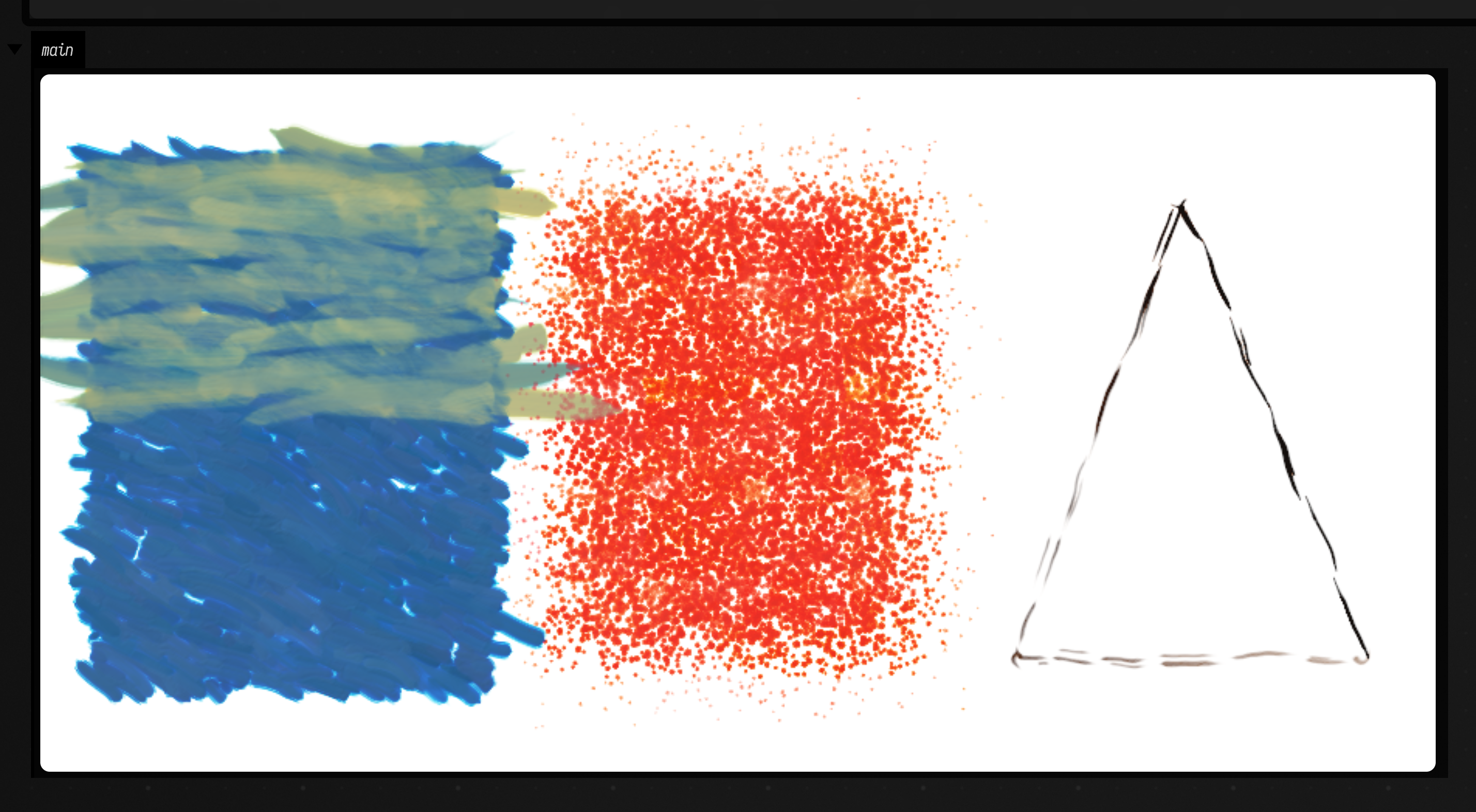
For single marks there is touch(brush, x, y), which presses the brush tip down and lifts it with
no path: a dab. drag, twist and angle move, roll and turn the tip while it is down.
A drawing under the paint
Pencil and paint share one canvas, so the usual order of work holds: draw first, then paint over
the drawing. Graphite under thin paint shows through, and wherever paint goes over it, it is sealed
into the picture. That gives hiding a second job: it decides how much of the drawing survives.
Here a landscape is sketched in 3B, then painted with work. The sky is a Glaze at hiding
0.25 and the grass is Broad strokes at 0.35, so the hill line and the tree trunk read through
both. The tree's crown is Body strokes at 0.6, which mostly cover its drawing.
:::static
val canvas = PaintCanvas(900, aspect = 1.5, sizeMm = 250.0, seed = 3)

// the underdrawing: a horizon, two hills and a tree, in pencil
val hills = FLine().moveTo(40, 380).cubicTo(250, 250, 420, 300, 560, 360).cubicTo(700, 300, 850, 280, 960, 340)
val trunk = FLine().moveTo(700, 560).lineTo(705, 380)
val crown = FLine().moveTo(705, 300).cubicTo(640, 300, 630, 400, 705, 400).cubicTo(780, 400, 770, 300, 705, 300)
val pencil = canvas.pencil("3B")
for (line in [hills, trunk, crown]) canvas.sketch(line, pencil, pressure = 0.7, passes = 2)

// thin paint over it: the pencil shows through a glaze, and is sealed in where paint covers it
val sky =
    FLine()
        .moveTo(0, 0)
        .lineTo(1000, 0)
        .lineTo(1000, 380)
        .cubicTo(850, 280, 700, 300, 560, 360)
        .cubicTo(420, 300, 250, 250, 0, 380)
        .lineTo(0, 0)
val land =
    FLine()
        .moveTo(0, 380)
        .cubicTo(250, 250, 420, 300, 560, 360)
        .cubicTo(700, 300, 850, 280, 1000, 340)
        .lineTo(1000, 667)
        .lineTo(0, 667)
        .lineTo(0, 380)
canvas.work(sky, rgb(0.55, 0.7, 0.85), Handling.Glaze, hiding = 0.25, angle = 0.0)
canvas.work(land, rgb(0.45, 0.6, 0.3), Handling.Broad, hiding = 0.35, angle = -0.2)
canvas.work(crown, rgb(0.2, 0.35, 0.15), Handling.Body, hiding = 0.6, width = 14.0)

display("main", canvas.png())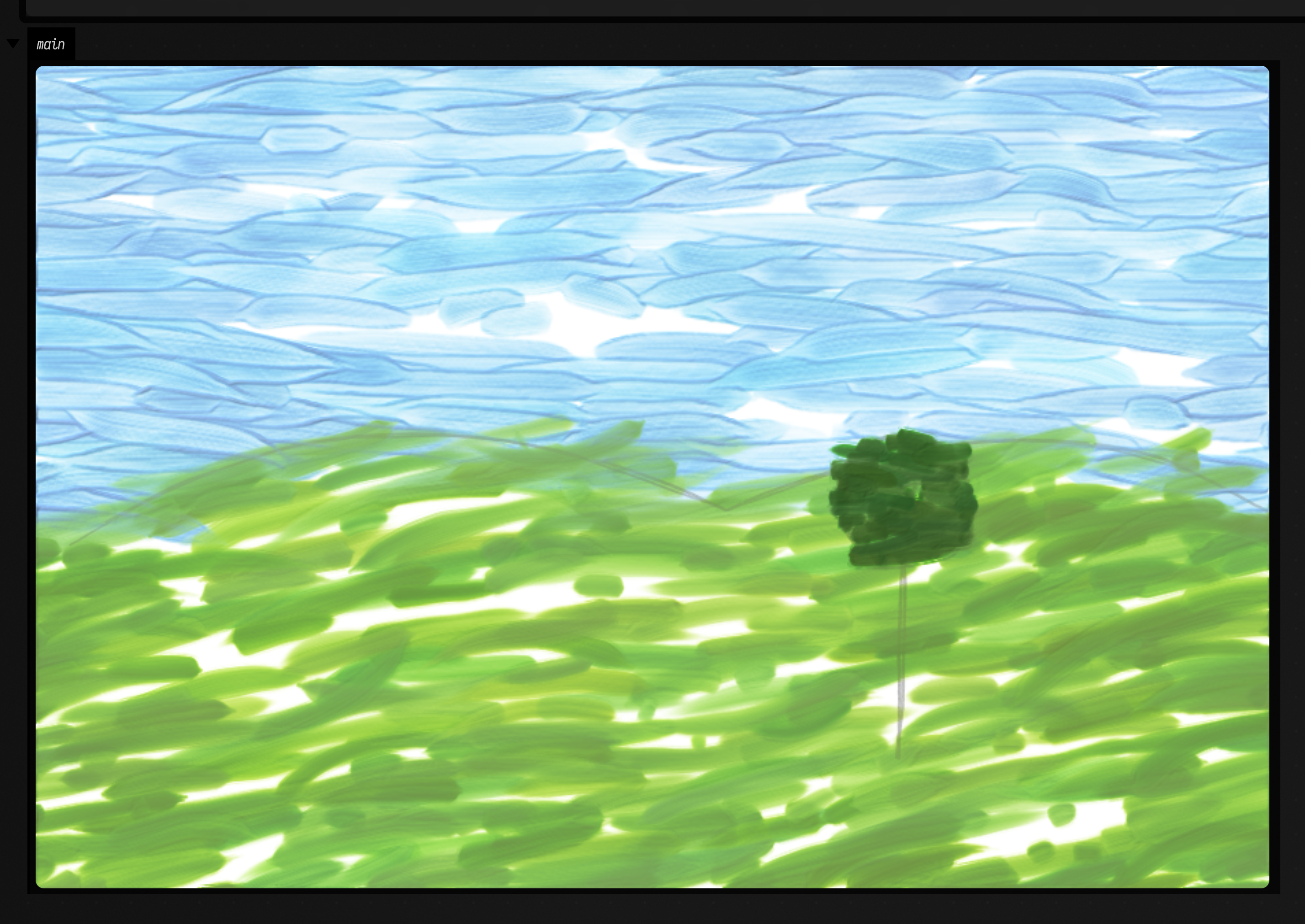
Tube paints, glazes and age
Instead of a colour, a brush can be loaded from the crate's catalogue of historical tube paints,
mixed by parts: brush.load(mapOf("lead white" to 3.0, "vermilion" to 1.0)). The tubes mix the way
paint does, weighted by how strongly each pigment tints, and the pile keeps their hiding, stiffness
and drying rate. Tubes.names lists the catalogue, Tubes["smalt"] describes one tube,
Tubes.mix(...) gives the colour of a mixture without painting it, and Tubes.mixSpectral(...)
mixes any colours as pigments rather than as light.
Two more steps finish a painting:
glaze(color, region, coats)lays a transparent film over dry paint. Over the whole canvas, a thin warm glaze looks like old varnish.crack()grows craquelure through the paint and ground, with cupping and dirt in the cracks.CrackKind.Agedgives a hierarchy of cracks that developed unevenly, andCrackKind.Evenone uniform network. Cracks open a few dozen micrometres, so like pencil they need a smallsizeMmto show.
This one mixes each band from two parts lead white to one part of a different tube, dries the painting, glazes it lightly and cracks it.
:::static
val canvas = PaintCanvas(900, aspect = 1.25, ground = PaintGround.Oil, sizeMm = 250.0, seed = 5)
val brush = canvas.brush(BrushKind.Filbert, width = 70.0)
val tubes = ["ultramarine blue", "viridian", "Naples yellow", "vermilion", "rose madder", "burnt sienna", "bone black"]
tubes.forEachIndexed { i, tube ->
    brush.load(mapOf("lead white" to 2.0, tube to 1.0))
    canvas.stroke(
        FLine().moveTo(60, 90 + i * 100).cubicTo(400, 40 + i * 100, 600, 160 + i * 100, 940, 80 + i * 100),
        brush,
    )
}
canvas.dry()
canvas.glaze(rgb(0.6, 0.45, 0.2), coats = 0.15) // old varnish
canvas.crack(CrackKind.Aged)

display("main", canvas.png(relief = 0.8, gloss = 0.3))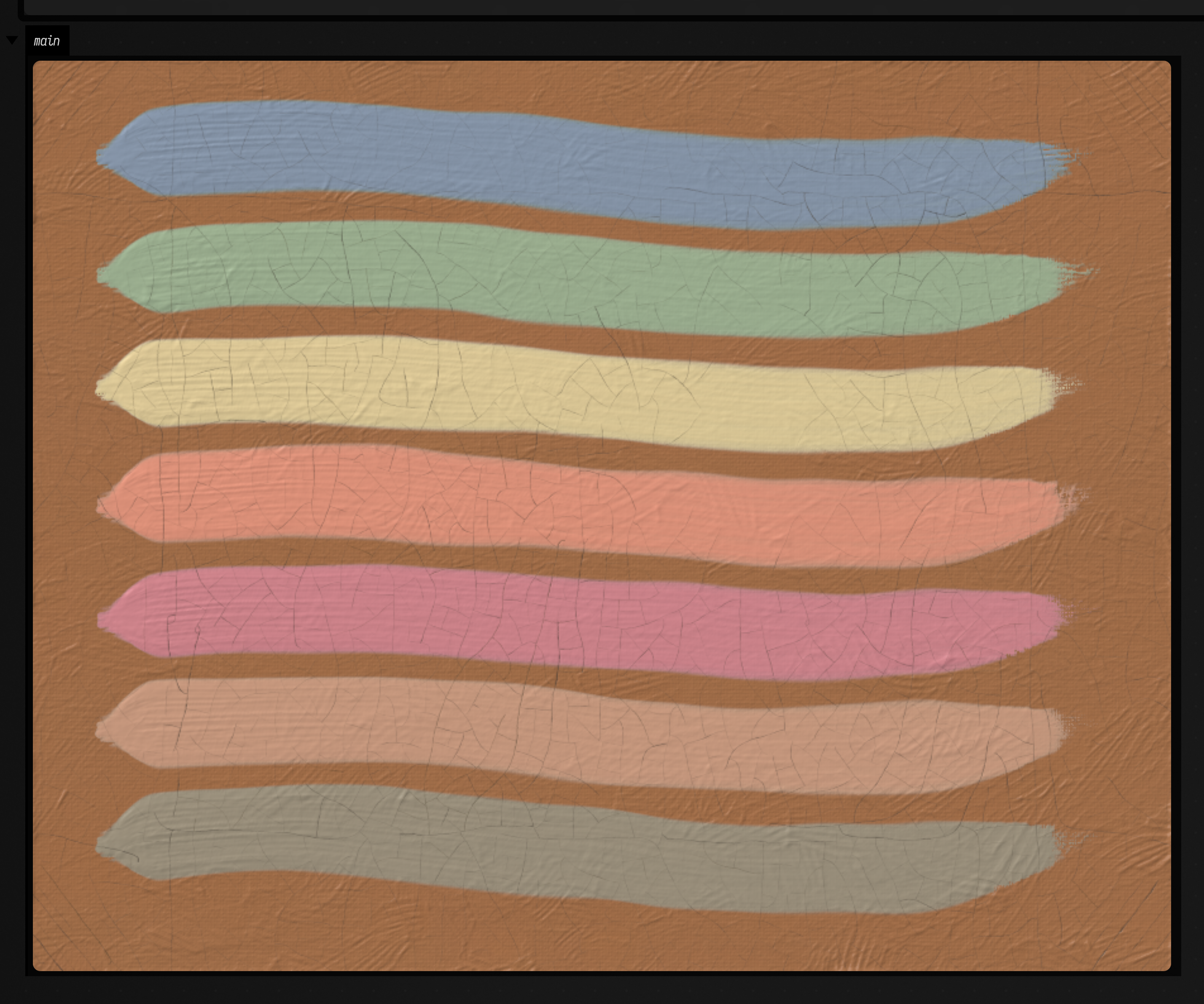
Knives, rags and spatter
Three more tools work the paint without a brush:
canvas.knife(width)is a painting knife, andknife.load(color)puts a bead of paint on its blade.canvas.knife(line, knife)pulls it along a line. The flexible blade rests on the high points of the surface and lays a flat-topped slab below its edge, pressing paint out into ridges at its ends and leaving a bead where it lifts.canvas.scrape(line, knife)presses hard and lays nothing: it cuts the wet paint off down to the dry surface, and the blade keeps what it cut.canvas.rag(width)is a cotton rag bunched into a pad.canvas.wipe(line, rag)lifts open paint along a line in streaks, where the creases of the cloth touch, andcanvas.blot(rag, x, y)presses it down once. Paint that has begun to set no longer comes away. The face of the rag loads up as it works;canvas.refold(rag)turns a cleaner face out andcanvas.dampen(rag)wets it with spirits, so that it lifts nearly to the ground.canvas.spatter(brush, x, y, toward)flicks a loaded brush. Only the paint the hairs can't hold flies off, so fluid paint spatters and stiff paint barely does: load withturps(turpentine, 0..0.9 of the paint's volume) for a wet flick. Each drop comes off one hair, so a brush loaded with two colours, one on each side (part = LoadPart(side = ...)), spatters both.
All three report what they move. wipe and blot return the mm³ of paint they lifted,
canvas.carried(knife) is the paint on the blade, and stats.wetPaintMm3 is the wet paint left on
the canvas; a scrape takes off the canvas exactly what it puts on the blade.
The box below lays a dark passage, wipes two lights out of it with a rag, knifes a pale band across
it and scrapes through that, then spatters a double-loaded brush. A low lamp from the upper left
(light = PaintLight.Raking) shows the slab's ridges and the shine of the wet paint.
:::static
val canvas = PaintCanvas(900, aspect = 1.5, ground = PaintGround.Oil, sizeMm = 300.0, seed = 4)
val passage = FLine().rect(60, 60, 880, 540)
canvas.work(passage, rgb(0.22, 0.16, 0.12), handling = Handling.Broad, hiding = 0.7, stiff = 0.3)

val rag = canvas.rag(70.0)
canvas.wipe(FLine().moveTo(120, 170).cubicTo(350, 120, 600, 220, 880, 150), rag, [0.8])
canvas.refold(rag).dampen(rag, 0.8)
canvas.wipe(FLine().moveTo(160, 260).lineTo(840, 250), rag, [0.6])

val knife = canvas.knife(90.0).load(rgb(0.92, 0.85, 0.66), amount = 1.0)
canvas.knife(FLine().moveTo(100, 420).lineTo(900, 400), knife, pressure = 0.4..0.6)
canvas.scrape(FLine().moveTo(240, 330).lineTo(250, 520), knife.wipe())

val flick = canvas.brush(BrushKind.Round, 40.0)
flick.load(rgb(0.8, 0.2, 0.1), stiff = 0.3, turps = 0.5, part = LoadPart(side = -1.0, share = 0.5))
flick.load(rgb(0.2, 0.45, 0.8), stiff = 0.3, turps = 0.5, wipe = 0.0, part = LoadPart(side = 1.0, share = 0.5))
canvas.spatter(flick, 150.0, 540.0, toward = 600.0 to -60.0, spread = 0.3, force = 0.6)

display("main", canvas.png(wet = true, light = PaintLight.Raking))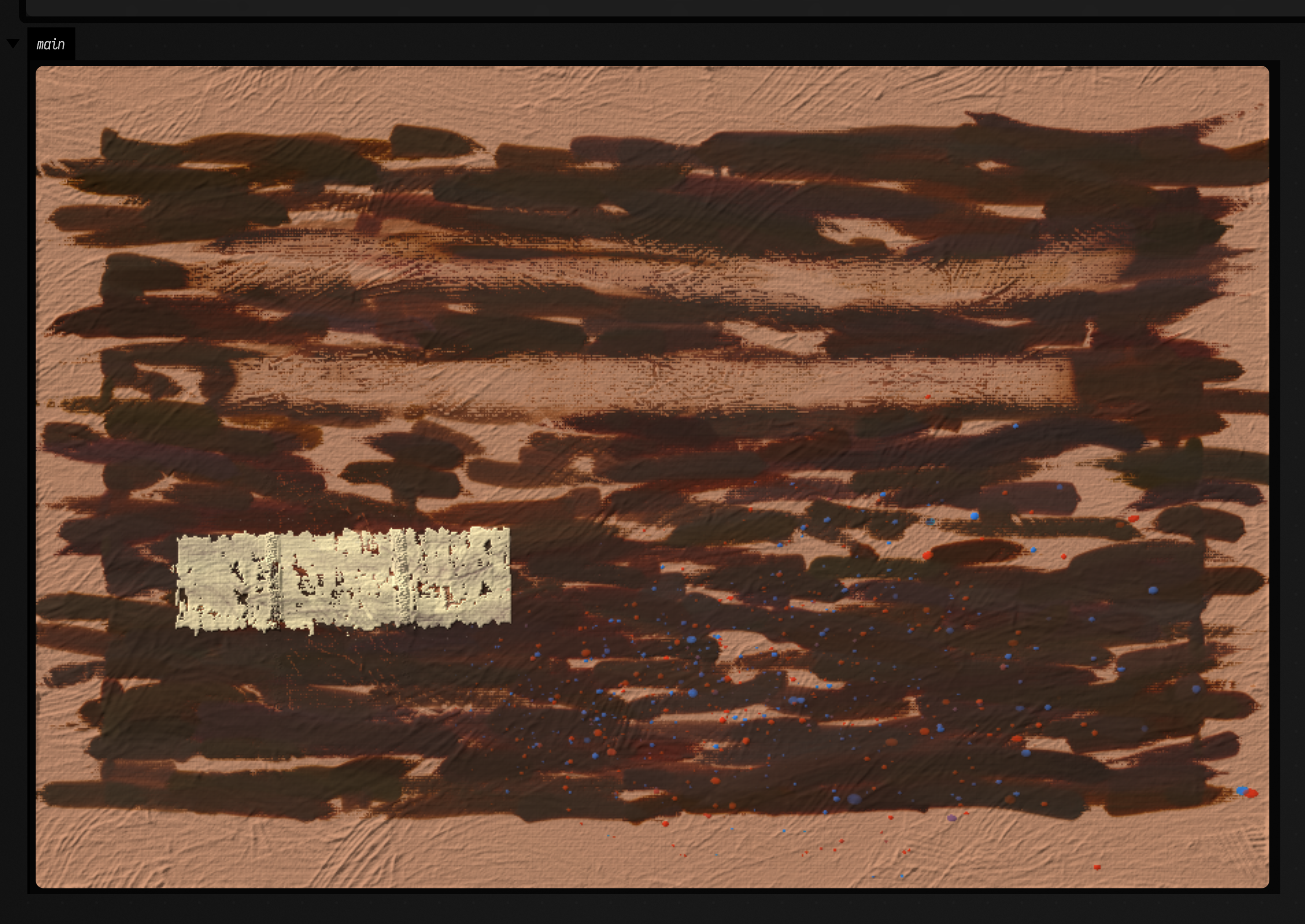
Brushes made to order
A BrushKind is a starting point. brush(kind, width, config = BrushConfig(...)) changes how the
brush is made: bristles (how many hairs it is simulated with), stiffness (0 soft sable to 1
stiff hog), length (how far the tips trail behind the contact), lay (how thick a full brush
lays paint), run (how far a load lasts), pickup and push (how much wet paint each hair takes
up or ploughs aside), splay, ragged and point. Anything left out keeps the kind's own value,
and brush.config reads back what the brush is. Below, the same hog flat, each dipped in the same
paint and stroked the same way: as it comes, with 12 bristles, with 40 ragged ones, taking up and
ploughing aside most of the paint it passes over, and laying a thin film that lasts:
:::static
val canvas = PaintCanvas(900, aspect = 1.6, groundColor = rgb(0.97, 0.96, 0.92), sizeMm = 300.0)
val configs = [
    null,
    BrushConfig(bristles = 12),
    BrushConfig(bristles = 40, ragged = 1.0),
    BrushConfig(pickup = 0.9, push = 0.9),
    BrushConfig(lay = 0.4, run = 900.0),
]
configs.forEachIndexed { i, config ->
    val brush = canvas.brush(BrushKind.HogFlat, width = 60.0, config = config)
    brush.load(rgb(0.12, 0.13, 0.2), amount = 0.6)
    val x = 110.0 + i * 190
    canvas.stroke(FLine().moveTo(x, 50).cubicTo(x + 90, 230, x - 90, 400, x, 580), brush, pressure = 0.9..0.5)
}
display("main", canvas.png())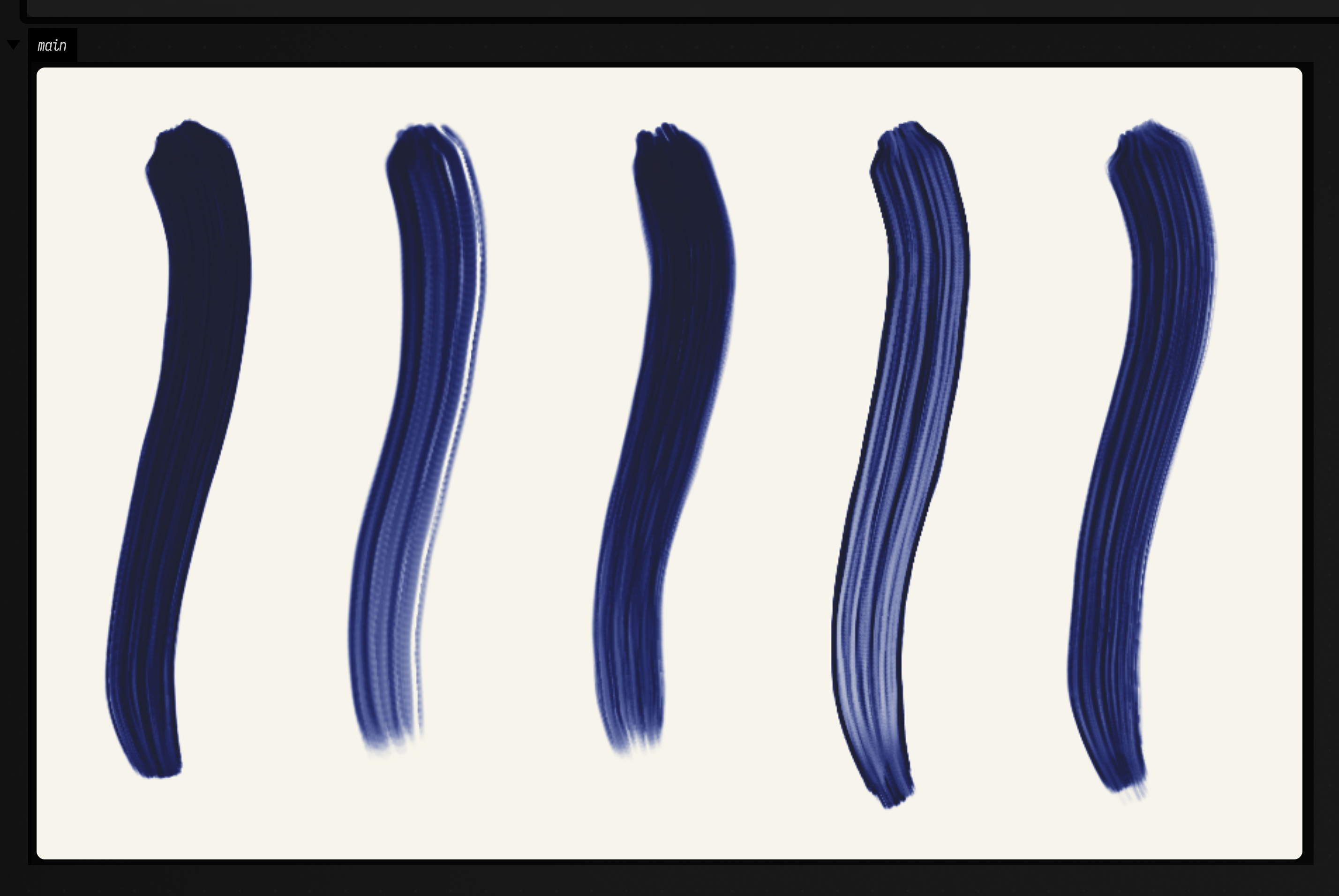
Brushes that stay dirty
A brush keeps what it picks up. Stroked through wet paint, it carries some of that colour into its
next stroke, and load mixes new paint into what is left unless wipe takes it out first. To come
back to the same brush later, keep it: a PaintToolbox holds brushes, knives, rags and pencils by
name.
val tools = PaintToolbox()
tools["sky"] = canvas.brush(BrushKind.HogFlat, 45.0)
tools.brush("sky").load(rgb(0.45, 0.55, 0.75))
canvas.stroke(sky, tools.brush("sky"))
// later, dirty with the earth it was dragged through
canvas.stroke(horizon, tools.brush("sky"))
tools.save(file) // every bristle's paint, the knife's bead, the rag's faces
val again = PaintToolbox.load(file) // carries on exactly as the tools would have
Here the sky brush paints once clean, is dragged through a wet band of earth, and the toolbox is saved. Topped up with blue without wiping, the brush paints a greyer second stroke; the same brush loaded back from the file paints the third, just as grey:
:::static
val canvas = PaintCanvas(900, aspect = 1.6, groundColor = rgb(0.97, 0.96, 0.92))
val tools = PaintToolbox()
tools["sky"] = canvas.brush(BrushKind.HogFlat, 45.0)
tools["earth"] = canvas.brush(BrushKind.HogFlat, 70.0)

// A wet band of earth along the bottom.
tools.brush("earth").load(rgb(0.45, 0.28, 0.12))
canvas.stroke(FLine().moveTo(60, 500).lineTo(940, 500), tools.brush("earth"))

// The clean sky brush: its first stroke, then dragged along through the wet earth.
tools.brush("sky").load(rgb(0.45, 0.55, 0.75))
canvas.stroke(FLine().moveTo(60, 90).lineTo(940, 90), tools.brush("sky"))
canvas.stroke(FLine().moveTo(300, 480).lineTo(700, 520), tools.brush("sky"))

// Keep the toolbox as it is now, dirty brush and all.
val file = java.io.File.createTempFile("toolbox", ".bin")
tools.save(file)

// Topped up with the same blue without wiping, the brush paints a dirtier horizon.
tools.brush("sky").load(rgb(0.45, 0.55, 0.75), amount = 0.5, wipe = 0.0)
canvas.stroke(FLine().moveTo(60, 230).lineTo(940, 230), tools.brush("sky"))

// The saved toolbox, loaded and topped up the same way, paints the same dirty stroke.
val again = PaintToolbox.load(file)
again.brush("sky").load(rgb(0.45, 0.55, 0.75), amount = 0.5, wipe = 0.0)
canvas.stroke(FLine().moveTo(60, 360).lineTo(940, 360), again.brush("sky"))

display("main", canvas.png())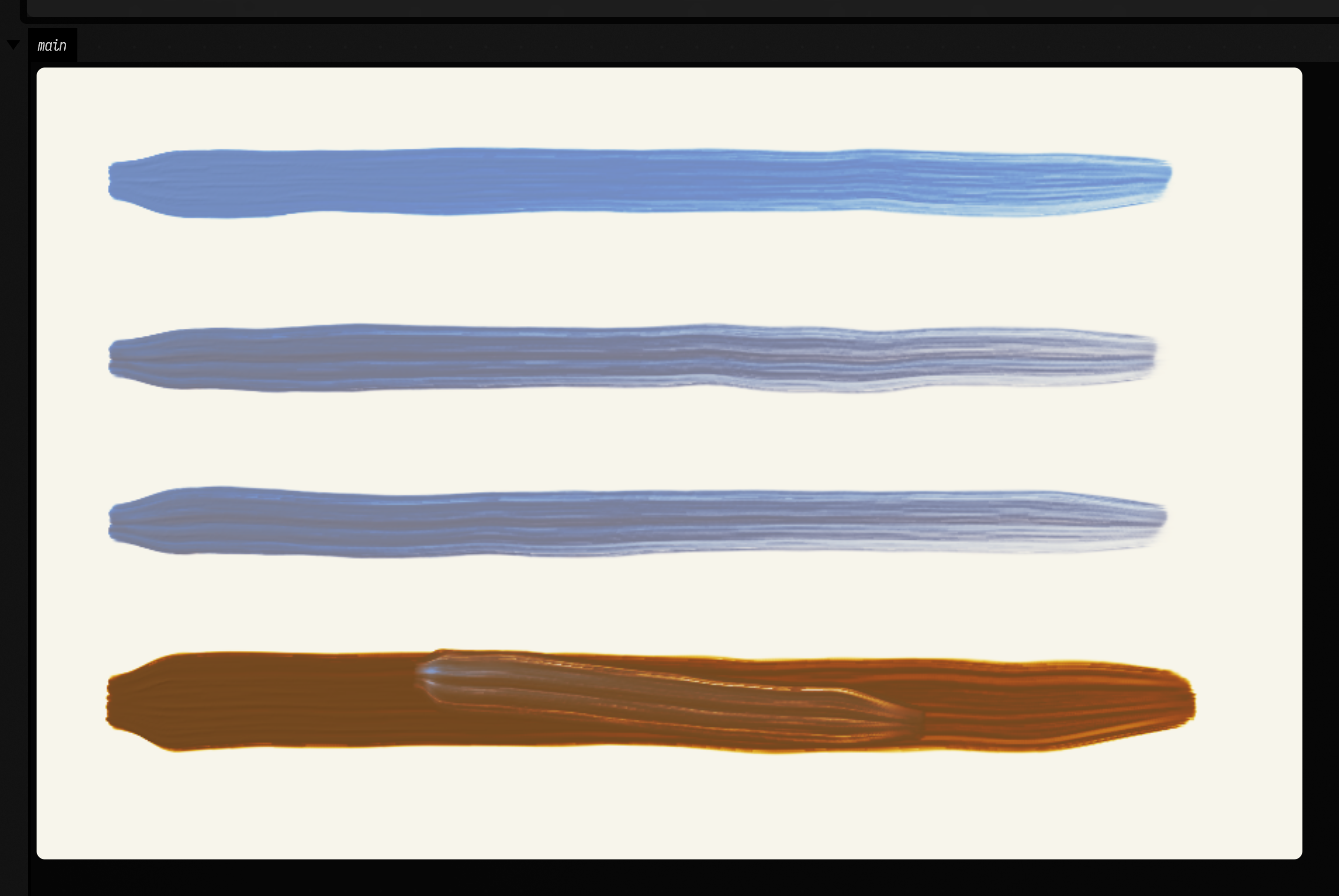
canvas.carried(brush) reports the colour and volume of the paint in a brush, and
tools.describe(canvas) says the same for every tool. Each tool also snapshots on its own:
brush.state() and PaintBrush.restore(state). AI4 paints keeps its painter's
brushes this way, so a conversation rewound to an earlier request gets its brushes back as dirty as
they were.
The canvas itself
PaintCanvas(widthPx, aspect, ground, groundColor, seed, view, sizeMm, engine):
-
groundis what the canvas starts as:PaintGround.Bare, the default, is a flat ground ofgroundColor(white by default).PaintGround.Oilis the crate's prepared oil canvas: woven linen, sized and primed with a warm red-brown ground. Its texture shows through thin paint and catches the relief lighting.PaintGround.OilRedGroundis a red-brown layer under two pale knifed and rolled grounds.PaintGround.Linenis raw linen ingroundColor, for priming yourself withprime(color, microns = ...).prime(..., absorbent = 1.0)makes that ground a chalk and glue one, which draws oil out of the paint laid on it, so the paint dries leaner and matte.PaintGround.RawCottonandPaintGround.RawLinenare bare cloth in its own colour, with no ground at all, as soak-stain painters used it.
groundColoronly applies toBareandLinen. -sizeMmis the canvas's physical width. It changes nothing about the coordinates, only how big the real-sized things in the simulation look: bristles, pencil points, the linen weave, cracks. -seedseeds every brush, pencil mark and crack, and the linen of an oil ground. The same seed and the same calls always paint the same picture. -engineis the version of the simulation to paint with, the newest by default (PaintCanvas.engine). An engine never changes, so the same calls on the same engine always paint the same pixels, and a saved canvas opens with the engine it was painted with. Thinned paint and raw cloth need engine 3 or later; stiff impasto, clumping hair, turpentine, absorbent grounds and matte or glossy surfaces need engine 4; the knife's torn edges need engine 5. Oil paint dries 2.5 times more slowly from engine 3 on.
Looking at it, and keeping it:
png()andrender()show a dried copy, the way the painting will look.render(wet = true)shows it as it looks right now, wet paint and all.light = PaintLight(azimuth, elevation)looks at it under a lamp instead of the default relief lighting: ridges cast shadows along the light, and wet paint shines.PaintLight.Rakingis a low lamp from the upper left,PaintLight.Gallerya high one.statsreports the simulated clock, an estimate of the hand time the marks would take a painter, how much of the canvas is still open, setting, tacky or dry, and the wet paint and solvent on it in mm³.copy()is an independent copy, wet paint included, for trying something out.saveState(path)writes the whole canvas to a file andPaintCanvas.load(path)carries on from it.save(path)writes a PNG.
A canvas and its brushes hold native memory. It is freed when they are garbage-collected, or straight
away with close() (both are AutoCloseable, so use { } works).
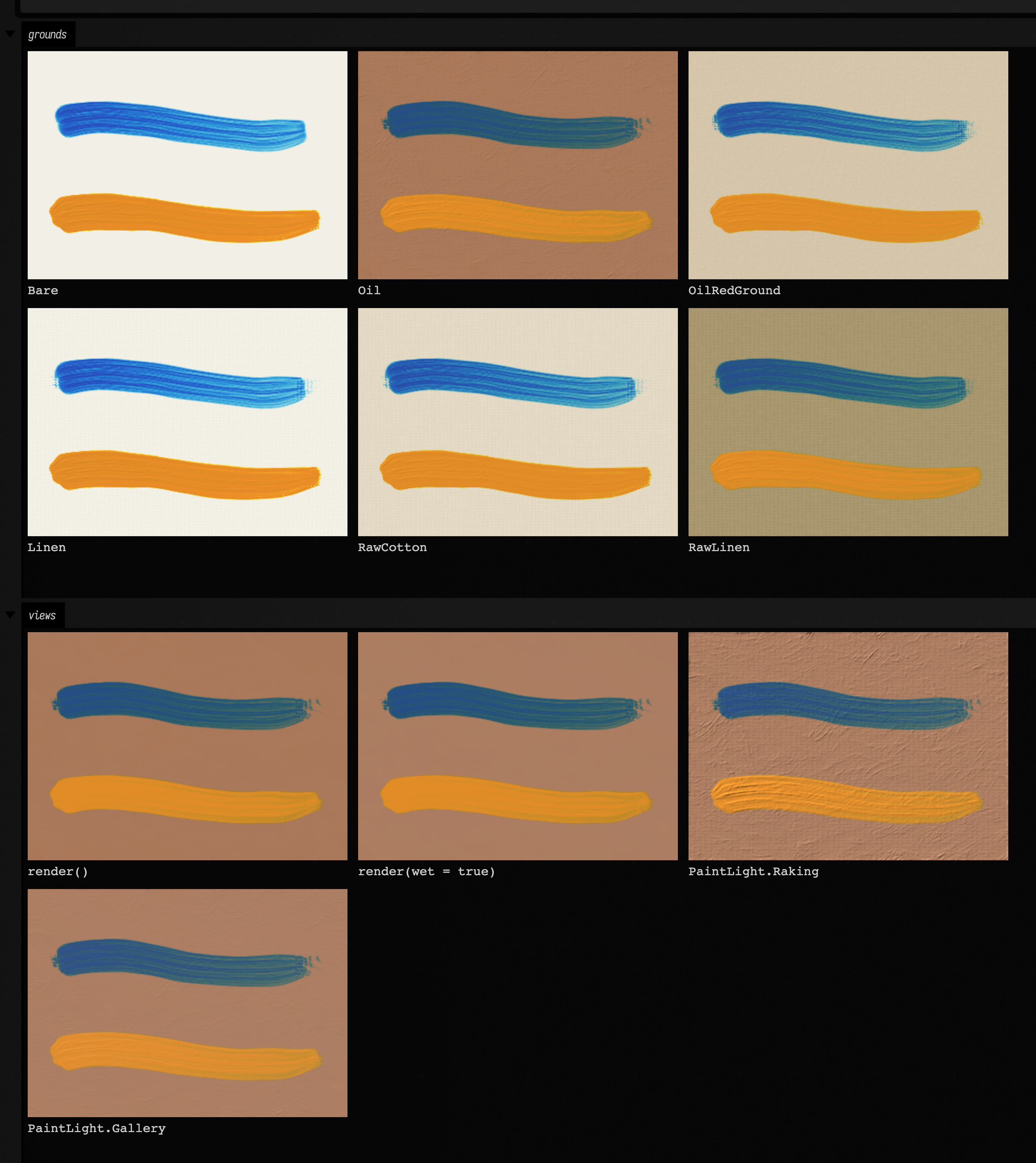
The same thin blue stroke and stiff orange one on each ground, then one oil-ground canvas under the four views:
:::static
// One thin stroke and one impasto stroke, painted the same way on each ground.
fun paintOn(ground: PaintGround): PaintCanvas {
    val canvas = PaintCanvas(360, aspect = 1.4, ground = ground, groundColor = rgb(0.95, 0.94, 0.9), sizeMm = 200.0)
    val brush = canvas.brush(BrushKind.HogFlat, width = 90.0)
    brush.load(rgb(0.15, 0.3, 0.6), amount = 0.3, turps = 0.6)
    canvas.stroke(FLine().moveTo(80, 230).cubicTo(330, 150, 630, 330, 920, 230), brush)
    brush.load(rgb(0.9, 0.55, 0.15), stiff = 0.95, amount = 1.0)
    canvas.stroke(FLine().moveTo(80, 520).cubicTo(330, 440, 630, 620, 920, 520), brush, pressure = 0.9..0.6)
    return canvas
}

fun cell(label: String, png: ByteArray) =
    "<figure style='margin:0'><img width='300' src='data:image/png;base64,${java.util.Base64.getEncoder().encodeToString(png)}'/>" +
        "<figcaption style='font:12px monospace;color:#ccc'>$label</figcaption></figure>"
fun grid(cells: List<String>) = "<div style='display:grid;grid-template-columns:repeat(3,300px);gap:10px'>${cells.joinToString("")}</div>"

display("grounds", grid(PaintGround.entries.map { cell(it.name, paintOn(it).png()) }))

// One canvas, four ways of looking at it.
val oil = paintOn(PaintGround.Oil)
display(
    "views",
    grid(
        [
            cell("render()", oil.png(relief = 0.0)),
            cell("render(wet = true)", oil.png(relief = 0.0, wet = true)),
            cell("PaintLight.Raking", oil.png(light = PaintLight.Raking)),
            cell("PaintLight.Gallery", oil.png(light = PaintLight.Gallery)),
        ],
    ),
)
Building the library
The simulation is Rust. Field calls it through a small wrapper library in native/field-paint,
which is not part of the normal build. Install a current stable Rust toolchain (cargo and
rustc); older distribution packages may be too old for this crate. --setup checks their
versions before preparing paint. Build it once:
./gradlew buildPaintNativeThe crate is alice's claude-paint paint
crate, kept in the repository at native/field-paint/vendor/paint under its MIT licence, with the
upstream commit it was taken from in VENDORED.md. Field's additions to it are in
native/field-paint/vendor/paint/src/field/ and are Field's, not alice's. The first build downloads the crate's dependencies from
crates.io and takes a few minutes.
Later builds take seconds. The library goes in build/field-paint/release, where Field finds it
without restarting. To use a copy somewhere else, set AFIELD_PAINT_LIBRARY or
-Dafield.paint.library to its path. PaintCanvas.isAvailable says whether Field can find it, and
PaintLibrary.describe() says where it looked.
See also: Watercolour and ink, where water on paper moves by itself, Brushes with moving hairs, whose hairs bend, splay and flick under timed gestures of the hand, Drawing with FLines, Colors, Drawn Strokes Become Paint, which paints strokes drawn on the drawing layer with the pen's pressure, and AI4 paints, where the AI chat paints on this canvas.