Values over time: interpolants & keyframes
A value can ease towards its target instead of jumping there. That makes a control feel different to drag, and the same idea can morph a whole set of parameters between saved looks. You can also follow the relationship between two signals as it changes over time.
The examples draw each of these: showSignals plots values over time, while FLines show motion
in space.
For recovering a hidden value from noisy measurements, see
State estimation. To draw a value over time by
hand rather than ease it from code, see The keyframe editor.
Interpolants: easing a value to a target
An interpolant is a value that chases a target over a controlled number of
evaluations rather than jumping. smoothTo(...) is the workhorse. Opacity,
brightness, a filter cutoff, a camera move, a number coming off a gesture —
anything you would otherwise assign outright can be handed to it instead. The
single knob that shapes the approach is steps: fewer steps arrive sooner and
sharper, more steps settle later and softer. The way to feel that is to give three
interpolants a target that keeps moving (a set-point that jumps every 60
evaluations) and re-aim each one from wherever it currently sits (startAt) the
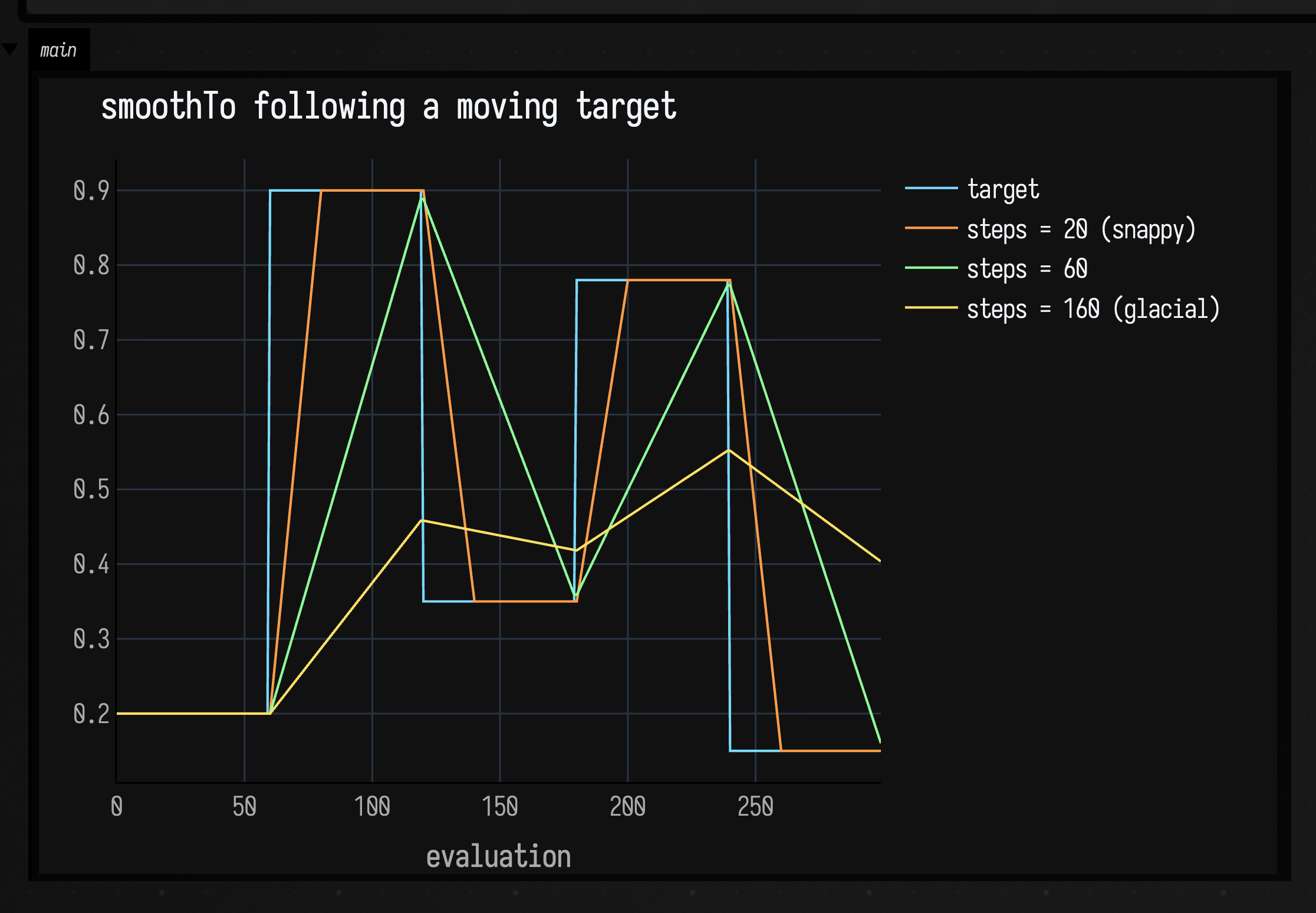
moment the target changes. Now steps reads as responsiveness: the snappy one
locks on almost immediately, the glacial one is still leaning into the last jump
when the next one arrives.
:::static
val n = 300
// A target that jumps to a new set-point every 60 evaluations — the value to chase.
val setPoints = floatArrayOf(0.20f, 0.90f, 0.35f, 0.78f, 0.15f)
fun targetAt(i: Int) = setPoints[(i / 60).coerceAtMost(setPoints.size - 1)]

var goal = setPoints[0]
fun chaser(steps: Int) = smoothTo<Float>(steps = steps) { goal }.also { it.startAt(goal) }

val snappy = chaser(20) // locks on fast
val medium = chaser(60) // arrives about when the next jump lands
val glacial = chaser(160) // always leaning toward the last set-point

val tgt = FloatArray(n)
val a = FloatArray(n)
val b = FloatArray(n)
val c = FloatArray(n)
var prev = goal
for (i in 0 until n) {
    goal = targetAt(i)
    if (goal != prev) {
        // Retarget: re-aim each interpolant from its current value toward the new set-point.
        snappy.startAt(a[i - 1])
        medium.startAt(b[i - 1])
        glacial.startAt(c[i - 1])
        prev = goal
    }
    tgt[i] = goal
    a[i] = snappy()
    b[i] = medium()
    c[i] = glacial()
}

showSignals(
    "target" to tgt.toList(),
    "steps = 20 (snappy)" to a.toList(),
    "steps = 60" to b.toList(),
    "steps = 160 (glacial)" to c.toList(),
    channel = "main",
    title = "smoothTo following a moving target",
    xTitle = "evaluation",
)
The cyan step line is the target; the three curves re-aim at each jump. steps = 20
snaps onto every set-point and holds; steps = 60 arrives just as the next jump
lands; steps = 160 rounds every corner and never quite catches up before the
target moves again. Pick the ramp whose settling time matches the gesture.
Diff: retime interpolation by duration
"Smooth" can mean "over the next 140 evaluations" or "over 1.2 seconds of real time." The two come apart as soon as the frame rate or sampling cadence changes. The diff below keeps a step-counted line and adds a duration-based one, sampling both under a cadence that slows partway through:
:::before
val q = smoothTo<Float>(steps = 140) { 1.0f }
q.startAt(0.0f)
val y = List(180) { q() }

val f = fline {
    breakNext()
    y.forEachIndexed { i, v ->
        val x = 40.0 + i.toDouble() / (y.size - 1).toDouble() * 980.0
        val yy = 560.0 - v * 420.0
        lineTo(x, yy)
    }
    color = vec(1.0, 0.72, 0.35, 0.95)
    thickness = 2.2
}
lines(f, channel = "interpolants-diff", w = 1080.0, h = 640.0, fitToSize = true)
:::after
data class Sample(val elapsed: Double, val byStep: Float, val byTime: Float)

val byStep = smoothTo<Float>(steps = 140) { 1.0f }
byStep.startAt(0.0f)

var elapsed = 0.0
val duration = 1.2
val byTime = smoothTo<Float>(time = duration, steps = null, clock = { elapsed }) { 1.0f }
byTime.startAt(0.0f)

val samples =
    List(220) { i ->
        val sample = Sample(elapsed, byStep(), byTime())
        elapsed += if (i < 150) 0.002 else 0.018
        sample
    }

val maxTime = 1.6
fun x(t: Double) = 40.0 + (t / maxTime).coerceIn(0.0, 1.0) * 980.0
fun y(v: Float) = 560.0 - v * 420.0

fun trace(values: List<Pair<Double, Float>>, rgba: Vec4, width: Double) = fline {
    breakNext()
    values.forEach { (t, v) ->
        val xx = x(t)
        val yy = y(v)
        lineTo(xx, yy)
    }
    color = rgba
    thickness = width
}

val guides = [
    fline {
        moveTo(40, 560)
        lineTo(1020, 560)
        color = vec(1, 1, 1, 0.22)
        thickness = 1.2
    },
    fline {
        moveTo(40, 140)
        lineTo(1020, 140)
        color = vec(1, 1, 1, 0.14)
        thickness = 1.0
    },
    fline {
        moveTo(x(duration), 110)
        lineTo(x(duration), 580)
        color = vec(1, 1, 1, 0.18)
        thickness = 1.0
    },
]

val stepLine = trace(samples.map { it.elapsed to it.byStep }, vec(1.0, 0.72, 0.35, 0.95), 2.6)
val timeLine = trace(samples.map { it.elapsed to it.byTime }, vec(0.56, 1.0, 0.68, 0.95), 3.0)

lines(guides + stepLine + timeLine, channel = "interpolants-diff", w = 1080.0, h = 640.0, fitToSize = true)
:::fold render the colour key
// The two colours name the trace colours above, so they stay as spans. The card around
// them does not need spelling out.
markdown(
    "legend",
    """
    <span style='color:#ffb85a'>orange</span>: fixed 140 calls;
    <span style='color:#8fffad'>green</span>: $duration seconds;
    vertical guide = requested duration
""",
)
:::endfold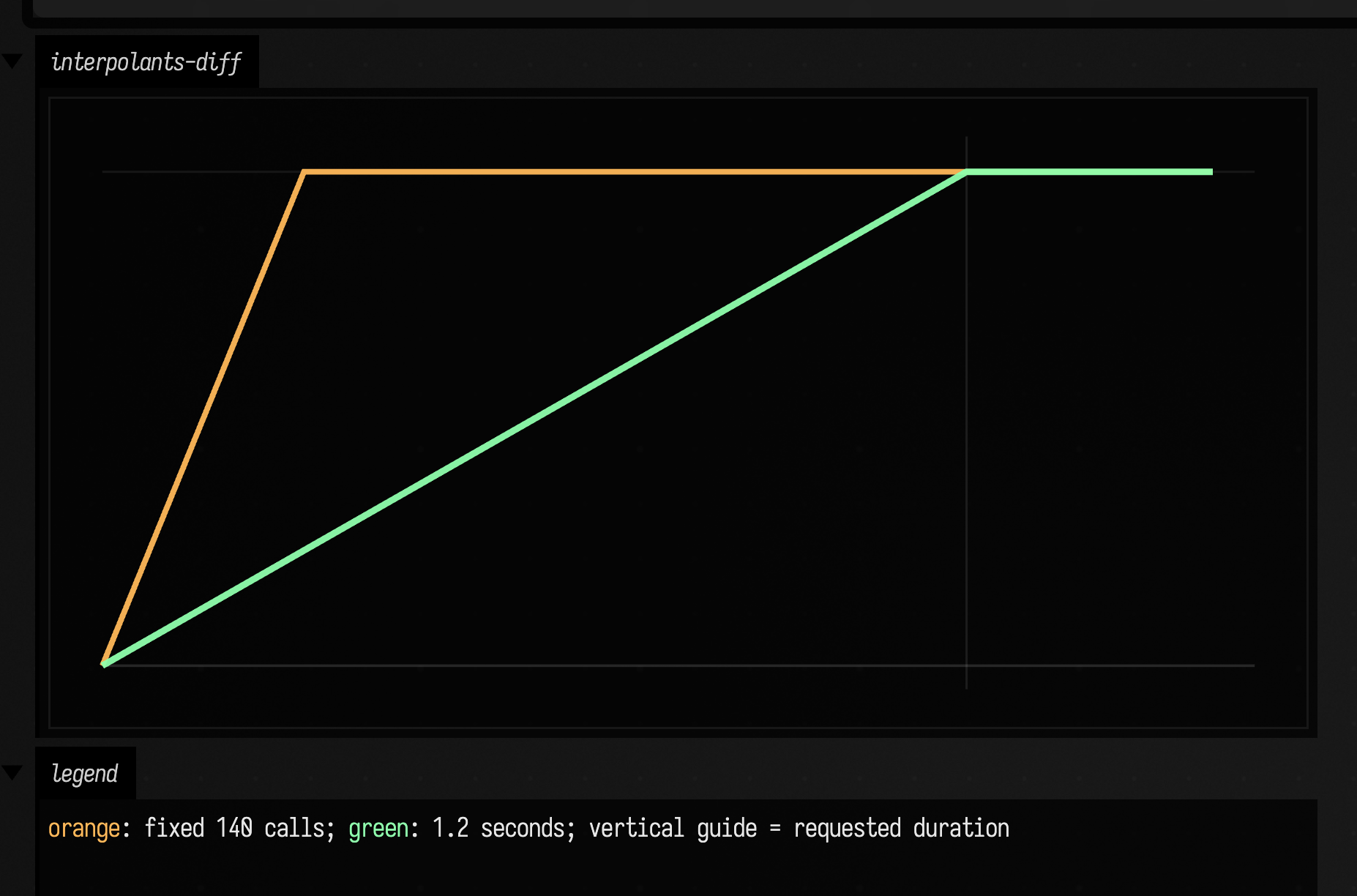
The orange trace arrives after 140 calls; the green trace reaches the target on the first read at
or after the requested duration. The example passes in its own clock, so
the uneven cadence is the same on every run. For a film or
offline render, use clock = frameClock(24.0) { renderer.frameCounter }: repeated reads in one frame
see the same time, and each rendered frame advances exactly 1/24 second. Use the
step form when the world is discrete and counted, the time form when it is
musical, animated, or otherwise measured in seconds.
Inertia: re-aiming a blend that is already moving
Every smoothTo above is re-aimed by a call to startAt, and startAt restarts.
That is the right behaviour for a value that animates once, and the wrong
behaviour for a value that is being dragged: the current velocity is discarded,
so each new target puts the motion back at a standstill. Bind a smoothTo to a
mouse position, so that whatever owns it re-aims on every move, and the result
stutters once per move.
inertialTo takes the same target lambda and re-solves instead of restarting. It
compares the target against the one it was last aimed at, and when they differ it
finds the blend that passes through the value's current position at its current
velocity. Nobody has to call startAt, because noticing is the interpolant's
job, which is why the third interpolant below is the only one with no bookkeeping
around it:
:::static
val n = 320
// The set-point jumps every 45 evaluations, which is less than the 64-evaluation blend,
// so every jump interrupts a blend that is still running.
val setPoints = floatArrayOf(0.20f, 0.90f, 0.35f, 0.78f, 0.15f)
fun targetAt(i: Int) = setPoints[(i / 45).coerceAtMost(setPoints.size - 1)]

var goal = setPoints[0]
val linear = smoothTo<Float>(steps = 64) { goal }
linear.startAt(goal)
val restarted = inertialTo<Float>(steps = 64) { goal }
val carried = inertialTo<Float>(steps = 64) { goal }

val tgt = FloatArray(n)
val a = FloatArray(n)
val b = FloatArray(n)
val c = FloatArray(n)
var previous = goal
for (i in 0 until n) {
    goal = targetAt(i)
    if (goal != previous) {
        linear.startAt(a[i - 1])
        restarted.startAt(b[i - 1])
        previous = goal
    }
    tgt[i] = goal
    a[i] = linear()
    b[i] = restarted()
    c[i] = carried()
}

// The step-to-step change is the velocity, up to the constant factor of one evaluation.
fun change(v: FloatArray) = List(v.size) { if (it == 0) 0.0 else (v[it] - v[it - 1]).toDouble() }

showSignals(
    "smoothTo, re-aimed" to a.toList(),
    "inertialTo, restarted by startAt" to b.toList(),
    "inertialTo, left to re-solve" to c.toList(),
    "target" to tgt.toList(),
    channel = "value",
    title = "One jumping set-point, three ways of re-aiming at it",
    xTitle = "evaluation",
)
showSignals(
    "smoothTo, re-aimed" to change(a),
    "inertialTo, restarted by startAt" to change(b),
    "inertialTo, left to re-solve" to change(c),
    channel = "change",
    title = "The same three, differenced — how fast each one is travelling",
    xTitle = "evaluation",
)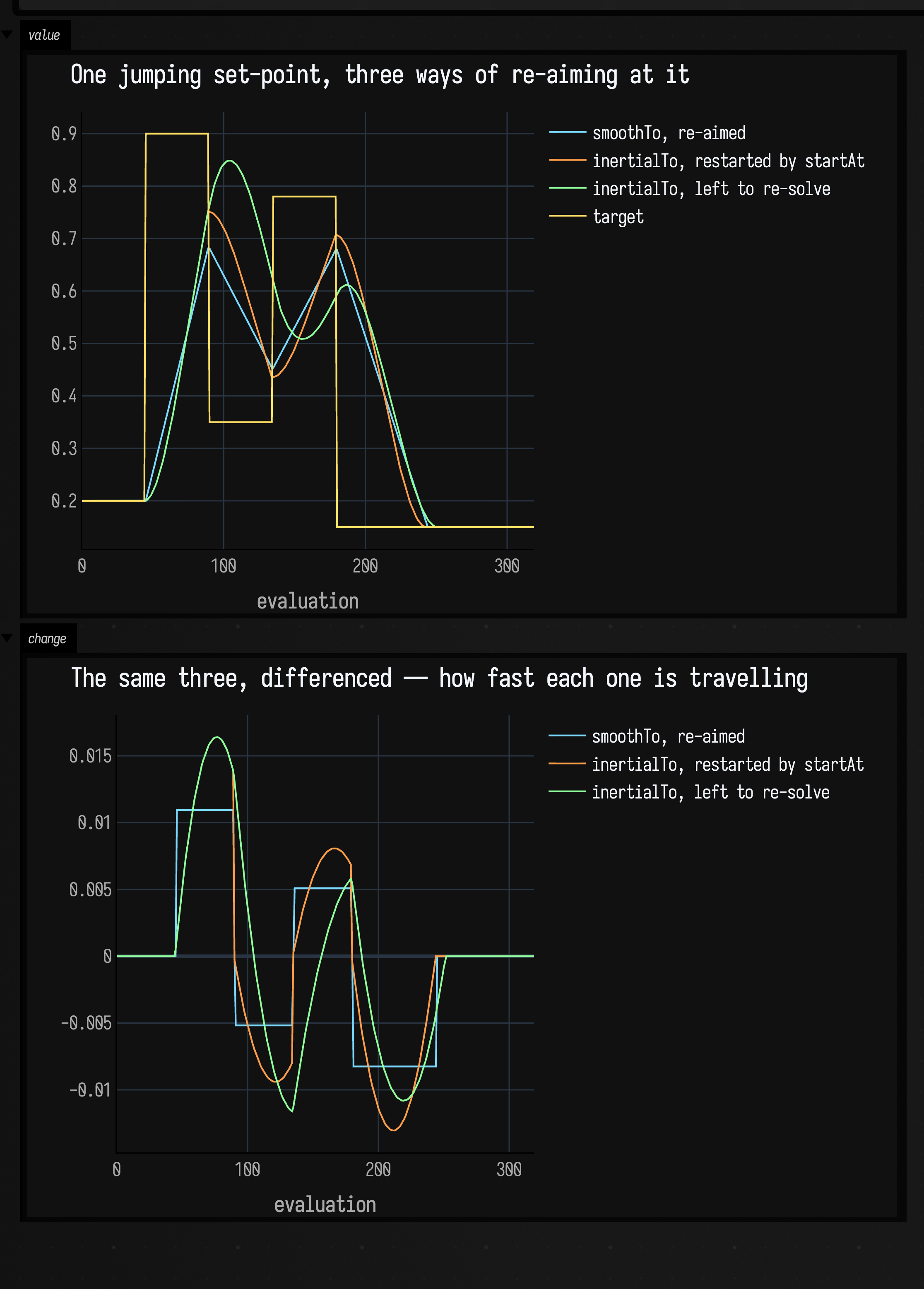
The value panel separates the three at the corners; the change panel differences
them into speeds. smoothTo is a straight line between two numbers, so its speed is a
plateau, and re-aiming steps that plateau to a new level between one evaluation
and the next. Restarting inertialTo replaces the step with a zero: the new blend
begins at rest, so whatever speed the value had is thrown away and built again
from nothing. Left to re-solve, it is the only one of the three whose speed after
a jump is the speed it had before — it carries on in the old direction for a
moment, turns around, and has no corners. A drag bound to it does not stutter.
Before you bind one, note two things about re-solving:
inertialTonever reports itself complete, even while sitting on its target. A uniform that reports completion stops being written, and an interpolant that has to be read to notice its target has moved cannot afford that. So it keeps costing an evaluation for as long as it is bound; reach forsmoothTofor a value that animates once and settles.- It starts at rest on whatever the target first reads as, so it works standalone
and not only as a bound uniform.
startAtis available but optional.
Entering the curve part-way
InertialEasing is the arithmetic underneath, exposed for driving a blend by hand
in a game loop, or on something the interpolant cannot carry — a quaternion, say.
smoothstep(t, s) is the scaled cubic \( s\,(3t^2 - 2t^3) \) indexed by its own time
rather than the GLSL function of the same name, smoothstepDt is its derivative,
and solve(x, v) is the one you enter a curve part-way with: it returns the t
and s whose curve is x away from its destination and moving at velocity v. Advance t to 1
from there and the gap closes, arriving at rest. A restart is the v = 0 case of
that, and the top panel below asks for the same distance at five different
incoming speeds instead:
:::static
// One unit of distance still to go, five different speeds of arrival at it. Velocity is
// per blend time, not per second: a 0.4s blend on something moving 5 units/second is v = 2.
val speeds = [0.0, 1.0, 3.0, 8.0, 20.0]
val shades = [
    vec(0.48, 0.85, 1.0, 0.95),
    vec(0.55, 0.95, 0.80, 0.95),
    vec(0.75, 1.00, 0.55, 0.95),
    vec(1.00, 0.85, 0.40, 0.95),
    vec(1.00, 0.62, 0.42, 0.95),
]

fun x(u: Double, from: Double) = 40.0 + (u - from) / (1.3 - from) * 1000.0
fun y(v: Double, span: Double) = 560.0 - v / span * 400.0

fun curve(v: Double, overshoot: Double, rgba: Vec4, from: Double, span: Double, width: Double): FLine {
    val solved = InertialEasing.solve(x = 1.0, v = v, overshoot = overshoot)
    val base = InertialEasing.smoothstep(solved.t, solved.s)
    return fline {
        breakNext()
        for (i in 0..600) {
            val u = solved.t + (1.3 - solved.t) * i / 600.0
            val value = InertialEasing.smoothstep(u, solved.s) - base
            lineTo(x(u, from), y(value, span))
        }
        color = rgba
        thickness = width
    }
}

fun guides(from: Double, span: Double, at: List<Double>) =
    at.map { v ->
        fline {
            moveTo(x(from, from), y(v, span))
            lineTo(x(1.3, from), y(v, span))
            color = vec(1, 1, 1, if (v == 0.0 || v == 1.0) 0.22 else 0.10)
            thickness = 1.2
        }
    } +
        fline {
            moveTo(x(0.0, from), y(-0.06 * span, span))
            lineTo(x(0.0, from), y(span * 1.04, span))
            color = vec(1, 1, 1, 0.16)
            thickness = 1.0
        } +
        fline {
            moveTo(x(1.0, from), y(-0.06 * span, span))
            lineTo(x(1.0, from), y(span * 1.04, span))
            color = vec(1, 1, 1, 0.16)
            thickness = 1.0
        }

val family = speeds.mapIndexed { i, v -> curve(v, 0.05, shades[i], -0.05, 1.1, 2.6) }
lines(guides(-0.05, 1.1, [0.0, 1.0]) + family, channel = "family", w = 1080.0, h = 540.0, fitToSize = true)

// Past v = 21.3 × the distance left, `solve` prefers the negative root: the curve is entered
// before its own zero crossing, which flies past the target and comes back.
val jolt = curve(26.0, 0.0, vec(0.55, 0.72, 0.95, 0.9), -0.6, 6.4, 2.2)
val past = curve(26.0, 0.05, vec(1.00, 0.62, 0.42, 0.95), -0.6, 6.4, 2.8)
lines(guides(-0.6, 6.4, [0.0, 1.0]) + jolt + past, channel = "overshoot", w = 1080.0, h = 540.0, fitToSize = true)
:::fold render the colour key
markdown(
    "legend",
    """
    top, incoming speed per blend time:
    <span style='color:#7ad9ff'>0</span>,
    <span style='color:#8cf2cc'>1</span>,
    <span style='color:#bfff8c'>3</span>,
    <span style='color:#ffd966'>8</span>,
    <span style='color:#ff9e6b'>20</span>;
    guides at t = 0 and t = 1.
    bottom, v = 26: <span style='color:#8cb8f2'>overshoot = 0.0</span> stops inside the blend,
    <span style='color:#ff9e6b'>the default 0.05</span> flies past and returns.
""",
)
:::endfold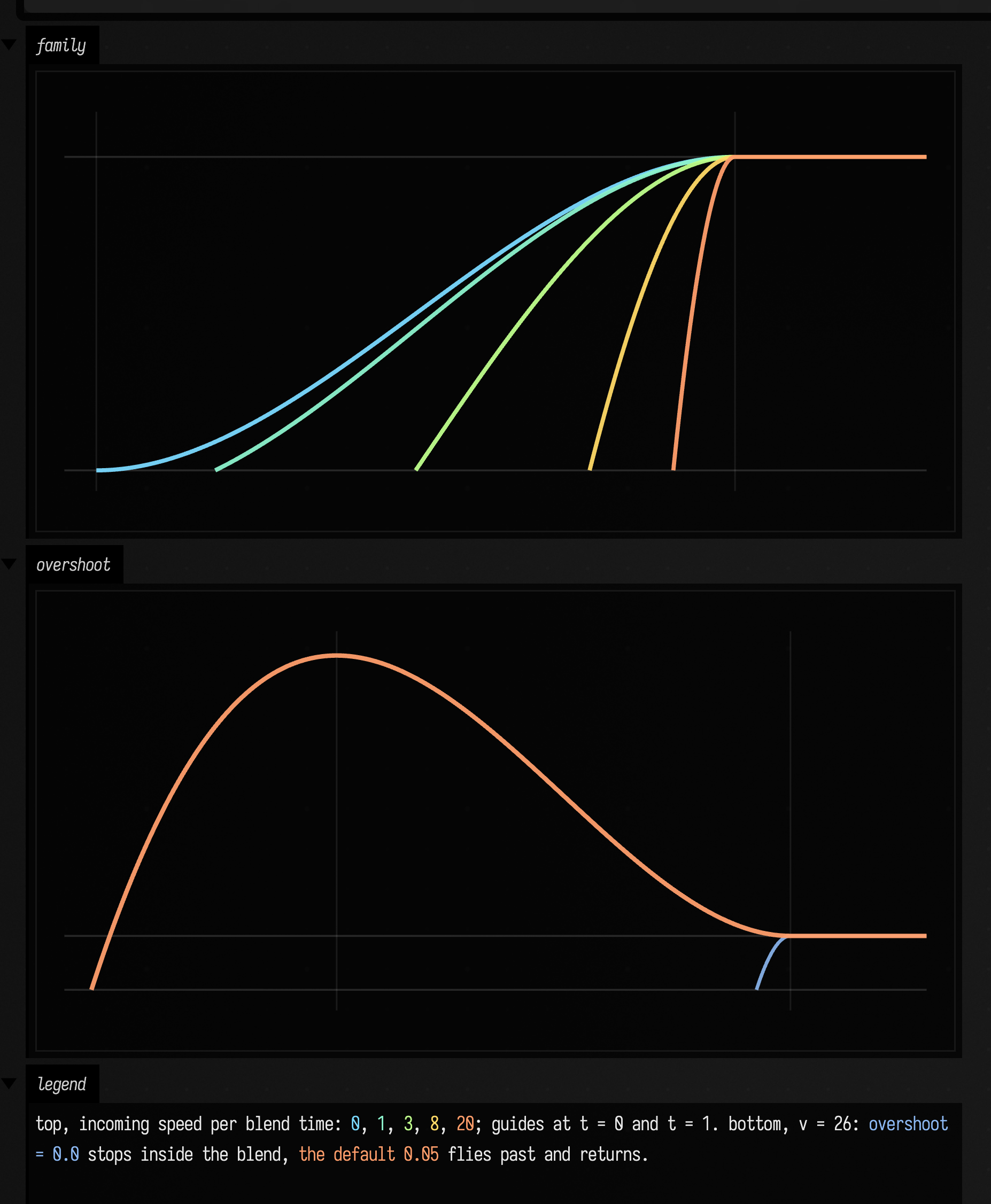
In the top panel every curve covers the same unit of distance and arrives at rest
at t = 1; the faster it is already going, the further along the curve it starts,
so v = 20 enters at t = 0.903 and has a tenth of a blend time left to do the
whole job. The bottom panel is the second root. solve returns two, and it picks
the negative one — the curve entered before its own zero crossing — when the
incoming speed exceeds about 21.3 times the distance remaining, which for
overshoot = 0.05 is the whole of that branch. Stopping cleanly from there would
need an implausibly sharp deceleration, so the curve flies past the target and
comes back. With overshoot = 0.0 it does not overshoot, and the blue sliver at
the right of that panel shows the cost: the same unit of distance, covered in the
last few percent of the blend.
Keyframes: morphing a whole parameter state — including code
An interpolant moves one number. A KeyframeScope moves a whole named state
between saved snapshots, and its values are typed: numbers and vectors ease
continuously, quaternions slerp, and code values (StackSLString, source
blocks) switch discretely at the end of the transition. So a patch can
crossfade its continuous parameters while its actual synthesis code snaps over at
the moment the crossfade completes. Two Keys and interpolate
are all it takes; here the numeric gain is eased through a smoothstep remap,
the pos vector eases linearly, and the voice code steps:
:::static
val scope = KeyframeScope()
val a = scope.Key(
    "gain" to 0.12,
    "pos" to Vector2f(80f, 500f),
    "voice" to stackSLString("saw 110 *"),
)
val b = scope.Key(
    "gain" to 0.94,
    "pos" to Vector2f(960f, 150f),
    "voice" to stackSLString("sin 220 * fold"),
)

// Ease only the gain with a smoothstep; pos stays linear.
scope.remap["gain"] = { t ->
    t * t * (3.0 - 2.0 * t)
}

val steps = 220
val gain = fline {
    breakNext()
    for (i in 0..steps) {
        val t = i.toDouble() / steps
        val g = (scope.interpolate(a, b, t)["gain"] as Number).toDouble()
        val x = 60.0 + t * 960.0
        val y = 560.0 - g * 460.0
        lineTo(x, y)
    }
    color = vec(0.55, 0.92, 1.0, 0.95)
    thickness = 2.8
}

// The position vector traces a linear path across the frame.
val path = fline {
    breakNext()
    for (i in 0..steps) {
        val t = i.toDouble() / steps
        val p = scope.interpolate(a, b, t)["pos"] as Vector2f
        lineTo(p.x, p.y)
    }
    color = vec(1.0, 0.70, 0.32, 0.55)
    thickness = 2.0
}

// The code value is discrete: it stays "a" until t reaches 1, then snaps to "b".
// Draw that as a step trace to contrast it with the smooth gain.
val code = fline {
    breakNext()
    for (i in 0..steps) {
        val t = i.toDouble() / steps
        val isEnd = scope.interpolate(a, b, t)["voice"] == b["voice"]
        val x = 60.0 + t * 960.0
        val y = if (isEnd) 120.0 else 540.0
        lineTo(x, y)
    }
    color = vec(0.65, 1.0, 0.55, 0.95)
    thickness = 2.2
}

lines(path, gain, code, channel = "keyframe-morph", w = 1080.0, h = 640.0, fitToSize = true)
:::fold render the colour key
// As above: the three colours are the trace colours, the card around them is not.
markdown(
    "keys",
    """
    <span style='color:#8fe6ff'>blue</span>: gain, eased (smoothstep);
    <span style='color:#ffb185'>orange</span>: pos, linear path;
    <span style='color:#a6ff8c'>green</span>: voice code — one discrete switch at the end
""",
)
:::endfold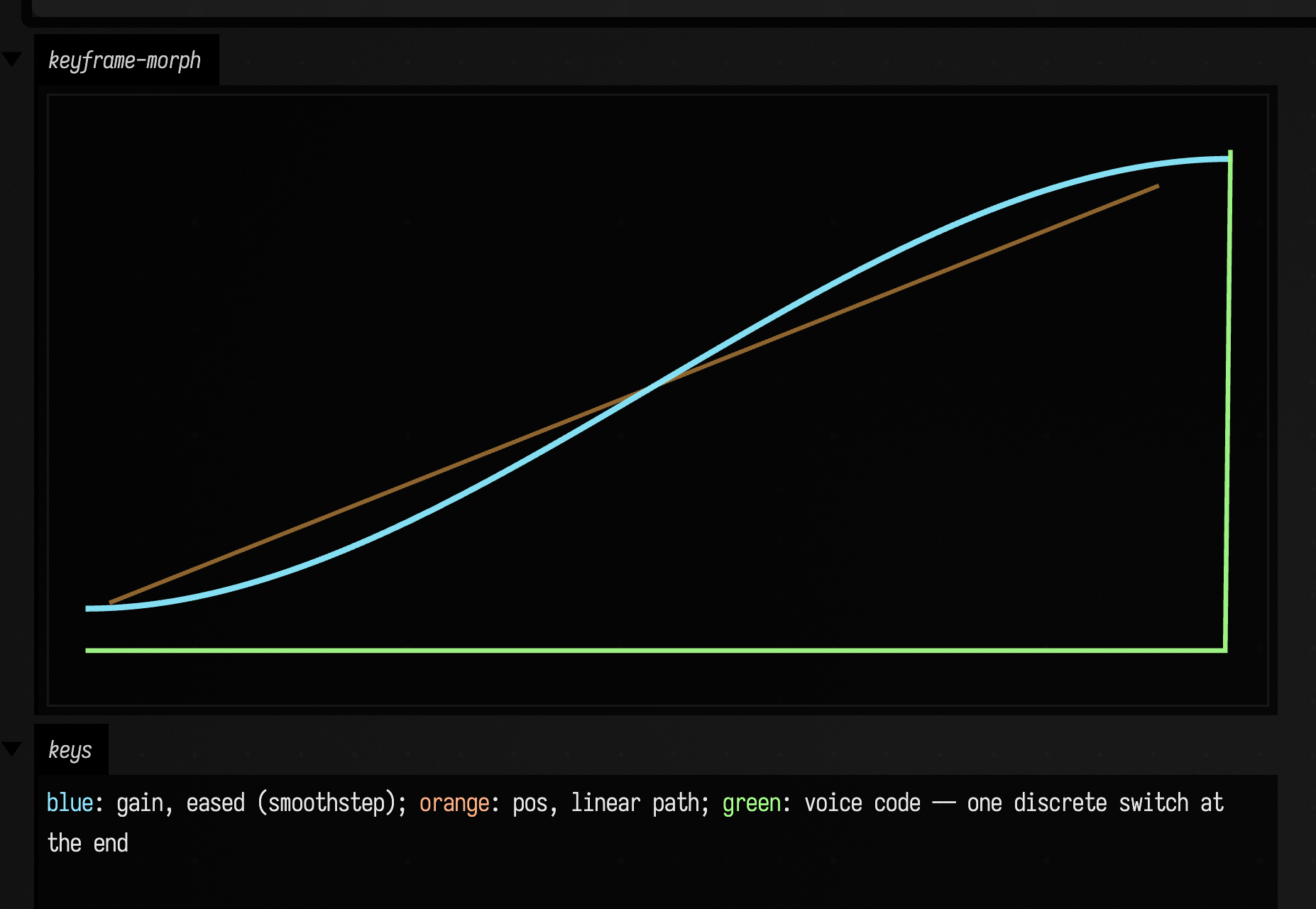
The green step trace sits low for the whole transition and jumps exactly once, at
the very end — that is StackSLString/source-block interpolation, which never
produces a half-parsed intermediate. The blue gain is the smoothstep, the orange
path is the linear vector ease. Two programs that differ only in numbers can
do better than a single step: see
blending two programs. A Key also knows how to diff against another
and emit the update { ... } code that reproduces it, so a captured look is both
a value you can interpolate toward and a snippet you can paste back into a box.
Correlations: drawing how two signals depend on each other
A correlation compresses a relationship into one number. That number can hide a nonlinear dependency, or flatten a relationship that changes over time into one value. Two signals can clearly belong together without a straight-line relationship. A rolling metric lets you watch that dependence change as the signals play:
:::static
val rollingD = RollingDistanceCorrelation(windowSize = 60)
val rollingXi = RollingXiCorrelation(windowSize = 60)

// A partner signal whose relationship to the driver changes in thirds: first it tracks x
// (linear), then it becomes independent noise, then it is a nonlinear function of x.
val n = 420
val xs = DoubleArray(n) { sin(it / n.toDouble() * 2.0 * PI * 3.0) }
val ys =
    DoubleArray(n) { i ->
        when {
            i < 140 -> xs[i] + (-0.05 + random() * 0.10) // linear dependence
            i < 280 -> -0.9 + random() * 1.8 // independent noise
            else -> 2.0 * xs[i] * xs[i] - 1.0 + (-0.05 + random() * 0.10) // nonlinear dependence
        }
    }
val dcor = DoubleArray(n) { rollingD.push(xs[it], ys[it]) ?: 0.0 }
val xi = DoubleArray(n) { rollingXi.push(xs[it], ys[it]) ?: 0.0 }

showSignals(
    "x (driver)" to xs.toList(),
    "y (partner)" to ys.toList(),
    "rolling dcor" to dcor.toList(),
    "rolling xi" to xi.toList(),
    title = "Dependence coming in and out: linear → noise → nonlinear",
    xTitle = "sample",
    marks = ["noise" to 140, "nonlinear" to 280],
    markColor = "#9aa4b2",
)
Both source signals are drawn alongside the metrics computed from them, so you can
see what each rolling window is actually looking at. In the first third y tracks
x; in the second it is independent noise; in the third it is a nonlinear function
of x (\( y = 2x^2 - 1 \)). Both RollingDistanceCorrelation and RollingXiCorrelation
climb on the two dependent stretches and collapse across the noise band, so the
dependence visibly comes and goes (the grey guides mark the regime changes), which
a single summary number would smear into one lukewarm value.
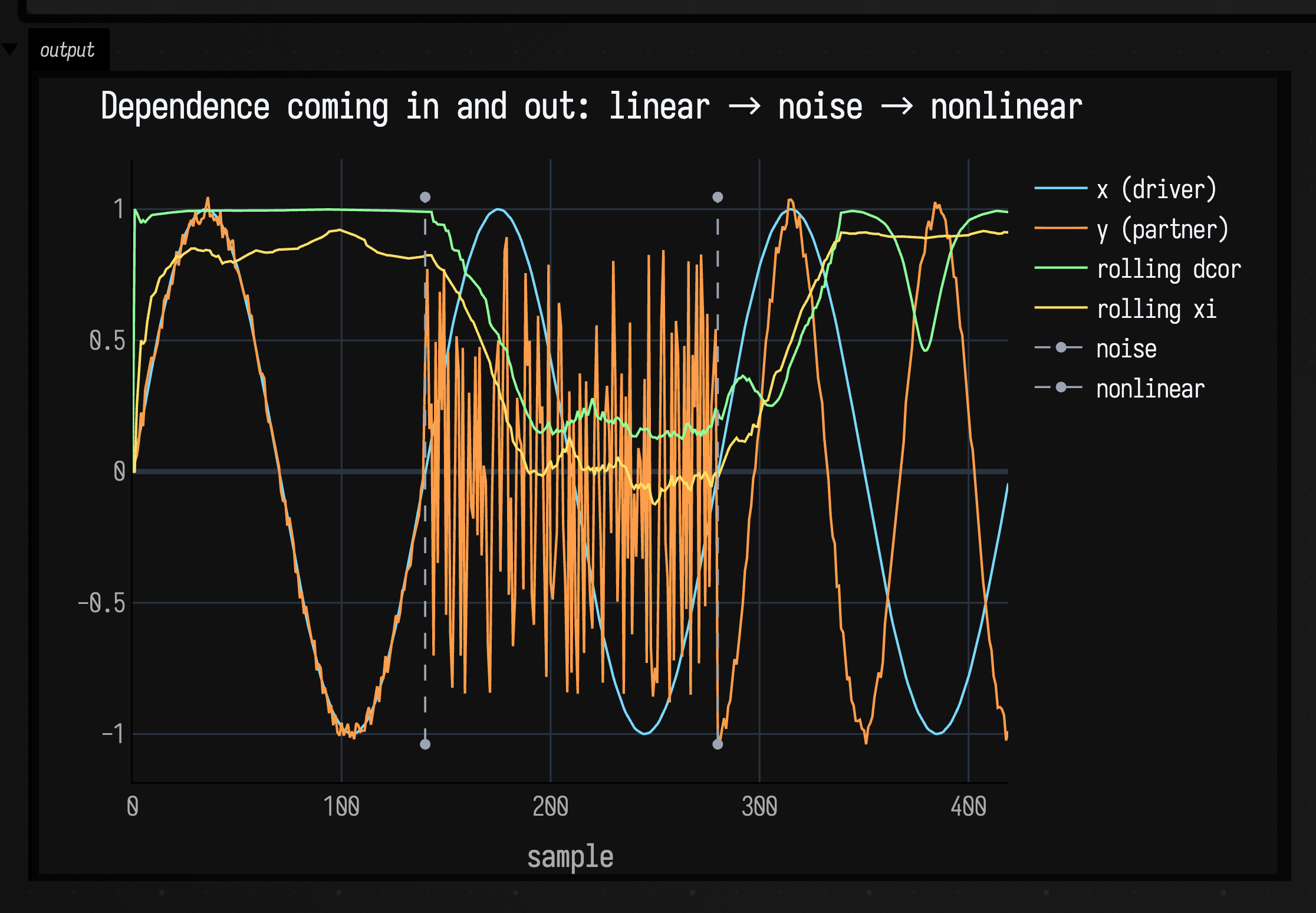
The two metrics rise and fall together without coinciding, and both recover on the nonlinear third where a straight-line correlation would not. Use this kind of sanity check before trusting a rolling metric on sensor streams, musical features, or exploratory data. When you instead want a fast comparison of several metrics on one fixed dataset (which one notices the shape, which punishes you for asking a linear question of a nonlinear cloud), plot the cloud they run on, then the metrics as bars:
:::static
import space.kscience.plotly.*
import space.kscience.plotly.models.ScatterMode

val n = 320
val xs = DoubleArray(n) { it / (n - 1.0) * 2.0 - 1.0 }
val ys = DoubleArray(n) { xs[it] * xs[it] + (-0.05 + random() * 0.10) }

val metrics = mapOf(
    "pearson" to StatsDependence.pearson(xs, ys),
    "spearman" to StatsDependence.spearman(xs, ys),
    "kendall" to StatsDependence.kendallTauB(xs, ys),
    "xi" to StatsDependence.xi(xs, ys),
    "dcor" to StatsDependence.distanceCorrelation(xs, ys),
)

display(
    "source",
    Plotly.plot {
            scatter {
                mode = ScatterMode.markers
                x.set(xs)
                y.set(ys)
                marker { size = 4 }
            }
            layout {
                title = "The source cloud: y = x² + noise"
                xaxis { title = "x" }
                yaxis { title = "y" }
            }
        }
        .darkMode(),
)

display(
    "metrics",
    Plotly.plot {
            bar {
                x.set(metrics.keys.toList())
                y.set(metrics.values.toList())
            }
            layout {
                title = "…and five dependence metrics on it"
                yaxis { title = "correlation" }
            }
        }
        .darkMode(),
)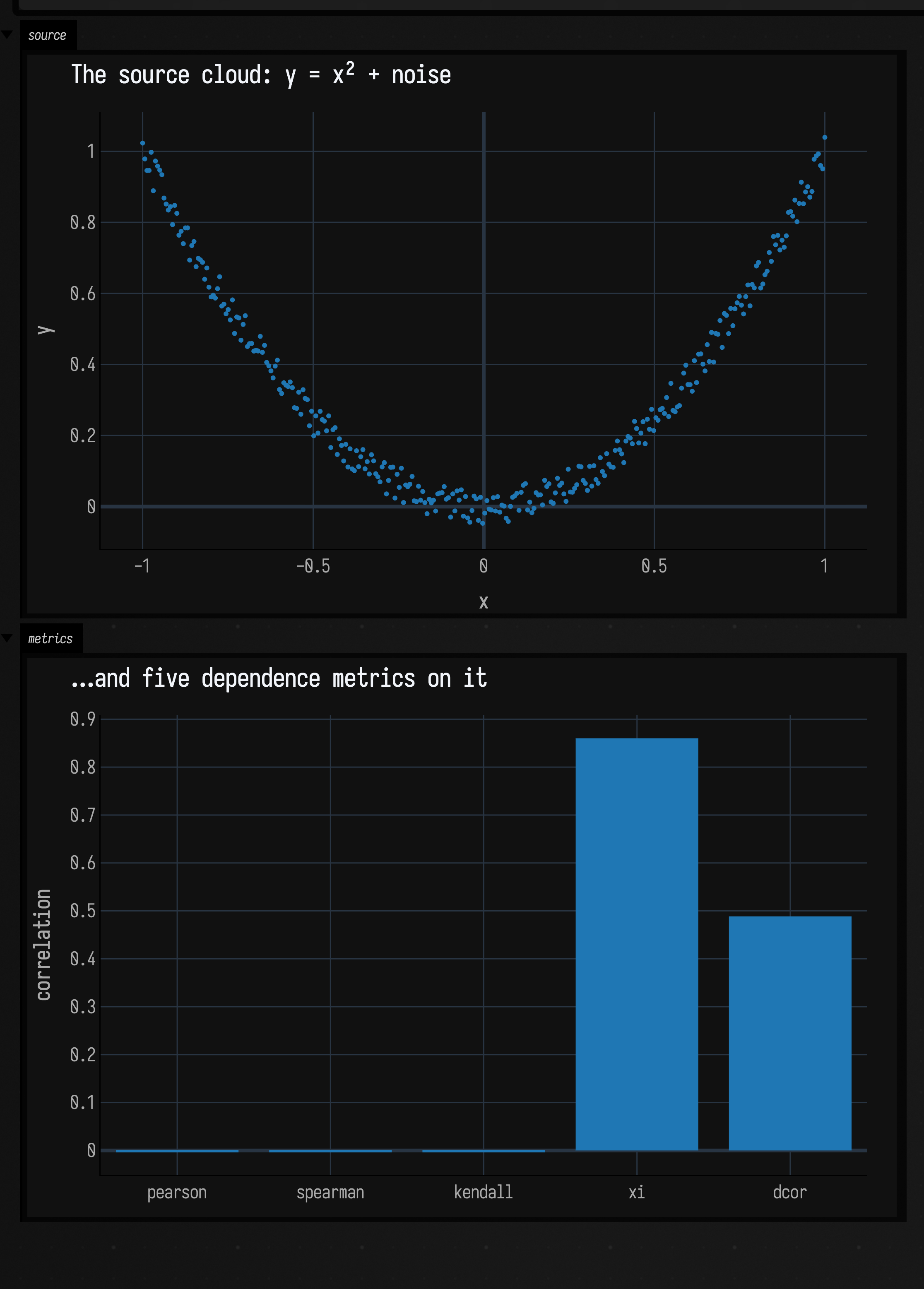
The metrics visibly disagree about the same sample: pearson and spearman
shrug at the parabola while xi and dcor notice it. Check that disagreement
before choosing a statistic. For neighborhood and graph structure on related point sets,
see Neighbors & graph connectivity examples.
For recovering a hidden value from noisy measurements, see State estimation; for raw and filtered signals rather than these derived quantities, continue with the time-domain signal examples.
The public declarations used on this page are listed, with their KDoc, in the codebase reference: interpolants.kt, keyframer.kt. Start from what's already in the box.