Linear algebra in Field
Linear algebra is the small vocabulary underneath movement, cameras, lighting,
meshes, simulation, and spatial data. In Field it is meant to read like GLSL and
run like live code: reorder a vector's components by name, do arithmetic with the
usual + - * /, copy a vector with one field changed, rescale it to a length,
all as expressions and without ceremony.
:::static
val position = vec(1, 2, 3)
position.x += 1f // now (2, 2, 3)
position { normalize() } // a unit copy; position itself is untouched
The same names behave the same way across vec2, vec3, vec4 and both
precisions.
The images below come from Field's value visualizer,
ValueVisualizer.visualize(...), the renderer described in
Visualizers & Controls, fed the result of the code above each
one. Vectors draw as auto-scaled arrows (a 2D arrow for vec2, an isometric
frame for vec3); matrices draw as diverging heatmaps. For the member list of
every type, see the generated vector API reference.
Constructing vectors
vec(...) is the ergonomic constructor: two, three, or four numbers give a
Vector2f, Vector3f, or Vector4f. It accepts any Kotlin Number, so live
code can mix integer, double, and float literals without decorating everything
with f. The number of arguments selects the arity.
:::static
val a = vec(2, 1) // Vector2f
val v = vec(1, 2, 3) // Vector3f
val p = vec(0.25, 0.5, 1.0, 2.0) // Vector4f
When the expected type is already known, Kotlin collection literals are an even terser option:
:::static
val origin: Vec2 = [0, 0]
val up: Vec3 = [0, 1, 0]
val white: Vec4 = [1, 1, 1, 1]
The examples below use vec(...) because it also establishes the type when there
is no declaration annotation. In a Field box the linalg imports arrive with the
standard preamble, so you rarely type them yourself; a plain Kotlin file wants:
:::static
Vectors are arrows (and sometimes points)
The most useful mental picture is an arrow. Its components say how far the arrow
travels along each axis; its length() is the arrow's magnitude. The same three
numbers can stand for a point or a displacement, and the operation reveals which
you mean: subtracting two points gives the arrow between them, and adding an
arrow to a point moves it.
:::static
val from = vec(2, 1, 0)
val to = vec(7, 4, 0)
to - from // vec3(5, 3, 0) — the displacement between two points
(to - from).length() // 5.8309517     — how far apart they are
Read swizzles: reorder, narrow, expand, repeat
Every length-2, length-3, and length-4 sequence of a vector's components is a
read swizzle: an extension val on the read interface (Vector3fc, …), so it
works on any view and not just a mutable vector. A swizzle returns a same-arity
vector: v.xy is a vec2, v.xyz a vec3. The sequence is free to:
- reorder the components —
v.zyxreverses avec3; - narrow to fewer components —
v.xydropsz; - expand past the source arity —
v.xxxxbroadcastsxinto avec4; - repeat a component —
v.yyis(y, y).
:::static
val v = vec(1, 2, 3)
v.zyx // vec3(3, 2, 1)  — reorder
v.xy // vec2(1, 2)     — narrow
v.xxxx // vec4(1, 1, 1, 1) — expand
v.yy // vec2(2, 2)     — repeat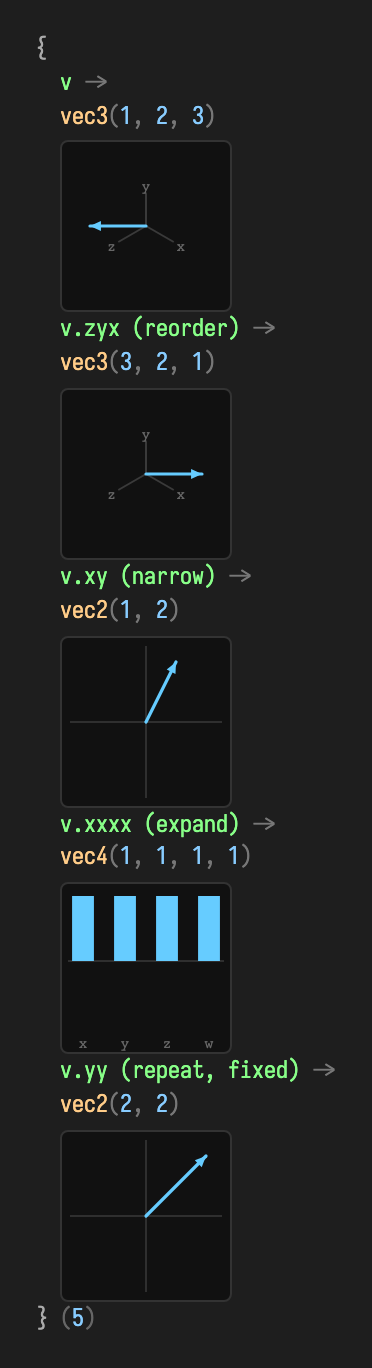
Components can be spelled two ways, positional x/y/z/w or colour
r/g/b/a, so v.rgb and v.xyz are the same swizzle. The two
vocabularies are never mixed inside one name.
Write swizzles: GLSL-style assignment
When a swizzle's indices are all distinct, it also gets a writable var on the
mutable vector type, so you can assign through it. This mutates the target in
place:
:::static
val target = vec(0, 0, 0, 0)
val source = vec(1, 2, 3, 4)
target.xy = source.zw // target becomes vec4(3, 4, 0, 0)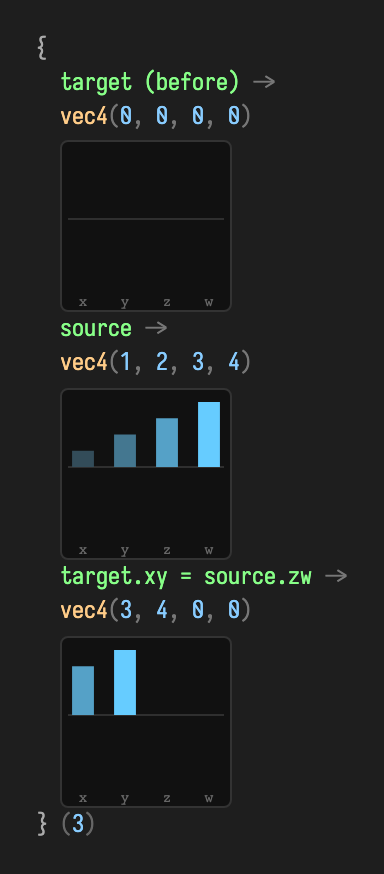
The right-hand source.zw is an ordinary read swizzle producing a vec2; the
left-hand target.xy receives it. Repeated-index swizzles like v.xx have no
unambiguous target, so they stay read-only: there is no var for them.
Arithmetic: + - * /
The vectors carry the usual operators. Between two vectors of the same arity they act component-wise; against a scalar they broadcast. Each returns a fresh vector, leaving its operands untouched.
:::static
val a = vec(2, 1)
val b = vec(1, 3)
a + b // vec2(3, 4)   — component-wise
a - b // vec2(1, -2)
a * 2 // vec2(4, 2)   — scalar broadcast (2 * a works too)
a * b // vec2(2, 3)   — component-wise (Hadamard) product
a * b is the component-wise product. The dot and cross products keep their
named forms (a.dot(b), and a x b for the 3D cross, below). Division by a
scalar (a / 2) and unary minus (-a) round out the set.
Copy operators: invoke and len
invoke gives a vector two live-coding conveniences. Called with named arguments,
it returns a copy with those components replaced, keeping the rest. It is a
tidy way to nudge one axis:
:::static
val v = vec(3, 4) // length 5
v(y = 1f) // vec2(3, 1) — copy, only y changed
Called with a block, it returns a copy after applying the block, leaving the original alone. That is the shape to reach for with the mutating vector methods:
:::static
v { normalize() } // vec2(0.6, 0.8) — a normalized copy; v is untouched
Finally, the infix len returns a copy rescaled to a given length, keeping
direction. It sets a length rather than reading one; for the current magnitude
use v.length():
:::static
v len 2 // vec2(1.2, 1.6) — same direction, length 2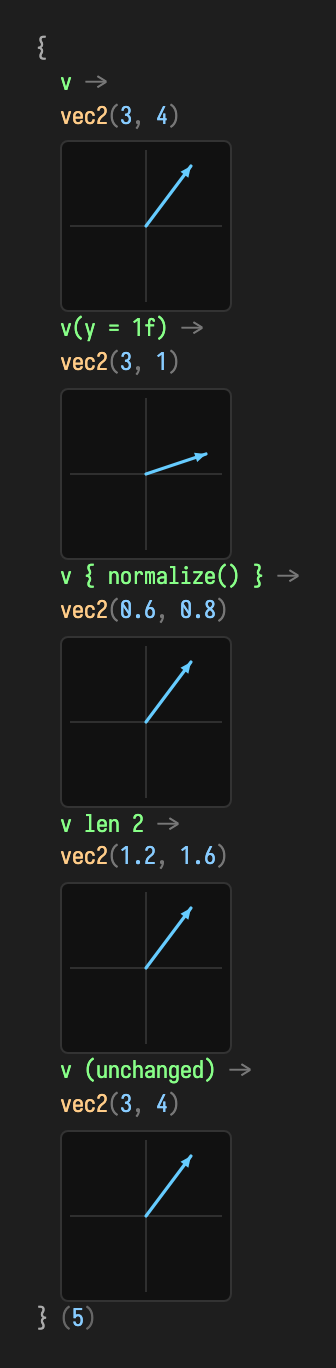
The bottom row confirms the copy semantics: after all three expressions v is
still vec2(3, 4). Nothing above mutated it.
In-place assignment: %=
When you do want to overwrite a vector in place, reusing the same object rather
than allocating, %= copies another vector's components into it:
:::static
val a = vec(9, 9)
val b = vec(1, 2)
a %= b // a is now vec2(1, 2); same object, new contents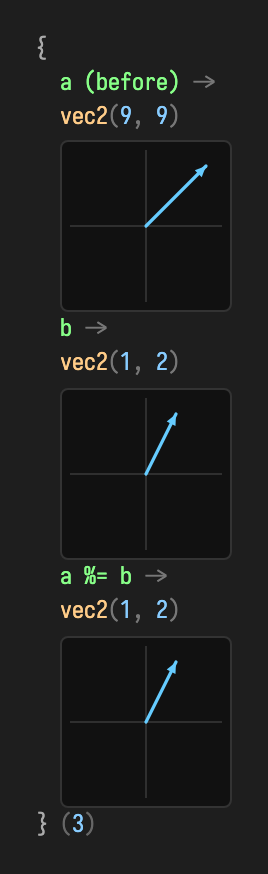
This pairs naturally with the copy operators: reach for v { … } and v(…) when
you want a new vector, and for %= (or the write swizzles) when you want to
mutate an existing one, such as a persistent vector held across animation
frames.
Length, direction, and normalization
length() answers how much?; normalize() keeps the direction and sets the
length to one. Because normalizing mutates, reach for v { normalize() } when you
want a fresh unit copy:
:::static
val velocity = vec(6, 8, 0)
velocity.length() // 10.0
velocity { normalize() } // vec3(0.6, 0.8, 0) — same direction, unit length
velocity len 4 // vec3(2.4, 3.2, 0) — direction kept, length 4
The zero vector has no direction, so normalizing it produces non-finite components; guard it when zero is possible. Use the squared forms for comparisons; they skip the square root while preserving ordering:
:::static
if (velocity.lengthSquared() > 1e-12f) velocity.normalize()
if (candidate.distanceSquared(mouse) < 20f * 20f) {
    /* within 20 units */
}
For a direction that may be zero, generated extensions on the heap-vector interfaces also provide
normalized(). It returns a new unit vector and preserves zero; normalized(dest) writes
into reusable storage without allocating a result. Neither mutates the source unless you
explicitly pass that same vector as the destination.
:::static
val direction = velocity.normalized()
val scratch = vec(0, 0, 0)
velocity.normalized(scratch, epsilon = 1e-6f)
The default epsilon is zero; choose a threshold when a very short direction should count
as stationary. Very large and very small finite inputs are handled; NaN, infinity and an
invalid epsilon are rejected. normalize() and v { normalize() } still produce
non-finite components for the zero vector. normalized() exists on float, double and
half vectors; see the generated API reference.
Dot product: “how much do these agree?”
The dot product multiplies matching components and adds them. For unit vectors it
is the cosine of the angle between them: 1 same way, 0 perpendicular, -1
opposed:
:::static
val forward = vec(0, 0, -1)
forward.dot(vec(0, 0, -1)) //  1.0  — identical direction
forward.dot(vec(1, 0, 0)) //  0.0  — perpendicular
vec(1, 2, 3).dot(vec(4, 5, 6)) // 32.0 — 1·4 + 2·5 + 3·6
A classic lighting term asks how much a surface normal agrees with the direction toward a light, clamped so a light behind the surface contributes nothing:
:::static
val brightness = normal.dot(directionToLight).coerceAtLeast(0f)
Cross product: “which way is perpendicular?”
The 3D cross product (a x b, or a.cross(b)) returns an arrow perpendicular to
both inputs, following the right-hand rule. Its length before normalizing is the
area of the parallelogram the inputs span, so parallel inputs give zero:
:::static
vec(1, 0, 0) x vec(0, 1, 0) // vec3(0, 0, 1)  — right-hand rule
vec(0, 1, 0) x vec(1, 0, 0) // vec3(0, 0, -1) — order flips the sign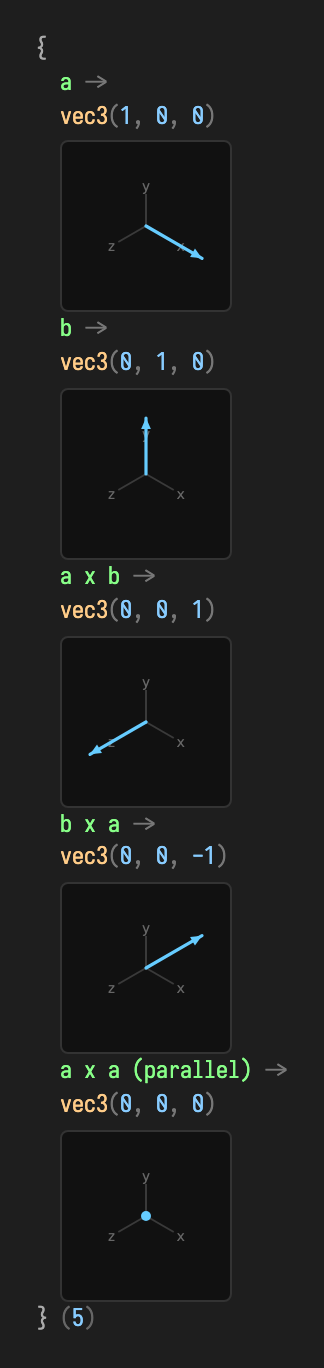
That is the standard way to find a triangle's surface normal:
:::static
val normal = ((b - a) x (c - a)) { normalize() }
Interpolation: lerp and fma
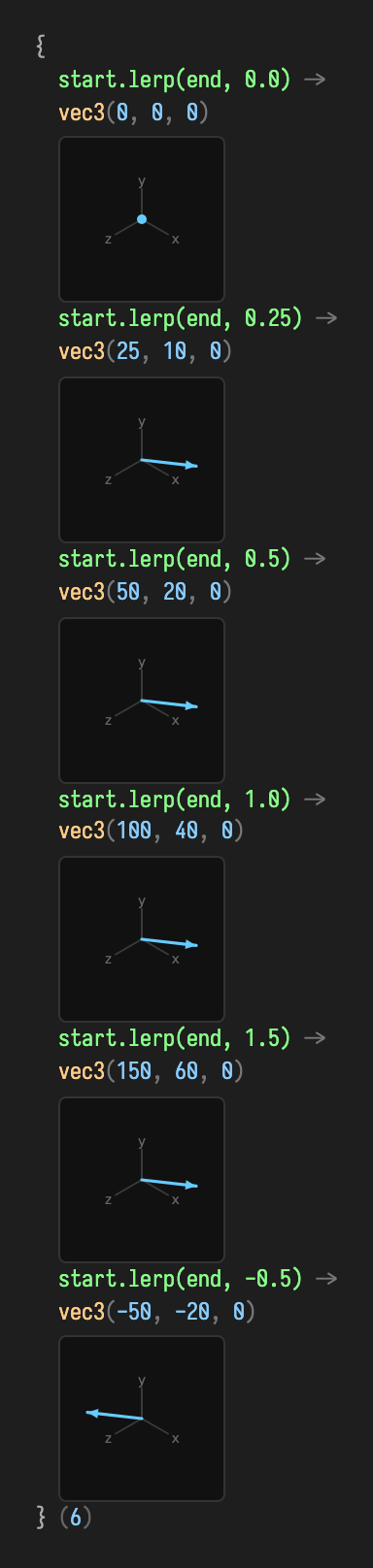
lerp traces a straight line from one vector to another — t = 0 is the start,
t = 1 the end, values outside extrapolate:
:::static
val start = vec(0, 0, 0)
val end = vec(100, 40, 0)
start.lerp(end, 0.5f, vec(0, 0, 0)) // vec3(50, 20, 0) — halfway
Each arrow is scaled to its own box, so read the distance along the segment from the numbers:
t = 1.5 lands past the end at vec3(150, 60, 0), and t = -0.5 behind the start, pointing the
other way.
For the repeated “position plus direction times amount” pattern, fma expresses
the whole step without a temporary vector:
:::static
position.fma(deltaSeconds, velocity) // position += velocity * deltaSeconds
Operations either mutate the receiver or write into an explicit destination. Mutating methods return the receiver; destination methods return the destination, so both chain naturally:
:::static
val normal = vec(0, 0, 0)
edgeA.cross(edgeB, normal) // no result allocation; returns normal
normal.normalize()
Matrices: transforms & precision
Field's matrices come in two precisions that share one shape. The
single-precision family (Matrix2f, Matrix3f, Matrix4f) is what the
renderer, camera, and quaternion code speak. The double-precision family
(Matrix2d, Matrix3d, Matrix4d) is its f64 sibling, for arithmetic that must
never round to float silently. Both are generated from the same model as the
vectors, so corresponding methods have the same API while rounding at their respective precisions.
A matrix draws as a diverging heatmap: neutral grey at zero, blue for positive entries, orange for negative, scaled by magnitude. The header keeps the full-precision numbers (and, for 3×3 and 4×4, the determinant and translation). All matrices are column-major (the JOML convention).
Constructing a matrix
Each type has a component constructor and defaults to the identity. The 2×2
constructor takes (m00, m01, m10, m11), column by column, so m00, m01 is the
first column. Read as a conventional maths matrix, that is the two rows
(m00, m10) and (m01, m11).
:::static
val m = Matrix2d(1.0, 2.0, 3.0, 4.0) // columns (1,2) and (3,4) → rows (1,3),(2,4)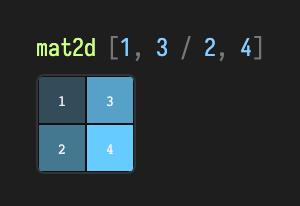
The header spells the two rows, [1, 3 / 2, 4], while the grid shows the
column-major storage. A bare Matrix4d() is the 4×4 identity.
Multiply, determinant, inverse, transpose
These four are precision-agnostic, identical on Matrix2d and Matrix2f.
mul composes another matrix onto the receiver in place, so wrap the left
operand in a copy constructor when you want to keep it:
:::static
val a = Matrix2d(1.0, 2.0, 3.0, 4.0) // rows (1,3),(2,4)
val b = Matrix2d(5.0, 6.0, 7.0, 8.0) // rows (5,7),(6,8)
Matrix2d(a).mul(b) // A·B — a fresh copy, a and b untouched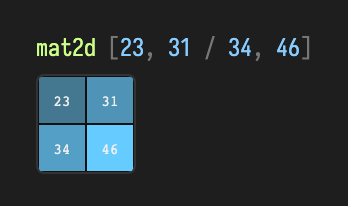
The product [[23, 31], [34, 46]] is exactly the textbook result.
determinant() and invert() come along for free; a matrix times its own inverse
returns to the identity, exact at f64 scale:
:::static
a.determinant() // -2.0
Matrix2d(a).mul(Matrix2d(a).invert()) // ≈ identity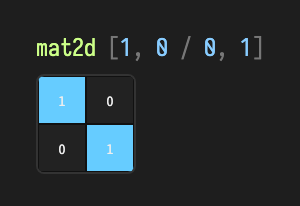
invert() and transpose() also mutate in place (with a transpose(dest)
overload). The same names (mul, determinant, invert, transpose,
identity, set) exist on the 2×2, 3×3, and 4×4 types alike.
A 3×3 linear map
Matrix3d carries the same surface one size up. Its set(...) takes nine values,
row by row for readability, and the visualizer prints the determinant in the
header:
:::static
val m3 =
    Matrix3d()
        .set(
            2.0,
            0.0,
            1.0,
            1.0,
            3.0,
            0.0,
            0.0,
            1.0,
            4.0,
        )
m3.determinant() // 25.0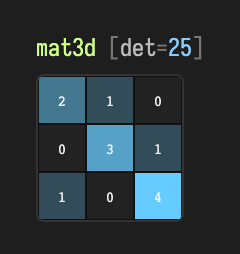
A non-zero determinant means the map is invertible; Matrix3d(m3).invert() gives
the inverse.
Composing affine transforms in 4D
Matrix4d adds the affine builders scale, translate, scaling, and
translation. Like mul, they compose onto the receiver in place and return it.
Composition applies each step in the frame established so far, which is the
JOML "local" convention and catches people out:
:::static
val t = Matrix4d().scale(2.0, 3.0, 4.0).translate(5.0, 6.0, 7.0)
t.determinant() // 24.0  (= 2·3·4; translation never changes the determinant)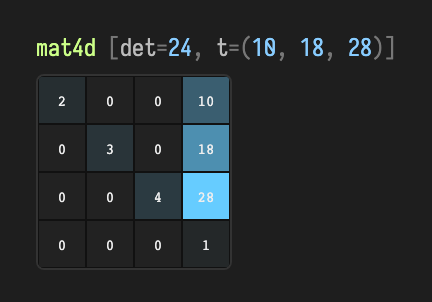
The header reports t=(10, 18, 28), not (5, 6, 7). Because the translate
runs after the scale, it moves in the already-scaled frame, so each component
is multiplied by its axis scale: (5·2, 6·3, 7·4). The determinant stays 24,
because a pure translation preserves volume.
Where precision stops: the f32 bridge
The f64 family covers only the precision-agnostic parts: multiply, determinant,
invert, transpose, scale, translate. Rotation, projection/camera
helpers (perspective, lookAt), and transforming a vector live on the
single-precision Matrix4f, matching Field's f32 quaternion and render
pipeline. Quaternion angles are in radians.
:::static
val r = Matrix4f().rotateY(0.6f) // rotate about Y by 0.6 rad
r.determinant() // 1.0 — a rotation preserves volume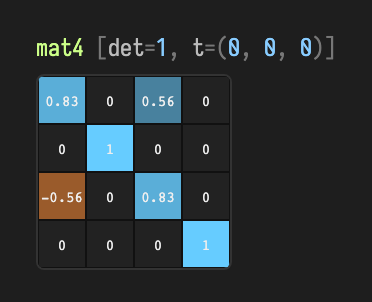
The header now reads mat4 rather than mat4d, because the visualizer
distinguishes the two precisions. The \( \cos 0.6 \approx 0.83 \) on the diagonal and \( \pm\sin 0.6 \approx \pm 0.56 \)
off-diagonal are the classic Y-rotation entries. Transforming a point is likewise
a Matrix4f operation: * on a vec3 calls transformPosition (translation
included) and returns a fresh Vector3f:
:::static
Matrix4f().translation(5f, 6f, 7f) * vec(1, 2, 3) // vec3(6, 8, 10)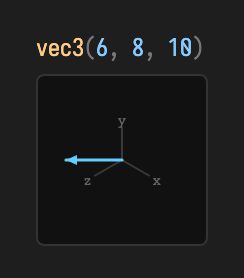
Use transformDirection (or the Vector4f overload with w = 0) to rotate/scale
a direction without the translation.
When allocation matters
Heap vectors and matrices are right for persistent box properties, saved state,
and almost all code where allocation is not a bottleneck. When a hot loop creates
many short-lived values, frameScratch gives them one shared lifetime:
:::static
frameScratch {
    val a = vec(1, 2, 3)
    val b = vec(4, 5, 6)
    val normal = vec3()
    a.cross(b, normal).normalize()
    println(normal.x)
}
Everything made inside frameScratch { } is released together when the block
ends, so copy a result out (copyTo, set) when you need it afterwards, and use
the block from one thread only. For dense CPU data, direct memory, or mapped
Vulkan buffers, the SegmentVec2/3/4Buffer views offer the same operations over
memory something else owns. Field reports an error when a scratch value is used
after its block has ended, as the wrong type, or from another thread.
Turning the scratch checks off
The checks are compiled in by default. A distribution build can drop them with
-PlinalgArenaChecks=false.
| Situation | Use |
|---|---|
| Persistent box state or a handful of values | Vector3f, Matrix4f, Quaternionf |
| Temporary math in a stable render/update thread | frameScratch { ... } |
| A subsystem with explicit scratch ownership | FrameArena |
| Packed vertex/point data, or aligned mapped records | SegmentVec2/3/4Buffer |
| Passing a scratch result into persistent state | Explicit copyTo or set |
Geometry recipes
The library ships closest-point, barycentric, containment, AABB/sphere overlap, and common segment/ray intersection helpers. Their destination arguments follow the same no-result-allocation convention as the vectors:
:::static
val closest = vec(0, 0, 0)
closestPointOnTriangle(point, a, b, c, closest)

val hit = vec(0, 0, 0)
if (intersectRayTriangle(rayOrigin, rayDirection, a, b, c, hit)) println("hit at $hit")

val nearFar = vec(0, 0)
if (intersectRayAabb(origin, direction, minimum, maximum, nearFar)) {
    println("enter ${nearFar.x}, leave ${nearFar.y}")
}
The shape of it
For vectors: name components in any order to read them, assign through
distinct-index names to write them, use + - * / for arithmetic, invoke and
len to copy, and %= to overwrite. The same rules hold across vec2, vec3,
and vec4. Swizzles and the invoke/len/%= operators exist on the float
vectors; arithmetic also works on the double and half-precision vectors.
For matrices, pick the precision by need: the …f family for anything that ends
up on screen (cameras, rotations, per-frame transforms), the …d family when
accumulated arithmetic needs greater precision. Rotation, projection, and transforming a
vector are done with the single-precision Matrix4f.
For the complete member listing of every type, precision, and storage form, see the generated vector API reference.
The public declarations used on this page are listed, with their KDoc, in the codebase reference: linalg.kt. Start from what's already in the box.