A pattern in space: pat → Dough → Steam Audio
A pattern says what to play and when. patSpatial adds where: you tag each event with a direction
and a distance, and Steam Audio places it around your head. This example plays a drum pattern whose
sources swing from left to right and move nearer and further:
audio {
    patSpatial(
        pat("bd ~ sd ~, hh*8")
            .with(
                param("az", sine().range(-70.0, 70.0)),
                param("dist", "1 3 1 6"),
            ),
        cps = 2.0,
    )
}
Listen on headphones. The rendering (an HRTF, a model of how your head and ears filter sound from each direction) assumes each ear hears only its own channel. Over speakers it sounds much like ordinary panning.
Whether this is the path you want
| Decision | Guidance |
|---|---|
| Use it when | you want a rhythm or a line to come from somewhere — a direction, a distance, a thing you can walk around — and you want the placement written in the pattern rather than driven from outside it |
| Use it when | you want dough's synth vocabulary: s, note, lpf, room, crush, fmi and the rest of superdough's parameters, which this path forwards untouched |
| Don't | if you need sample-exact onsets. Notes quantise to a 128-frame dough block, 2.9 ms at 44.1 kHz. patSynth is sample-exact |
| Don't | if you want dozens of independently placed voices. Each spat group costs a dough engine — about 200 MB of wasm and a few hundred milliseconds to boot — and the default ceiling is four |
| Needs | the dough wasm build (in the repository) and Steam Audio's libphonon, which is not committed: ./gradlew fetchSteamAudioNatives |
The nearest alternatives: patSynth plays a pattern sample-exactly with no
spatialisation; faustPoly plays a Faust instrument from a pattern, also sample-exact and
unplaced; spatial-openal is Field's other spatial engine, which places sources you position from
code rather than from a pattern, and which can also render offline.
Making a sound in Field puts every path side by side.
Placing a source
Placement is written with the same with(param(...)) you use for any other pattern parameter.
patSpatial reads the keys in this table and forwards every other key to dough unchanged.
| Pattern example | Effect | Default |
|---|---|---|
pat("bd") with param("spat", "1") |
Routes the event to spatial group 1. Each group owns a Dough engine, so adding groups also adds memory and startup cost. | "0" |
pat("bd") with param("az", "90") |
Places the source 90 degrees to the right. Zero is directly ahead; values are degrees. | 0 |
pat("bd") with param("elev", "90") |
Places the source overhead. Zero elevation lies in the horizontal plane. | 0 |
pat("bd") with param("dist", "2") |
Places the source two metres from the listener. Further sources are quieter and, with air, duller. |
1.5 |
pat("bd") with param("occl", "0.5") |
Sets partial occlusion. The range is zero for clear to one for fully blocked. | 0 |
pat("bd") with param("air", "0") |
Disables distance-dependent air absorption for this event. Set one to apply it. | 1 |
This version alternates whole cycles between two spatial groups, kit and hats, each placed on
its own:
patSpatial(
    pat("bd ~ sd ~, hh*8")
        .with(
            paramOf("spat", pat("<kit hats>")),
            param("az", sine().range(-70.0, 70.0)),
            param("dist", "1 3 1 6"),
        ),
    cps = 2.0,
)
Here it is rendered offline through Steam Audio, six seconds with the listener still. Listen on headphones:
Because az takes a continuous pattern, sine() sampled per event is a source that moves between
notes. The placement belongs to the group, not to the note, so a group's next event moves everything
that group is playing.
A number in a pattern is a note, and anything else is a sound name. pat("36 48") plays MIDI notes
through the default saw; pat("bd sd") asks dough for the sounds called bd and sd. Dough has
its own drums, so a drum pattern written for patSynth plays here unchanged. The two spellings sound
quite different: the drums are much darker than the saw.
Two more things about placement:
- A change of placement glides over about 5 ms rather than jumping, so a note that moves far across the field does not click.
distis clamped at 0.4 m, so a source cannot land inside the head. Air absorption uses Steam Audio's default coefficients.
Hearing it
You need Steam Audio's native library, which is not in the repository. Fetch it once:
./gradlew fetchSteamAudioNativesThen play the example in a box, as in Hearing it in a box below. To check the path without writing any code, this smoke test plays two sources circling at opposite azimuths (on a machine with no audio device it says so and stops):
tools/run_field_tests.py --id synth.pat-spatial.engineHearing it in a box
showPatSpatial plays a pattern and shows a live waveform and spectrum in the box's output. This
example moves a four-note line between two groups:
showPatSpatial(
    pat("60 64 67 71")
        .with(
            paramOf("spat", pat("a b a b")),
            param("az", sine().range(-85.0, 85.0)),
            paramOf("dist", pat("1.2 3 1.2 5")),
            param("lpf", 2200),
        ),
    cps = 2.0,
)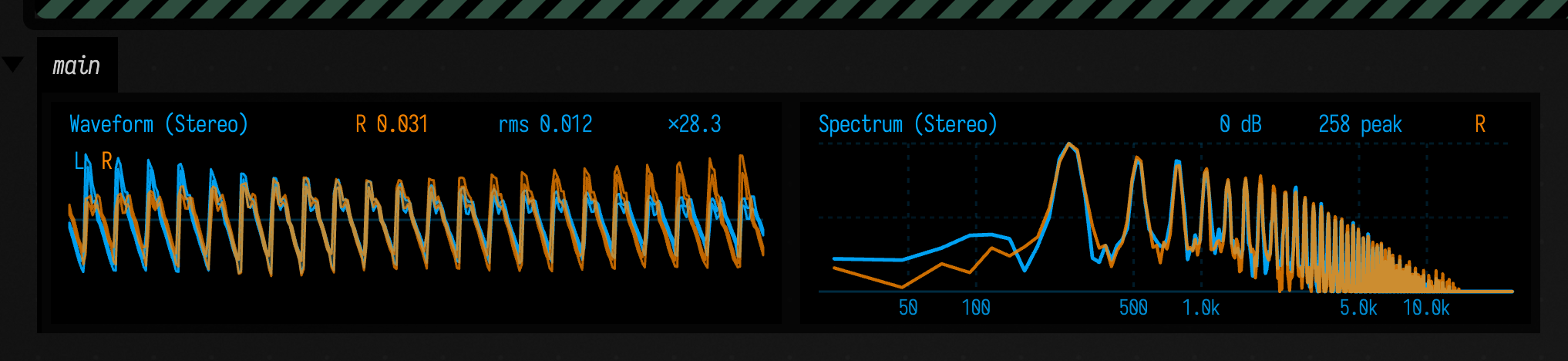
Rendered offline through Steam Audio, with the listener still:
It returns a PatSpatialLaunch. As the box's last expression, that ties the sound to the box: the
box stays lit while it plays, and stopping the box stops the sound and frees its engines.
launch.turnListener(deg) turns the listener's head. Positive is to the right, so a source dead
ahead moves to your left.
Following a head
turnListener takes one angle. A headset reports position and orientation, so
launch.setListenerPose(pose) takes both, and launch.followHead(source) keeps following a pose
source. Here a virtual head turns at 45° a second:
val launch = patSpatial(
    pat("bd ~ sd ~, hh*8")
        .with(
            paramOf("spat", pat("<kit hats>")),
            param("az", "0 -85"),
            param("dist", 2.0),
        ),
    cps = 2.0,
)
launch.awaitReady()
launch.followHead(VirtualHead.turning(degreesPerSecond = 45.0))
launch
With an OpenXR headset, pass hmd.asHeadPoseSource() from an OpenXRHmdTarget instead. OpenXR and
Steam Audio use the same axes (+X right, +Y up, −Z ahead, in metres), so the pose passes through
unconverted.
Once the head can move, az, elev and dist place a source in the room rather than relative to
the listener: lean toward a source and it gets nearer, step past one and it crosses your ears. With
the listener at the origin and facing ahead, the two readings are the same.
If tracking is lost, the sound field stays where it was rather than snapping back to face ahead.
Here is a kick two metres ahead, a hat hard left and a snare hard right, heard from a head that moves through four movements of five seconds each: still, turning once to the right, stepping two metres to each side, and leaning in toward the kick and back. Listen on headphones. While the head turns, the hat passes behind you to your right; while it steps, the kick sweeps across; while it leans in, the kick grows as the hat and snare fall away behind.
./gradlew headTrackedDemo renders the same four movements at eight seconds each, to
build/demo/head-tracked.wav. In both, the head is a function of where the render has got to,
passed as patSpatial(..., listenerPoseAt = { frame -> pose }), so a render to a file repeats exactly.
A headset reports its pose as it happens instead, through followHead.
What Steam Audio is handed
These two clips are the mono signal one spat group sends to Steam Audio, before it is placed. The
placed, binaural result is the clip in Following a head above.
The mono source for one spat group, before Steam Audio places it.
The same notes with lpf added to the pattern. lpf is not a spatial key, so dough receives it and
its own filter darkens the sound.
The direction is not in this signal at all: Steam Audio adds it afterwards. Changing az leaves the
mono source exactly as it was.
Agents: what the clip renderer checks
run_field_tests.py --id synth.pat-spatial.sound renders both clips and measures the
un-normalised buffers. Dough mixes to stereo, so every event is sent pan/0, which puts the whole
signal in the left channel; that channel is copied as the mono source, and the right channel is
checked to be silent. The six spatial keys are checked to be consumed before dough and lpf to
arrive. The same pattern at az = 0 and az = -70 must give a bit-identical source, which is
also the determinism the docs audio contract needs. The lpf clip's spectral centroid must stay
under 0.6× the plain one's, so a filter that stopped reaching dough fails the build.
| figure | spectral centroid | vs the first | peak | RMS |
|---|---|---|---|---|
spatial-source-plain |
4677 Hz | — | 0.284 | 0.078 |
spatial-source-forwarded |
544 Hz | 0.12× | 0.198 | 0.059 |
How it plays
Steam Audio places a whole mono signal at one position, so patSpatial runs one dough engine per
spat group and places each group's output. That has two consequences for a pattern:
- A pattern's
panis ignored. Useazinstead. - Note onsets fall on dough's 128-frame blocks, 2.9 ms at 44.1 kHz, because dough applies events
once per block.
patSynthis sample-exact if you need that.
Engines start before the audio does: patSpatial looks through the first prescanCycles cycles
(8 by default) for spat groups and boots an engine for each. A group that first appears later has
to boot while the sound plays, which takes a few hundred milliseconds and is likely to cause a gap.
PatSpatialRoom.lateSourceBoots counts these.
Dough runs as WebAssembly, whose timing is less predictable than Field's own synths, so the groups are rendered on their own thread into a ring buffer, and the audio thread only copies out of it. The ring holds 341 ms by default, enough to ride out the scheduling stalls of a busy machine. That delay only affects how soon a start or stop is heard; notes stay in time with one another.
Match the sample rates. The ring's two sides run on separate clocks, so a render at 44.1 kHz
played at 48 kHz both runs dry and plays sharp. registerPatSpatialReturnValue refuses a mismatch
and names the rate to pass. A launch handed to an audio engine before it is ready plays silence
until Steam Audio is up and the ring has filled.
The fields to read while it plays
These fields on the launch, and on its room, can be read from the box while it plays:
| what to read | what it means |
|---|---|
launch.underruns |
Counts audio frames requested when the ring had no samples available. A growing count means the producer is falling behind; the target is zero. |
launch.room.ring.fill / .minFill |
Reports the ring’s current fill and its lowest observed fill. A falling minimum warns that the audio thread is approaching starvation. |
launch.room.worstBlockMs |
Reports the longest render-thread block in milliseconds. Compare this peak with the available buffering when diagnosing dropouts. |
launch.room.lateSourceBoots |
Counts engines booted after audio playback began. Pre-create the spatial groups when startup during playback causes gaps. |
launch.room.busyMsTotal |
Accumulates milliseconds spent doing render work. Compare it with elapsed time to estimate how much producer capacity is in use. |
launch.sources[i].peakVoices |
Reports the greatest number of simultaneous voices in group i. Use it to locate a group whose polyphony is driving rendering cost. |
If underruns grows while busyMsTotal stays well below the elapsed time, the machine is too busy
to schedule the render thread; if it is near the elapsed time, the work does not fit.
Measurements behind the design
PatSpatialBudgetProbe measured four sources at about 4% of a block's budget at the median, idle
or loaded, with a tail that tripled under load; PatSpatialEngineSmoke saw a loaded machine miss
blocks while the render thread was mostly idle. Hence a separate render thread and a ring sized
for scheduler stalls. Raising the render thread's priority starved OpenAL and was reverted (see
the comment in PatSpatialRoom.start). The percentiles are in
dev_docs/PAT_SPATIAL_MEASUREMENTS.md, which also says what each smoke on this path checks.
See also
- Making a sound in Field compares this with every other sound path.
- Pattern language covers
pat,withand mini-notation. - The full API is in
PatSpatial.ktin the generated reference.