Rhino files (.3dm)
Have a Rhino model you want to explore? Load it in a box and draw it in a viewer you can orbit:
import afield.geometry.rhino.*

val model = Rhino3dm.load("~/Downloads/model.3dm")
println(model) // layers, objects by kind, and anything skipped with the reason
three { rhino(model) } // every object as a part, folded under its layer path
A Rhino model is more than its surfaces. It has a layer tree, curves that are not the edges of
anything, polygons, notes, and blocks placed many times. Rhino3dm.load reads all of that
through McNeel's own openNURBS library and hands it back in Field's terms.
rhino(model) draws what Rhino shows and lists what it hides: an object on a switched-off layer is
in the viewer's Parts list, unticked, under the same layer path it has in Rhino. Meshes are shaded
in the colour Rhino gives them (by layer, by object, by material, or from the block they sit in) and
outlined with their Brep edges rather than their facets. Text is set as outlines lying in its own
plane at its own height, so a label written on a wall stays on the wall as you orbit.
A sample with one of everything
The example below has no file to read, so it asks the reader to write a sample first: nested
layers, a mesh, two Breps, five kinds of curve, text, a point, a hatch and a block placed twice.
With a file of your own, the Rhino3dm.load line is all you need.
:::static
import afield.geometry.rhino.*

val dir = java.nio.file.Files.createTempDirectory("rhino-demo").toFile()
val model = Rhino3dm.load(Rhino3dm.writeSample(java.io.File(dir, "sample.3dm")))
println(model)

// The tree and its objects are plain data.
for (layer in model.layers) {
    val count = model.on(layer.path, sublayers = false).size
    println("${layer.path.padEnd(14)} ${if (layer.isVisible) "on " else "off"}  $count objects")
}
:::fold draw it, then clean up
three(height = 460) { rhino(model) }
dir.deleteRecursively()
:::endfold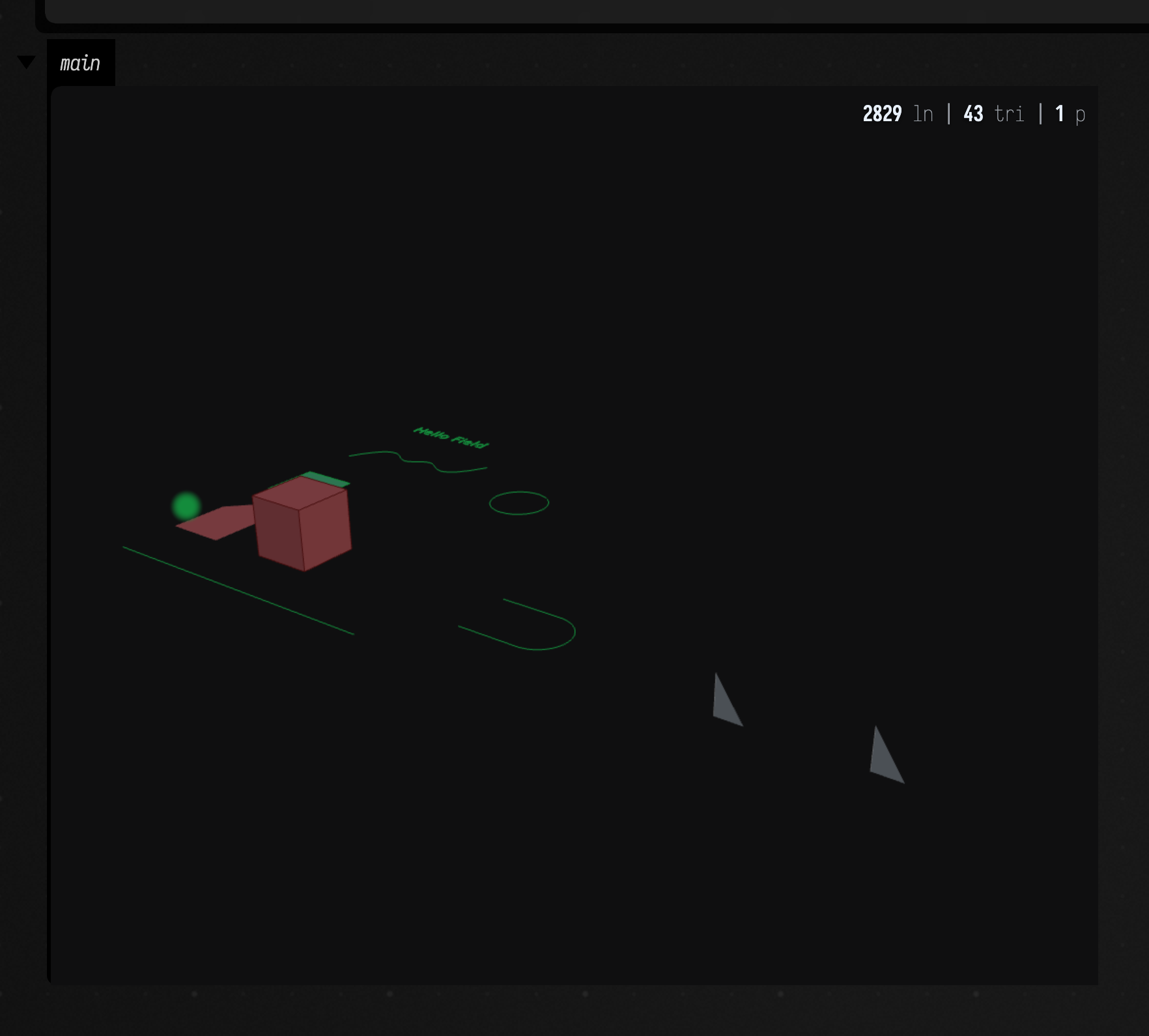
What comes back
Object by object:
| in Rhino | in the RhinoModel |
exact? |
|---|---|---|
| mesh | RhinoMesh, its quads split into triangles, with its vertex normals and (linear) vertex colours |
yes |
| Brep, extrusion | RhinoMesh from the render mesh Rhino saved, or tessellated from its NURBS surfaces where there is none, plus its edges as an FLine |
Rhino's mesh, or vertices on the exact surface |
| SubD | RhinoMesh on its limit surface, subdivided subdLevel times |
vertices on the limit surface |
| line, polyline, polycurve, NURBS curve | RhinoCurve with an FLine |
lines and polynomial spans up to cubic, yes; arcs and other rational spans within 10⁻⁵ of the curve's size, flagged approximated |
| hatch | RhinoCurve with isHatch, its boundary loops filled |
as curves |
| text | RhinoText: string, plane, capital height, alignment; toFLines() sets it |
the font is Field's, not the file's |
| point, point cloud | RhinoPoints |
yes |
| block instance | its members, moved into place, block naming the definition |
yes |
| anything else | RhinoSkipped, with the reason |
— |
The model is also plain data for anything else in Field: model.mesh() is every visible mesh
merged into one TriMesh for the mesh tools, model.lines() every curve and
edge as FLines, and model.on("Hull") the objects on a layer and the layers inside it.
Leaving layers out
rhino(model) takes an include filter. Construction geometry that Rhino shows but you do not
want in the picture goes with one line:
three { rhino(model, include = { it.layer?.path != "Construction" }) }The camera frames whatever is visible and included, so leaving out a far-flung helper layer also
brings the model up to fill the view. hiddenLayers = false drops what Rhino hides altogether,
edges = false drops the Brep outlines, and text = false the lettering.
Writing a .3dm for Rhino
Geometry made in Field goes the other way with Rhino3dm.save. Give it a file and a unit, and
inside the block declare layers and put meshes, FLines, NURBS curves, points and text on them.
Rhino opens the file as it would one of its own, with the layer tree, colours and names intact.
This box grows a ring of twisted ribbons, each a spine curve and a strip of triangles under it, saves them on two layers, and reads the file straight back to draw what Rhino will see:
:::static
import afield.geometry.mesh.TriMesh
import afield.geometry.rhino.*
import kotlin.math.*

val dir = java.nio.file.Files.createTempDirectory("rhino-save").toFile()
val ribbons = 14
val steps = 40

// One ribbon: a point on its centre line at t in 0..1, and how far it has twisted there.
fun centre(a: Double, t: Double) = vec((30 + 25 * t) * cos(a + t), (30 + 25 * t) * sin(a + t), 40 * sin(PI * t))
fun twist(a: Double, t: Double) = a * 2 + 3 * PI * t

val file = Rhino3dm.save(java.io.File(dir, "ribbons.3dm"), units = "millimeters") {
    layer("Ribbons", vec(0.85, 0.4, 0.15, 1.0))
    layer("Ribbons::Spines", vec(0.95, 0.9, 0.8, 1.0))
    layer("Notes", vec(0.8, 0.8, 0.8, 1.0))

    for (i in 0 until ribbons) {
        val a = 2 * PI * i / ribbons

        // The spine, as cubic Bezier spans through the centre line: they arrive in Rhino as
        // degree-3 NURBS with exactly these control points.
        val spine = FLine().moveTo(centre(a, 0.0))
        for (k in 1..4) {
            val t0 = (k - 1) / 4.0
            val t1 = k / 4.0
            spine.cubicTo(centre(a, t0 + (t1 - t0) / 3), centre(a, t0 + 2 * (t1 - t0) / 3), centre(a, t1))
        }
        curve(spine, layer = "Ribbons::Spines", name = "spine $i")

        // The strip: two edges either side of the centre line, turning as it rises.
        val positions = FloatArray((steps + 1) * 6)
        for (s in 0..steps) {
            val t = s.toDouble() / steps
            val c = centre(a, t)
            val w = 4.0
            val dx = w * cos(twist(a, t)) * cos(a + t)
            val dy = w * cos(twist(a, t)) * sin(a + t)
            val dz = w * sin(twist(a, t))
            floatArrayOf(c.x + dx.toFloat(), c.y + dy.toFloat(), c.z + dz.toFloat(), c.x - dx.toFloat(), c.y - dy.toFloat(), c.z - dz.toFloat())
                .copyInto(positions, s * 6)
        }
        val triangles = IntArray(steps * 6)
        for (s in 0 until steps) intArrayOf(2 * s, 2 * s + 1, 2 * s + 2, 2 * s + 1, 2 * s + 3, 2 * s + 2).copyInto(triangles, s * 6)
        val hue = i.toDouble() / ribbons
        mesh(TriMesh(positions, triangles), layer = "Ribbons", name = "ribbon $i", color = vec(0.9, 0.3 + 0.5 * hue, 0.2, 1.0))
    }
    text("$ribbons ribbons", vec(-30.0, -70.0, 0.0), height = 6.0, layer = "Notes")
}

// What Rhino will open, read back with the same openNURBS.
val model = Rhino3dm.load(file)
println(model)
println("${file.length() / 1024} kB, layers " + model.layers.joinToString { it.path })
:::fold draw it, then clean up
three(height = 460) { rhino(model) }
dir.deleteRecursively()
:::endfold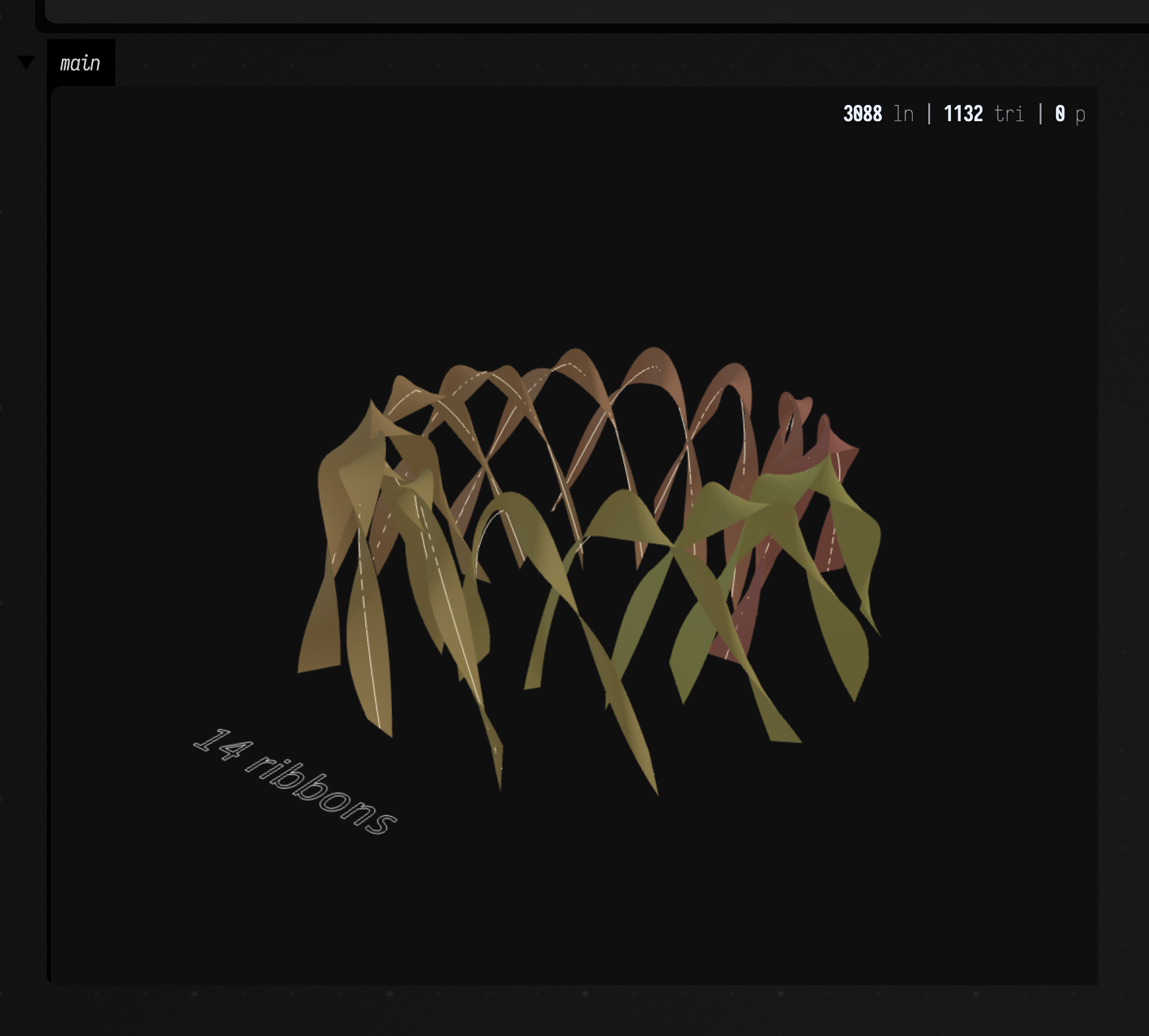
What goes in, and what Rhino gets:
| call | in the file | exact? |
|---|---|---|
layer("A::B", color, visible) |
a layer B inside A; an undeclared layer an object names is made black and on |
yes |
mesh(triMesh) |
a mesh, with its vertex normals and vertex colours when the TriMesh has them |
yes |
curve(fline) |
one curve a subpath: a degree-1 polyline when it is all lines, else a polycurve of degree-1 and degree-3 NURBS spans; close() is a line back to the start |
yes |
nurbs(degree, points, knots, weights) |
a NURBS curve, rational when you give weights, knots as openNURBS counts them | yes |
points(list), point(p) |
a point cloud, or a point | yes |
text(string, origin, height) |
text on a plane, xAxis and yAxis giving its orientation |
the font is Rhino's |
brep(faces) |
a Brep: each RhinoBrepFace is a NURBS surface with trim loops and, optionally, a cached render mesh; shared edges, seams and poles are worked out for you. RhinoBreps.sphere, cylinder, box and plate make the faces of those solids |
yes |
surface(nurbsSurface) |
an untrimmed NURBS surface, which Rhino keeps as a one-face Brep | yes |
subd(points, faces, creases) |
a SubD from its control net, with the edges you name kept sharp; RhinoBreps.subdBox makes a box's net |
yes |
hatch(fline) |
a solid hatch: the first subpath is the outline, the rest holes | yes |
block(name) { ... }, instance(name, translation) |
a block definition holding what the block adds, and a placement of it | yes |
Each call also takes layer, name and color; with no colour, an object is drawn in its
layer's, as Rhino does by default. units is the model's length unit ("millimeters", "meters",
"inches", ...). Field does not scale anything: a point at 30 in a millimetre file is 30 mm in
Rhino.
A model you read writes back with model.save(file), in its own units. Add to it on the way out
with Rhino3dm.save(model, file) { curve(...) }, so read, change, write is three lines. Breps and
extrusions go back as the meshes they were read as (a Save Small Brep, read with the default
meshing, goes back as its tessellation, below), hatches as their boundary curves, block
instances as their placed members, and RhinoSkipped objects not at all.
Breps without meshes
Rhino saves a render mesh with each Brep face unless you choose Save Small. Where a face has
none, Rhino3dm.load makes one from the face's exact NURBS surface and its trim curves, so a file
saved small still comes back shaded. SubD objects come back the same way, as their limit surface.
The example below writes such a file — a sphere, a capped cylinder, a plate with a hole, a box
saved with its mesh and one without, and a smooth and a creased SubD box, none of them carrying a
render mesh but the first box — and draws it twice. First, read with
meshing = RhinoBrepMeshing.SAVED, the way Rhino's saved meshes alone would give it: only the
box that has one is shaded, the rest are their edges. Then read with the default.
:::static
import afield.geometry.rhino.*

val dir = java.nio.file.Files.createTempDirectory("rhino-nurbs").toFile()
val file = Rhino3dm.writeNurbsSample(java.io.File(dir, "save_small.3dm"))

val saved = Rhino3dm.load(file, meshing = RhinoBrepMeshing.SAVED)
val evaluated = Rhino3dm.load(file)
println(evaluated)
:::fold draw both, then clean up
three(channel = "saved", name = "saved", width = 380, height = 360) { rhino(saved) }
three(channel = "evaluated", name = "evaluated", width = 380, height = 360) { rhino(evaluated) }
dir.deleteRecursively()
:::endfold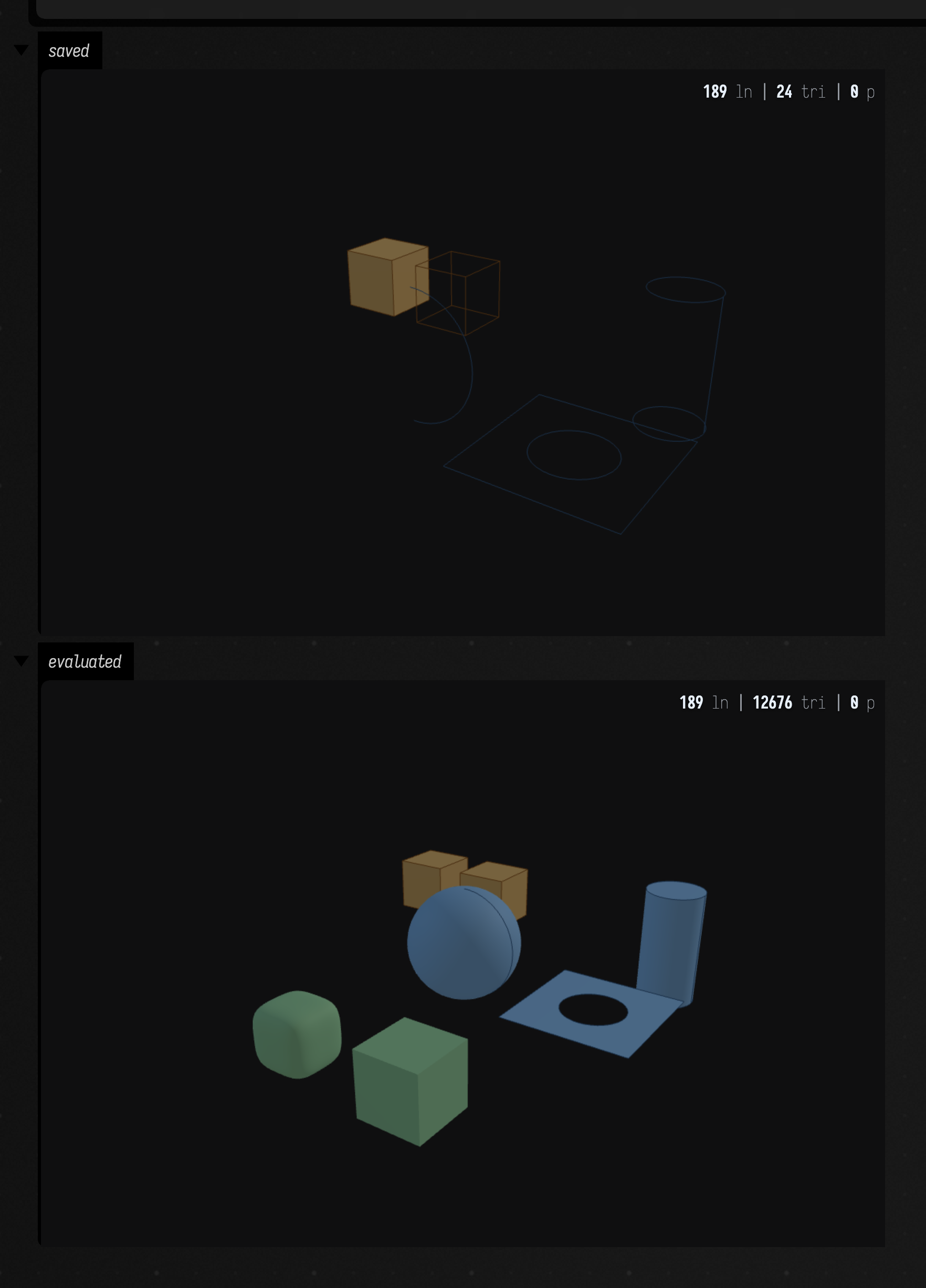
meshing chooses where the triangles come from:
meshing |
a face with a saved mesh | a face without one |
|---|---|---|
SAVED_ELSE_EVALUATE (the default) |
Rhino's mesh | tessellated from its surface |
SAVED |
Rhino's mesh | none: the Brep is a RhinoSkipped, drawn as its edges |
EVALUATE |
tessellated from its surface | tessellated from its surface |
A tessellated face starts as one cell per knot span of its surface, and each cell is split, in
one direction or both, until the surface strays from the triangles by less than tolerance (a
thousandth of the Brep's size unless you pass one, in model units). A flat face stays a few large
triangles; a cylinder is divided around and not along. Cells the trim curves cross are cut along
them, so holes and trimmed edges follow the trim. Every vertex lies on the exact surface.
Neighbouring faces are then stitched together by the Brep's own topology. Each Brep edge is
sampled once, along its 3D curve, and every face that uses the edge gets those same points as its
boundary, however its trim curve is parameterised, so the two sides meet vertex for vertex. Where
a cell cuts a face's edge between two of those points, the face across the edge is split at the
same place. A closed Brep therefore comes back as a closed mesh, with no cracks along its edges. Faces
are joined where they meet smoothly and kept apart at creases, so the shading stays sharp at a
box's edges and smooth across a sphere's seam. RhinoMesh.evaluatedFaces says how many of an
object's faces were tessellated.
A SubD is subdivided subdLevel times (3 unless you say otherwise; each level makes four times
the triangles) by openNURBS's own Catmull-Clark rules, and each vertex is moved onto the limit
surface. Creased edges stay creased. RhinoMesh.subdLevel is set on those.
Rhino's own meshes and these are not the same triangles: Rhino's render mesh settings decide its
density, and a tessellation here follows tolerance. For measuring, EVALUATE gives every Brep the
same treatment.
Writing a file and reading it back
How much of a scene survives Rhino3dm.save and Rhino3dm.load? This box writes one of each kind of
object the writer makes: three closed Breps, a trimmed plate, a SubD, a mesh with vertex colours, a
curve, a hatch and a block placed twice. It reads the file back with meshing =
RhinoBrepMeshing.EVALUATE, so every Brep is tessellated the same way, and measures each object
against the exact figure:
:::static
import afield.geometry.mesh.TriMesh
import afield.geometry.rhino.*
import kotlin.math.*

fun square(x: Double, y: Double, size: Double) =
    FLine().moveTo(x, y, 0.0).lineTo(x + size, y, 0.0).lineTo(x + size, y + size, 0.0).lineTo(x, y + size, 0.0).close()

// Four corners, linear red, grey and white.
val quad = TriMesh(
    floatArrayOf(60f, 0f, 0f, 64f, 0f, 0f, 64f, 3f, 0f, 60f, 3f, 0f),
    intArrayOf(0, 1, 2, 0, 2, 3),
    colors = floatArrayOf(1f, 0f, 0f, 0.2f, 0.1f, 0.05f, 0.5f, 0.5f, 0.5f, 1f, 1f, 1f),
)

val dir = java.nio.file.Files.createTempDirectory("rhino-roundtrip").toFile()
val file = Rhino3dm.save(java.io.File(dir, "roundtrip.3dm"), units = "millimeters", version = 7) {
    layer("Solids", vec(0.27, 0.51, 0.78, 1.0))
    layer("Solids::Trimmed", vec(0.78, 0.47, 0.16, 1.0))
    layer("SubD", vec(0.35, 0.67, 0.35, 1.0))
    layer("Flat", vec(0.6, 0.6, 0.6, 1.0))
    brep(RhinoBreps.sphere(vec(0.0, 0.0, 0.0), 10.0), layer = "Solids", name = "sphere")
    brep(RhinoBreps.cylinder(vec(30.0, 0.0, -10.0), 5.0, 20.0), layer = "Solids", name = "cylinder")
    brep(RhinoBreps.box(vec(-30.0, -5.0, -5.0), vec(-20.0, 5.0, 5.0)), layer = "Solids", name = "box")
    brep(RhinoBreps.plate(vec(0.0, -30.0, 0.0), 20.0, [Triple(0.0, -30.0, 5.0)]), layer = "Solids::Trimmed", name = "plate with hole")
    val (points, faces, creases) = RhinoBreps.subdBox(vec(25.0, -35.0, -5.0), vec(35.0, -25.0, 5.0), 2, false)
    subd(points, faces, creases, layer = "SubD", name = "subd box")
    mesh(quad, layer = "Flat", name = "coloured quad")
    curve(square(-35.0, -40.0, 10.0), layer = "Flat", name = "outline")
    val withHole = square(-35.0, 20.0, 10.0)
    withHole.nodes.addAll(square(-32.0, 23.0, 4.0).nodes)
    hatch(withHole, layer = "Flat", name = "hatch")
    block("fin") { mesh(TriMesh(floatArrayOf(0f, 0f, 0f, 4f, 0f, 0f, 0f, 0f, 6f), intArrayOf(0, 1, 2)), layer = "Flat", name = "fin skin") }
    instance("fin", vec(50.0, 20.0, 0.0), layer = "Flat", name = "fin A")
    instance("fin", vec(56.0, 20.0, 0.0), layer = "Flat", name = "fin B")
}
val model = Rhino3dm.load(file, meshing = RhinoBrepMeshing.EVALUATE)

:::fold measure it, draw it, clean up
fun area(m: TriMesh) = (0 until m.triangleCount).sumOf { t ->
    val (a, b, c) = (0..2).map { k -> m.indices[3 * t + k].let { vec(m.positions[3 * it], m.positions[3 * it + 1], m.positions[3 * it + 2]) } }
    Vec3(b).sub(a).cross(Vec3(c).sub(a)).length() / 2.0
}
fun volume(m: TriMesh) = (0 until m.triangleCount).sumOf { t ->
    val (a, b, c) = (0..2).map { k -> m.indices[3 * t + k].let { vec(m.positions[3 * it], m.positions[3 * it + 1], m.positions[3 * it + 2]) } }
    Vec3(a).dot(Vec3(b).cross(c)) / 6.0
}
fun openEdges(m: TriMesh): Int {
    val id = HashMap<Triple<Float, Float, Float>, Int>()
    val ids = IntArray(m.vertexCount) { id.getOrPut(Triple(m.positions[3 * it], m.positions[3 * it + 1], m.positions[3 * it + 2])) { id.size } }
    val count = HashMap<Pair<Int, Int>, Int>()
    for (t in 0 until m.triangleCount) for (e in 0..2) {
        val a = ids[m.indices[3 * t + e]]; val b = ids[m.indices[3 * t + (e + 1) % 3]]
        count.merge(minOf(a, b) to maxOf(a, b), 1, Int::plus)
    }
    return count.values.count { it == 1 }
}
val exact = mapOf(
    "sphere" to (400 * PI to 4000 * PI / 3), "cylinder" to (250 * PI to 500 * PI),
    "box" to (600.0 to 1000.0), "plate with hole" to (400 - 25 * PI to null),
)
fun f(x: Double) = x.f1
val rows = model.objects.joinToString("\n") { o ->
    when (o) {
        is RhinoMesh -> {
            val m = o.mesh
            val (a, v) = exact[o.name] ?: (null to null)
            val vol = if (openEdges(m) == 0) f(volume(m)) + (v?.let { " of " + f(it) } ?: "") else "open"
            "| ${o.name} | ${o.layer?.path} | ${m.triangleCount} | ${f(area(m))}${a?.let { " of " + f(it) } ?: ""} | $vol | ${openEdges(m)} |"
        }
        is RhinoCurve -> "| ${o.name} | ${o.layer?.path} | ${if (o.isHatch) "hatch" else "curve"}, ${o.line.nodes.size} nodes | | | |"
        else -> "| ${o.name} | ${o.layer?.path} | ${o.type} | | | |"
    }
}
val back = model.meshes.single { it.name == "coloured quad" }.mesh.colors
val sent = quad.colors!!
markdown(
    "readout",
    """
| object read back | layer | triangles | area mm² (exact) | volume mm³ (exact) | open edges |
|---|---|---|---|---|---|
$rows

${model.objects.size} objects on ${model.layers.size} layers from 10 written; the two block placements
came back as their member, `block` = ${model.meshes.filter { it.block != null }.map { it.block }.toSet()}.
Vertex colours: largest error ${back?.let { (sent.indices.maxOf { abs(sent[it] - back[it]) }).f4 } ?: "none came back"}.
""",
    width = 820,
)
three(height = 380) { rhino(model) }
dir.deleteRecursively()
:::endfold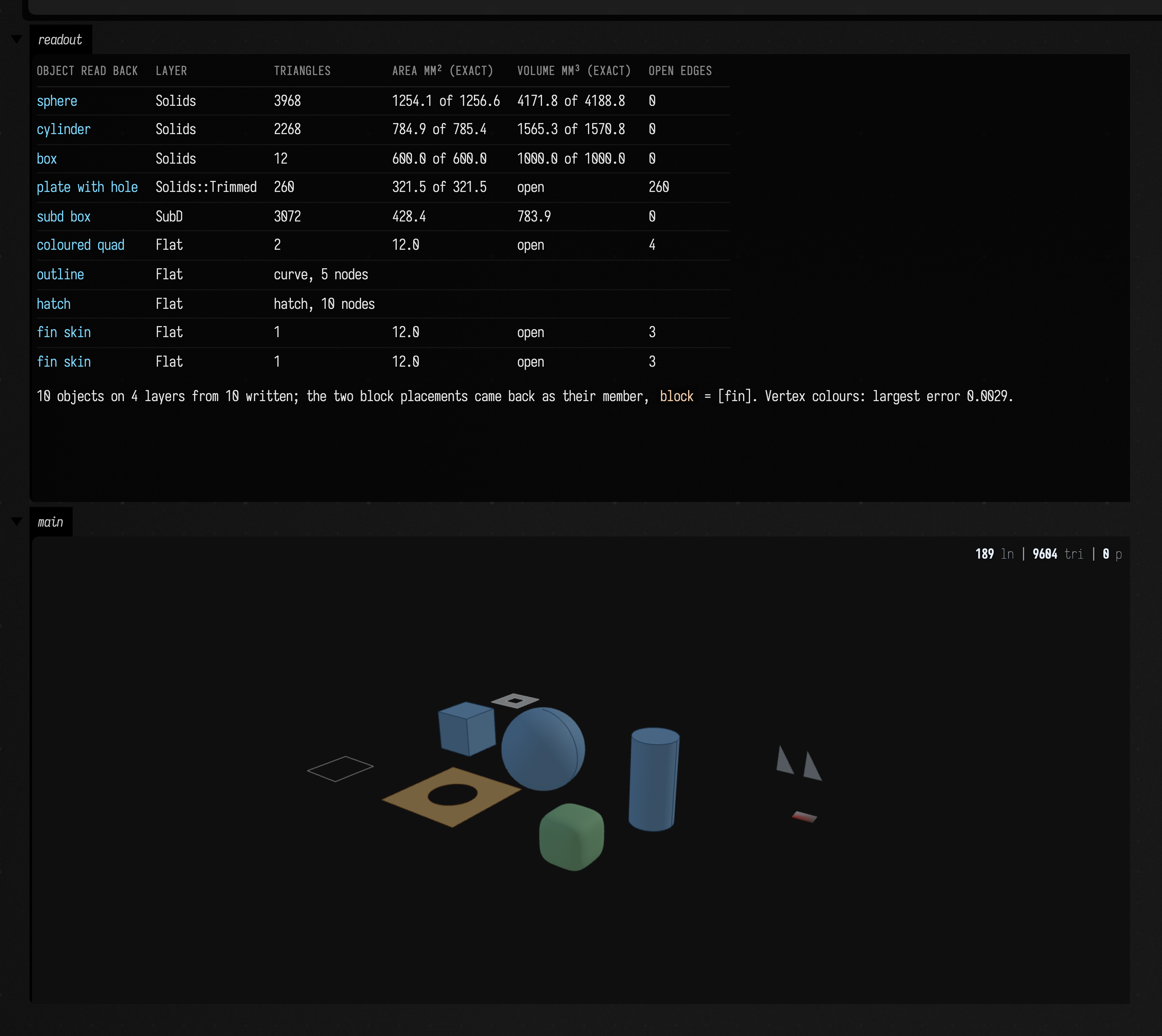
What the readout shows:
- Solids come back closed and within half a percent. Every vertex of a tessellated face is on the exact surface, so the sphere and cylinder lose a little area and volume to their chords (0.2% and 0.4% of volume at the default tolerance); the box is exact. None has an open edge: the faces are stitched along the Brep's edges. The trimmed plate is a sheet, so its outline and hole are its open edges, and its area matches the trimmed square to the first decimal.
- The SubD comes back as its limit surface, rounder and smaller than its 10 mm control cage: 784 mm³ against the cage's 1000.
- Layers, the layer tree and colours survive, an object's own colour over its layer's.
- Vertex colours survive to within a byte. A
TriMeshholds linear colour; the file holds the sRGB bytes Rhino draws, so linear 0.5 is written as 188, and read back as 0.5. - Curves and hatches keep their points exactly; the hatch comes back as its outline and its hole.
- Block placements lose their own names. Each instance comes back as its member, moved into
place, named as the member is in the block (
fin skin) withblocknaming the definition;fin Aandfin Bare not in whatloadreturns.
Building the reader
The reader and the writer are one optional native library. Build it once with ./gradlew buildOpenNurbsNative
(it needs cmake, and the network the first time), or pick it from the optional extras when you
first set Field up. Rhino3dm.describe() says whether Field found it.
Where to go next
- Geometry from disk: the other formats Field reads, and repairing a mesh into a solid.
- Meshes and 3D geometry: what to do with a
TriMeshonce you have one. - A Rhino file, path traced: the same objects rendered by the GPU path tracer, each in its display colour.
- Three.js output: the viewer
rhino(model)draws into, and what else athree { }scene can hold. - Solids & Booleans (Manifold): a
RhinoMesh.meshis aTriMesh, sotoSolid()checks it and, if it is closed and manifold, turns it into a solid you can boolean. - Graphics reference:
Rhino3dm,RhinoModeland the object classes.