Sentence diagrams
A sentence can be a row of words, a canopy of constituents, a set of dependency arcs or a piece of Reed–Kellogg furniture. Field lets you draw each from a parse, then keep working with the result: the words, curves, labels and underlines are all geometry. Further down, we'll use those diagrams to measure how far words sit from their heads across a whole text.
The examples below write out their choices, like the constructions in Euclid's Elements. They use retained Stanza parses. Loading and drawing these examples needs neither a Python environment nor a running parser. Open the four examples to get editable boxes in Field, or copy a complete example from this page.
A sentence, two structures
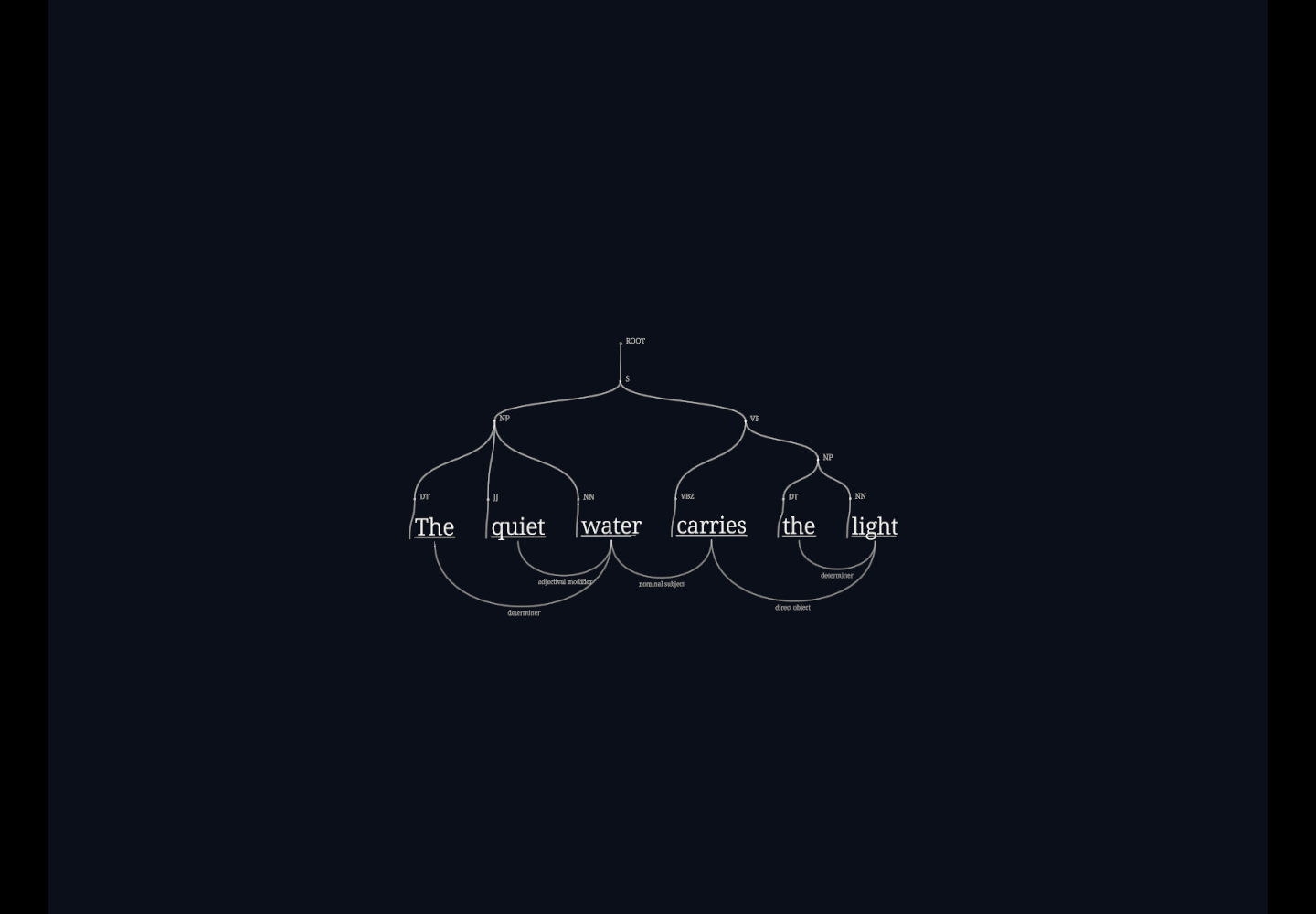
“The quiet water carries the light” has one token list. The constituency tree goes above it;
collapsed dependency arcs go below it. Font metrics and drawn glyph outlines come from the
same font, so changing wordFont changes the layout too. The result is ordinary FLines,
rendered here as SVG through Field's existing path renderer.
import afield.graphics.text.sentences.*

val d = SentenceDiagram().use(Sentences.example(2))
d.wordFont = font("Serif", 30.0)
d.heights = Heights.Flat()
d.wordGap = 50.0
d.layerGap = 50.0
d.tagFontSize = 12.0
d.labelFontSize = 11.0
// Constituents above, collapsed dependencies below; both share the same token row.
val svg = d.svg()

val figureId = "sentence-figure-${thisBox.id}"
display(
    "diagram",
    """
    <div id="$figureId" style="width:760px;background:#f4f0e6;padding:24px;box-sizing:border-box">
    <style>#$figureId svg { width:100%; height:auto; display:block; }</style>
    $svg
    </div>
    <script>
    (() => {
        const svg = document.getElementById("$figureId")?.querySelector("svg");
        if (svg) svg.setAttribute("viewBox", "0 0 " + svg.getAttribute("width") + " " + svg.getAttribute("height"));
    })();
    </script>
""",
)
displayOpen("diagram")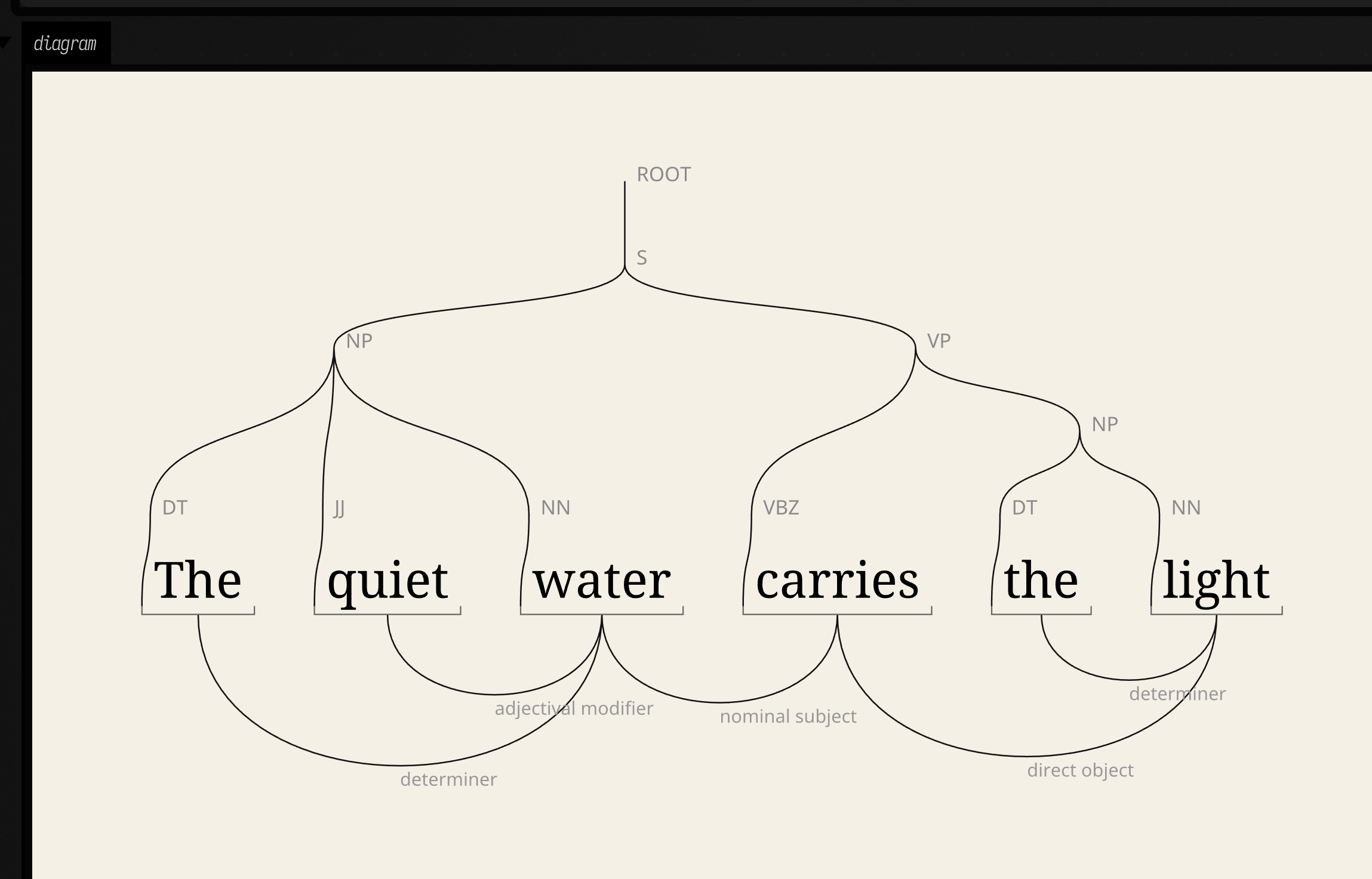
The constituency canopy
Keep just the constituent edges, word connectors, underlines and their text. Nodes can carry rings or other marks; each decoration hook receives the actual laid-out node and the whole diagram. A word-height mode changes the layout while the parsed structure stays intact.
import afield.graphics.text.sentences.*

val d = SentenceDiagram().use(Sentences.example(2))
d.wordFont = font("Serif", 32.0)
d.heights = Heights.ByTreeDepth(jitter = 0.0)
d.layerGap = 55.0
d.wordGap = 36.0
d.tagFontSize = 13.0
val marks = decorations {
    node { if (!it.node.leaf) ring(it.position, 3.5).also { f -> f.color = vec(.7, .3, .1, 1) } else null }
}
val f = d.flines(decorate = marks)
val canopy = f.copy(arcs = emptyList(), texts = f.texts.filter { it.kind != TextKind.RELATION })
val svg = afield.ui.visualization.drawToSVG(canopy.everything(style = DiagramStyle.onWhite), -1.0, -1.0)

val figureId = "sentence-figure-${thisBox.id}"
display(
    "diagram",
    """
    <div id="$figureId" style="width:760px;background:#f4f0e6;padding:24px;box-sizing:border-box">
    <style>#$figureId svg { width:100%; height:auto; display:block; }</style>
    $svg
    </div>
    <script>
    (() => {
        const svg = document.getElementById("$figureId")?.querySelector("svg");
        if (svg) svg.setAttribute("viewBox", "0 0 " + svg.getAttribute("width") + " " + svg.getAttribute("height"));
    })();
    </script>
""",
)
displayOpen("diagram")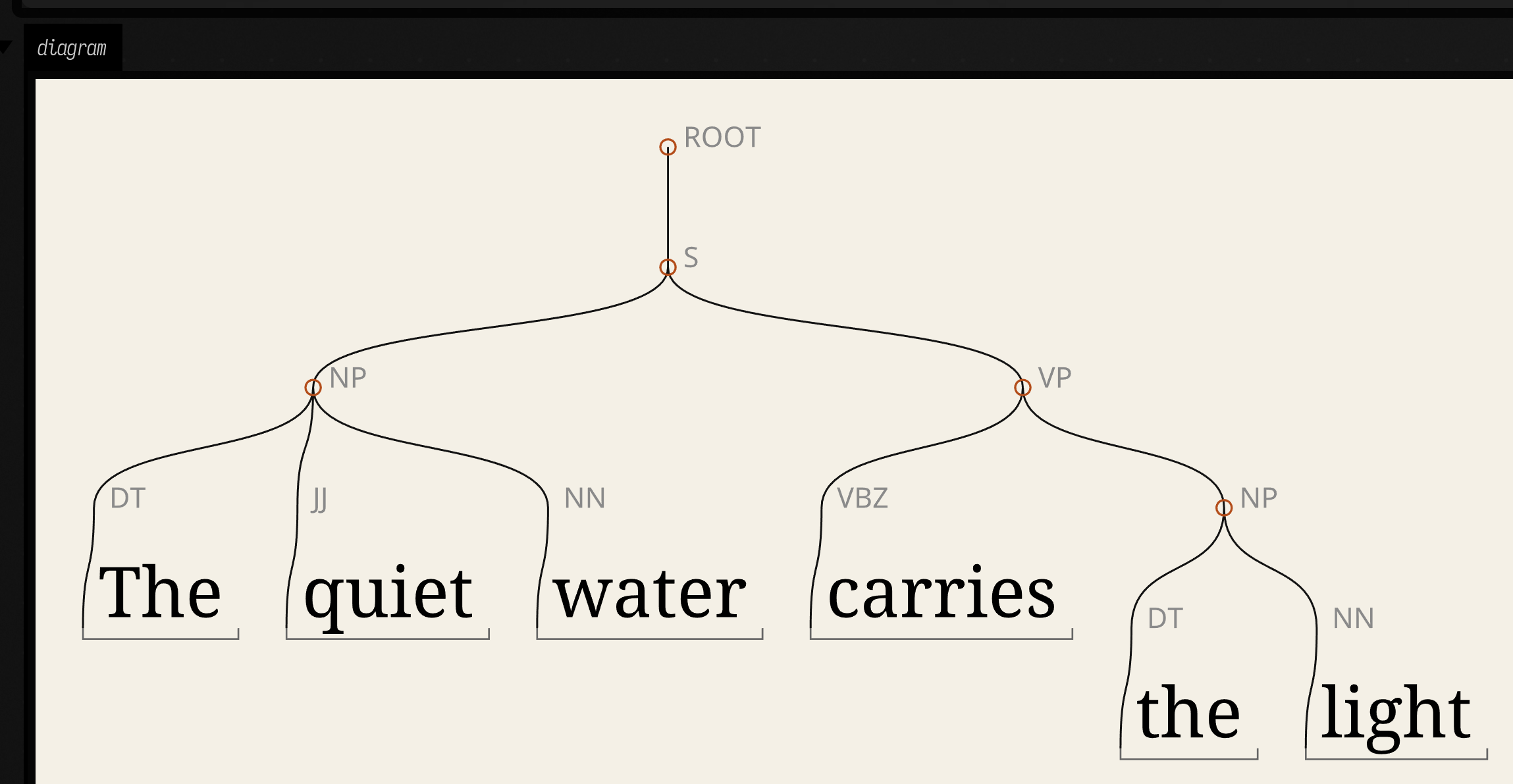
Dependency arcs and decorations
Keep only dependencies and their words. Short arcs nest within longer ones; the layout reserves room for words and relation labels. Decorations attach to the actual curve, not a second approximation of its position. The small orange marks are generated by the two hooks.
import afield.graphics.text.sentences.*

val d = SentenceDiagram().use(Sentences.example(3))
d.wordFont = font("Serif", 32.0)
d.heights = Heights.Wandering(seed = 17, amplitude = 20.0)
d.wordGap = 48.0
d.labelFontSize = 11.0
d.arcSpanRatio = .43
val marks = decorations {
    arc { dot(it.pointAt(.5), 3.0).also { f -> f.color = vec(.7, .3, .1, 1) } }
    underline { ring(it.left, 3.0).also { f -> f.color = vec(.7, .3, .1, 1) } }
}
val f = d.flines(decorate = marks)
val undertow = f.copy(
    treeEdges = emptyList(),
    wordEdges = emptyList(),
    texts = f.texts.filter { it.kind != TextKind.TAG },
)
val svg = afield.ui.visualization.drawToSVG(undertow.everything(style = DiagramStyle.onWhite), -1.0, -1.0)

val figureId = "sentence-figure-${thisBox.id}"
display(
    "diagram",
    """
    <div id="$figureId" style="width:760px;background:#f4f0e6;padding:24px;box-sizing:border-box">
    <style>#$figureId svg { width:100%; height:auto; display:block; }</style>
    $svg
    </div>
    <script>
    (() => {
        const svg = document.getElementById("$figureId")?.querySelector("svg");
        if (svg) svg.setAttribute("viewBox", "0 0 " + svg.getAttribute("width") + " " + svg.getAttribute("height"));
    })();
    </script>
""",
)
displayOpen("diagram")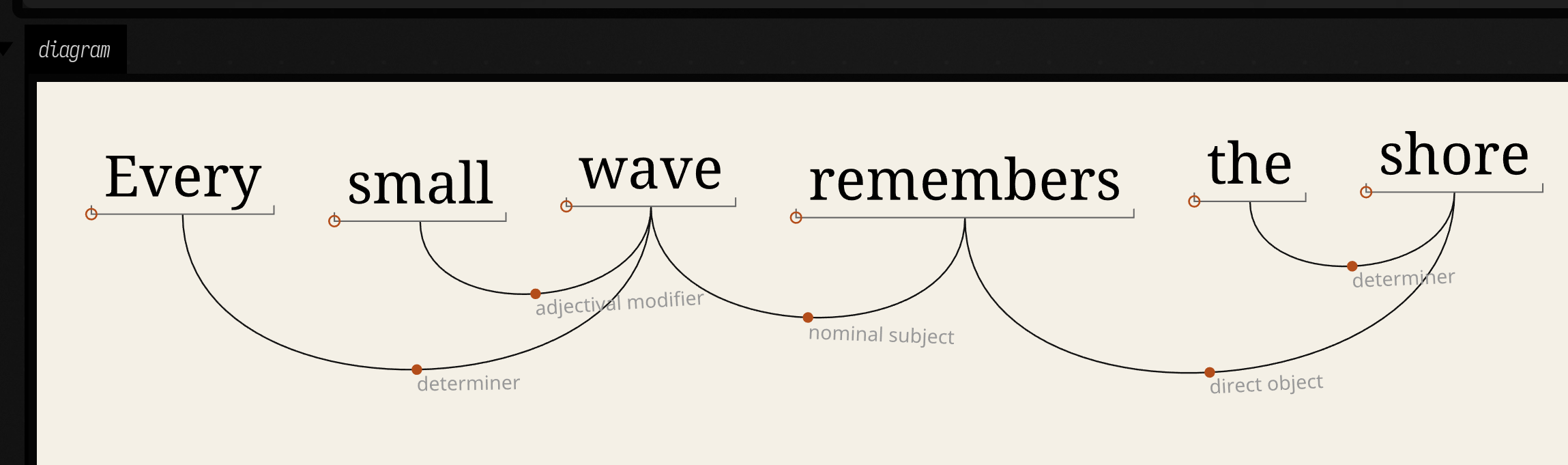
Reed–Kellogg sentence furniture
This layout starts from dependency roles and places words on baselines, shelves and slants. Subjects, predicates and objects make a spine; modifiers branch from it. The slant-angle settings are practical reading controls. The same parse can be laid out either way.
import afield.graphics.text.sentences.*

val d = SentenceDiagram().use(Sentences.example(4))
d.wordFont = font("Serif", 32.0)
// Here grammar places words on shelves/slants; it is a different layout, not a style on the arc tree.
val config = KelloggConfig(
    slantAngle = 30.0,
    nestAngleStep = 10.0,
    maxSlantAngle = 48.0,
    fontSize = 32.0,
    metrics = Java2DMetrics(d.wordFont!!),
    modifierSize = 23.0,
    modifierMetrics = Java2DMetrics(d.wordFont!!.deriveFont(23f)),
)
val svg = d.kelloggSvg(kelloggConfig = config)

val figureId = "sentence-figure-${thisBox.id}"
display(
    "diagram",
    """
    <div id="$figureId" style="width:760px;background:#f4f0e6;padding:24px;box-sizing:border-box">
    <style>#$figureId svg { width:100%; height:auto; display:block; }</style>
    $svg
    </div>
    <script>
    (() => {
        const svg = document.getElementById("$figureId")?.querySelector("svg");
        if (svg) svg.setAttribute("viewBox", "0 0 " + svg.getAttribute("width") + " " + svg.getAttribute("height"));
    })();
    </script>
""",
)
displayOpen("diagram")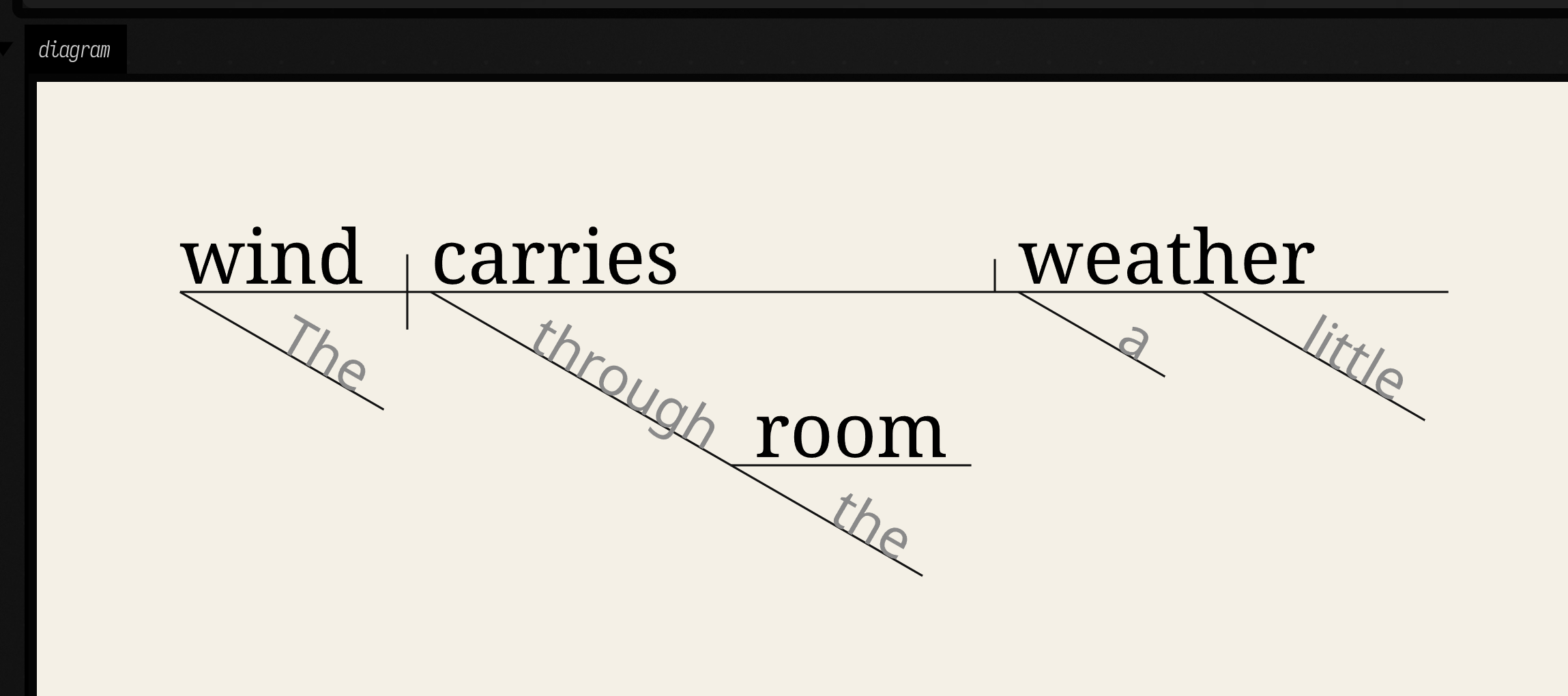
From geometry to a shallow-3D reading space
Open text_one for thirteen related reading spaces, including: Marked breath, Constituency canopy, Dependency undertow, Sentence furniture, A room for words, and Words becoming weather. Sentence furniture crossfades its structural drawing into a complete reading line; the typography playground combines inline styles, multiple faces and text-relative geometry. Select an example in Scores / example selector, then use Restart entrances, Show complete diagram or the score-time slider.
These are world-space graphs, with shallow depth layers and a small CPU SIMDVerlet system. Connections are rebuilt around moving anchors as the words move. Full text runs use Slug analytic curve coverage. FLines supply centrelines; vertex/fragment shaders thicken them separately for the two current eye views and draw antialiased SDF dots. Physics advances in fixed steps; rendering uses the current eye views.
The default launch is a desktop stereo preview. VR additionally needs an OpenXR
runtime/headset, a fresh Field process with val headsetMode in the Reading space code set to
true, and the Slug helper (./gradlew buildSlugNative). VR mode includes a movable browser
surface for editing the document.
The drawing first accumulates into a transparent, two-eye float texture. Half- and
quarter-resolution blur stages feed the Green / light compositor. Green selects the
blend of sharp, medium and broad images; the displayed green is reconstructed from red
and blue. Blur mix starts at zero. Increase it to soften the diagram, or edit
blurWeights in the compositor's fragment shader to change the response.
The reading scene strictly adds opacity-weighted light: strokes, dots, glyphs and text frames do not attenuate existing light. Alpha still records summed coverage, but never normalizes RGB. The browser is drawn afterward and stays sharp. The entire chain uses the same eye views and command buffer, without a previous-frame image.
Words, spans and dots
A run can contain a complete sentence. A span retains that run's original glyph placement and kerning, and its anchors follow the run's physical position, draw offset and scale.
val graph = readingDiagram {
    val baseline = point("baseline", 0, 0)
    val sentence = text("sentence", "between one breath and the next", baseline)
    val breath = sentence.word("breath")
    dot("beside", breath.right.offset(x = .025f)) { radius = .004f }
    val mark = underline("breath-mark", breath, gap = .016f) { width = .002f }
    dot("on-the-line", mark.at(.65f))
}
Positions, radii, widths and offsets are metres, with Y up. word selects whole words;
span selects literal text; characters(start, endExclusive) uses UTF-16 indices and rejects
boundaries inside a shaped glyph cluster. path.at(fraction) uses full untrimmed arclength.
That lets a dot stay on an underline while the underline draws in or erases. Dots have their
own opacity and timing.
A separate score
val score = diagramScore(graph, duration = 12.0) {
    enter(graph.text("sentence"), at = 0.0, seconds = 1.0)
    drawIn(graph.path("breath-mark"), at = 1.0, seconds = 1.0)
    enter(graph.dot("on-the-line"), at = 2.0, rise = 0f)
    exitAll(at = 9.0, seconds = 2.0)
}
player.playback.score = score
The score controls opacity, arclength reveal/erasure, metre offsets and text/dot size.
Named groups can crossfade with transition(from, to, at, seconds). Seeking evaluates a
fresh pose at an absolute time, so scrubbing backward does not accumulate edits. Re-running
only the score leaves the physics, prepared outlines and renderer alive. Stop Drawing before
rebuilding graph topology or fonts. The example source and detailed guide are in
templates/text_one/.
Build the scene with ReadingDiagram.
ReadingDiagramPlayer.prepare prepares its native text once;
textFrame fits a surround to a run, and
textFrustum joins two text faces into a holder.
Typography and geometry in the words’ coordinate system
A text item can choose its own font (Typeface), bold, italic, numeric weight
(100–900) and font-unit tracking. Word and character selections can override the font
and style inside a single shaped run:
val title = text("title", "quiet water", point("title-point", 0, 0)) {
    font = Typefaces.named("Noto Serif", 100, strict = true)
    word("quiet").style { italic = true }
    word("water").style { bold = true }
}
rectangle("word-box", title.word("water").bodyBounds, padding = .008f)
underline("word-rule", title.word("water"), gap = .015f)
textPath(
    "cap-ruler",
    title,
    shape = {
        FLine().moveTo(advance.left, capHeight).lineTo(advance.right, capHeight)
    },
)
inkBounds includes the actual curved outlines and italic overhangs. bodyBounds clips
those bounds at each baseline to exclude descenders. emBounds, capBounds,
xHeightBounds and advanceBounds provide the other useful typographic rectangles.
Each rectangle exposes corners, edge midpoints, center and .at(u,v); those anchors
follow the text’s physics, rotation, score translation and scale.
player.frame().measure(run) or .measure(run.word("water")) returns the cached
font-space ink/advance rectangles, ascent, descent, leading, cap height and x-height.
Whitespace has an advance but no ink. run.words, run.line(index) and run.caret(index)
locate words, baselines and shaped cluster boundaries without remeasuring character counts.
Use textPath or frame.textLine(run, fline) for arbitrary local FLines, in font units
with Y up and the origin at the run’s baseline-left. Rectangle padding and underline
gaps are metres. anchor.alongText(run, x, y, z) makes metre offsets in the run’s rotated
axes; anchor.offset(...) remains in diagram axes.
Font/style changes require preparing the player and drawing again. Each inline style
boundary starts a shaping context, preserving kerning within that section. Inline font
styles currently use one baseline; plain multiline runs have full union bounds and
per-line selections. AWT resolves numeric weights to available faces or synthesizes them;
this is not an arbitrary OpenType variable-axis API. Use a specific named or file-backed
Typeface when an exact face or weight is required.
Parsing new text
Choose Sentence diagrams / Stanford parser in first-run setup and approve BUILD, or run this explicitly:
./gradlew prepareSentenceParser
optional/sentence-parser/.venv/bin/python python/fieldsentences --serve 9500
Preparation installs the locked optional environment, downloads English Stanza models and
verifies a CPU parse. It does not start a server. On Windows, use
optional\sentence-parser\.venv\Scripts\python.exe python\fieldsentences --serve 9500.
The server binds to loopback, warms the model once and defaults to two CPU inference threads,
leaving GPU memory for graphics. The Python worker ships under python/fieldsentences;
it runs separately from Field's JEP interpreter.
import afield.graphics.text.sentences.*

val d = SentenceDiagram("The wind carries a little weather through the room")
val parsed = d.sentence // the first access asks the warm server at localhost:9500
check(parsed.problems().isEmpty()) { parsed.problems().joinToString() }
d.wordFont = font("Serif", 32.0)
val svg = d.svg() // subsequent layouts reuse the parse; no model call per framed.load(json), d.loadFile(path) and d.use(sentence) supply retained material instead.
d.refresh() asks again after the source changes. The JSON carries a constituency tree and
UD, classic and collapsed dependency representations over shared token IDs. Stanza's
UD-to-classic conversion is a drawing convention; it is not identical to a native Stanford
Dependency analysis. An optional CoreNLP backend can contact a separately managed CoreNLP
server. Treat the parser's choices as editable material, especially for poetry.
The current typography layout is left-to-right and requires glyphs in the chosen font. Text outlines remain planar; the surrounding graph and its anchors can move in three dimensions. Models, inference and headset support are optional; the four retained-parse drawing demos remain available without them.
Words becoming weather
Let each piece of text emerge from a broad Gaussian cloud, then slowly dissolve again.
blurIn(word, at = 0.0, seconds = 8.0, radius = .9f) and
blurOut(word, at = 18.0, seconds = 9.0, radius = 1.2f) add tracks you can seek through;
opacity remains a separate control. Radii are in ems, relative to the font size. Try it in the
sixth playground, alongside the five diagram and typography examples.
The renderer caches padded Slug coverage and Gaussian levels in text coordinates, then draws the
masks with the current eye poses each frame. Only text with a blur reservation allocates this
cache. For a live radius control, set blurCapacity before preparing Drawing, then change blur.
Re-create Drawing if you increase the reserved range. Each default pair of cached text shapes
uses approximately 22.3 MiB of mask storage.
Dependency length in real texts
In a dependency parse, a word hangs from another word called its head. The arcs above join each word to its head. How long are those arcs? Next-door neighbours are 1 apart; a word with three words between it and its head is 4 apart. Add the lengths in a sentence and you have its total dependency length.
Futrell, Mahowald and Gibson measured this over parsed corpora of 37 languages and found the same thing in every one: real sentences have shorter totals than random reorderings of the same trees, and the gap widens as sentences get longer (PNAS 112, 10336–10341, 2015). Let's try the measurement on five public-domain English texts. We'll draw a sentence beside its reorderings, look through a whole speech one sentence at a time, and compare the five texts.
These parses are retained too: Stanza parsed each passage once, and the trees ship with Field, so nothing here needs the parser. Open the five examples to get them as editable boxes.
One sentence and its reorderings
A random reordering keeps the tree and changes only the order. At each head, the head and its dependents are shuffled, and then each dependent's own group is shuffled in the same way. Every word stays next to the rest of its phrase, so no two arcs cross; only the order of the phrases changes. Punctuation is removed first, and the arc into the root does not count.
This box takes the fifth sentence of the Gettysburg Address and draws it as Lincoln said it, three
random reorderings, and the shortest order the tree allows, with the same SentenceDiagram as the
arcs above. The number beside each line is its total.
import afield.graphics.text.sentences.*

// "It is altogether fitting and proper that we should do this", without its full stop.
val tree = SentenceTexts.load("gettysburg").sentences[4].tree()!!
val rng = java.util.Random(5)
val rows =
    listOf("as spoken" to tree.observed) +
        (1..3).map { "shuffled" to Linearization.freeRandom(tree, rng) } +
        listOf("shortest" to Linearization.optimal(tree))

val caption = font("Serif", 30.0)
var y = 0.0
val figure = rows.flatMap { (name, order) ->
    val d = SentenceDiagram().use(tree.sentence(order))
    d.scheme = Scheme.UD
    d.wordFont = font("Serif", 30.0)
    d.wordGap = 22.0
    d.heights = Heights.Flat(y)
    d.arcLabels = false
    d.x0 = 250.0
    val f = d.flines()
    // Keep the words and the arcs; the constituency tree is a stand-in for a reordered sentence.
    val arcs =
        f.copy(treeEdges = emptyList(), wordEdges = emptyList(), texts = f.texts.filter { it.kind == TextKind.WORD })
    val label = outlinedText("$name  ${tree.length(order)}", P(0.0, y), caption)
    y = d.diagram().bounds.y1 + 60.0
    arcs.everything() + label
}
display("figure", figureSvg(figure))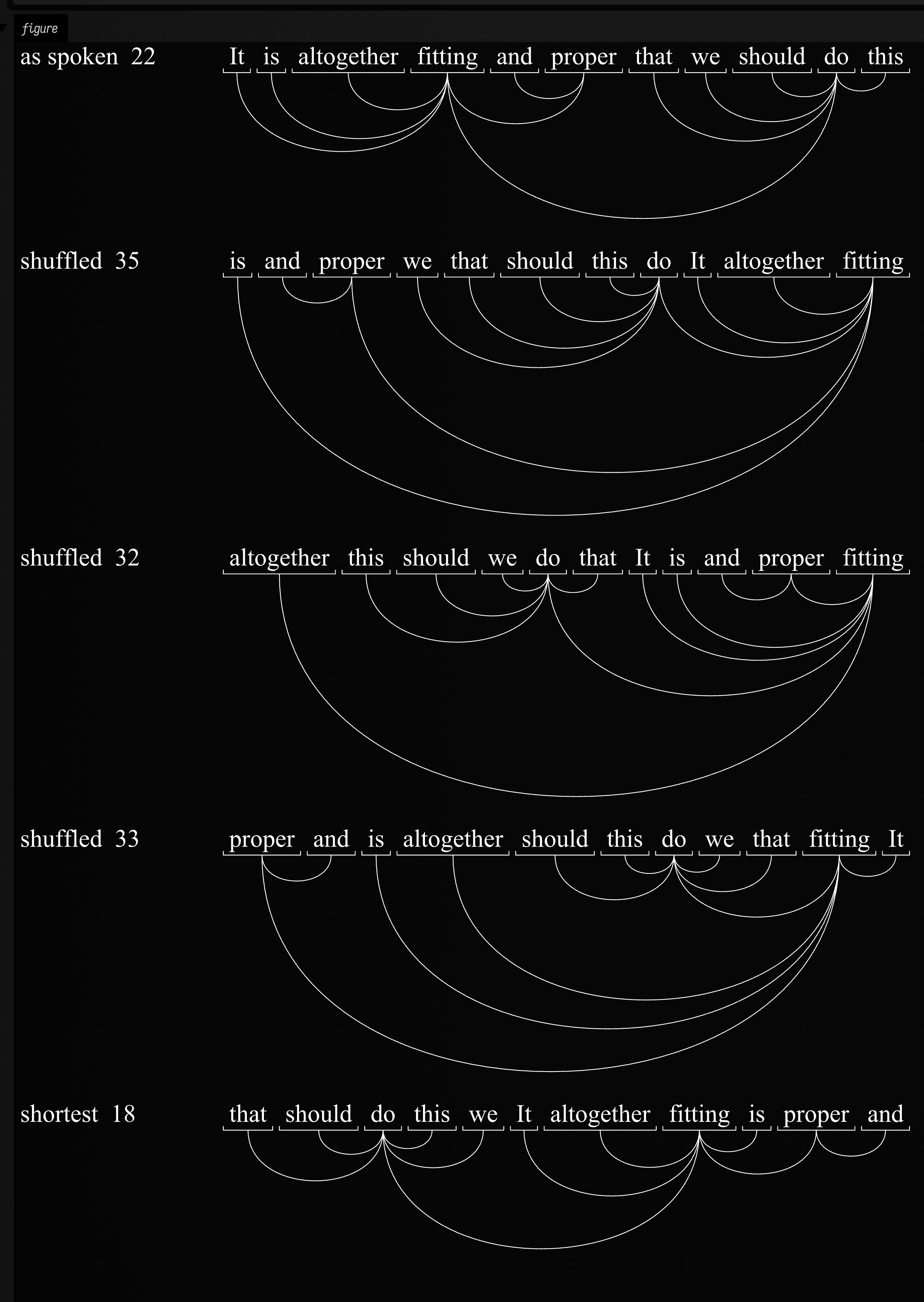
As spoken, every word sits close to its head except one: "do", the head of "that we should do this", hangs from "fitting" across "and proper". Each shuffle puts whole phrases between words and their heads, and the arcs that reach under them take the total past 30. The shortest order saves four more by putting the clause first, an order no one would say.
A whole text, sentence by sentence
measure() does this for every sentence of a text: the observed total, the totals of a hundred
random reorderings, and the shortest possible. The ratio of the observed total to the mean of the
random ones is the number to read: below 1 is shorter than chance.
Here are the ten sentences of the Gettysburg Address as arcs alone, one dot per word, the ratio beside each.
import afield.graphics.text.sentences.*

val text = SentenceTexts.load("gettysburg")
val ratioFont = font("Serif", 18.0)
val openingFont = font("Serif", 13.0)
var y = 0.0
val figure =
    text.measure().flatMap { m ->
        // The arcs start at x = 270, leaving a column for the ratio and the opening words.
        val row =
            m.tree.arcLines(at = P(270.0, y), spacing = 8.0, depth = 0.3) +
                outlinedText(m.ratio.f2, P(0.0, y + 6), ratioFont) +
                outlinedText(m.tree.words.take(4).joinToString(" ") + " …", P(50.0, y + 5), openingFont)
        y += m.tree.arcDepth(spacing = 8.0, depth = 0.3) + 30.0
        row
    }
display("figure", figureSvg(figure))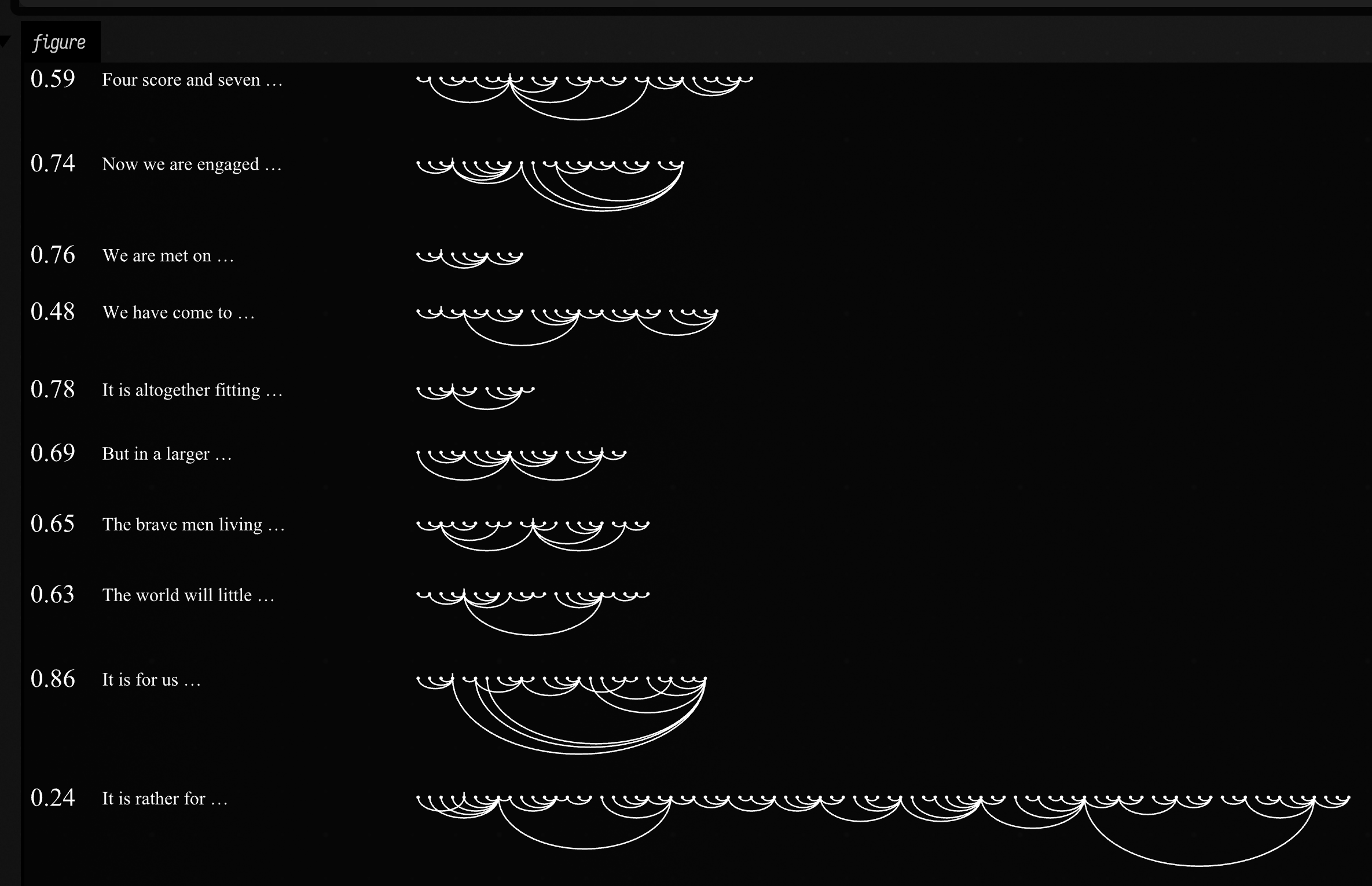
Every sentence is below 1. The lowest ratio belongs to the longest sentence, the closing one: it runs to more than eighty words, but almost all of its arcs join neighbours or near neighbours.
Shorter than chance, more so for long sentences
All five texts pooled: one point per sentence for each measure, against the number of words in the sentence. The random reorderings rise quickly with length; the real sentences rise more slowly and stay closer to the shortest order the tree allows.
import afield.graphics.text.sentences.*
import space.kscience.plotly.*
import space.kscience.plotly.models.ScatterMode

val measured = SentenceTexts.all().flatMap { it.measure() }
val words = measured.map { it.length }
val series = [
    "free random reordering (mean of 100)" to measured.map { it.lengths.freeMean },
    "fixed order random reordering (mean of 100)" to measured.map { it.lengths.fixedOrderMean },
    "as written" to measured.map { it.lengths.observed.toDouble() },
    "shortest possible" to measured.map { it.lengths.optimal.toDouble() },
]
val plot = Plotly.plot {
    for ((name, values) in series) {
        scatter {
            this.name = name
            x.set(words)
            y.set(values)
            mode = ScatterMode.markers
            marker { size = 4.0 }
        }
    }
    layout {
        title = "Total dependency length, ${measured.size} sentences from five texts"
        xaxis { title = "words in the sentence" }
        yaxis { title = "total dependency length" }
    }
}
plot.darkMode()
// darkMode() places the legend beside the plot; put it inside, over the empty upper left.
plot.layout {
    legend {
        x = 0.02
        y = 0.98
    }
}
display(plot)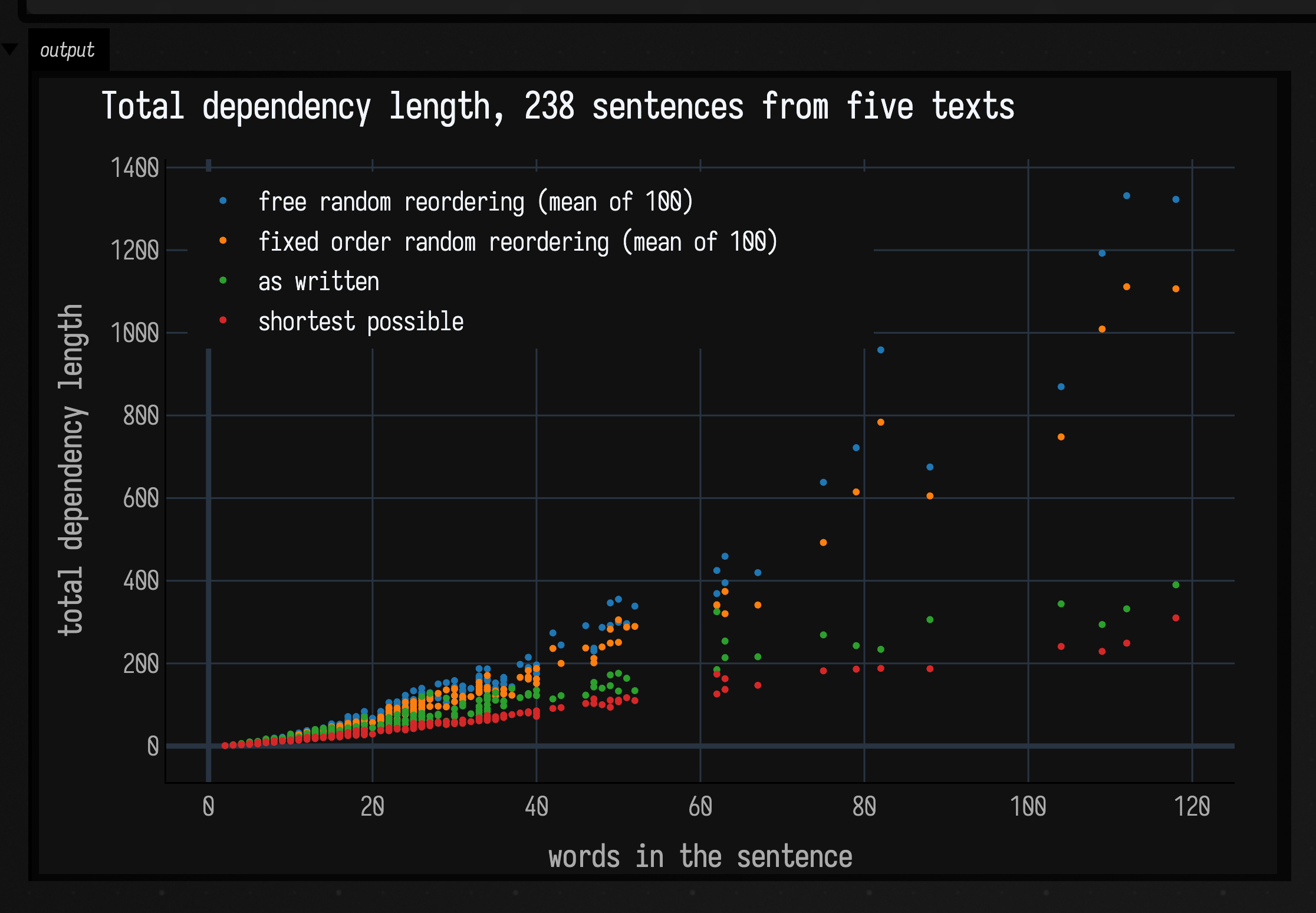
The fixed order baseline is the stricter control. It gives each relation type one place relative to its head for the whole sentence, so every subject goes the same side of its verb, as in English. Its means sit below the free ones, and the real sentences are still shorter.
Five texts side by side
The table sums each text's totals, so long sentences weigh more than short ones. The last column counts sentences whose own total is below the mean of their own reorderings.
import afield.graphics.text.sentences.*

val rows =
    SentenceTexts.all().map { t ->
        val m = t.measure()
        val observed = m.sumOf { it.lengths.observed }.toDouble()
        "| ${t.title} | ${m.size} | %.1f | %.2f | %.2f | %.2f | %.0f%% |"
            .format(
                m.map { it.length }.average(),
                observed / m.sumOf { it.lengths.freeMean },
                observed / m.sumOf { it.lengths.fixedOrderMean },
                observed / m.sumOf { it.lengths.optimal },
                100.0 * m.count { it.lengths.observed < it.lengths.freeMean } / m.size,
            )
    }
markdown(
    """
    | text | sentences | mean words | ÷ free random | ÷ fixed order | ÷ shortest | shorter than chance |
    | --- | ---: | ---: | ---: | ---: | ---: | ---: |
    ${rows.joinToString("\n    ")}""".trimIndent(),
)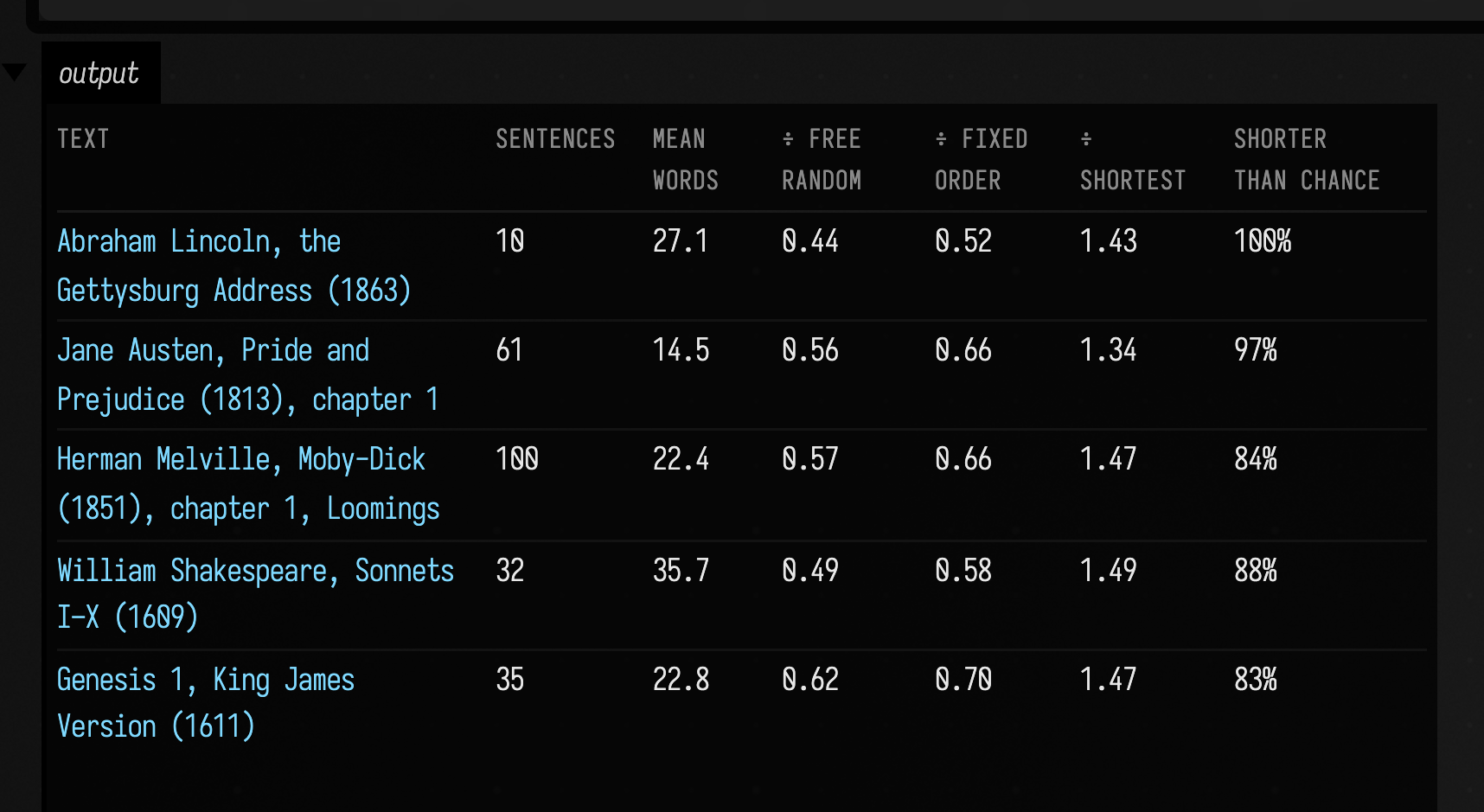
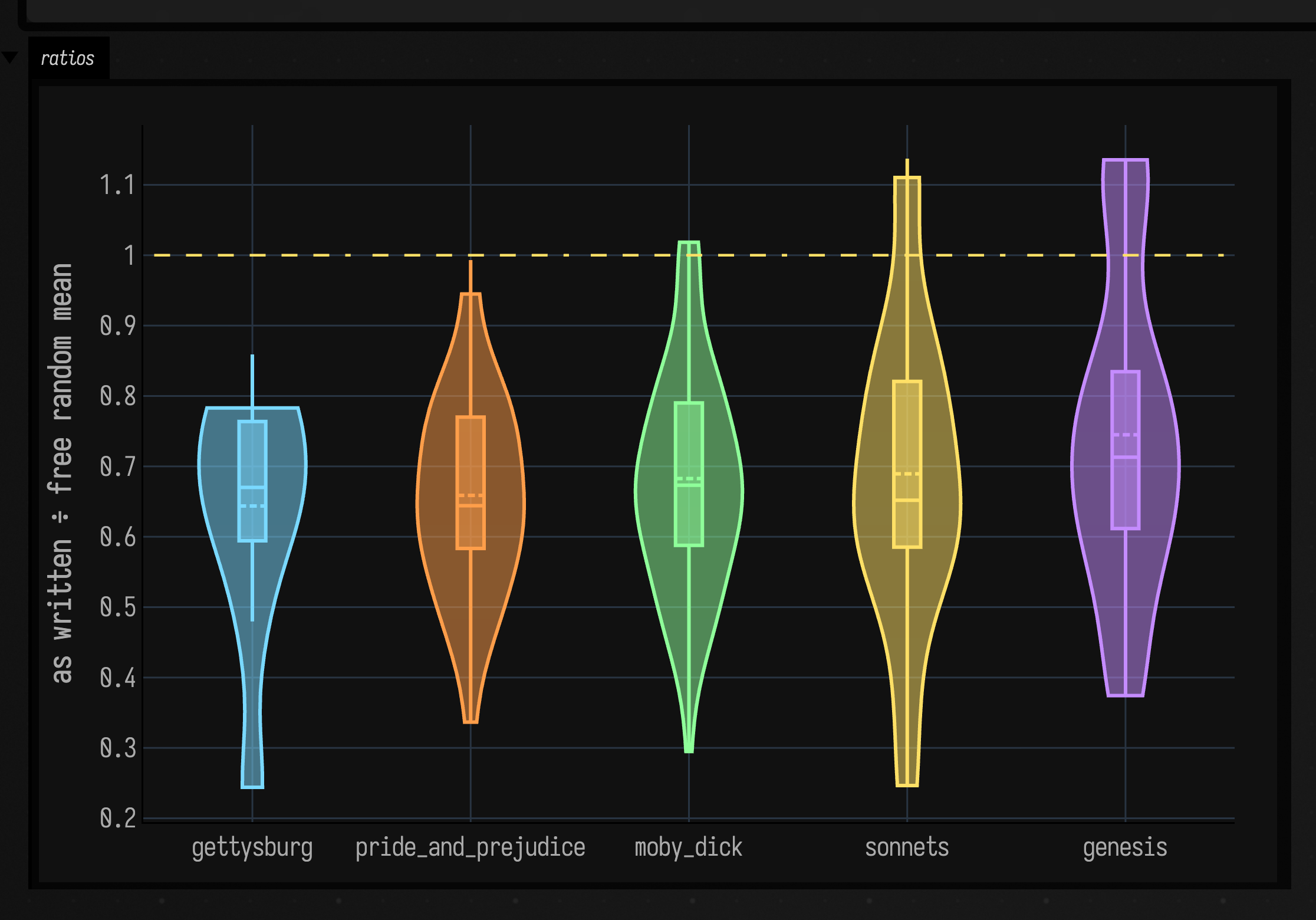
The Gettysburg Address is furthest below chance and Genesis closest, with its run of short clauses joined by "and". The sonnets come second, inversions and all: their sentences are long, and the sum is weighted towards long sentences. The violins show the spread per sentence, for sentences of eight words or more, with chance as the dashed line at 1.
import afield.graphics.text.sentences.*

val texts = SentenceTexts.all()
display(
    "ratios",
    violin(
        *texts.map { t -> t.key to t.measure().filter { it.length >= 8 }.map { it.ratio } }.toTypedArray(),
        references = List(texts.size) { 1.0 },
        yTitle = "as written ÷ free random mean",
    ),
)
How it is measured
SentenceTexts.load(key) reads one retained passage (gettysburg, pride_and_prejudice,
moby_dick, sonnets, genesis) as a ParsedText, whose sentences carry words, tags and a
Universal Dependencies tree. ParsedSentence.tree() removes punctuation, reattaching anything
that hung from a punctuation mark to that mark's head, and returns a DependencyTree.
On a tree, length(order) is the total for an order of its words (order[k] is the word at
position k; observed is the order as written), isProjective(order) says whether every subtree
is contiguous, and lengths(samples, seed) measures the observed order against the baselines:
| baseline | Linearization |
what it keeps |
|---|---|---|
| free random | freeRandom |
the tree; at each head, the head and its dependents shuffled |
| fixed order random | fixedOrder with randomWeights |
one weight in [−1, 1] per relation type, the head at 0, each group sorted by weight |
| fixed head position | fixedHeadPosition |
each dependent on the side of its head where it was written, shuffled within that side |
| shortest | optimal |
the shortest order with no crossing arcs (Gildea and Temperley, 2007) |
The first two are the paper's main baselines, the third is from its supplement, and each draws a
hundred orders per sentence. fixedOrder draws fresh weights for each order, as the paper does,
so the relation order is consistent within a sentence, not across a text.
The trees use Universal Dependencies, which makes the noun the head of "of the people" and the verb the head of "that we should do this". The paper reattached prepositions and complementizers as heads before measuring, and reports the same result without doing so. A sentence as written may have crossing arcs (Stanza finds a few in Moby-Dick); its total is still measured, against baselines that never do.
To measure a text of your own, add a passage file beside the retained ones, in
src/jvmMain/resources/afield/sentences/texts/,
and parse it with the parser prepared as in Parsing new text:
./gradlew prepareSentenceParser
optional/sentence-parser/.venv/bin/python tools/parse_sentence_texts.py my_passage
A passage starts with # title: and # source: lines, then paragraphs separated by blank lines.
For verse add # sentences: punctuation, which splits sentences at ., ? and !; otherwise
Stanza takes the capital at the start of each line as a new sentence. Add the key to
SentenceTexts.keys to have all() include it.
Where to go next
- Charts as FLines and Plotly: other ways to plot the measurements.
- Starting points: the four diagrams above as a document, and the five measurement boxes as another.
- Futrell, Mahowald and Gibson, Large-scale evidence of dependency length minimization in 37 languages, PNAS 112(33), 2015, for the corpora, regressions and the other baselines.
Elastic sentence threads
In the seventh text_one playground, Elastic sentences, threads connect the words and move as
the text moves. Their ends stay attached to the current text geometry while the points between them
follow more slowly. Attach them to centres or sides, nearest points, sliding underlines, line margins
or bounding-box perimeters. The attachments follow the glyphs' font measurements, rotation and score
transforms, including shorter lines in a multiline run. The threads use a CPU SIMD Verlet solver.
Layout response time and damping, length stabilization or minimization, and curvature
minimization are independent physical controls. TCB tension/continuity/bias shape the FLine
through those nodes separately. The connection's .path supports the ordinary draw-in/out,
opacity, dashes, arrows and arclength anchors. Headset views continue to use the current poses.
The source is in the template; the document's Elastic connections guide has the complete API, parameter units and examples. Resetting physics resets thread history; pausing or seeking the score alone lets the existing thread motion continue.
Drop caps
A dropped initial, the eighth text_one playground, gives a paragraph an enlarged opening
initial spanning a chosen number of authored lines. Those lines are indented beside it; later
lines return to the left margin. Font, bold, italic and weight can be chosen for the initial.
Its actual ink is fitted between the first line's cap-height and the final dropped baseline.
The paragraph remains one Slug run, with its original text and character indices intact.
Use dropCap(lines = 3, gapEm = .2f) { bold = true } inside a text block. The resulting
paragraph.initial is a measurable span, so elastic threads can attach to its bounding box.
Line breaks remain authored; this feature does not introduce automatic paragraph wrapping.
The document's Drop caps guide covers multi-letter initials, typography and rebuilding.
Mechanical text holders
The reading-space starting point has frames around its text, with lines extending outward from the corners. You can set their length as a fraction of the frame's side plus a distance in metres. A stepped surround keeps its frosted silhouette and sliding attachments; only its outer corners get these extensions.
textFrustum joins two fitted, frosted text rectangles with four rails. The ends share an
aspect ratio, while their physics anchors and font scales set the depth and taper. You can fade,
blur and move the holder as a whole, or animate the text at each end independently. Complete
lines crossfade without drawing themselves in. Examples 10–13 and the document's Mechanical
text holders guide show how to build and animate them.
API reference
Implementation and parameter details for the helpers used above: