Let AI4 Wait for Long Builds
A checked mesh, a fabrication export or a solver run can take minutes or hours. AI4 can start a derived build, end its turn and resume the same conversation when the result is ready. Field does the waiting, so the model doesn't need to keep checking on the build.
Start a build and let the agent wait
This box defines one slow stage. It estimates π from sixty billion random points, sixty batches of a billion, and reports its progress after each batch:
val builds = studyBuilds(
    "estimate",
    [
        StudyBuildStage("pi", "Estimate π", "pi-v1") { context ->
            val random = java.util.SplittableRandom(4)
            val batches = 60
            val perBatch = 1_000_000_000
            var inside = 0L
            for (batch in 1..batches) {
                repeat(perBatch) { sample ->
                    // Check within the batch so Stop need not wait for a billion samples.
                    if (sample % 65_536 == 0) context.checkCancelled()
                    val x = random.nextDouble()
                    val y = random.nextDouble()
                    if (x * x + y * y < 1.0) inside++
                }
                context.checkCancelled()
                context.progress(batch / batches.toDouble(), "$batch of $batches batches")
            }
            val samples = batches.toLong() * perBatch
            val estimate = 4.0 * inside / samples
            context.file("estimate.txt").writeText("$estimate\n")
            StudyBuildProduct(
                ["estimate.txt"],
                facts = mapOf("samples" to samples, "estimate" to estimate, "error" to Math.abs(estimate - Math.PI)),
            )
        },
    ],
) {
    emptyMap()
}
showStudyBuilds("estimate")
Run the box to get its build card, open the box's AI4 chat (ctrl/command-4), and ask for the
build:
Run the π estimate build on this box. It takes a few minutes; tell me what it finds.
The agent inspects the runner, starts the stage, and then calls AwaitStudyBuildsRequest with the
job it started. That ends its turn. Saying the build will take a while helps: the agent cannot know
in advance, and for a short build it may watch it from inside the turn instead.
While it waits
The chat ends with a row that says what the conversation is waiting for, and the latest time it will carry on. The row shimmers for as long as the wait lasts. The build card goes on showing the build's progress.
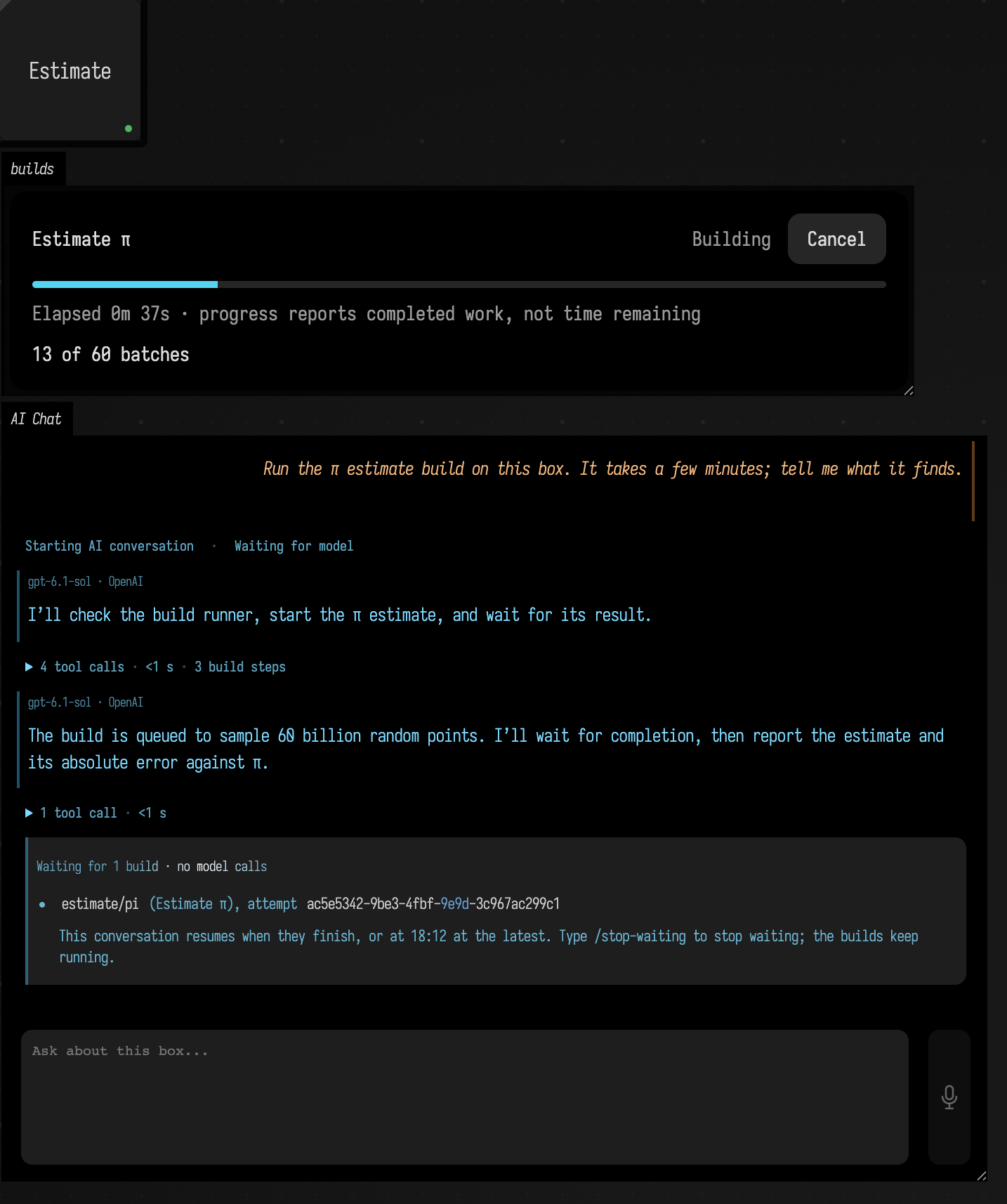
You can go on working while it waits, in the document or in the chat. A message you send starts an
ordinary turn, and the wait carries on behind it. To stop waiting, type /stop-waiting in the
chat: the build keeps running, and nothing resumes the conversation when it finishes. Clearing the
chat, rewinding it or switching its branch stops the wait too.
The agent can set a maximum wait. The default is four hours, and the longest allowed is 48.
What the conversation resumes with
When every awaited job has finished, whether it succeeded, failed, was cancelled or was interrupted, or when the time limit passes, Field writes a message into the chat and starts the next turn with it. The chat labels it Field, since you did not write it. For each job it gives:
- its status, and for a success whether its result is still the current one;
- a failure's message and suggestions;
- the facts the stage returned in its
StudyBuildProduct; - the stage's result notes, when it has a
resultNotesadapter, or for a failure, afailureNotesadapter; - a picture of each view a note names, at most three: Field draws the view, captures the box that shows it and attaches the picture to the message, so the agent looks at the result as well as reading about it.
When the time limit passes first, the message says how many jobs are still running; they go on running. The waiting row stays in the chat, folded, as a record of the wait. The agent carries on from where it stopped:
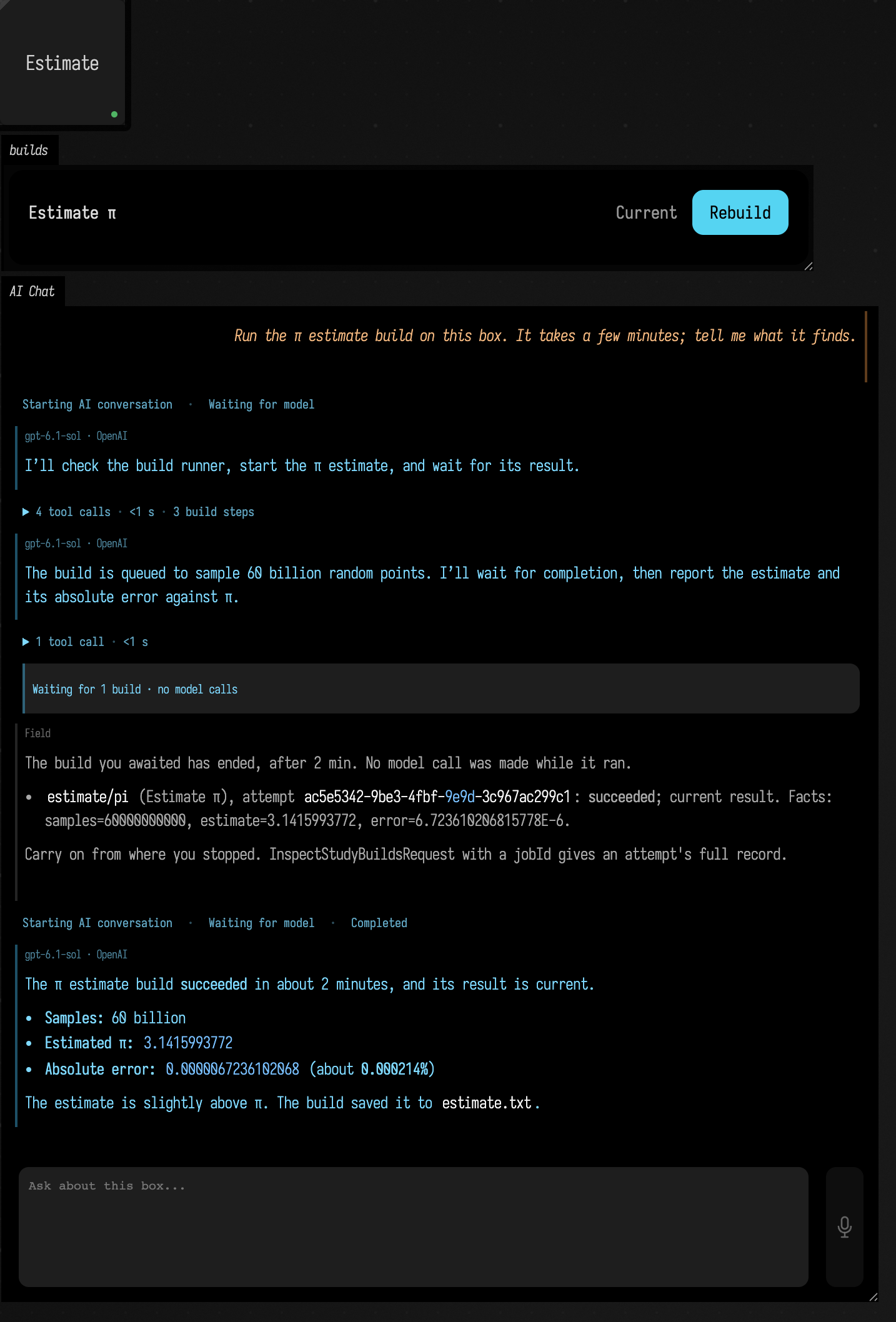
If a turn is already running in that box when the builds finish, because you sent a message in the meantime, the outcome goes to that turn instead, the way a message you type while the agent works does: the agent reads it after its current step.
No model calls while it waits
Field does the waiting. It reads the build runner every five seconds and makes no request until the
builds are done. Compare WaitStudyBuildRequest, which an agent can call to
watch a job from inside its turn: each call returns after at most fifteen minutes, and every call
after that is another model request, which sends the whole conversation again.
Every request Field makes to OpenAI, OpenRouter or Anthropic is recorded, with its time, in
~/.afield/logs/ai_usage/. python3 tools/ai_usage.py --hours 1 counts them by document, so you
can check the cost of a long build for yourself.
Seeing a suspended turn from outside
A script or another agent can ask a chat for its state. The ai-chat-history request's reply
carries running, true while a turn is running in that box, and suspendedOn, which is present
while the chat waits: when the wait began (since), when it ends at the latest (resumesBy), and
each awaited job with its runner, stage and last seen status. The backdoor prints the same, with the
chat's last reply:
uv run --project . --group backdoor python tools/field_backdoor.py --json --attach-existing \
  --document long-builds --command 'open long-builds' --command 'ai-chat Estimate'
Add --stop-waiting after ai-chat Estimate to end the wait, as /stop-waiting does.
When Field restarts
The wait is saved with the chat and resumes when you reopen the document. A build that was running
when Field stopped is marked interrupted; the conversation resumes with that result and the
agent can start it again. Field gives the runner two minutes after the document opens to come back
(its box running again, by hand or by autorun); after that it reads what the runner last recorded.
Where AI4 can wait
AwaitStudyBuildsRequest is offered in a box's AI4 chat, on OpenAI, OpenRouter and Anthropic
alike. It is not offered where nothing would resume the conversation: the editor's inline requests,
the document chat, a headless agent task. There the agent watches a build with
WaitStudyBuildRequest. A tool program cannot call it
either, since only a call the model makes itself can end its turn.
See also: Studies, AI features, Experimenting with AI4.
How these figures were made
By tools/capture_ai4_long_builds.py, on a Field it starts in a temporary workspace. It runs the
box above, sends the request as a live panel turn (OpenAI gpt-6.1-sol, low reasoning effort),
typed into the chat in the backdoor's browser, and captures the box and chat while the turn waits
and again after Field has resumed it. It writes the second figure only if the request ledger for
that Field shows the conversation's two turns and no request between the moment the first turn
ended waiting and the moment the build finished. On the run of 2026-10-09 that published these
figures, the two turns made six requests and the build ran 169 seconds.