Templates
A template is a box, or a group of boxes, saved under a name so you can drop copies of it into any
document. Select the boxes and run Save selection as template from the command palette; later,
press cmd+t (Insert template) in any document and pick the name. Each insertion is a fresh,
independent copy, placed where your mouse is.
Templates are for pieces of a document. For a whole document to start from, use a starting point on the Welcome screen; for reusable code, dependencies and documents packaged together, use a kit.
Save boxes as a template
Select the boxes you want to keep: one box, or a group with the connections between them. Open
the command palette (f1) with the canvas focused, choose Save selection as template, type a
name and press Enter.

Field writes the boxes to templates/greeter.edn inside your workspace and confirms with
"Template saved: greeter". Boxes nested inside a selected box come along with it. The name is a
file name, so it cannot contain /, \ or the characters Windows forbids in file names.
Saving under a name that already exists replaces that template.
The template is a snapshot. Editing the boxes you saved from changes nothing in the template, and saving again under the same name changes nothing in the copies already made.
Insert a template
Move the mouse to where you want the copy, press cmd+t and start typing the name. The
palette lists every template it can find, with the documentation of its boxes beside the
selected entry.
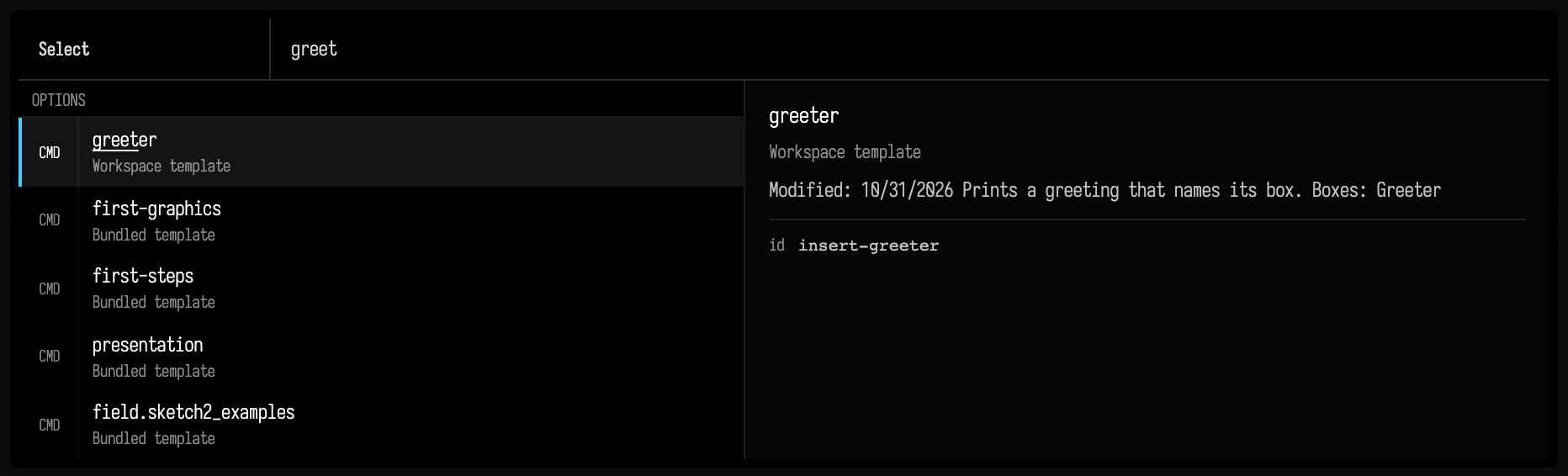
Press Enter and the copy appears, centred on the mouse. Insert it again and you get a second copy: each insertion gives every box a new identity, so the copies never share edits or state with each other or with the template. Inserted boxes do not run, unless a box was saved with autorun on.
The palette names where each entry comes from:
| Entry | Where it lives |
|---|---|
| Workspace template | templates/<name>.edn (or a folder) in your workspace, which is where Save selection as template writes |
| Bundled template | templates/ in the Field checkout, such as first-steps and first-graphics |
| Personal template | ~/.afield/templates/ (or -Dafield.personalTemplates.dir), and src/personal/templates/ in the checkout: the same folders as Personal templates on the Welcome screen |
| Workspace file | another document in your workspace (not the one you are in): inserting it copies all of its boxes into this one |
| Remote template | a template server you configured (see Share templates) |
The palette looks in the folders in the order of this table, and the first folder holding a name
owns it: its entry, its documentation and what is inserted all come from there. The same name
further down is listed once more with the folder added, so a personal first-steps next to the
bundled one appears as first-steps-personal, and a workspace document called greeter next to a
saved template appears as greeter-workspace. A remote template whose name a local one already
has is not listed.
Describe a template
The text beside an entry comes from its boxes' metadata property, which is YAML. Field
reads doc from every box in the template, top box first, so a few lines on each box explain the
whole group:
doc: |
  Prints a greeting that names its box.
A template with no doc anywhere shows "No documentation available".
A copy remembers where it came from
Every inserted box records two properties, and both are saved with the document:
templateIdis the name of the template it was inserted from (greeter).source_idis the uid (the unique id every box carries) the box had inside the template, which is the uid of the box you saved.
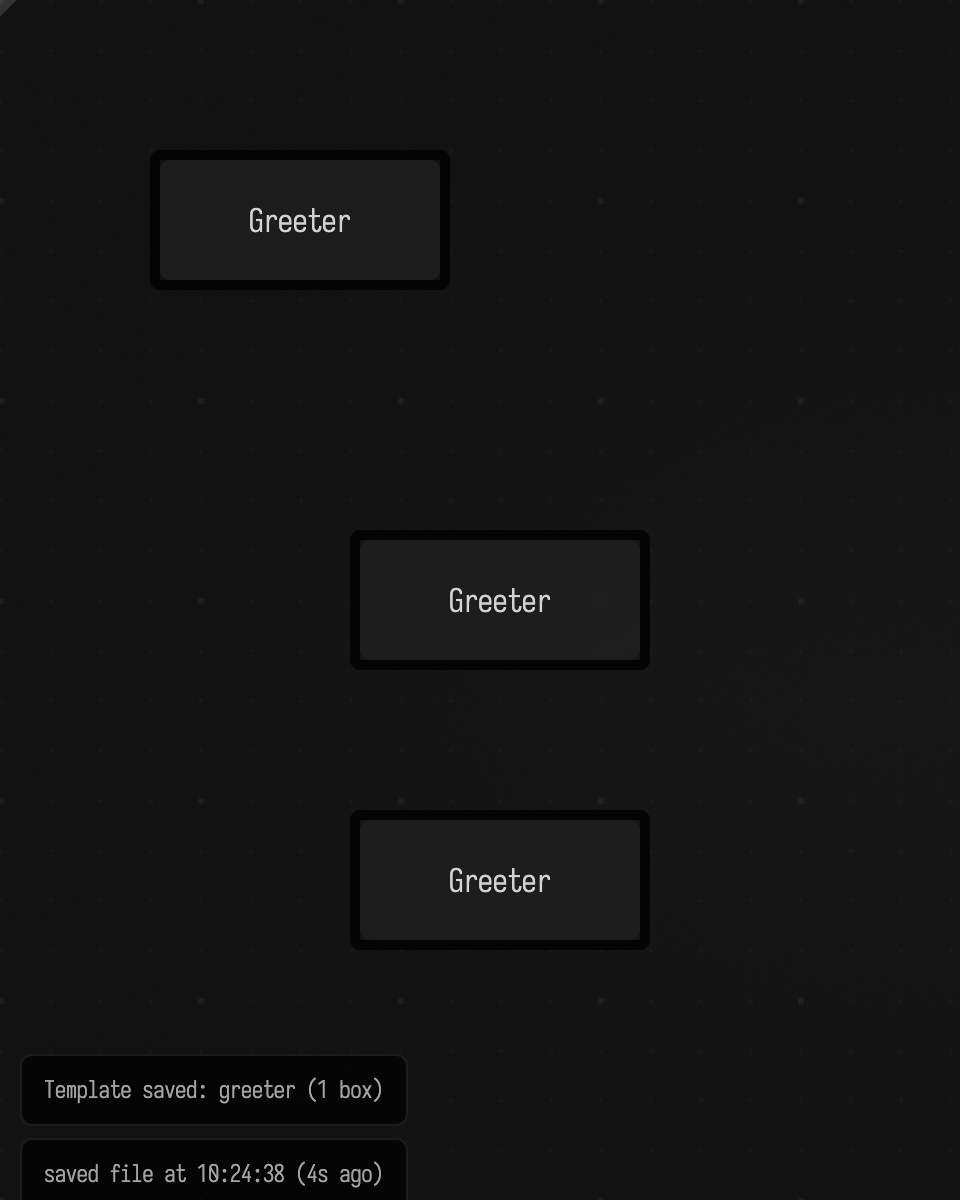
So two copies of greeter share a templateId and a source_id, but have their own uids.
Here Greeter was saved as greeter and two copies were inserted below it with cmd+t:
Slideshow chats use the same property: withChat(id = "templateId") gives every copy of a
template one shared discussion (Interactive Guides).
Share templates
A saved template is one .edn file holding its boxes and their code. Copy
templates/greeter.edn into another workspace's templates/ folder and it appears in that
workspace's palette.
To offer templates from a server, start Field with AFIELD_TEMPLATE_SERVERS (or
-Dafield.templateServers=) set to a comma-separated list of URLs. At startup Field asks each
server's /list for a JSON list of {"name": ..., "has_edn": true} entries and adds them to the
palette as Remote templates; choosing one downloads /download/<name>. The list is read once, so
templates added to a server later appear after a restart.
Templates, starting points and kits
Field uses the word "template" for two things.
- Templates (this page) are boxes you insert into the document you are in, with
cmd+t. - Starting points, listed under Templates on the Welcome screen, are whole documents.
Opening one makes a new document, a copy, in your workspace. Your own go in
~/.afield/templates/(Personal templates). Those folders and the checkout'stemplates/appear in both places: on the Welcome screen as starting points, and in thecmd+tpalette as templates whose boxes you insert into the document you are in.
A kit packages starting points with the code, dependencies and assets they need, and keeps track of which version each document received. Reach for a kit when the thing you want to reuse is more than a few boxes, or when copies should be able to take updates; a template copy never changes after it is inserted.