A learned pen
A recurrent network that has watched people write by hand, and draws the next point. Give it any FLine and it carries on from where the line ends: one continuation, a dozen alternatives, or a pen that keeps writing live while you change how it samples.
The model is the one from Shan Carter, David Ha, Ian Johnson and Chris Olah's Experiments in Handwriting with a Neural Network (Distill, 2016). It is a 500-cell LSTM, trained on the IAM On-Line Handwriting Database, whose output at each step is a probability for every possible next pen movement. It ships with Field and runs in Kotlin, so nothing needs installing. It learned handwriting, not text, so what it writes looks like writing and says nothing.
The quickest way in is the starting point. Open Starting points on the welcome screen and search for learned pen. Its third box is a drawing panel: draw a stroke and the pen keeps writing from the end of it. Browse the starting point ↗
Continue a line
continueWith shows the pen the whole line, then lets it draw. It returns only the pen's
part, as a new FLine that starts where yours ends. The yellow stroke here is ours; everything after
it is the pen's.
:::static
import afield.ai.learning.pen.*

val start = fline {
    moveTo(0, 0)
    cubicTo(6, -26, 22, -26, 20, -4)
    cubicTo(18, 8, 30, 10, 38, -2)
    lineTo(46, -14)
    color = vec(1.0, 0.85, 0.3, 1.0)
    thickness = 2.0
}
val more = start.continueWith(steps = 500, seed = 3).apply { color = vec(0.85, 0.9, 1.0, 1.0) }
lines(start, more, w = 520.0, h = 260.0, fitToSize = true)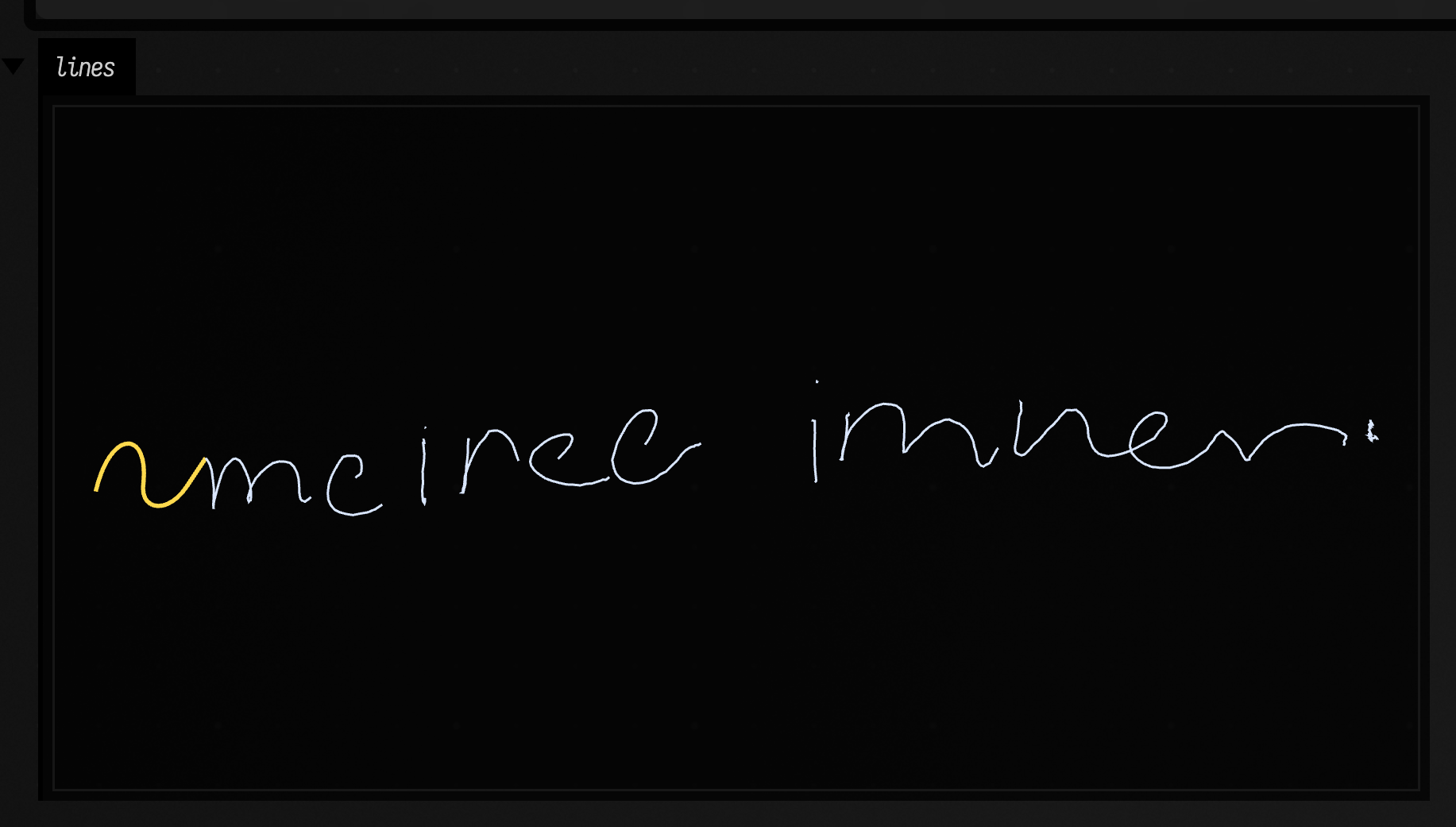
The same seed gives the same continuation every time; change it for another. steps is the
number of points the pen adds. A letter takes thirty or so.
The pen reads your line at its own size. One of its model units is about four times a typical
handwritten step, and scale = 8.0 (the default) says that one model unit is 8 of your FLine's
units, which makes canvas-pixel writing about the size above. Draw larger or smaller and change
scale to match. A stroke that is much bigger than handwriting at that scale reads to the pen as
one long sweep, and it will try to continue a sweep.
Many futures
futuresWith asks the pen what it might do next without committing to any of it. Each future
starts from the same reading of your line and differs only in the random choices after it. Here
are twelve, each drawn beside its own copy of the stroke.
:::static
import afield.ai.learning.pen.*

val start = fline {
    moveTo(0, 0)
    cubicTo(4, -14, 12, -14, 12, 0)
    cubicTo(12, 8, 20, 8, 24, 0)
    color = vec(1.0, 0.85, 0.3, 1.0)
    thickness = 1.5
}
val futures = start.futuresWith(count = 12, steps = 80)
val grid = mutableListOf<FLine>()
futures.forEachIndexed { k, future ->
    val at = vec(k % 3 * 170.0, k / 3 * 60.0, 0.0)
    grid += start + at
    grid += (future + at).apply { color = vec(0.75, 0.85, 1.0, 1.0) }
}
lines(grid, w = 520.0, h = 260.0, fitToSize = true)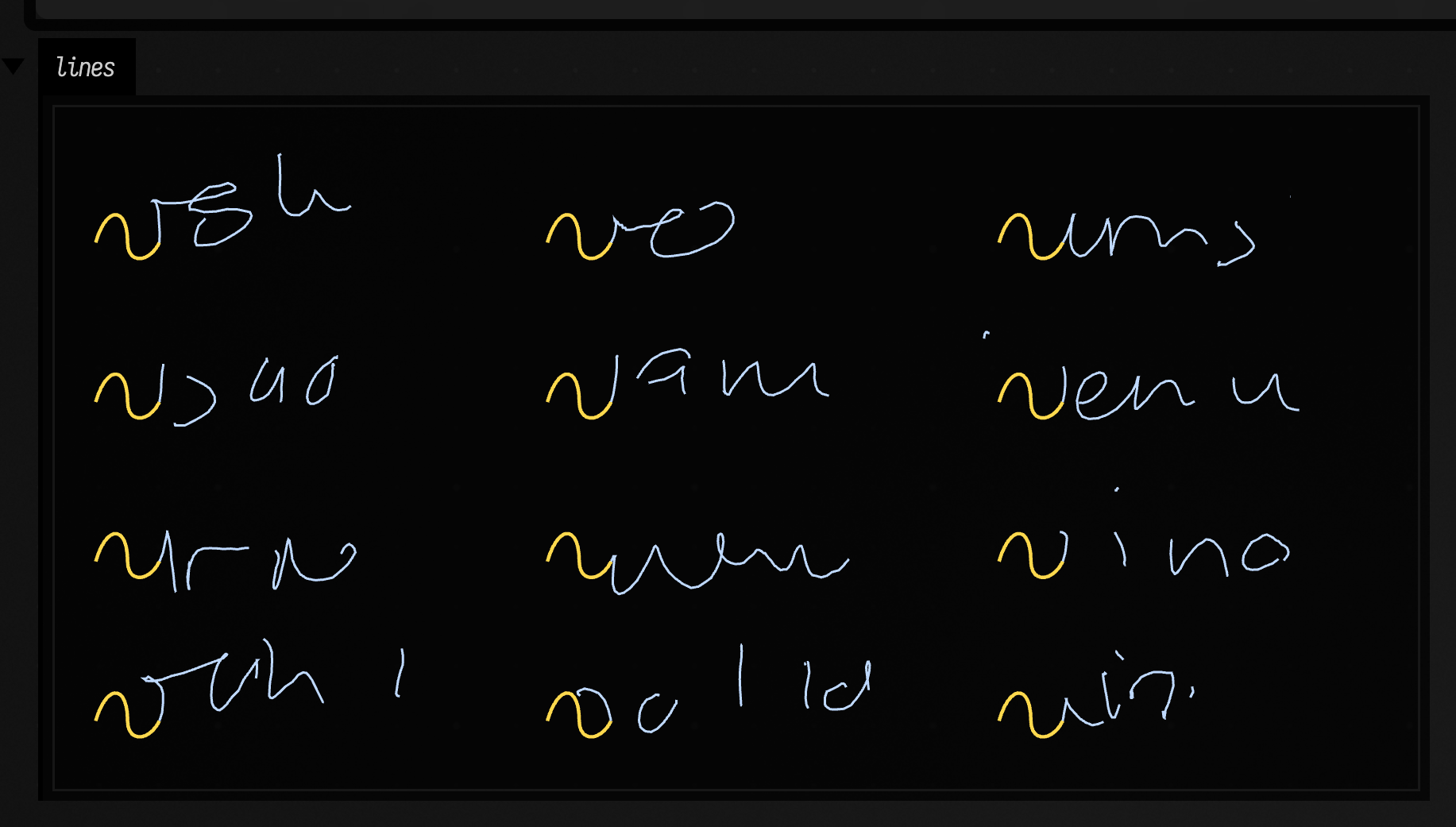
Temperature and noise
The pen's prediction is a mixture of twenty overlapping guesses (Gaussians), each a likely
direction and distance for the next step. Every step it picks one guess, then a point near it.
PenControls sets how it does both:
temperatureis how the guess is picked. Low values keep the pen to its most likely habit; high ones let it change its mind. 0.65 is the default.noisescales how far from the chosen guess the point lands. 1 is the spread the model learned. At 0 the pen takes each guess's centre, which is a small, cautious step, and it barely leaves the end of your stroke; turned up, the strokes get longer and looser.liftBiaslifts the pen more often (positive) or keeps it on the paper (negative), anddriftX/driftYpush every step a little in one direction.
Rows here are temperature 0.2, 0.65 and 1.2; columns are noise 0, 0.65 and 1.2. Every one has the same seed.
:::static
import afield.ai.learning.pen.*

val start = fline {
    moveTo(0, 0)
    cubicTo(4, -14, 12, -14, 12, 0)
    cubicTo(12, 8, 20, 8, 24, 0)
    color = vec(1.0, 0.85, 0.3, 1.0)
    thickness = 1.5
}
val grid = mutableListOf<FLine>()
[0.2, 0.65, 1.2].forEachIndexed { row, temperature ->
    [0.0, 0.65, 1.2].forEachIndexed { column, noise ->
        val at = vec(column * 200.0, row * 70.0, 0.0)
        val pen = PenControls(temperature = temperature, noise = noise)
        grid += start + at
        grid +=
            (start.continueWith(steps = 110, seed = 5, controls = pen) + at).apply { color = vec(0.75, 0.85, 1.0, 1.0) }
    }
}
lines(grid, w = 520.0, h = 260.0, fitToSize = true)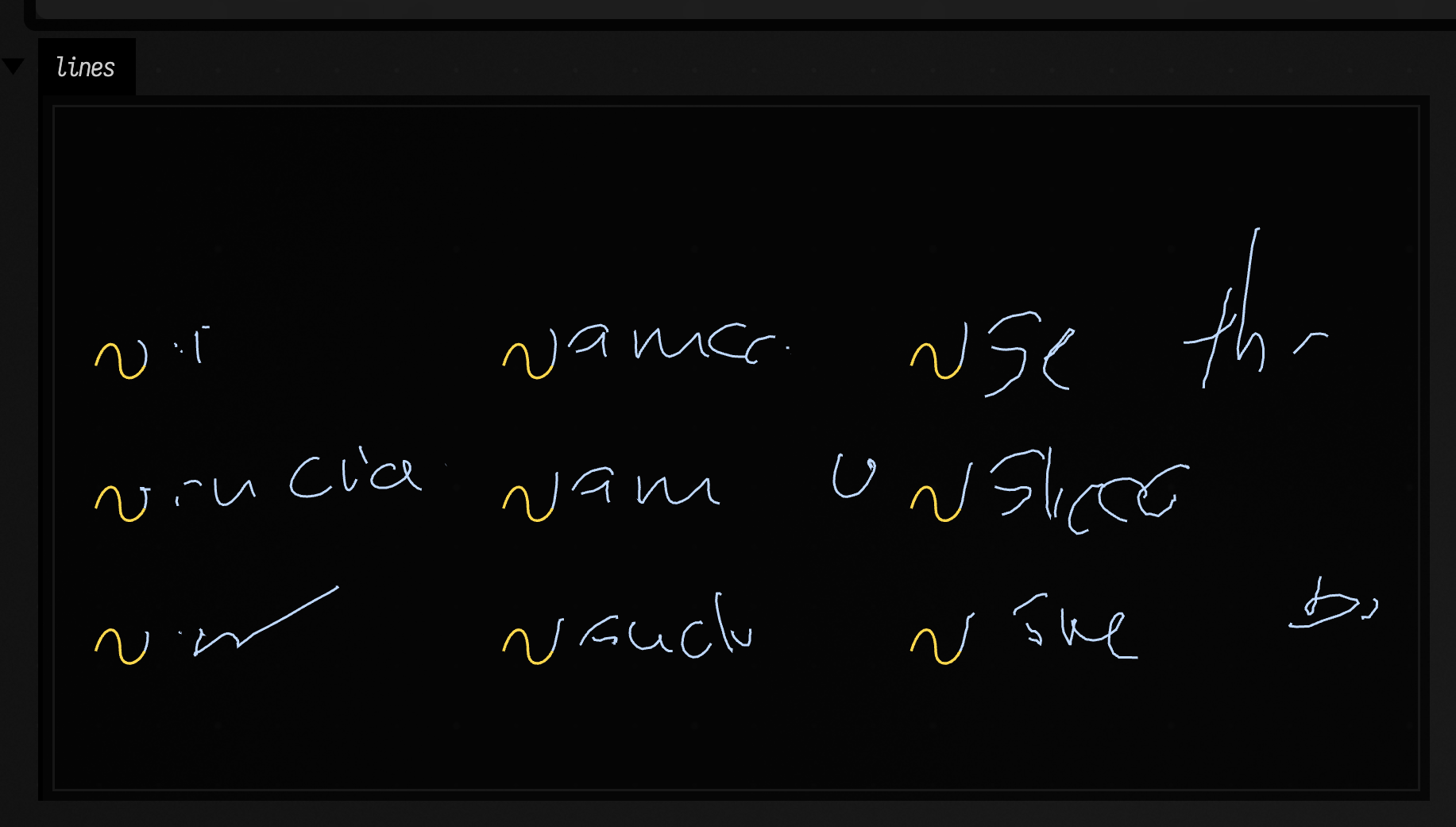
What the pen expects next
Before every point the pen has a picture of where the next one will land: twenty guesses, each a
small oval of likely places, some more likely than others. distribution() on a PenLine returns
that picture in drawing coordinates, and ellipses() draws it, each guess as an ellipse two
standard deviations wide, fainter the less likely it is. closeUp() keeps the pen's last few
points with it, so a moment can be looked at on its own.
Here the pen writes two hundred points at its learned spread (noise = 1.0), keeping a close-up
of every moment. The top row is the four moments mid-stroke where it was least sure; the bottom row
the four least sure with the pen up, about to start somewhere new. Both rows are at the same
scale. sideBySide lays groups of lines out left to right without overlapping.
:::static
import afield.ai.learning.pen.*

val start = fline {
    moveTo(0, 0)
    cubicTo(4, -14, 12, -14, 12, 0)
    cubicTo(12, 8, 20, 8, 24, 0)
    color = vec(1.0, 0.85, 0.3, 1.0)
    thickness = 2.0
}

val writer = PenLine(start, seed = 4, controls = PenControls(noise = 1.0))
val moments = (0 until 200).map {
    writer.grow()
    writer.closeUp()
}

val down = moments.filter { !it.penUp }.sortedByDescending { it.distribution.uncertainty }.take(4)
val up = moments.filter { it.penUp }.sortedByDescending { it.distribution.uncertainty }.take(4)
lines(
    sideBySide(down.map { it.lines() }) + sideBySide(up.map { it.lines() }, y = 60.0),
    w = 520.0,
    h = 260.0,
    fitToSize = true,
)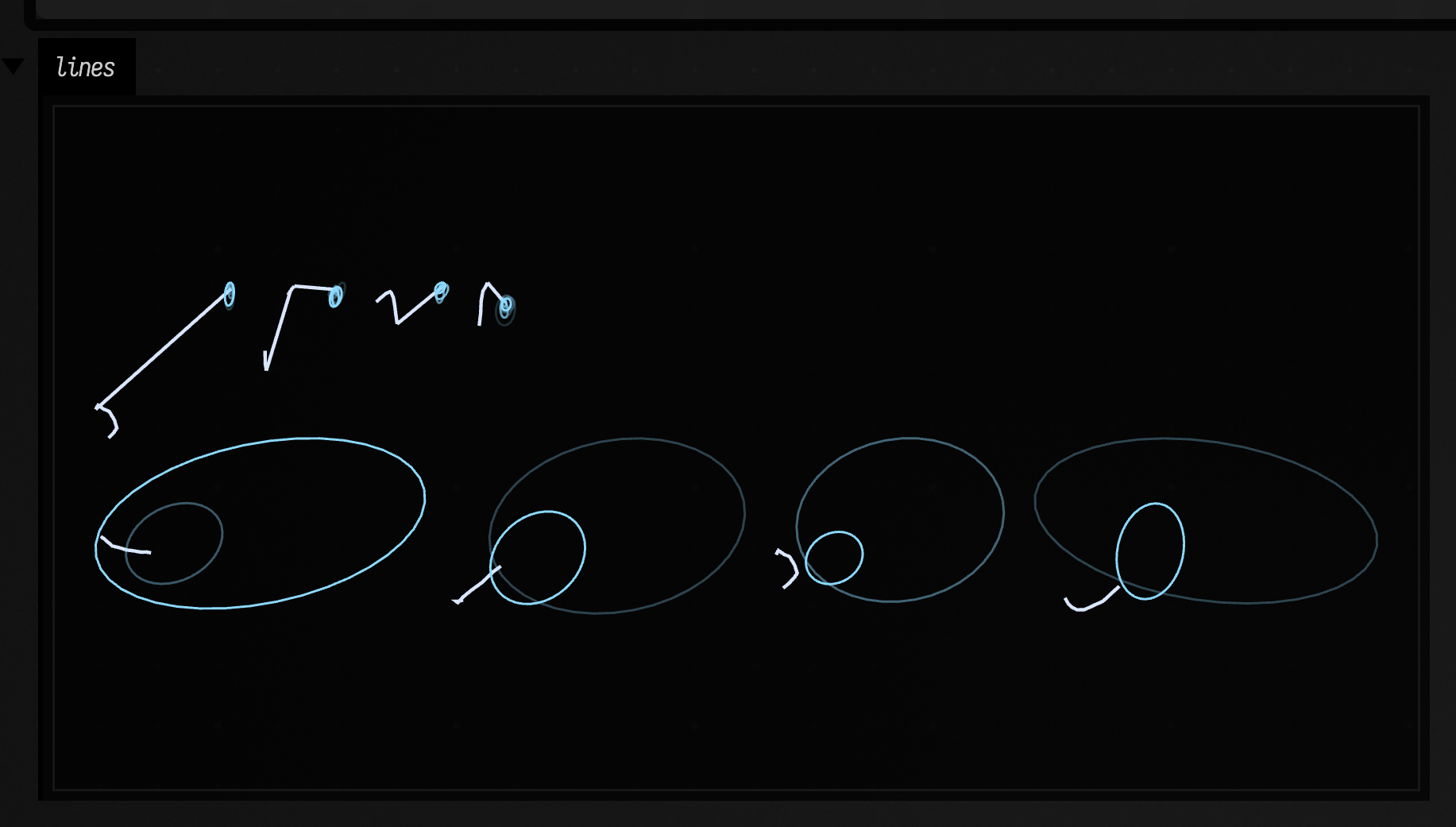
Mid-stroke, even at its least certain, the pen knows within a pixel or two where it is going.
With the pen up it is choosing between a short hop (the dot of an i, the cross of a t) and a jump
to the next letter, and the two guesses are far apart. uncertainty is the spread of the whole
mixture, the number used to pick these moments.
The same question asked hundreds of times gives a map of where the pen might go.
futuresDensity() runs that many futures from the end of a line and piles them into an image,
brightest where most of them went, on a log scale so a single stray future still shows. It returns
PNG bytes, which display shows as a picture.
:::static
import afield.ai.learning.pen.*

val start = fline {
    moveTo(0, 0)
    cubicTo(4, -14, 12, -14, 12, 0)
    cubicTo(12, 8, 20, 8, 24, 0)
}
display("density", PenLine(start, seed = 4).futuresDensity(count = 600, steps = 40))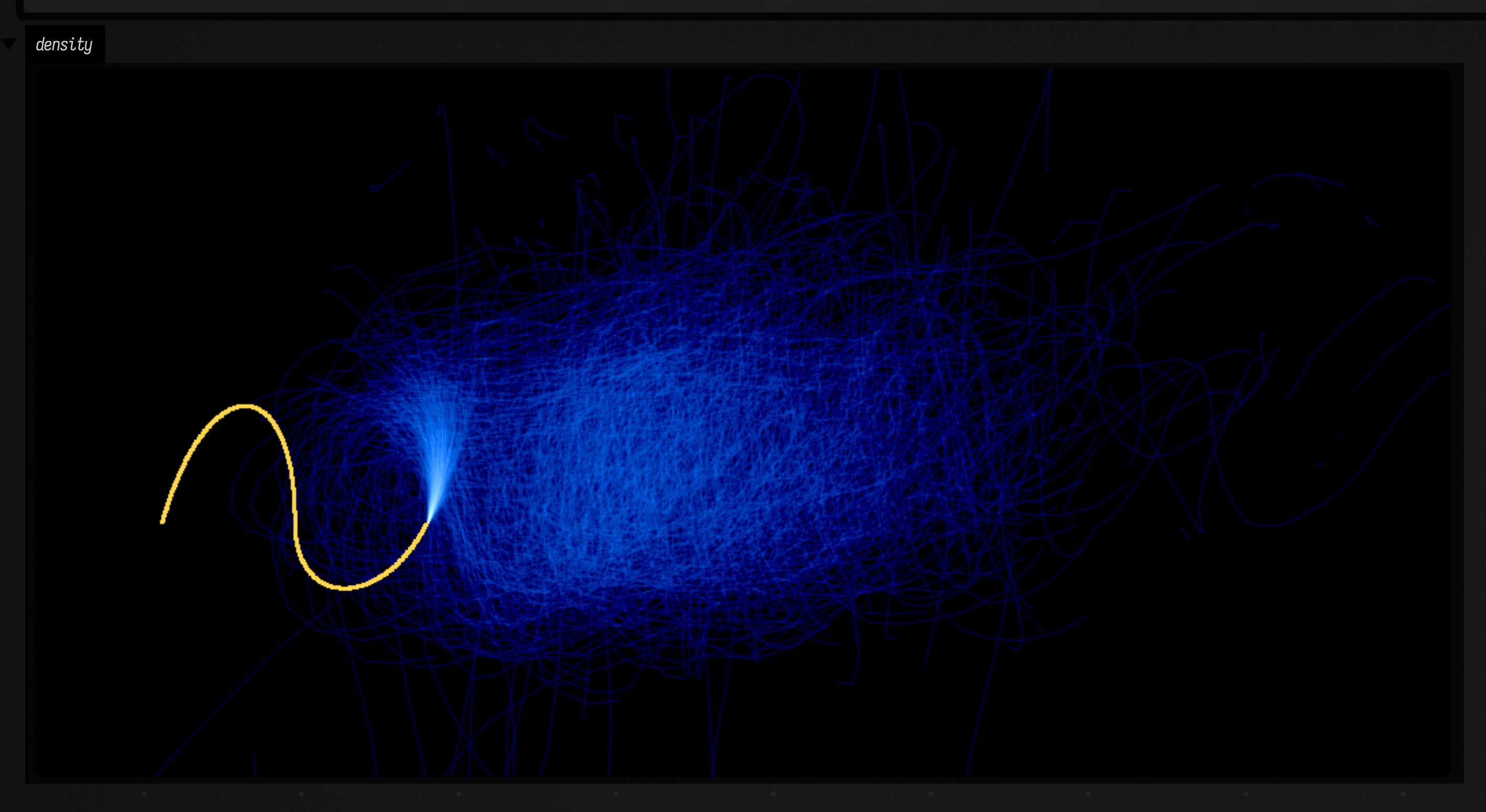
A pen that keeps writing
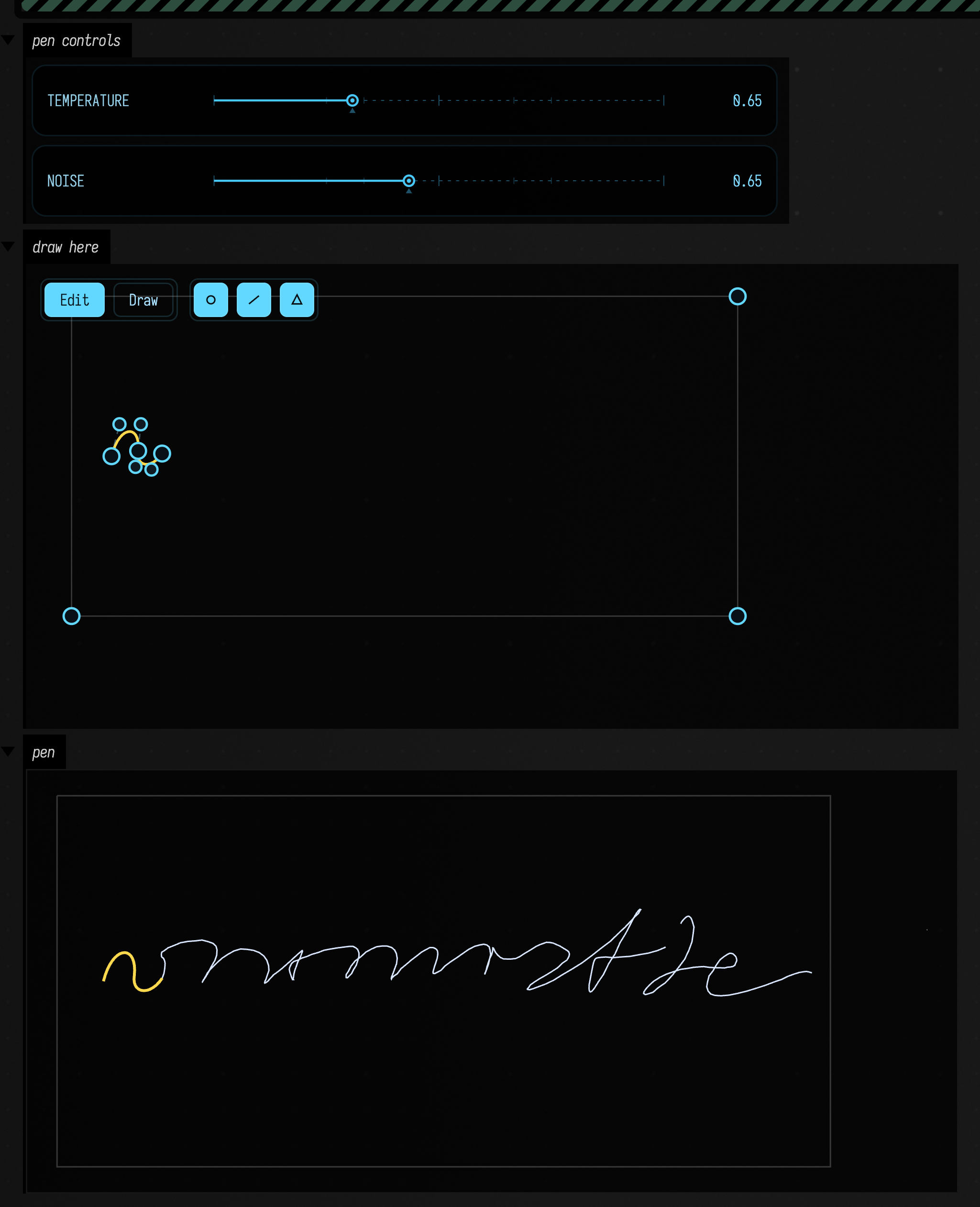
continueWith draws everything at once. A PenLine keeps the pen and lets you draw a few points
at a time: grow(n) adds n points, and line (your stroke and the pen's) and drawn (the pen's
alone) are FLines that grow in place. Its controls can change between calls, so a slider can
steer the pen while it writes.
This is the starting point's third box. It draws four points a frame, starting from a stroke in the "draw here" panel. Draw a stroke of your own there and the pen starts again from yours.
:::static
import afield.ai.learning.pen.*

var temperature = 0.65
var noise = 0.65
controlGroup("pen controls") {
    slider("temperature", min = 0.05, max = 2.0, initialValue = temperature) { temperature = it }
    slider("noise", min = 0.0, max = 1.5, initialValue = noise) { noise = it }
}

val border = fline {
    moveTo(0, 0)
    lineTo(500, 0)
    lineTo(500, 240)
    lineTo(0, 240)
    lineTo(0, 0)
    color = vec(1, 1, 1, 0.2)
}
val starter = fline {
    moveTo(30, 120)
    cubicTo(36, 96, 52, 96, 50, 116)
    cubicTo(48, 128, 60, 130, 68, 118)
    color = vec(1.0, 0.85, 0.3, 1.0)
    thickness = 2.0
}
val canvas = lines(border, starter, channel = "draw here", w = 520.0, h = 260.0, editable = true, drawing = true)!!
var primer = starter
var writer: PenLine? = null
var seen = 1
frames {
    while (frame()) {
        val drawn = canvas.currentLines()
        if (drawn.size > seen) {
            seen = drawn.size
            primer = drawn.last().copy().apply {
                color = vec(1.0, 0.85, 0.3, 1.0)
                thickness = 2.0
            }
            writer = PenLine(primer)
        }
        val w = writer ?: continue
        w.controls = PenControls(temperature = temperature, noise = noise)
        // four points a frame, until it writes off the right-hand edge
        val x = w.drawn.currentPoint?.x ?: 0f
        if (x < 490f) w.grow(4)
        lines(border, primer, w.drawn.apply { color = vec(0.85, 0.9, 1.0, 1.0) }, channel = "pen", w = 520.0, h = 260.0)
    }
}
PenLine.futures(count, steps) is futuresWith from wherever the pen has got to, and lift()
makes the pen come up so its next point starts a new stroke.
Inside the pen's memory
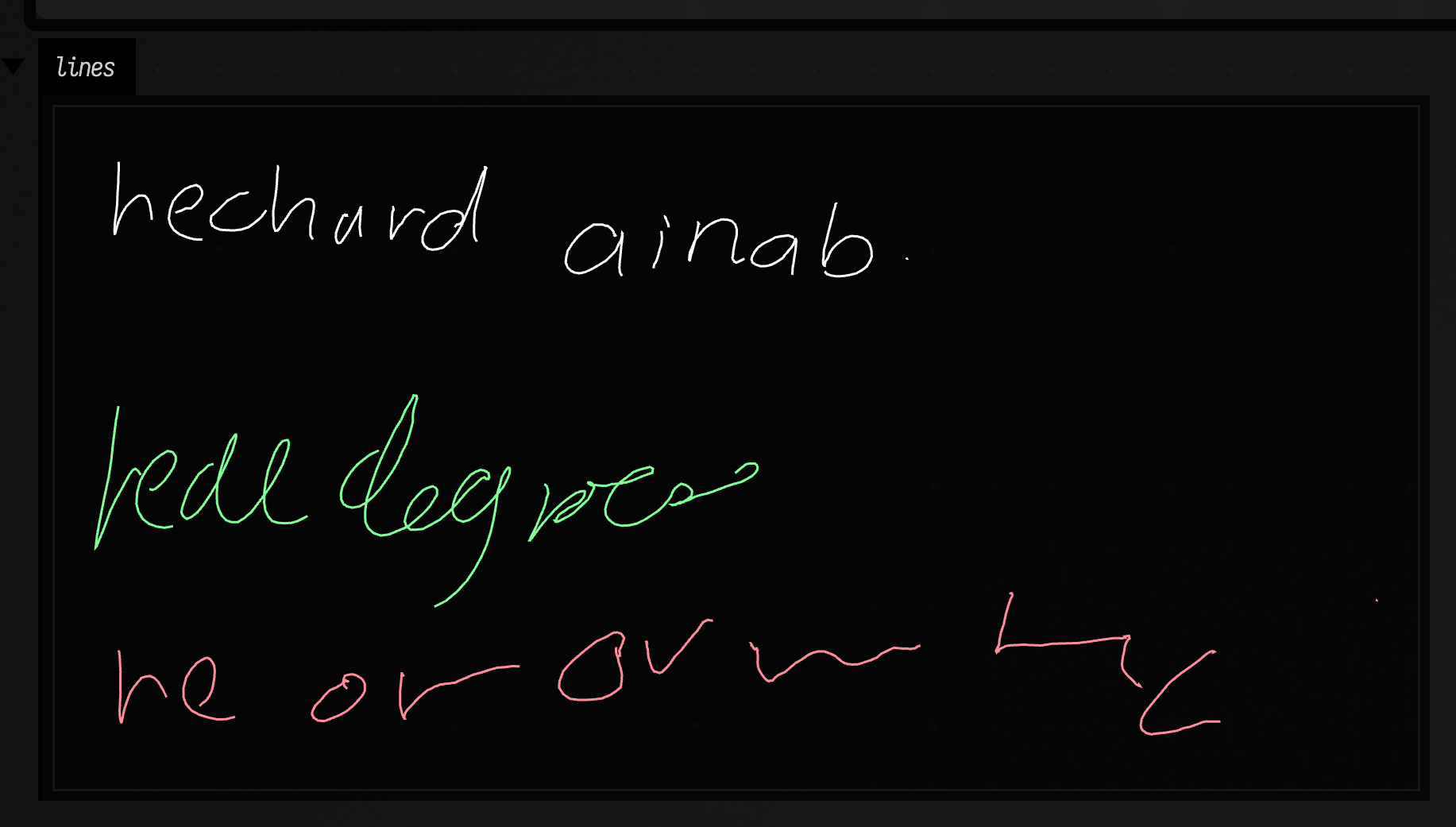
The Distill article's fourth experiment edits the network's memory while it writes. A Pen (the
state under a PenLine, its pen property) exposes its 500 memory cells: cells() reads them and
setCell(cell, value) overwrites one. Here the same pen, with the same seed, writes three times:
untouched, then with cell 136 held at +4, then at −4.
:::static
import afield.ai.learning.pen.*

val cell = 136
fun row(value: Double?, y: Double): FLine {
    val writer = PenLine(start = vec(0.0, y, 0.0), seed = 11)
    repeat(400) {
        if (value != null) (writer.pen as Pen).setCell(cell, value)
        writer.grow()
    }
    return writer.line
}
lines(
    row(null, 0.0),
    row(4.0, 140.0).apply { color = vec(0.5, 1.0, 0.6, 1.0) },
    row(-4.0, 280.0).apply { color = vec(1.0, 0.55, 0.6, 1.0) },
    w = 520.0,
    h = 340.0,
    fitToSize = true,
)
Which cell does what is not written down anywhere; the network found its own uses for them. To
look for one, colour the line by it. A PenLine made with recordMemory = true keeps every
cell's output for every point it draws, coloredByCell(cell) draws the line blue where that cell
is low and orange where it is high, and liveliestCells(n) names the cells that changed most
while it wrote, which is where to start looking.
:::static
import afield.ai.learning.pen.*

val start = fline {
    moveTo(0, 0)
    cubicTo(4, -14, 12, -14, 12, 0)
    cubicTo(12, 8, 20, 8, 24, 0)
}
val writer = PenLine(start, seed = 4, recordMemory = true)
writer.grow(400)

val rows =
    writer.liveliestCells(4).mapIndexed { i, cell ->
        writer.coloredByCell(cell, thickness = 2.0).map { it + vec(0.0, i * 45.0, 0.0) }
    }
lines(rows.flatten(), w = 520.0, h = 300.0, fitToSize = true)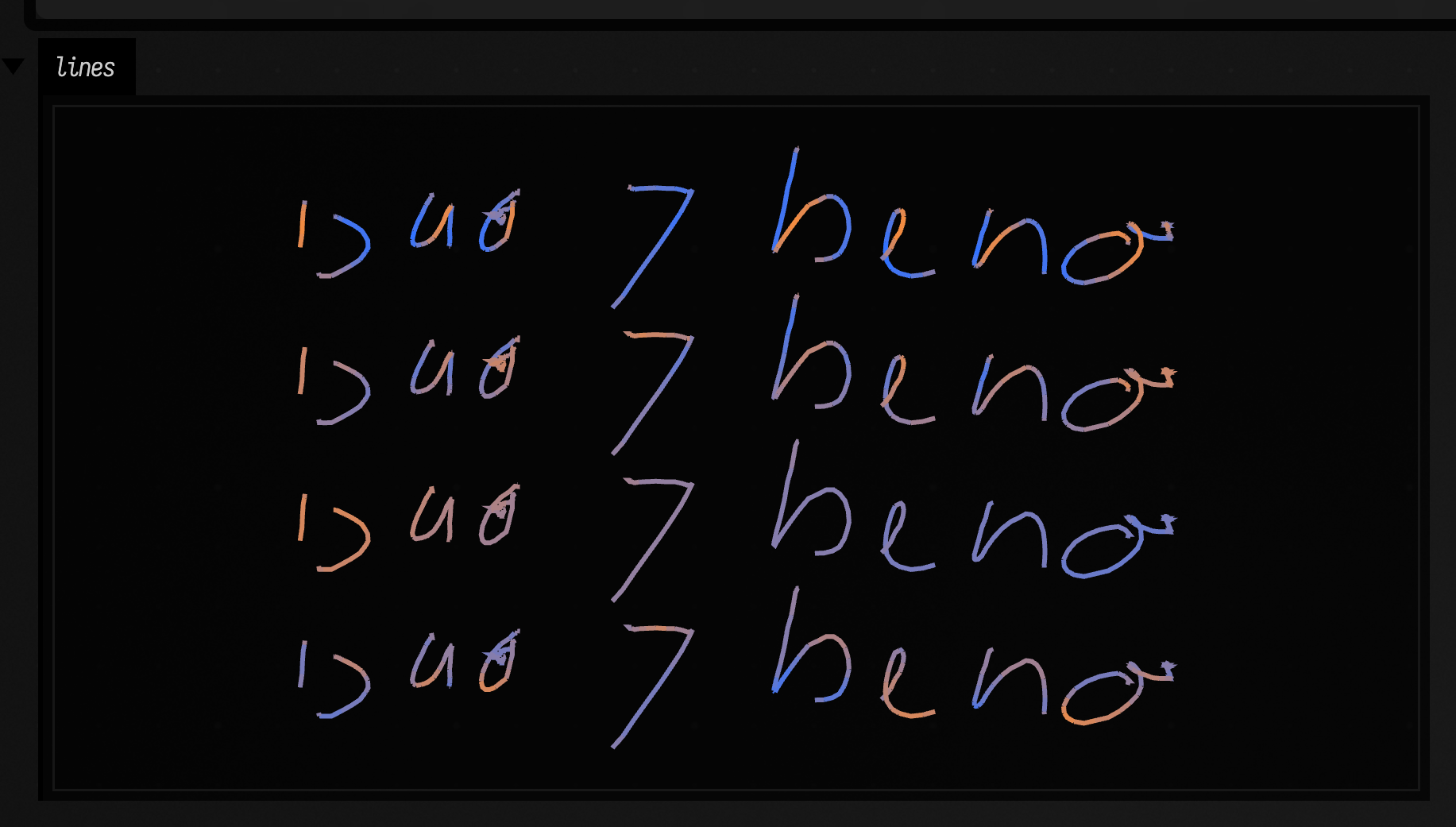
Lift as pressure
The pen was never shown pressure, but it does know, at every point, how likely it is to lift.
widthByLift() draws the line thick where the pen is sure to stay on the paper and thin where it
expects to lift, which looks a lot like a hand pressing and easing off: strokes swell in the middle
and taper to their ends. It is the model's confidence, drawn as width.
:::static
import afield.ai.learning.pen.*

val start = fline {
    moveTo(0, 0)
    cubicTo(4, -14, 12, -14, 12, 0)
    cubicTo(12, 8, 20, 8, 24, 0)
}
val writer = PenLine(start, seed = 4)
writer.grow(400)
lines(writer.widthByLift(), w = 520.0, h = 160.0, fitToSize = true)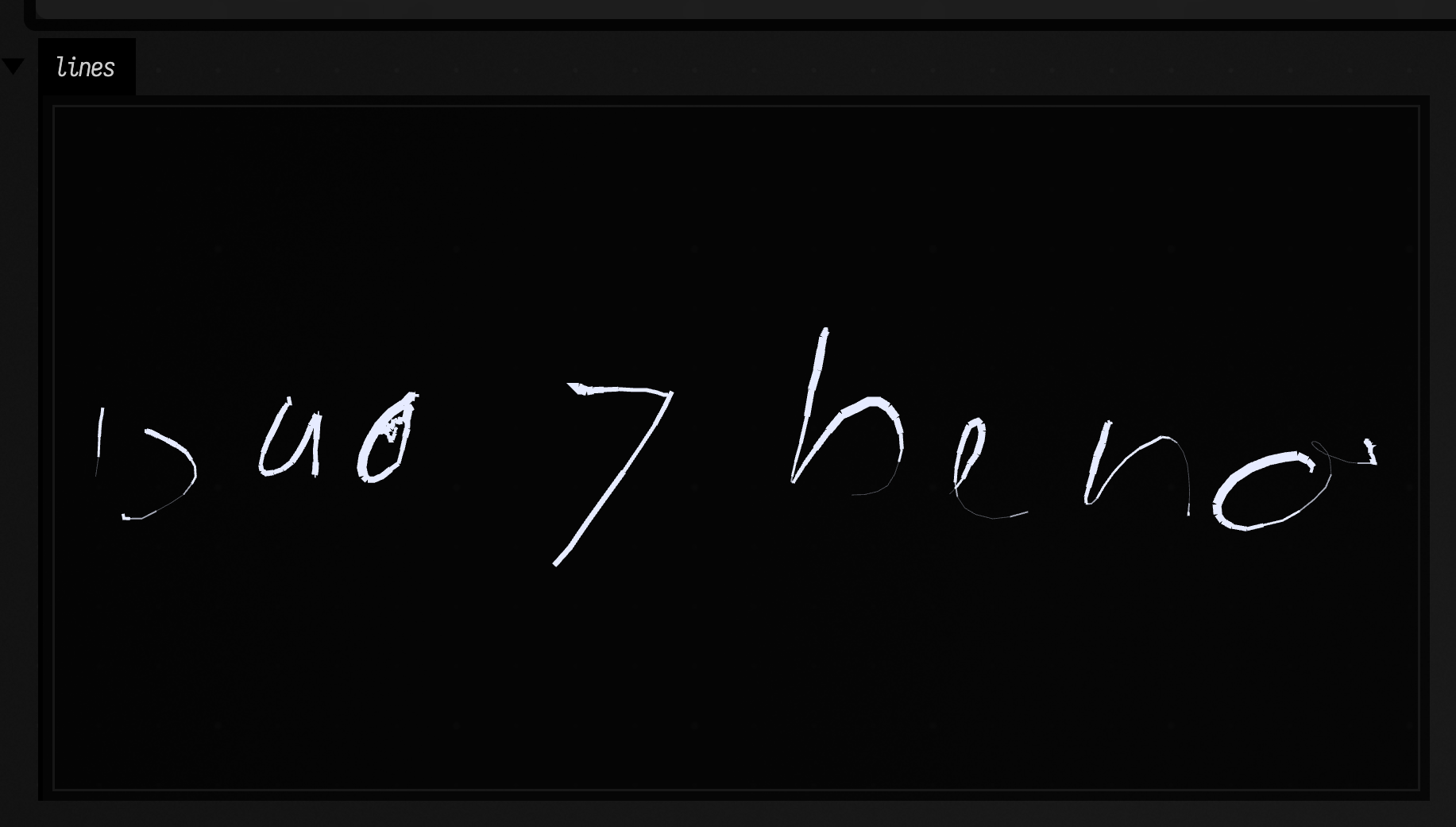
Training your own pen
The pen knows handwriting because it watched handwriting. Show it something else and it will
learn that. Teaching a pen trains six new pens on drawings Field generates
(plotter lettering, harmonographs, plants, Truchet curves, flocking trails and a two-handed
script), finds a learned habit inside one of them, and fine-tunes this pen on a taste. They all
ship with Field: PenModel.bundled("hershey") passed to continueWith writes in plotter
lettering.
Training uses the optional fieldpen Python package (in python/fieldpen, the same model in
PyTorch). The package also runs in a Python box
(from fieldpen import load_model, Session), and python -m fieldpen.lab opens a page in the
browser for drawing primers, watching futures and editing cells without Field.
python/fieldpen/README.md has both.
Other models
continueWith, futuresWith and PenLine take any StrokeModel: something that makes a
StrokePen, which can be fed a displacement, asked for the next one, and forked. PenModel is the
one that ships. Implement the two interfaces to put a different model behind the same calls: a
Markov chain over recorded strokes, a model running in Python, or a rule you wrote.
Source files
| file | what is in it |
|---|---|
afield/ai/learning/pen/pen.kt |
PenModel, Pen, PenLine, PenControls, PenDistribution, continueWith, futuresWith, StrokeModel |
afield/ai/learning/pen/penviz.kt |
ellipses, closeUp, coloredByCell, liveliestCells, widthByLift, futuresDensity, sideBySide, stacked |
python/fieldpen/ |
the PyTorch model, training, data preparation, export and the browser lab |
src/jvmMain/resources/afield/pen/distill-b64.json |
the Distill article's published weights, shared by Kotlin and Python |
The Kotlin forward pass is checked against PyTorch's to four decimal places (PenModelTest), and
the PyTorch port against the original article's JavaScript.
Where this came from
The PyTorch port, its training code and the lab were written in a ChatGPT conversation in
October 2026, as a standalone package with a subprocess bridge to Field. Field's version keeps
the Python for training and runs inference in Kotlin instead: one step of a 500-cell LSTM is
about a million multiply-adds, which the JVM does fast enough to write live, so drawing needs
no bridge. The weights are the article's own quantized release, decoded, not retrained.
The port is Apache-2.0 (python/fieldpen/LICENSE, NOTICE); the Distill repository's
licence is beside the weights.