Chromium as a native Field surface
Field can put a complete Chromium tab anywhere native graphics can put a texture. Navigation, cookies, cross-origin media, DOM, fonts, audio and browser controls all work as usual, and Chromium's composited pixels arrive in Field as a sampled Vulkan image.
You can click and type into that tab with the mouse and keyboard, aim at it with an OpenXR controller, drive it from code, and hand it to any ordinary mesh, shader or render pass.
Field inside VR combines these pieces into a live IDE panel, with either-hand pointer input, two-grip resizing, headset keyboard and mouse input, and runtime-sized OpenXR eye targets.
You can also drive the tab without rendering its pixels: navigation, input, JavaScript, CDP and the page bridge work without a renderer or GPU. That lets a test, a docs build or a data box use a browser. See a browser you do not have to render.
A browser in a native window
PuppetBrowserWindowPanel fits a live tab to a native Field window without changing its aspect
ratio. Your clicks, wheel motion, physical keys, modifiers and text input go back to the original
Chromium page.
val browser = FieldUiBrowserTexture(
    renderer = renderer,
    url = "https://www.youtube.com/watch?v=aqz-KE-bpKQ",
    width = 1280,
    height = 720,
    // Linux: Chromium's shared-texture export never fills the buffer (electron#53271).
    cpuBitmapFallback = FieldUiBrowserTexture.cpuBitmapFallbackRequired,
)

val screen = PuppetBrowserWindowPanel(renderer, browser)
screen.build(takeFocus = true)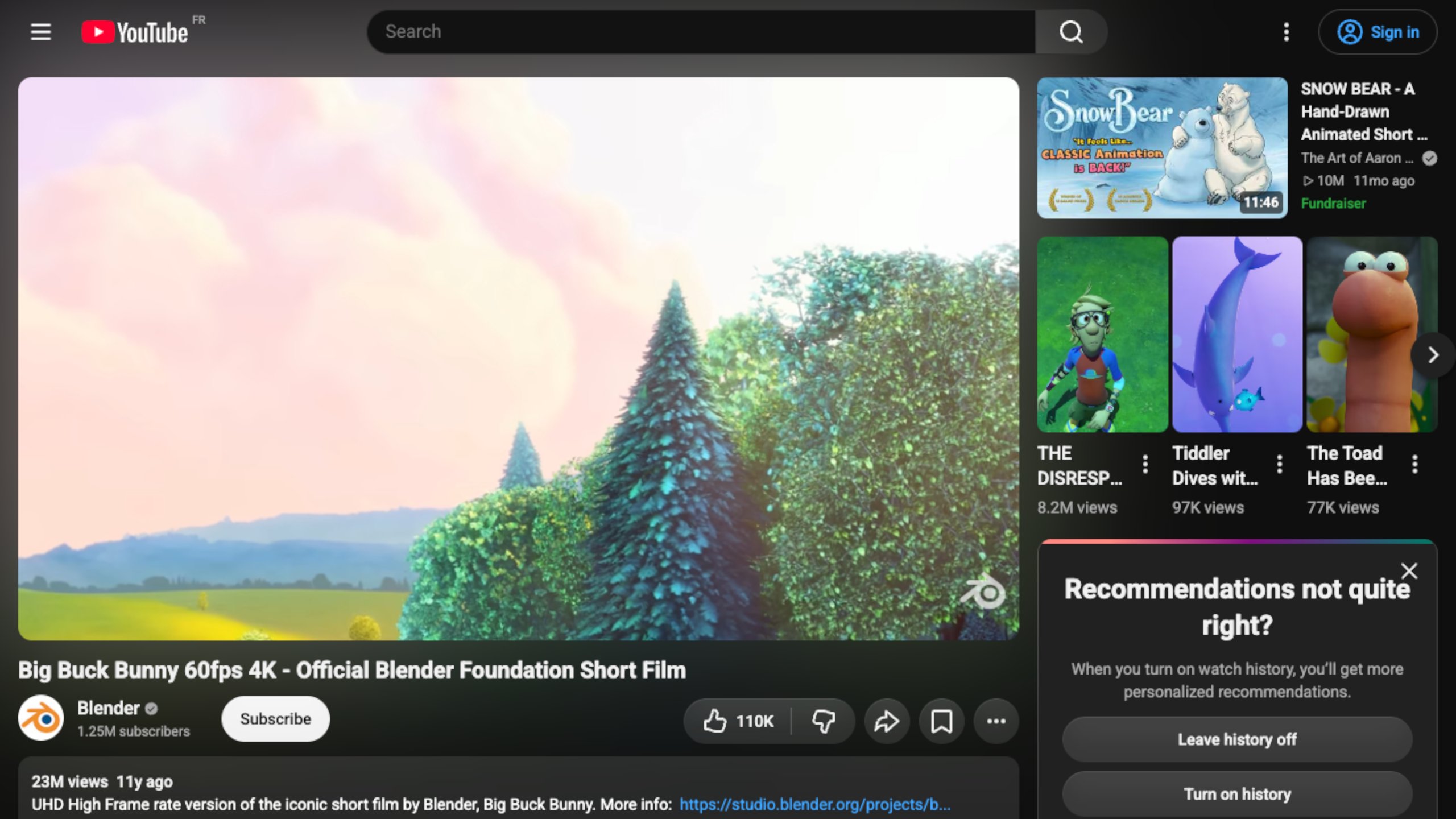
This is the full YouTube watch page, including the EU consent flow and player chrome. The native window is the browser: click the consent button, type into search, scroll the page, use keyboard shortcuts, and listen to its audio. Resizing the window letterboxes or pillarboxes the texture and uses the same fitted rectangle for hit testing, so pixels and input cannot drift apart.
Pixels without readback
The browser and renderer stay separate processes. Chromium produces an accelerated offscreen paint
with a native GPU handle and an explicit lease. Field imports that image, performs one GPU copy into
a stable resident VkImage, and returns the lease only after the graphics fence says the copy has
finished. The path stays on the GPU throughout: Chromium compositor → native shared texture and
lease → platform import → stable resident Vulkan image → any Field mesh, shader, render target
or OpenXR panel.
The copy exists so that Chromium can reuse its buffer; it happens on the GPU. No screenshot, encoded frame or pixel array travels between Electron and the shader. The resident image is imported as sRGB, so ordinary page colour survives the trip into the renderer correctly.
On macOS the transferred object is an IOSurface sent through a Mach port. MoltenVK backs a Vulkan
image with it; KosmicKrisp, the default driver on recent Apple silicon, maps its pages as a buffer
and copies them into an image on the GPU. On Windows and Linux the GPU transfer is refused with a
message, and cpuBitmapFallback = true reads frames back instead.
The other half: PuppetBrowser
The texture comes with a control plane. FieldUiBrowserTexture implements
PuppetBrowser (src/jvmMain/kotlin/afield/media/browser/PuppetBrowser.kt),
so a neighbouring Field box can keep the browser as a property and operate it without reaching for
a desktop or exposing an Electron window.
| Surface | What is available |
|---|---|
| State | URL, title, loading, history availability, audio, focus, cursor, responsiveness, crash state and navigation generation |
| Navigation | Navigate, back, forward, reload with or without cache, stop, focus and blur |
| Pointer | Move, five mouse buttons, wheel, click count, modifiers, mouse or pen pressure, tilt and twist |
| Text input | Raw key down/up, repeat, physical key codes, Unicode text insertion and IME composition |
| Touch | Multi-point start, move, end and cancel events with radius, rotation and force |
| JavaScript | Promise-aware evaluation in the page or an isolated world, by value or retained handle, with timeout and user-gesture control |
| DevTools protocol | Any Chrome DevTools Protocol command, optional session id, and optional forwarding of the complete CDP event stream |
| Page bridge | Allowlisted asynchronous requests from sandboxed page JavaScript back into Field |
The fire-and-forget input calls preserve their order. flushInput() is a barrier when the next
operation must observe every earlier click or keystroke. Commands return CompletableFutures, and
failures arrive as PuppetBrowserCommandException with the rejected command and Chromium details.
JavaScript is a real request/response channel
Evaluation awaits returned promises. It can carry JSON-compatible values back to Kotlin, retain a
remote object in Chromium for later CDP work, or report the page's actual exception rather than
silently returning undefined:
browserControl
    .evaluate(
        "document.querySelector('video')?.play()",
        userGesture = true,
        timeoutMillis = 15_000,
    )
    .whenComplete { result, error ->
        if (error != null) println("page rejected playback: ${error.message}")
        else println("Chromium returned ${result.value}")
    }

browserControl
    .evaluate(
        "window.applicationState",
        world = BrowserJavascriptWorld.ISOLATED,
        returnMode = BrowserJavascriptReturnMode.HANDLE,
    )
    .thenAccept { remote ->
        println("remote object: ${remote.objectId}")
        remote.objectId?.let(browserControl::releaseJavascriptObject)
    }
userGesture = true matters for the same things it matters for in an ordinary browser: media
playback and APIs guarded by an active user gesture. The isolated world is useful for inspection or
instrumentation that should not add names to the page's own JavaScript environment.
DevTools without putting DevTools in the scene
A docked DevTools window is not required to get at the useful machinery underneath it. Raw CDP is available directly:
browserControl.addEventListener("console diagnostics") { event ->
    if (event.name == "console" || event.name == "javascript-exception") println("${event.name}: ${event.payload}")
}

browserControl.cdp("Network.enable")
browserControl.cdp("Performance.enable")
browserControl.cdp("Performance.getMetrics").thenAccept { println(it) }

browserControl.forwardCdpEvents(true)
The named listener replaces its predecessor on this browser; Stop or rerun of the registering box removes it.
The normal event stream already includes state changes, navigation, load failures, page titles,
console messages, cursor changes, context menus, audio state, pop-up attempts, permission requests,
JavaScript dialogs and exceptions, responsiveness and renderer exits. Turning on CDP forwarding
adds protocol events as cdp messages for tools that want Network, Runtime, Debugger, Performance
or any other domain. So Field can build the diagnostics it wants without recreating the visual
DevTools shell in VR.
A sandboxed page can call back into Field
The preload exposes only two JSON-cloning operations—window.fieldPuppet.emit and
window.fieldPuppet.request—rather than Node or an unrestricted IPC object. Field chooses the
request names it will accept:
val removeBridge =
    browserControl.onPageRequest("selected-point") { payload ->
        println("page selected $payload")
        CompletableFuture.completedFuture(
            buildJsonObject { put("accepted", true) },
        )
    }
requireNotNull(RunScope.current()).own { removeBridge() }
const answer = await window.fieldPuppet.request("selected-point", {
x: event.clientX,
y: event.clientY
})This is enough for a cooperative application to expose semantic actions while the generic pointer, keyboard and CDP paths remain available for every other site.
A browser you do not have to render
Everything in the table above is about the tab, not about its pixels, and none of it needs a
Vulkan image view, a window or a GPU.
PuppetBrowserControl, in the same file, is the control plane on its own, and
HeadlessPuppetBrowser (src/jvmMain/kotlin/afield/media/browser/HeadlessPuppetBrowser.kt)
implements it with no renderer, no Vulkan surface, no native handle bridge and no readback socket.
The Electron producer has a third frame mode in which the paints are dropped at the source.
val browser = HeadlessPuppetBrowser("https://field.graphics/")
try {
    browser.loaded.get(30, TimeUnit.SECONDS)
    println("${browser.state.title} at ${browser.state.url}")
} finally {
    browser.close()
}
PuppetBrowser extends PuppetBrowserControl and ExternalBrowserSurface together, so a box that
publishes browserControl publishes the control plane whether or not anything is drawing it, and
every example on this page reaches the same commands.
The producer, the wire protocol and every command are the ones the textured browser uses; only the paint handler differs.
Constructing a browser with a URL and navigating in the very next statement is safe: navigate
waits for the producer's un-awaited first load to settle, so Chromium cancelling that load cannot
surface as an ERR_ABORTED against the new navigation.
Pages as data
Once a page can be driven without being drawn, the web becomes a source Field can read rather than
only a picture it can show. The queries are extensions on PuppetBrowserControl, so they work
equally on a headless browser and on a FieldUiBrowserTexture already in your scene:
val readings = browser.table("#readings").get(10, TimeUnit.SECONDS)

readings.header // [station, depth, count]
readings.column("station") // [alpha, beta, gamma]
readings.numbers("depth") // [12.0, 48.0, 93.0]

browser.text("h1") // the first heading, or null
browser.texts("p.note") // every match, in document order
browser.attribute("#link", "href") // the markup's value, not the resolved URL
browser.count("#readings tbody tr") // 3
browser.waitFor("document.readyState === 'complete'")
These queries evaluate in an isolated world, so a page that has shadowed
document.querySelectorAll or shipped a polyfill cannot change what Field reads out of it.
numbers returns null, not zero, for a cell that is not a number, so a plot can tell a missing
reading from a reading of zero. waitFor waits in the page, so the whole wait costs one round
trip, and a condition that throws fails at once instead of being retried until the deadline.
column and numbers read a table's columns out side by side, which is what a Plotly or FLine box
wants: labels down one and values down another.
This box writes a three-row page to a temporary file, opens it in a headless browser, and turns the table into a Markdown table and a bar per station:
import afield.media.browser.*
import java.util.concurrent.TimeUnit

// A small page with a table, written to a temporary file and read by a browser nobody draws.
val page =
    java.io.File.createTempFile("readings", ".html").apply {
        writeText(
            """
            <h1>Survey readings</h1>
            <table id="readings">
              <thead><tr><th>station</th><th>depth</th><th>count</th></tr></thead>
              <tbody>
                <tr><td>alpha</td><td>12</td><td>4</td></tr>
                <tr><td>beta</td><td>48</td><td>9</td></tr>
                <tr><td>gamma</td><td>93</td><td>n/a</td></tr>
              </tbody>
            </table>
            """
                .trimIndent(),
        )
    }
val browser = HeadlessPuppetBrowser(page.toURI().toString())
try {
    browser.loaded.get(30, TimeUnit.SECONDS)
    val readings = browser.table("#readings").get(10, TimeUnit.SECONDS)
    val stations = readings.column("station")
    val depths = readings.numbers("depth")
    markdown(
        "readings",
        "**${browser.text("h1").get(10, TimeUnit.SECONDS)}**\n\n" +
            "| station | depth | count |\n| --- | --- | --- |\n" +
            stations.indices.joinToString("\n") { i ->
                "| ${stations[i]} | ${depths[i]} | ${readings.numbers("count")[i]} |"
            },
    )
    // One bar per station, depth downwards.
    val bars =
        stations.indices.map { i ->
            FLine().rect(i * 60.0, 0.0, 40.0, depths[i] ?: 0.0).apply {
                filled = true
                color = vec(0.3, 0.7, 1.0, 1.0)
            }
        }
    lines(*bars.toTypedArray(), channel = "depth", w = 300.0, h = 200.0, fitToSize = true)
} finally {
    browser.close()
}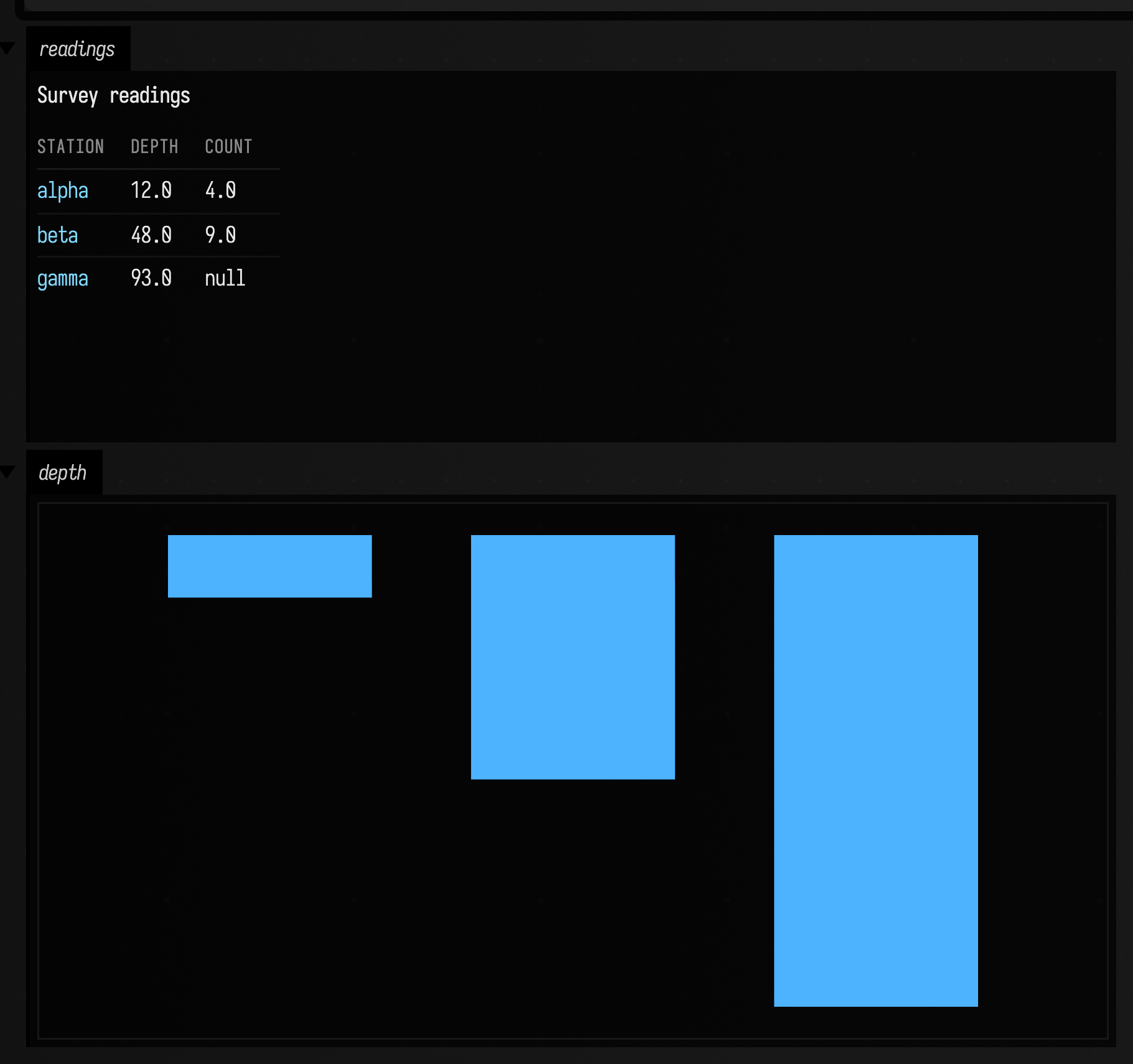
The page's n/a count comes back as null.
How desktop events land on the page
PuppetBrowserWindowInput (src/jvmMain/kotlin/afield/media/browser/PuppetBrowserInteraction.kt)
turns Field window events into Chromium input:
- the panel's aspect-correct viewport hit-tests the native cursor;
- the hit becomes normalized panel UVs;
- UVs become Chromium CSS pixels using the tab's device scale factor;
- buttons are captured until release, even if the cursor leaves the panel;
- key transitions keep their modifiers, scan codes, repeat and keypad identity; and
- the character callback separately inserts Unicode text, while focus loss releases every held button and blurs the page.
The mapping is replaceable. A planar window uses a rectangle, but a curved screen can unproject a window ray, intersect its own geometry, and return whichever UV belongs under the pointer.
Then put the browser in VR
PuppetBrowserVrPanel places the same browser texture on a correctly proportioned world-space
quad. This path requires Vulkan multiview support. One multiview draw writes both eye layers, with a shared eye-uniform buffer and
gl_ViewIndex selecting the view. The panel has actual stereo distance.
val stereo = MultiviewStereoTarget(renderer, openXR = renderer.openXRHmdTarget)
val panel = PuppetBrowserVrPanel(
    renderer = renderer,
    stereo = stereo,
    browser = browser,
    widthMeters = 1.6f,
    distanceMeters = 1.7f,
)
panel.build()
panel.enableDesktopInteraction()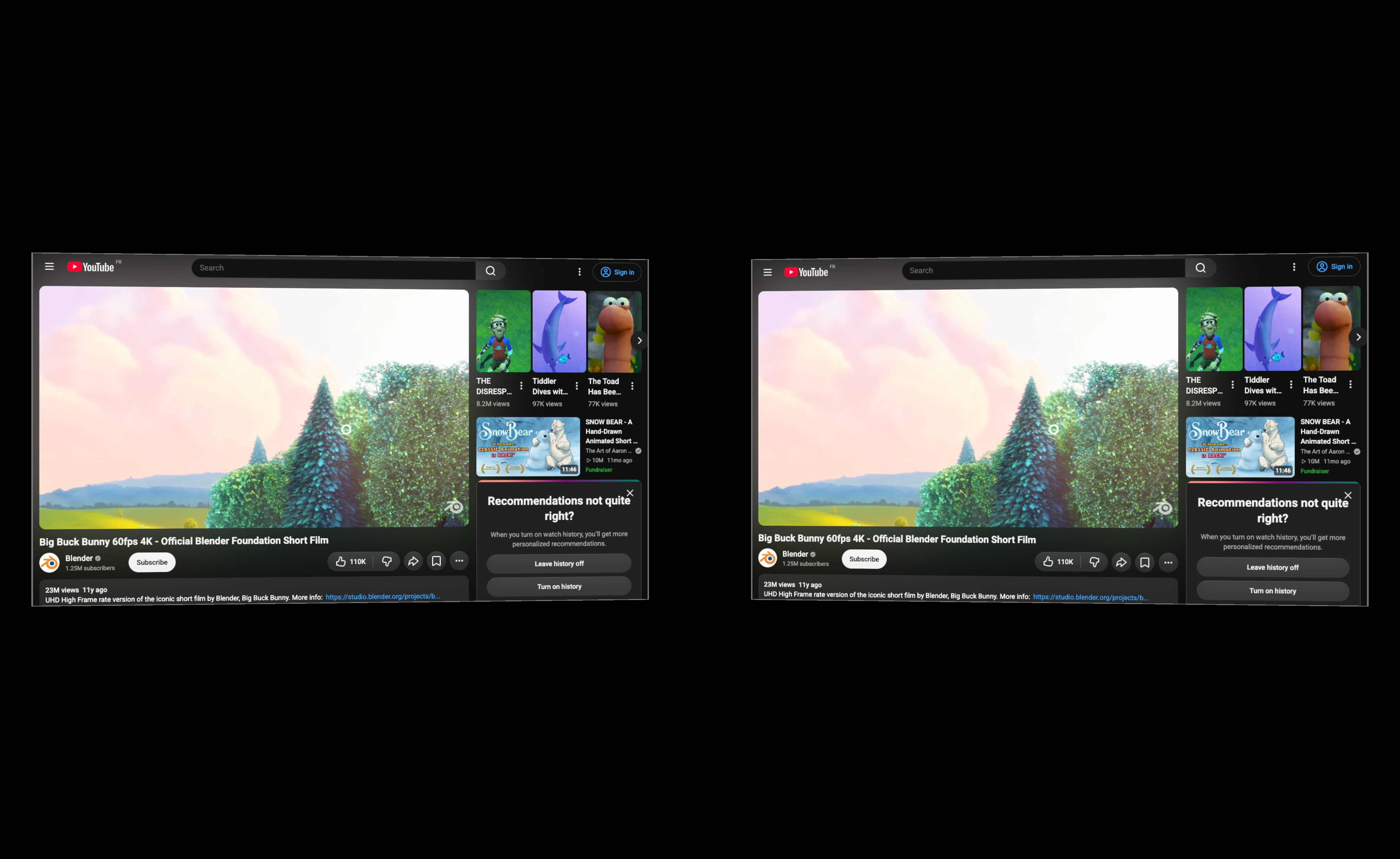
The desktop image above shows both eyes side by side. The renderer stores them in two array
layers, which OpenXR copies directly to its eye swapchains. stereo.mirrorToScreen() samples
the left eye; stereoPair = { true } shows both eyes in the development preview. Each eye sees the same 1.6 m × 0.9 m browser panel from a slightly different position.
Each frame the interaction layer:
- takes the OpenXR controller pose and projects its forward ray;
- intersects that ray with the panel plane and converts the local hit to browser UVs;
- maps select or trigger to a captured primary click;
- maps the touched thumbstick or trackpad to page scrolling; and
- leaves physical keyboard and IME input available for search boxes, editors and forms.
With no headset, Field's mouse-driven controller stand-in exercises the same ray, hit test, hover, click and scroll path. The fragment shader draws a small ring at the browser UV currently under the ray, so the preview also shows what Chromium is about to receive.
Field can even browse Field
This example points Chromium back at the current Field document and samples that page onto a Vulkan
mesh. It performs a page-to-Field-to-JavaScript promise round trip and publishes its live
browserControl property for neighbouring boxes:
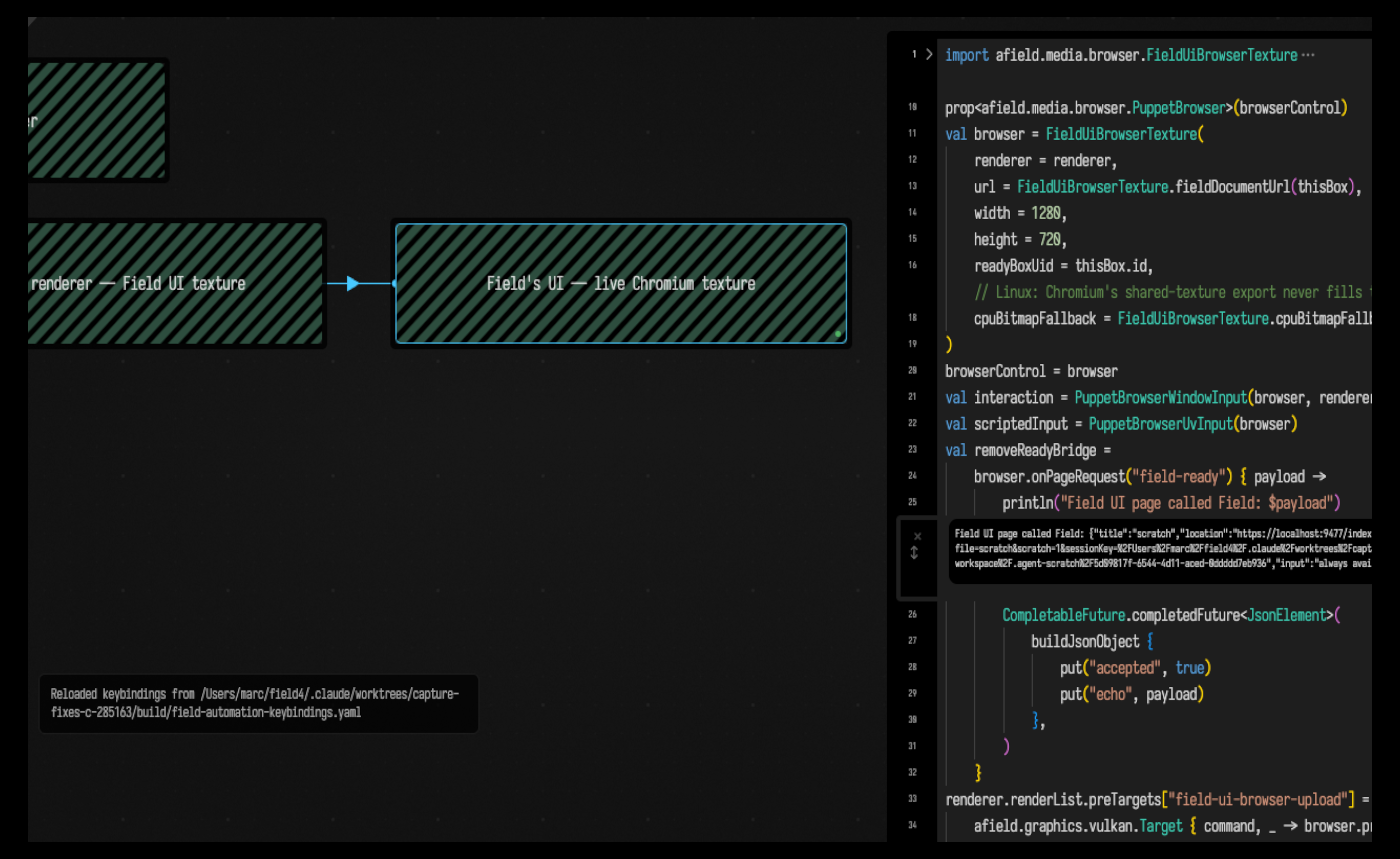
That recursive example is the field_ui_browser_texture starting point. In the capture, the live browser-texture box is selected and its own Monaco editor is open inside Chromium. Any page Chromium can compose can become part of a Field scene.
The kaleidoscope: a whole tab as 224 triangles
Once the browser is an ordinary native texture, a rectangle is only a convention. This example opens a YouTube watch page, handles the EU consent page, starts its real video element, and fractures the complete tab into 224 animated triangles:
val shards = PuppetBrowserKaleidoscope(
    renderer = renderer,
    browser = browser,
    columns = 14,
    rows = 8,
)
shards.motion = 1.0f
shards.facets = 5.0f
shards.chroma = 1.0f
shards.build()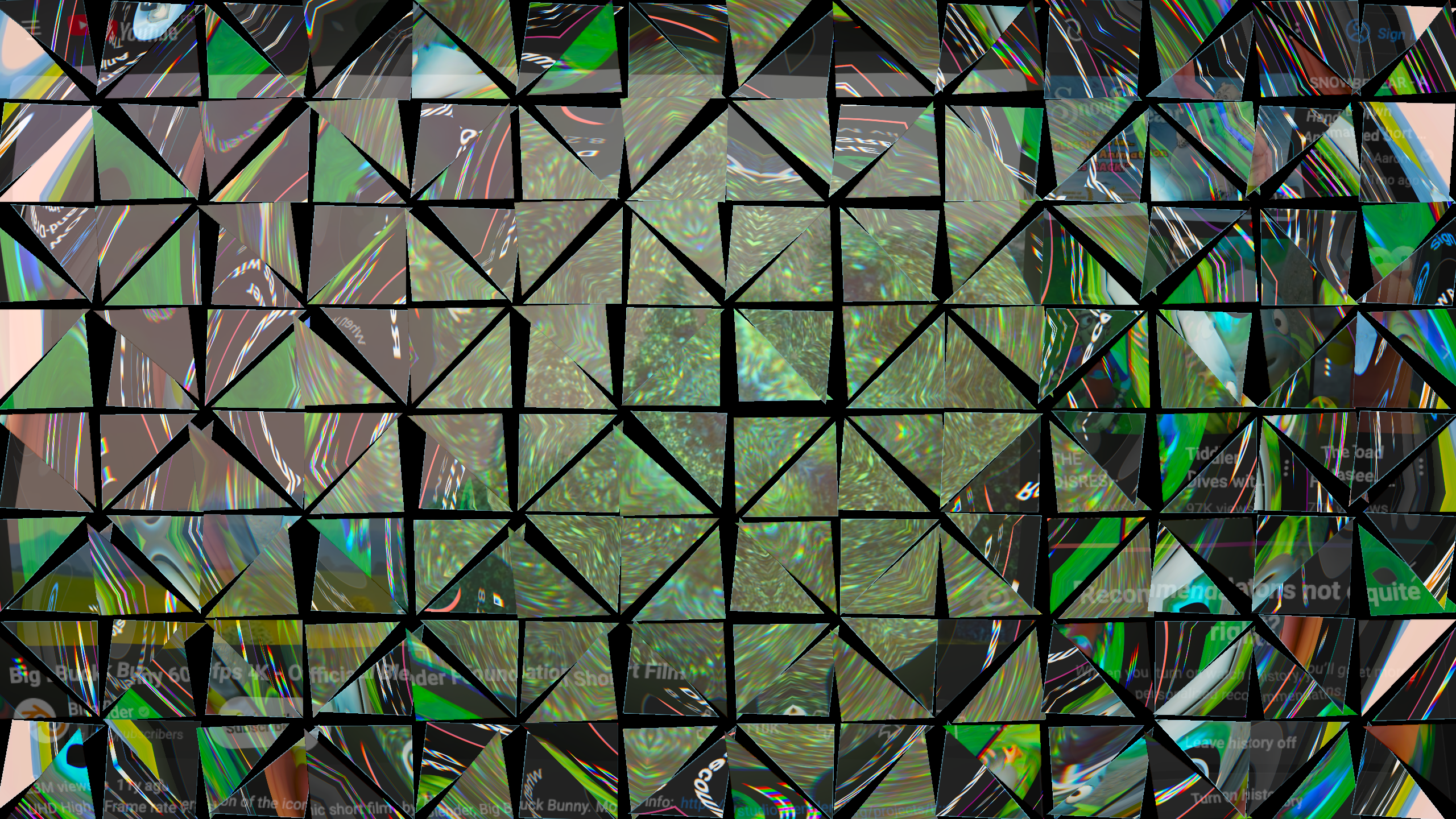
PuppetBrowserKaleidoscope builds a 14 × 8 grid and cuts every cell diagonally. Duplicated vertices
let all 224 triangles move independently. The vertex stage opens moving cracks; the fragment stage
performs an aspect-correct polar fold, twist and zoom per shard, separates the RGB sample positions,
and uses barycentric distance for the narrow glass edge.
How this figure is made
The figure comes from replaying dev_docs/agents/transcripts/youtube_kaleidoscope.yaml, which
waits for Chromium, captures the native Vulkan window, and reports the video title, an
advancing currentTime, readyState = 4, and the tab's audible state. The headless control
path is covered by HeadlessPuppetBrowserTest, which loads a committed file:// fixture in a
real Chromium with no GPU or network.
WebGL can apply a kaleidoscope to a cooperative <video> element. But here the source is the
browser's fully composited tab (cross-origin video, consent UI, DOM, fonts, controls and later
navigations), and it enters an arbitrary native Vulkan/OpenXR pipeline without
canvas pixel access or cooperation from the page.
Try the starting points
Start Field normally with ./field.sh (or .\field.ps1 on Windows), then choose one of these from
Starting points:
- youtube_mouse_keyboard_browser — a conventional browser controlled directly by the native window's mouse and keyboard.
- youtube_vr_browser — the same kind of page at stereo depth, with controller ray, trigger and thumbstick/trackpad interaction.
- field_ui_browser_texture — Field's own UI sampled back into Field, including the bidirectional page bridge.
- youtube_kaleidoscope — the texture handed to a native mesh and shader that cut it into 224 independently moving shards.
Run the renderer box first and then its connected browser box. Every example publishes
browserControl, so another box can immediately navigate it, listen to events, evaluate JavaScript
or send CDP commands.