A pattern that moves particles
Can a rhythm move a picture? Here pat("bd*4, ~ 52 ~ 52, hh*16"), in mini-notation (four kick
drums, a note 52 on beats two and four, sixteen hi-hats per cycle, all at once), drives a GPU compute shader.
The pattern language schedules the notes, patSynth turns the schedule into samples in real time,
four band-pass filters turn the samples into four numbers, and the renderer hands those numbers to a
shader that moves 24,000 particles.
Everything realtime in Field's audio meets at one signature, render(outL, outR, numFrames, ctx)
(see Making a sound, every path there is). A pattern is queried over a span of
time instead, so patSynth is what connects the two.
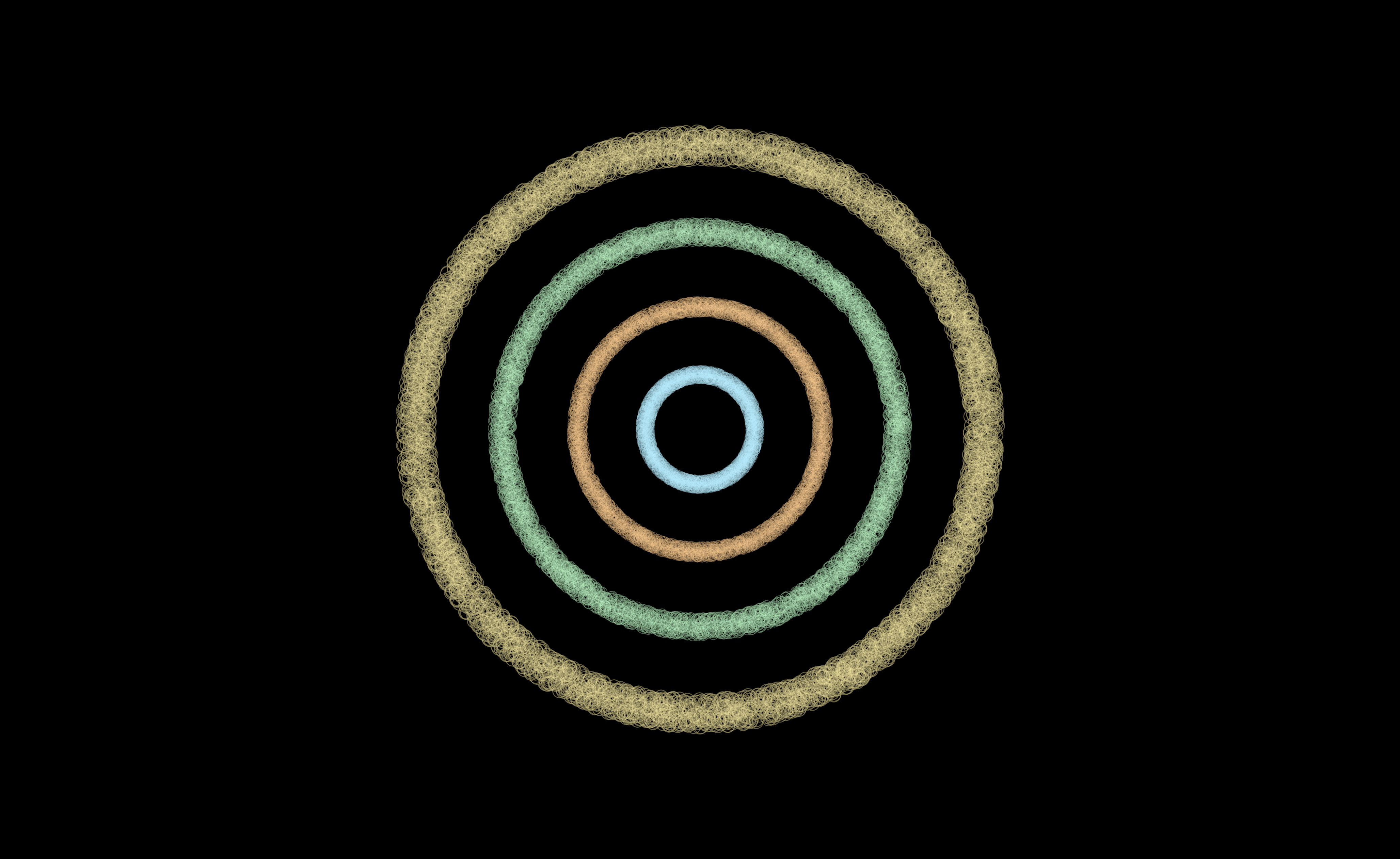
Each ring follows one band, in the same four colours the plot further down uses: the innermost is 70 Hz and the outermost 8 kHz. In the frame above the kick had just landed, so the innermost ring has bloomed into a disc while the hats hold the outermost one thin. It is one frame of something moving, and that plot is the signal it is following. The document behind the figure is a starting point: pattern_particles.
patSynth, the scheduler
Three parts, split by where they run:
| Component | where it runs | what it does |
|---|---|---|
PatSynthFeeder |
a daemon thread | queries the pattern a cycle at a time and turns events into notes stamped with the absolute frame they start on |
PatSynthBank |
the audio thread | starts a note on the frame it was given, and synthesises |
PatSynthLaunch |
neither | owns both, and closes both |
Querying a pattern allocates, and a cycle of a large composed pattern may take longer than the
audio thread has to spare. The feeder can do that work ahead of time: it produces frame numbers,
and the audio thread only needs to compare them with the current frame. DirtSamplePlayer and FaustPatternFeeder divide the work the same way.
Playing it is one call, and returning it from the box is what ties the sound to the box:
patSynth(pat("bd ~ sd ~, hh*8"), cps = 2.0)Stopping the box stops the voices and the feeder thread. PatSynthLaunch is also a
StereoRenderable, so it goes into a larger graph wherever a Signal would.
Every note starts on its own frame
patSynth starts each note on the exact frame it is due, not at the top of the audio block it
falls in. Its output is therefore the same, sample for sample, whatever buffer size the audio
engine runs at.
The offline renderer, patRenderStereo, runs the same voice bank, so a .wav it writes is sample
for sample what patSynth plays.
What it sounds like
Three bars, each recorded by running a PatSynthBank block by block, the way the audio engine
does.
The beat the rest of the sound documentation starts from:
Sixteen hats against twelve triangle notes, at a tempo where a twelfth of a cycle is 2666.67 frames, so almost nothing lands on a block boundary at any buffer size:
And the bar the particles are dancing to, which is a kick, a mid-register square stab on the offbeats, and sixteen hats:
The four numbers the shader reads
BandSplit pushes a window of samples through a bank of Biquad band-passes and returns the RMS of
each. It is the same Biquad a box would put in a signal chain, reading a buffer instead of an
oscillator.
:::static
// The same scene the .wav above is, and the same scene the GPU figure plays.
val scene = PatSynthDocs.SCENES.first { it.name == "seam-bands" }
val audio = scene.render()

val split = logBands(4, lowHz = 70.0, highHz = 8000.0, sampleRate = PatSynthDocs.SR)
val series = PatSynthDocs.bandSeries(audio, split, windowFrames = 2048, hopFrames = 256)

:::fold four bands against time
val seconds = series.indices.map { it * 256.0 / PatSynthDocs.SR }
showSignals(
    "70 Hz" to series.map { it[0] },
    "340 Hz" to series.map { it[1] },
    "1.6 kHz" to series.map { it[2] },
    "8 kHz" to series.map { it[3] },
    x = seconds,
    title = "four bands of one bar, the numbers the shader reads",
    xTitle = "seconds",
    channel = "bands",
)
:::endfold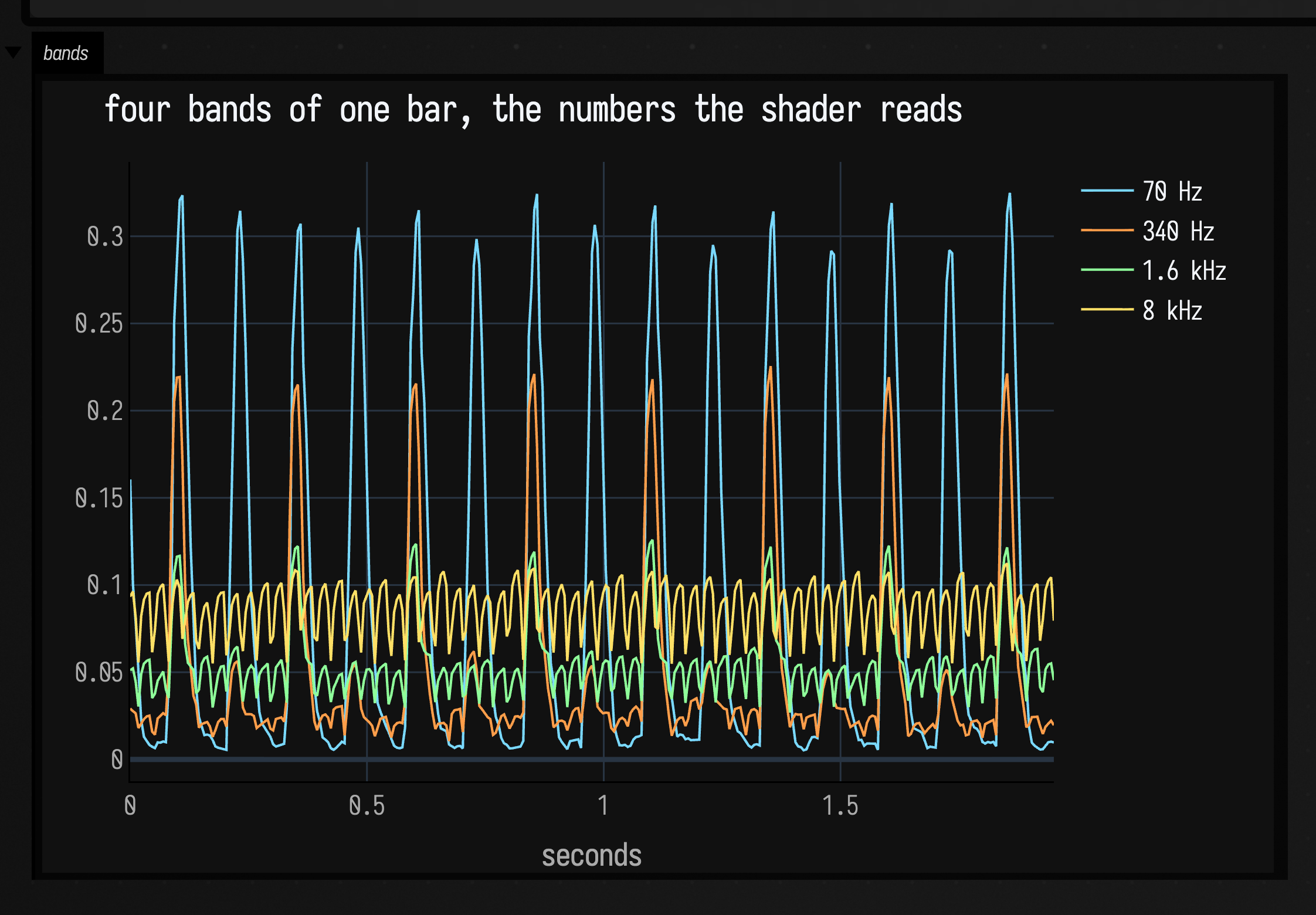
Sixteen kicks in two seconds in the lowest band, which is bd*4 at two cycles per second. The 340 Hz
band spikes with them rather than with the offbeat stabs, because a kick's attack is broadband and
sixteen kicks are louder in that band than eight stabs. The top two bands stay busy and comparatively
flat, because sixteen hats a cycle never leave a gap. That is why the rings look different from each
other.
Take band levels from the tap
Take your band levels from PatSynthLaunch.tap, which is a snapshot the audio path published.
Do not render the synth graph a second time to get a display value: afield.audio.synth's nodes
are audio-thread-owned, and many of them carry mutable DSP state past the per-cycle Signal
cache, so a second render from another thread makes a modulation oscillator run at double speed.
BandSplit keeps its own band-passes and input buffer, and reads only the tap.
Into the push constants
The compute shader declares four floats beside its two buffer references:
layout(push_constant) uniform dat {
    Seeds seeds; // written once: one random phase and radius per particle
    Out outData; // this frame's positions, read by the draw box
    float time;
    float band0; // 70 Hz    — the kick
    float band1; // 340 Hz
    float band2; // 1.6 kHz  — the square stab's harmonics
    float band3; // 8 kHz    — the hats
    uint count;
} pc;
and the Kotlin binds each one to a lambda. The renderer evaluates them once per frame, so the shader sees this frame's analysis and nothing is copied by hand:
var gain = 2.4 // Edit and Alt+Enter this declaration to change the running response.

step.band0 = { (bandEnergy.getOrElse(0) { 0.0 } * gain).f }
step.band1 = { (bandEnergy.getOrElse(1) { 0.0 } * gain).f }
step.band2 = { (bandEnergy.getOrElse(2) { 0.0 } * gain).f }
step.band3 = { (bandEnergy.getOrElse(3) { 0.0 } * gain).f }
bandEnergy is an inherited property, declared with prop<DoubleArray>(bandEnergy) in the audio box
and read by name in the compute box below it. So the box graph is what says which shader is listening
to which pattern: pp_renderer → pp_audio → pp_compute → pp_draw, and moving the compute box out from
under the audio box is how you disconnect them.
In the shader each ring's radius rises a little with its band and its thickness rises a lot. A ring of 6,000 particles all at one radius would look like a drawn circle rather than particles.
float base = 0.14 + 0.17 * float(ring);
float thickness = 0.012 + 0.10 * energy;
float radius = base * (1.0 + 0.55 * energy) + thickness * (seed.y - 0.5) * 2.0;
Why the figure is a still, and silent
The docs runner cannot record a native Field 4 window, so the page shows one frame and
the band plot instead of a clip. While capturing, the audio box calls
PatSynthLaunch.advanceOffline once per frame instead of returning the launch for the audio
engine, so the figure is the same on a machine with no sound output. While an engine is
pulling the launch, advanceOffline does nothing, so a box can do both.
Where each piece is documented
- Patterns & Rhythm for the event model, the mini-notation and the operators.
- Making a Sound, Every Path There Is for the other ways to make sound in Field.
- DoughDSP Sound Examples for the filters, envelopes and oscillators a voice is built from, and Synthesis plus Patterns for the declarations.
- Field 4 Graphics for compute modules, buffers and push constants, and GPU State for what changes when a shader's input is its own last output.
- A cellular automaton you can hear is the neighbouring chain in the other direction: a discrete dynamical system into notation, and notation into sound.