Running code in a box
A box can run a line, a selection, or a whole program; it can also keep code running in Field's animation loop. Once you've tried the shortcuts, you may want to know how fragments find their variables, how boxes share values, or why a familiar-looking call behaves differently in Field. This page takes you through what happens when code runs.
We'll start with the shortcuts for running part or all of a box, then follow the code through fragments, macros and the preamble that lets boxes share values. If you're looking for a quicker introduction, try the Tour or the Survival Guide.
For code that keeps running, Frames and the animation loop picks up where this page leaves off. To find where an inherited value came from, try Why does this value resolve here?. The graphics APIs built on these ideas are in Field 4 Graphics.
Running code around the cursor
In the code editor, alt/option-Enter runs the selected text if you have a selection. With no
selection, it runs the line under the cursor. If that line is inside a { … } block, it runs the
outer enclosing block, from its opening line through its closing line. This includes the whole
outer block when the cursor is inside a nested block:
repeat(2) {
    if (true) {
        println("hello") // Alt+Enter here runs the whole repeat(2) block
    }
}
Select just the inner lines when you want to run less. alt/option-0 runs the whole box, regardless of the cursor position.
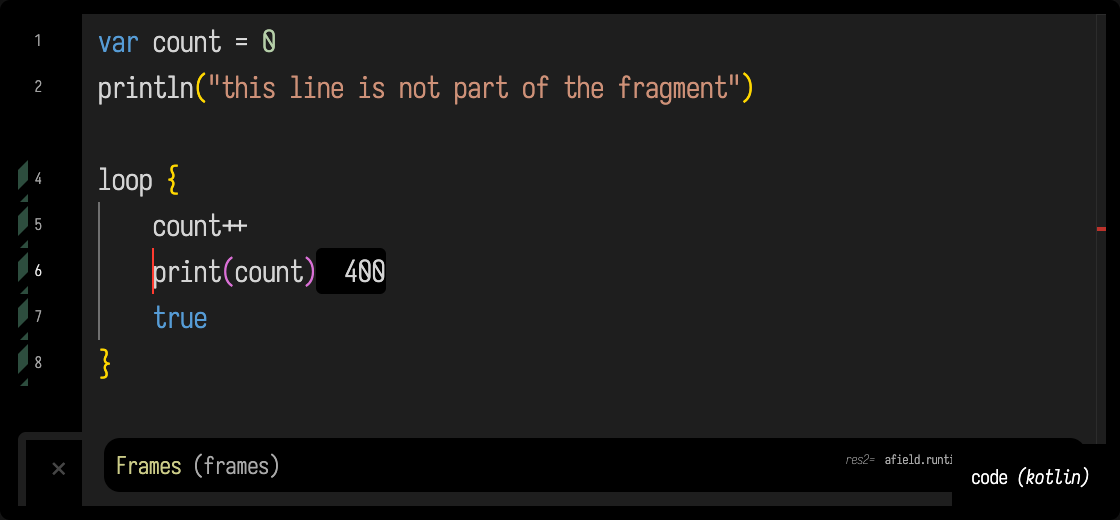
alt/option-1 is for relaunching part of a box you have already run. It picks out the same code
as alt/option-Enter (the selection, or the line, or its outer enclosing block) and launches just
that, so the setup at the top of the box is not run again. The fragment sees the variables earlier
runs left behind: below, the box has been run once, and Alt+1 inside the loop relaunches the loop
with the count the top part already made. Launched from a box that has never been run, the same
fragment fails with Unresolved reference 'count'. The striped green bar in the margin marks the
lines that were launched while they keep running:
To tune a value while watching its effect, put the cursor on a numeric literal and use Increment number under cursor and rerun or Decrement number under cursor and rerun. The shortcuts are ctrl/command-alt/option-K/J (K increments, J decrements). Each command changes that number and then performs the same run as alt/option-Enter, so a number inside a block reruns the outer enclosing block. Integers change by one; decimal numbers use a step scaled to the value and keep their decimal precision. You can also find both commands by name in the ctrl/command-shift-P palette.
Calling suspend functions with go { }
Some Field APIs, including calls into embedded editors, are suspend functions: they wait for a
reply while the rest of Field keeps running. From ordinary box code, put these calls in go { }:
go {
    delay(100)
    println("done")
}
go { } starts a coroutine on Field's run loop and returns immediately. Code after the call
continues without waiting for the block to finish. Inside the block, suspend calls run in order,
and an uncaught error appears on the box as an execution error. The block keeps this box as its
context, so Field's usual box-scoped values and output work there. Stopping the box cancels a
running go block at its next suspension. Use go { } when a box needs to start a suspend
operation; an aiTool { action { ... } } can call suspend functions directly.
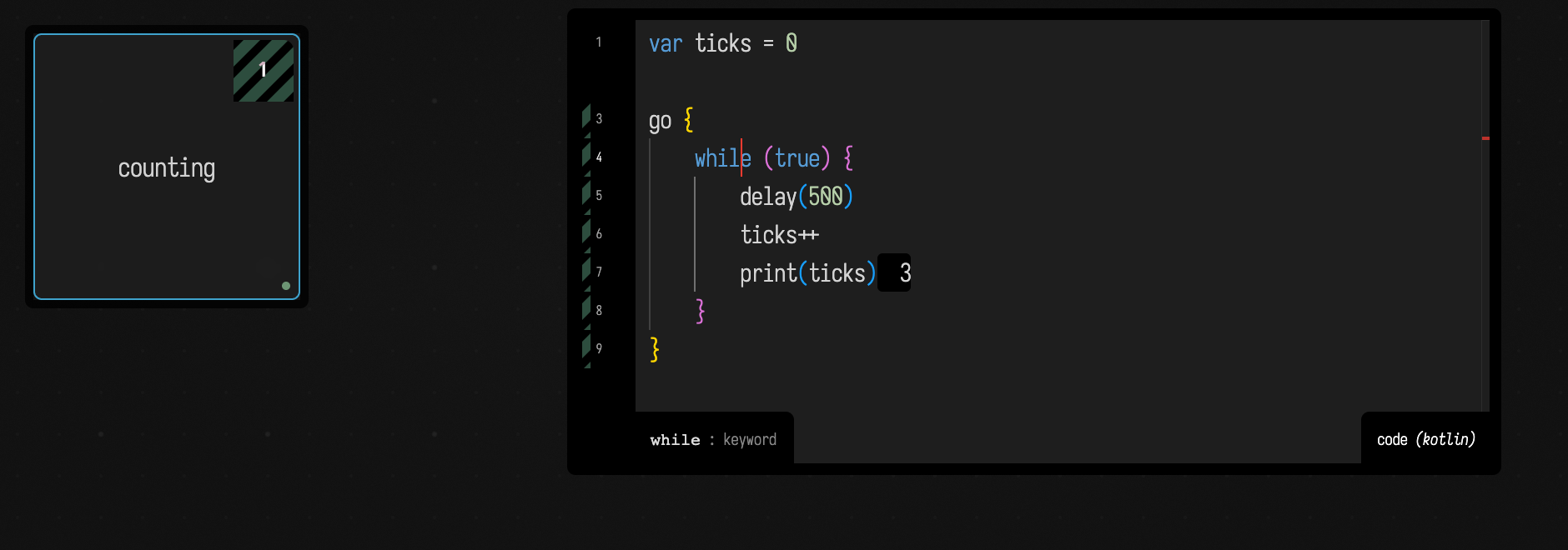
While a go block is still running, the box shows it: a striped square in its top-right corner
holds the number of go blocks that have not finished, and the box is not drawn as launched. If
you started the block with Alt+1, its margin marker stays on until the block ends too. Stopping the
box (Alt+Down) cancels them and clears both. Inside go { }, delay(ms) waits without holding up
the rest of Field:
The pipeline, in five steps
When you run a box, Field does not hand your text straight to the Kotlin compiler. It:
- splits the code into fragments (on
//%-lines, and before amoduleHerethat follows a shader seed), - macro-expands each fragment (rewriting some calls and injecting generated glue),
- prepends a preamble gathered from the box and its parents in the graph,
- compiles and evaluates the fragment,
- and folds some of what just ran (
@exporteddeclarations) back into the preamble.
These five steps are what make prop, once, inherited renderer/window, the typed accessors you get from moduleHere { }, and @exported helpers work.
Two distinct "code that writes code" mechanisms are involved, and they run at different times:
- Macros run before compilation. They are a source→source rewrite of your text (plus a side-effect: they can inject glue into the preamble, and even set box properties).
@exportedruns after evaluation. It reflects over what you defined and promotes it into the preamble.
Both write into the same place, the box's preamble: the shared, auto-regenerated layer of glue between a box, its own future runs, and its children.
Macros: calls rewritten before they compile
A handful of things that look like ordinary function calls are actually source macros, expanded at compile time. The most important are prop / rootProp, moduleHere / computeModuleHere / meshModuleHere / shadertoyHere, fieldStatsHere, print / println, and the two that keep their own source, sourceBlock and interpolant.
These are Field's built-in macros. To write your own source rewrite rules in a box, see
Rewriting your own syntax for the rewrite { … } DSL.
They are intercepted before the compiler sees them. Most have a bare declaration that exists only to fail loudly if a call ever reaches the compiler un-expanded:
fun <T> Box.prop(name: String) {
    throw MacroRegistry.MacroNotExpandedException(
        "prop should not be callable directly, but should be expanded as a macro",
    )
}
Expansion produces an Insert with three parts that matter:
here— text that replaces the call site.preamble/preambleAfterImports— glue (imports + generated declarations) pushed into the box's preamble.target— optionally, which box's preamble to write to (rootProptargets the document root).
The expander walks your code's syntax tree, asks the macro registry to rewrite each recognised call, and applies the edits. Two consequences follow from that:
- Macro expansion is not pure. Besides rewriting text, it mutates box state.
moduleHere { }, for instance, seeds the box'svertex/fragmentshader properties and compiles those shaders during expansion (it needs the shader interface to generate typed accessors — see Generated GLSL accessors below). This is why the ordering of//%-fragments matters (see The//%-fragment break below). - A macro's output lands in the preamble, making it available to the rest of your code and, when tagged for inheritance, to child boxes too.
sourceBlock and interpolant: code that keeps its own source
Two macros wrap a lambda so that it carries the text it was written as. That text can be saved, and compiled again later, so the code still works when the box that wrote it has not run.
sourceBlock { … } gives you a block you call like a function, with its body's text in .source:
val answer = sourceBlock { 6 * 7 }
println(answer()) // 42
println(answer.source) // 6 * 7
The keyframer and code blends save blocks this way. A block loaded back from a saved file has no lambda yet; the first call compiles its source in the box it came from.
interpolant("name") { … } defines a key type for the keyframe editor: a segment shape, written as
the curve's value across the segment.
interpolant("wobble") { lerp(u) + 0.08 * sin(u * 6 * PI) * (1 - u) }The type appears in the key menu, and its source is saved with the box. A curve that uses it keeps its shape when the definition has not run yet (it comes later in the box, or you deleted it), because Field compiles the saved source instead. See Your own key types for what the lambda can use.
Call a saved block from a frame loop, a callback or another box
A block that came from a file compiles its saved source in its own box, and doing that while the
box's code is running would run that code again. So it is an error: calling such a block from its
own box's code stops with a message naming the box, before anything runs twice. Call it from a
frame loop or a control callback, after the code has finished, or from another box. A block made by
sourceBlock in this run already has its lambda and is safe to call at once.
prop, once and cached: values that outlive a run
Each run of a box starts with fresh local variables: a val written at the top of the code is
made again every time you run it. These three keep a value across runs.
prop: a typed slot that children inherit
prop<T>(name) is the workhorse. Writing it in a parent box:
prop<Int>(savemarker) = 12321expands to nothing at the call site but the bare name (savemarker = 12321), plus three generated lines injected into the box's preamble:
var Box.savemarker by Inheritance<Int>() /**/
val Once.savemarker by Onceing<Int>() /**/
val Why.savemarker by Whying() /**/
(and an import for the type). Now savemarker is a real, typed Kotlin property. From then on:
- Writing
savemarker = …stores the value on this box. - Reading
savemarkerreturns this box's value if set, otherwise walks up the box graph to the first ancestor that has one (that is whatInheritancedoes — see Property inheritance below). why.savemarkersays which box that value came from; see Why does this value resolve here?.
Write the name without quotes, as in the example.
once: fill the slot the first time
once.savemarker { … } runs the block only when the property is null, stores the result, and
returns the stored value on every later run. This is the idiom behind a renderer box publishing its
window and renderer to its children:
prop<Window>(window)
prop<Renderer>(renderer)

once.renderer { // runs on the first run only
    window = Window("My sketch")
    Renderer(window)
}
window and renderer are now typed properties on this box, filled once, and visible to every box
connected beneath it. A child reads renderer by name; it never needs to look the renderer up.
null means "empty": a block that returns null is not cached and runs again next time.
cached: one value per set of keys
once has one slot per name. When a value depends on something else — a view made for a
particular renderer, a buffer made for a particular size — use cached, which keeps one value per
type and key:
val view = cached<ElectronRTTView>(renderer) { ElectronRTTView(640, 360) }Re-run the box and you get the same view back. Connect the box under a different renderer, or pass
different keys, and the block runs again to make a new one; the old one is closed (if it is
AutoCloseable), so changing a key replaces rather than leaks. Keys are compared with equals, and
any number can be given: cached<FloatArray>(width, height) { FloatArray(width * height) }.
One run may ask for several values of one type under different keys — one view per renderer in a
loop — and keeps them all. Two calls with the same type and keys share one value; add a key such as
"left" to keep them apart. cached needs no prop first, and its value is not visible to child
boxes: return it into a prop if children should see it.
aside: code an ordinary run skips
once and cached run their block on the first full run. Sometimes you want the opposite: code
that a full run never runs, and that you run by hand when you want it — a one-off experiment, a
reset, a debug dump. Wrap it in aside:
aside("reset") {
    savemarker = 0
    println("reset")
}
Running the whole box skips the block. Put the cursor inside it and press alt/option-Enter to run just that block. (Running a selection that includes it runs it too.) The name is only a label for you; it changes nothing. It saves keeping that code commented out and uncommenting it each time.
flipbox: a block with a checkbox
A flipbox is a block you switch on and off with a checkbox. Press ctrl/command-shift-. to insert
a marker (drawn as a single rune), then write .flipbox(true) { … } after it:
__m("Zk3q-a1").flipbox(true) {
    buildTheExpensiveThing()
}
The editor draws the true as a checkbox. The block runs when the box runs with the box ticked,
and each run unticks it. With true it starts ticked, so it runs on the first run like once, and
later runs skip it. Click the checkbox to run the block again, without running the box, like
alt/option-Enter on an aside. With false it runs only when you click. The tick is not saved
with the document, so true applies again after Field restarts.
What lasts how long
What the block of a once or cached makes — a slider, a render module, an audio patch —
belongs to the box, not to the run that happened to make it, so a re-run does not take it apart.
| re-run | stop | delete the box / close the document | |
|---|---|---|---|
a val in the code |
made again | — | — |
prop value |
kept | kept | gone |
once / cached value |
kept | kept, unless its block started something that runs (an audio patch, a process); then cleared and made again on the next run | released |
cached value whose keys changed |
closed, a new one made | — | — |
Stop only stops what is running. If a once or cached block started an audio patch, stop ends
the patch and forgets the value, so the next run makes a fresh one instead of handing back one whose
sound has gone.
Property inheritance: how children see a parent's values
Box properties are, underneath, an untyped name → value bag per box. Three delegates turn that bag into typed Kotlin properties, differing in where they read from:
| Declaration example | Read behavior | Write behavior |
|---|---|---|
var Box.level by Delegation<Float>() |
Reads this box’s own slot. A supplied lazy default initializes it locally. | Writes this box’s slot. |
var Box.level by Inheritance<Float>() |
Reads locally first, then searches parents breadth-first. Use it when children should inherit a parent’s setting. | Writes locally, shadowing the inherited value. |
var Box.level by InheritanceFromContext<Float>() |
Also consults live REPL variables while resolving the inherited value. This is the mechanism used by @exported. |
Writes this box’s slot. |
By convention the underscore-prefixed shader properties (_vertex, _fragment, …) are box-local Delegation; the user-facing ones (vertex, fragment, …) are Inheritance, so a child that doesn't set its own vertex transparently inherits the parent's.
Two things have to be true for a child to use a parent's value:
-
The typed accessor must exist in the child's compilation scope. Accessors travel through the preamble. When a box is about to run, its effective preamble is regathered from its own preamble plus, from each ancestor, the
importlines and any line ending in the/**/marker:diffstatic {data-lang=kotlin} // in the child's gathered preamble, pulled down from the parent: var Box.savemarker by Inheritance<Int>() /**/That
/**/suffix is exactly whyprop(and@exported) tag their generated lines with it: it is the "inherit me into descendants" marker.The filter applies to every ancestor, including one that has no preamble of its own. So the accessors
moduleHere { }generates from a box's shaders (below) do not come down: they are untagged, andtimeorworldToClipis a name two unrelated shaders will both use. A child that wants them regenerates its own, which it gets for free:vertex/fragmentare themselvesInheritanceproperties, so a child with no shaders of its own inherits the parent's source and its ownmoduleHere { }generates accessors from it. -
The value is fetched at read time by the
Inheritancedelegate's walk upparents. The preamble only carries the accessor; the value stays on whichever box set it.
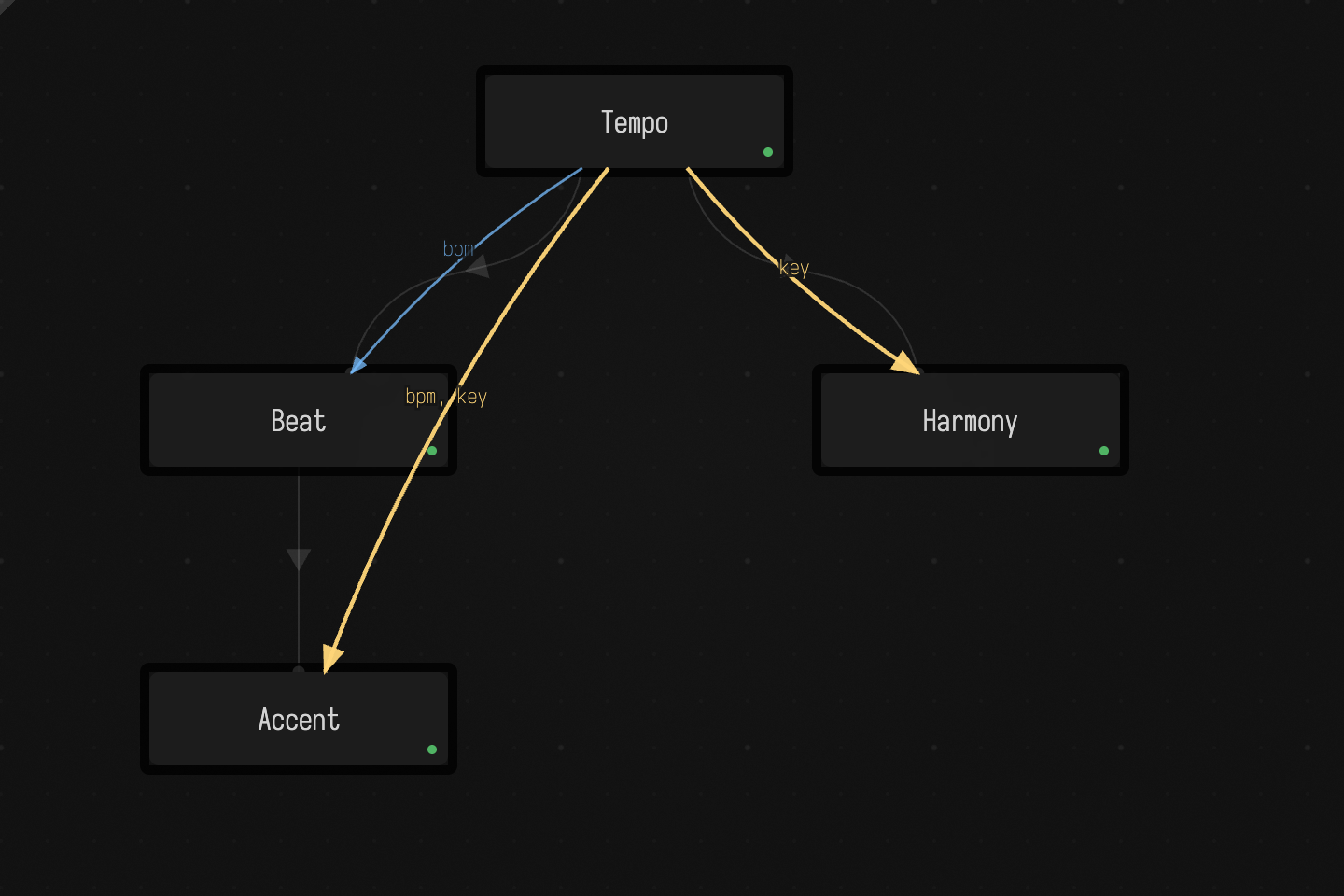
The dependency layer (palette: Toggle Dependency Layer) draws those reads on the canvas. Below,
Tempo holds bpm and key, and Accent, two levels down, reads both straight from it:
Reactive properties has the layer in more detail.
Which box is whose parent decides what is visible
Both the preamble gather and the value walk follow parents. Connecting a child under a parent (parent.connect(child), or selecting the parent and pressing g in the UI) is what puts the parent into the child's ancestor chain.
This is the commonest graphics mistake: a freshly created box whose only parent is the document root is a sibling of the renderer box, not a descendant. It will not inherit renderer: the accessor never gathers into it, and the value walk never reaches it. Only after you connect it beneath the renderer box does the next run gather the accessor and resolve the live Renderer. (The RectSL examples are built this way: one window + renderer box, with every example connected beneath it.)
When a value comes from a box you did not expect, Why does this value resolve here? shows how to ask Field which box supplied it, by what path, and which other boxes it shadowed.
Disconnecting a running box
A box reads an inherited value at the moment its code reads the name. Disconnecting it does not stop
it or change the code it compiled; the next read just walks a graph that no longer has the parent in
it. Ticker runs a go block that reads Garden's petals every 300 ms, and partway through its
connection to Garden was cut:
go {
    repeat(40) { n ->
        val seen = try {
            "petals = $petals"
        } catch (e: Exception) {
                e.message
            }
        markdown("read $n: $seen")
        delay(300)
    }
}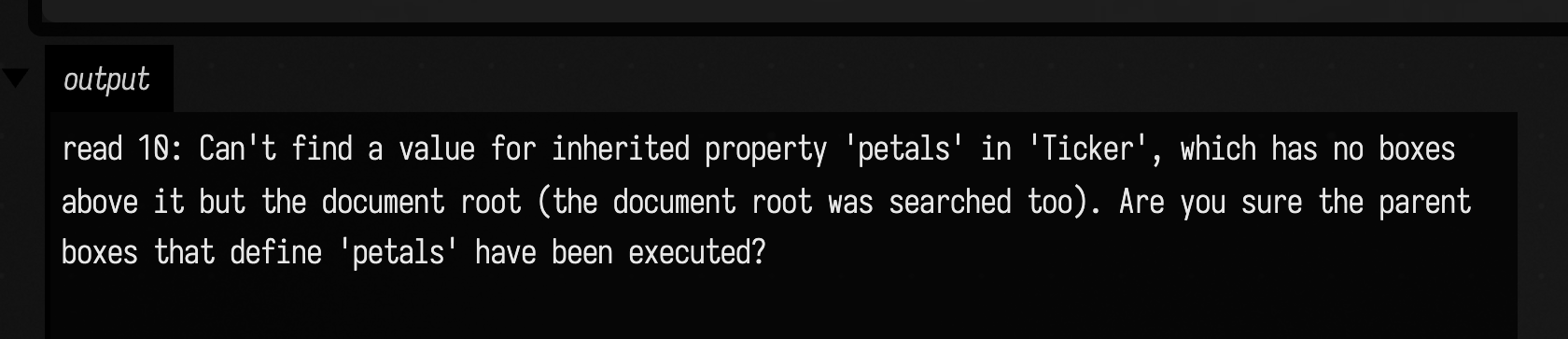
Before the cut each read found Garden's 5; the capture is a read after it. Ticker keeps running, but
every read now fails. A long-running box that must survive being rewired reads the value once, before
it starts, and keeps it. The same holds for renderer: read it before start { } or go { } and
pass it in, rather than looking it up inside a block that may run after the box has moved.
When a lookup fails
The error message can help you tell these three failures apart.
Unresolved reference 'petals' is a compile error: no box above this one declares petals.
The box is not connected where you think it is, or the declaring box uses another name.
Can't find a value for inherited property ... means the accessor was gathered but no box up the
graph has a value yet. Usually the parent has not run, or it failed. Here Garden declares petals
but was never run, and Flower, beneath it, reports:
val seen = try {
    "petals = $petals"
} catch (e: Exception) {
        e.message
    }
markdown("$seen")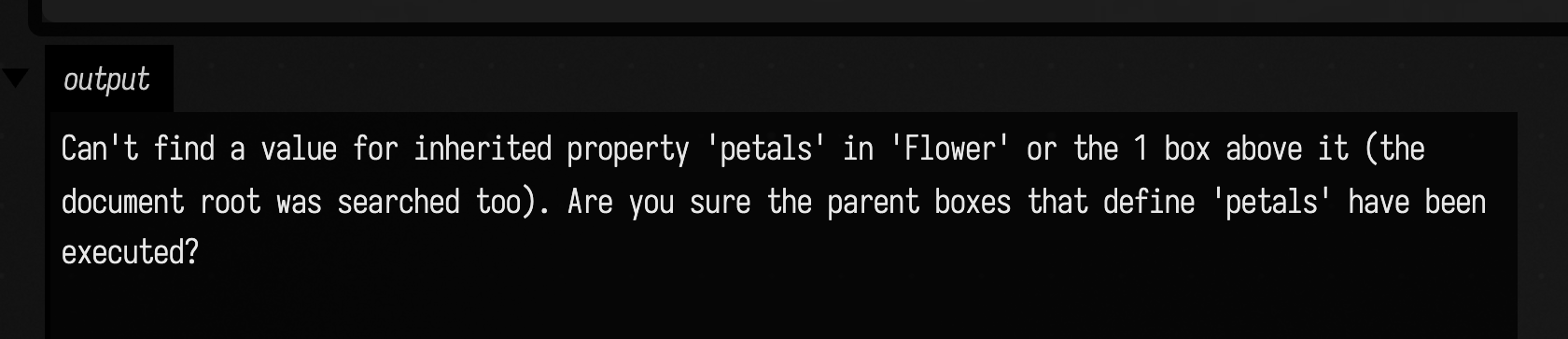
must pass in a value for context parameter ... comes from fromContext<T>() when nothing up
the graph is a T; for a renderer it names afield.graphics.vulkan.Renderer. Pass
fromContext(defaultValue = ...) if the box should run without one.
Waiting longer fixes none of these; the connection or the parent's run does.
A child sees a changed value the next time it runs. To have Field rerun the readers when the value changes, or run the supplier when a read finds nothing, declare it with propDown, propUp or propUpDown: Properties that re-run boxes.
The preamble is regenerated on run: Field recomputes the gathered preamble, diffs it against the cached copy, and executes only the newly-added segments, so adding a prop in a parent and re-running a child is enough to make the new accessor appear.
@exported: promote what you defined
prop is the explicit way to make an inheritable slot. @exported is the automatic cousin: annotate a normal Kotlin fun/val/var, and after the box runs, Field reflects over it and does the same job for you.
@exported
fun add(x: Int, y: Int): Int = x + y
@exported
val answer: Int = 42
After this box runs, its preamble gains inheriting accessors (note the leading-underscore alias):
val Box._add by InheritanceFromContext<(Int, Int) -> Int>() /**/
val Box._answer by InheritanceFromContext<Int>() /**/
and the values are bound on the box. Note the leading underscore: @exported publishes under an aliased name. add becomes _add, answer becomes _answer (a name already starting with _ is left as-is). So from a later run or a child box you call _add(2, 3) and read _answer, not add/answer. (This is the opposite of prop<T>(name), which keeps the exact name; prop<Int>(savemarker) is read back as savemarker.) The alias exists so the export never collides with the original live declaration in the defining box. The upsert is idempotent (re-running doesn't duplicate lines; a type change replaces the old declaration), and exotic types are simplified so the generated accessor always compiles in the child.
Three variants set where the accessor goes:
@exported→ this box (and therefore its descendants).@rootExported→ this box and the document root (visible document-wide).@metarootExported→ this box and the cross-document metaroot (shared across open documents).
That makes @rootExported/@metarootExported the tidy way to define a helper once and share it across boxes.
Both prop and @exported write a /**/-tagged Inheritance… accessor into the preamble, and
both resolve the value by walking the graph when you read it. Use prop to make a slot you can
assign; use @exported to share a declaration you have already written.
Generated GLSL accessors: moduleHere { }
A shader box's GLSL also decides what Kotlin you can write against it. moduleHere { } is a macro: at expansion it reads the box's vertex and fragment (or compute) shaders, writes typed Kotlin accessors into the preamble, then replaces itself with the real runtime builder. (The Field 4 Graphics page covers using these from a user's point of view; here we show what is actually generated.)
For a vertex shader with layout(location = 0) in vec3 pos; and a push-constant block, expansion generates lines like:
// one per vertex input — resolves mesh.input("pos")
val Mesh.pos by FromInput()

// a builder so you can fill the mesh: m.set(nVerts, nTris) { pos.add(...); tri.add(...) }
// (generated MappedStructure with a FloatBuffer per input + an IntBuffer `tri`)

// per push-constant / UBO member — typed, two ways to reach it:
var Mesh.worldToClip by Mesh.BoundFromStructure<afield.math.linalg.Matrix4f>()

// ...or the untyped map form, which needs no generated accessor:
//   m.push["worldToClip"] = ...
A GLSL struct (or a buffer_reference buffer) becomes a generated Kotlin class mirroring its layout, with nested structs emitted recursively:
class Params(/* layout members */ ) : Structure(/* ... */ ) {
    var resolution_time_samples by Structure.FromStructure<afield.math.linalg.Vector4f>()
    val P: Params
        get() = childStructure("P") { m, b, p, r -> Params(m, b, p, r) } // nested
}
fun ParamsByteSize(): Long = 464L
fun HasBuffer.asParams(): Params = asStructure(Params(), ParamsLayoutMembers())
{{ stack.auto.name }} slots in GLSL generate assignable StackSL properties on the module pointer (var ModulePointer.name: String); see stack.auto in the StackSL examples.
Where the module's shaders come from. moduleHere { } builds its module from the box's shader-source properties (vertex, fragment, prepared into _vertex/_fragment), not from assignments inside the lambda. If the box has no shaders yet, it seeds the defaults (a plain in vec3 pos vertex shader and a solid-colour fragment). To hand moduleHere a non-default shader from code, you must set the box's shader-source property before moduleHere expands, either by editing the box's shader tab or from code with once.vertex { … } / once.fragment { … }:
once.vertex { RECT_ANIMATION_VERTEX_SHADER }
once.fragment { myMaterial.exampleFragmentShader }
once.vertex runs at runtime and moduleHere reads the property at expansion time, so Field starts a new fragment before a top-level moduleHere that follows a once.vertex or once.fragment, as if you had written the //%- described next.
The //%- fragment break
A box's code can be split into fragments with a line whose trimmed text starts with //%- (or /*%-*/):
val a = expensiveSetup()
//%-
useThe(a)
Fragments are partially-editable chunks, and they run in order with expand → compile → evaluate interleaved per fragment: fragment N+1 is macro-expanded only after fragment N has finished running. Between fragments, the preamble/setup blocks are re-run too.
That ordering matters because macro expansion is not pure (see Macros above): a later
fragment's macro can read state an earlier fragment set at runtime. Seeding a shader before
moduleHere is the common case, and Field inserts that break for you; the DataFrame case below
needs it written.
Agents: fragment ordering in launch groups
A single Kotlin box launched through the transcript/multi-box path is also awaited fragment by fragment; mixed-language launch groups do not promise the same first-frame ordering across boxes.
The preamble and setup blocks also re-run between fragments, so a fragment that writes to the box's preamble at runtime has published a real source declaration by the time the next fragment is compiled. That is how DataFrame.typed("People") makes typed columns survive into the second half of the same execution; see DataFrames in a Box.
Code that never returns
Box code runs on Field's main loop, so a box that never finishes stops every other box and the canvas with it:
var i = 0L
while (true) {
    i++
}
Field notices. After about a second and a half with no frame, the log names the box that is
running and where it is. After thirty seconds Field throws out of that box's code: the run ends with
the error Box interrupted: ..., and everything else carries on. To get out sooner, run
Interrupt Running Box from the command palette.
The interruption lands at the next loop iteration or function call in the box's own code, so it
also stops runaway recursion, and a catch (e: Exception) inside the loop does not swallow it.
It cannot reach into a library call that never returns on its own. A Thread.sleep or a wait
inside the loop is woken, though.
Two environment variables change the timings: AFIELD_RUNLOOP_WATCHDOG_INTERRUPT_MS sets the
delay before the automatic interrupt (0 turns it off and leaves only the command), and
AFIELD_RUNLOOP_WATCHDOG_REPORT_MS sets the delay before the report.
Putting it together
- During interactive execution, Kotlin box code is fragmented on
//%-, and each fragment is macro-expanded, compiled, and evaluated in turn — so a fragment sees the runtime effects of earlier fragments in that box. - Macros (
prop,moduleHere, …) rewrite calls before compilation and inject glue into the preamble; some also mutate box state or compile shaders during expansion. @exportedpromotes declarations into the preamble after a run.onceandcachedkeep a value across runs;cachedkeeps one per type and key, and closes the old one when a key changes (see What lasts how long).aside { }is the reverse: a block a full run skips, run by hand with alt/option-Enter.- The preamble is the shared glue layer: a box's effective preamble is gathered from itself plus its ancestors'
importand/**/-tagged lines — which is how typed accessors fromprop/@exportedreach child boxes.moduleHere's generated shader accessors are not tagged, so they stay in the box whose shader declared them. - Property inheritance resolves values by walking up the box graph, so connecting boxes (topology) decides what a box can see — the reason a graphics box must be a child of its renderer.
See also: Feature Overview (user-level prop/connect/once), Field 4 Graphics (graphics API), StackSL Examples (stack.auto), RectSL Examples, Why Does This Value Resolve Here? (which box a
value came from), and the Kotlin Overview.