Neural image rendering with OpenDLSS-NR
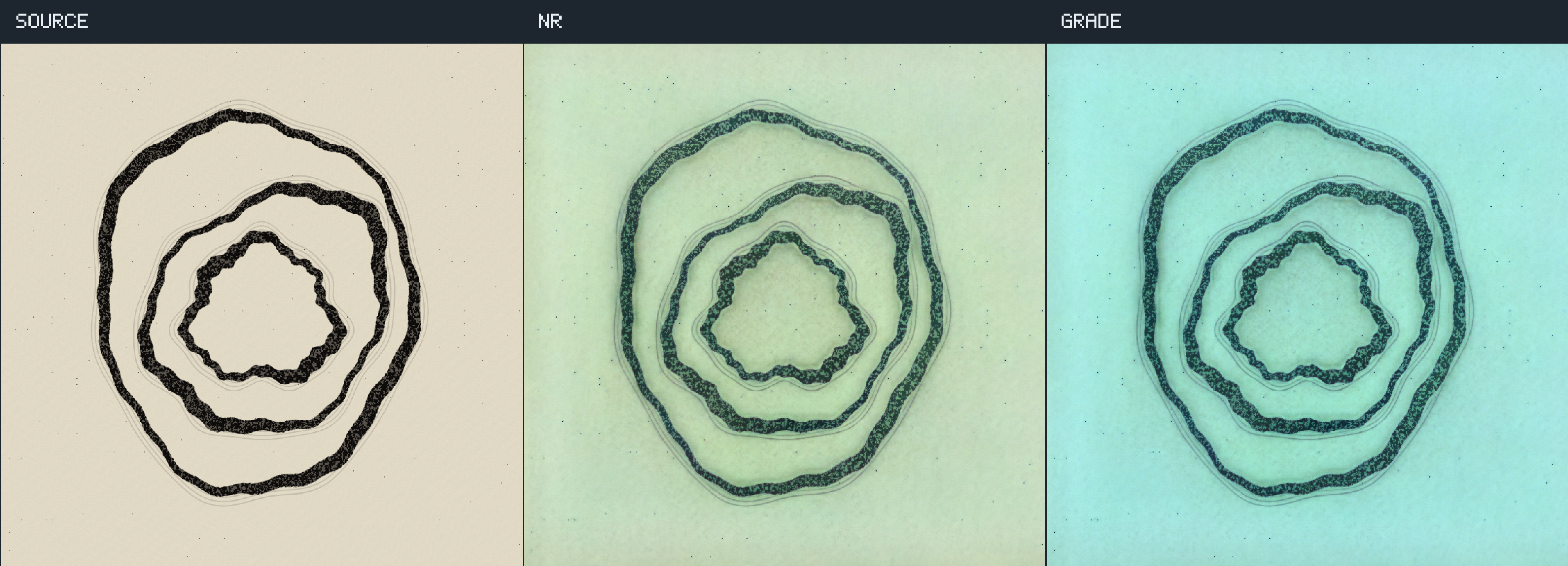
Draw into a texture, run a neural network over it, then color-grade the result. All three views above are rendered by Field: SOURCE is an editable fragment shader, NR is the native network at style 1, tone 0, structure 10, and GRADE multiplies that same result by (0.65, 1.1, 1.4) in linear light. The grain and loose brush echoes give the network something to work on. The original stays visible so you can judge what it changes.
Open the open_dlss_nr starting point, run renderer, then neural ink. Turn on Animate source, vary the network controls, or edit fragment and press Reload edited shaders. Each panel is 768 × 768; open the image or video fullscreen to inspect the strokes.
Prepare the network
On Linux x86_64, run from the Field checkout:
./gradlew buildOpenDlssNrThis task fetches checksummed OpenDLSS-NR sources, Vulkan headers, volk, glslang 16.3.0,
and the weights from RankFTW/rhi-repo.
It reads the DLL's weight resource without loading or executing Windows code. Ordinary Field builds,
startup and documentation builds never download this dependency. The model stays in Field's shared
native download cache when you run clean. Once cached, ./gradlew --offline buildOpenDlssNr works.
fetchOpenDlssNrWeights prepares just the weights; buildOpenDlssNrNative prepares the complete adapter.
Install CMake, Ninja, a C/C++ compiler, Python and patch before running preparation. The Vulkan
loader/driver must be installed to render. Device creation checks the required cooperative-matrix,
FP8, CUDA-launch and related features. Unsupported devices keep normal Field rendering available.
Overrides: FIELD_OPEN_DLSS_NR_LIBRARY, FIELD_OPEN_DLSS_NR_MODEL, FIELD_OPEN_DLSS_NR_SHADERS.
Set FIELD_OPEN_DLSS_NR_DISABLE=1 to disable the optional backend.
The starting point also opens without the optional backend: it prints the reason and shows the source in the middle panel, labeled SOURCE. Grading still works. Prepare the dependency and restart the renderer to enable NR.
Watch cubes become a different material
Two colored cubes rotate on a checkerboard plane while the camera orbits and the light moves. Thin crossing bars add fine edges. This is rasterized geometry with depth testing: the vertex shader generates the ground, cubes and bars, and the fragment shader lights their faces. SOURCE, NR, and GRADE share the same camera, geometry and frame, and use the same network settings and grade as the ink study. The right panel samples the middle panel's output; it does not run a second network.
The video is six seconds, 180 consecutive frames at 30 fps, exported from the live render targets at 2304 × 832 including headings; each panel is 768 × 768.
Open the open_dlss_nr_cubes starting point. Run renderer, then neural cubes and turn on Animate source. Edit either shader property and press Reload edited shaders; an invalid edit retains the working scene. Source and grading still work when the optional NR backend is unavailable.
The network processes each frame independently with a fixed seed, so this is an image effect in motion rather than temporal reconstruction. Look at the checkers, moving highlights and silhouette edges: the network can change details between frames.
The cube study code
Use the same complete renderer box shown in the ink study below, then connect this child beneath it.
Set its vertex and fragment properties to the two shaders that follow. The shared
OpenDlssNrStudy target's geometry=true option enables depth
testing and draws 3 + 39 × 36 vertices: one background triangle and 39 boxes (ground, two cubes,
36 thin bars), all generated in the vertex shader.
import afield.graphics.render.neural.*

val owner = renderer
prop<OpenDlssNrStudy>(lab)
lab = OpenDlssNrStudy(
    owner,
    size = 768,
    name = "nr-cubes",
    geometry = true,
    vertex = requireNotNull(vertex) { "Missing vertex shader on this box or its parents" },
    fragment = requireNotNull(fragment) { "Missing fragment shader on this box or its parents" },
)
println(lab.availability.reason)
:::fold the controls: network style, tone, structure, intensity and grade
var style = 1
var tone = 0f
var structure = 10f
var intensity = 1f
var animate = false
var reload = false
var red = .65f
var green = 1.1f
var blue = 1.4f
controlGroup("neural cubes") {
    if (lab.availability.ready) {
        slider("Network style", min = 0.0, max = 2.0, step = 1.0, initialValue = style.toDouble()) {
            style = it.toInt()
        }
        slider("Tone", min = -10.0, max = 30.0, initialValue = tone.toDouble()) { tone = it.toFloat() }
        slider("Structure", min = -10.0, max = 30.0, initialValue = structure.toDouble()) { structure = it.toFloat() }
        slider("NR intensity (0 = source)", min = 0.0, max = 1.0, initialValue = intensity.toDouble()) {
            intensity = it.toFloat()
        }
    }
    checkbox("Animate source", initialValue = animate) { animate = it }
    slider("Grade red", min = 0.0, max = 2.0, initialValue = red.toDouble()) { red = it.toFloat() }
    slider("Grade green", min = 0.0, max = 2.0, initialValue = green.toDouble()) { green = it.toFloat() }
    slider("Grade blue", min = 0.0, max = 2.0, initialValue = blue.toDouble()) { blue = it.toFloat() }
    button("Reload edited shaders") { if (it) reload = true }
}
displayOpen("neural cubes")
:::endfold
println(
    "SOURCE | NR | GRADE · 768 × 768 per panel. Edit fragment, then reload. Run record clip for six seconds of GPU frames.",
)
val owned = lab
frames {
    try {
        while (!owner.isClosed) {
            owned.controls =
                OpenDlssNrControls(style = style, tone = tone, structure = structure, intensity = intensity)
            owned.grade = Vector4f(red, green, blue, 1f)
            owned.animate = animate && !owned.recording
            if (reload) {
                owned
                    .reload(
                        requireNotNull(vertex) { "Missing vertex shader on this box or its parents" },
                        requireNotNull(fragment) { "Missing fragment shader on this box or its parents" },
                    )
                    .onFailure { println("Keeping working shaders: ${it.message}") }
                reload = false
            }
            frame()
        }
    } finally {
        owned.close()
    }
}
The vertex shader defines every mesh, transform and camera projection. pc.times.x is time in
seconds; sizeJitter.xy is the source resolution. The source uses no projection jitter.
#version 460
layout(push_constant) uniform Scene {
    // xy = input pixels; zw = raster jitter in pixels (Y down).
    vec4 sizeJitter;
    // xy = current/previous scene seconds; zw = horizontal shifts in pixels.
    vec4 times;
    // x = appearance stress flag; y = camera orbit flag; zw unused.
    vec4 settings;
} pc;
layout(location=0) out vec3 world;
layout(location=1) out vec3 normal;
layout(location=2) out vec4 nowClip;
layout(location=3) out vec4 oldClip;
layout(location=4) flat out int objectId;
layout(location=5) flat out vec3 cameraEye;
const int indices[36]=int[](0,2,1,1,2,3,4,5,6,5,7,6,0,1,4,1,5,4,2,6,3,3,6,7,0,4,2,2,4,6,1,3,5,3,7,5);
vec3 corner(int i) {
    return vec3((i&1)==0?-1:1,(i&2)==0?-1:1,(i&4)==0?-1:1);
}
vec3 objectPoint(int id,vec3 p,float time) {
    if(id>=39) {
        float k=float(id-39);
        return p*(pc.settings.x==1?.035:0)+vec3(sin(k*2.4+time)*3,1.4+sin(k*.8+time*.7),cos(k*1.7+time)*2);
    }
    if(id==0)return p*vec3(5,.06,4)+vec3(0,-.08,0);
    if(id==1) {
        float a=time*.55;
        p.xz=mat2(cos(a),sin(a),-sin(a),cos(a))*p.xz;
        return p*vec3(.85,.7,.85)+vec3(-1.5,.7,-.5);
    }
    if(id==2) {
        float a=-time*.4;
        p.xz=mat2(cos(a),sin(a),-sin(a),cos(a))*p.xz;
        return p*vec3(.7,.9,.7)+vec3(1.4+sin(time)*.6,.9,-.4);
    }
    int n=id-3;
    if(n<18) {
        p*=vec3(.015,1.2,.015);
        p.xy=mat2(.8,.6,-.6,.8)*p.xy;
        return p+vec3(float(n)*.19-1.7,1.7,1.4);
    }
    p*=vec3(.015,1.2,.015);
    p.xy=mat2(.8,-.6,.6,.8)*p.xy;
    return p+vec3(float(n-18)*.19-1.7,1.7,1.45);
}
// Orbit in world space; share the current eye with fragment lighting.
vec3 cameraPosition(float time) {
    float angle = pc.settings.y == 1 ? time * .18 : 0;
    return vec3(5 * sin(angle) + 5 * cos(angle), 3.7, 5 * cos(angle) - 5 * sin(angle));
}

// Positive view depth maps the near plane to Z=0 and the far plane to Z=W.
vec4 project(vec3 worldPosition, float time) {
    vec3 eye = cameraPosition(time);
    vec3 forward = normalize(vec3(0, .8, 0) - eye);
    vec3 right = normalize(cross(forward, vec3(0, 1, 0)));
    vec3 up = cross(right, forward);
    vec3 viewOffset = worldPosition - eye;
    float depth = dot(viewOffset, forward);
    float near = .1;
    float far = 100;
    return vec4(
        dot(viewOffset, right) * 1.9 * pc.sizeJitter.y / pc.sizeJitter.x,
        dot(viewOffset, up) * 1.9,
        far / (far - near) * depth - far * near / (far - near),
        depth
    );
}
void main() {
    cameraEye = cameraPosition(pc.times.x);
    // First triangle fills the background; remaining triangles form the objects.
    if(gl_VertexIndex<3) {
        vec2 xy=vec2((gl_VertexIndex<<1)&2,gl_VertexIndex&2)*2-1;
        gl_Position=vec4(xy,.999999,1);
        objectId=-1;
        world=vec3(0);
        normal=vec3(0,1,0);
        nowClip=oldClip=gl_Position;
        return;
    }
    // Recover object/face IDs, then transform the triangle into world space.
    objectId=(gl_VertexIndex-3)/36;
    int v=(gl_VertexIndex-3)%36;
    float t=pc.times.x,old=pc.times.y;
    vec3 p=corner(indices[v]);
    world=objectPoint(objectId,p,t);
    int tri=(v/3)*3;
    vec3 a = objectPoint(objectId, corner(indices[tri]), t);
    vec3 b = objectPoint(objectId, corner(indices[tri + 1]), t);
    vec3 c = objectPoint(objectId, corner(indices[tri + 2]), t);
    normal=normalize(cross(b-a,c-a));
    nowClip=project(world,t);
    oldClip=project(objectPoint(objectId,p,old),old);
    nowClip.x+=2*pc.times.z/pc.sizeJitter.x*nowClip.w;
    oldClip.x+=2*pc.times.w/pc.sizeJitter.x*oldClip.w;
    gl_Position=nowClip;
    gl_Position.xy+=vec2(2*pc.sizeJitter.z/pc.sizeJitter.x,-2*pc.sizeJitter.w/pc.sizeJitter.y)*gl_Position.w;
}
The fragment shader writes linear LDR color, which is also what the SOURCE panel displays. The vertex stage passes its current world-space camera position to the fragment for lighting.
#version 460
layout(push_constant) uniform Scene {
    // xy = input pixels; zw = raster jitter in pixels (Y down).
    vec4 sizeJitter;
    // xy = current/previous scene seconds; zw = horizontal shifts in pixels.
    vec4 times;
    // x = appearance stress flag; y = camera orbit flag; zw unused.
    vec4 settings;
} pc;
layout(location=0) in vec3 world;
layout(location=1) in vec3 normal;
layout(location=2) in vec4 nowClip;
layout(location=3) in vec4 oldClip;
layout(location=4) flat in int objectId;
layout(location=5) flat in vec3 cameraEye;
layout(location=0) out vec4 color;
void main() {
    if(objectId<0) {
        color=vec4(.014,.022,.04,1);
        return;
    }
    vec3 n=normalize(normal);
    vec3 base=objectId==0?vec3(.23):objectId==1?vec3(.05,.27,.65):objectId==2?vec3(.8,.14,.045):vec3(.9,.68,.21);
    if(objectId<3) {
        vec2 st=world.xz*9;
        float checkers=mod(floor(st.x)+floor(st.y),2);
        base*=mix(.22,1,checkers);
    }
    vec3 light=normalize(vec3(sin(pc.times.x)*4,5,3)-world);
    float diffuse=.2+.8*abs(dot(n,light));
    // Lighting and the view vector use the same world-space eye as projection.
    vec3 viewDirection = normalize(cameraEye - world);
    vec3 halfDirection = normalize(light + viewDirection);
    float specular = pow(max(0, abs(dot(n, halfDirection))), 96);
    color=vec4(clamp(base*diffuse+specular*1.8,0,1),1);
    if(pc.settings.x==1) {
        color.rgb=objectId==0?vec3(.04,.08,.16):base;
        // Deliberately changing appearance has no geometric correspondence. It is visible in
        // comparisons, but not represented as fictional velocity or an undocumented vendor mask.
        if(objectId==1)color.rgb=.45+.4*cos(world*8+pc.times.x*vec3(2,3,5));
        if(objectId>=3)color.rgb=mix(vec3(.1,.8,.6),vec3(.9,.08,.3),step(0,sin(pc.times.x*1.7)));
    }
}
Record the cubes
With neural cubes running at its defaults, run record clip. It uses the complete recorder shown below, with the output folder changed to:
val folder = Path.of("build/opendlssnr-cubes/clip").toAbsolutePath().also { it.createDirectories() }Don't change controls or reload shaders while recording. Encode the resulting GPU frames with:
ffmpeg -y -framerate 30 -i build/opendlssnr-cubes/clip/frame-%03d.png \
  -c:v libx264 -preset slow -crf 16 -pix_fmt yuv420p -movflags +faststart \
  build/opendlssnr-cubes/cubes-study.mp4
Download the complete cube operation transcript,
study code, vertex shader,
fragment shader and recorder.
In a checkout, tools/opendlssnr/capture_study.py --scene cubes runs that transcript and records
and encodes the clip in one step. Measurements
accompany the capture.
The ink animation uses the same network and grading on the editable brush-loop shader below. Each study has its own starting point and recorder output folder.
The editable ink study
The starting point has three boxes. renderer owns the Vulkan renderer. neural ink is connected beneath it and owns the source target, NR pass and display. record clip is connected beneath neural ink and reads the same study.
The renderer box is complete:
import afield.graphics.vulkan.util.Options

prop<Window>(window)
prop<Renderer>(renderer)
Options.enableVR = false
Options.enableHDR = false
Options.profiling = false
once.renderer {
    window = Window("Field · neural ink", initialDimensions = Rect(40.0, 40.0, 2304.0, 832.0))
    Renderer(window)
}
start(renderer::run)
Paste this into a connected child, with the vertex and fragment properties shown below.
OpenDlssNrStudy is Field's reusable target; it records
source → NR → comparison in that order in the caller's command buffer, before drawing the screen.
Its comparison shader implements the headings and grade.
import afield.graphics.render.neural.*

val owner = renderer
prop<OpenDlssNrStudy>(lab)
// Leave null for the editable fragment shader; try the bundled drawing or your own image.
val imagePath: String? = null
// val imagePath: String? = "public/docs/assets/opendlssnr/ink-input.png"
lab = OpenDlssNrStudy(
    owner,
    size = 768,
    imagePath = imagePath,
    vertex = requireNotNull(vertex) { "Missing vertex shader on this box or its parents" },
    fragment = requireNotNull(fragment) { "Missing fragment shader on this box or its parents" },
)
println(lab.availability.reason)
:::fold the controls: network style, tone, structure, intensity and grade
var style = 1
var tone = 0f
var structure = 10f
var intensity = 1f
var animate = false
var reload = false
var red = .65f
var green = 1.1f
var blue = 1.4f
controlGroup("neural ink") {
    if (lab.availability.ready) {
        slider("Network style", min = 0.0, max = 2.0, step = 1.0, initialValue = style.toDouble()) {
            style = it.toInt()
        }
        slider("Tone", min = -10.0, max = 30.0, initialValue = tone.toDouble()) { tone = it.toFloat() }
        slider("Structure", min = -10.0, max = 30.0, initialValue = structure.toDouble()) { structure = it.toFloat() }
        slider("NR intensity (0 = source)", min = 0.0, max = 1.0, initialValue = intensity.toDouble()) {
            intensity = it.toFloat()
        }
    }
    checkbox("Animate source", initialValue = animate) { animate = it }
    slider("Grade red", min = 0.0, max = 2.0, initialValue = red.toDouble()) { red = it.toFloat() }
    slider("Grade green", min = 0.0, max = 2.0, initialValue = green.toDouble()) { green = it.toFloat() }
    slider("Grade blue", min = 0.0, max = 2.0, initialValue = blue.toDouble()) { blue = it.toFloat() }
    button("Reload edited shaders") { if (it) reload = true }
}
displayOpen("neural ink")
:::endfold
println(
    "SOURCE | NR | GRADE · 768 × 768 per panel. Edit fragment, then reload. Run record clip for six seconds of GPU frames.",
)
val owned = lab
frames {
    try {
        while (!owner.isClosed) {
            owned.controls =
                OpenDlssNrControls(style = style, tone = tone, structure = structure, intensity = intensity)
            owned.grade = Vector4f(red, green, blue, 1f)
            owned.animate = animate && !owned.recording
            if (reload) {
                owned
                    .reload(
                        requireNotNull(vertex) { "Missing vertex shader on this box or its parents" },
                        requireNotNull(fragment) { "Missing fragment shader on this box or its parents" },
                    )
                    .onFailure { println("Keeping working shaders: ${it.message}") }
                reload = false
            }
            frame()
        }
    } finally {
        owned.close()
    }
}
Intensity 0 returns the source through NR's composition path; 1 uses the full neural result. Style is the network's integer choice 0, 1 or 2; style 0 still evaluates the network. Tone and structure are conditioning values passed straight to the network, so the sliders run from −10 to 30 rather than 0 to 1. Seed 1 is fixed throughout the study. The grade is separate: restore all three multipliers to 1 to remove it.
Draw the source yourself
The vertex property draws a fullscreen triangle and gives the source a top-left UV origin:
#version 460
layout(location=0) out vec2 uv;
void main() {
    vec2 corner=vec2((gl_VertexIndex<<1)&2,gl_VertexIndex&2);
    uv=vec2(corner.x,1-corner.y);
    gl_Position=vec4(corner*2-1,0,1);
}
The fragment property draws the whole animated source. Change the loop count, pigment, noise scales or stroke widths and reload:
#version 460
layout(location=0) in vec2 uv;
layout(location=0) out vec4 color;
layout(push_constant) uniform Study {
    vec4 frame;
} pc;

float hash(vec2 p) {
    return fract(sin(dot(p,vec2(127.1,311.7)))*43758.5453);
}
float noise(vec2 p) {
    vec2 i=floor(p), f=fract(p);
    f=f*f*(3-2*f);
    return mix(mix(hash(i),hash(i+vec2(1,0)),f.x),
    mix(hash(i+vec2(0,1)),hash(i+vec2(1)),f.x),f.y);
}
vec3 linearize(vec3 c) {
    return mix(c/12.92,pow((c+.055)/1.055,vec3(2.4)),step(vec3(.04045),c));
}
void main() {
    float time=pc.frame.x;
    vec2 p=(uv-.5)*2;
    float grain=noise(uv*pc.frame.yz*.7);
    vec3 paper=vec3(.88,.85,.77)+.025*(grain-.5);
    float ink=0;
    // Three breathing, imperfect loops. The source is drawn here, in Field, every frame.
    for(int i=0;i<3;i++) {
        float k=float(i);
        vec2 q=p-vec2(.035*sin(time*.6+k*2),.035*cos(time*.7+k));
        q=mat2(cos(k*.8),sin(k*.8),-sin(k*.8),cos(k*.8))*q;
        q.y*=1.05+.16*sin(time*.3+k);
        float a=atan(q.y,q.x), r=length(q);
        float radius=.27+k*.22+.025*sin(a*3+time*.55+k*2)+.018*sin(a*7-time*.3+k);
        float rough=.004*(noise(q*110)-.5)+.006*sin(a*23+k*4);
        float width=.013+.017*(.5+.5*sin(a*2+time*.3+k*1.7));
        float edge=abs(r-radius+rough);
        float body=1-smoothstep(width,width+.005,edge);
        float dry=1-.35*smoothstep(.48,.72,noise(q*160+vec2(k*10)));
        ink=max(ink,body*dry);
        // Loose charcoal echoes around the brush stroke.
        for(int j=1;j<4;j++) {
            float d=float(j)*.017;
            float echo=abs(r-radius-d-.008*sin(a*11+k+time*.2));
            ink=max(ink,(1-smoothstep(.001,.004,echo))*.13);
        }
    }
    // Fixed flecks move with the paper, not with a fresh random seed each frame.
    vec2 cell=floor(uv*85);
    vec2 local=fract(uv*85)-.5;
    float speck=step(.974,hash(cell))*(1-smoothstep(.03,.10,length(local)));
    ink=max(ink,speck*.65);
    vec3 pigment=vec3(.055,.046,.041);
    color=vec4(linearize(mix(paper,pigment,ink)),1);
}
pc.frame.x is time in seconds; yz is the source size. The shader converts its paper and ink
colors from display code to linear light before writing the target. NR therefore receives
LINEAR_LDR, and its RGBA16F output stays linear until Field presents it.
Try an image instead
Change the imagePath line in neural ink, then stop and run that box again. For example:
val imagePath: String? = "public/docs/assets/opendlssnr/ink-input.png"That file is the original, unprocessed drawing. The following capture loads it into a Field texture and runs the same comparison at tone 0 / structure 10:
import afield.graphics.render.neural.OpenDlssNrStudy

val study = OpenDlssNrStudy(renderer, imagePath = "public/docs/assets/opendlssnr/ink-input.png")
study.animate = false
frames {
    try {
        while (true) frame()
    } finally {
        study.close()
    }
}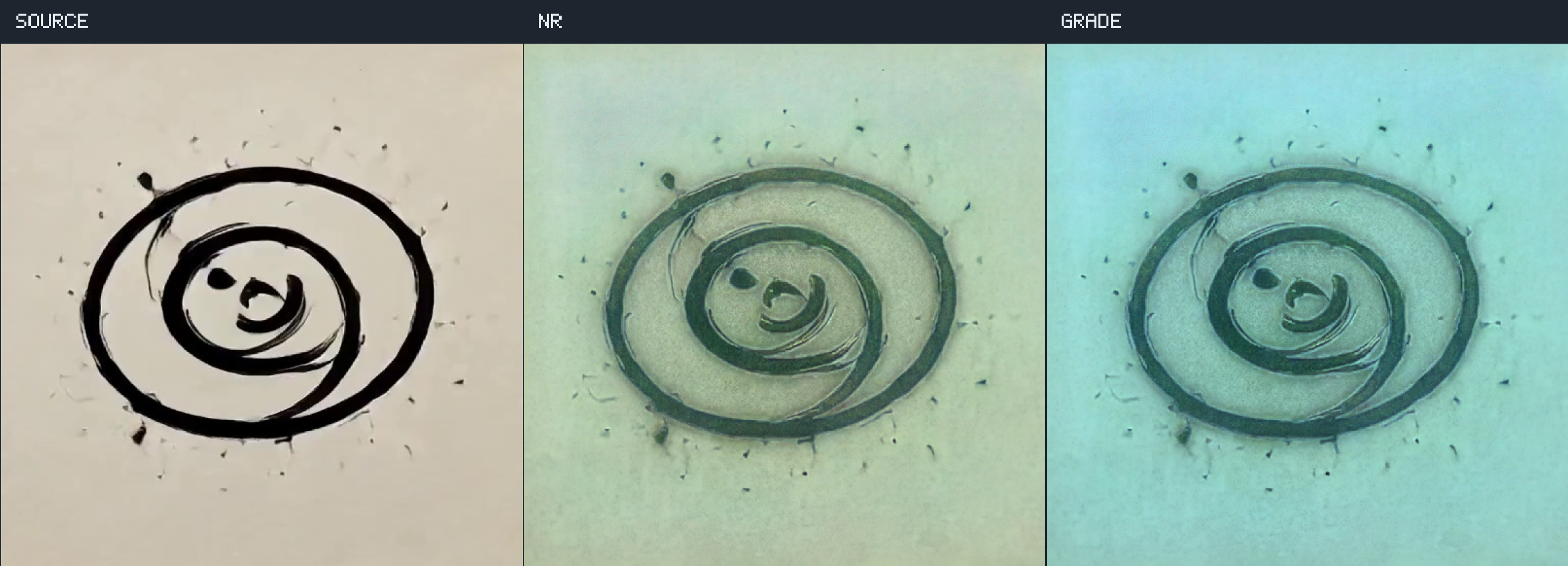
Use a photograph, drawing or other RGB image in its place. This square study samples the image into 768 × 768; use OpenDlssNrImage for an image at its original dimensions. The source stays on the left in the comparison, so distorted aspect ratios are immediately visible.
Reproduce the video
With neural ink running at its defaults, run record clip. It reserves the study's time, requests the next frame's pixels, and waits for that frame's GPU fence before writing PNG. Slow disk or readback changes capture time, not the animation's 30 fps clock. Don't change controls or reload the source shader while it records. The record box contains all of this code:
import java.nio.file.Path
import kotlin.io.path.createDirectories

// Run beneath the live study box. The scene remains editable after recording.
val study = lab
check(study.availability.ready) { study.availability.reason }
check(!study.recording) { "A recording is already running" }
val folder = Path.of("build/opendlssnr-study/clip").toAbsolutePath().also { it.createDirectories() }
val controls = study.controls.copy()
val grade = study.grade.toString()
val previousTime = study.time
study.recording = true
study.animate = false
frames {
    try {
        for (i in 0 until 180) {
            check(study.controls == controls && study.grade.toString() == grade) {
                "Controls changed during capture; record again"
            }
            study.time = i / 30f
            val saved = study.saveFrame(folder.resolve("frame-%03d.png".format(i)))
            while (!saved.isDone) frame()
            saved.join()
            if (i % 30 == 0) println("Recorded $i / 180")
        }
        println("NR STUDY RECORD DONE: 180 frames at 30 fps, 2304 × 832; $folder")
    } finally {
        study.time = previousTime
        study.recording = false
    }
}
Encode those frames from the checkout root:
ffmpeg -y -framerate 30 -i build/opendlssnr-study/clip/frame-%03d.png \
  -c:v libx264 -preset slow -crf 16 -pix_fmt yuv420p -movflags +faststart \
  build/opendlssnr-study/ink-study.mp4
The operation transcript creates the whole graph and its shader
properties. Study code, vertex,
fragment and record code are also downloadable.
In a checkout, tools/opendlssnr/capture_study.py runs that transcript, captures a still, and
records and encodes the clip.
Put the pass in your own pipeline
Create a pass at your source dimensions. In a Target, after the source producer has finished its
render pass, record the network and sample its output in a later shader:
import afield.graphics.render.neural.*

val pass = OpenDlssNrPass(renderer, width, height)
pass.controls = OpenDlssNrControls(style = 1, tone = 0f, structure = 10f)
// Inside Target.render(command, index), after rendering color:
pass.evaluate(
    command,
    OpenDlssNrInputs(color, OpenDlssNrColorEncoding.LINEAR_LDR),
    OpenDlssNrFrame(frameIndex),
)

// pass.output is a sampled linear RGBA16F texture. Close the pass when its owner stops.
Declare what the sampler returns: SRGB_CODE for display-code RGB stored in UNORM/float;
LINEAR_LDR for linear 0…1, including SRGB textures whose sampler already decodes them;
LINEAR_HDR for scene values with an explicit paperWhite. The sampled source is mip 0, layer 0,
with top-left origin. Alpha is preserved by default. Unpremultiply premultiplied RGB before NR and
premultiply its result afterwards.
pass.postEffect("nr", inputs={...}, frame={...}) exposes the same target to Fabricate. Insert it
before grading and tone mapping. It uses Vulkan compute shaders and NVIDIA PTX kernel launches in
the same command buffer. It has no fragment module of its own.
The default controls are style 1, tone/structure 1, skin −1, automatic masking off, intensity 1, seed 1 and temporal off; the study explicitly changes tone to 0 and structure to 10. With automatic masking enabled, a negative skin value follows structure. Finite conditioning values through the binary16 range are accepted. Composition clips RGB before grading; grading cannot recover values already clipped by composition.
Temporal inputs
Temporal mode is experimental and requires both motion and depth. Set temporal=true and supply
them in OpenDlssNrInputs. The default motion convention is current minus previous UV; set
motionCurrentMinusPrevious=false for the reverse sign and motionInPixels=true for pixel units.
Depth is standard Vulkan depth, background 1. A camera cut should set the frame's reset=true or
change its revision. Skipped frames, source replacements and control changes also reset history.
Resize by replacing and closing the pass. Field retires its allocations behind completion fences.
Both studies use independent frames. The ink shader supplies no geometric motion or depth; the cube study writes color and uses its depth buffer for rasterization, but does not supply motion or depth textures to NR. Temporal input needs those textures from its producer; the pass does not infer motion.
Agents: verification and capture provenance
The still at the top is generated by this page's diffstatic_runner from open_dlss_nr.yaml.
The cube video uses open_dlss_nr_cubes.yaml and its record clip box; both animations
capture the same live targets that their Starting Points display. The original
drawing is only an input to the second runnable figure. Ordinary docs builds retain these
Linux/NVIDIA captures; regenerate the stills with FIELD_DOCS_CAPTURE_PROFILES=linux-nvidia
and FIELD_DOCS_RUNNER_MODE=always, selecting --page open_dlss_nr.
Capture measurements record source/NR/grade
differences and frame counts. Raw network-head parity against the pinned standalone port,
allocation measurements, fixed-seed checks and the separate motion/history smoke are recorded
in the checkout's dev_docs/lighting/OPEN_DLSS_NR_VERIFICATION.md.