Depth and CLIP: neural vision in a box
Give Field a photograph and ask how far away things are, or compare an image with a description you've written. Two pretrained vision models make this possible: Depth Anything V2 Small predicts depth from a photograph, and CLIP puts images and text in a shared 512-dimensional space. With CLIP you can score a picture against a prompt without training a model or supplying a label set.
Both run on the ONNX Runtime JNI artifact (com.microsoft.onnxruntime:onnxruntime, 1.27.0), which is
on the classpath already because semantic search embeds text with it. The weights
are not: each model is fetched the first time you ask for it, and that is the whole install. The
onnx_webcam_live starting point runs both models on a
webcam frame in one box.
:::static
import afield.ai.inference.onnx.*
import java.nio.ByteBuffer
import java.nio.ByteOrder

:::fold load a photograph that ships with Field, and pack it as the RGBA8 bytes both models read

val photo = imgFromFile("public/docs/assets/vision/fline-viewer.jpg", 3).scaleBy(0.45)

fun toRgba8(img: Img): ByteBuffer {
    val out = ByteBuffer.allocateDirect(img.width * img.height * 4).order(ByteOrder.nativeOrder())
    for (p in 0 until img.pixelCount) {
        for (c in 0 until 3) {
            val v = (img.data[p * img.channels + c].coerceIn(0f, 1f) * 255f + 0.5f).toInt()
            out.put(p * 4 + c, v.toByte())
        }
        out.put(p * 4 + 3, 255.toByte())
    }
    return out
}

val rgbaBytes = toRgba8(photo)
:::endfold

// How far away is everything? — one image in, one single-channel map out.
val depth = DepthAnything.forSource(photo.width, photo.height)
depth.infer(rgbaBytes, photo.width, photo.height)
depth.depthFp16 // ready to upload as VK_FORMAT_R16_SFLOAT

// What is this a picture of? — no training, no labels, just prompts.
val prompts = ClipText.encodeAll(["an empty room", "a person at a desk"])
val best =
    ClipImage().encode(rgbaBytes, photo.width, photo.height).best(prompts)!! // the better-matching label, and its share
:::fold show both answers
val depthMap = Img(depth.width, depth.height, 1, FloatArray(depth.width * depth.height) { depth.depthRaw.get(it) })
showImgGrid(
    "CLIP: \"%s\" (%.0f%%)".format(best.first, best.second * 100) to photo,
    "depth, bright = near" to depthMap.colormap("inferno").resize(photo.width, photo.height),
    columns = 2,
    cellSide = 500,
)
:::endfold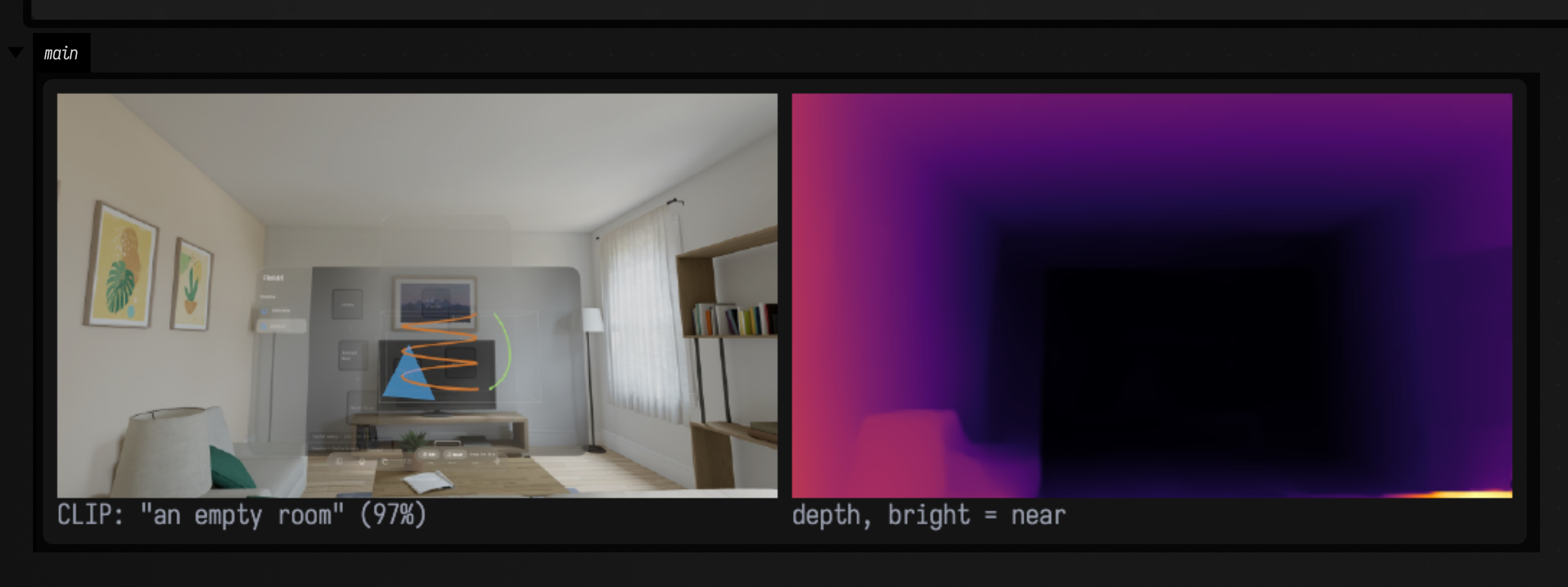
Sessions are cached, so a box can re-run
Session construction is the expensive half of ONNX: the graph is parsed, fused and specialised for
the execution provider, which costs hundreds of milliseconds. Inference is the cheap half. A box that
says DepthAnything(...) and gets re-evaluated on every keystroke must not pay that on every
keystroke.
So OnnxRuntime keeps its sessions for the life of Field, outside any box. Re-running a box finds
the session it built last time. FaustEngine does the same for compiled
DSP. The first line below asks the cache; the second builds a session directly, and pays the full
cost on every run:
// Cached. Two boxes asking for the same spec get the identical OrtSession.
val loaded = OnnxRuntime.session(spec)

// NOT cached — this rebuilds on every keystroke, and it is the one mistake to avoid.
val mine = OnnxRuntime.env.createSession(path, options)
The cache key is a SessionSpec: the model file, the provider, and the two thread counts. Thread
pools are fixed when a session is built, so two specs differing only in intraOpThreads are
different sessions. Use evict() or closeAll() when the model file has changed or you want the
memory back, not because a box re-ran.
Depth: what comes out of the model
Depth Anything V2 Small is a simple model to run: one image in, one single-channel map out, no anchors, no non-maximum suppression, no decode step, no state between frames.
It is relative inverse depth in arbitrary units, not metres
depthRaw is not metres, not normalised, and larger means nearer. The numeric
range depends on the scene and on the input resolution, so a threshold calibrated on one frame
at one size means nothing on another.
Assume metric depth and you will build something that looks approximately right and is wrong in a way no single frame reveals. If you need metres, this is the wrong model.
This box runs the model on a photograph of a room (a Vision Pro passthrough frame that ships with Field) at two input sizes, and shows both depth maps beside the source.
:::static
import afield.ai.inference.onnx.*
import java.nio.ByteBuffer
import java.nio.ByteOrder

// A real photograph that already ships with Field: a Vision Pro passthrough frame of a room.
val photo = imgFromFile("public/docs/assets/vision/fline-viewer.jpg", 3).scaleBy(0.45)

// Both models want tightly packed RGBA8, and an Img is interleaved floats in 0..1 — so this is the
// whole adapter. Nothing in afield.ai.inference.onnx knows about Img; it asks for bytes and a size.
fun toRgba8(img: Img): ByteBuffer {
    val out = ByteBuffer.allocateDirect(img.width * img.height * 4).order(ByteOrder.nativeOrder())
    for (p in 0 until img.pixelCount) {
        for (c in 0 until 3) {
            val v = (img.data[p * img.channels + c].coerceIn(0f, 1f) * 255f + 0.5f).toInt()
            out.put(p * 4 + c, v.toByte())
        }
        out.put(p * 4 + 3, 255.toByte())
    }
    return out
}

val rgba = toRgba8(photo)

/*
Run the same frame at two sizes. sizeFor snaps to multiples of 14 (the backbone is ViT-S/14) and
preserves aspect. adaptation = 1f means "normalise against this frame's own range", which is what
a single still wants; a video stream wants the default 0.1f so the picture does not flicker.
*/
fun runAt(longestSide: Int): Triple<DepthAnything, DepthStats, Img> {
    val (w, h) = DepthAnything.sizeFor(photo.width, photo.height, longestSide)
    val d = DepthAnything(w, h, adaptation = 1f)
    val s = d.infer(rgba, photo.width, photo.height)
    // depthRaw is the model's own units. Wrap it in an Img to actually look at it.
    return Triple(d, s, Img(w, h, 1, FloatArray(w * h) { d.depthRaw.get(it) }))
}

val (big, bigStats, bigMap) = runAt(266)
val (small, smallStats, smallMap) = runAt(126)
:::fold caption them with their own measurements, and draw
// No milliseconds in the caption: a wall-clock number would differ on every run. The pixel count
// makes the same point and is deterministic; timings go to stdout instead.
fun caption(tag: String, d: DepthAnything, s: DepthStats) =
    "%s %dx%d  %d px  raw [%.2f, %.2f]".format(tag, d.width, d.height, d.width * d.height, s.rawMin, s.rawMax)

println("source ${photo.width}x${photo.height} — a real photograph, no depth camera anywhere")
println("${caption("@266", big, bigStats)}  ${big.lastInferenceMs}ms on ${big.activeProvider}")
println("${caption("@126", small, smallStats)}  ${small.lastInferenceMs}ms on ${small.activeProvider}")
println("window settled=${bigStats.settled}; larger raw value = NEARER; the units are arbitrary")

/*
Both maps are upscaled to the source size so the panels are comparable by eye, and each is
colour-mapped against its OWN range — which is exactly why the two look similarly bright despite
the ranges in their captions being completely different.
*/
showImgGrid(
    "source ${photo.width}x${photo.height} (bright = near, below)" to photo,
    caption("@266", big, bigStats) to bigMap.colormap("inferno").resize(photo.width, photo.height),
    caption("@126", small, smallStats) to smallMap.colormap("inferno").resize(photo.width, photo.height),
    columns = 3,
    cellSide = 600,
)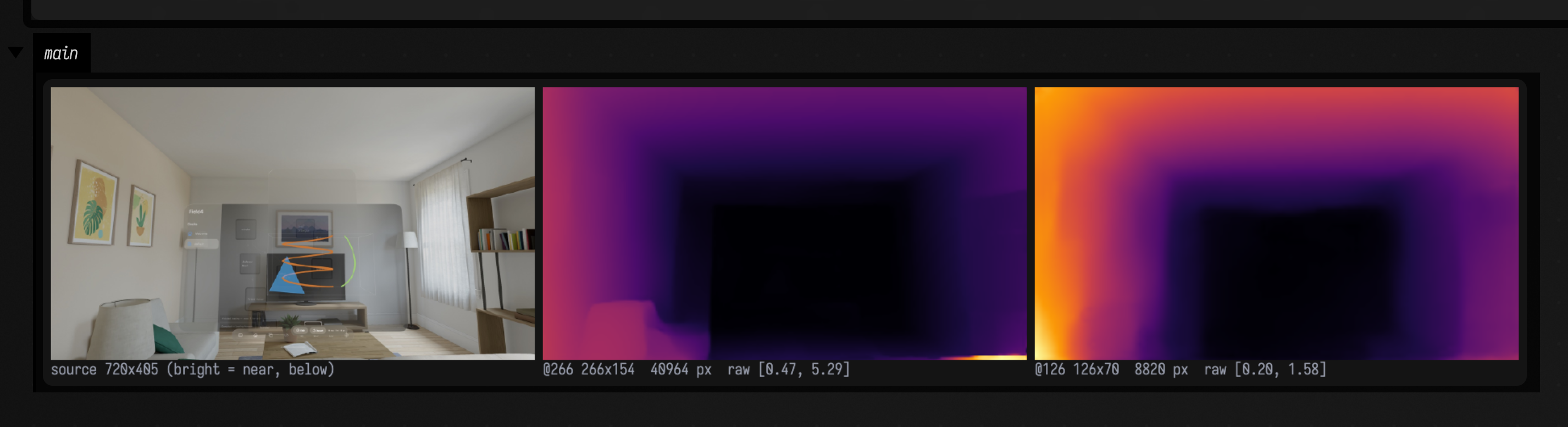
The near floor and the left arm of the sofa are bright, the wall behind the television is dark, and the bookshelf on the right comes forward. Compare the two captions: the same photograph at two sizes gives two different numeric ranges, so a window calibrated at one size does not carry over to the other.
Resolution is also the setting that most affects speed, because cost grows roughly with the square
of it. The @126 panel has about 4.6× fewer pixels than @266 (the counts are in the captions) and ran
in roughly a quarter of the time.
The normalisation window
A texture needs values in [0,1], so the raw map has to be normalised against something. Picking
each frame's own min and max makes the image flicker — a hand entering shot rescales the entire
background. So DepthAnything tracks the window with an exponential moving average and normalises
against the smoothed version. infer returns a DepthStats reporting both:
| field | what it is |
|---|---|
rawMin / rawMax |
Report the smallest and largest depth values in this frame, in the model’s arbitrary inverse-depth units. Compare them with the smoothed window to see how much the scene has changed. |
windowMin / windowMax |
Report the smoothed bounds mapped to 0.0 and 1.0 in the output texture. Smoothing keeps a changing raw range from rescaling the image abruptly. |
settled |
Reports whether the smoothed window has caught up with the raw range. It is true on the first frame, whose range seeds the window, and can become false after a scene change. |
settled is true on the first frame after construction or resetAdaptation(), because the window
is seeded from that frame's own range. It is false for the frames after a scene change, while the
average moves towards the new range. Wait for
settled if you want a stable picture; watch for !settled if you want to know one is still
rescaling.
adaptation is the moving average's rate per frame, in (0,1]. 1.0 means "use this frame's own
range", which is right for a single still and wrong for video; the default 0.1f suits video.
resetAdaptation() forgets the window entirely,
which is what you want after a cut.
A constant frame (a lens cap, a solid colour) would give a zero-width window and a texture full of NaN. It emits mid-grey instead.
Running depth beside a renderer
On a CPU Depth Anything Small takes roughly 100ms at 266² and roughly 400ms at 518², far slower
than a frame. Calling infer from a render loop would stall it, so DepthAnythingWorker runs
inference on its own thread. The renderer never waits; it draws the most recent depth map, which
is a few frames old. The sketch below sets one up and feeds it webcam frames:
// Construct once per box run; Stop or rerun closes its worker thread.
val depth = DepthAnythingWorker(width = 266, height = 266)
val tex = StreamingTexture(
    depth.depthFp16,
    depth.width,
    depth.height,
    imageFormat = VK10.VK_FORMAT_R16_SFLOAT,
)
// per frame
depth.submit(webcam.frameBuffer, 640, 480) // returns immediately
if (depth.consume()) tex.recordUpload(commandBuffer)
Needs a Vulkan device and a webcam
Which code on this page runs says which blocks on the page are illustration and which you can paste.
The worker handles frames like this:
- Frames are dropped, not queued.
submitoverwrites anything not yet picked up. Inference is slower than capture, so a queue would only grow, and every frame in it would be staler than the last.framesSubmitted,framesInferredandframesDroppedare all readable, so you can read the drop rate off the worker. consume()copies, on the calling thread.depthFp16must keep a fixed identity, becauseStreamingTexturecaptures its source buffer once at construction and re-reads it every frame. If the worker wrote into it directly, the renderer could read half an old map and half a new one. So the worker publishes into an internal buffer andconsume()copies under the lock. That copy is the only work the render thread does.
Six frames of staleness at 60fps looks fine for displacement, parallax and depth-keyed compositing, and looks like lag for anything a hand is steering directly. No provider flag removes that delay; see what the flags cost.
CLIP: a shared space for pictures and words
Field binds both of CLIP's towers, text_model.onnx and
vision_model.onnx. Each one emits an already-projected 512-vector into the shared space, so no
projection head has to be reimplemented here.
:::static
import afield.ai.inference.onnx.*
import java.nio.ByteBuffer
import java.nio.ByteOrder

fun toRgba8(img: Img): ByteBuffer {
    val out = ByteBuffer.allocateDirect(img.width * img.height * 4).order(ByteOrder.nativeOrder())
    for (p in 0 until img.pixelCount) {
        for (c in 0 until 3) {
            val v = (img.data[p * img.channels + c].coerceIn(0f, 1f) * 255f + 0.5f).toInt()
            out.put(p * 4 + c, v.toByte())
        }
        out.put(p * 4 + 3, 255.toByte())
    }
    return out
}

// Two real images already in the repository, chosen to be unalike.
val room = imgFromFile("public/docs/assets/vision/fline-viewer.jpg", 3).scaleBy(0.45)
val car = imgFromFile("public/docs/assets/fabricate-toy-car-donmccurdy-reference-close.png", 3)

// Encode the prompts ONCE, into a val. That is the whole discipline: the text tower is then simply
// not in the per-frame path, and there is nothing cleverer to do about it than this.
val prompts = ["an empty living room", "a shelf of books", "a car", "red cloth", "a bowl of soup"]
val text: Map<String, ClipVector> = ClipText.encodeAll(prompts)

val encoder = ClipImage()
val roomVec = encoder.encode(toRgba8(room), room.width, room.height)
val carVec = encoder.encode(toRgba8(car), car.width, car.height)

// A text-text cosine for scale, so the modality gap below is visible rather than asserted.
val textText = clipEncode("storm").cosine(clipEncode("calm"))

/*
A semantic axis: the unit direction from one prompt towards another. Projecting an image onto it
is a continuous knob whose units are meaning rather than pixels. What matters is not the absolute
value — same modality gap — but that the two images order correctly along it.
*/
val axis = text.getValue("an empty living room") axisTo text.getValue("a car")
val roomOnAxis = roomVec.project(axis)
val carOnAxis = carVec.project(axis)
:::fold draw the numbers into the figure, because a box capture shows the output area, not stdout
val rows = buildList {
    add("cosine of image against prompt")
    add("                       room     car")
    prompts.forEach {
        add("%-20s %.4f  %.4f".format(it, roomVec.cosine(text.getValue(it)), carVec.cosine(text.getValue(it))))
    }
    add("")
    add("every one near 0.2 = the modality gap,")
    add("not weak agreement. For scale, two")
    add("prompts: cos(storm,calm) = %.4f".format(textText))
    add("")
    add("classify() over the same 5 candidates")
    add("is the comparison that means something:")
    add("  room -> %-20s %5.1f%%".format(roomVec.best(text)!!.first, roomVec.best(text)!!.second * 100))
    add("  car  -> %-20s %5.1f%%".format(carVec.best(text)!!.first, carVec.best(text)!!.second * 100))
    add("")
    add("axis: \"an empty living room\" -> \"a car\"")
    add("  room photo   %+.4f".format(roomOnAxis))
    add("  car render   %+.4f".format(carOnAxis))
    add("  ordered correctly: %s".format(carOnAxis > roomOnAxis))
}
var table = Img.filled(600, 540, 3, 0.08f)
rows.forEachIndexed { i, line -> table = table.withLabel(line, 8, 10 + i * 25, 2) }

showImgGrid(
    "room photo" to room,
    "car render" to car,
    "what CLIP says about both" to table,
    columns = 3,
    cellSide = 600,
)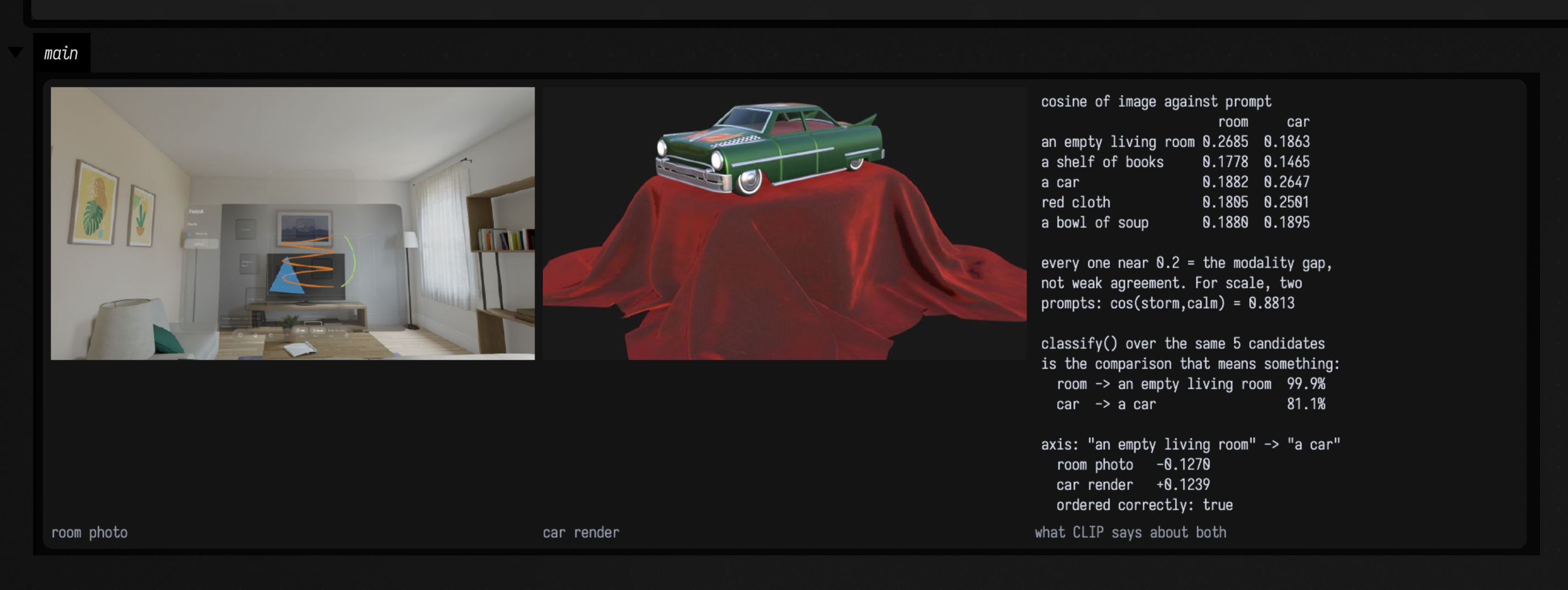
There is no training step and no fixed label set: the prompts are ordinary strings. The room photograph picks "an empty living room" and the car render picks "a car", with "red cloth" second — the car really is sitting on red drapery.
How to read a cosine between a prompt and an image
A raw cosine is easy to misread, which is why classify exists alongside cosine. Every
image↔text cosine in the figure sits between about 0.15 and 0.27, including the correct ones. Meanwhile two unrelated text prompts, storm and calm, sit at
0.8813. The two towers occupy offset regions of the sphere — the modality gap — so:
| comparison | where it lands | what you may conclude |
|---|---|---|
| text ↔ text | a narrow high cone, ~0.75–0.95 | almost nothing; even opposites score high |
| image ↔ text | far lower, ~0.15–0.30 | almost nothing in absolute terms |
| one image ↔ several prompts | ranked | this is the signal |
| one prompt ↔ the same scene over time | a moving projection | this is also the signal |
0.21 does not mean "unrelated" and 0.88 does not mean "the same". Only rank and difference
carry information, and a threshold on a raw cosine that works for one scene will fail on the next.
classify(candidates) asks the question in a form that has an answer: it softmaxes the cosines against each
other and returns scores that sum to 1, highest first. They compare this particular set of prompts;
they are not calibrated probabilities. best() is its first element.
logitScale only changes how peaked the distribution is; it cannot change the ranking.
Projecting onto an axis between two prompts
The difference of two prompt embeddings is a direction, and projecting a frame onto it gives a
continuous value that follows the meaning of the two prompts. It takes two calls,
a axisTo b and then .project(axis), and the figure above runs them on the axis from
"an empty living room" towards "a car".
Both projections come out small and on opposite sides of zero. The modality gap applies to a
projection as it does to a cosine, so the magnitude is not a score; what matters is that the car
render sits further along the axis than the room photograph. For a live input, watch how the value
moves. ClipVector.mean(...) averages and renormalises several prompts, which usually gives a
steadier axis than a single prompt.
The rest of ClipVector is small and pure: plus/minus/times (not renormalised,
because the length of a difference is meaningful), dot, cosine, normalized, and
toBase64/fromBase64 for persisting an embedding — 2732 characters of exact fp32 round trip, for a
stored identity to cosine against later.
Encoding prompts once
Encode each prompt once, into a val, rather than inside the per-frame code. That keeps the text
encoder out of the per-frame path, and never opens it in a session that asks it nothing.
ClipText.encodeAll is the batch form, and val prompts = mapOf("…" to clipEncode("…"), …) is
what the onnx_webcam_live starting point does.
Getting the models onto a fresh machine
Weights are not in the repository (tens to hundreds of megabytes, and separately licensed), so a model is a URL plus somewhere to put it, and the first call fetches it.
The cache root is ~/.afield/onnx/models, overridable with the afield.onnx.cacheRoot system
property or the AFIELD_ONNX_CACHE_ROOT environment variable, as for semantic search. Sizes are what these files occupy on disk:
| file | on disk | what it is |
|---|---|---|
depth-anything-v2-small/model.onnx |
99.1 MB | fp32 depth weights, ~25M params — the default |
depth-anything-v2-small/model_fp16.onnx |
49.6 MB | fp16 weights; half the download, slower |
clip-vit-base-patch32/text_model.onnx |
254.1 MB | CLIP text tower, fp32, projected to 512-d |
clip-vit-base-patch32/vision_model.onnx |
351.7 MB | CLIP vision tower, likewise |
clip-vit-base-patch32/tokenizer.json |
2.2 MB | the BPE vocabulary; sot=49406, eot=49407 |
So depth alone costs about 99 MB and CLIP costs about 608 MB more. What happens on first call:
ensureLocal()checks for the file and returns immediately if it is there. The second call, and every call in every later session, is a file-exists check.- Otherwise it downloads to a
.partsibling and moves it into place in one step, so an interrupted fetch cannot leave a truncated model behind. - The sha256 is verified before the move, against a digest recorded in the source. A mismatch deletes the partial file and throws.
- Then the session is built, which is the slow part — see the caching note above.
OnnxModel.isPresent is a cheap boolean if you want to branch on it. Clip.TOKENIZER is fetched
the same way.
afield.ai.inference.onnx needs nothing but network access on first run: the ONNX Runtime native library ships
inside the JNI jar.
CoreML, fp16 and thread pinning
None of these three provider settings makes depth inference faster. Measured on Apple Silicon with 10 cores, at 518² unless stated:
| setting | measured | so |
|---|---|---|
| CoreML | 43 of 848 nodes claimed, across 19 partitions; ≈470ms vs ≈388ms for CPU | CoreML is slower; AUTO resolves to CPU |
| fp16 weights | ≈462ms vs ≈388ms — every operator upcasts | fp16's win is download size, not speed |
| pinned threads | setIntraOpNumThreads(4) gave ≈457ms vs ≈388ms for ORT's default |
leave intraOpThreads at 0 |
A Hugging Face model_fp16.onnx still has fp32 input and output tensors, so nothing is saved
at the runtime boundary. Pick it to save 50 MB of disk, not to save time. CoreML is still worth
requesting for transformer encoders, where the partition count is small.
On a CPU, depth inference is slower than a frame whatever the settings, and changing the input resolution saves far more time than any of these flags.
The ONNX Runtime Java API has no IoBinding, so outputs are always copied. For the models here the
copy is negligible: a 518² fp32 depth map is 1.07MB.
How much the timings move
Depth at 266×154 has been observed between about 60 ms and 95 ms, and at 126×70 between about 16 ms and 25 ms; the CLIP vision tower, 31–34 ms per image — all on one machine, in August 2026. The spread is the machine rather than the model, and the numbers burned into the captures above are whatever that capture run measured. The numerics are the part that holds across runs and machines.
Checking it on your own machine
Two entries in the smoke catalog, onnx.depth.smoke and onnx.clip.smoke, both jvm-main and both
tagged network because a cold machine downloads weights before they can run. Each checks Field's
preprocessing against reference values taken from the same weights under Python's onnxruntime and
tokenizers. Run them the usual way (see building and testing):
python3 tools/run_field_tests.py --id onnx.depth.smoke --id onnx.clip.smokeNeither test uses a camera. To try the webcam demo without one, give WebcamPerceptionDemo a
still image from a shell:
# second argument is a path rather than a camera index -> still-image mode
run-jvm-main afield.examples.onnx.WebcamPerceptionDemo \
    --arg /tmp/out.png --arg public/docs/assets/vision/fline-viewer.jpg
That writes a side-by-side PNG of the source and its depth map, and prints a zero-shot ranking plus two semantic-axis projections. On the room photograph above it ranks "an empty room" at 52.0% and "a computer screen" at 41.7%, and puts "a person sitting at a desk" at 0.4%, since there is nobody in the picture. It checks the image's mean brightness first, so a decode that came back black does not produce a plausible-looking ranking.
Which code on this page runs
The opening snippet, the depth figure and the CLIP figure run as shown. The session-cache example and the worker sketch are not run: the worker needs a Vulkan device and a webcam, so treat it as a starting point to finish rather than code to paste.
Agents: snippet coverage
StreamingTexture(...) and recordUpload(...) are the only calls on this page that nothing in
the repository exercises. dev_docs/DOCS_PAGE_SNIPPET_COVERAGE.md has the block-by-block census.
Reference
| Call or property | Behavior |
|---|---|
OnnxRuntime.session(spec) |
Returns the session cached under this SessionSpec, constructing it on first request. Reuse the same spec to avoid repeated model initialization. |
OnnxRuntime.evict(spec) / .closeAll() |
Closes one cached session or all cached sessions. Evict after changing a model file or before measuring a cold start; existing users must stop using the closed session. |
OnnxRuntime.liveSessionCount |
Counts currently cached sessions. Check it to confirm that repeated inference is reusing a session. |
OnnxModel.ensureLocal() |
Returns the local model file, downloading and verifying its SHA-256 when absent. Call it before timing inference so downloading is outside the measurement. |
OnnxModel.isPresent / .localPath |
Checks whether the model is already available and reports its cache location. Reading these does not substitute for ensureLocal() when a download is required. |
OnnxModel.cacheRoot |
Names the model cache directory, normally ~/.afield/onnx/models. Use it to inspect where downloaded weights are stored. |
DepthAnything(w, h, …) |
Creates an estimator for one frame at a time. Both input dimensions must be multiples of 14; choose them with sizeFor for arbitrary sources. |
DepthAnything.sizeFor(w, h, longestSide) |
Computes a legal model input size while preserving the source aspect as closely as the grid permits. longestSide controls inference resolution and cost. |
DepthAnything.forSource(w, h, …) |
Chooses a legal input size and constructs the estimator for that source shape. Use it instead of calculating rounded dimensions yourself. |
.infer(rgba, srcW, srcH) |
Runs inference on one RGBA frame and returns DepthStats. The estimator’s depth buffers hold the corresponding output. |
.depthRaw / .depthFp16 |
Expose depth in model units and adapted [0,1] half-float values respectively. Use the latter for an R16_SFLOAT texture and the former when you need unnormalised output. |
.resetAdaptation() |
Forgets the running normalization window. Reset after a scene change when the old range would distort the new depth contrast. |
DepthAnythingWorker(…) |
Runs depth inference on a worker thread. Submit frames and consume completed results so the rendering loop need not wait for inference. |
ClipText.encode(text) / clipEncode(text) |
Encodes one prompt as a unit 512-dimensional vector. Cache prompt vectors when comparing many frames against the same labels. |
ClipText.encodeAll(texts) |
Encodes several prompts using the loaded text model. The returned labelled vectors can be reused for classification. |
ClipImage().encode(rgba, w, h) |
Encodes an RGBA image as a unit 512-dimensional vector. Compare it against several prompt vectors to interpret relative similarity. |
ClipVector.cosine / .dot / .project |
Measures cosine similarity, inner product or scalar projection onto an axis. Relative rankings are more useful than a universal threshold across text and image modalities. |
a axisTo b |
Builds the unit direction from embedding a toward b. Project image embeddings onto it to turn a semantic contrast into a continuous control. |
.classify(candidates) / .best(…) |
Ranks labelled candidates using softmax, or returns the best candidate. Scores describe competition within that candidate set rather than a calibrated real-world probability. |
.toBase64() / ClipVector.fromBase64(s) |
Serializes and restores an embedding without changing its values. Use it to save a prompt or image reference without re-encoding. |
Where to go next
- Imaging and computer vision —
Img, and everything you would do to a depth map once you have one: colour maps, gradients, thresholds, contours. - Field 4 graphics —
StreamingTextureand the Vulkan side of getting anR16_SFLOATmap onto the GPU. onnx_webcam_live: a starting point running both models on one webcam frame in a single box.- Faust, which caches compiled DSP across box re-runs in the same way.