FM-1 simulator
The M-VAVE FM-1 is a pocket groovebox with eight 64-step tracks: DX7-style FM, a 303 bass, 808 drums, a plucked string, a chip-tune PSG and a sampler. Field runs its browser simulator in the audio engine. Load a factory project, play its tracks from a box, feed them Field patterns, turn controls with signals, or read the sequence back as MIDI.
The simulator ships with Field as a WebAssembly module built from the open firmware. You can try it without installing anything or owning the device.
A box that plays it
This box loads factory project 1, starts the sequencer, and returns the simulator as its last expression, so launching the box puts it in the mix:
val fm1 = FM1Sim.shared

fm1.preset(1) // a factory project, 0 to 15: change it and re-run
fm1.start() // start from the first step, playing or not
fm1.level(0.8)

fm1.node
FM1Sim.shared is one simulator for the whole of Field. Re-running the box loads the new project into
it, so you can change the slot and hear the next project. Stopping the box takes it out of the mix;
fm1.stop() stops the sequencer itself.
Factory project 0 sounds like this, six seconds from the moment PLAY is pressed:
And factory project 1, the one the box above plays:
fm1.factoryName(slot) names each of the sixteen, and fm1.tracks() says what each track of the
loaded project holds: its sound source (DX7, BASS_303, DRUM_808, PSG, PLUCK or SAMPLER), its
volume, the steps that hold notes, the tempo and the MIDI channel it listens on.
Playing notes on any track
Every track listens on a MIDI channel, so a box can play any of them by pitch. In project 1, track 0 is the 303, track 1 the 808 and track 2 a DX7 voice; this plays a chord on the DX7 and a kick and snare on the 808, a quarter of a second apart:
val fm1 = FM1Sim.shared
fm1.chord(2, [60, 64, 67], seconds = 1.0)
fm1.note(1, 36, afterSeconds = 0.25) // the 808's kick
fm1.note(1, 38, afterSeconds = 0.5) // and snare
afterSeconds puts each note on the simulator's own clock, so the box returns at once and the notes land
on time. Timing is to the simulator's block of 128 samples, about 3 ms.
| call | what it does |
|---|---|
note(track, note, seconds = 0.25, velocity = 100, afterSeconds = 0.0) |
play a MIDI note (60 is middle C) for a while; a fractional note is rounded |
chord(track, notes, seconds = 0.5) |
several notes struck together |
noteOn(track, note, velocity), noteOff(track, note) |
hold and release a note yourself |
cc(track, controller, value) |
set a controller, 0 to 127; FM1Sim.CC names the ones the voices answer to |
bend(track, amount) |
pitch bend, -1 to 1 of the bend range (two semitones on a DX7 track) |
program(track, n) |
switch a DX7 track to voice n of the 128 in the voice library |
start(), stop(), resume() |
the sequencer's transport, as MIDI Start, Stop and Continue |
midi(0x90, 60, 100) |
any raw MIDI message |
On a drum track the note picks the drum: 36 is the kick, 38 the snare, 42 the closed hat and 46 the open one, 39 the clap, 37 the rim, 49 the crash, 56 the cowbell, and 41, 45 and 48 the toms.
The controllers each voice answers to are CC.VOLUME, PAN, EXPRESSION, REVERB and MOD_WHEEL on
every track; CUTOFF, RESONANCE, DECAY, ENV_MOD and SLIDE on the 303; CUTOFF, RELEASE and
DAMPING on the pluck and CUTOFF and RELEASE on the PSG. A DX7 voice is shaped by its patch, and
answers MOD_WHEEL, BREATH, FOOT and SUSTAIN through the patch's own modulation settings.
From a keyboard
fm1.listen(input) sends everything a MIDI device plays to the simulator, which routes it by channel
to the tracks listening there:
val keys = MidiDevices.openInput(MidiDevices.inputs().first())
FM1Sim.shared.listen(keys)
Playing a pattern on a track
fm1.play(pattern, track) keeps playing a Field pattern on one track, in time with the project: unless
you give a cps, one cycle lasts one bar of the project's tempo. This lays a line over project 1's DX7
track while the project's own 303 and 808 carry on:
val fm1 = FM1Sim.shared
fm1.preset(1)
fm1.start()
fm1.play(pat("<c5 ef5> ~ [g5 bf5] ~ c6 ~ g5 ~"), track = 2)

fm1.node
Re-running the box with a different pattern replaces the one on that track, and
fm1.stopPatterns(track) stops it. The atoms are read as notes (c5 is middle C, as everywhere in
Field's patterns), the note parameter is a MIDI note, and the drum names bd, sd, hh, oh, cp,
rim, cr, cb, lt, mt and ht play the drum tracks: fm1.play(pat("bd*2 [~ sd] hh*4"), track = 1) plays on top of the 808's own
pattern. gain scales the velocity, and a gain of 0 is a rest.
Here are three cycles of it over the project, rendered offline:
From the drawing layer
A region of the drawing layer becomes a pattern with toPattern() (see
Drawing and notation), so a score drawn on the canvas plays a track. Here
x runs over eight beats and y over two octaves of MIDI notes, from 84 at the top to 60 at the bottom:
val score = notation.space("score", x = 0.0..8.0, y = 84.0..60.0)
FM1Sim.shared.play(score.toPattern(), track = 0, cps = FM1Sim.shared.cps / 2)
The drawn score is one cycle, so halving cps gives its eight beats two bars of the project's tempo. A
note drawn between two lines is rounded to the nearer one.
Turning a control with a signal
fm1.modulate(track, controller, signal) lets any of Field's signals turn a controller: 0 is the bottom
of its travel and 1 the top. This sweeps the 303's filter in project 1 with a sine that takes four
seconds to go round:
val fm1 = FM1Sim.shared
fm1.preset(1)
fm1.start()
fm1.modulate(0, FM1Sim.CC.CUTOFF, SineOsc(0.25.p) * 0.5 + 0.5)

fm1.node
The signal is read once per audio block in the same pass that plays the simulator, so an LFO used here is
the same LFO wherever else it is heard, and an envelope follower or a Param from a slider works as
well. A NaN leaves the controller where it was; values past 0 and 1 hold it at the end of its travel,
since a MIDI controller has 128 steps. modulateBend(track, signal) does the same for the pitch bend,
and stopModulating() lets go of everything.
The FM-1 inside a signal graph
fm1.node is a stereo source like any other, so it can go through Field's filters and effects.
toMono() gives one channel to work with; this keeps the right channel as it is and puts the left
through a low-pass filter:
val fm1 = FM1Sim.shared
val dry = fm1.node.toMono()
StereoSignal(dry / OnePole(500.p), dry)
DX7 voices
The DX7 tracks play voices from the FM-1's voice library: four banks of 32, which program(track, n)
picks from. fm1.voices(bank) reads a bank as Dx7Voices, which a box can edit and send back to a track
with fm1.voice(track, v):
val fm1 = FM1Sim.shared
val piano = fm1.voices(0)[0] // "PIANO 1"
val bell = piano.copy()
bell.algorithm = 5
bell.feedback = 6
bell.op(2).coarse = 7 // operator 2 at seven times the note's frequency
bell.op(6).coarse = 11
bell.name = "BELLPIANO"

fm1.voice(0, piano.lerp(bell, 0.5)) // halfway between the two
lerp(other, t) blends two voices parameter by parameter: 0 is the first, 1 the second, and values
outside 0 to 1 carry on past them until each parameter reaches the end of its range. Switches such as
the algorithm change over at the halfway point. Each operator has level, coarse, fine, detune,
velocity, ampMod, fixed and its envelope's rate(i) and egLevel(i); the voice has algorithm,
feedback, transpose, the LFO and its name. Each parameter has the DX7's own range, and a value set
past it is held at the end.
This clip plays the same chord eight times on project 0's first track while the voice moves from the factory piano to that bell, an eighth of the way each time:
A DX7 bank file (a 32-voice .syx dump) loads into a library bank with fm1.loadDx7Bank(file, bank),
after which program(track, bank * 32 + i) plays its voices. fm1.setVoices(bank, voices) writes 32
voices of your own, and Dx7Voice.bankSysex(voices) makes a .syx file of them for a real DX7 or an
editor.
Field sounds on the sampler's pads
A track whose source is the sampler plays eight pads, one per drum note: bd (36), sd (38), rim
(37), lt (41), mt (47), ht (48), hh (42) and oh (46), pads 0 to 7. fm1.sample(pad, seconds,
signal, name) renders a Field signal and puts it on a pad. fm1.source(track, FM1Sim.SourceType.SAMPLER)
turns a track into a sampler track, keeping its sequence. This builds a kit from Field's oscillators and
noise and plays ACID ALLEY's drum part on it:
val fm1 = FM1Sim.shared
fm1.preset(1) // ACID ALLEY: track 1 is the 808

val kick = SineOsc(Param(0f).modulate(Line(150f, 45f, 0.09f))) * perc(0.45) * 0.9
val snare = SineOsc(185.p) * perc(0.08) * 0.5 + WhiteNoise(seed = 1).highpass(1800f) * perc(0.18) * 0.6
val hat = WhiteNoise(seed = 2).highpass(7000f) * perc(0.05) * 0.7
val open = WhiteNoise(seed = 3).highpass(7000f) * perc(0.35) * 0.6

fm1.sample(0, 0.5, kick, "FIELD KICK")
fm1.sample(1, 0.3, snare, "FIELD SNARE")
fm1.sample(6, 0.1, hat, "FIELD HAT")
fm1.sample(7, 0.45, open, "FIELD OPEN")

fm1.source(1, FM1Sim.SourceType.SAMPLER)
fm1.start()
fm1.node
The pads not given a sound keep the factory's voice samples (HEY, WAH, HAHA, YOI). fm1.samples() lists all eight with their names and
lengths. fm1.sample(pad, file) loads a WAV or AIFF file, and fm1.sample(pad, audio, sampleRate, name)
takes a FloatArray, such as a recording or one channel of renderSignalsOffline. fm1.clearSample(pad)
empties a pad and fm1.factorySamples() puts the factory kit back.
The audio is converted the way the FM-1's own editor converts it: mixed to mono, resampled to 32 kHz and
compressed with the firmware's SEA5 encoder, about 7 bits a sample. The eight pads share 19.5 seconds,
and a sample that would overflow that is refused, leaving the pads as they were. A sample plays at its own pitch and
length: the firmware's per-pad tune, level, length and choke keep their defaults, since Field has no
way to set them yet. fm1.sampleBank() returns the whole bank and
fm1.setSampleBank(bank) writes one back, so a kit can be kept beside a project.
The FM-1's sequence as MIDI
A track can send its notes out of the simulator as well as, or instead of, playing them:
midiOut(track, FM1Sim.MidiOut.ALSO) or MidiOut.ONLY. drainMidi() collects what was sent, and
toMidiClip(bpm) turns it into a clip that Field can draw, save as a MIDI file or play as a pattern with
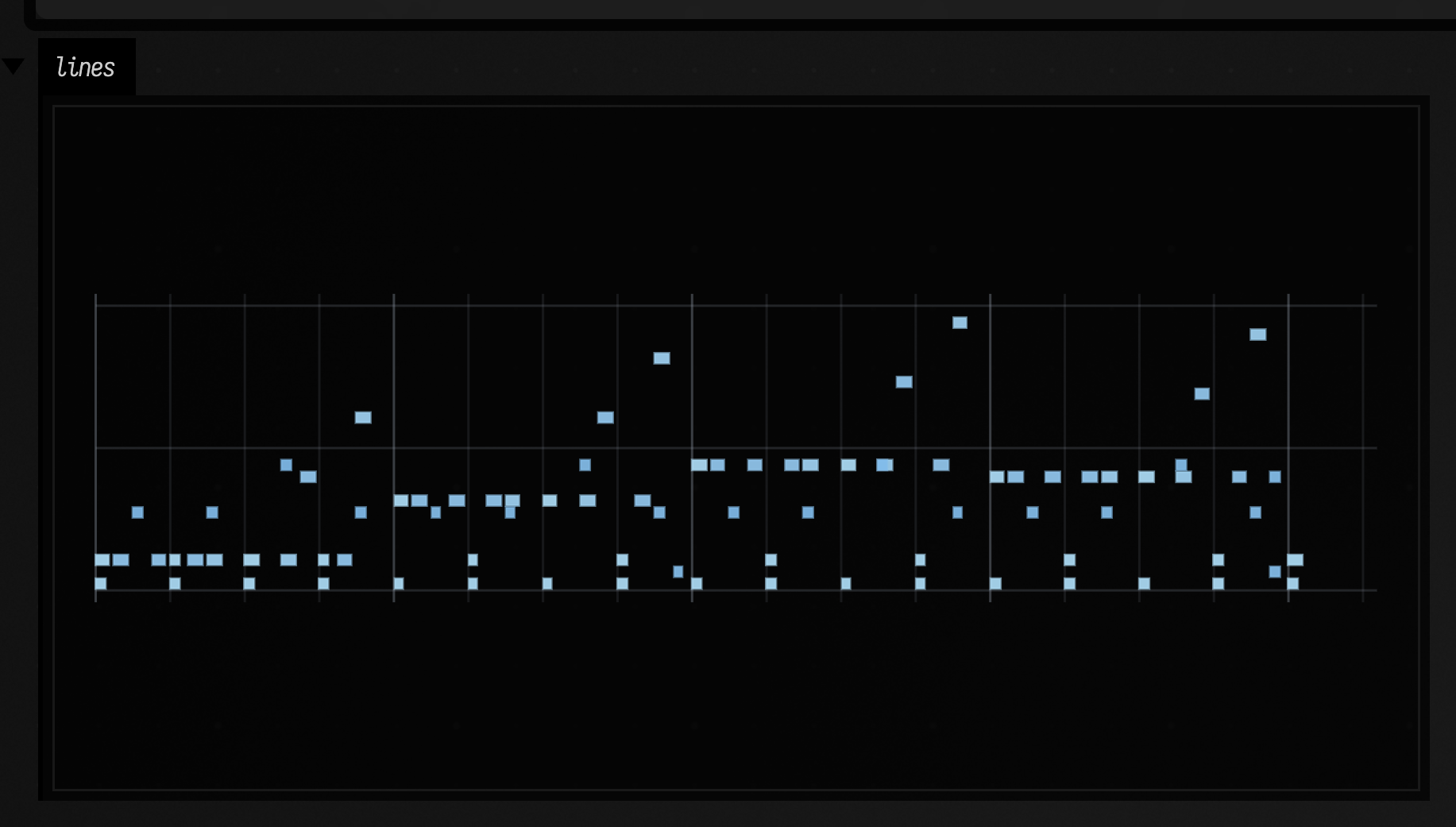
toPat(). This renders project 1 offline for one pass through its 64 steps and draws the 303's and the
808's parts as a piano roll:
FM1Sim.create().use { fm1 ->
    fm1.preset(1)
    fm1.midiOut(0, FM1Sim.MidiOut.ALSO)
    fm1.midiOut(1, FM1Sim.MidiOut.ALSO)

    val l = FloatArray(4800)
    val r = FloatArray(4800)
    repeat(5) { fm1.render(l, r, 4800, 48000f) }
    fm1.start()
    repeat(75) { fm1.render(l, r, 4800, 48000f) } // 7.5 seconds: four bars at 130 bpm

    showMidiRoll(fm1.drainMidi().toMidiClip(fm1.bpm.toDouble()))
}
With MidiOut.ONLY the FM-1's sequencer plays something else: drain its notes in a loop and hand them
to a Faust instrument or a MIDI device.
The front panel
fm1Panel(fm1) puts the FM-1's front panel in the box: its screen, redrawn whenever the firmware draws
on it, and rows of buttons below that press the panel's buttons, play its 27 keys and turn its seven
encoders. The buttons are held while the mouse is down, as the real ones are. Return the panel with the
simulator's node and the box plays the FM-1 and shows it:
val fm1 = FM1Sim.shared
fm1.preset(4)
fm1.start()

fm1.node + fm1Panel(fm1)
This is the screen of factory project 4, CHIP PARADE, running for eight seconds. Here the panel has a
simulator of its own that nothing else plays, so pull = true lets the panel keep it running, end
closes it when the box stops, and controls = false leaves the buttons out of the picture:
val fm1 = FM1Sim.create()
fm1.preset(4)
fm1.start()

fm1Panel(fm1, controls = false, pull = true).end { fm1.close() }
With the buttons, the box's output has the screen above three groups of hold buttons: the fourteen
panel buttons (PLAY, REC, SEQ, ARP, HOME, EDIT, SEL, SAVE, FX, ENV, LFO, GLO and the two octave
buttons), the 27 keys from C1 to D3, and a ◀ and ▶ for each of the seven encoders, with a level
slider at the end. scale sets how large the screen is drawn (2 by default, for a 480-pixel screen). For a single picture, fm1.screenPng(scale) returns the
screen as it is now as a PNG, which display shows, and fm1.knobs() has the labels and values the
screen shows beside the encoders, as text.
Saving projects
fm1.saveProject(file) writes the project the simulator has loaded, in the FM-1's own format, and
fm1.loadProject(file) reads one back, so an edit made on the panel or from code can be kept beside the
document. exportProject() and importProject(bytes) do the same with the bytes, and
factoryProject(slot) gives a factory project's bytes without loading it.
Playing the panel from code
The panel itself is there too. Every call queues a control change that the simulator picks up at the start of its next block, so it is safe to call from a box while the sound plays.
| call | what it does |
|---|---|
preset(slot) |
load a factory project, 0 to 15 (0 is "NEON KEYS") |
play() |
press PLAY/STOP, which toggles the sequencer |
whiteKey(n, blocks = 40, afterBlocks = 0) |
play white key n (1 to 16) for that many 128-frame blocks, optionally starting later; the white keys are also the step keys 01 to 16 |
tap(FM1Sim.Button.REC) |
press and release a panel button: OCT_DOWN, OCT_UP, FX, SEL, ENV, LFO, EDIT, GLO, HOME, SAVE, ARP, SEQ, PLAY, REC |
button(index, down), key(index, down) |
hold or release a button or any of the 27 keys yourself |
encoder(index, delta) |
turn one of the seven encoders by some detents |
select(track) |
select a track, so the keys, encoders and screen work on it |
step(n) |
toggle step n of the selected track |
level(0.0..1.0) |
the output-level knob |
panic(), release() |
silence every voice; let go of everything held |
isPlaying |
whether the sequencer is running |
A button press has to last at least one of the firmware's 10 ms control scans to be seen, which is why
tap and whiteKey hold for a number of blocks rather than pressing and releasing at once. The white
keys play the selected track in the panel's octave; note plays any track at any pitch.
Rendering it offline
FM1Sim.create() makes a simulator of its own, which you pull audio from directly and close when you
are done. Nothing here needs an audio device, so it works in a test or a docs build. This renders three
seconds of each of the first four factory projects and prints its level every 100 ms as a row of bars:
val bars = " ▁▂▃▄▅▆▇█"
val l = FloatArray(4800)
val r = FloatArray(4800)

for (slot in 0 until 4) {
    FM1Sim.create().use { sim ->
        sim.preset(slot)
        repeat(5) { sim.render(l, r, 4800, 48000f) }
        sim.start()
        val levels = (0 until 30).map {
            sim.render(l, r, 4800, 48000f)
            kotlin.math.sqrt(l.indices.sumOf { i -> (l[i] * l[i] + r[i] * r[i]).toDouble() } / (2 * l.size))
        }
        val trace = levels.joinToString("") { bars[(it / 0.14 * 8).toInt().coerceIn(0, 8)].toString() }
        println("project $slot  playing=${sim.isPlaying}  $trace")
    }
}
Offline, fm1.schedule(pattern, track, cycles, cps) puts every note of a pattern on its block at once
instead of feeding it as the sound plays, so two renders of the same pattern are the same samples.
The simulator renders at a fixed 44,100 Hz, and render converts to the rate you ask for with a
four-point cubic interpolator, which passes the samples through unchanged at 44,100 Hz. A simulator costs
a small fraction of one core: FM1SoundDocs.realtimeFactor() measures how many seconds of a playing
project one second of rendering produces on your machine, so you can see how many simulators of your own
(FM1Sim.create(), one per extra set of eight tracks) the machine can carry.
The simulator, not the hardware
The FM-1 itself runs a closed engine library that the open firmware links against, and the web build leaves it out: the simulator has its own DX7-compatible FM core beside the open 303, 808, pluck, PSG and sampler voices. What you hear is M-VAVE's simulator, which may differ from the device.
Changing the firmware
The simulator is the FM-1's open firmware compiled to WebAssembly, so a box can change the C, build it
and play the result. FM1Firmware.checkout(folder) clones the source into a folder, at the commit Field's
own module was built from. FM1Firmware.patch changes one piece of a source file, FM1Firmware.build
compiles the folder, and fm1.loadFirmware swaps the new module into the running simulator. This one
cuts the 303's output down to whole eighths before it reaches the mix, a three-bit 303 at about half its level:
val fm1 = FM1Sim.shared
val source = FM1Firmware.checkout(java.io.File(System.getProperty("user.home"), "fm1-crushed"))

FM1Firmware.patch(
    source,
    "third_party/synth/bass303.c",
    "out[i]=(int32_t)(sample*16777216);",
    "out[i]=(int32_t)((int)(sample*8)*2097152);",
)

fm1.loadFirmware(FM1Firmware.build(source))
In this clip ACID ALLEY plays on the shipped firmware, and four seconds in the crushed build is swapped in without stopping the sequence:
The first build downloads the WASI SDK the firmware's own build uses, about 115 MB, into
~/.field4/toolchains, and checks it against the release's SHA-256. A build after that takes a few
seconds. The firmware builds with warnings as errors. C that does not compile throws
FM1FirmwareBuildException, whose message is the compiler's output, file and line first. The simulator
keeps playing the firmware it had.
loadFirmware builds the new module before it stops the old one, then swaps them between two audio
blocks. Everything in the simulator's flash goes across: saved projects, the voice library, the sample
bank and settings. So do the project loaded now, each track's MIDI channel and MIDI-out mode, the level,
and the transport. Notes and patterns scheduled ahead still land on their blocks, and a box that returned
fm1.node keeps playing without being relaunched. loadFirmware(wasm, keepState = false) boots the new
firmware with its own factory storage instead, for a build whose flash layout has changed.
fm1.loadBuiltInFirmware() goes back to the module Field ships.
patch needs the text it replaces to occur exactly once in the file, so an edit written against one
version of the source fails loudly against another instead of doing nothing. FM1Firmware.reset(source)
undoes every edit. FM1Sim.create(file) starts a private simulator on a module of your own, which must
export the simulator interface Field drives (FM1Sim.FIRMWARE_EXPORTS).
Live-coding the firmware
fm1.hook(track, program) runs a StackSL program inside the firmware, on every
sample of one track, after the track's voice and before its level, pan and effects. Running the box again
with a changed program changes the sound from the next block, about 3 ms later. The sequence, the voices
and the rest of the firmware keep running.
val fm1 = FM1Sim.shared
fm1.preset(1)
fm1.start()
fm1.hook(0, "in 30 * sin 0.12 *") // ACID ALLEY's 303, folded through a sine
fm1.node
In this clip the 303 plays unchanged, then folded by in 30 * sin 0.12 * from two seconds, by
in 80 * sin 0.12 * from four, and unchanged again from six:
Each sample reaches the program as its input, vec4(sample, previous sample, track, seconds), with 1 at
the voice's full scale, so in is the sample. The .x of what the program leaves on top is what the
track plays. The voices' samples mostly stay within a tenth or so of full scale, which is why the fold
above drives the sample 30 times and then scales it back. A program sees one sample at a time, so it shapes, folds and mixes rather than filtering or
delaying; the previous sample in .y is the only memory it has. Output past ±64 is held there, and NaN
becomes silence.
A hook compiles in about a tenth of a second. The first one also loads a build of the firmware with the
hook points in it, which is built once and kept in ~/.field4/fm1, and carries the project and transport
across as loadFirmware does. A program that does not compile throws FM1HookException with StackSL's
message, and the track keeps the hook it had. StackSL's image words (sample, gather, blur and the
rest) are refused, since a hook has a stream of samples and no picture to read. A hook that fails while
it runs is taken out, fm1.hookError(track) says why, and the track plays on without it.
fm1.clearHook(track) takes a hook out, and fm1.evalHook(track, x) runs the program once on a value,
for drawing its curve.
Hooking the sequence
fm1.noteHook(track, program) runs a StackSL program on each note the track's own sequence plays, before
the voice hears it. The note reaches the program as vec4(note, velocity, step, seconds), with MIDI note
numbers, velocity from 1 to 127 and the step from 0 to 63. The program's .x is the note played and .y
its velocity. >x replaces just the note, so in in .x 12 + >x plays the sequence an octave up with its
velocities as written:
val fm1 = FM1Sim.shared
fm1.preset(1)
fm1.start()
fm1.noteHook(0, "in in .x in .z 2 mod 7 * + >x") // the 303's odd steps a fifth up
fm1.node
In this clip the 303 plays its line as written, then with its odd steps a fifth up from two seconds, and an octave up from five:
A velocity at or below zero drops the note, and so do a note outside 0 to 127 and NaN, so
in 0 >y silences a track's sequence. Two notes of a chord moved onto the same note sound once. The
note-off goes to the note that was played, so a hook changed in the middle of a note does not leave it
hanging. Only melodic tracks' own sequences pass through a note hook. Drum tracks' pads don't, and nor do
notes Field sends with fm1.note, a pattern or a keyboard, which Field can change itself before sending.
fm1.evalNoteHook(track, note, velocity, step) says what the hook does to one note,
fm1.clearNoteHook(track) takes it out, and fm1.noteHookError(track) says why one that failed was
removed.
How the hooks are checked
fm1.hook compiles StackSL to GLSL, rewrites that lightly into C++ (FM1Hooks.glslToCpp), and builds
it with the WASI SDK's clang against fm1/glsl_prelude.hpp, where clang's vector types supply GLSL's
swizzles. The synth.fm1.hooks smoke test compiles every StackSL program on Field's docs pages this
way. All 73 that do not read a texture build, and each one's eval agrees with Field's CPU GLSL
interpreter at six inputs to within 1.4 × 10⁻⁵. The same test checks that an identity hook (in)
leaves the 303 bit-for-bit as it was, and that a hook that traps is removed while the track keeps
playing. For note hooks it reads ACID ALLEY's 303 back through its MIDI out: with
in in .x 12 + >x every one of its notes comes out exactly 12 higher, and with in 0 >y none play.
Licence
The firmware's application code is GPL-3.0 with a linking exception for M-VAVE's SDK; the voices it
builds on are MIT (Open303, DaisySP, stmlib, emu2149) and Apache-2.0 (MSFA/Dexed). The module Field
ships, its source commit and the command that built it are recorded in
src/jvmMain/resources/fm1/PROVENANCE.md. Field adds no vendored code to it: the DX7 voice format,
the patterns and the MIDI handling above are Field's own Kotlin. A module built from changed source is a
modified version of the firmware, under the same licences.
Limitations
- It is the simulator, not the device. The FM-1's own FM engine is closed and is not in the simulator, and nothing here has been compared against a real FM-1.
- Timing is to the block. Notes, controllers and voices land at the start of one of the simulator's 128-sample blocks, about 3 ms apart; the firmware has no finer event time.
- Whole semitones. Notes are rounded to MIDI's semitones; a drawn score's in-between pitches are lost.
- One mix. The simulator mixes its eight tracks, with their reverb and delay, into one stereo
output, so there are no separate track outputs to process in Field. A second
FM1Sim.create()with some tracks muted is the way round it, at the cost of a second simulator. - No clock sync. A Field pattern keeps time with the project through
cps, from the project's tempo, and both start together if started together, but neither follows the other's clock. - Eight pads, 19.5 seconds, 32 kHz mono. The sampler's pads are drum hits, one per note, not a keyboard sampler: a pad plays at one pitch whatever note a pattern asks for, and stereo is mixed to mono on the way in.
- The panel is buttons, not the drawing. Clicks go to the rows of buttons below the screen, not to the screen itself, and the knob and encoders are buttons and a slider rather than dials.
- A firmware build needs the network once. The first
FM1Firmware.checkoutandbuildclone the source and fetch the WASI SDK; after that they work offline.
Where to go next
- Sound paths: every way Field makes sound, and which of them play together.
- Faust: the same WebAssembly hosting, for DSP you write yourself.
- Sound: Field's patterns, which
fm1.playplays. - Drawing and notation: the drawn scores
toPattern()reads. - Open the FM-1 starting point to try the simulator, a pattern and the front panel in their own boxes.
- The source:
src/jvmMain/kotlin/afield/audio/synth/FM1Sim.kt(the simulator, MIDI, the screen and projects),FM1Panel.kt(the live panel),FM1Patterns.kt(patterns in, MIDI clips out) andFM1Voice.kt(DX7 voices),FM1Samples.kt(the sampler's bank),FM1Firmware.kt(building the firmware) andFM1Hooks.kt(StackSL hooks); what was left out and why is indev_docs/FM1.md. - The firmware's source: m-vave/fm1_open. The voices are in
third_party/synth/andweb/synth/, and the mixer and sequencer inweb/engine/.
What to build next, most useful first:
- Recording into a pad live: take a box's audio output or a microphone straight onto a pad while the FM-1 plays, rather than rendering a signal offline first.
- MIDI clock both ways: let the FM-1's sequencer follow Field's clock, or Field's patterns follow the FM-1's, so tempo changes on either side carry over.
- A panel drawn like the device: buttons, keys and encoders laid out where the FM-1 has them, around the screen, with dials that turn by dragging and the step lights the firmware sets.
- Microtonal tuning: write the project's tuning block from Field, so drawn pitches between the semitones play as drawn.
- Separate track outputs: a firmware patch that exports each track's buffer from
render_stereoinweb/engine/sound.c, and anodeper track that reads them. - More hook points: the master bus before the effects, and drum tracks' pads in the sequence.
- Hooks with memory: give a hook a block of state that lasts between samples, so it can filter and delay.
- Firmware edited in the box's own editor: open a source file as a box property, so saving it rebuilds and swaps the firmware, with compile errors marked on their lines.
API reference
- Simulator and offline rendering:
FM1Sim,FM1Sim.create,FM1Sim.render,FM1Sim.preset. - Pattern and control inputs:
FM1Sim.play,FM1Sim.modulate,FM1Sim.sample,FM1Sim.voice. - Firmware editing:
FM1Firmware,FM1Firmware.checkout,FM1Firmware.patch,FM1Firmware.build.