Sonic Pi
Sonic Pi v5 is a live-coding instrument with a good synth engine, a sample library, and an idea of time that a text editor can drive. You write Sonic Pi's Ruby in a Field box and run the box. Field talks to it in owned mode: Field starts the Sonic Pi server itself and becomes the client it expects, so there is no Sonic Pi window. Your box is the buffer, and Sonic Pi's log, errors and per-line activity come back into it. On Linux, see Linux AppImage setup first.
Do not start the Sonic Pi GUI when using it from Field. Field starts and owns the daemon itself; that is how it receives v5's one-time control token, routes errors back to the right box, and stops the audio job when you stop the box.
A Sonic Pi you launched yourself can still be reached, but only through its cue port, with
SonicPi.cue; it will not run code Field sends it. For OSC to and from other programs, see
OSC and TUIO.
Why owned mode is the only mode
Sonic Pi authenticates every message that runs code with a token the server mints at boot and
prints once, to the daemon's stdout. daemon.log does not have it in time: the boot-time log
line is commented out, and the surviving one runs in the daemon's exit handler. So only the
process that started the server can ask it to run anything.
A box that is a piece of music
#sonicpi marks a region of Ruby inside an ordinary Kotlin string. # is a comment in Ruby, so the
marker is a legal line of the program it introduces: Sonic Pi reads straight past it and still counts
it, keeping its line numbers in step with the box's.
:::static
sonicPi(
    """
#sonicpi
live_loop :bikes do
  with_synth :dsaw do
    with_fx :reverb, room: 0.5, mix: 0.3 do
      start_note = chord([:b1, :e2, :b3].choose, :minor).choose
      play start_note, release: 8, cutoff: 90, detune: rrand(0, 0.2)
    end
  end
  sleep 8
end
""",
)
Returning the result as the box's last expression is what ties the music to the box. The box stays lit
for as long as the live_loop runs, and stopping the box stops the music: Sonic Pi's job is cancelled
through the same path as any other Field launch.
Here it is running: the box lit, and sixteen seconds recorded from Sonic Pi, two passes of the loop, each a different chord note:
How the recording was made
SonicPiSoundDocs.renderWav("bikes", …) runs the same program in a real Sonic Pi and records it through Sonic Pi's own recorder (the path SonicPiPatternProbe measures). choose and rrand make every recording different.
Write the music as a live_loop for the same reason. A loop never finishes on its own, so the box
stays lit and stays stoppable. A bare sequence of play calls flashes green for a few milliseconds
and goes idle, and whatever it scheduled keeps sounding with no box left to stop.
Errors arrive late, and land on the line
Sonic Pi reports errors asynchronously, and code inside a live_loop fails on its own thread, often
long after the run that started it finished. A mistake there is invisible unless something is still
listening.
Consider a typo that Ruby is happy to parse:
:::static
sonicPi(
    """
#sonicpi
live_loop :bikes do
  start_note = chord(:e1, :minor).choose
  final_no te = chord(:e2, :minor).choose
  play start_note, note: final_note
  sleep 8
end
""",
)
final_no te is not a syntax error. Ruby reads it as final_no(te = …), a call to a method that does
not exist, so nothing complains until the loop runs that line, and then it raises on thread
:live_loop_bikes, not on the thread that ran the box.
Box.sonicPi wires the box up as the destination before sending the code, so what comes back is put
where it belongs:
:::static
[sonic-pi error in run 2 at line 5] Runtime Error Sonic Pi doesn't know a function called `final_no`

buffer bikes, line 5 - thread :live_loop_bikes
NoMethodError: undefined method 'final_no'
  final_no te = chord(:e2, :minor).choose
The line number is marked in the editor as well as printed, and a fresh run clears the previous
marker. Line 5 is counted in the box's code, wherever the sonicPi( call sits in it.
Which line is making sound
Sonic Pi tells its client which line just triggered a note. play, synth, sample, control,
play_chord and the with_fx / live_loop block boundaries each report the caller's line, so the
editor can show the music moving through the code.
A lit line fades over about half a second after its last report. A line lights when it triggers a
note, whether or not you can hear it: a play at amp: 0 still lights its line.
Here a drum loop that triggers every half second runs beside a bass loop that triggers once a second, so the bass lines dim between their notes while the drum lines barely do:
The same reports are available from code. activity() counts triggers per line, and
activeLines lists the lines that triggered recently:
:::static
val music =
    sonicPi(
        """
#sonicpi
live_loop :drums do
  sample :bd_haus, amp: 0.4
  sleep 0.5
end

live_loop :bass do
  use_synth :tb303
  play :e1, release: 0.4, amp: 0.4
  sleep 1
end
""",
    )

// which lines have triggered sound, and how often
music.activity() // {2=13, 3=13, 5=13, 7=7, 9=7, 11=7}
music.sonicPi.activeLines(withinMs = 500)
The editor knows Sonic Pi's vocabulary
A #sonicpi region gets highlighting, hover documentation and completions: functions, the opts of the
function you are calling, and (filtered by context) synth, FX and sample names. use_synth : offers
synths; sample : offers samples.
The vocabulary comes from the Sonic Pi you have installed.
tools/generate_sonic_pi_vocabulary.py extracts every signature, opt, synth, FX and sample name from the app:
:::static
tools/generate_sonic_pi_vocabulary.py
# wrote src/commonMain/resources/sonicpi-vocabulary.json from Sonic Pi 5.0.0:
#   238 fns, 66 synths, 42 fx, 206 samples in 18 groups
Re-run it after upgrading Sonic Pi, and new functions such as v5's link_audio and set_drive!
appear in completion. --check reports whether the committed vocabulary still matches the
installed app.
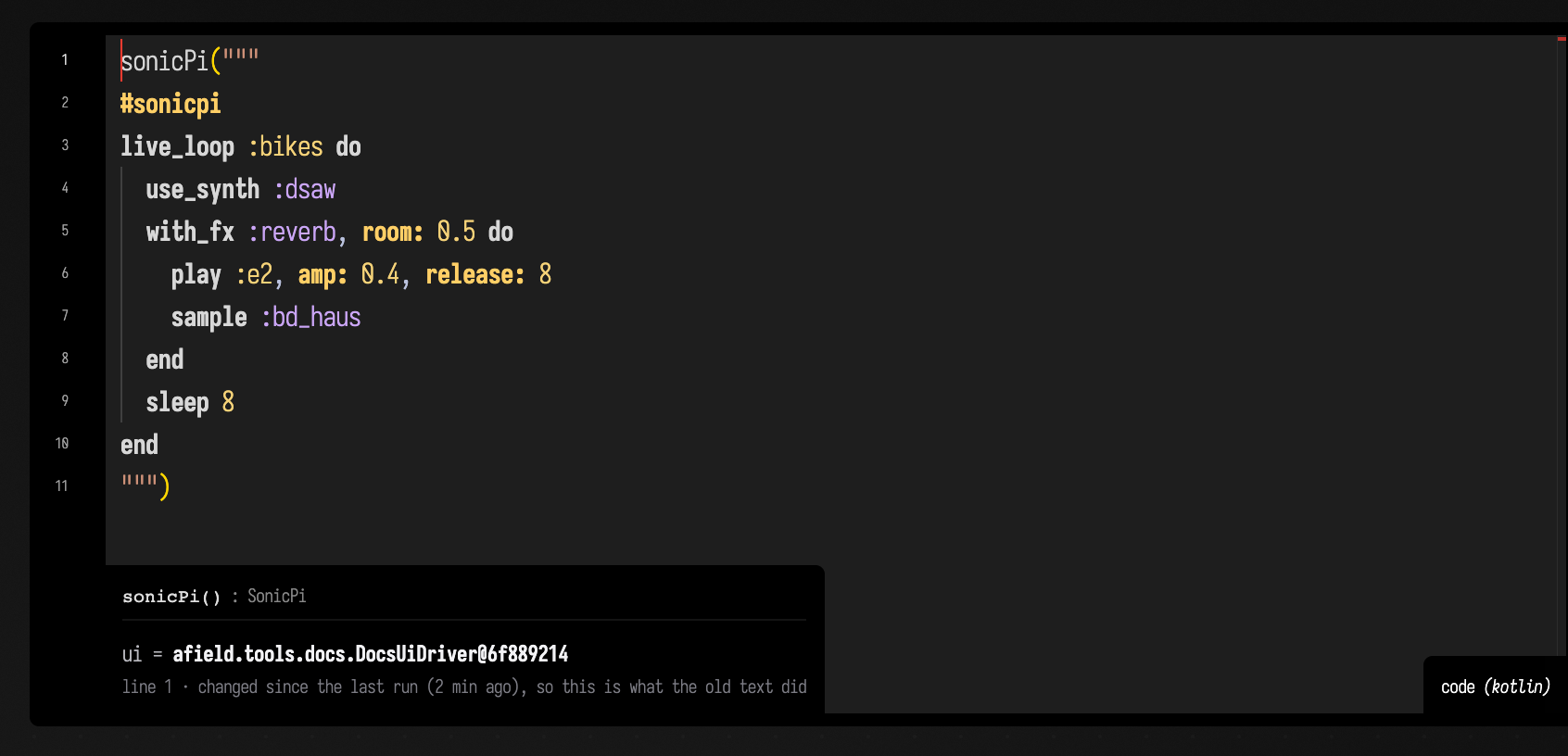
Here is a region in the editor, with the vocabulary in play:
Field patterns as a Sonic Pi sequencer
Field has its own pattern language. pat("bd [hh hh] sd") parses Tidal-style mini-notation, keeps
every transform exact in rational cycle space, and has .every(4) { it.rev() }, .degradeBy,
euclidean rhythms, polymeters and continuous control signals on top of it
(Patterns & Rhythm). Sonic Pi has the synths, FX, samples and a
sample-accurate scheduler. You can write the pattern in Field and have Sonic Pi play it, without
writing any Ruby.
There are two ways to do it. compile turns the pattern into a Sonic Pi program, letting Sonic
Pi schedule its notes. drive sends notes from Field's clock, which lets you edit the pattern
mid-bar. The timing comparison below shows what each approach costs.
compile: the pattern becomes a program
sonicPiProgram(...) lowers named layers to a live_loop each. The result is ordinary Sonic Pi
that you can read, paste into a #sonicpi region and edit by hand.
:::static
println(pat("bd ~ [bd bd bd] bd").sonicPiSource(cps = 0.5, cycles = 1, name = "groove"))
:::static
#sonicpi
# Generated from a Field pattern. Ordinary Sonic Pi from here on — edit it freely.
#
# layer groove
#
# use_bpm makes one beat exactly one Field cycle, so every sleep below is the cycle
# fraction the pattern computed. Rational(n, d) appears where a decimal would round.
# 0.5 cycles/second, 1 cycle(s) per loop.
live_loop :groove do
use_bpm 60 * 0.5
use_synth :beep
sample :bd_haus
sleep 0.5
sample :bd_haus
sleep Rational(1, 12)
sample :bd_haus
sleep Rational(1, 12)
sample :bd_haus
sleep Rational(1, 12)
sample :bd_haus
sleep 0.25
enduse_bpm 60 * cps makes one Sonic Pi beat one Field cycle, so each sleep is the fraction of a
cycle the pattern computed. Change cps and only the use_bpm line changes.
Three even hits inside a quarter of a bar fall at twelfths, which no decimal holds exactly, and a
rounded sleep would drift out of time over a long live_loop. So a duration is written as a
decimal when it has one that ends (halves, quarters, fifths) and as a Ruby Rational otherwise.
Leave cycles out and the loop is as long as the pattern takes to repeat (<a b> gives 2,
.every(4) gives 4, up to 16). Give fewer and the program's header lists the layers it cuts short.
How words in a pattern become instruments
Each word (atom) in the pattern is looked up in order: an explicit override, then a Sonic Pi sample
name, then a synth name, then a note (c4, e2, 60), then the drum-machine aliases such as bd,
sd, hh, cp, oh and amen. Sample and synth names are checked against the vocabulary
extracted from your installed Sonic Pi.
Sonic Pi plays a misspelled sample such as sample :bd_hauz as silence, with no error. So an atom
that matches nothing is named in a comment at the top of the generated program instead of being
dropped quietly.
Notes are written as MIDI numbers rather than :c4, because Field puts middle C at c5 and Sonic
Pi puts it at :c4; the number avoids an octave error.
Control patterns such as with(gain(sine().range(0.2, 0.8))) carry over. Two of them are converted
on the way:
| Field | Sonic Pi | conversion |
|---|---|---|
gain |
amp: |
none, the scales agree |
pan |
pan: |
Field's pan is 0..1, Sonic Pi's is -1..1 |
cutoff |
cutoff: on a synth, lpf: on a sample |
Field's cutoff is Hz, Sonic Pi's is a MIDI note number |
Other parameters are passed through only if the target synth or sample accepts them. cutoff is
not an opt of :beep, so on a :beep layer it is dropped, and the drop is listed in
SonicPiProgram.droppedOpts and in a comment in the program.
Pass synth = to choose which synth a layer's notes play on:
:::static
sonicPiProgram(
    sonicPiLayer("drums", pat("bd ~ [bd bd bd] bd")),
    sonicPiLayer("bass", pat("<e3 g3> ~ e4 ~") with cutoff(700.0), synth = "tb303"),
    cps = 0.5,
    cycles = 4,
)
FX wrap a layer
A layer can carry a chain of Sonic Pi's with_fx effects. FX names and opts are checked against the
vocabulary when the layer is built, so a typo such as :revreb fails in Field rather than as a
runtime error in the middle of a performance. This layer runs through reverb and then echo:
:::static
sonicPiProgram(
    sonicPiLayer(
        "bass",
        pat("e3 ~ [e4 g3] ~") with cutoff(700.0),
        synth = "tb303",
        fx = [sonicPiFx("reverb", "room" to 0.8), sonicPiFx("echo", "phase" to 0.25, "decay" to 4)],
    ),
    cps = 0.5,
)
and this is the program it generates:
:::static
live_loop :bass do
  use_bpm 60 * 0.5
  use_synth :tb303
  with_fx :reverb, room: 0.8 do
    with_fx :echo, decay: 4, phase: 0.25 do
      play 40, cutoff: 77.0382
      sleep 0.5
      play 52, cutoff: 77.0382
      sleep 0.125
      play 43, cutoff: 77.0382
      sleep 0.375
    end
  end
end
The FX wrap the body inside the live_loop, and each adds its own end; the last end closes the
loop.
drive: Field keeps time, Sonic Pi plays
sonicPiLive sends Sonic Pi one message per note, timed by Field's clock like any other live
pattern in Field. There is no live_loop to redefine, so you can edit the pattern mid-bar, and a
continuous signal is sampled at every note, which a compiled loop cannot do.
:::static
(pat("bd*4, [~ cp]*2, hh*8") with gain(sine().range(0.15, 0.5))).sonicPiLive(cps = 0.5)
The cost is timing. Each note travels as a network message and then waits for Sonic Pi's own
scheduling, so notes arrive a roughly constant time late with a few milliseconds of jitter. The
constant part sounds like latency; the jitter affects the rhythm. A compiled live_loop avoids
the per-note trip from Field.
Which one keeps time
This is a recording of a real Sonic Pi 5 playing the compiled pat("bd ~ [bd bd bd] bd") for eight
seconds. Every onset, triplets included, lands on the sample the pattern asked for.
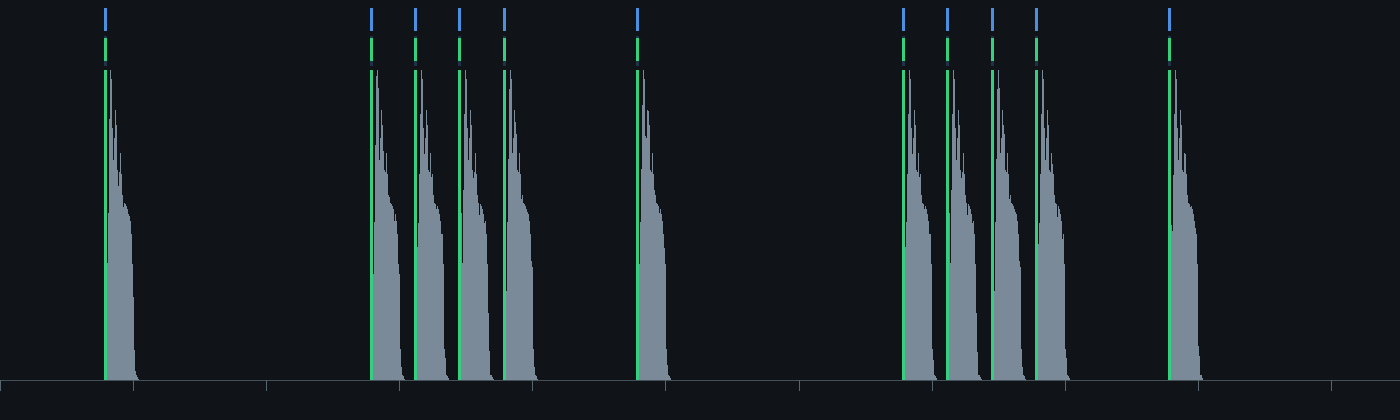
Use compile when the rhythm has to be exact, and drive when you want to change the pattern while
it plays.
How the timing is checked
Two smoke probes skip on a machine without Sonic Pi: synth.sonic-pi.patterns parses the
generated program back and compares it with the pattern's own positions, including through
nested FX, and sonicpi.pattern.timing records the audible run and measures the onsets.
FIELD_SONIC_PI_REQUIRED=1 turns a skip into a failure. The bounds and the last run are in
dev_docs/SONIC_PI_MEASUREMENTS.md.
A document to open
The sonicpi_pattern_demo starting point has three boxes. The
first needs no Sonic Pi at all: it prints the generated program and how each atom was resolved. The
second plays it. The third drives Sonic Pi from Field's clock.
The first box, a pattern turned into a Sonic Pi program, needs nothing installed:
:::static
/*
Pat plays Sonic Pi — the program, before you hear it.

Field's pattern algebra keeps musical structure exact in rational cycle space. Sonic Pi has 66
synths, 42 FX, 206 samples and a sample-accurate scheduler. This is the join: a pattern is
lowered to ordinary Sonic Pi source that you can read, paste into a #sonicpi region, and edit.

  public/docs/sonic_pi.md — "Field patterns as a Sonic Pi sequencer"

Nothing here needs Sonic Pi installed. It is a text transformation.
*/

/*
A triplet inside a binary bar — three even hits inside the third quarter. This is exactly where
a lowering that wrote `sleep 0.333` would start drifting, and it is why the emitter writes
Rational(1, 3) instead.
*/
val groove = pat("bd ~ [bd bd bd] bd")

println(groove.sonicPiSource(cps = 0.5, cycles = 1, name = "groove"))

// use_bpm makes one Sonic Pi beat exactly one Field cycle, so the sleeps above ARE the pattern's
// cycle fractions. Nothing about them depends on the tempo — change cps and only use_bpm moves.

// Atoms resolve against the *installed* vocabulary, in order: a real sample name, then a real
// synth name, then a note, then the drum-machine aliases.
println()
println(SonicPiVocabulary)
val kit = SonicPiInstruments()
["bd", "hh", "bd_tek", "tb303", "c4", "60", "nonesuch"].forEach {
    println("  %-10s -> %s".format(it, kit.resolve(it) ?: "NOTHING — this atom would be silent"))
}
The second box plays it. Turn your volume down first.
:::static
/*
Hear it.

The same lowering, played. Sonic Pi 5 has to be installed; Field starts it itself — owned mode,
so there is no Sonic Pi window and this box is the buffer. The box stays lit while the music
runs, and the stop button stops it.

Turn your volume down before you run this.
*/

/*
Three things a layer can carry beyond its pattern: which synth its bare notes play on, an FX
chain wrapped around its live_loop, and parameters from the pattern algebra. Every FX name and
every FX opt below is checked against the installed vocabulary when the layer is built — Sonic
Pi's answer to `with_fx :revreb` is a runtime error on the loop's own thread, minutes in.

Field's octave numbering puts middle C at c5 = 60, one octave below Sonic Pi's :c4. That is why
the lowering emits MIDI numbers rather than :symbols — the number the pattern meant survives.
*/
sonicPiPattern(
    sonicPiLayer("drums", pat("bd ~ [bd bd bd] bd")),
    sonicPiLayer(
        "hats",
        pat("[hh hh hh hh]").degradeBy(0.35, salt = 4) with gain(0.35),
        fx = [sonicPiFx("echo", "phase" to 0.125, "decay" to 2, "mix" to 0.3)],
    ),
    sonicPiLayer(
        "bass",
        pat("<e3 g3> ~ e4 ~").every(4) { it.rev() } with cutoff(700.0),
        synth = "tb303",
        fx = [sonicPiFx("reverb", "room" to 0.7, "mix" to 0.4)],
    ),
    cps = 0.5,
    cycles = 4,
)
The third box keeps time in Field and lets Sonic Pi play the notes:
:::static
/*
The other direction: Field's clock is the sequencer, Sonic Pi is the instrument.

One /run-code per event instead of a live_loop. Slightly less accurate — a UDP hop of jitter per
note, measured at a few milliseconds — and completely live: edit the pattern below, re-run, and
the next event goes out changed, with no live_loop to redefine.

The thing a compiled loop cannot do is on the last line: a continuous signal sampled once per
note, so the hats breathe.
*/

(pat("bd*4, [~ cp]*2, hh*8") with gain(sine().range(0.15, 0.5))).sonicPiLive(cps = 0.5)
Streaming Field's audio into Sonic Pi
Sonic Pi v5 has link_audio, which subscribes to another Ableton Link peer's published audio channel
and treats it like a soundcard input. Field publishes one, so Field's output can be an input to a
Sonic Pi patch (with reverb on it, a filter, or anything else Sonic Pi does to a live input), and the
two share tempo over the same Link session.
Field publishes as a peer with channels: the peer name comes from LinkAudioInterface.shared,
the channel from enableLinkOutput. Name the channel Main, which is link_audio's default, and
the Sonic Pi side needs only the peer name:
:::static
// Field: publish as peer "Field4", channel "Main"
FieldAudioEngine.shared().enableLinkOutput(name = "Main")
:::static
#sonicpi
# Sonic Pi: subscribe, and treat it like any other live input
with_fx :reverb, room: 0.8 do
link_audio "Field4", amp: 1
endSonic Pi's Link visibility is off by default, and only the Sonic Pi GUI's Link toggle turns it on;
there is no Sonic Pi function for it, and owned mode has no GUI. Until it is on, neither side can
see the other and link_audio plays silence without an error. Turn it on from the box with Sonic
Pi's internal Link API. A second setting, also off by default, lets Sonic Pi publish its own
channels:
:::static
#sonicpi
@link_api.link_enable                    # /clock/visibility 2 — NetworkWide (1 is loopback-only)
@link_api.link_audio_publish_set!(true)  # only needed for Sonic Pi to publish *its* output
puts @link_api.link_get_visibility       #=> 2
The smoke probe sonicpi.link-audio.probe checks the connection end to end. It publishes a 440 Hz
sine from Field, has Sonic Pi subscribe and record its own output, and compares the energy at 440 Hz
with a control frequency:
:::static
Field sees 1 Link peer(s)
Sonic Pi reports 1 Link peer(s), bpm 120.0     # adopted Field's Link tempo, was 60
overall RMS ......... 0.059291
energy at 440.0 Hz ... 0.040832
energy at 1170.0 Hz .. 0.000006  (control)
tone / control ...... 7423.66
VERDICT: YES — 440.0 Hz dominates the recording, so Field's channel reached Sonic Pi
Linux AppImage setup
Field can use the Sonic Pi v5 AppImage directly. Leave the AppImage executable in ~/Downloads;
the first call to sonicPi(...) finds the newest matching image and extracts its usr tree into
~/.cache/field4/sonic-pi/appimages/. Later boots reuse that cache. To keep the image elsewhere,
set FIELD_SONIC_PI_APPIMAGE=/absolute/path/to/Sonic-Pi.AppImage before starting Field.
The v5.0.0 Linux image's bundled Ruby extension for YAML links to libyaml-0.so.2. On Arch Linux
and CachyOS, install that small runtime dependency once:
sudo pacman -S --needed libyamlPorts, tokens and shutting down
The Sonic Pi daemon announces itself with one line on stdout: five ports and the token, in this order.
:::static
30201 30198 30197 30199 4560 -1374997887
#     ^      ^     ^     ^    ^
#     |      |     |     |    token — a random *signed* 32-bit int, so often negative
#     |      |     |     osc-cues (4560 when free)
#     |      |     scsynth — still its historical name, though SuperSonic replaced scsynth in v5
#     |      gui-send-to-spider — where /run-code goes
#     gui-listen-to-spider — bound by us, where the log and errors come back
Field sends /daemon/keep-alive every 1.2 s and asks the daemon to exit when Field closes. If Field
dies instead, the daemon shuts down its audio server by itself, but only after about 90 s (Sonic Pi's
daemon.rb says 3 s; its KillSwitch waits much longer).
Until then the abandoned daemon holds the cue port. Field records the PID of each daemon it starts, so the next boot ends one an earlier Field left behind before starting its own, and keeps 4560.
Stopping a box takes about a second and a half to go quiet. Sonic Pi has already scheduled the next moment of audio, and that drains after the stop.
If Sonic Pi ignores everything Field sends while /version still answers, check
~/.sonic-pi/log/spider.log for Invalid token: 0. That means the OSC messages are misaligned, so
the token arrives as 0; it should only happen if the OSC library changes.