How an output panel decides its size
An output panel usually sizes itself to what it contains. If yours opens too narrow, crops its contents or keeps more empty space than you expect, start with the symptoms below. You can also resize a panel by hand.
For an introduction to panels and channels, see Box Output; for 3D viewers, see Field's 3D output.
Call display in a box and the box grows a grey disclosure to hold the output. That is an output
panel. Closed, it is exactly 200 pixels wide
(src/commonMain/resources/outputareas2.js:5). Open, it is whatever size
contentSizeForDisclosure decides the content wants, re-measured over seven passes
(src/commonMain/resources/outputareas2.js:17) as fonts load and iframes
boot.
A panel can come out the wrong size when it cannot use the size its content declares. There may be no error or log message, so the symptoms below help you find which measurement to check.
Symptoms
| what you are seeing | what it is | where |
|---|---|---|
| a panel opens at 200px and never grows, with a small frame in the corner of it | your iframe declares a percentage width, and something suppressed the other measurement source | no measurement source at all |
| a panel is short by the height of whatever sits above its frame | a frame's own height is being read as the whole content height | height is measured from the content edge |
| a docs figure is far wider than its box, or its right-hand column is cropped off | the screenshot-prep pass and the auto-sizer are chasing each other | the screenshot pass is a second sizer |
| a panel stays taller than what it shows, with empty space below | something in it stretches to the panel's height instead of having one | a panel follows its content back down |
| a panel stops at most of the window's height and scrolls | auto-size never goes past 80% of the window | a panel follows its content back down |
| a panel ignores the size the content asked for | somebody dragged that panel once | a dragged panel stops listening |
Where a width can come from
contentSizeForDisclosure (src/commonMain/resources/outputareas2.js:434)
walks every visible node inside the panel and collects candidate widths. They are candidates, not a
priority chain: the last line of the function is a Math.max over the largest node width, the
header, and the fill-width fallback
(src/commonMain/resources/outputareas2.js:545).
The largest candidate wins, and a source with nothing to report contributes zero.
For an iframe, iframeIntrinsicSize
(src/commonMain/resources/outputareas2.js:381) has four places to
look and takes the max of them:
- the
widthattribute on the tag; - the inline
style.width; data-afield-intrinsic-width, which the frame's own copy ofiframe_autosize.jswrote after measuring its document (src/commonMain/resources/iframe_autosize.js:71);- and, only if all three came back non-positive, the frame's own
getBoundingClientRect().width.
The first two go through parsePixels
(src/commonMain/resources/outputareas2.js:44), which is parseFloat and
nothing else. This is where a percentage width goes wrong. A percentage does not parse as zero:
parseFloat("100%") is 100, so a width:100% frame reports an intrinsic width of 100 pixels.
That has two effects. First, the 100 loses the final Math.max to the header's floor. headerWidth
(src/commonMain/resources/outputareas2.js:69) never returns less than
CLOSED_W, so 100 pixels of claimed width produces a 200-pixel panel, which looks the same as
having no width at all.
Second, because 100 is positive, the bounding-rect fallback never runs. iframeIntrinsicSize
guards it with if (width <= 0). A frame that declares no inline width does take the fallback, and
then measures the panel it sits in, because
.disclosure-content iframe { width: 100% !important } in field.css has already stretched the
frame to the panel's own width. The outputs that take that path are listed
below.
src/jvmMain/kotlin/afield/graphics/three/Three.kt:388 is where a caller's
pixel width beats a percentage, for the same reason and with the same effect.
A frame with nothing to report
data-afield-autosize="off" on an iframe makes the copy of iframe_autosize.js inside that frame
return on its sixth line
(src/commonMain/resources/iframe_autosize.js:6), before it
registers any listener. No afield-iframe-size event is ever dispatched, so the parent's handler
(src/commonMain/resources/outputareas2.js:818) never runs and
data-afield-intrinsic-width never appears on the tag.
Combine that with a width the panel cannot use (a percentage, which reports a nonsense 100, or no inline width at all, which sends it to the bounding-rect fallback and back to the panel) and there is nothing left: the panel opens at 200 pixels, however wide its box is.
Each half is reasonable on its own. autosize="off" is right for a frame that scrolls its own
content: its document is taller than the frame, and letting it report its scroll height would grow
the panel forever. A percentage width is right for a frame that should be as wide as whatever holds
it. Field recognises the pair and handles it.
src/commonMain/resources/outputareas2.js:356 is the three-part test —
autosize off, no reported intrinsic width, and no concrete inline width, where "concrete" is
hasConcreteCssSize (src/commonMain/resources/outputareas2.js:167) and
excludes the CSS-wide keywords, auto, the intrinsic keywords, a literal zero, and any percentage.
A frame that passes all three is a fill frame: it has no width of its own, so it takes the width of its box.
Which of Field's outputs are fill frames
Two outputs look like fill frames but are not. Box.three's no-width path writes
width:100% but carries no data-afield-autosize attribute, so its viewer does report an intrinsic
width and it is not a fill frame. And
src/jvmMain/kotlin/afield/lang/python/PythonInterface.kt:1463 is
width:960px, in pixels, with a KDoc explaining why the percentage was rejected.
The frames that do satisfy isFillWidthIframe are these, and they do not all get there the same
way:
- the lazy-output frame
(
src/jsMain/kotlin/afield/app/client/Outputs.kt:833) sets onlyheightinline. Its width comes from the.afield-lazy-output-frameclass, andhasConcreteCssSizeis handediframe.style.width, which is the inline style only, so a class-set width is not concrete and this frame is the one that genuinely takes the bounding-rect fallback and measures the panel it is in. - the value-viewer frame
(
src/jsMain/kotlin/afield/app/client/Outputs.kt:933) is the same story: its width lives in the.value-viz-output-viewer-frameclass. - the embedded value explorer a
.h2panel puts in a box output declareswidth:100%inline, so it is the reports-100 shape rather than the measures-itself shape. keyframeBrowserwhen you pass it a non-positive width (src/jvmMain/kotlin/afield/ui/output/outputs.kt:879), which is the one documented opt-in. Its KDoc atsrc/jvmMain/kotlin/afield/ui/output/outputs.kt:825describes it.
Why the fallback measures outwards
Every other measurement in contentSizeForDisclosure looks inward, at a descendant, and asks how
much room it needs. fillWidthForDisclosure
(src/commonMain/resources/outputareas2.js:371) looks outward
instead. It walks up to the enclosing .box and returns box.right - wrap.left: the distance from
the panel's own left edge to the right edge of the box that owns it.
Measuring inward would be circular: a fill frame is as wide as its panel, so it can only report the panel's current width back. The box's width was set by you, or by a drag, before the panel existed.
This width is a minimum, never a cap. A non-nested panel is left
maxW: Number.POSITIVE_INFINITY
(src/commonMain/resources/outputareas2.js:850), so content with a
real intrinsic width wider than its box still wins and overflows, which is what a wide table
wants. With no enclosing box, on a standalone page, it returns 0.
A fixed pixel width is fine when you are calling something yourself (keyframeBrowser takes
width = 900), but the value explorer appears for any value in any box, and 900 pixels would
overflow a narrow one.
Two frames, one declaring a width and one not
This example puts two frames in one box. Their content is identical, and only the width each
declares differs. Both carry data-afield-autosize="off", so neither reports a size of its own.
/*
Two frames whose ONLY difference is the width each declares. Both are
data-afield-autosize="off", so iframe_autosize.js returns early in both and
neither will ever dispatch afield-iframe-size.
*/
fun card(note: String) =
    "<body style=\"margin:0;background:#12202b;color:#8fd6ff;" +
        "font:12px/1.5 -apple-system,system-ui,sans-serif\">" +
        "<div style=\"padding:10px 12px\">" +
        note +
        "</div></body>"

fun frame(widthDecl: String, note: String) =
    "<iframe data-afield-autosize=\"off\" srcdoc='" +
        card(note) +
        "' " +
        "style=\"display:block;" +
        widthDecl +
        ";height:66px;" +
        "border:1px solid #2d4456;background:#12202b\"></iframe>"

// isFillWidthIframe says yes: autosize off, nothing reported, no concrete inline
// width. fillWidthForDisclosure gives the panel box.right - wrap.left.
display(
    "no width of its own",
    frame("width:100%", "width:100% + autosize off -> a fill frame. The panel takes the room the box gives it."),
)

// isFillWidthIframe says no: 640px is a concrete inline width, so iframeIntrinsicSize
// reads it straight off style.width and the fill-width fallback never applies.
display(
    "640 pixels wide",
    frame(
        "width:640px",
        "width:640px -> a concrete intrinsic width. The panel is 640 plus padding, whatever the box is.",
    ),
)

displayOpen("no width of its own")
displayOpen("640 pixels wide")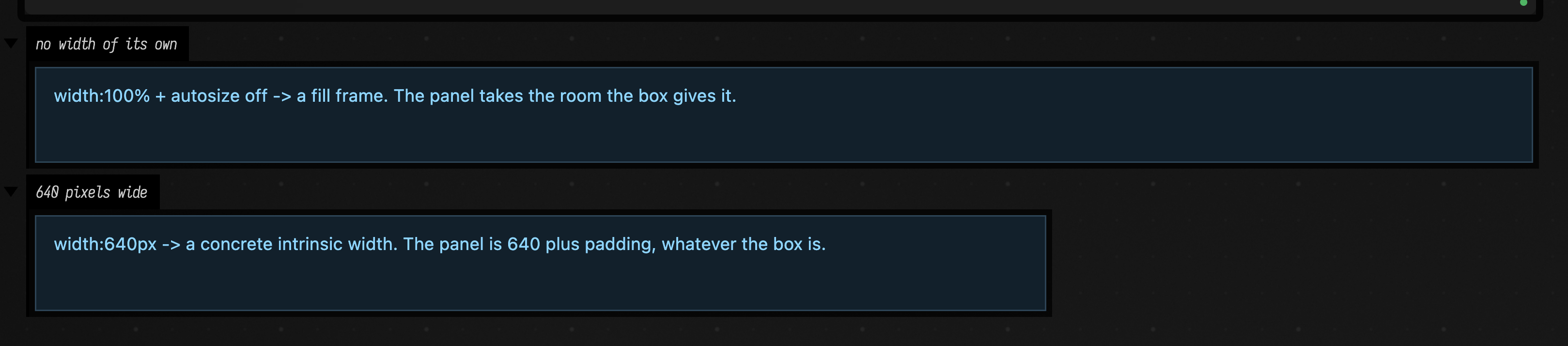
The upper panel is the whole width of the box because nothing in it had a width; the lower panel is 640 pixels plus the content padding because something in it did.
Height is measured from the content edge
Height has one source and no fallbacks worth the name: the bottom edge of the lowest visible
descendant, taken relative to the top of the panel's content box and with the leading padding
removed, which is
src/commonMain/resources/outputareas2.js:535 —
the width axis does the mirror of it on
src/commonMain/resources/outputareas2.js:532. A
node counts for how far down the content box it reaches, not for its own height. Dividing by
scale turns a zoomed canvas's screen pixels back into the panel's own pixels.
A scroller that sets its own limit counts at that limit. Give an element overflow:auto and a
max-height (or an inline pixel height) and the panel makes room for the scroller, not for
everything inside it. A <pre> capped at 320 pixels holding a long log counts as 320 pixels, and
the rest is reached by scrolling the <pre>
(src/commonMain/resources/outputareas2.js:88). A scroller whose height comes
from the panel, such as a height:100% or flex:1 column, has no limit of its own, so its whole
content still counts.
Iframes follow the same rule
(src/commonMain/resources/outputareas2.js:512): the
panel adds the frame's offset from the content edge to its declared height
(src/commonMain/resources/outputareas2.js:526). If you
see a panel that is short by the height of a row above its frame, this is the code to check.
A panel follows its content back down
A panel grows as soon as its content needs more room. It shrinks once its content has needed less
for half a second (src/commonMain/resources/outputareas2.js:21),
and then only to the largest size the content needed in that time. A panel whose content is
re-rendered faster than that, such as a build panel ticking through its progress, holds still while
the content changes and shrinks once when it settles
(src/commonMain/resources/outputareas2.js:644).
This box puts a tall list, a short line, a wide table and the short line again into one panel, a second and a half each. Watch the panel grow at once for the list and the table, and wait before it comes back down to the short line:
import kotlinx.coroutines.delay

// One panel, three contents in turn: tall, then short, then a wide table, then short again.
// A clock line at the top re-renders the panel five times a second.
val tall = (1..14).joinToString("") { "<div>line $it of a tall list</div>" }
val short = "<div>one short line</div>"
val wide =
    "<table>" +
        (1..3).joinToString("") { r ->
            "<tr>" + (1..12).joinToString("") { c -> "<td style='padding:2px 10px'>r${r}c$c</td>" } + "</tr>"
        } +
        "</table>"
go {
    for ((name, content) in ["tall" to tall, "short" to short, "wide" to wide, "short" to short]) {
        repeat(8) { tick ->
            display("main", "<div style='color:#8ab'>$name · ${(tick * 0.2).f1} s</div>$content")
            delay(200)
        }
    }
}
A panel whose content reaches its bottom edge without having a height of its own keeps the height it
has. That covers a height:100% wrapper, a flex:1 column, and any iframe, since
.disclosure-content iframe is height:100%
(src/commonMain/resources/outputareas2.js:491). Such content would shrink
along with the panel, so it says nothing about how short the panel could be.
Width follows the content the same way, but it is measured differently. Text wraps to whatever width
it is given, so a panel measured at its own width always looks about full. Instead, the content is
measured at the width a fresh panel opens at, 480 pixels
(src/commonMain/resources/outputareas2.js:668). A panel is as wide as
its content would make a newly opened panel, or wider if something in it does not wrap. A long
paragraph comes out a little under 480 pixels wide, short lines come out as wide as the longest of
them, and a table that does not fit grows the panel to fit it.
Auto-size never makes a panel taller than 80% of the window
(src/commonMain/resources/outputareas2.js:27), so you can always
bring its resize corner on screen. Content past that scrolls inside the panel. Dragging the corner
can still make the panel taller, and a dragged panel keeps its size from then on.
The screenshot pass is a second sizer
fitBoxWidthToOutputsForScreenshot
(src/jsMain/kotlin/afield/app/client/Main.kt:1579) runs when the
docs runner or the screenshot API is about to photograph a box, so that a figure is cropped to its
content rather than to whatever width the box was dragged to. It works in the opposite direction
from everything above: it measures the panels and then grows
box.style.width to fit them (src/jsMain/kotlin/afield/app/client/Main.kt:1652).
Its height sibling fitOutputDisclosuresForScreenshot sets panel heights too, but leaves alone a
panel whose frames all state their own height.
With a fill frame, that would loop: the panel grows to the box, the prep pass grows the box to the
panel, and the auto-size passes grow the panel to the new box, bounded only by the window-width
clamp on src/jsMain/kotlin/afield/app/client/Main.kt:1625. To prevent it, the prep pass
asks the same fill-frame test the panel sizer uses (window.fieldIsFillWidthIframe):
- fill panels are excluded from
maxContentWidth(src/jsMain/kotlin/afield/app/client/Main.kt:1585andsrc/jsMain/kotlin/afield/app/client/Main.kt:1591), so a panel that is only as wide as its box cannot be evidence that the box should be wider. The box stays at its authoredw=. - and they are exempted from the uniform
disclosureWidththe pass then writes onto every panel. Writing it would shrink a fill panel to whatever the other panels needed, and because the auto-size passes keep running after the prep pass and put the width back, the panel would end up wider than the clip already measured, cropping the right-hand column of a table out of the figure.
A dragged panel stops listening
None of the above applies to a panel a person has resized. rememberSize sets userSized
(src/commonMain/resources/outputareas2.js:986) the first time a panel's
measured size differs from its stored size by more than 2px, and every auto-size entry point is
gated on it. A panel marked fixed skips the mechanism from the start
(src/commonMain/resources/outputareas2.js:940). There
is no channel option for this: Field marks its own fixed-height viewers that way, which are the 3D
viewer, the 2D lines viewer and embedded property editors.
Because userSized sticks, a sizing problem only shows on a panel nobody has resized: a fresh box,
or a docs capture.
A drag is recorded by a ResizeObserver on the panel box
(src/commonMain/resources/outputareas2.js:1113) rather
than by a mouseup on the panel
(src/commonMain/resources/outputareas2.js:1098), so releasing the
grip over an iframe still counts: a mouse event inside an iframe never reaches the page holding the
panel. The three functions that resize the box themselves, applyOpen, primeAutoSizeForOpen and
applyClosed, mark selfResizeUntil so that their own resizing is not mistaken for a drag.
Agents: what the regression suite checks
tools/run_ui_regressions.py:3651 opens a real box in a browser at
--w 1040 --h 200, waits for the auto-size passes to settle, and checks that the panel tracks
the box's width without overhanging it, and that the frame inside keeps its declared height.
tools/run_ui_regressions.py drives one panel through a capped
<pre>, tall, fill, short and wide content, a re-rendered paragraph, rapid alternation, the
window cap, a zoomed canvas and a drag, and checks the width and height after each.
tools/run_ui_regressions.py opens a value from a .h listing
into the output area and checks the same two things for the value-viewer frame. The full census is in
OUTPUT_PANEL_SIZING_COVERAGE.md.
See also
- Box-owned requests: connect the controls in an iframe to Kotlin, for an iframe that edits a shared model.