Faust
Faust is a functional language for signal processing. You write what the
signal is and its compiler turns that into efficient code. Field embeds the compiler. A #faust
region inside an ordinary Kotlin string is compiled and played through Field's audio engine, and the
sliders it declares appear as Field controls.
There is nothing to install: the compiler comes with Field. The price is compile speed, a little under a second per compile once warm (see Nothing to install).
A box that is a signal processor
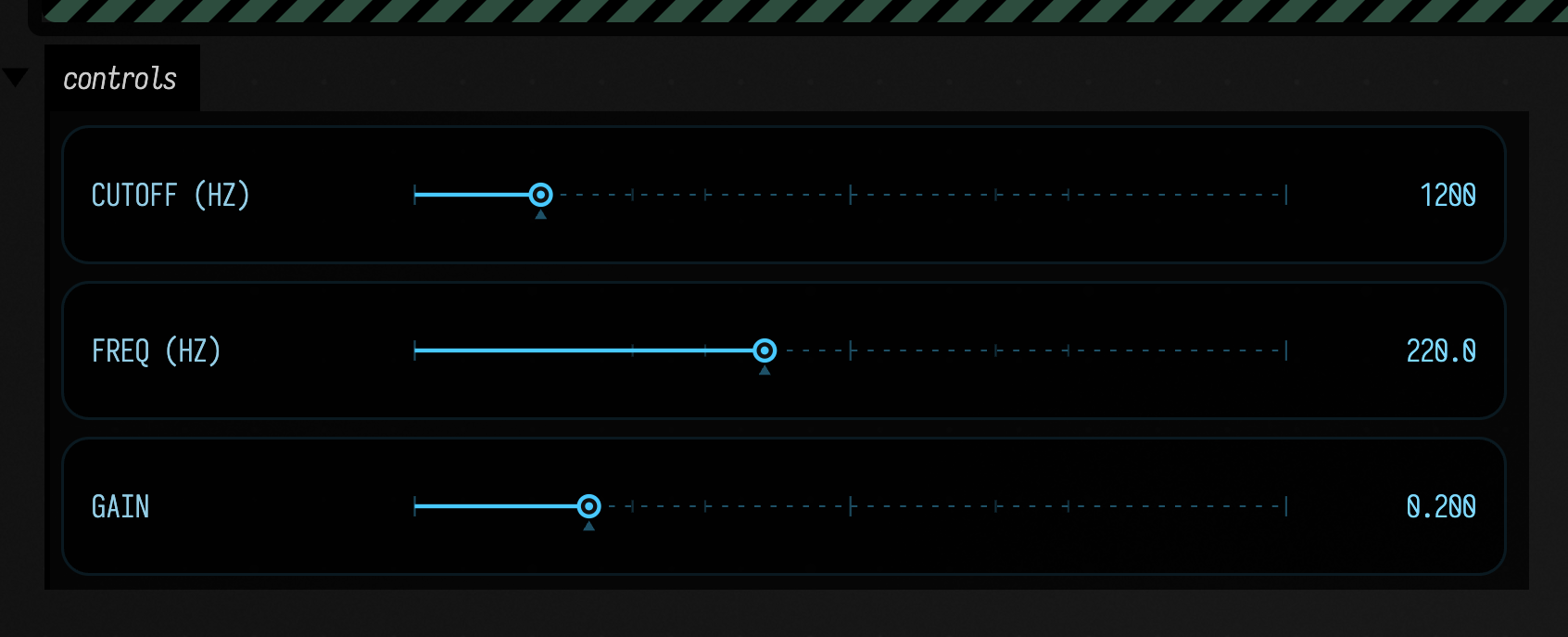
This box plays a sawtooth through a low-pass filter, with three sliders:
faust(
    """
#faust
import("stdfaust.lib");
freq   = hslider("freq [unit:Hz] [scale:log]", 220, 50, 2000, 0.01);
cutoff = hslider("cutoff [unit:Hz]", 1200, 50, 8000, 1);
gain   = hslider("gain", 0.2, 0, 1, 0.001);
process = os.sawtooth(freq) : fi.lowpass(2, cutoff) * gain <: _,_;
""",
)
Returning the result as the box's last expression ties the sound to the box. The box stays lit while the processor runs, and stopping the box stops the sound and releases the DSP, like any other Field audio launch.
The three sliders appear in the box's control area, with the ranges, defaults and steps the
hslider declarations asked for. Moving one changes the running sound immediately. Here is the
same program rendered offline for four seconds, with cutoff moved from 1200 Hz down to 300 Hz
halfway through:
The marker is not part of the program
#faust marks the region, but # is not a comment in Faust, so Field strips that line before
compiling. Line numbers in the compiler's messages are shifted back onto the box's own lines, so an
error lands on the line you wrote.
Errors land on the line
Faust's compiler errors appear as markers in the editor. Running this misspelled oscillator
faust(
    """
#faust
import("stdfaust.lib");
process = os.sawtoothX(440);
""",
)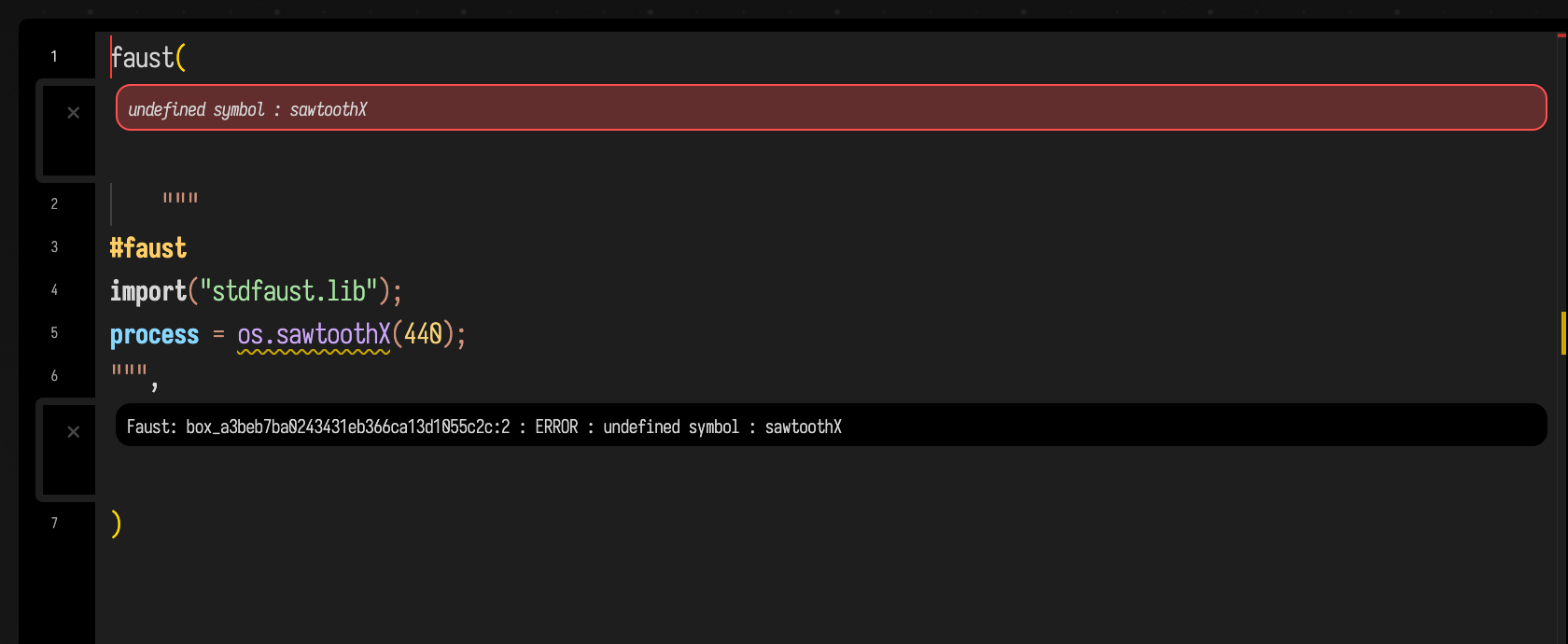
puts undefined symbol : sawtoothX on the process line, and the box reports the run as failed.
Some mistakes are marked as you type, before you run anything: unbalanced brackets, unterminated
strings and comments, a library prefix that stdfaust.lib does not define, a function that is not in
the library you named, and a region with no process definition. Everything else waits for the
compiler.
Completion knows the standard library
Completion follows the way Faust is written, by library prefix:
os.offers the oscillators, with their signatures;fi.the filters,ba.the basics,pm.the physical models.- With nothing typed, it offers the language itself:
process,with,letrec, the UI primitives, and the library prefixes. - The UI primitives insert as snippets with their arguments in order, because Faust puts
initbeforemin.
The popup below was opened by typing os. after process =. The list is alphabetical, so the
Casio CZ emulations come first:
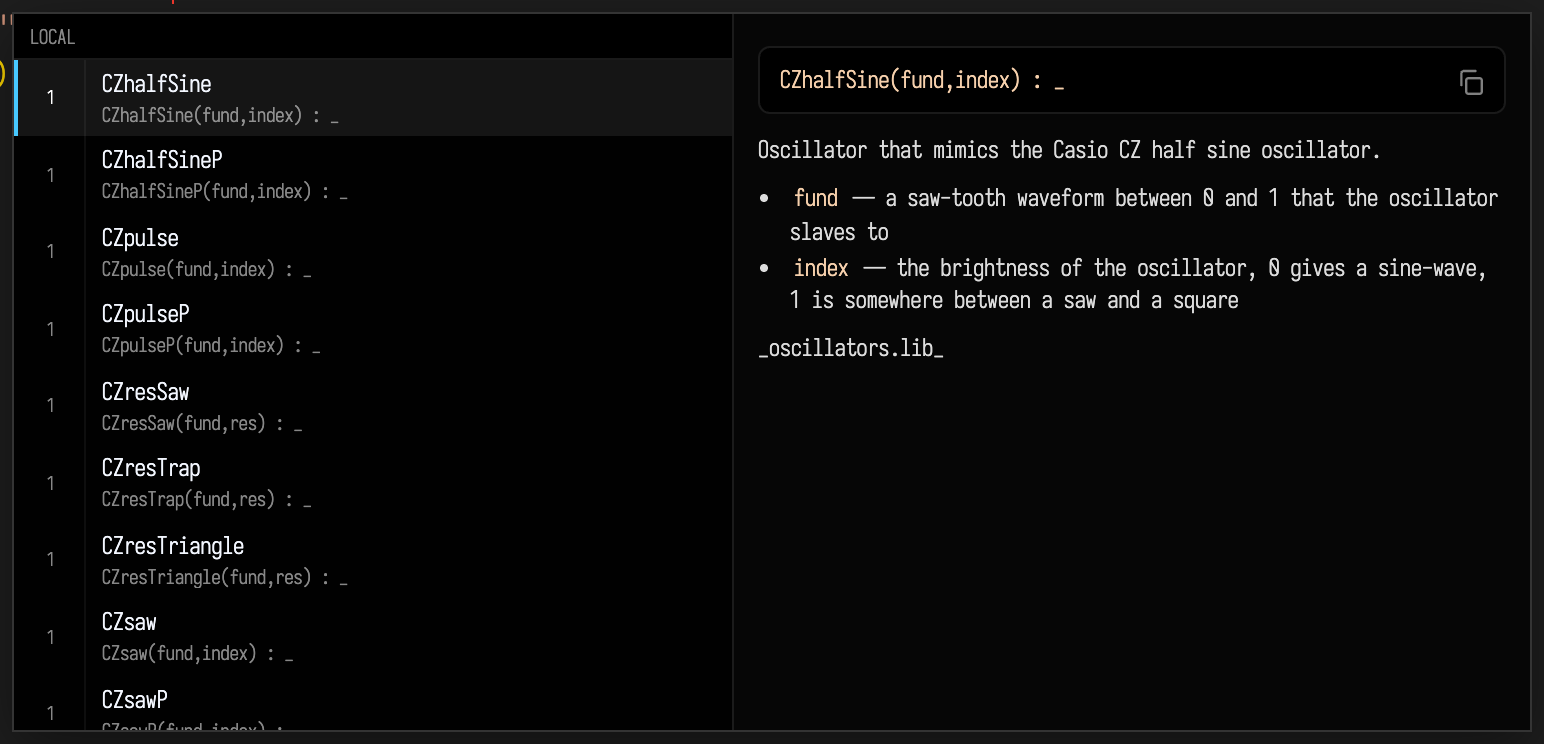
Hovering a qualified name shows its signature, summary and parameters.
The list comes from the documentation comments of the standard library inside the compiler Field ships.
Agents: regenerating the Faust vocabulary
tools/generate_faust_vocabulary.py reads the libraries' documentation comments and writes
src/commonMain/resources/faust-vocabulary.json. Re-run it after updating the compiler.
The controls are the program's own
A Faust program declares its interface in its source, and Field turns that into an ordinary Field
control group (Box.controlGroup, as any other box would build). Anything a control group can do, a
Faust program's controls can do too, including appearing on a phone or tablet through
mobile controllers; that last part has not been tried with a Faust box yet.
Controls keep their values when you re-run the box, so editing the program does not snap every slider back to its default. Each Faust declaration becomes:
| Faust declares | Field shows |
|---|---|
hslider, vslider, nentry |
a slider over the declared range |
checkbox |
a checkbox |
button |
a button, down while you hold it |
hbargraph, vbargraph |
nothing; read it with launch.meter("level") |
hgroup, vgroup, tgroup |
a qualified label, filter/cutoff |
[unit:Hz] |
appended to the label |
[scale:log], [scale:exp] |
a logarithmic or exponential slider over the same range |
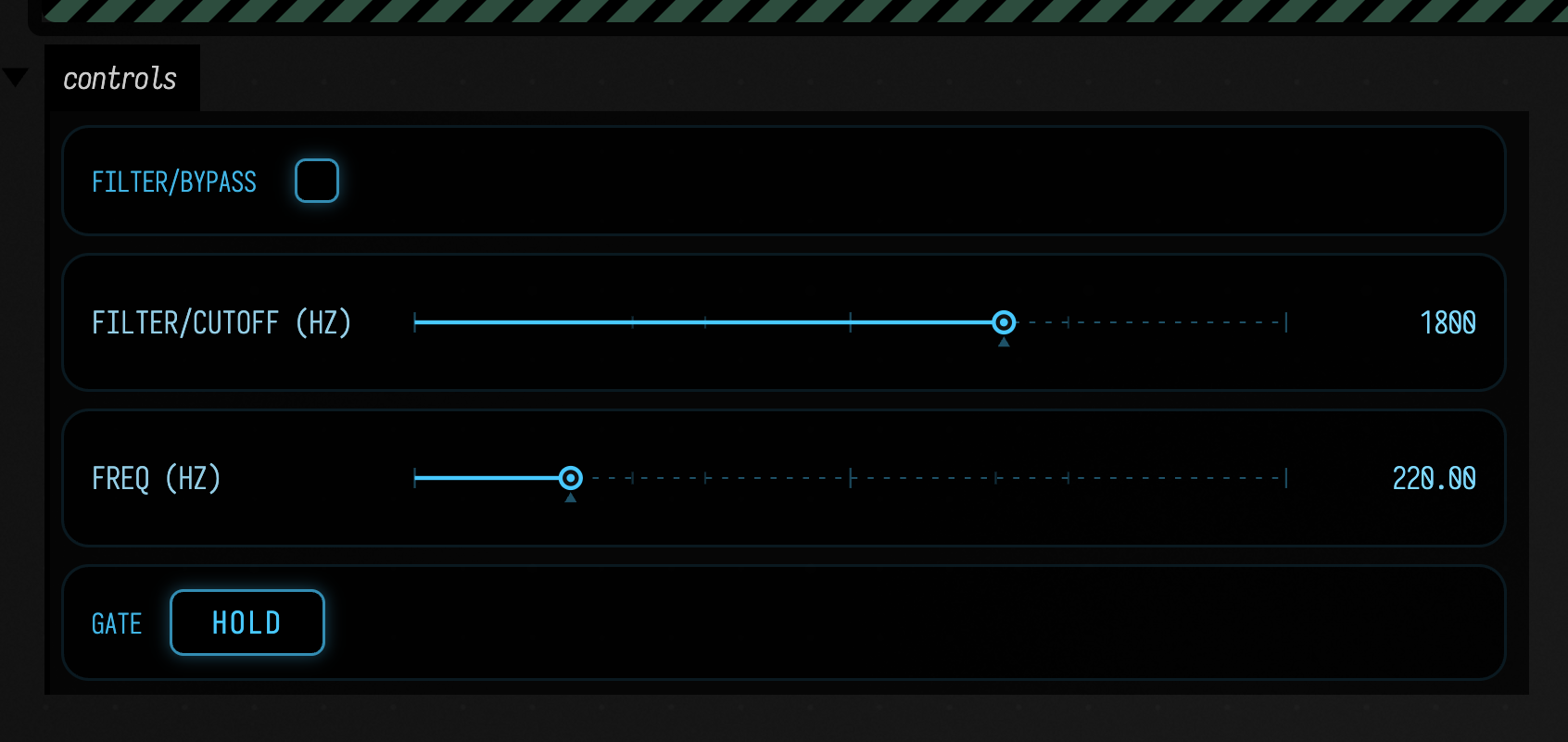
This program declares a button, a slider with a unit, and a checkbox and a log-scaled slider
inside an hgroup:
faust(
    """
#faust
import("stdfaust.lib");
gate   = button("gate");
freq   = hslider("freq [unit:Hz]", 220, 50, 1000, 0.01);
cutoff = hgroup("filter", hslider("cutoff [unit:Hz] [scale:log]", 1800, 80, 8000, 1));
bypass = hgroup("filter", checkbox("bypass"));
env    = en.adsr(0.01, 0.1, 0.7, 0.4, gate);
voice  = os.sawtooth(freq) * env * 0.3;
process = voice : ba.bypass1(bypass, fi.lowpass(2, cutoff)) <: _,_;
""",
)
One of those differs from Faust: hbargraph and vbargraph are outputs, so they are not in the
control group; launch.meter("level") reads the latest value, updated once per audio block. From
code, launch.press("gate") presses a button: the press and the release both reach the DSP, in
order, even inside one audio block.
This voice has a gate button; the code presses it for a quarter of a second and changes
the frequency:
:::static
val voice =
    faust(
        """
#faust
import("stdfaust.lib");
gate = button("gate");
freq = hslider("freq [unit:Hz]", 220, 50, 1000, 0.01);
env  = en.adsr(0.01, 0.1, 0.7, 0.4, gate);
process = os.sawtooth(freq) * env * 0.3 <: _,_;
""",
    )

// Play it from code rather than by hand.
voice.press("gate", holdMs = 250)
voice["freq"] = 330.0
voice
A pattern plays it
A Faust program can also be an instrument rather than a drone. faustPoly runs several copies
(voices) of the same compiled program and gives each note a voice, with the notes coming from Field's
own pattern language. This one plays four chords on eight voices, and patterns
the filter cutoff as well:
:::static
val inst =
    faustPoly(
        """
#faust
import("stdfaust.lib");
cutoff = hslider("cutoff [unit:Hz]", 2600, 120, 9000, 1);
freq   = hslider("freq [unit:Hz]", 220, 30, 4000, 0.001);
gain   = hslider("gain", 0.22, 0, 1, 0.001);
gate   = button("gate");
env = en.adsr(0.004, 0.09, 0.55, 0.03, gate);
process = os.sawtooth(freq) : fi.resonlp(cutoff, 1.4, 1) * env * gain <: _,_;
""",
        voices = 8,
    )

inst.play(
    pat("[c4,ef4,g4] [af3,c4,ef4] [bf3,d4,f4] [ef4,g4,bf4]"),
    cps = 0.5,
    automate = mapOf("cutoff" to pat("900 2600 1400 5200").nums()),
)

inst
The program is compiled once, however many voices you ask for.
Note the second pattern. Pat is a rhythm of anything, so the filter is patterned exactly as the
notes are, and both go through the same event timeline.
What it sounds like, at eight voices and at one
Two offline renders of the example above. The first is the example as written, with voices = 8.
The second changes only that argument, to voices = 1, so you can hear what the extra voices do.
With eight voices, the four triads play one per cycle, and all three notes of each chord sound together.
With one voice, the pattern, program and gain are the same:
The three notes of each chord arrive at the same moment and take the only voice in turn, so you hear the last of the three, with a click where the voice changed note.
The launch's steals count tells you how often that happened. A voice whose note has ended and whose
release has finished is free and is reused without a steal, so on this pattern only the second and
third notes of each chord steal. Read steals as a count of notes that wanted to sound at the same
time when you choose voices.
How the clips are checked
synth.faust.poly.sound counts spectral peaks in a band where only fundamentals can sit: three at
voices = 8, one at voices = 1. Counting attacks would not separate them, because a voice
stealing itself produces as many attacks. The band, the counts and the steal arithmetic are in
dev_docs/FAUST_MEASUREMENTS.md.
Play it yourself: the faust_polyphony starting point
The examples on this page are in the faust_polyphony starting point, on the welcome screen under
Starting points, or from here:
Faust instrument plays the pattern above live, and is the only box that opens an audio device.
Offline, with a plot renders the clips above, and is safe on any machine. Three notes at once
counts the sounding notes at four voices and at one. Onsets, in samples puts every notated frame
beside the frame the audio starts on. What it refuses is a program with no gate. When it runs
out of voices renders the same crowded passage at two settings of stealReleaseFrames
(below), with both WAVs playable. The
gallery entry shows what each box prints.
The notes land on the sample, not on the block
Audio is computed in blocks of 128 frames, 2.67 ms at 48 kHz, and rounding note starts to a block boundary would be audible. So a polyphonic launch splits each block where the next note or parameter change falls, and every note starts on the exact sample the pattern names. Splitting costs about twice an unsplit block at eight events, so schedule as finely as the music wants.
On a single faust launch, setting a control from code (launch["cutoff"] = …) takes effect at the
start of the next block instead.
freq, gate, gain: found by label, refused when absent
A polyphonic program names its pitch, gate and loudness controls freq, gate and gain, Faust's
own convention, so a program written for faust2jaqt -nvoices 8 plays here unchanged. Field finds
them by label, so their order in the program does not matter.
A program that does not declare gate is refused with a message saying what to add:
Faust: 'box_a1b2c3' cannot be played polyphonically — a polyphonic program must declare `gate`,
which is Faust's own convention (the same names `-nvoices` looks for). It declares:
cutoff (hslider), freq (hslider).
  gate = button("gate");
  … and gate the envelope with it, e.g. en.adsr(0.005, 0.08, 0.6, 0.05, gate)
The control group of a polyphonic launch has only the controls the voices share, cutoff here. There
are no sliders for freq, gate and gain, because each note sets them.
How a note claims a voice
A note claims a voice in this order:
- a finished voice: its gate is down and its output has fallen below
idleThreshold. Field watches the output because Faust does not report how long a release lasts. - else a released voice that is still ringing, counted as
tailCuts; you hear its tail cut short. - else the oldest sounding voice is stolen, counted as
steals. A note is never dropped.
peakConcurrency is how much polyphony a pattern actually asked for: the most voices that ever
sounded together over a render.
Stealing clicks, and the stealReleaseFrames trade
A steal clicks. To start the new note, Field drops the voice's gate for one sample, and Faust's
en.adsr restarts from zero rather than from the level it was at, so the old note is cut off in a
single sample. Without the drop, the envelope would not restart and the new note would not be heard.
stealReleaseFrames trades the click against lateness. The default, 1, keeps the new note on time
and leaves the click; 1440 (30 ms, longer than this program's release) all but removes the click
and makes the note 30 ms late. If you hear steals, the better fix is more voices.
Rendering a pattern offline
faustPatternRender renders a pattern with no audio device and no window, through the same code the
audio thread runs, so what you measure is what you would hear. Box.showFaustPattern puts a player
and a waveform in a box's output.
Three measurement helpers come with it:
faustOnsets: the frame of every attack. A burst is a run of samples that is not quiet, allowing quiet stretches shorter thanminGapMs; the onset is the burst's first sample.faustSilentGaps: the quiet stretches between notes. Check these before trusting an onset count. Atsustain = 1.0notes join into one continuous tone, and an onset detector reports envelope ripple as notes; that is whyFAUST_PATTERN_SUSTAINis 0.9.faustSpectrumPeaks: the partials present, which tell a chord from a single note. Counting attacks cannot, because one voice stealing itself makes as many attacks.
Calling in from another thread
You can call schedule and automate from any thread; the audio thread never waits on a lock. Work
handed over while a block is being computed is picked up by the next block, at most 2.67 ms later.
Notes are scheduled ahead of time anyway, and one that arrives too late is played at once and
counted in lateNotes. For the same reason, clearSchedule() takes effect within a block.
The block diagram
Faust can draw a program as a block diagram of its signal flow. Pass diagram = true and Field shows
it in the box's output:
faust(
    """
#faust
import("stdfaust.lib");
process = os.sawtooth(220) : fi.lowpass(2, 1200) * 0.2 <: _,_;
""",
    diagram = true,
)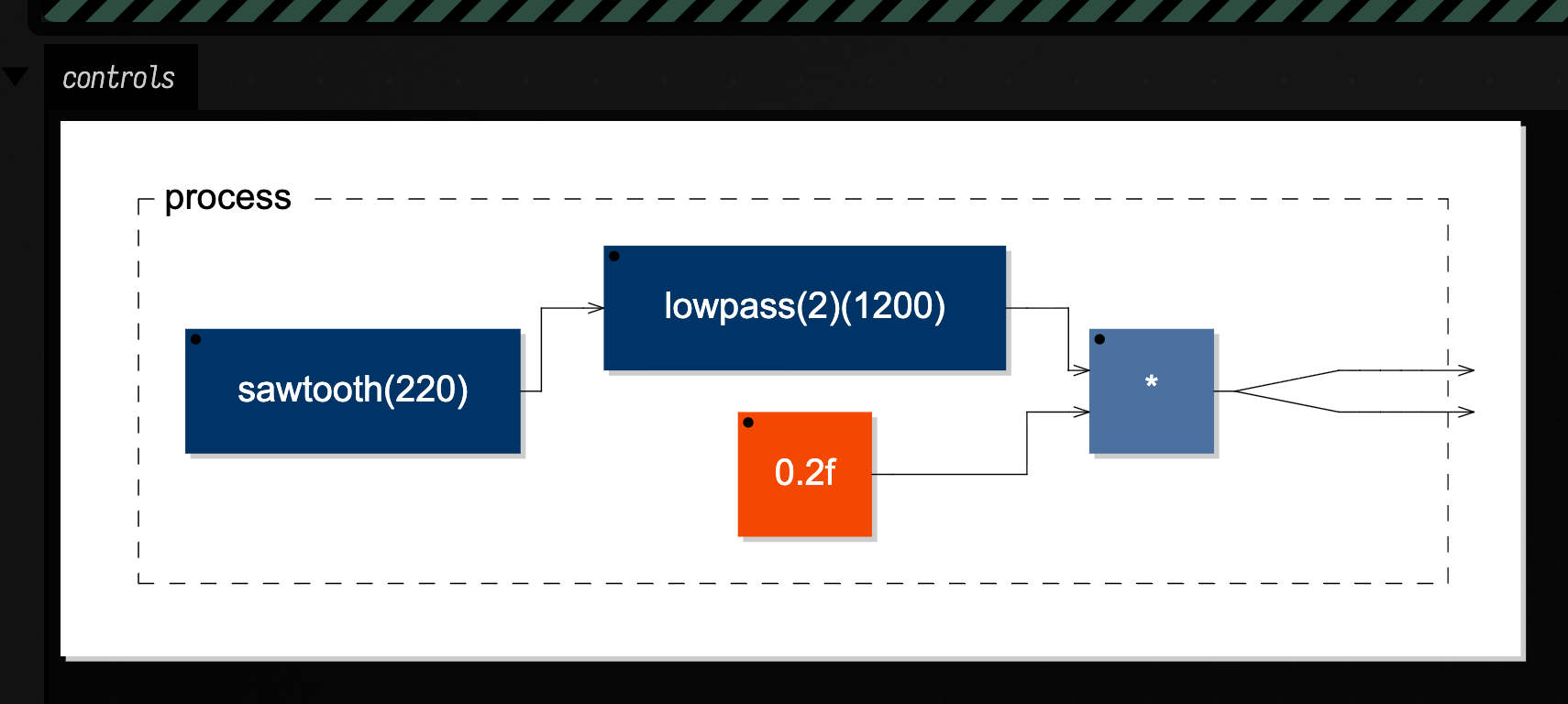
Only the top level is shown. Faust draws each sub-expression as a separate linked diagram, and Field does not follow those links.
Effects, not just synths
A program that declares inputs is an effect. Pass it something to process as input; here, a
detuned pair of sawtooths goes through a reverb:
:::static
// `input` takes any StereoRenderable — another Faust program, a Field oscillator, a pattern voice.
val dry: StereoRenderable = StereoSignal(SawOsc(Param(110f)) * 0.2f, SawOsc(Param(110.5f)) * 0.2f)

faust(
    """
#faust
import("stdfaust.lib");
room = hslider("room", 0.5, 0, 1, 0.01);
process = _,_ : re.zita_rev1_stereo(20, 200, 2000, 3.0, 2.0, 48000) : *(room), *(room);
""",
    input = dry,
)
Without an input argument the effect hears silence, and so does not make a sound.
Rendered offline, the pair plays for two seconds and then stops, so the reverb's tail can be heard. First the pair on its own:
Then the same pair through the reverb, at the default room:
What it costs
Faust runs inside GraalVM's WebAssembly runtime. Playing is cheap and compiling is slow. Measured on an M-series Mac, GraalVM CE 25.0.2:
| Operation | Measured | Relative speed |
|---|---|---|
| A playing voice, end to end | 60.4µs per 128-frame block against a 2667µs budget | 44× realtime |
The compute call alone |
7.6µs per block | 353× realtime |
| The compiler, warm | ~600ms per compile | ~20× slower than V8 |
| The compiler, cold | 13–22s for the first compile in a process | Truffle warm-up |
Most of a voice's 60.4µs is the cost of passing audio between the JVM and WebAssembly once per block, not Faust's own code. A voice costs a little over 2% of one core, so a handful of Faust boxes is no problem. A polyphonic instrument is cheaper per voice, because all its voices share one crossing.
The compiler is the slow part, and three things soften it:
- compiles are cached by source, so re-running an unchanged box, or undoing back to a program already seen, costs nothing;
- compiling never blocks a playing sound, so you can edit while it plays;
FaustEngine.warmInBackground()does the slow first compile on a background thread. Call it early in a document that will use Faust, and the 13–22 s passes while you are still typing.
Nothing to install
Unlike Sonic Pi, Faust needs nothing installed beside Field. Field ships the Faust
compiler as WebAssembly in src/jvmMain/resources/faust/ (5.3MB, LGPL-3.0, unmodified, with its
licence alongside). The same files run on every platform:
| Platform | Needs |
|---|---|
| macOS (x86_64, aarch64) | nothing |
| Linux (x86_64, aarch64) | nothing |
| Windows (x86_64) | nothing |
You do not need faust on your PATH, LLVM, a C++ toolchain or the faust2* scripts. A fresh
clone can play a Faust box. The cost is the slower compiler described above.
Not yet tried on Linux or Windows
The measurements above were taken on macOS (Apple silicon). On another platform, the smoke test
synth.faust.smoke checks the compiler works; it needs no audio hardware and no GPU.
Reference
| Call | Behavior |
|---|---|
Box.faust(source, …) |
Compiles the source and starts playback, returning a FaustLaunch. Keep the launch to change controls or inspect meters while it plays. |
Box.faustCompile(source) |
Compiles without starting playback, returning a program whose interface and diagram can be inspected. |
Box.faustControls(launch) |
Builds the control group for an existing launch. Use it when automatic controls were disabled with controls = false. |
Box.faustDiagram(program) |
Displays the compiled program’s block diagram. |
Box.faustWaveform(program) |
Renders the program offline and plots the result. No audio output device is needed. |
Box.faustPoly(source, voices) |
Compiles a polyphonic instrument and returns a FaustPolyLaunch. voices limits how many simultaneous note instances the bank can run. |
FaustPolyLaunch.play(pattern, …) |
Schedules a Pat pattern into the voice bank. Supply automate to vary controls shared by the instrument. |
FaustPolyLaunch.chord(midis) |
Starts all supplied MIDI notes on the same audio frame. |
Box.showFaustPattern(source, pattern) |
Renders a finite pattern offline and displays a player plus waveform. |
faustPatternRender(…) |
Returns the same offline render as data rather than a display, for analysis or writing a file. |
faustParamAutomation(values, control, …) |
Turns a numeric pattern into timed changes for a shared control. The control changes apply across the voice bank. |
faustOnsets / faustSilentGaps |
Finds attack frames and silent gaps in rendered audio. These measurements check whether a scheduled pattern produced distinct notes. |
faustFundamentalHz / faustSpectrumPeaks |
Estimates the fundamental by autocorrelation and spectral partials by FFT. Compare both when a strong harmonic could be mistaken for the played pitch. |
FaustLaunch["label"] = v |
Sets a running control by label, address or qualified name. Use a qualified name when several controls share the same label. |
FaustLaunch.press(label) |
Pulses a Faust button control. This is a momentary trigger rather than a persistent slider value. |
FaustLaunch.meter(label) |
Reads the current value of a Faust bargraph. |
FaustEngine.compile(name, src) |
Invokes the compiler directly and returns WebAssembly bytes with interface metadata. |
FaustEngine.blockDiagram(…) |
Returns the program’s SVG diagram set. |
FaustEngine.warmInBackground() |
Starts compiler warm-up in the background. Call it ahead of a performance to move the cold-start delay out of the first edit. |
FaustEngine.libfaustVersion() |
Reports the version of the loaded compiler. |
Agents: what the Faust smoke tests cover
The smokes check the compiler and its diagnostics, the editor extension, the box path and the
polyphonic layer, so a compiler update that changes behaviour fails; the list is in
dev_docs/FAUST_MEASUREMENTS.md. None covers a live launch through a speaker, which needs an
audio device.