RectSL examples
Make a rectangle, multiply it across a wall, and give the copies something to do. RectSL builds
animated scenes from rectangles, groups and materials; the examples here are whole programs you
can paste into a #rectsl box and pull apart. After the first wall, try emitters, rhythmic layouts,
charts and the larger gallery.
The cheatsheet describes the operators as you meet them. From Kotlin, the
host-side API lives in afield.lang.rectsl.*.
Rendered gallery
Unlike StackSL (a fullscreen fragment), a RectSL program is a whole scene: a
wall, a duration, rectangles, animation tracks, groups, and StackSL materials. It
compiles to a SceneProgram; each frame is sampled, lowered to a triangle mesh,
and drawn with a StackSL-compiled material.
Every example on this page is also a box in one Field document. In the viewer below
you can browse, live-edit, run, and download each of them. A window + renderer box
sets up the graphics context, and each example is a child of it, inheriting renderer
and drawing its scene live:
How the gallery is rendered
RectSLGalleryHarness renders the whole gallery inside one Field document (one
renderer, one graphics context), drawing through the shared
RECT_ANIMATION_VERTEX_SHADER (the same path as RectSLRenderRunner), reading
back a still per program at stillTime and sweeping each timeline to an mp4.
The programs live in the workspace at assets/rectsl_gallery/
(<name>_rectsl_.rectsl plus a <name>_metadata_.yaml carrying
docOrder/stillTime/animate). That directory is a declared build input of the
rectsl-gallery and rectsl-animations render scenes (FABRICATE_SCENE_INPUTS in
public/fabricate_docs_scenes.py), so editing or adding a *_rectsl_.rectsl file
re-renders the stills and mp4s on the next docs build, and
tools/check_doc_assets.py fails that build if a referenced clip was never
rendered and committed.
Each example shows its source first, then the render. The source is the whole
.rectsl program, and the viewer above is where to edit one and watch it
re-render, if you would rather scrub a scene than retype it.
Reproduction with modification — array primitives
Motion-graphic design, from Oskar Fischinger's marching squares to today's title sequences, runs on one idea. Take a single element and multiply it with modification, making copies spaced across a row, a grid, a ring, or a beat, each one shifted a little in position, size, timing, or colour. RectSL's array primitives make that a first-class move. They reproduce a subexpression (a built rect or group, or a quote that builds one) and hand every copy a small array context. A variation costs a few words:
array— reproduce the active objectcounttimes; element 0 is the template, the rest are fresh clones (deep for groups). The modifier quote runs on each.grid— buildcols·rowsfresh cells withcol/row/cols/rows(and the centeredcolc/rowc) in scope.radial— likearray, but each copy lands on a circle before the modifier runs.- Context words
f(fraction0…1),fc(centered-1…1),f0(cyclic fraction), andic(centered index) turn "which copy is this?" into a number you can feed straight intomix,->offset,->rotate,->polar, or->delay-all-time. - For shapes richer than linear, the Functions bridge
lets you
easea fraction through the Penner family orsampleagaussian,noise, orfbmcurve atf.
See the cheatsheet for the full table.
Radial bloom
radial drops sixteen petals onto a circle; f0 tau * turns each one to face
around the ring, a shared ->rotate track spins the whole bloom, and f fades the
alpha across the array. Colour comes from a StackSL palette material applied
per copy.
#rectsl
->wall 12 12 abstract
->duration 6
->fps 30

material bloom '(
  uv 5.0 * time 0.8 * + fbm palette
)

"petal" rect
  0.5 2.6 ->wh
  0xffffff solid ->fill
  16 4.0 '(
    f0 tau * ->rot
    '( 0 0  6 6.28318 ) ->rotate
    0.35 1 f mix ->alpha
    bloom ->material
  ) radial
;
Grid ripple
A centered grid of fifty cells: colc/rowc place each cell symmetrically,
a looping ->scale oscillator makes them breathe, and ->delay-all-time phased by
Manhattan distance from the centre (colc abs rowc abs +) turns that breath into
a concentric ripple, in the manner of Fischinger's Studien.
#rectsl
->wall 20 9 meters
->duration 4
->fps 30

10 5 '(
  "c" rect
    colc 1.7 *  rowc 1.7 *  ->xy
    0.6 ->square
    '( 0 0.15  1 1.15  2 0.15 ) 2 loop-time ->scale
    colc abs  rowc abs  +  0.16 *  ->delay-all-time
    0x14e0ff solid ->fill
  ;
) grid
Stagger cascade
One oscillating bar, reproduced twenty-six times with array and spread by the
centered index ic. A single ->stagger-time then delays each copy's whole
timeline in order, so the shared height oscillation reads as a travelling wave.
#rectsl
->wall 22 8 meters
->duration 3
->fps 30

"bar" rect
  0 0 ->xy
  0.55 1 ->wh
  '( 0 0.4  0.5 4.5  1 0.4 ) 1 loop-time ->h
  0xffd23c solid ->fill
  26 '( ic 0.8 * 0 ->offset ) array
  0.05 ->stagger-time
;
Spiral shards
array plus ->polar builds a sunflower: each of forty-eight shards is placed at
the golden angle (i 2.39996 *) with a radius that grows with the fraction f,
then oriented and spun. A phyllotaxis pattern from three lines of RectSL.
#rectsl
->wall 12 12 abstract
->duration 8
->fps 30

material shimmer '(
  uv 4.0 * time 0.5 * + fbm palette
)

"shard" rect
  0.32 1.05 ->wh
  0xffffff solid ->fill
  48 '(
    i 2.39996 *  f 4.6 *  ->polar
    i 2.39996 *  ->rot
    '( 0 0  8 6.28318 ) ->rotate
    0.4 1 f mix ->alpha
    shimmer ->material
  ) array
;
Facing the way you travel
RectSL tracks are pure functions of time, so a rect's heading (the direction it
is moving) can be recovered from its own x/y tracks by finite difference, with no
simulation. ->face-travel sets rotation to that heading; because the darts are drawn
elongated along their local +x axis, they read as arrowheads that always point where
they are going. The single dart carves a curved path and its orientation curves with
it; the ring pulses in and out and uses ->face-travel-at to bank each pip a quarter
turn off its radial travel. The swarm reads as a spinning pinwheel.
#rectsl
->wall 12 12 abstract
->duration 6
->fps 30

"dart" rect
  1.1 0.26 ->wh
  0xffcc33 solid ->fill
  '( 0=-5  3=0  6=5 ) ->x
  '( 0=-4  1.5=3  3=-3  4.5=3  6=-4 ) ->y
  ->face-travel
;

"pip" rect
  0.7 0.24 ->wh
  0x66ccff solid ->fill
  16 '(
    '( 0=0.6  3=5.4  6=0.6 )  f 6.28318 * cos  value*  ->x
    '( 0=0.6  3=5.4  6=0.6 )  f 6.28318 * sin  value*  ->y
    1.5708 ->face-travel-at
    0.3 1 f mix ->alpha
  ) array
;
Spawning and despawning — life windows
The scene has a fixed set of rects, but each one need not exist for the whole clip.
->appear and ->vanish hard-gate an object's visibility on and off at fixed times; the
beacon below blinks into existence at t=1 and is gone by t=4. ->live birth life
is the emitter primitive: it plays a template's animation from its birth (local time
0 becomes birth) and shows it only for life seconds. Authored once in local time,
the bullet becomes a staggered stream: copy i is fired 0.18 s after the last, each
crossing the wall in its own lane.
#rectsl
->wall 16 9 abstract
->duration 6
->fps 30

"beacon" rect
  0 3 ->xy
  0.6 ->square
  0xff2266 solid ->fill
  1 ->appear
  4 ->vanish
;

"bullet" rect
  0.42 ->square
  0xffcc33 solid ->fill
  '( 0=-8  2.5=8 ) ->x
  24 '(
    -3 f 6 * + ->y
    i 0.18 *  2.5  ->live
  ) array
;
Splitting — one shell becomes a spray
->split count t '( … ) retires the template at time t and starts count
shards exactly where it was; the split point is read straight off the template's
own tracks, so nothing needs to be positioned by hand. Each shard's flight
is authored around the origin in split-relative local time; the shell below rises to
the centre, bursts into a fourteen-way ring at t=2.5, and every shard flies outward
and ->face-travels so it points down its own trajectory.
#rectsl
->wall 12 12 abstract
->duration 6
->fps 30

"shell" rect
  0.5 ->square
  0xffee88 solid ->fill
  '( 0=-5  2.5=0 ) ->y
  14 2.5 '(
    0.7 0.22 ->wh
    0xff5522 solid ->fill
    '( 0=0  3.5=6 )  f 6.28318 * cos  value*
    '( 0=0  3.5=6 )  f 6.28318 * sin  value*
    ->translate
    ->face-travel
  ) ->split
;
Recursive splitting — a cascade
->split composes: because a shard's flight is authored around the origin in
split-relative local time, a nested ->split inside a shard's own modifiers just
works: the grand-shard's split time adds onto its parent's, and it is born on the
parent's split-point. So a nested ->split is enough for a fireworks cascade. An
off-centre mortar arcs up and bursts into a wide, gravity-drooped, turbo-tinted fan;
then every shard splits again into a smaller self-orienting spray, at a
per-shard-staggered time 2.2 + f·1.3, so the secondary sprays ripple outward around
the ring rather than all at once. Nothing here is a particle simulation: it is a fixed,
scrubbable scene of pure-function tracks, sampled.
#rectsl
->wall 12 10 abstract
->duration 7
->fps 30

"seed" rect
  0.5 0.28 ->wh
  0xfff0a0 solid ->fill
  '( 0=-5    1.4=-0.5 ) ->x
  '( 0=-4.5  1.4=2.5 ) ->y
  ->face-travel
  14 1.4 '(
    0.4 0.15 ->wh
    "turbo" 0.35 f 0.6 * + cmap solid ->fill
    '( 0=0  3.8=1 )  3.5 f 3 * +  value*   0.4 fc 2.6 * +  cos  value*
    '( 0=0  3.8=1 )  3.5 f 3 * +  value*   0.4 fc 2.6 * +  sin  value*
    ->translate
    0  '( 0=0  3.8=-1.6 )  ->translate
    ->face-travel
    5  2.2 f 1.3 * +  '(
      0.24 0.09 ->wh
      0xffe08a solid ->fill
      '( 0=0  2.4=1 )  1.1 fc 0.8 * +  value*   fc 1.2 * 0.3 +  cos  value*
      '( 0=0  2.4=1 )  1.1 fc 0.8 * +  value*   fc 1.2 * 0.3 +  sin  value*
      ->translate
      0  '( 0=0  2.4=-1.1 )  ->translate
      ->face-travel
    ) ->split  drop
  ) ->split
;
More array generators — arc, spiral, sunflower
Beyond radial's full circle, three placement generators cover the common
bullet-hell layouts. arc fans a fixed count across a partial sweep: a seven-way
aimed spread here. spiral ramps radius while the angle winds through whole turns.
phyllotaxis (a.k.a. sunflower) uses the golden angle for the densest even packing.
All three take the same [template] … quote shape as radial and return a selection,
so ->group-selected gathers each into a panel that is then translated apart and spun;
one ->rot on the group orbits the whole layout.
#rectsl
->wall 18 7 abstract
->duration 8
->fps 30

"a" rect
  0.8 0.22 ->wh
  0xff8844 solid ->fill
  7 2.6 4.71238 1.6 '(
    4.71238  f 1.6 *  +  ->rot
  ) arc
  "arcG" ->group-selected  -5.6 0 ->xy  '( 0=0  8=1.6 ) ->rot
;

"b" rect
  0.3 ->square
  0x44ccff solid ->fill
  56 0.4 2.7 3 '(
    0.25 1 f mix ->alpha
  ) spiral
  "spiralG" ->group-selected  0 0 ->xy  '( 0=0  8=6.28318 ) ->rot
;

"c" rect
  0.22 ->square
  0xffffff solid ->fill
  120 0.3 '(
    "turbo" f cmap solid ->fill
  ) sunflower
  "seedG" ->group-selected  5.6 0 ->xy  '( 0=0  8=-3.14159 ) ->rot
;
Distribution curves — the Functions bridge
Linear mix is rarely the shape you want across an array. RectSL borrows
afield.math.functions.Functions, a library of easings,
distributions, and noise defined over [0, 1], which is exactly the range of the
array fraction f. ease shapes a value through the full Penner family; gaussian,
noise, and fbm push a reusable curve you sample at f; reflect and tile
reshape it. Because the curves are graph-backed, the Functions rewrite/evolve
tooling can even optimise an array's distribution toward a target.
Gaussian comb
Thirty-three bars, each a looping oscillator whose amplitude is a gaussian
sampled at f: the row breathes in a bell curve instead of a flat block. A
seeded noise curve nudges each bar sideways, and ->stagger-time sweeps the
motion into a wave.
#rectsl
->wall 22 8 meters
->duration 3
->fps 30

"bar" rect
  0 -3 ->xy
  0.42 1 ->wh
  0xffd23c solid ->fill
  33 '(
    ic 0.62 * 0 ->offset
    '( 0 0.12  0.5 1  1 0.12 ) 1 loop-time  gaussian f sample 6.5 * value*  ->h
    7 noise f sample 0.45 *  0 ->translate
    gaussian f sample 0.25 +  sat  ->alpha
  ) array
  0.05 ->stagger-time
;
Eased orbit
A radial ring of twenty dots whose ->scale grows around the ring through a
back-out easing (so they overshoot and settle instead of ramping linearly), with
a seeded noise curve jittering each dot's rotation. Colour is a StackSL palette
material.
#rectsl
->wall 12 12 abstract
->duration 6
->fps 30

material tint '(
  uv 3.0 * time 0.6 * + fbm palette
)

"dot" rect
  0.9 ->square
  0xffffff solid ->fill
  20 4.2 '(
    f "back-out" ease 0.25 +  ->scale
    5 noise f sample 0.6 *  ->rotate
    '( 0 0  6 6.28318 ) ->rotate
    tint ->material
  ) radial
;
Inline Kotlin — the escape hatch
When the built-in words run out, {{ … }} drops into a with(Functions){ … }
Kotlin scope right inside the program. Here each bar's height envelope is a whole
Functions expression (a gaussian plus seeded fBm) composed and sampled at the
array fraction f inline, then multiplied by a looping oscillator:
#rectsl
->wall 22 8 meters
->duration 3
->fps 30

"bar" rect
  0 0 ->xy
  0.42 1 ->wh
  0x38e1b0 solid ->fill
  32 '(
    ic 0.66 * 0 ->offset
    '( 0 0.15  0.5 1.15  1 0.15 ) 1 loop-time
    {{ (gaussian(0.5, 0.2) + fbm(9) * 0.4).eval(f) }}  5.5 *  0.25 +  value*
    ->h
  ) array
  0.05 ->stagger-time
;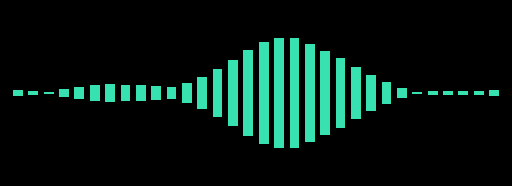
The escape compiles once and is invoked per copy.
Escapes in the gallery harness
A headless render is a long-running graphics loop on the box's own Kotlin engine,
and an escape cannot compile lazily on an engine that is mid-render. The harness
therefore pre-warms every escape on a separate idle engine before drawing and then
only invokes the cached lambdas. The CPU gallery smoke also compiles escape-bearing
files on an engine of its own, although jvm-main is not a render loop and the
lazy synchronous compile path would have been safe there.
Evolving a distribution toward a target
A distribution curve is more than a function: it is an inspectable graph whose
numeric leaves (positions, widths, heights) are tunable "genes". Hand the host a
target shape and it can search curve-space for a match, by gradient descent
(fitBest) or genetically (evolve), and RectSL then lays the array out from the
winner. RectSL itself is unchanged: it still just samples a curve. The
difference is only where the curve came from.
The RectSL scene is ordinary: three rows of bars, each an array sampling a
curve bound by name (target, seed, fit):
#rectsl
->wall 22 12 abstract
->duration 1
->fps 1

"trow" rect  0 -4 ->xy  0.5 1 ->wh  0x2e5a86 solid ->fill
  40 '( ic 0.55 * 0 ->offset  target f sample 4 * 0.12 +  ->h ) array ;

"srow" rect  0 0 ->xy  0.5 1 ->wh  0x8a5a2b solid ->fill
  40 '( ic 0.55 * 0 ->offset  seed f sample 4 * 0.12 +  ->h ) array ;

"frow" rect  0 4 ->xy  0.5 1 ->wh  0xffd23c solid ->fill
  40 '( ic 0.55 * 0 ->offset  fit f sample {{ 4.0 }} * 0.12 +  ->h ) array ;
The gold row's height scale is written as a {{ 4.0 }} Kotlin escape rather than
a literal: the same inline-Kotlin hatch as above, reaching inside a headless render.
The host builds a two-lobe target, seeds a curve with the same structure but
wrong numbers, fits it, and binds all three curves into the program
with compileRectSL(source, curves), the Functions→RectSL half of the bridge:
import afield.lang.rectsl.compileRectSL

with(Functions) {
    val target = gaussian(0.30, 0.11) + gaussian(0.72, 0.13) * 0.80
    val seed = gaussian(0.45, 0.20) + gaussian(0.60, 0.20) * 0.50
    val run = fitBest(target, seed, restarts = 12) // RMSE collapses toward ~0

    val program = compileRectSL(
        source,
        mapOf("target" to target, "seed" to seed, "fit" to run.fitted),
    ).program!!
    // ... render program like any other scene ...
}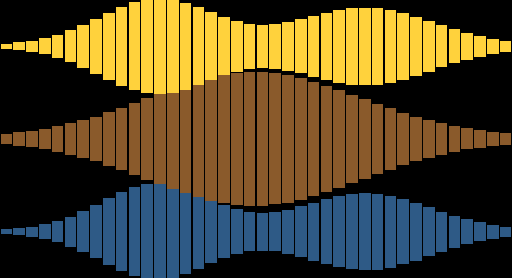
The bottom (blue) row is the target silhouette; the middle (brown) row is the seed,
whose two lobes start merged in the wrong place; the top (gold) row is the
fitted curve, which the optimiser has brought back to the target's two-lobe shape.
fitBest tuned the seed's lobe positions, widths, and heights by gradient descent;
RectSL only sampled the result. Reach for fitBest when you have a shape in mind
and just need the numbers dialed in, and for evolve(...) when the structure
itself (which operators) is still unknown.
The scene as a distance field, on the GPU
Everything above draws the way RectSL normally draws: sample the program at a
time, lower the sampled rects to a triangle mesh, upload it, composite it back to
front. This section does something else with the same language. A scene lowers
once to a closed-form float scene(vec2 p, float t) (the cheatsheet has the
details),
and then every fragment asks that one function how far away the nearest visible
rectangle is. Nothing is uploaded per frame; between frames exactly one float
changes.
The scene is an ordinary one. One animated template, six copies from
array, close enough together to overlap:
#rectsl
->wall 9 5 abstract
->duration 4
->fps 30

"blade" rect  0.85 ->square  0x2f9fe8 solid ->fill
  '( 0=0  4=6.28318 ) ->rot
  '( 0=-2.4  2=2.4  4=-2.4 ) tcb ->x
  '( 0=-0.7  1=0.7  2=-0.7  3=0.7  4=-0.7 ) tcb ->y
  6 '( ic 0.8 * 0 ->offset ) array
;
Nothing in the scene text mentions distance fields: every look below is chosen on the host side.
What each look does
A RectSLSdfLook is data (fill, outline width, glow falloff, contour spacing,
bevel depth and light, motion-blur samples and shutter, blend radius, carve), and
RectSLSdfShader.fragment(field, look) turns it into a complete fragment shader.
There is one preset per capability, and each image below is that preset rendered
through RectSLGalleryHarness.renderSdf.

fill — one pixel of edge at any resolution. Note that it is
the union silhouette: no seams where the copies overlap.
outline — the band |d| < 0.035. No stroke
geometry was generated, and no width is too large.
glow — exp(-k·max(d,0)), falling off with
distance outside the shape, which coverage cannot express at all.
contours — iso-distance lines: rounded at convex corners,
creased at concave ones, and continuing inside the shape, because the
distance is signed.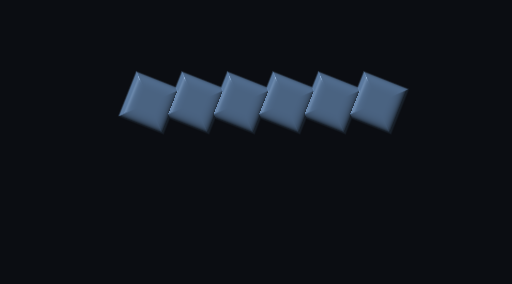
relief — the gradient of the field is the normal of a
rounded extrusion of it, so a flat 2D scene picks up a light. The hard creases are
where the copies meet under min.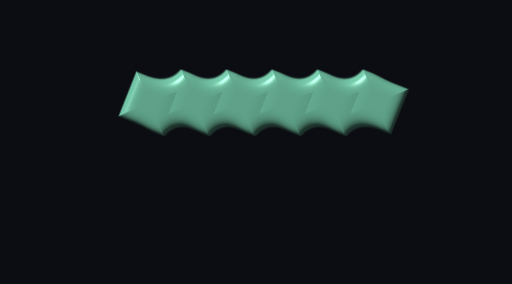
blend — the same scene with min replaced by
smin(·,·,0.55): the six copies fuse into one body. Compare the
creases in relief.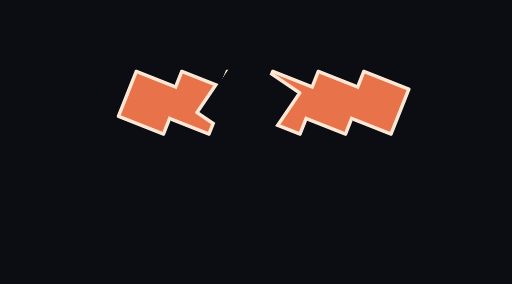
carve — max(d, -c), where c is a
second RectSL scene emitted into the same shader. A rotating square is
subtracted straight out of the band.
motion-blur — 24 instants across a 0.14s shutter. Those
instants were never rendered; the tracks are closed-form, so the field simply
answers for them.In motion, the streak follows the velocity, which comes from a TCB spline the CPU solved once:
At any zoom, from the same source
Both halves show the same region of the same wall at the same output size. The left is rendered at the gallery's ordinary resolution and then magnified 4× with nearest-neighbour; the right is rendered at 4× and cropped. Nothing about the scene, the shader or the look changed between them — only how many fragments are asking the question:

The raster path and the field, side by side
Left: the ordinary raster path (RectSLRenderRunner). Right: the distance field.
Same program, same instant, same wall, composited side by side in one pass of the
harness:

The left half has per-rect fill, StackSL materials and z order: the individual
quads and their overlaps are visible. The right half has none of them, because
min is union and a union has no layers: fill, material and draw order are gone.
In exchange it has an outline and a glow the left half cannot express at any
resolution, and it could have blending, boolean ops, normals and motion blur too.
Visibility is not dropped. A rect gated to zero by ->appear, ->vanish or
->live contributes no silhouette, exactly as it draws nothing on the CPU.
The shader and the CPU sampler agree to about 1e-6 of a wall unit (float in the
shader against double on the CPU). That holds for ->degrade too, which is a 64-bit
integer hash lowered into the shader rather than sampled: the GPU drops the same
copies the CPU does. See the cheatsheet's Fidelity section
for how a 64-bit hash fits in a shader that has no 64-bit integers.
Agents: how the GPU and raster agreement is checked
Before it draws any of the looks, the harness renders a probe shader (the same
field, reporting scene(p, t) as a 24-bit fixed-point number instead of drawing
it), reads the framebuffer back, and compares it against program.sample(t), the
sampler the raster path draws from. No image is written unless they agree. One
pass is built from ->degrade and a mini-notation pattern: a single-bit hash
mismatch there would show up as a disagreement the size of a rectangle. The full
report (every pass, its point count and its worst disagreement) is regenerated on
each re-capture and committed beside the images as
assets/rectsl/rectsl-sdf-agreement.txt. dev_docs/RECTSL_SDF_AGREEMENT.md has
how the probe recovers the pixel→wall mapping and how a scene earns its place in
the gallery spread.
Open it
The rectsl_sdf_live starting point puts
this on screen, moving, in two boxes: a Window + Renderer, and one box
that compiles the scene, emits the field, wraps it in a look and draws it with a
fullscreen triangle. Change preset("relief") to "contours" or "blend" and
re-run; edit the #rectsl string and re-run.
Musicality — rhythm as scene structure
The array primitives above multiply a shape across space. This section multiplies it across time, by borrowing Field's Tidal-inspired pattern language whole.
The two languages fit together with very little glue, because a RectSL track is a pure function of time, and so is a pattern:
RectSL
interface Track<out T> {
    fun sample(t: Double): T
}
Pattern
class PatPattern<A> {
    fun events(arc: PatArc): List<PatEvent<A>>
}
Neither simulates, and both answer any time in any order with the same value. That gives two rules:
- A pattern is a track.
sine ->alphaneeds no conversion word: the coercion happens at RectSL's singleValue → Tracksite, upstream of every track-taking mutator (->x,->rot,->w,->layer, …) and every scalar operator. All of them take a pattern for free. - An event is a life window. A pattern event carries an onset and a real duration;
->livewants exactly an onset and a duration. Sopatisarrayindexed by rhythm instead of by ordinal, and each copy lives for exactly its event.
So the whole mini-notation arrives intact (polymeter, Euclid, <a b> alternation, ? degrade,
. grouping, @ elongation) without RectSL parsing a character of it. See the
cheatsheet for the
full table.
Four to the floor
Every element below is driven by the same clock, and no time in the program is written in seconds.
->tempo 120 makes a cycle a 4/4 bar at two seconds; ->duration-cycles 4 says the piece is four
bars long.
The kick is pat at its plainest: "bd*4" makes four copies a bar, each one ->live for exactly
its own quarter, each dropping in from above on a curve authored in local time. One template
becomes sixteen strikes rather than a synchronised chorus. step places each strike across the
wall, restarting at every bar line.
The hats do the same across space: sixteen copies laid out by array, then thinned to a
five-against-sixteen figure by ->euclid, with the whole ring turned by saw — a pattern read as
a rotation track. The accent is ->every 4: one white flash that only fires on the fourth bar,
so the four bars are not all the same.
#rectsl
->wall 16 9 abstract
->tempo 120
->beats-per-cycle 4
->duration-cycles 4
->fps 30
->background 0x0a0a12

# The accent: a full-wall flash, behind everything, on every fourth bar only.
"accent" rect
  16 9 ->wh
  0 0 ->xy
  0xffffff solid ->fill
  0 ->alpha
  ->back
  selected 4 '( 0.14 ->alpha ) ->every
;

# The ring: sixteen slots, five of them sounding, the whole figure turning once a bar.
"ring" group
  "hat" rect
    0.26 1.0 ->wh
    0x7cf5d0 solid ->fill
    16 '( f0 tau * ->rot  f0 tau * 3.2 ->polar ) array
    5 16 0 ->euclid
  ;
end
"ring" ->select
  saw tau * ->rotate
;

# The kick: one copy per event, each authored in its own local time.
"kick" rect
  1.3 ->square
  0xff5a3c solid ->fill
  "bd*4" '(
      step 1.5 - 4.2 *  ->x
      '( 0=5.5  0.34=0 ) ease-out ->y
      '( 0=0  0.10=1  0.5=0 ) linear ->alpha
  ) pat
;

# The score: the same kind of string, read as a ruler instead of as a rhythm.
"tick" rect
  0.34 ->square
  0x3c8cff solid ->fill
  "bd [sd sd] hh*4" '( -3.9 ->y  0.55 ->alpha ) strip
;
Read the last two blocks together: "bd*4" and "bd [sd sd] hh*4" are the same notation, and
pat and strip are the same reproduction. One spends the subdivision on when, the other on
where.
Variation operators
These operators make bar n+1 unlike bar n. They are useful on material that has nothing to
do with rhythm, too.
#rectsl
->wall 18 10 abstract
->cps 1
->duration-cycles 8
->fps 30

# Pattern-level variation: each row is the same three-hit figure, varied differently.
# `every` fires on cycles 0, 3, 6…; `iter` walks the bar one quarter further each cycle;
# `off` superimposes a shifted echo; `sometimes-by` transforms a deterministic half.
"plain" rect  0.7 ->square  0xff5a3c solid ->fill
  "bd*3" '( f0 14 * 7 -  4.2  ->xy ) pat ;

"faster" rect  0.7 ->square  0xffd23c solid ->fill
  "bd*3" mini 3 '( 2 fast ) every '( f0 14 * 7 -  2.4  ->xy ) pat ;

"walking" rect  0.7 ->square  0xa6e22e solid ->fill
  "bd sd hh cp" mini 4 iter '( f0 14 * 7 -  0.6  ->xy ) pat ;

"echoed" rect  0.7 ->square  0x38e1b0 solid ->fill
  "bd*3" mini 1 8 '( 2 ply ) off '( f0 14 * 7 -  -1.2  ->xy ) pat ;

"swung" rect  0.7 ->square  0x3c8cff solid ->fill
  "bd*8" mini 4 swing '( f0 14 * 7 -  -3.0  ->xy ) pat ;

"sometimes" rect  0.7 ->square  0xc678dd solid ->fill
  "bd*4" mini 0.5 '( press ) sometimes-by '( f0 14 * 7 -  -4.6  ->xy ) pat ;
swing delays every second subdivision of a 2n grid in exact rational time, so a swung
figure is still perfectly quantised, just not straight, unlike a random jitter.
Signals, stepped and smooth
A signal is a pattern with exactly one event per query, so everything above applies to it too.
segment samples a smooth curve into n events a cycle, which turns continuous motion into the
held-then-snapped quality that reads as musical. Alongside it, ->stagger-swing, ->jux,
->degrade and the rest of the surface:
#rectsl
->wall 18 10 abstract
->tempo 90
->duration-cycles 4
->fps 30

# Smooth: sine straight into a rotation track, and into x through the scalar operators.
"smooth" rect  1.0 ->square  0xff5a3c solid ->fill
  sine 12 * 6 -  ->x   3.4 ->y   sine tau * ->rot ;

# Stepped: the same sine, sampled eight times a cycle. It holds, then snaps.
"stepped" rect  1.0 ->square  0xffd23c solid ->fill
  sine 8 segment  12 *  6 -  ->x   1.6 ->y ;

# A numeric rhythm read directly as a track, and a rest held rather than zeroed.
"steps" rect  0.9 ->square  0xa6e22e solid ->fill
  "0 3 -3 6" ->x   -0.2 ->y ;
"held" rect  0.9 ->square  0x38e1b0 solid ->fill
  "-6 ~ 6" mini nums hold-pat ->x   -2.0 ->y ;

# Remapped, quantised, bipolar, and seeded noise — all the same kind of value.
"remapped" rect  0.8 ->square  0x3c8cff solid ->fill
  tri -5 5 pat-range ->x   -3.6 ->y ;
"quantised" rect  0.8 ->square  0xc678dd solid ->fill
  saw 0.25 quantise 16 * 8 -  ->x   -4.6 ->y ;
"noisy" rect  0.8 ->square  0x56b6c2 solid ->fill
  7 perlin bipolar 6 *  ->x   4.4 ->y ;

# Selection variation: a mirrored twin, a delayed echo, a swung stagger, a dropout.
"twin" rect  0.7 ->square  0xe06c75 solid ->fill
  5 0 ->xy  2.6 ->y
  selected '( 0.45 ->alpha ) ->jux
;
"echo" rect  0.6 ->square  0xd19a66 solid ->fill
  '( 0=-8  4=8 ) linear ->x   0.4 ->y
  selected 0.5 '( 0.4 ->alpha ) ->off
;
"row" rect  0.5 ->square  0x98c379 solid ->fill
  -7 -5.4 ->xy
  8 '( ic 1.6 * 0 ->offset ) array
  0.12 0.6 ->stagger-swing
  0.25 ->degrade
;
The rest of the surface
Everything the sections above did not reach, in one program: the clock conversions, the remaining pattern transforms, and the per-event context words.
#rectsl
->wall 20 12 abstract
->tempo 120
->beats-per-cycle 4
->duration-cycles 4
->fps 30

# Clock conversions: seconds computed from musical units rather than typed.
"beat" rect  0.6 ->square  0xff5a3c solid ->fill
  1 beats 8 *  2 cycles 4 * ->xy ;
"cyc" rect  0.6 ->square  0xffd23c solid ->fill
  cycle-secs 4 *  scene-cycles 1 -  ->xy ;

# The per-event context: onset, length, cycle, step, atom, and named parameters.
"ctx" rect  0.5 ->square  0xa6e22e solid ->fill
  "bd:2 sd cp*2" '(
      t 2 *  9 -  ->x
      cyc 2 *  step 0.4 *  +  3 -  ->y
      "n" param 0.1 *  0.4 +  ->alpha
      "n" param? 0.2 *  0.5 +  ->square
      "bd:2" atom? 0.4 *  ->rotate
      dur 3 *  0.3 +  ->scale
      atom ->tag
  ) pat
;

# The remaining pattern transforms.
"rev" rect  0.4 ->square  0x38e1b0 solid ->fill
  "0 1 2" mini rev '( f 16 * 8 -  -1 ->xy ) pat ;
"pal" rect  0.4 ->square  0x3c8cff solid ->fill
  "bd sd" mini palindrome '( f 16 * 8 -  -2 ->xy ) pat ;
"back" rect  0.4 ->square  0xc678dd solid ->fill
  "bd sd hh cp" mini 4 iter-back '( f 16 * 8 -  -3 ->xy ) pat ;
"slowed" rect  0.4 ->square  0x56b6c2 solid ->fill
  "bd sd hh" mini 2 slow '( f 16 * 8 -  -4 ->xy ) pat ;
"lingered" rect  0.4 ->square  0xe06c75 solid ->fill
  "bd sd hh cp" mini 1 2 linger '( f 16 * 8 -  -5 ->xy ) pat ;
"rotated" rect  0.4 ->square  0xd19a66 solid ->fill
  "0 1 2 3" mini 1 pat-rot '( f 16 * 8 -  1 ->xy ) pat ;
"shuffled" rect  0.4 ->square  0x98c379 solid ->fill
  "bd sd hh cp" mini 4 shuffle '( f 16 * 8 -  2 ->xy ) pat ;
"thinned" rect  0.4 ->square  0x61afef solid ->fill
  "bd*8" mini 0.4 degrade-by '( f 16 * 8 -  3 ->xy ) pat ;
"swungby" rect  0.4 ->square  0xbe5046 solid ->fill
  "bd*8" mini 1 4 4 swing-by '( f 16 * 8 -  4 ->xy ) pat ;
"pressed" rect  0.4 ->square  0x7cf5d0 solid ->fill
  "bd*4" mini 1 3 press-by '( f 16 * 8 -  5 ->xy ) pat ;
"shifted" rect  0.4 ->square  0xffffff solid ->fill
  "bd*4" mini 1 8 pat-delay '( f 16 * 8 -  4.6 ->xy ) pat ;
"stuttered" rect  0.4 ->square  0xff9e64 solid ->fill
  "bd sd" mini 3 16 stut '( f 16 * 8 -  -5.6 ->xy ) pat ;
"over" rect  0.4 ->square  0x9ece6a solid ->fill
  "bd*2" mini '( 2 fast ) superimpose '( f 16 * 8 -  0 ->xy ) pat ;
"in" rect  0.4 ->square  0x7aa2f7 solid ->fill
  "bd sd hh cp" mini 2 '( rev ) inside '( f 16 * 8 -  -0.5 ->xy ) pat ;
"out" rect  0.4 ->square  0xbb9af7 solid ->fill
  "bd sd" mini 2 '( rev ) outside '( f 16 * 8 -  0.5 ->xy ) pat ;

# Building patterns from other patterns, and a Euclidean figure as events.
"together" rect  0.4 ->square  0xf7768e solid ->fill
  "bd*2" mini "sd*3" mini stack-pat '( f 16 * 8 -  -1.5 ->xy ) pat ;
"sequenced" rect  0.4 ->square  0x2ac3de solid ->fill
  "bd*2" mini "sd*4" mini cat-pat '( f 16 * 8 -  1.5 ->xy ) pat ;
"euc" rect  0.4 ->square  0xe0af68 solid ->fill
  3 8 0 euclid '( f 16 * 8 -  5.5 ->xy ) pat ;

# Signals not otherwise shown, and the alternate spelling of quantise.
"cos" rect  0.4 ->square  0x41a6b5 solid ->fill
  cosine 10 * 5 -  -6.4 ->xy ;
"isaw" rect  0.4 ->square  0x73daca solid ->fill
  isaw 10 * 5 -  -6.9 ->xy ;
"sq" rect  0.4 ->square  0xff007c solid ->fill
  square 8 * 4 -  6.4 ->xy ;
"rnd" rect  0.4 ->square  0xb4f9f8 solid ->fill
  3 rand 0.2 quantize 10 * 5 -  6.9 ->xy ;
"asText" rect  0.4 ->square  0xcfc9c2 solid ->fill
  "0 1" mini nums texts '( f 16 * 8 -  -6 ->xy ) pat ;
Kolakoski rhythms
euclid spreads a fixed number of onsets as evenly as the step count allows. kolakoski answers a
different question: the terms of the word 1 2 2 1 1 2 1 2 2 1 … are read as alternating on- and
off-runs, so the figure's own run lengths spell the word that made it. Sixteen steps of it are
x..xx.x..x..xx.x. kolakoski-gaps reads the same terms as the distance to the next onset instead,
which fills in to xx.x.xxx.xx.x.xx: eleven onsets in sixteen steps against the run reading's
eight, and never more than one rest between hits.
The figure is prefix-stable, which is what makes it usable as a dial: turning steps from 16 up to
32 extends the rhythm rather than redistributing it, where a Euclidean rhythm moves every onset. So
the top row below can grow without the hits it already has jumping around.
->kolakoski is the layout form, ->euclid's sibling: it keeps the onsets of a selection and hides
the rest. The two pattern words push events instead, for pat to lay out one copy per hit.
#rectsl
->wall 16 9 abstract
->tempo 120
->beats-per-cycle 4
->duration-cycles 2
->fps 30
->background 0x0a0a12

# The figure in space: sixteen slots, and the word decides which eight stay lit.
"slot" rect
  0.55 1.8 ->wh
  0x7cf5d0 solid ->fill
  16 '( f 15 *  7.5 -  2.8 ->xy ) array
  16 0 ->kolakoski
;

# The same figure in time: one copy per onset, each alive for its own step.
"run" rect
  0.7 ->square
  0xe0af68 solid ->fill
  16 0 kolakoski '( f 15 *  7.5 -  0 ->xy ) pat
;

# The gap reading of the same word, a step later so the two rows can be compared.
"gap" rect
  0.7 ->square
  0xff5a3c solid ->fill
  16 1 kolakoski-gaps '( f 15 *  7.5 -  -2.8 ->xy ) pat
;
The same program with steps turned up to 32 (slots and squares made narrower to fit). The figure
grows rather than redistributing: its first sixteen steps are still x..xx.x..x..xx.x.
Data visualization
Dense data is an explicit target for RectSL. Three pieces compose it: a colormap
(colormap/cmap) turns a value in [0, 1] into a perceptually-uniform colour; a
Data value (data, linspace) is a numeric list you normalize and inspect
(extent, dmin, dmax, data-len, data-at, data-map); and the chart words
(bars, heat/heatmap, scatter) fold both into ready-made rects. Because a chart
returns an ordinary Selection, everything else in the language (each, tracks,
->stagger-time, group) still applies, so a static chart animates with one more line.
For a plotted figure (a shared domain with axes, ticks, numeric labels, and legends, so
several series can overlay in one coordinate system) see the plotting layer below.
Colormap legend
The seven ramps are named viridis, magma, inferno, plasma, turbo,
coolwarm (diverging), and grayscale. Sample one across the array fraction f to
draw a colour bar, which is how you actually see a colormap:
#rectsl
->wall 24 4 abstract
->duration 4
->fps 30

"swatch" rect  0.7 3 ->wh
  24 '( fc 11 *  0 ->offset  "viridis" f colormap solid ->fill ) array
;
Bar chart from data
data collects the numbers a quote leaves; bars normalizes them by their own extent
for both height and colour. The chart is a plain selection, so a keyed ->alpha track run
through each plus ->stagger-time gives a staggered fade-in:
#rectsl
->wall 18 8 abstract
->duration 5
->fps 30

'( 3 7 2 9 5 8 4 6 1 6 ) data  normalize  "magma" bars
  '( '( 0=0 0.6=1 ) ease-out ->alpha ) each
  0.07 ->stagger-time
Heatmap of a computed field
linspace lays down evenly spaced samples; data-map runs each value through a quote
(here sin, so the field ripples); heat tiles them row-major into wall-filling cells:
#rectsl
->wall 12 8 abstract
->duration 4
->fps 30

0 1 48 linspace  '( 6 * sin 1 + ) data-map  8 6 "turbo" heat
  '( '( 0=0 0.5=1 ) ease-in-out ->alpha ) each
  0.03 ->stagger-time
heatmap is an alias for heat.
Scatter plot
scatter plots (x, y) points, each axis normalized to the wall, coloured by y:
#rectsl
->wall 10 10 abstract
->duration 4
->fps 30

0 1 40 linspace  dup  '( 7 * sin ) data-map  "plasma" scatter
Reading a Data value
The inspection words read a list without consuming it (with dup); extent pushes min
then max, dmin/dmax/data-len/data-at pull one number out:
#rectsl
->wall 16 6 abstract
->duration 2
->fps 30

'( 12 5 27 3 19 8 ) data
  dup extent  drop drop
  dup dmin drop
  dup dmax drop
  dup data-len drop
  dup 2 data-at drop
  "coolwarm" bars
A plotted figure: shared domain, axes, overlaid series, legends
The chart words above each fill the wall and normalize by their own extent, which is great
for a quick figure, but two series can't share a coordinate system that way. The
plotting layer adds that. Set an explicit ->domain (or let the first series adopt its
own extent), reserve a ->frame of margins, then draw axes: x/y rules, "nice-number"
ticks, numeric tick labels, and faint gridlines. Because there is no text primitive in
RectSL, the labels are numerals drawn as a 3×5 grid of rects (numbers only). The
domain-aware series area, line (alias plot), and points all map through the one
shared domain, so they overlay correctly; a colorbar and a discrete-swatch legend
finish the figure:
#rectsl
->wall 16 10 abstract
->duration 3
->fps 30

# shared coordinate ->frame: explicit ->domain + auto ->margins, then axes underneath
0 10  0 1  ->domain
->frame
axes

# three series overlaid in the ONE shared ->domain
0 10 40 linspace  dup '( 0.7 * sin 1 + 2 / ) data-map   "viridis" area
0 10 40 linspace  dup '( 0.55 * cos 1 + 2 / ) data-map  "plasma"  line
0 10 12 linspace  dup '( 0.9 * sin 1 + 2 / ) data-map   "turbo"   points

# a colour-bar legend (numeric labels) and a discrete swatch key
"viridis" colorbar
5 "turbo" legend
You can set the axes by hand instead of ->frame/->domain: ->xdomain/->ydomain set one axis
each, and ->margins reserves the frame explicitly (left/right/bottom/top as wall fractions).
plot is an alias for line:
#rectsl
->wall 14 8 abstract
->duration 2
->fps 30

0 6 ->xdomain
0 1 ->ydomain
0.12 0.06 0.14 0.06 ->margins
axes
0 6 30 linspace  dup '( sin 1 + 2 / ) data-map  "turbo" plot
Rendered gallery — more examples
Mirrored orbit
One rect bounces along keyed ->x/->y tracks while spinning; dup … ->mirror-x gives it a mirrored twin in a complementary colour.
#rectsl
->wall 16 9 meters
->duration 6
->fps 30

"left" rect
  -4 0 ->xy
  2.2 ->square
  0xff5a3c solid ->fill
  '( 0 -4  3 0  6 4 ) ->x
  '( 0 -2  1.5 2  3 -2  4.5 2  6 -2 ) ->y
  '( 0 0  6 6.28318 ) ->rot
;

dup "right" ->rename
  ->mirror-x
  0x3c8cff solid ->fill
;
Rising bars
A template rect is cloned eight times; a shared linear-track lifts them all while a smoothed hold-track pulses their alpha.
#rectsl
->wall 18 8 meters
->duration 6
->fps 30

linear-track "rise" '( 0 -2.6   3 0   6 2.6 )
hold-track "pulse" '( 0 0.2   2 1.0   4 0.45 )

"bar-template" rect
  0 -1.6 ->xy
  0.9 2.2 ->wh
  "rise" track-ref ->y
  "pulse" track-ref smooth ->alpha
  0xeeeeee solid ->fill
;

8 '(
  "bar-template" ->select
    clone
    i ->layer
    i 0.1 * ->z
    i 3.5 - 2.0 * ->x
) repeat
Orbit petals
A group holds a range-cloned row of spinning squares, every copy painted with the same bands material, which reads each rect's own uv.
#rectsl
->wall 18 8 meters
->duration 8
->fps 30

material bands '(
  uv 6.0 * sin abs
)

"row" group
  "petal" rect
    0 0 ->xy
    1.7 ->square
    '( 0 0   4 3.14159   8 6.28318 ) ->rot
    0xffffff solid ->fill
    bands ->material
  ;

  0 7 '(
    "petal" ->select
      clone
      i 3 - 2.4 * 0 ->xy
      bands ->material
  ) range
end-group
Gradient sweep
A single panel with a two-stop linear gradient fill, rocking and breathing on keyed ->rot/->scale tracks.
#rectsl
->wall 18 8 meters
->duration 6
->fps 30

"panel" rect
  0 0 ->xy
  15 6 ->wh
  0xff2d55 0x2d7bff  -7.5 -3  7.5 3  linear ->fill
  '( 0 -0.3  3 0.3  6 -0.3 ) ->rot
  '( 0 0.7  3 1.0  6 0.7 ) ->scale
;
Pinwheel
A range loop places sixteen blades on an ellipse using cos/sin of the loop index i, each given a base angle plus an added spin track via ->rotate.
#rectsl
->wall 18 8 meters
->duration 6
->fps 30

"blade" rect
  0 0 ->xy
  1.2 ->square
  0xffd23c solid ->fill
;

0 16 '(
  "blade" ->select
    clone
    i tau * 16 /
    dup dup cos 7.0 * swap sin 3.0 * ->xy
    ->rot
    '( 0 0  6 6.28318 ) ->rotate
) range
Lissajous swarm
Sixteen dots ride a 2:1 Lissajous: loop-time turns keyframes into seamless oscillators, ->delay-all-time phase-shifts each clone, and a time-driven fbm palette material cycles their colour.
#rectsl
->wall 18 9 meters
->duration 8
->fps 30

material glow '(
  uv 5.0 * time 0.6 * + fbm palette
)

"dot" rect
  0 0 ->xy
  0.8 ->square
  '( 0 -7  1 0  2 7  3 0  4 -7 ) 4 loop-time ->x
  '( 0 -3.5  0.5 0  1 3.5  1.5 0  2 -3.5 ) 2 loop-time ->y
  0xffffff solid ->fill
  glow ->material
;

16 '(
  "dot" ->select clone
    i 0.25 * ->delay-all-time
) repeat
Strobe columns
A 9×4 grid whose alpha is a loop-time pulse, phase-offset per column with ->delay-all-time: a rhythmic McLaren-style flicker sweeping across the wall.
#rectsl
->wall 18 8 meters
->duration 6
->fps 30

"cell" rect
  0 0 ->xy
  1.4 ->square
  '( 0 1  1 0  2 1 ) 2 loop-time ->alpha
  0x44e0ff solid ->fill
;

36 '(
  "cell" ->select clone
    i 9 mod 4 - 2.0 *
    i 9 / floor 1.5 - 2.0 *
    ->xy
    i 9 mod 0.22 * ->delay-all-time
) repeat
Spectrum bars
Sixteen bars whose height is a looping oscillator, phase-staggered into a travelling wave, under a time-cycling StackSL material.
#rectsl
->wall 20 8 meters
->duration 6
->fps 30

material spectrum '(
  uv 3.0 * time 0.5 * + fbm palette
)

"bar" rect
  0 0 ->xy
  0.9 1 ->wh
  '( 0 0.6  0.75 6.5  1.5 0.6 ) 1.5 loop-time ->h
  0xffffff solid ->fill
  spectrum ->material
;

16 '(
  "bar" ->select clone
    i 7.5 - 1.2 * 0 ->xy
    i 0.14 * ->delay-all-time
) repeat
Phase fan
Twenty-four tall thin blades rock back and forth on a loop-time rotation, each delayed a little more than the last: a travelling wave of angles.
#rectsl
->wall 18 8 meters
->duration 6
->fps 30

"blade" rect
  0 0 ->xy
  0.35 4.5 ->wh
  '( 0 -1.0  1 1.0  2 -1.0 ) 2 loop-time ->rot
  0xff3caa solid ->fill
;

24 '(
  "blade" ->select clone
    i 11.5 - 0.72 * 0 ->xy
    i 0.11 * ->delay-all-time
) repeat
Wave lattice
A 10×6 lattice where every tile scales and spins on looping tracks, phase = col + row, so a diagonal wave rolls through the grid.
#rectsl
->wall 18 9 meters
->duration 8
->fps 30

"tile" rect
  0 0 ->xy
  1.0 ->square
  '( 0 0.15  1 1.15  2 0.15 ) 2 loop-time ->scale
  '( 0 0  2 6.28318 ) 2 loop-time ->rot
  0x66ffcc solid ->fill
;

60 '(
  "tile" ->select clone
    i 10 mod 4.5 - 1.7 *
    i 10 / floor 2.5 - 1.7 *
    ->xy
    i 10 mod i 10 / floor + 0.14 * ->delay-all-time
) repeat
Two mirrored rectangles
dup copies the active rectangle, ->rename gives the copy a stable id, and
->mirror-x mirrors its constants and x-tracks. The still is one orange square
sweeping left-to-right while fading in and out; its mirrored blue twin does the
opposite.
#rectsl
->wall 8 4 meters
->duration 4
->fps 24

"left" rect
  -2 0 ->xy
  1.4 ->square
  0xff8c1a solid ->fill
  '( 0 -2  2 0  4 2 ) ->x
  '( 0 0.15  2 1  4 0.15 ) ->alpha
;

dup "right" ->rename
  ->mirror-x
  0x1ac6ff solid ->fill
;
RectSL's premise is that the CPU can read exact rectangle state, so the same program is equally a data structure. From normal Field Kotlin:
import afield.lang.rectsl.*

val program = RectAnimationOracle.compile(rectsl).program!!
val mid = program.sample(2.0) // exact rect transforms/colours at t = 2s
val mesh = lowerSampledScene(mid) // lowered to a CPU triangle mesh — no GPU
sample returns the concrete SampledRects (centre, size, rotation, alpha,
fill, material) at any time, and lowerSampledScene turns them into the same
mesh the renderer draws. Analysis, testing, and rendering all share one
source of truth.
Named tracks and draw layers
A named linear-track/hold-track is defined once and referenced by many
rects with track-ref; smooth softens the held pulse into an eased curve. The
template rect owns the shared geometry and tracks, then a repeat loop clones it
eight times, spreading them along ->x and stacking their draw order with ->layer
and ->z. All eight ride the same rise track up while their alpha pulses.
#rectsl
->wall 18 8 meters
->duration 6
->fps 30

linear-track "rise" '( 0 -3   3 0   6 3 )
hold-track "pulse" '( 0 0.2   2 1.0   4 0.45 )

"bar-template" rect
  0 0 ->xy
  0.7 1.8 ->wh
  "rise" track-ref ->y
  "pulse" track-ref smooth ->alpha
  0xeeeeee solid ->fill
;

8 '(
  "bar-template" ->select
    clone
    i ->layer
    i 0.1 * ->z
    i 3.5 - 2.0 * ->x
) repeat
Groups, selections, and StackSL material
A group nests its rectangles into a small hierarchy and ->tag labels them
(descendants, tagged, and rects gather such subsets back out as
selections). Each cell is painted with a StackSL material: the material tint
'( … ) body is StackSL, so shader behaviour stays in the same language as the
rest of Field's shader stack. Here seven cells spin in place, banded by the
material.
#rectsl
->wall 16 8 meters
->duration 8
->fps 30

material tint '(
  uv 4.0 * sin abs
)

"orbit" group
  "cell" rect
    0 0 ->xy
    1.5 ->square
    "petal" ->tag
    '( 0 0  4 3.14159  8 6.28318 ) ->rot
    0xffffff solid ->fill
    tint ->material
  ;
  0 7 '(
    "cell" ->select
      clone
      i 2.2 * 6.6 - 0 ->xy
      tint ->material
  ) range
end-group
Operator coverage — the rest of the language
The clips below fill in the rest of the language: together with the gallery above they use every operator in the cheatsheet at least once.
Agents: the cheatsheet coverage check
checkCheatsheetCoverage in RectSLExamples.kt fails if some cheatsheet operator stops
appearing in an example, treating aliases (add/+, lte/<=, clone/copy, …) as
one. It needs the Kotlin compiler and the gallery workspace, so it runs as the
rectsl.examples.smoke field test rather than under ./gradlew check.
Easing ladder
Four markers ride the same up-and-down key track, but each shapes it with a different Penner curve: a linear reference, then ease-in, ease-out, and ease-in-out. Acceleration, deceleration, and the symmetric case visibly pull apart. ->fit contain keeps the wall's aspect ratio inside the frame.
#rectsl
->wall 12 8 meters
->duration 4
->fps 30
->fit contain

"linear" rect
  -4.5 0 ->xy  1.1 ->square  0xff5a3c solid ->fill
  '( 0 -3  2 3  4 -3 ) 4 loop-time ->y ;

"ease-in" rect
  -1.5 0 ->xy  1.1 ->square  0xffd23c solid ->fill
  '( 0 -3  2 3  4 -3 ) ease-in 4 loop-time ->y ;

"ease-out" rect
  1.5 0 ->xy  1.1 ->square  0x38e1b0 solid ->fill
  '( 0 -3  2 3  4 -3 ) ease-out 4 loop-time ->y ;

"ease-inout" rect
  4.5 0 ->xy  1.1 ->square  0x3c8cff solid ->fill
  '( 0 -3  2 3  4 -3 ) ease-in-out 4 loop-time ->y ;
Time canon
One left-to-right sweep, reproduced as eight rows, each warped only in time: delay-time starts later, scale-time and time* change tempo, time+ nudges the keys forward, reverse-time runs it backward, pingpong-time bounces, and snap-time quantises the key times to a grid. The shared motion falls into a round.
#rectsl
->wall 20 12 meters
->duration 6
->fps 30

"plain" rect  -8 5 ->xy  1 ->square  0xff5a3c solid ->fill
  '( 0 -8  3 0  6 8 ) ->x ;
"delayed" rect  -8 3.4 ->xy  1 ->square  0xff8c3c solid ->fill
  '( 0 -8  3 0  6 8 ) 1.5 delay-time ->x ;
"stretched" rect  -8 1.8 ->xy  1 ->square  0xffd23c solid ->fill
  '( 0 -8  3 0  6 8 ) 0.5 scale-time ->x ;
"shifted" rect  -8 0.2 ->xy  1 ->square  0xa6e22e solid ->fill
  '( 0 -8  3 0  6 8 ) 1 time+ ->x ;
"faster" rect  -8 -1.4 ->xy  1 ->square  0x38e1b0 solid ->fill
  '( 0 -8  3 0  6 8 ) 1.4 time* ->x ;
"reversed" rect  -8 -3 ->xy  1 ->square  0x3c8cff solid ->fill
  '( 0 -8  3 0  6 8 ) reverse-time ->x ;
"pinged" rect  -8 -4.6 ->xy  1 ->square  0xb45cff solid ->fill
  '( 0 -8  1.5 8  3 -8 ) 3 pingpong-time ->x ;
"snapped" rect  -8 -6 ->xy  1 ->square  0xff5ab4 solid ->fill
  '( 0 -8  1.2 -2  2.4 4  3.6 8 ) 1 snap-time ->x ;
Key lenses
Every animated channel is also readable and re-writable. Each small square sets one track, then pulls it back out with an accessor (x-track, y-track, w-track, h-track, rot-track, scale-x-track/scale-y-track, alpha-track, z-track/layer-track) and reshapes it with value+, clamp-values, or the key-window filters keys-before/keys-after/keys-between before assigning it back. The last two squares show the three key modes: a named track (TCB), a tcb curve tuned with tcb!, and a stepped hold.
#rectsl
->wall 16 10 meters
->duration 4
->fps 30

track named-wobble '( 0 -1  1 1  2 -1  3 1  4 -1 )

"lx" rect  -7 4 ->xy  1 ->square  0xff5a3c solid ->fill
  '( 0 -2  4 2 ) ->x
  x-track  3 value+  ->x ;
"ly" rect  -5 4 ->xy  1 ->square  0xffd23c solid ->fill
  '( 0 -4  2 4  4 -4 ) ->y
  y-track  -2 2 clamp-values  ->y ;
"lw" rect  -3 4 ->xy  2 1 ->wh  0x38e1b0 solid ->fill
  '( 0 0.5  2 3  4 0.5 ) ->w
  w-track  2 keys-before  ->w ;
"lh" rect  -1 4 ->xy  1 2 ->wh  0x3c8cff solid ->fill
  '( 0 0.5  2 3  4 0.5 ) ->h
  h-track  2 keys-after  ->h ;
"lr" rect  1 4 ->xy  1.4 ->square  0xb45cff solid ->fill
  '( 0 0  2 3.14159  4 6.28318 ) ->rot
  rot-track  1 3 keys-between  ->rot ;
"ls" rect  3 4 ->xy  1.2 ->square  0xff5ab4 solid ->fill
  '( 0 0.6  2 1.6  4 0.6 )  '( 0 1.4  2 0.6  4 1.4 ) ->scale-xy
  scale-x-track  1.1 value*  scale-y-track  ->scale-xy ;
"la" rect  5 4 ->xy  1.4 ->square  0xffffff solid ->fill
  '( 0 0.15  2 1  4 0.15 ) ->alpha
  alpha-track  0.2 value+  0 1 clamp-values  ->alpha ;
"lz" rect  0 -1 ->xy  3 ->square  0x224466 solid ->fill
  '( 0 0  4 2 ) ->z
  z-track  1 value+  ->z
  layer-track  0 4 keys-between  ->layer ;
"modes-tcb" rect  -6 -4 ->xy  0.9 ->square  0xff5a3c solid ->fill
  "named-wobble" track-ref  1.5 value*  ->y
  '( 0 0.6  2 1.6  4 0.6 ) tcb  -0.4 0 0 tcb!  ->scale ;
"modes-hold" rect  -4 -4 ->xy  0.9 ->square  0xffd23c solid ->fill
  '( 0 -3  1 -1  2 -3  3 1  4 3 ) hold ->y ;
Selection & logic
Build first, sort by logic second. A times loop lays down a strip of tagged cells whose brightness and size are gated by comparisons (<, <=, >, >=, =, !=) and booleans (and, or, not) on the loop index. Then the scene organises itself: all, roots, children, and descendants walk the tree; rects, groups, tagged and the predicates rect?/group?/tagged?/id filter it; and each/map/filter transform the survivors, finishing with a copy-deep of the whole strip and a ->group-selected that gathers the sparks into a new group.
#rectsl
->wall 20 10 meters
->duration 4
->fps 30

"strip" group
  8 '(
    "cell" rect
      i 3.5 - 2.2 *  0  ->xy
      1.3 ->square
      "cell" ->tag
      0x2e5a86 solid ->fill
      i 2 >=  i 6 <=  and  not   0.55 *  0.45 +   ->alpha
      i 3 <  i 4 >  or   i 5 != and   0.25 *  0.85 +   ->scale
      '( 0 -0.2  2 0.2  4 -0.2 ) 4 loop-time ->rot
  ) times
end

"decor" group
  "dot-a" rect  -8 3.5 ->xy  0.6 ->square  0xffd23c solid ->fill  "spark" ->tag ;
  "dot-b" rect   8 3.5 ->xy  0.6 ->square  0xffd23c solid ->fill  "spark" ->tag ;
end

all rects  '( 0.85 ->opacity* ) each ;
all  '( "spark" tagged? ) filter  '( 1.4 ->scale ) map ;
all  '( rect? ) filter  '( ) each ;
all  '( group? ) filter  '( ) each ;
all groups  '( ) each ;
all  "spark" tagged  '( ) map ;
all rects  '( id "cell" = ) filter  '( 0xff5a3c solid ->fill ) each ;
all rects  '( id "cell" != ) filter  '( ) each ;
roots  '( ) each ;
"strip" ->select selected  '( ) each ;
"strip" ->select children  '( 0.95 ->opacity* ) each ;
"strip" ->select descendants rects  '( ) each ;
"strip" ->select copy-deep "strip2" ->rename ;
"strip2" ->select  0 -4 ->translate ;
all rects  '( "spark" tagged? ) filter  "sparks" ->group-selected ;
Whole-timeline transforms
Where the key-lens words retime one track, the *-all-time words retime every track on an object at once: ->loop-all-time, ->pingpong-all-time, ->reverse-all-time, and ->scale-all-time each bend one spinning square's whole timeline. The fan below reproduces a square with array and spreads the copies with ->stagger, tinting each by its centered fraction fc.
#rectsl
->wall 20 10 meters
->duration 6
->fps 30

"loopy" rect  -6 2.5 ->xy  1.6 ->square  0xff5a3c solid ->fill
  '( 0 0  3 6.28318 ) ->rot  '( 0 0.6  1.5 1.5  3 0.6 ) ->scale
  2 ->loop-all-time ;
"pongy" rect  -2 2.5 ->xy  1.6 ->square  0xffd23c solid ->fill
  '( 0 0  3 6.28318 ) ->rot  '( 0 0.6  1.5 1.5  3 0.6 ) ->scale
  2 ->pingpong-all-time ;
"revvy" rect  2 2.5 ->xy  1.6 ->square  0x38e1b0 solid ->fill
  '( 0 -6  6 6 ) ->x  '( 0 0  6 6.28318 ) ->rot
  ->reverse-all-time ;
"slowy" rect  6 2.5 ->xy  1.6 ->square  0x3c8cff solid ->fill
  '( 0 0  3 6.28318 ) ->rot  '( 0 0.6  1.5 1.5  3 0.6 ) ->scale
  0.5 ->scale-all-time ;

"fan" rect  0 -3 ->xy  0.7 ->square  0xffffff solid ->fill
  '( 0 0  6 6.28318 ) ->rot
  9 '( fc abs 0.7 *  0.3 +  ->alpha ) array
  1.7 0 ->stagger ;
Kaleidoscope
A single travelling seed, mirrored three ways: ->mirror-x-at and ->mirror-y-at fold it across custom axes and ->mirror-y across the origin, while ->front and ->back decide which copy wins where they overlap. ->background sets the dark field behind them.
#rectsl
->wall 14 14 abstract
->background 0x101018
->duration 6
->fps 30

"seed" rect
  -3.5 -3.5 ->xy  2.4 ->square  0xff5a3c solid ->fill
  '( 0 0  6 6.28318 ) ->rot
  '( 0 -4.5  3 -2.5  6 -4.5 ) ->x ;

"seed" ->select clone "mx" ->rename
  3.5 ->mirror-x-at  0x38e1b0 solid ->fill  ->front ;
"seed" ->select clone "my" ->rename
  0 ->mirror-y-at  0xffd23c solid ->fill  ->back ;
"seed" ->select clone "myy" ->rename
  ->mirror-y  0x3c8cff solid ->fill ;
Grid field
A grid hands each cell its col/row and the grid's cols/rows; from those this field computes a radial falloff and a quantised rotation with the scalar toolbox (sqrt, pow, min, max, neg, ceil, clamp, smoothstep, pi) plus the stack shuffles over and drop. The wall is sized in pixels and ->fit cover fills the frame.
#rectsl
->wall 1600 900 pixels
->fit cover
->duration 4
->fps 30

12 7 '(
  "c" rect
    colc 110 *  rowc 110 *  ->xy
    76 ->square
    colc dup *  rowc dup *  +  sqrt
    dup  0 5 smoothstep  neg 1 +  0.05 max  0 1 clamp  0.9 *  0.1 +  ->alpha
    5 min  neg 5 +  5 /  0.4 pow  40 *  40 +  ->w
    col cols 1 - /  row rows 1 - /  over  +  0.5 *  swap drop
    4 *  ceil  4 /  pi *  ->rot
  ) grid
Curve transforms
Two more moves from the Functions bridge: tile repeats a gaussian into a comb of identical bumps that scales each bar's looping height, and reflect mirrors a seeded noise curve to nudge each bar sideways.
#rectsl
->wall 22 8 meters
->duration 3
->fps 30

"bar" rect  0 -3 ->xy  0.5 1 ->wh  0x38e1b0 solid ->fill
  24 '(
    ic 0.85 * 0 ->offset
    '( 0 0.15  1.5 1.1  3 0.15 ) 3 loop-time
    gaussian 3 tile  f sample  5.5 *  value*
    ->h
    7 noise reflect  f sample  0.3 *  0 ->translate
  ) array
;
Paint & scene kit
The paint and scene-setup words in one panel-and-chips composition: rgb/rgba build fills channel-by-channel, ->nxy/->nwh place and size the panel in normalised [0, 1] wall space, and each chip carries per-rect ->shader data read by its material. The strip is built with a times loop that normalises its index with loop-count and fract, runs a quote immediately with apply, marks one quote with defer, and the scene declares ->fit stretch.
#rectsl
->wall 12 8 meters
->background 0x0a0a12
->fit stretch
->duration 4
->fps 30

material chip '(
  uv 3.0 * time 0.6 * + fbm palette
)

"panel" rect
  0.5 0.5 ->nxy
  0.9 0.5 ->nwh
  rgb 0.12 0.34 0.62 solid ->fill
  '( 0 -0.2  2 0.2  4 -0.2 ) ->rot ;

6 '(
  "chip" rect
    i loop-count 1 - /  fract  4.5 *  2.25 -  -2.2 ->xy
    0.7 ->square
    rgba 0.9 0.4 0.2 0.85 solid ->fill
    i 0.15 *  0.2  0.5  0  ->shader
    chip ->material
    '( 0.9 ->opacity* ) apply
    '( ) defer drop
) times
Rendering JPG frames
To write a program out as a JPG sequence, give RectSLRenderRunner the pixel scale,
frame rate and output folder, and run it inside frames {}:
import afield.lang.rectsl.*

val settings = RectSLRenderSettings(
    pixelsPerMeter = 100.0,
    fps = 60.0,
    outputDirectory = "rectsl".path,
    renderer = renderer,
    jpegQuality = 92,
    includeFinalFrame = false,
    driveRendererWhileWaiting = false,
)

frames {
    val result = RectSLRenderRunner.renderJpgSequence(rectsl, settings)
    print(result)
}
Use includeFinalFrame = false when you want a looping sequence without duplicating the first frame at the end.