Kits and Starting Points
A kit packages reusable tools and named document starting points. Add it once in Welcome, restart Field to prepare its runtime, then create editable documents from its starting points. A package can include Kotlin classes, dependencies, resources and lifecycle hooks, or just working documents such as the Presentations starter.
field-kit.json describes that package. Its installed snapshots stay separate from your documents;
each managed document records the revision it received. Updates are explicit and compare your local
changes before replacing anything.
A staged project is something a kit can carry, not another kind of kit. It is one document whose stages track which results an edit has made stale. Once it works, you can make it a kit's starting point so other documents start from it and receive its updates.
A starting point can also carry a smaller role kit, described by kit.json, for shared box code,
box-held sources and assets. That model remains useful inside a package. The Welcome workflow comes
first below; Make a kit from a document covers the finer role model and
its command-line tools.
Add a self-contained kit in Welcome
Expand Kits beneath the workspace list in Welcome. Choose Browse…, drop a kit folder into the kit area in Electron, or
paste its path, then press Add kit. A package folder contains field-kit.json. You can also add
the bundled Presentations kit directly from this area.
Your own kit folders can live outside the Field repository.
Adding a kit validates it and saves an immutable snapshot. It does not run its classes or scripts. Press Restart Field to prepare the selected runtimes. Field resolves the pinned dependencies and compiles the extension code before stopping the current host. A failed build leaves Welcome running with the error and log path, so you can correct or remove the kit. After a successful build, the existing browser or Electron window reconnects to the restarted host.
Each kit has a guide, its version and content revision, runtime requirements and named starting points. Create document copies a starting point into the current workspace. Your documents shows its existing instances; Run opens and activates a closed instance, or reruns the declared launch boxes of an open one. Kits have no dedicated menu items.
For Presentations, press Add presentation starter kit, restart, then choose Create document beside Teaching with Field. Its talk, live example and teaching guide are ordinary Kotlin boxes; there is no per-talk Node project to install.
Package layout
A package can contain several starting points and optional Kotlin sources, resources, JARs, pinned Maven libraries, native libraries and lifecycle code:
my-kit/
  field-kit.json
  README.md
  extensions/
    kotlin/example/Tools.kt
    resources/example/palette.txt
  shared/
    reference.svg
  starting-points/
    lesson/metadata.edn
    lesson/files/...
    experiment/metadata.edn
For example:
{
  "schema": "field.kit.package.v1",
  "id": "motion-lessons",
  "title": "Motion lessons",
  "version": "1.0",
  "description": "Working material for a course about motion.",
  "guide": "README.md",
  "runtime": {
    "extensionDirs": ["extensions"],
    "dependencies": ["org.jsoup:jsoup:1.16.1"]
  },
  "sharedResources": "shared",
  "preferences": {"theme": "dark"},
  "startingPoints": {
    "lesson": {
      "title": "A lesson",
      "path": "starting-points/lesson",
      "launch": ["Tools", "Lesson"]
    },
    "experiment": {
      "title": "A blank experiment",
      "path": "starting-points/experiment",
      "launch": ["Tools"]
    }
  }
}
The starting-point directories are ordinary saved Field documents. launch names their boxes in
execution order. A package document activates those boxes when it opens; other autorun boxes
retain their usual behavior. Make activation safe to repeat. Text completion and Kotlin's live
compiler see the kit classes; their source is included in Field's local source index.
runtime.jars lists package-relative JAR paths. runtime.nativeDirectories maps platform names
such as macos-arm64, windows-x64 and linux-x64 to lists of package-relative library folders.
Those folders join java.library.path. runtime.systemProperties supplies JVM properties;
${kit} expands to the immutable installed package directory. Dependency versions must be pinned;
conflicting versions, runtime properties and native-library names are refused. A Maven dependency
that conflicts with Field's own version fails preparation with both versions named. Kit Gradle
scripts are not executed.
A small document-only package can use "path": "." for a starting point, as the bundled
presentation kit does. For a package with runtime code or shared files, put its documents in separate
subdirectories so each instance receives only its starting material.
Lifecycle and shared Project state
A runtime may name a compiled class in runtime.lifecycle. It implements KitLifecycle:
package afield.example

import afield.document.graph.Box
import afield.document.properties.Inheritance
import afield.document.workspace.*

// Compiled kit code declares the typed delegate that prop<String>(lessonMode) creates in a box.
var Box.lessonMode by Inheritance<String>()

class Lifecycle : KitLifecycle {
    override fun startup(context: KitHostContext) {
        // Once when this kit runtime loads in the Field host.
    }

    override fun activate(context: KitDocumentContext) {
        context.project.root.lessonMode = "explore"
    }

    override fun deactivate(context: KitDocumentContext) {
        // Release this document's subscriptions and other kit-owned state.
    }

    override fun cleanup(context: KitHostContext) {
        // Release host-wide kit resources on shutdown.
    }
}
Documents created from the same kit belong to a workspace Project named kit-<id>. Its shared,
invisible root sits above each document root and below Field's global metaroot. Values set on that
Project root can be inherited by the documents' boxes, and its properties can hold shared runtime
objects or communication channels. Different Projects have different roots.
In box code, projectScopes() returns the document's Project scopes. Use
projectScopes().single().setPreference("theme", "dark") to save a preference; preferences() reads
a snapshot. Preferences live in the Project's preferences.json, and Project files live in its
files/ folder. Those values survive restart. Runtime objects on the shared root are recreated by
the kit's lifecycle.
Relative .file lookup checks document files, Project files and then the instance's recorded kit
shared resources before the usual search folders. This lets a course share large media without
copying it into each document. A document file can override a shared resource.
reloadPersonal() reloads kit runtimes with the rest of the personal layer: each kit is deactivated
and cleaned up, then started again from the new classes, and the documents that were open are
activated again. Installing or removing a kit still needs a restart. Shutdown allows four seconds for
kit cleanup.
Starting-point revisions and instance updates
The package revision hashes its descriptor and all the declared starting-point, runtime, guide and shared-resource files. Source changes do not edit an installed snapshot. Check source for updates registers a new snapshot; restart prepares that revision. Older snapshots remain available for existing instances and recovery. Keep package source versions in Git so a recorded revision can be installed again on another machine.
A new instance records the kit id, package revision, runtime revision, starting point, Project and
its starting file hashes in .field-kit-instance.json. Its editable document files belong to it.
It reads shared resources from its recorded package revision, even after another revision is
installed. A host refuses to activate an instance if its compiled runtime differs from the runtime
that instance records; inspect the update or restore a matching package revision first.
Inspect update compares the instance's recorded starting files, its current files and the new
starting point. The preview distinguishes upstream updates, local edits, removed upstream files and
conflicts. Apply update to closed document validates the whole plan first. It refuses every write
if any file conflicts, preserves unrelated local files and edits, keeps a recovery backup, and
records the new revision last. Changes to a document's metadata.edn can conflict too; they are
reported rather than silently replacing its box graph. Running documents must be closed before an
update. On another machine, install the instance's recorded package revision and restart before
running it; preserve .field-kit-instance.json along with the document's other files.
The existing kit.json role model below still applies inside a starting point. It provides finer
box-property and asset comparison; field-kit.json packages the runtime and the set of starting
points around it.
Adopt an existing project launcher
An established project can retain its launcher, private manifest, provider activation and workspace. Add a descriptor alongside them and declare a dedicated host:
"host": {
  "launcher": "start.sh",
  "endpoint": "http://127.0.0.1:19835",
  "workspace": "workspace",
  "environment": {"PORT": "9835", "AFIELD_HTTP_PORT": "19835"}
}
This is a field inside field-kit.json. The guide and starting points are listed in the same way as
for a managed kit. Open kit host invokes the existing launcher from its original source directory
only when requested. Create in kit host uses that host's normal starting-point copy API. Field
verifies its workspace before using it. Its declared runtime requirements are shown in the library,
and remain managed by that launcher rather than being injected into the calling Field process.
This compatibility mode adds no changes to existing documents or the old manifest. It retains that project's existing instance/versioning mechanism. Adopting the common managed lifecycle and Project scope later is a separate, explicit change.
Make a kit from a document
The role-kit model describes shared parts inside a document:
- roles: boxes and their code. A box plays a role when its
kitRoleproperty names it. - sources: text held in another box property, such as a rule set or a recipe that an agent edits.
- assets: files in the document's
files/folder that the boxes read.
kit.json lists those parts with a hash of each, and its revision hashes the complete list. These
role-kit commands do not register a runtime package in Welcome. To distribute the resulting document
through the package library, give it a field-kit.json descriptor as described above, or list it as
one of a package's starting points.
This document lays out a level. Its Rules box keeps the room sizes in its roomRules property,
which an agent changes through SetBoxPropertyRequest or a study's guarded edits. It also keeps
rulesBaseline, an unchanging copy of the rules that a check compares an agent's candidates with:
// The room sizes every level of this kind uses, read from this box's roomRules property.
prop<String>(roomRules, "")
val rules =
    roomRules
        .lines()
        .filter { "=" in it }
        .associate { it.substringBefore("=").trim() to it.substringAfter("=").trim().toInt() }
markdown("main", "Rooms are ${rules["minRoom"]} to ${rules["maxRoom"]} cells wide.")
The Plan box reads the colours it draws with from palette.txt in the document's files/ folder:
// A plan of three rooms in the palette's first colour.
val colours = "palette.txt".file.readLines().filter { it.isNotBlank() }
markdown("main", "Plan: three rooms, walls in ${colours.first()}.")
With the document open in Field, make the kit. Name each role's box in launch order, then the sources, the frozen copies and the assets:
uv run --project . --group backdoor python tools/field_kit.py make ~/kits/level-kit --document level-one \
  --role rules=Rules --role plan=Plan --source rules.roomRules \
  --frozen rules.rulesBaseline=rules.roomRules --asset palette.txt
made kit level-kit b1595510 in ~/kits/level-kit: rules (3 properties), plan (1 property); 1 asset
level-one is on itmake writes the kit to ~/kits/level-kit: kit.json, each role's code and sources under
roles/, and the assets under files/. It sets kitRole on the two boxes and records the kit in the
document, which is now on it. --frozen rules.rulesBaseline=rules.roomRules says the baseline is a
copy of the rules, so the kit holds the two as one file.
field_kit.py talks to the Field on port 9092; pass --port for another. Keep the kit directory
under version control: the kit is the thing you will change.
To see which kit a document runs, and what differs from it, give it a box that shows the kit card:
showKit()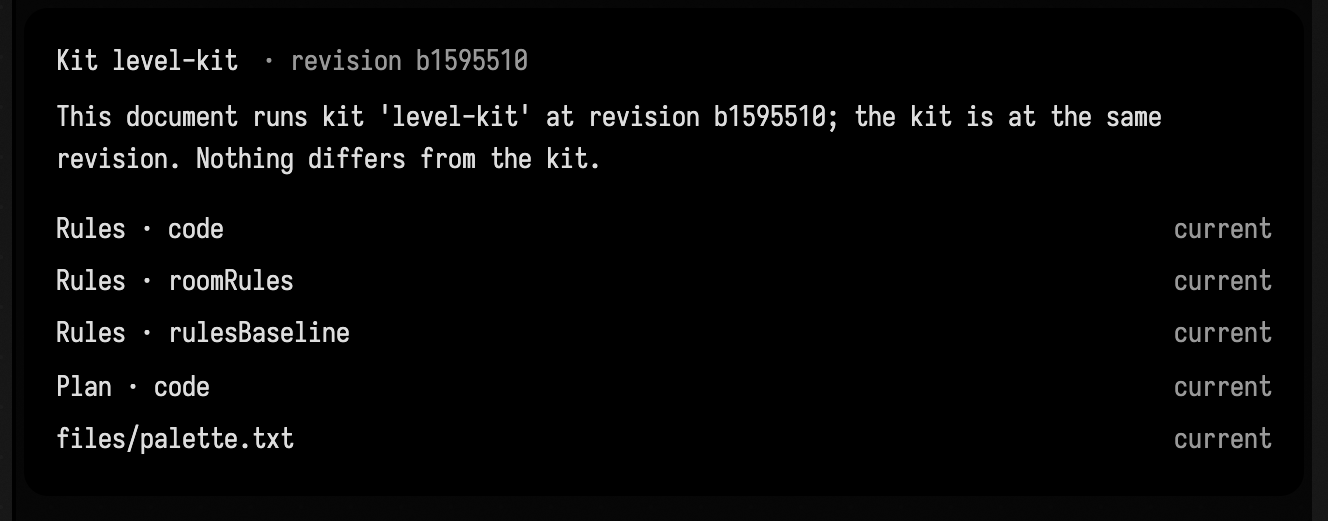
Publish it as a starting point
publish saves the document and copies it, with the kit's assets and its record, into your own
templates, ~/.afield/templates. It leaves out the document's history, its AI chats and its build
attempts.
uv run --project . --group backdoor python tools/field_kit.py publish --document level-onepublished level-one as starting point level-kit in ~/.afield/templates (kit level-kit b1595510)The starting point appears under Templates on the Welcome screen. Opening it gives you a new document in your workspace that is on the kit from the start:
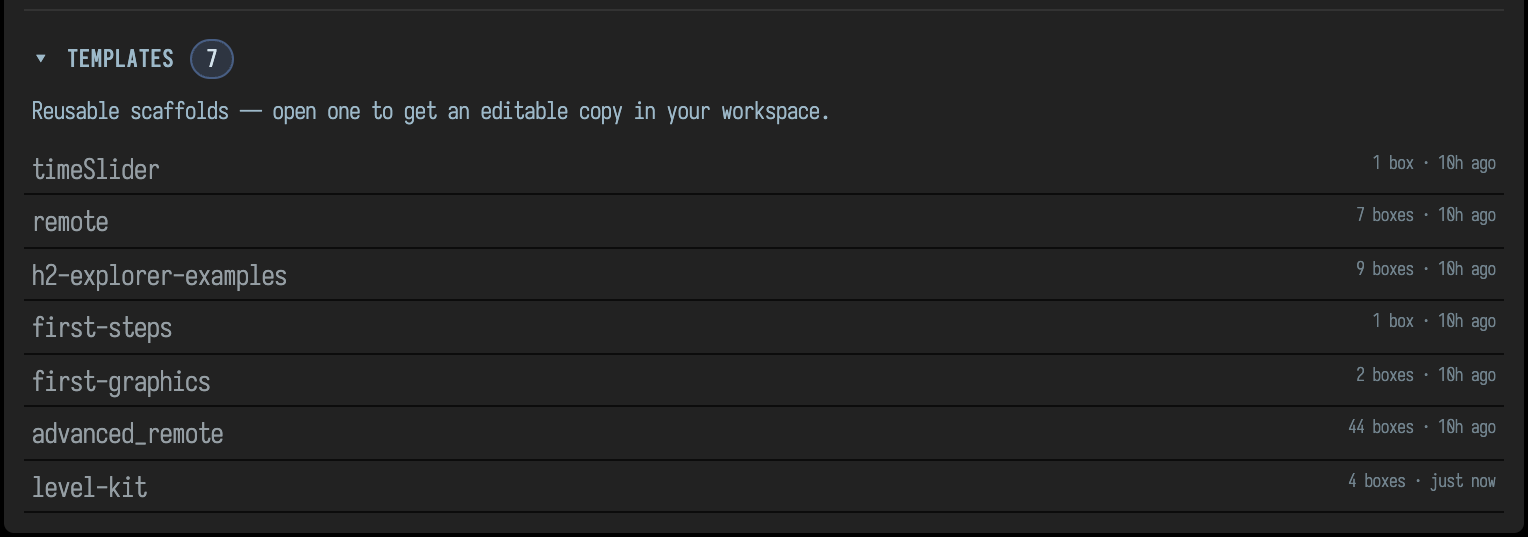
publish refuses a document that differs from its kit, or one with a build running. Run it again
with --replace to publish a newer version; the previous one is kept in ~/.afield/templates/.replaced/.
The first time a document made from the starting point opens, Field runs its roles in the kit's launch order, so it starts
working without a separate command. After that it runs only what autorun asks for, like any
document. To run a document's roles in launch order again later, use activate:
uv run --project . --group backdoor python tools/field_kit.py activate ~/kits/level-kit --document level-kitChange the kit
Change the kit's files, then rehash it to bring kit.json up to date. Here the plan gets a fourth
room, in ~/kits/level-kit/roles/plan/code.kt:
// A plan of four rooms in the palette's first colour.
val colours = "palette.txt".file.readLines().filter { it.isNotBlank() }
markdown("main", "Plan: four rooms, walls in ${colours.first()}.")
uv run --project . --group backdoor python tools/field_kit.py rehash ~/kits/level-kitchanged: plan.code
revision b1595510 -> 77b8d0f8rehash --check changes nothing and exits 1 if kit.json is out of date. When the kit is in git and
your working tree holds kit changes you are not committing yet, stage writes a kit.json to the
index that hashes only what is staged.
Every document made from the kit still runs its own copy. Its card now says what a migration would change:
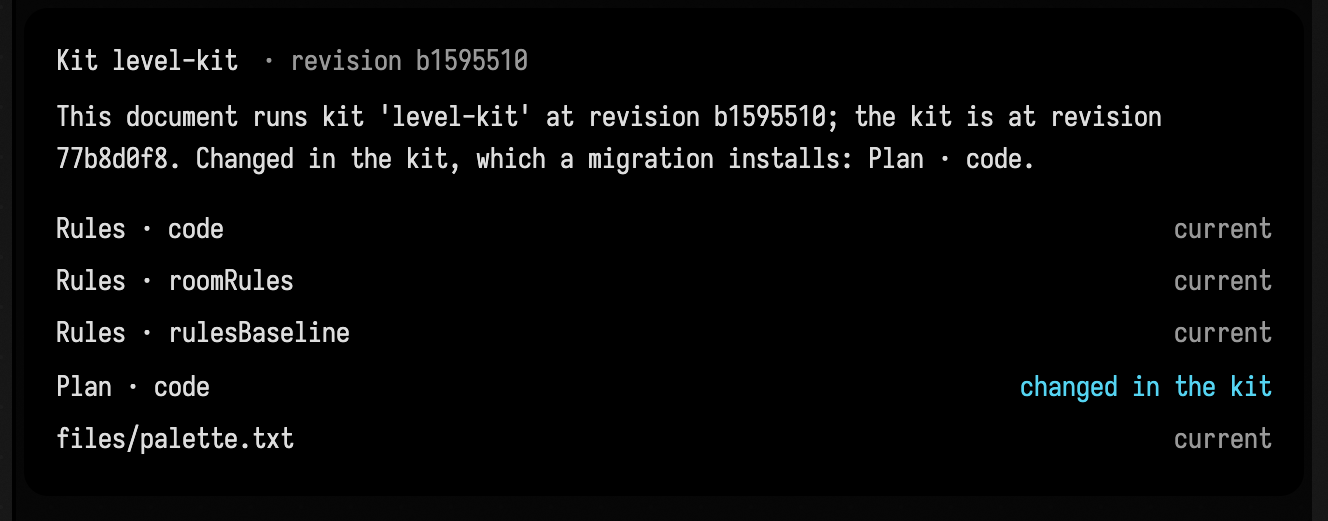
Migrate a document
migrate --dry-run says what a migration would do and changes nothing:
uv run --project . --group backdoor python tools/field_kit.py migrate ~/kits/level-kit --document level-kit --dry-runlevel-kit: kit level-kit b1595510 -> 77b8d0f8
install: Plan · code (from the kit)Without --dry-run it installs what changed, runs every role again in launch order (a role may
depend on one before it), and records the new revision last:
uv run --project . --group backdoor python tools/field_kit.py migrate ~/kits/level-kit --document level-kitlevel-kit: kit level-kit b1595510 -> 77b8d0f8
install: Plan · code (from the kit)
launched rules
launched plan
recorded kit level-kit 77b8d0f8If a role fails to run, the migration stops there and the document still records the old revision. Fix the role in the kit, rehash, and migrate again: what was already installed matches the kit and is left as it is.
When a migration refuses
A migration compares three versions of each part: the one the document recorded when it was last migrated, the one the document holds now, and the kit's. If the document holds the recorded version, the kit changed it and the migration installs the kit's. If the document holds a version that is neither, someone changed it in this document, and the migration refuses rather than overwrite it.
In level-one an agent has changed the room rules, and the kit has a new plan:
uv run --project . --group backdoor python tools/field_kit.py migrate ~/kits/level-kit --document level-oneRefusing to migrate level-one:
Rules · roomRules was edited in this document (it holds 746b40e9; the record and the kit hold dfe21dd5)
Nothing was changed.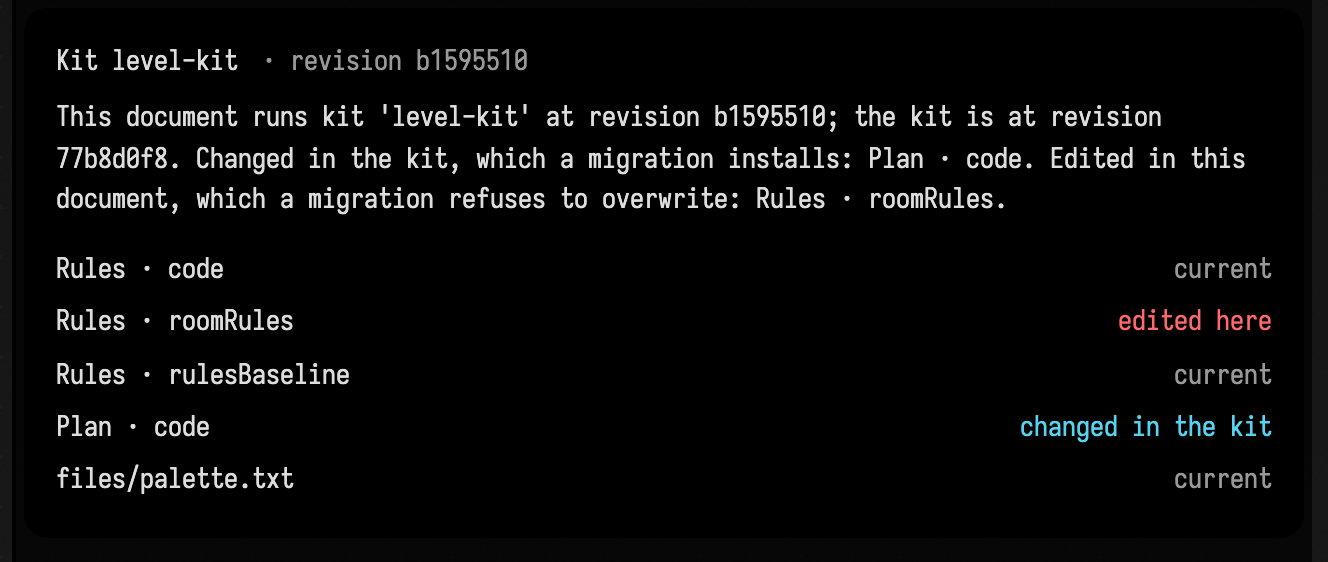
The migration changed nothing. To keep the agent's rules, fold them into the kit: copy them into
roles/rules/roomRules.txt and rehash. Every other document on the kit then gets them on its next
migration. To drop them, put the recorded text back in the box. Either way the document's copy then
matches the record or the kit, and the migration goes ahead.
A migration also refuses while a build is running in the document, because running the roles again would cancel that build or leave it describing the old kit. It names the build; migrate again once it finishes.
Frozen copies
A frozen copy, such as rulesBaseline, is a part nothing in the document should change. A check
compares candidates with it, so a candidate must not be able to edit it. A migration replaces a frozen
copy whenever it differs from the kit's, and lists it as a frozen copy so the replacement is never
silent. With the agent's rules folded into the kit, level-one's rules match the kit, and its
baseline is out of date:
uv run --project . --group backdoor python tools/field_kit.py rehash ~/kits/level-kitchanged: rules.roomRules, rules.rulesBaseline
revision 77b8d0f8 -> 42fd5c7c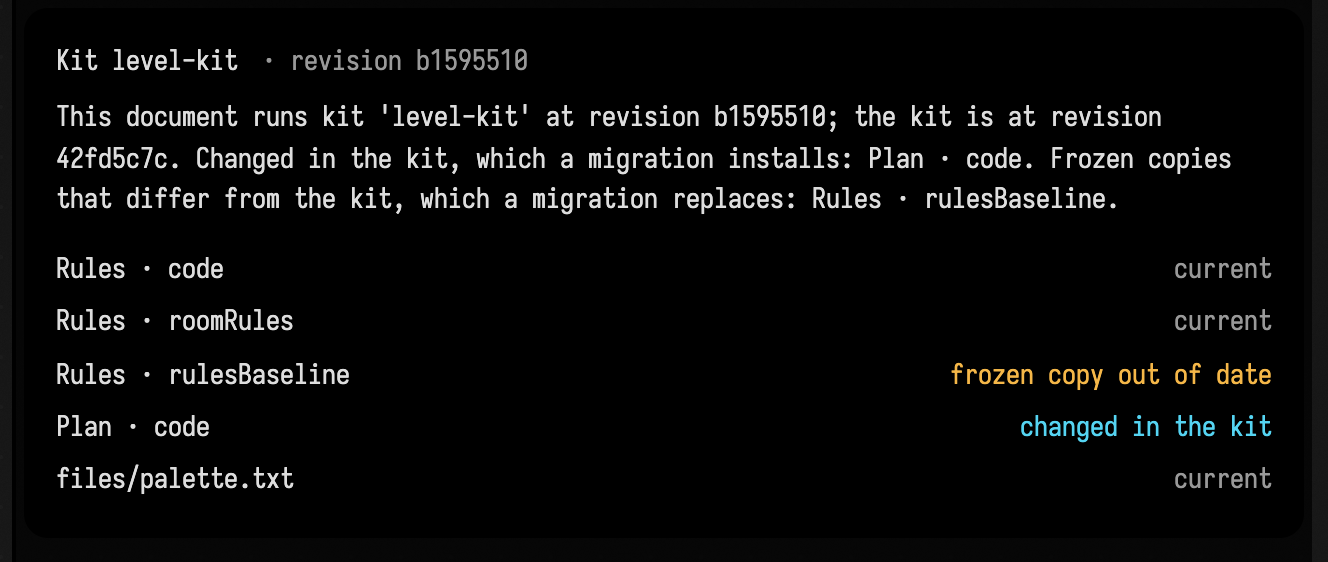
uv run --project . --group backdoor python tools/field_kit.py migrate ~/kits/level-kit --document level-onelevel-one: kit level-kit b1595510 -> 42fd5c7c
install: Plan · code (from the kit)
frozen copies: Rules · rulesBaseline (replaced with the kit's)
launched rules
launched plan
recorded kit level-kit 42fd5c7cAsk the agent
AI4's InspectKitRequest tool reports the same thing as the card: the kit, the recorded revision,
the kit's revision now, and each part that differs and what a migration would do with it. It changes
nothing. Ask the agent whether the document is up to date with its kit before relying on its boxes
behaving as the kit describes.
Pin the code a kit depends on
A kit's boxes often depend on code that is not in the kit: classes compiled into Field, or a native
library. When a build's results are only trustworthy with particular versions of that code,
RuntimeIdentity pins them. Capture the identity once, after you have checked the results, and keep
it as an asset of the kit:
RuntimeIdentity.capture([Solid::class], natives = [File(ManifoldLibrary.resolvedPath!!)])
    .write("runtime-identity.json".file)
Then check it before building on that code:
RuntimeIdentity.verify("runtime-identity.json".file, natives = [File(ManifoldLibrary.resolvedPath!!)])verify refuses a Field that loaded other code, and names each class or library that differs with
both hashes. Name the classes that do the work rather than everything a box uses, so an unrelated
change does not make the pin fail. A native library is matched by its file name and its contents,
not by where it was loaded from, so the same library in another checkout passes.
See also: Studies, for sources an agent edits through guarded tools and for derived builds, and Let AI4 Wait for Long Builds.
How these figures were made
By tools/capture_kits.py, on a Field it starts in a temporary workspace with its own templates
root. It builds level-one from this page's Kotlin, runs this page's commands in this order, and
captures the Kit box's card (and the Welcome screen as Field serves it at /welcome) at each step.
The text under each command is what that command printed in the run, with the run's temporary
directories written as ~/kits and ~/.afield/templates; the script fails when the page quotes
anything else.