Sound: from a pattern to something you can hear
Boxes make sound too. Write pat("bd ~ sd ~") in one and you have a beat: kick, rest, snare,
rest, round and round. This page follows that one line until you can hear it — first through a
small synthesiser built into Field, then through real drum samples — and then runs the path
backwards, from a recording to a pattern you can play again.
A pattern is a schedule: it says what happens and exactly when. To hear it, we need something to turn its events into samples. Nothing on this page needs an audio device for rendering; each clip is a file you can play here, with a caption naming the voice that made it.
Other pages cover the other voices. A pattern can play a
Faust program as a polyphonic instrument, or be placed in space with
patSpatial, which places each sound with Steam Audio.
How to make sound in Field lists every way Field makes sound and helps you pick
one.
You can listen to the clips here before setting anything up. To make a pattern of your own, follow the stand-in voice first; Getting real drums in your own box then shows how to use samples.
See also Field from your phone, which puts the controls of a running document within reach of a phone browser.
The path
A pattern does not make sound by itself. You ask it for the events in a stretch of time — say, the first two cycles — and it hands back a list: each value with the exact moment it starts and stops. Everything else on this page takes that list and does something with it. These are the calls you will meet, in the order the sections use them:
| call | what it does |
|---|---|
pat("bd ~ sd ~") |
turns the mini-notation into a pattern (Patterns & Rhythm) |
showPatRollOf(...) |
draws a pattern's events as a piano roll, before anything is heard |
showPatAudio(...) |
plays the events through the stand-in, a small built-in synth (patVoice) |
showDirtAudio(...) |
plays them through real drum samples from Tidal's Dirt-Samples |
patTranscribe |
goes back the other way: hears a recording as notes and writes a pat("…") you can play again |
patTranscribeAuto |
the same, guessing the pitch range instead of being told it |
Both voices below play the same list, so you can hear what changes when you change the sound source. For more on writing patterns, see Patterns & Rhythm.
The events, before anything makes a sound
showPatRollOf takes a few labelled patterns and draws each one as its own lane, time running
left to right. Here a kick-and-snare lane sits over a lane of eight hats, for two cycles. Each
block is one event; the gaps in the top lane are the rests.
:::static
// The pattern the two A/B figures below render. Nothing here is audio yet — these are
// the events, and both voices are handed exactly this list.
showPatRollOf(
    "bd ~ sd ~" to pat("bd ~ sd ~"),
    "hh*8" to pat("hh*8"),
    title = "pat(\"bd ~ sd ~, hh*8\")",
    subtitle = "the schedule both voices are given",
    cycles = 2,
)
:::fold open the output pane
displayOpen("main")
:::endfold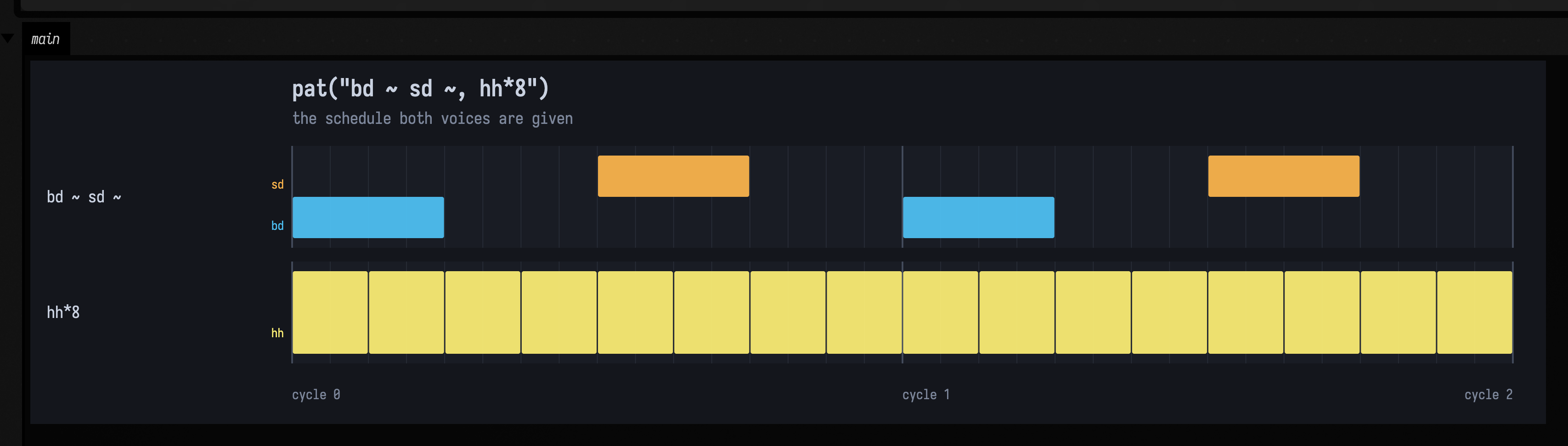
Ten events a cycle — the two ~ are rests and produce nothing at all — at exact rational
positions. Nothing so far has an opinion about what a kick drum sounds like.
The stand-in voice
patVoice gives each event a simple sound: an oscillator, a one-pole lowpass and an exponential
decay envelope. An event containing a MIDI number supplies its pitch; named drums use this small
map:
| Pattern example | What the stand-in plays |
|---|---|
pat("bd ~ kick ~") |
Both names select a 62 Hz sine voice. This is a deterministic kick stand-in, not a recording from a sample library. |
pat("~ sd ~ snare") |
Both names select the 190 Hz noise voice. |
pat("cp ~ clap ~") |
Both names select the 900 Hz noise voice. The higher noise setting distinguishes claps from the snare stand-in. |
pat("hh*8") |
hh and hat select the 6200 Hz noise voice. |
pat("~ oh ~ oh") |
Selects the 4200 Hz noise voice. It gives the open-hat token a different sound from hh. |
pat("custom ~") |
An unrecognised token uses the voice’s baseHz. Use Dirt rendering when a token is meant to name an actual sample. |
showPatAudio(pattern) renders through it and drops an audio player into the box's output.
Here is the beat:
Voice: the stand-in synth (patVoice). No sample library was used.
This little stand-in uses a sine wave and filtered white noise to sketch the sounds of a drum machine. It needs nothing installed and sounds the same each time you run it.
The real samples
To hear the same pattern with Tidal's Dirt-Samples, use patRenderStereoDirt to render the
samples into a buffer. For live playback, playDirt uses respondAhead, a clock and an audio
device.
The same beat, the same ten events a cycle, the same gain / pan / speed annotations:
Voice: real Dirt-Samples one-shots, every token matched.
Two details determine how the samples follow the pattern:
- Hits are one-shots. A sample plays to its natural end rather than being gated by the length of the arc that triggered it. That is what SuperDirt does, and it is the reason a snare sounds like a snare instead of a click: an eighth-note arc is far shorter than the snare's tail.
- Only events with an onset trigger. A fragment carried over from a previous query arc is a continuation, not a new hit; re-triggering it would flam.
How the library is found
If you have run Tidal, you already have Dirt-Samples and Field finds it by itself. If not,
./gradlew fetchDocsDirtSamples downloads the few folders these docs use (see
Getting real drums in your own box). Field does not include
the library itself.
To point Field at a copy somewhere else, set FIELD_DIRT_SAMPLES; it takes effect on the next
render, with no restart. Field looks in these places, in order:
$FIELD_DIRT_SAMPLES, if set and non-blank — the documented override;~/Library/Application Support/SuperCollider/downloaded-quarks/Dirt-Samples(macOS);~/.local/share/SuperCollider/downloaded-quarks/Dirt-Samples(Linux);~/Dirt-Samples.
When samples are missing
No library on this machine: you hear the stand-in. showDirtAudio plays exactly what
showPatAudio would, and its result says so (usedSamples is false). Nothing breaks. Install
the library as described above to hear real drums.
Library present, one token missing from it: only that event uses the stand-in. A pattern of
MIDI note numbers, or one naming a drum Dirt has never heard of, must not go silent just
because the library loaded successfully. The unrecognised events are voiced by patVoice and
mixed on top of the sampled ones, and DirtRenderResult.unmatched names them.
pat("bd zzzznotadrum bd hh") is the second case: bd and hh are in every
Dirt install and zzzznotadrum is in none. You can hear where the join falls: three sampled
drums and one square-wave blip, in one bar.
Voice: real Dirt-Samples where the library had the token, the stand-in synth per event where it did not.
describe() names exactly which, in one line a demo box can print:
Dirt samples: bd hh — synth voice for zzzznotadrumand for the whole-render fallback, the same call names the override rather than failing silently:
synth voice (no Dirt-Samples found; set FIELD_DIRT_SAMPLES to use real samples)See also
- Patterns & Rhythm — writing patterns, with Dirt-Samples drums on its cards.
- DoughDSP Sound Examples — effects on real signals.
- Faust — a pattern playing a Faust instrument.
- Subharmonic Synthesis — a new tone under a bassline, drums and film dialogue.
- A pattern in space — a pattern rendered binaurally through Steam Audio.
- How to make sound in Field and Boolean network music examples — more patterns on real Tidal samples.
Getting real drums in your own box
Install the quark (Quarks.install("Dirt-Samples") in SuperCollider, or clone
tidalcycles/Dirt-Samples) and then change one
call. Without either, ./gradlew fetchDocsDirtSamples downloads just the folders these docs use
(arpy, bd, click, cp, hh, perc, sd, sn, about 6 MB), and the library is found
there too, after any full install:
// the stand-in
showPatAudio(pat("bd ~ sd ~, hh*8") with gain(0.9))

// the real thing — same shape, same annotations
val played = showDirtAudio(pat("bd ~ sd ~, hh*8") with gain(0.9))
println(played.describe()) // say which voice you actually got
Both put a player in the box's output. showPatAudio hands back the rendered
PatSoundDocs.Stereo so you can plot or measure it as well as listen to it;
showDirtAudio hands back a DirtRenderResult, which carries the same audio in .audio
plus usedSamples, matched and unmatched. Print describe() and the box tells you
which voice it found rather than leaving you to guess from the sound.
If you want to be sure, force it:
FIELD_DIRT_SAMPLES=/path/to/Dirt-Samples ./field.shThe sound_render_path starting point has all of this
side by side. Open it from the welcome screen, then play box 1 and box 2 back to back.
From audio back to a pattern
patTranscribe takes a finite audio buffer and finds pitched note events. It also returns
mini-notation you can feed back to the renderer, so you can listen to what the analysis recovered.
The transcriber is for one melodic line. It reports a triad as POLYPHONIC rather than choosing
its loudest note, while accepting the harmonics of a single sawtooth as one note.
The register you declare sets the analysis window and therefore the shortest note that can be
resolved. In one test on identical audio, onset recall was 0.91 with the register declared and
0.03 without it. If you cannot declare one, call
patTranscribeAuto, which estimates it from a cheap wide first pass; estimating is about as good
as being told, and much better than leaving the wide default in place. It refuses rather than
transcribing when the first pass says the material is not one line.
Check the warnings and listen back before relying on a transcription.
To try it, open the pitch_transcription_roundtrip starting point.
What that looks like
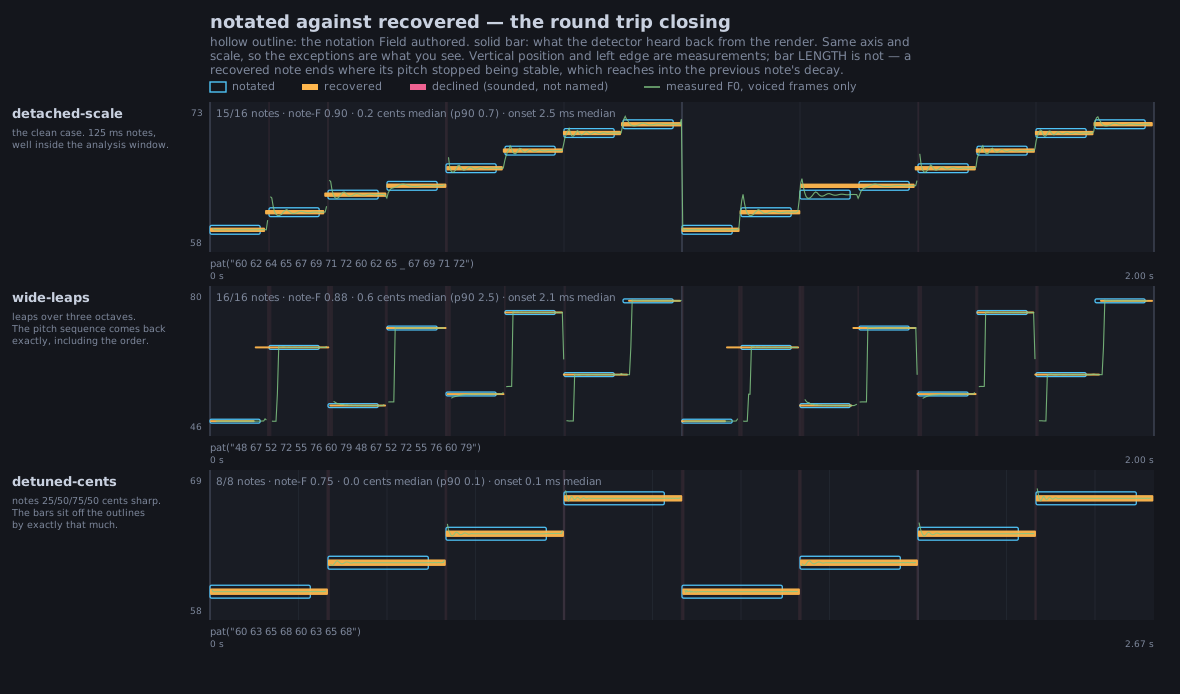
Every panel below plots the notation you wrote as a hollow outline and what the detector heard back out of the render as a solid bar, on one shared MIDI axis, so the exceptions are the only thing you have to look at. Vertical position and left edge are measurements; bar length is not, because a recovered note ends where its pitch stopped being stable, and that reaches into the previous note's decay.
The clean case first: a stepped scale, wide leaps over three octaves, and a run detuned by 25/50/75/50 cents. The bars sit on the outlines, and in the third panel they sit off them by exactly the detuning.
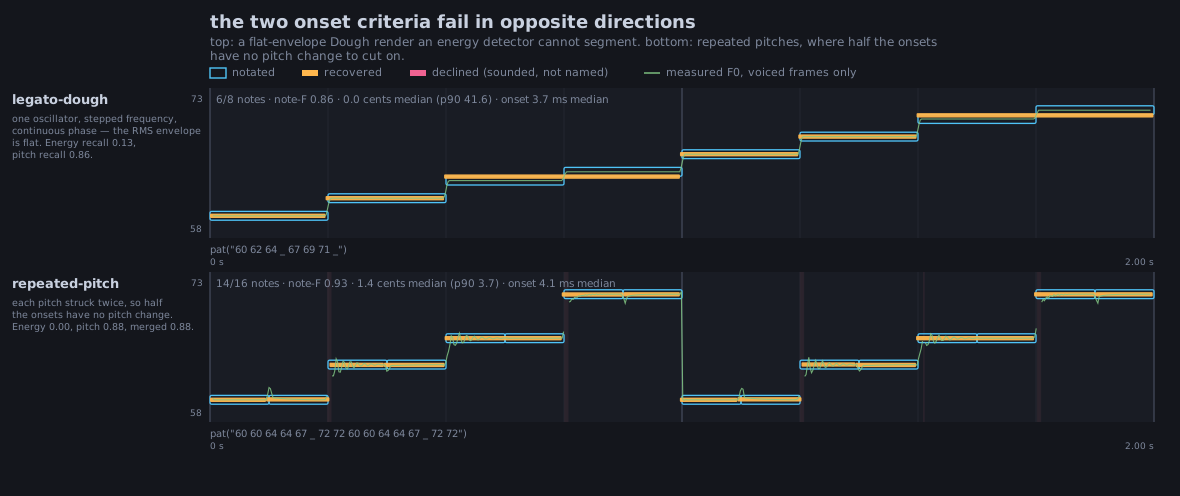
Finding where each note starts is the harder part. The detector uses two clues and combines them: a jump in loudness, and a change of pitch. Each fails where the other works. A smooth legato line has no loudness jumps but clear pitch changes; a line that plays each pitch twice has a loudness jump at every note but no pitch change at half of them. In the figure below, the left panel is the legato line and the right panel the repeated pitches; combining the two clues finds most note starts in both:
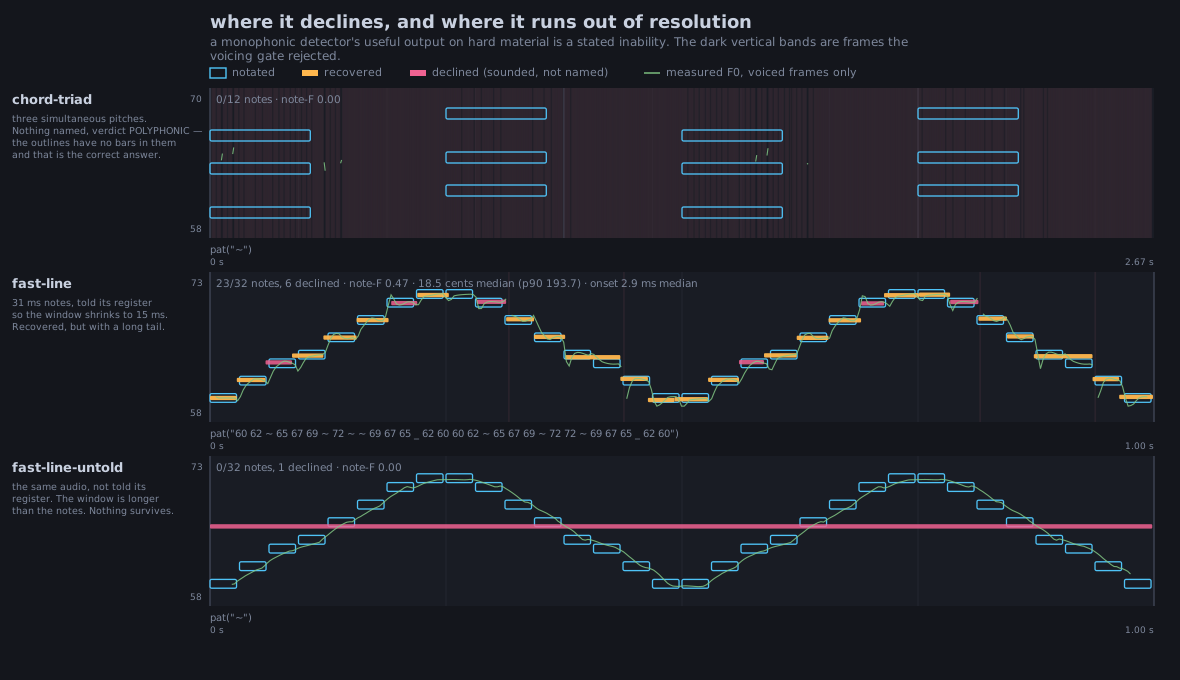
A refusal looks like this. Three simultaneous pitches gives 0 of 12 notes, a POLYPHONIC
verdict and pat("~"): the outlines have no bars in them at all, which is the correct answer. The same audio at 31 ms per
note recovers 23 of 32 when it is told its register and 0 of 32 when it is not, because the analysis
window is then longer than the notes; the output is again pat("~") rather than a plausible parseable
wrong one:
Agents: regenerating the transcription figures
The three figures above come from the synth.pat.transcription smoke test:
PAT_TRANSCRIPTION_DIR=/tmp/pat-transcription python3 tools/run_field_tests.py --id synth.pat.transcriptionAgents: where the \"Voice:\" captions come from
The "Voice: …" captions on this page are written by the docs build, not by hand. A clip
captioned as the stand-in has to match a fresh synth render, and one captioned as real samples
has to not match one. That shows an asset did not come from the synth; it does not show it
came from the Tidal library specifically. run_field_tests.py --id synth.docs.audio.provenance
prints the table; the method and figures are in dev_docs/DOCS_AUDIO_PROVENANCE_AGREEMENT.md.