Graphics in an Output Area
A Field 4 render target can draw straight into a box's output area, next to its code, instead of into a separate render window. Frames go from the GPU to the panel without being copied back to the CPU or encoded. In our 640×360 example on an Apple silicon Mac, the view keeps up with the renderer at 85 to 120 frames a second.
Field desktop app required
The view works in Field's Electron app on macOS and on Linux using native Wayland. A web browser, including Field's HTTP mirror, shows a message instead of frames. Windows is not implemented.
A view in a box
This box draws a moving, colour-shifting square into a 640×360 view and shows it in the box's
main output. It sits under a renderer box, like any other Field 4 box, and its vertex and
fragment properties hold the two shaders.
import afield.media.stream.ElectronRTTView

val view = ElectronRTTView(640, 360)

val module = moduleHere { +view }
val m = Mesh()
module += "mainMesh" to m
view += "content" to module

val camera = Camera()
m.p = camera.p
m.m = camera.m
m.finalColor = {
    val t = System.nanoTime() / 1e9
    vec(3 * Math.sin(t), 2 * Math.cos(1.3 * t), Math.sin(4 * t), 1.0)
}

val sc = 4.0
m.set(4, 2) {
    pos.add(-sc, -sc, 0)
    pos.add(sc, -sc, 0)
    pos.add(sc, sc, 0)
    pos.add(-sc, sc, 0)
    tri.add(0, 1, 2)
    tri.add(0, 2, 3)
}

display("main", view.html())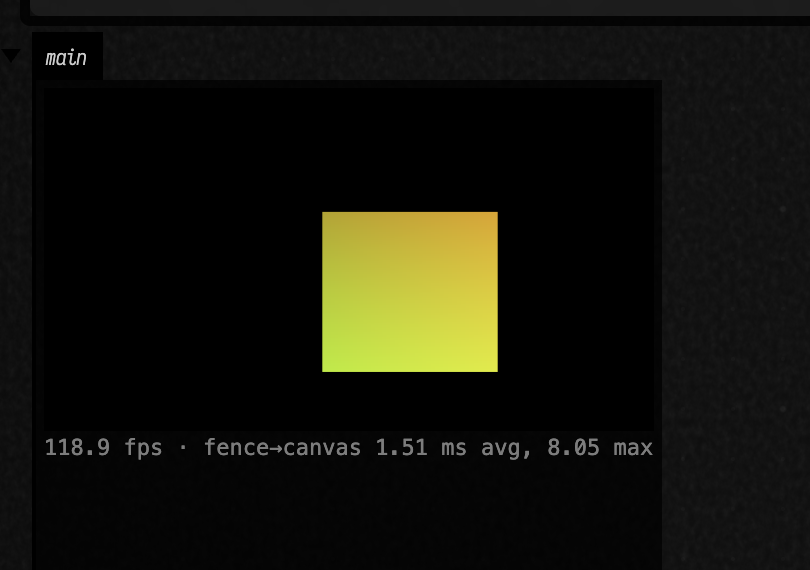
The view stands in for the RenderToTexture it draws through, view.rtt: +view inside
moduleHere { } points the module at it, and view += ... attaches modules exactly as you would to
a texture you meant to sample.
view.html() is the panel itself, a canvas plus a line of live timings, and display puts it in
whichever output you name.
Re-running, stopping, and sharing the view
A box has one view. Running the box again replaces its previous view with the new one, so you can edit the size or the content and re-run without views piling up. Stopping the box leaves the view drawing, the same as anything else a box has launched; deleting the box, or closing the document, releases it.
Another box that wants the same view can take it the usual ways: mark it @exported val view and
read it as _view in a child box, or declare it with prop<ElectronRTTView>(view).
How fast it is
The line under the canvas reports two numbers, averaged over each second: frames shown per second, and the time from the GPU finishing a frame to the panel showing it. At 640×360 on an Apple silicon Mac the view runs at the renderer's own rate, and that time is 1 to 3 ms on average, with occasional frames taking up to about 15 ms. The view holds three frames in flight, so a slow panel makes it skip frames instead of slowing the renderer down.
On Linux
Use the app in a native Wayland session. Under Xorg or XWayland the canvas stays blank, and the view reports an error instead. No ANGLE/Vulkan switch is needed for this view; forcing that backend can stop the Wayland app window from appearing.
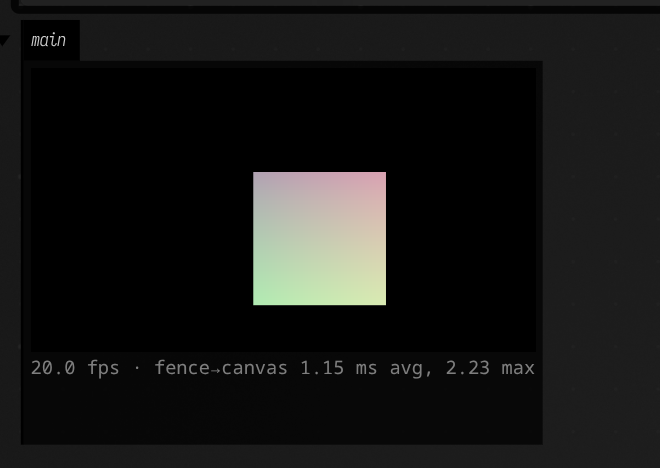
The Linux view also passes frames through a shared GPU image ring, with no CPU readback or video encoding. On an NVIDIA RTX 4090 (driver 610.43.02, Electron 44.5.1) the 640×360 view showed about 20 frames a second, with roughly 0.8 ms from the frame's GPU fence to the canvas draw. The same moving square, in the Linux app:
| Session on that machine | Vulkan texture shown in the canvas |
|---|---|
| Native Wayland | Yes; all source pixels matched |
| Xorg | Blank with both default GL and ANGLE/Vulkan |
| XWayland | Blank with both default GL and ANGLE/Vulkan |
The verification record has the source and canvas pixel counts, the exact switches, and the checks after re-running and deleting the box.
See also: Field 4 Graphics for meshes, modules and render-to-texture, and WebRTC Streams to publish a view as a live stream.
Agents: how the figure is captured
The docs runner's capture browser is a plain Chromium, which cannot show these frames, so this
page's figure is captured from the Field Electron app itself: the fence's
capture-profile="macos-electron" makes the runner start this checkout's Electron with remote
debugging on and capture through it (playwright-open --electron on the backdoor,
afield.tools.docs.ElectronCaptureBrowser). Like the Linux GPU captures, it is regenerated only on a
host that asks for it (FIELD_DOCS_CAPTURE_PROFILES=macos-electron on macOS), and kept
everywhere else. The mechanism behind the view is in dev_docs/ELECTRON_RTT_VIEW.md.