Connecting an output iframe to its box
A page in a box's output can ask the box's Kotlin code to do something: update a model, for
example, or return the result of an edit. outputRequests connects the page to a callback on the
box, using JSON over Field's existing WebSocket connection.
Register the callback in the source box:
import kotlinx.serialization.json.*

val endpoint =
    outputRequests("editor") { request ->
        buildJsonObject { put("received", request) }
    }
Pass endpoint.id to the iframe as part of its rendered configuration. In its JavaScript module:
import {outputRequests} from '/output_requests.js';
const model = outputRequests(bindingId);
const response = await model.request({operation: 'inspect'});
bindingId is the id passed from Kotlin. In a srcdoc iframe, provide a base URL on the Field
server, or pass {base: fieldOrigin} as the second argument. Keep the iframe on Field's origin.
Resolve the document's assets with FileManager, such as
"editor/index.html".file; serve them through Field's existing document asset routes.
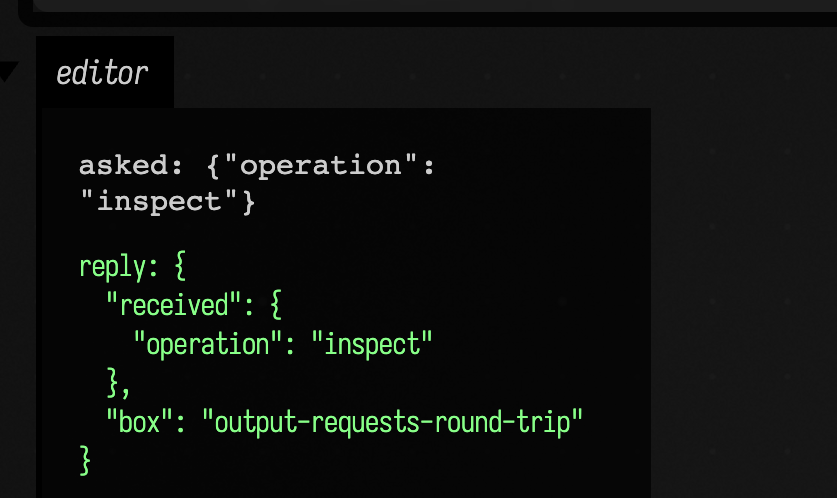
Both halves in one box: the box registers the callback and displays a page that sends one request when it loads and prints the reply under it.
import kotlinx.serialization.json.*

val endpoint =
    outputRequests("editor") { request ->
        buildJsonObject {
            put("received", request)
            put("box", thisBox.name)
        }
    }

// The page asks once when it loads and writes the box's reply under its question.
display(
    "editor",
    """
    <div style="font-family: monospace; color: #ccc; padding: 8px">
      <div>asked: {"operation": "inspect"}</div>
      <pre id="reply-${endpoint.id}" style="color: #8f8">waiting…</pre>
    </div>
    <script type="module">
      import {outputRequests} from '/output_requests.js';
      const model = outputRequests('${endpoint.id}');
      const response = await model.request({operation: 'inspect'});
      document.getElementById('reply-${endpoint.id}').textContent = 'reply: ' + JSON.stringify(response, null, 2);
    </script>
    """
        .trimIndent(),
)
Kotlin tools can call sourceBox.outputRequests("editor").request(json) directly from a suspend
function. Browser and tool requests join the same queue, so they share ordering and validation.
The handler starts with its box and document context on the Runloop. Move expensive work to a
worker with withContext; suspend while waiting instead of blocking the Runloop. Publish an
immutable snapshot if synchronous rendering or build-input callbacks need to read the model.
Stopping or deleting the source box closes its bindings and completes outstanding requests with errors. Re-registering a name replaces its binding and produces a new id: render that id into the replacement outputs. An old client gets an explicit unavailable-binding error. The registry is runtime state; persist the authored model separately in the document's files.
The browser client reconnects for subsequent requests, but never replays an edit after a lost
connection or timeout: it might already have been accepted. Read the current model and its
revision before deciding whether to retry. Use model.close() when removing a client. Each
binding accepts at most 64 queued requests and rejects JSON larger than six million characters.
Callbacks in read-only documents are refused.