Stereo RTT composite
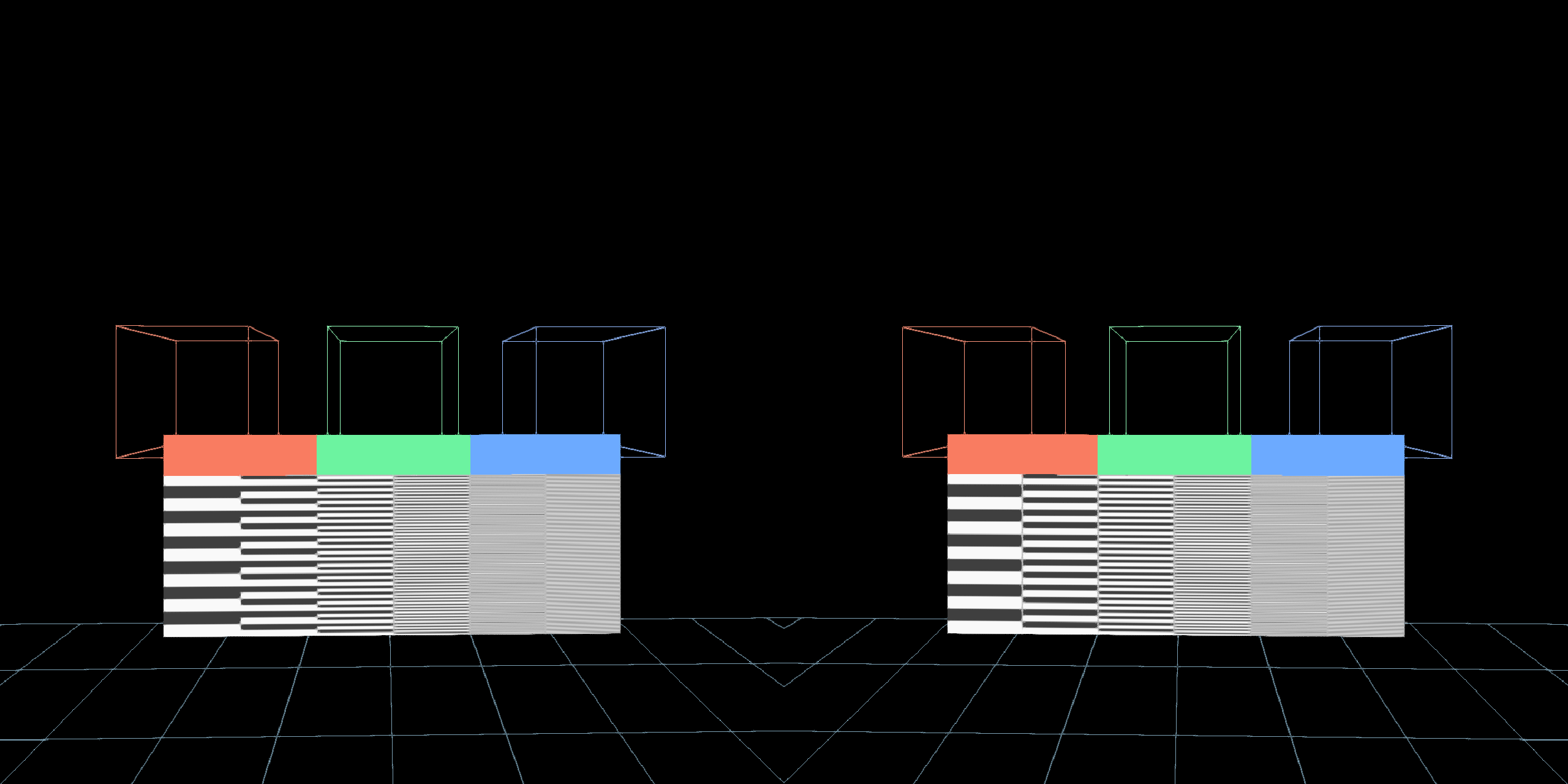
A small scene you can change while wearing a headset: three wireframe cubes, a floor and a resolution chart, rendered once per eye into textures. An editable FXAA pass composites the packed stereo image before it reaches the headset and desktop mirror. The same graph runs without a headset as a desktop stereo preview.
Launch it
Open stereo_rtt_composite from Field's starting points. It opens with code and shaders ready to edit; rendering begins when you launch the numbered boxes in order:
| Box | What it owns | First thing to change |
|---|---|---|
| 1 — Window and renderer | Vulkan window, optional OpenXR session, launch guide | useHeadset |
| 2 — Stereo cubes and floor | Two eye RTTs, packed image, scene geometry | Cube positions or colours |
| 2b — Resolution chart | RGB patches and progressively finer bars | Chart position or its fragment shader |
| 3 — FXAA composite RTT | Fullscreen pass sampling the packed scene | FXAA checkbox, thresholds or fragment shader |
| 4 — Headset and desktop | Output routing and the renderer's frame loop | Which RTT to present |
Launch 1, 2, 2b, 3, 4. Box 4 must be last: all RTTs and passes are installed before the loop starts. Stop box 4 to pause rendering. Restart Field to change between desktop and headset mode or rebuild the whole graph. For shader experiments, change box 3's fragment property and reload the shader; its FXAA checkbox switches AA on and off without changing render resolution.
The desktop default uses 1200 × 1200 pixels per eye. This is a stereo preview with a fixed camera; moving your head does not control it.
Use a headset
On a machine with Vulkan and an OpenXR runtime, connect the headset first. For the Quest 3 session used to develop this example, WiVRn supplied that runtime over the local network. This scene uses whichever OpenXR runtime is active; it contains no machine address or WiVRn launcher configuration.
Set useHeadset = true in box 1, restart Field, and launch the same five boxes. Wear the headset
while launching so the runtime can locate its eye views. Box 2 reads the runtime's actual eye image
size; box 4 prints that size. The runtime supplies both eye matrices every frame. The cubes and
chart are positioned relative to the initial head position, two metres and 1.6 metres ahead.
After changing WiVRn's render resolution, start a fresh WiVRn and Field session. A resumed session can retain the old eye dimensions. Check the dimensions printed by Field rather than assuming the slider has changed the running texture.
Change the composite
The graph is:
scene geometry → left/right eye RTTs → packed stereo RTT
                                          ↓
                                    FXAA composite RTT
                                          ├→ desktop mirror
                                          └→ OpenXR eye images (when enabled)
SideBySideStereoTarget registers its left, right and packing passes in the renderer's ordered
preTargets. Box 3 adds the composite afterwards, so it reads the scene rendered in the same frame.
Box 4 sends that composite to both outputs. To add colour grading, a vignette or another spatial
filter, edit box 3's fragment shader and keep its output format and dimensions compatible with the
packed source.
The FXAA shader is adapted from Field's existing StandardRenderer shader. Each texture lookup is
clamped inside the fragment's own eye, half a texel away from the stereo seam. Keep that restriction
when adding filters, so one eye never samples the other eye's image. FXAA uses the current image
only; it has no temporal history. It softens fine edges and cannot recover detail absent from a
low-resolution eye image.
Let Renderer.run() own OpenXR frame pacing. It locates the predicted pose before rendering the
scene and submits the resulting image with the same pose and display time. Additional passes belong
inside this frame, rather than in a second independent render loop.
The scene was exercised on a Quest 3 through WiVRn, including the editable FXAA pass. Reported motion-to-photon estimates depend on runtime, network, codec and headset settings; this starting point makes no fixed latency promise. Its automated headless check compiles the boxes without opening a window; the image above runs the actual desktop Vulkan path.
The native regression check exercises first-frame sampling, one render pass per eye and square-eye projection on a non-square window, with Vulkan validation enabled:
uv run --project . --group backdoor python tools/run_field_tests.py --id four.stereo-packing.smokeFor interactive controls in the scene itself, continue with ImGui as an in-VR panel. For another source of stereo eye matrices, see Apple Vision Pro.