Drawing and Notation
Press alt/option-D and the canvas becomes a drawing surface. Press it again and you are back with the boxes.
The drawing surface is Excalidraw, the open-source whiteboard (source on GitHub), running inside Field over your boxes. Its pens, shapes, arrows, text, toolbar and shortcuts are all there. Field starts with Iosevka text, crisp lines and square corners; use the sloppiness and font controls if you prefer the hand-drawn look. Your drawing stays where you put it, pans and zooms with the canvas, and is saved with the document.
Your code can read the drawing and write to it. Every stroke is data a box can ask about, and every box can draw.
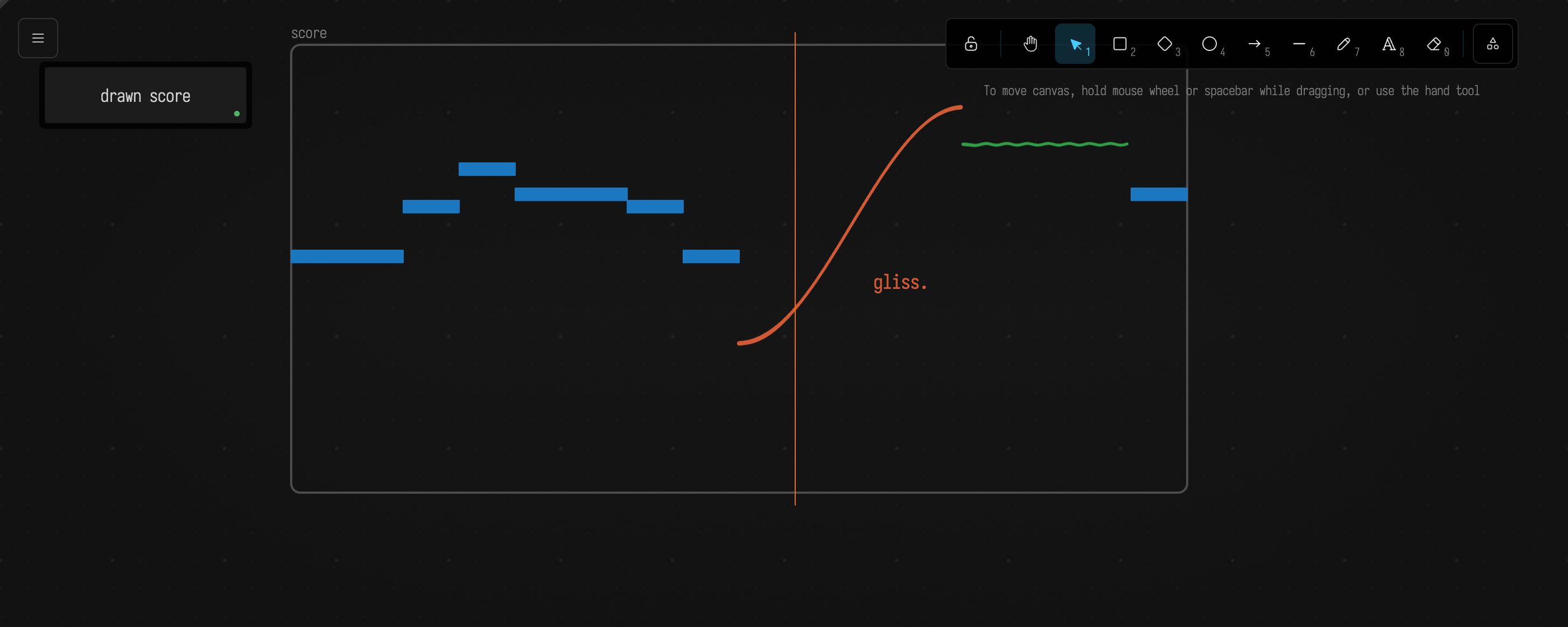
Drawing
alt/option-D switches the mouse and keyboard to the drawing; alt/option-D again gives them back to the boxes. While the drawing has them, Excalidraw's own keys work: p for the pen, r rectangle, o ellipse, a arrow, l line, t text, e eraser, and space-drag or two fingers to pan. Pinch to zoom, and the boxes zoom with you.
When drawing mode is off, your marks remain visible and clicks reach the boxes underneath. You can also attach marks to boxes so they move together:
- Draw an arrow from one box to another and it follows both when you drag them.
- Use Anchor Drawing to Boxes in the command palette to attach selected marks to the boxes underneath. With nothing selected, it anchors every mark sitting on a box.
A box that listens
Make a box and name it listen. It waits for you to draw. Each time you finish a pen stroke, it reads the stroke as an FLine, draws a green copy of it offset to one side, and reports how long the stroke was:
notation.onStroke { s ->
    val line = s.toFLine()
    notation("echo") {
        stroke = "#2f9e44"
        stroke(line.byOffsetting(36f))
    }
    markdown("heard", "a stroke of ${s.points.size} points, ${s.length.toInt()} long")
}
A second box, named tell, draws an arrow from itself to the first. thisBox.named("listen") finds the box called listen in this document. The arrow's ends sit on the two boxes' edges, so dragging either box takes the arrow with it:
val listen = thisBox.named("listen")
notation {
    stroke = "#1971c2"
    arrow(from = thisBox, to = listen, label = "tells")
}
Run both, press alt/option-D, pick the pen and draw. When you lift the pen, a green copy of your stroke appears beside it, and listen reports the stroke's size:
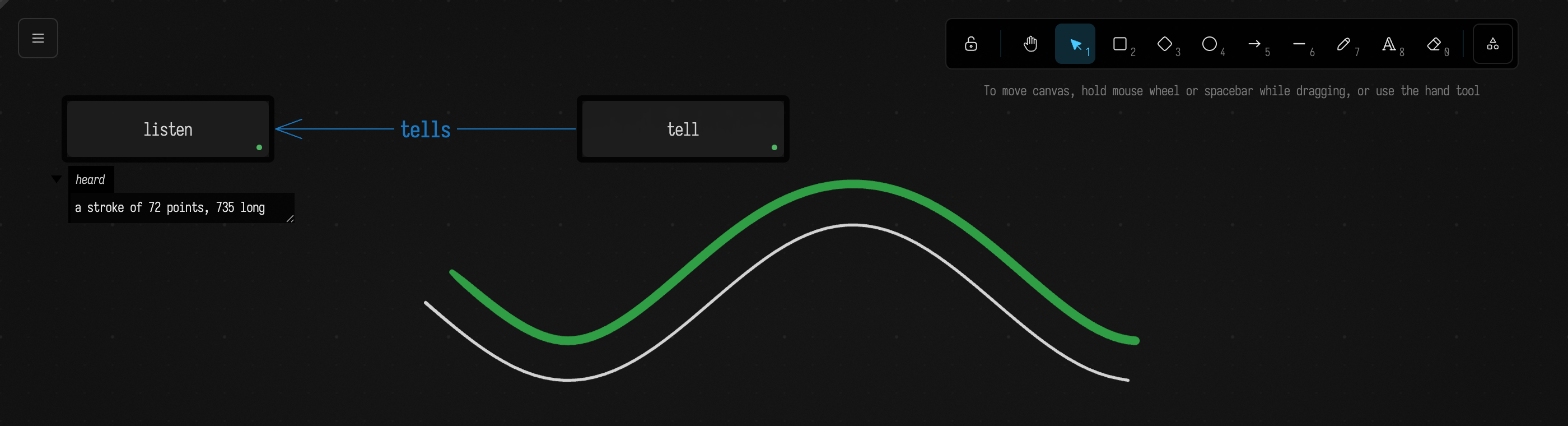
Everything else on this page builds on those two moves: code that draws, and code that reads what you drew.
Drawing from code
notation { } draws. Everything a block makes belongs to the box that ran it, so running the box again replaces those marks rather than adding to them. Marks you drew by hand are never touched.
notation {
    stroke = "#1971c2"
    ellipse(frame.x - 16, frame.y - 16, frame.w + 32, frame.h + 32)
    rect(560, 110, 260, 150, label = "a region")
    arrow(vec(frame.x + frame.w + 24, frame.y + 30), vec(550, 180), label = "points here")
    stroke((0..60).map { k -> vec(560 + k * 7.0, 400 + 50 * sin(k / 6.0)) }, stroke = "#2f9e44")
}
markdown("marks", "${notation.mine.size} marks drawn")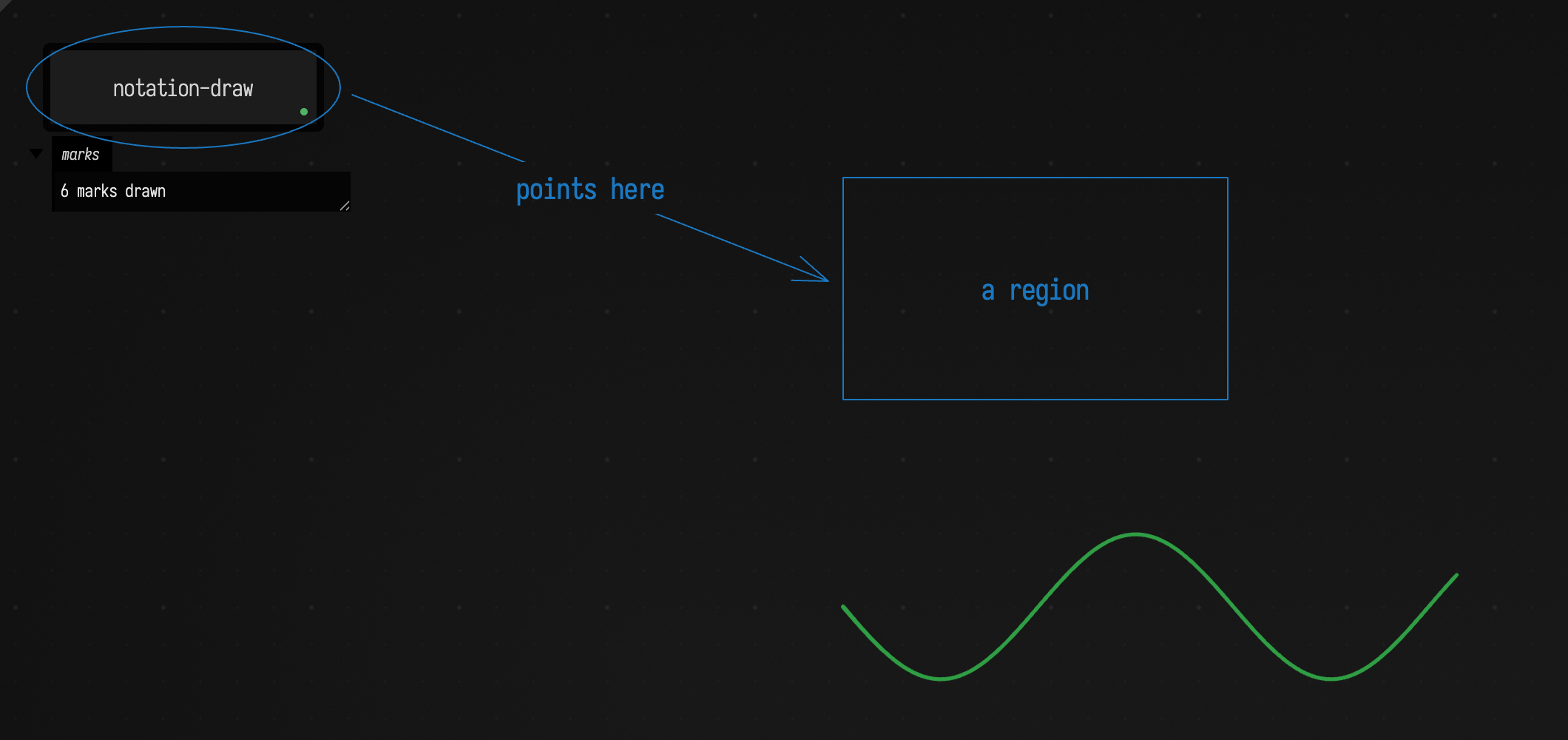
Inside the block, frame is still the box's own frame, its position and size on the canvas, which is how the ellipse circles the box. label = writes text on a shape, and notation.mine is the list of marks this box owns.
The block can make a rect, ellipse, diamond, text, line, arrow, stroke (a freehand stroke, from points or an FLine), or an Excalidraw frame with frame(name, x, y, w, h), a named region that holds other marks; the call with arguments makes one, the bare frame is the box's. arrow(from = thisBox, to = otherBox) puts the ends on the two boxes' edges, and they stay there when either box moves. Give a block a key, notation("overlay") { … }, to keep a second set of marks that is replaced on its own.
A stroke can carry pen pressure, as one drawn with a tablet pen does: stroke(line, pressure = { t -> 0.2 + 0.8 * t }) gives the pressure, 0 to 1, as a function of how far along the stroke the pen is. mark.pressures reads it back, from code-drawn and hand-drawn strokes alike, and Drawn Strokes Become Paint paints with it.
Marks made inside a frame(name, x, y, w, h) { } block belong to that frame, so Excalidraw clips them to it and drags them with it, and notation.inside(frame) finds them. Marks made inside group { } are grouped the way Ctrl+G groups them: select one and you have them all. name = gives a mark a label that code can find it by with notation.named(...). Shapes take a fillStyle ("solid", "hachure", "cross-hatch", "zigzag") and an opacity, and the block's roughness and dashed set how the lines after them are drawn:
notation {
    roughness = 0.0
    frame("score", 560, 180, 480, 240) {
        rect(620, 220, 120, 30, name = "C5", fill = "#1971c2")
        rect(740, 300, 180, 30, name = "E4", fill = "#2f9e44", fillStyle = "cross-hatch")
    }
    group {
        ellipse(80, 500, 60, 40, fill = "#ffc9c9", opacity = 60)
        diamond(150, 495, 60, 50, fill = "#ffc9c9", opacity = 60)
    }
}
Any mark, hand-drawn or not, can be changed or removed:
val m = notation.named("tempo")!! // a mark labelled "tempo"
notation.edit(m) {
    stroke = "#e03131"
    text = "tempo 96"
}
notation.anchor(m, thisBox) // it now follows this box
notation.delete(m)
Reading the drawing
notation is the whole drawing, seen from the box that asks:
for (m in notation.marks) println("${m.kind} ${m.label} at ${m.bounds}, over ${m.box?.name}")

notation.strokes // just the pen strokes; also .arrows .lines .texts .shapes .frames
notation.over(thisBox) // marks sitting on this box
notation.arrowsTo(thisBox) // arrows that end on it
notation.selected // what is selected in the drawing right now
Each mark knows its shape, position, colours and label (listed in the Reference), in the same canvas coordinates a box's frame uses, and toFLine() turns it into an FLine for everything Field can do with geometry.
Listening to the drawing
A box can listen for finished strokes, arrows, text, or any change to the drawing:
notation.onStroke { s ->
    println("a stroke of ${s.points.size} points, over ${s.box?.name ?: "nothing"}")
}
notation.onText { t -> println("you wrote '${t.text}'") }
notation.onChange { edit -> println("${edit.added.size} added, ${edit.removed.size} removed") }
A handler runs once the stroke is finished, not while it is being drawn. Running the box again replaces its handlers, and stopping the box removes them. Changes a box makes itself do not call it back.
A long tradition
Artists and composers spent much of the twentieth century pulling notation apart, and most of what they found is useful here.
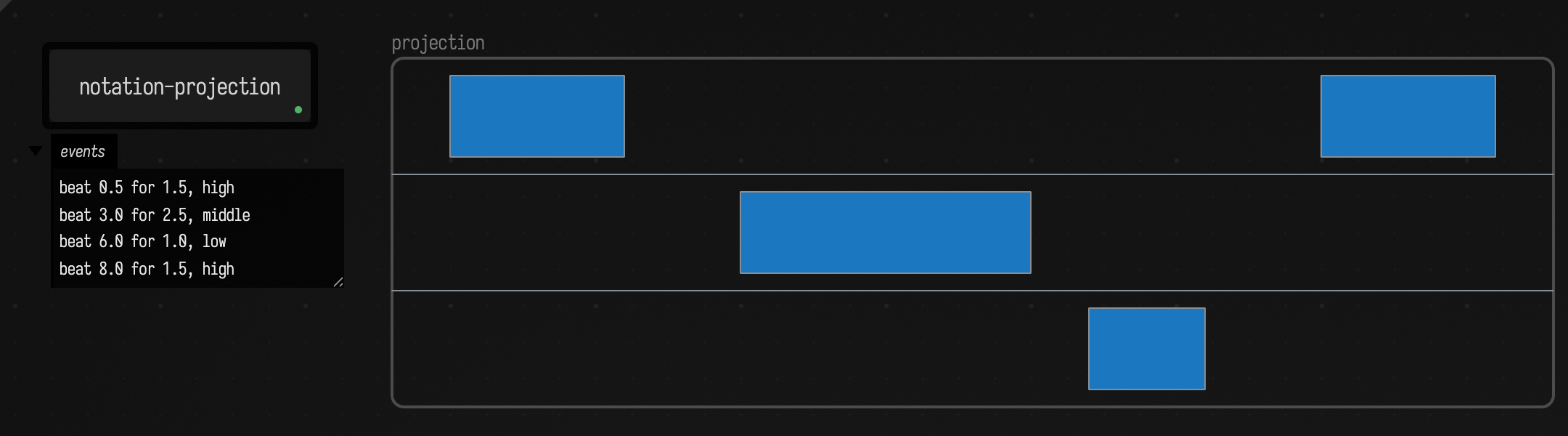
Kandinsky's Point and Line to Plane (1926) treated the elements of a drawing as things with properties you could name and measure. In the 1950s composers took the hint. Morton Feldman's Projection 1 (1950) gives the cellist boxes on a grid: time runs left to right, three rows say high, middle or low, and the pitches themselves are left open. Earle Brown's December 1952 is a page of horizontal and vertical rectangles that can be read in any direction. Stockhausen's Studie II (1954) was published as a score of overlapping rectangles, each a band of frequencies over a stretch of time.
John Cage came closest to the idea behind this page. Fontana Mix (1958) is a kit of sheets with curved lines, transparencies of points, a grid and a straight line. The performer lays them over one another, draws a line from a point inside the grid to a point outside it, and measures where that line crosses the curves. The measurements become the piece. The score is read by intersection.
Others built machines to do the reading. Daphne Oram's Oramics drew sound on strips of 35mm film for photocells to follow, and Iannis Xenakis's UPIC (1977) turned drawings made on a tablet into sound. The traffic ran the other way too: Fluxus event scores and Sol LeWitt's wall drawings are instructions, text that makes the work when someone follows it.
Field sits in the middle of all this. A box can draw, which is LeWitt's direction, and a box can read what you drew, which is Cage's, in the same document while both are running.
Reading by intersection
Draw a score, then lay a vertical line across it at beat 2: wherever the line crosses a mark, that mark is sounding at beat 2, at the pitch where they meet. A horizontal line does the same for one pitch, giving the beats at which something passes through it. Reading a drawing this way, by cutting it with a line, also makes a drawn line a value over time, the freehand counterpart of placing keys in the keyframe editor. notation.space names a region and says what its axes mean. The region can be a frame, a box, or a rectangle:
val score = notation.space("score", x = 0.0..8.0, y = 84.0..48.0) // eight beats; MIDI 84 at the top
score.vertical(2.0) // everything at beat 2, as hits sorted by pitch
score.horizontal(66.0) // every place something passes F#4, as beats
score.events // every mark as an event: start, end, and the pitch it starts and ends on
A cut returns hits. A stroke crosses it at points, so a line that doubles back gives two hits, two voices at once. A shape or a text covers a stretch of it, a span, so a rectangle in a piano roll gives the pitches it covers. Each hit also says how far along its stroke it is (along), how fast the stroke is rising there in the space's units (slope, which for a score is semitones per beat), and, for a pen stroke, how hard the pen was pressing (pressure).
Fontana Mix
Fontana Mix is a kit of overlaid sheets: the performer draws a straight line from a point inside a grid to a point outside it and measures where it crosses a set of curves. Here is that kit drawn by code: six curves, a grid, a point, and the straight line from the point inside the grid to one outside it. The box cuts the curves with the line and reports where the line meets each one:
val colors = ["#e03131", "#1971c2", "#2f9e44", "#f08c00", "#9c36b5", "#0c8599"]
notation {
    frame("fontana mix", 260, 30, 780, 460)
    for (i in 0 until 6) {
        val curve = (0..48).map { k -> vec(280 + k * 15.4, 80 + i * 66 + 45 * sin(k / 5.0 + i * 1.9)) }
        stroke(curve, name = "curve ${i + 1}", stroke = colors[i])
    }
    rect(520, 170, 200, 170, name = "grid", stroke = "#868e96")
    ellipse(580, 230, 10, 10, name = "point", fill = "#868e96")
    line([vec(585, 235), vec(1010, 470)], name = "the line", stroke = "#1e1e1e")
}
val line = notation.named("the line")!!
val crossings = notation.intersect(line.start!!, line.end!!).filter { it.mark.name!!.startsWith("curve") }
markdown("readings", crossings.joinToString("  \n") { "${it.mark.name}: %.2f along the line".format(it.value) })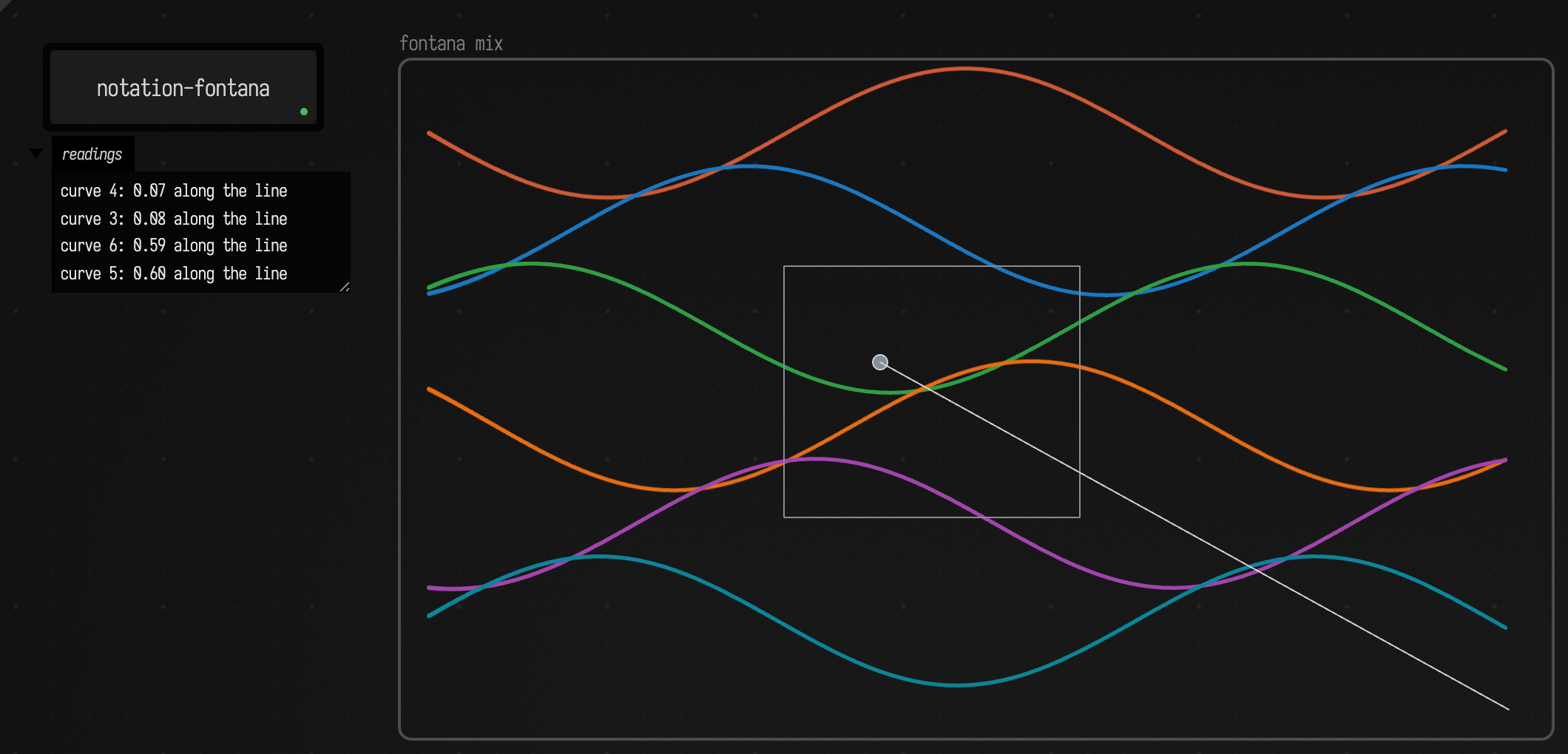
In the starting point below, you draw that line yourself with l, and the box reads it each time you move it.
Projection 1
Feldman's grid, read as events. Time runs across the frame and the three rows are high, middle and low. Each rectangle is a note, and the box reports when it starts, how long it lasts, and which row it is in:
notation {
    stroke = "#868e96"
    frame("projection", 260, 30, 800, 240)
    for (row in 1..2) line([vec(260, 30 + row * 80), vec(1060, 30 + row * 80)])
    fill = "#1971c2"
    rect(300, 42, 120, 56)
    rect(500, 122, 200, 56)
    rect(740, 202, 80, 56)
    rect(900, 42, 120, 56)
}
val score = notation.space("projection", x = 0.0..10.0, y = 3.0..0.0) // ten beats; three rows
fun register(v: Double) = when {
    v >= 2 -> "high"
    v >= 1 -> "middle"
    else -> "low"
}
markdown(
    "events",
    score.events
        .filter { it.mark.kind == MarkType.RECTANGLE }
        .joinToString("  \n") {
            "beat %.1f for %.1f, %s".format(it.start, it.duration, register(it.value))
        },
)
A crescendo
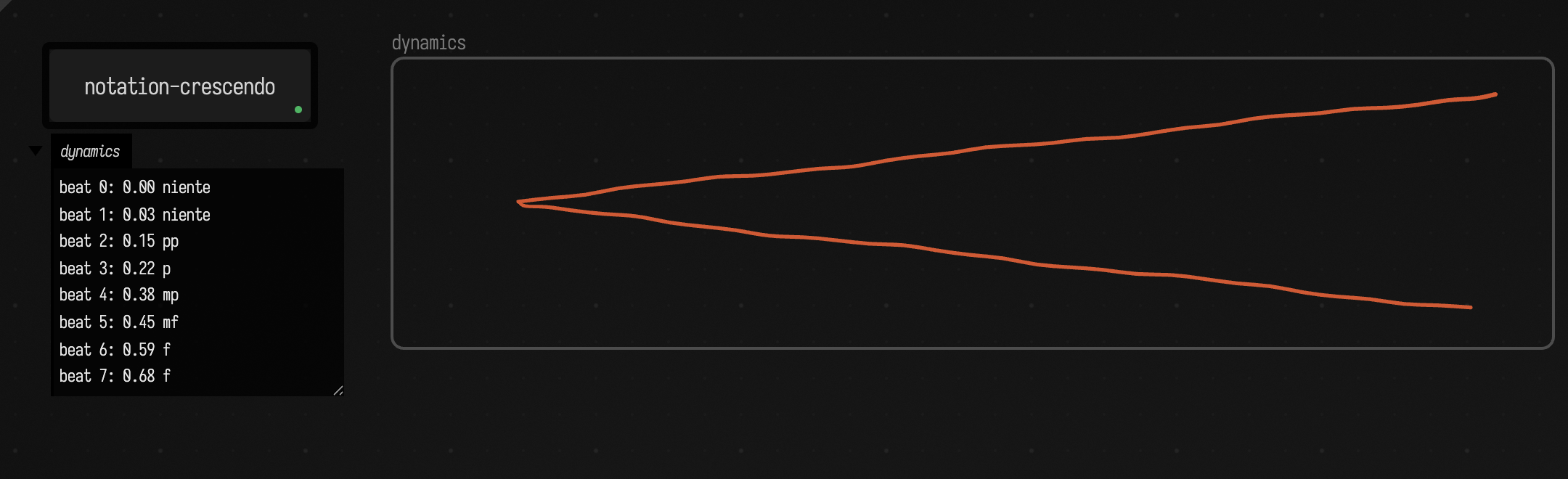
A hairpin is a good thing to cut. A vertical line crosses its two sides once each, and the gap between the crossings is how loud it is at that moment: nothing at the point, most at the mouth. It makes no difference whether the hairpin is one pen stroke drawn as a < or two separate lines, because the box reads the spread of everything the cut meets.
The hairpin below is drawn by code with a little wobble in it. In your own document you draw it with the pen:
notation {
    frame("dynamics", 260, 30, 800, 200)
    val hand = { i: Int -> 2.5 * sin(i * 2.3) + 1.5 * sin(i * 0.7) } // a hand is not a ruler
    val hairpin =
        (0..60).map { i ->
            val k = if (i <= 30) i else 60 - i // out along the top, back along the bottom
            val side = if (i <= 30) -1 else 1
            vec(1020 - k * 23.0, 130 + side * (75 - k * 2.5) + hand(i))
        }
    stroke(hairpin, name = "hairpin", stroke = "#e03131")
}
val dynamics = notation.space("dynamics", x = 0.0..8.0, y = 0.0..1.0)
val markings = ["niente", "pp", "p", "mp", "mf", "f", "ff"]
markdown(
    "dynamics",
    (0..7).joinToString("  \n") { beat ->
        val ys = dynamics.vertical(beat.toDouble()).filter { !it.isSpan }.map { it.value }
        val gap = if (ys.size >= 2) ys.max() - ys.min() else 0.0
        "beat $beat: %.2f %s".format(gap, markings[(gap / 0.75 * 6).roundToInt().coerceIn(0, 6)])
    },
)
Draw two hairpins, or a diminuendo after the crescendo, and the same reading code reads them.
The starting point
Open drawing_notation from the welcome screen's starting points. It has the ideas on this page as six boxes you run and then draw against: draw, read, listen, projection 1, fontana mix and crescendo. Or browse it in the offline viewer. The offline viewer draws the drawing layer under the boxes too: this small document has a drawing written by its sketch box, and notes on every box.
notation_elements draws every kind of mark from code, reads a score, and calls each part of the API once in a box called audit, which prints one line per call.
Reference
notation.marks |
every mark, back to front; also .strokes .arrows .lines .texts .shapes .frames .mine |
notation["id"], notation.named("x") |
one mark, by id or by label |
notation.over(box), .arrowsFrom(box), .arrowsTo(box) |
marks in relation to a box |
notation.near(point, r), .inside(rect) |
marks by position |
notation { … }, notation("key") { … } |
draw marks this box owns |
frame(name, x, y, w, h) { … }, group { … } |
marks that belong to a frame, marks grouped together; mark.frame, mark.groups, notation.inside(frame), notation.grouped(m) read them |
notation.edit(m) { … }, .delete(m), .anchor(m, box) (or m.anchorTo(box)), .clear() |
change marks; the editor sets stroke, fill, fillStyle, strokeStyle, dashed, roughness, opacity, text, position and size |
mark.points, mark.pressures, mark.pressuresAlong(n) |
a stroke's points and its pen pressure, per point or evenly spaced; painted |
notation.onStroke, .onArrow, .onText, .onChange |
react to what people draw |
notation.vertical(x), .horizontal(y), .intersect(a, b) |
cut the canvas |
notation.space(region, x = …, y = …) |
a region with its own axes; the region is a name, a mark, a box or a rect, and the mark that defines it is not read as a note |
space.vertical(t), .horizontal(v), .events, .between(t0, t1), .sounding(t) |
read it |
mark.kind, .bounds, .points, .stroke, .fill, .label, .box, .fromBox, .toBox, .toFLine(), .yAt(x), .xAt(y) |
one mark; points are in canvas coordinates, and label is the mark's own text, the text written inside it, or a name given from code |
Colours
Field shows the drawing in Excalidraw's dark theme, which draws every colour through an inversion. A colour given from code is stored adjusted for it, so greys, greens and blues appear as asked, and stroke and fill read back the colour you gave. The default ink, #1e1e1e, still follows the theme, so it shows light on dark. Warm and pale colours (#e03131, #ffec99) lie outside what the inversion can show and appear duller or shifted.
The drawing is one scene per document, kept in the document's root box. When code and a hand change it at the same moment, both changes are kept.
Next on the Tour, The Documentation Browser shows how to find out what calls like these do without leaving the editor.