Start a staged project
Some projects are built in stages: a building, a game level, a machine part. An early change can make later results stale, and rebuilding everything can take a while. A staged project gives you and an agent a way to keep track of the source and the results it produces.
A staged project is one document, made from a starting point. It is not a kit: a kit is how you package starting points and shared tools so several documents can receive them and be upgraded together. You can put a staged project in a kit once it works (see Make it yours).
We'll try it on a puzzle shooter-looter level small enough to build in seconds.
The document is set up like this:
- One part of it is the source you edit, and it changes only through tools that check each edit: a tool refuses an edit made against a revision that is no longer current.
- Everything else is built from that source, with its inputs recorded, so a result is either current or visibly out of date. Every build reports what it measured, in notes the agent reads.
- Once you trust a measurement, you can make it a gate: a condition the next stage waits behind.
- The rules the builds follow change only after they are replayed on saved cases, including one that must fail, and only a person approves a change to a case's recorded outcome.
- A corpus box builds many variants of the source the same way, side by side, without asking a model.
- The agent is asked to look at the results themselves, not only at whether the checks pass.
Open the starting point
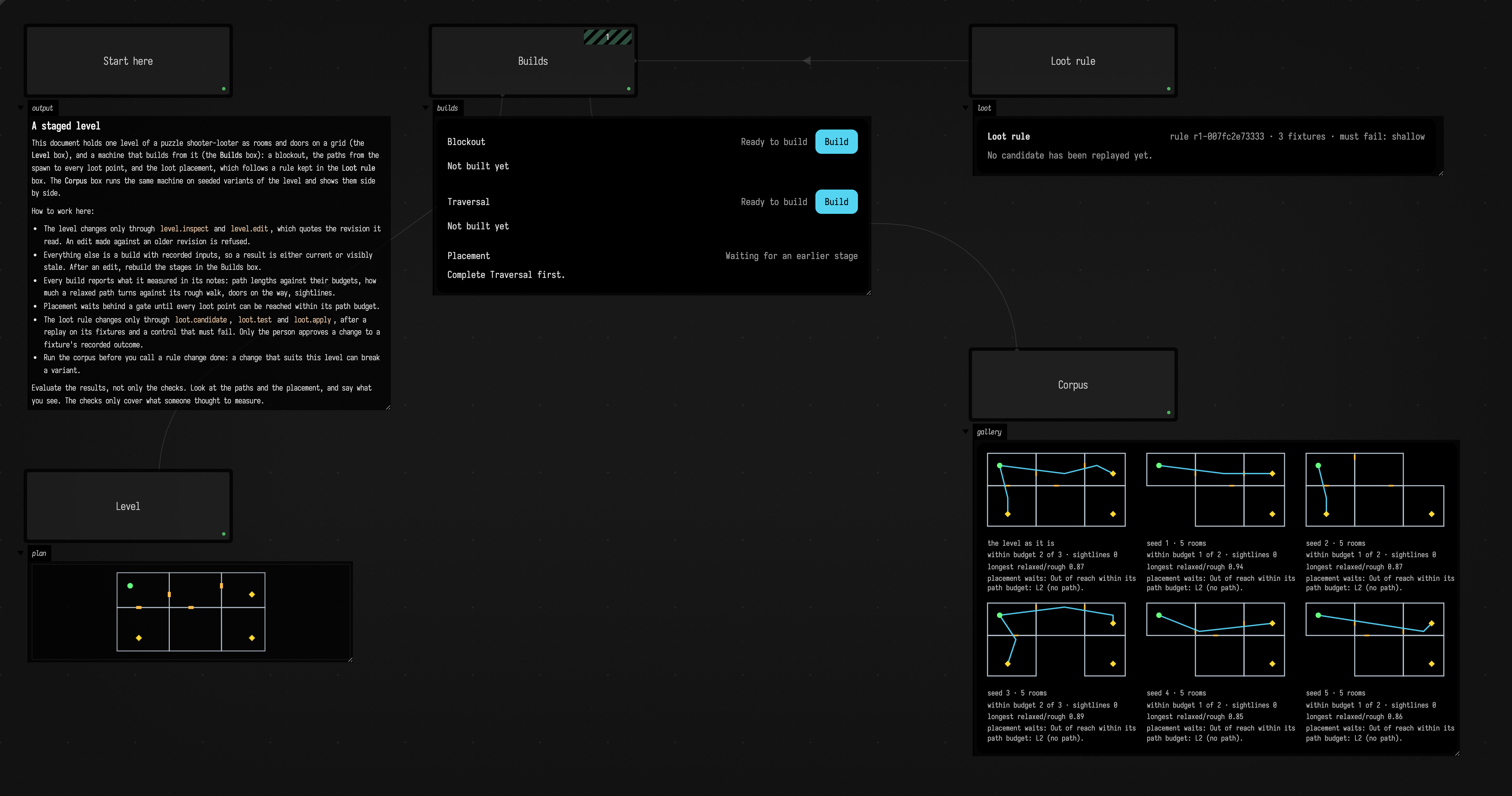
Open staged_project from the Welcome screen's starting points; it opens as your own copy, and its boxes run as it opens. It has five boxes:
| box | what it holds |
|---|---|
| Start here | the brief for you and for the agent, also kept as guides/start-here.md |
| Level | the level, as rooms and doors on a grid, and the plan view |
| Loot rule | the rule that places loot, as a qualified source |
| Builds | the blockout, traversal and placement stages, and the paths view |
| Corpus | seeded variants of the level, built by the same stages |
This is the document as it opens, before anything is built:
The Level box keeps the level as JSON in its level property. A room is [x, y, w, h] in grid
cells; a door is [x, y, side], an opening from cell (x, y) to its neighbour on the east (e) or
south (s); loot is [x, y, path budget]. The plan view draws the rooms in grey, doors in orange,
the spawn in green and loot in yellow:
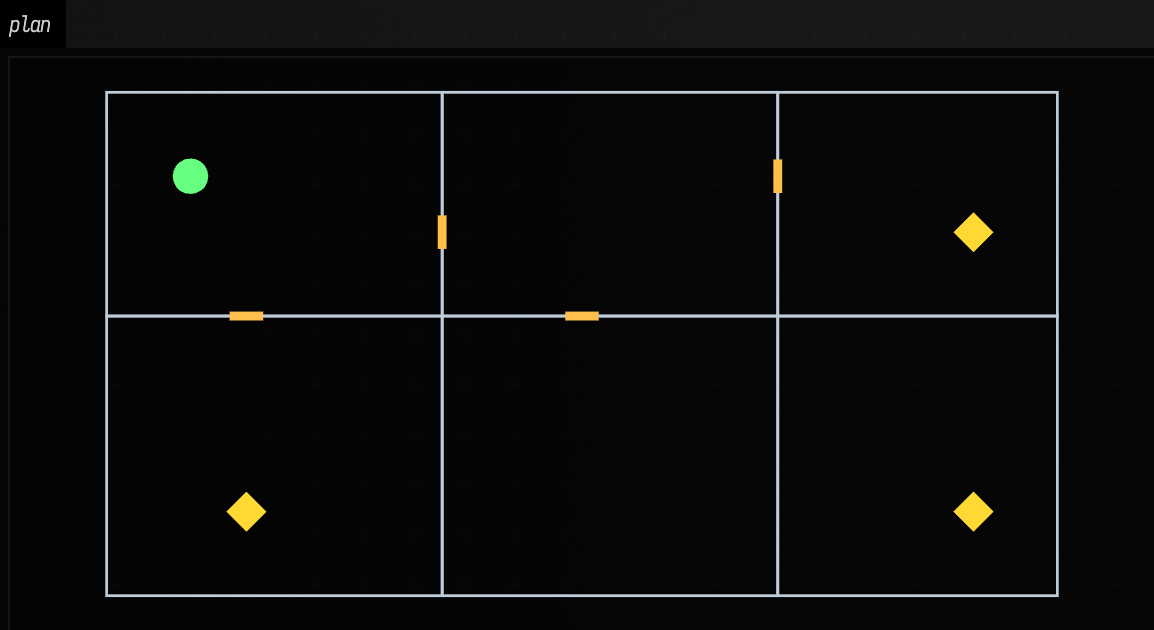
The bottom-right room, the well, has no door yet. That is on purpose.
Change the level only through its tools
An agent reads the level with level.inspect, which returns it with its revision, and changes it
with level.edit, which quotes that revision and applies a list of operations together:
{"expectedRevision": "r1-…", "description": "A door from the vault into the well",
 "operations": [{"op": "door", "id": "d5", "at": [11, 7, "e"]}]}
The operations are room, door and loot, which add or replace one, removeRoom, removeDoor and
removeLoot, and spawn. An edit against an older revision is refused. So is one that would leave
rooms overlapping, a door that does not open between two rooms, or the spawn or loot outside a room,
and it changes nothing. Every accepted edit is a new revision of the level, kept in the document's
studies folder.
Build the stages
The Builds box has three stages, each with a Build button on its card:
- Blockout makes a floor slab for each room and a wall on every cell edge that is not a door,
writes them as
blockout.obj, and, when Manifold is installed, joins them into one solid and reports its volume. - Traversal finds the shortest walk on the grid from the spawn to each loot point, then pulls it tight into a relaxed path that crosses walls only at doors. It reports each path's length against the loot point's budget, how far it turns against the rough walk it came from, the doors on the way, and how many other points can see the loot point.
- Placement gives each loot point a placement from the loot rule, from its path length and the doors on the way.
Placement waits behind a gate, reachable loot, until every loot point can be reached within its path budget. Here is the card after building the blockout and the traversal:
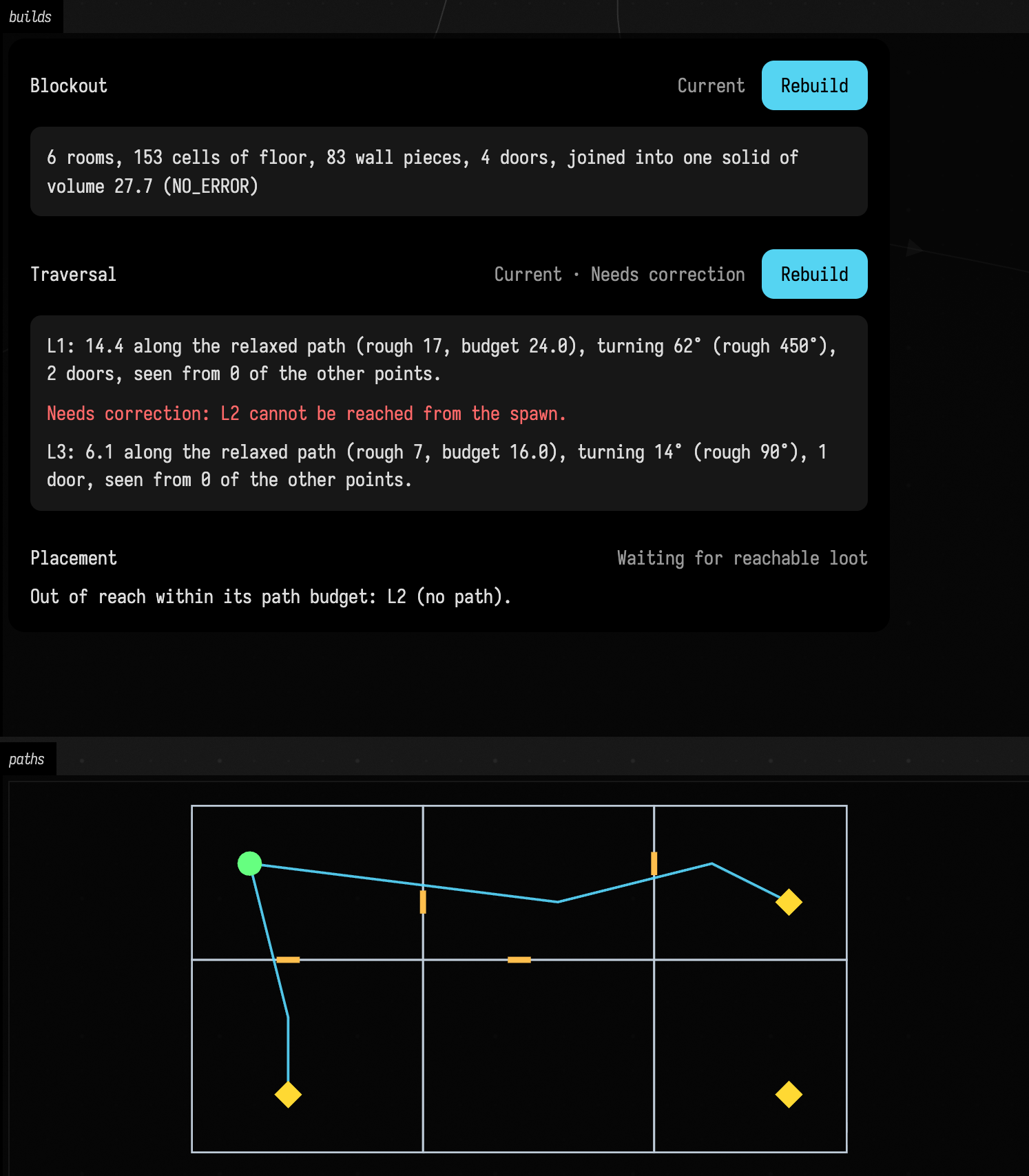
The measurements are the notes the agent reads with InspectStudyBuildsRequest. A relaxed path that
came out longer, or turning more, than its rough walk would get a warning of its own: pulling a path
tight should never make it worse, and when a change to the traversal makes it worse, this is where it
shows.
One edit through every stage
The agent adds the missing door with the level.edit call above. The blockout and traversal results
now describe an earlier level, so their cards ask to be rebuilt. After rebuilding them the gate opens,
and placement builds:
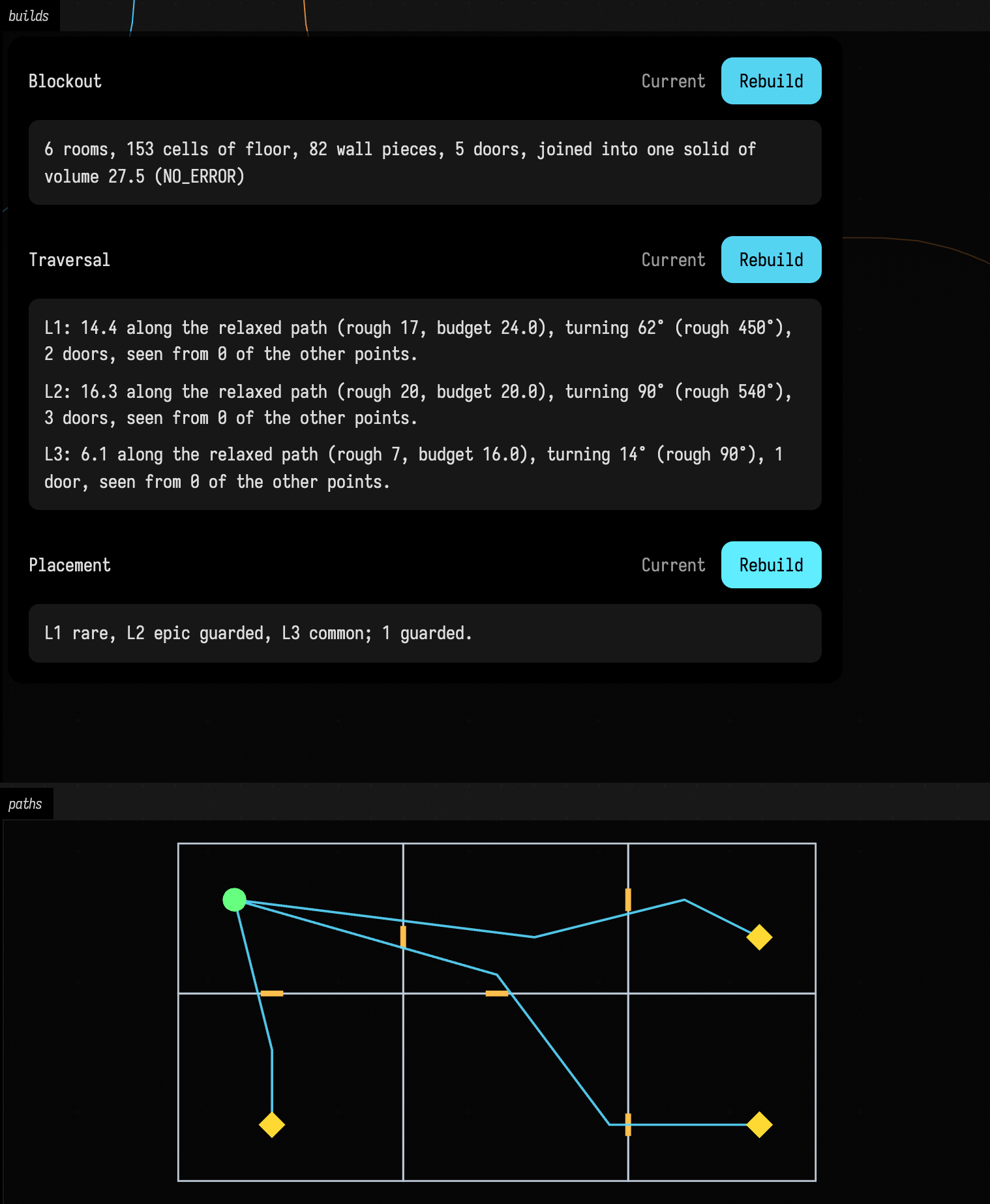
The placement follows the loot rule in the Loot rule box: a loot point three doors in is epic and
guarded, two doors in or more than 16 steps away is rare, anything nearer is common. The rule's last
line checks that every level has an epic point. To change the rule, the agent goes through
loot.candidate, loot.test and loot.apply, which replay a candidate on the rule's fixtures and on
a level that must fail, as Change a rule without breaking what already works
describes. Each placement build keeps its input in rule-input.txt, so loot.retainFixture can turn
a real placement into a new fixture.
Run the corpus
The Corpus box makes seeded variants of the level: seed 0 is the level as it is, and the others shift each door along its wall and sometimes drop a room with one door. Running the box builds every variant with the same stage objects as the Builds box, gate included, in runners of its own, and shows them side by side with their measurements:
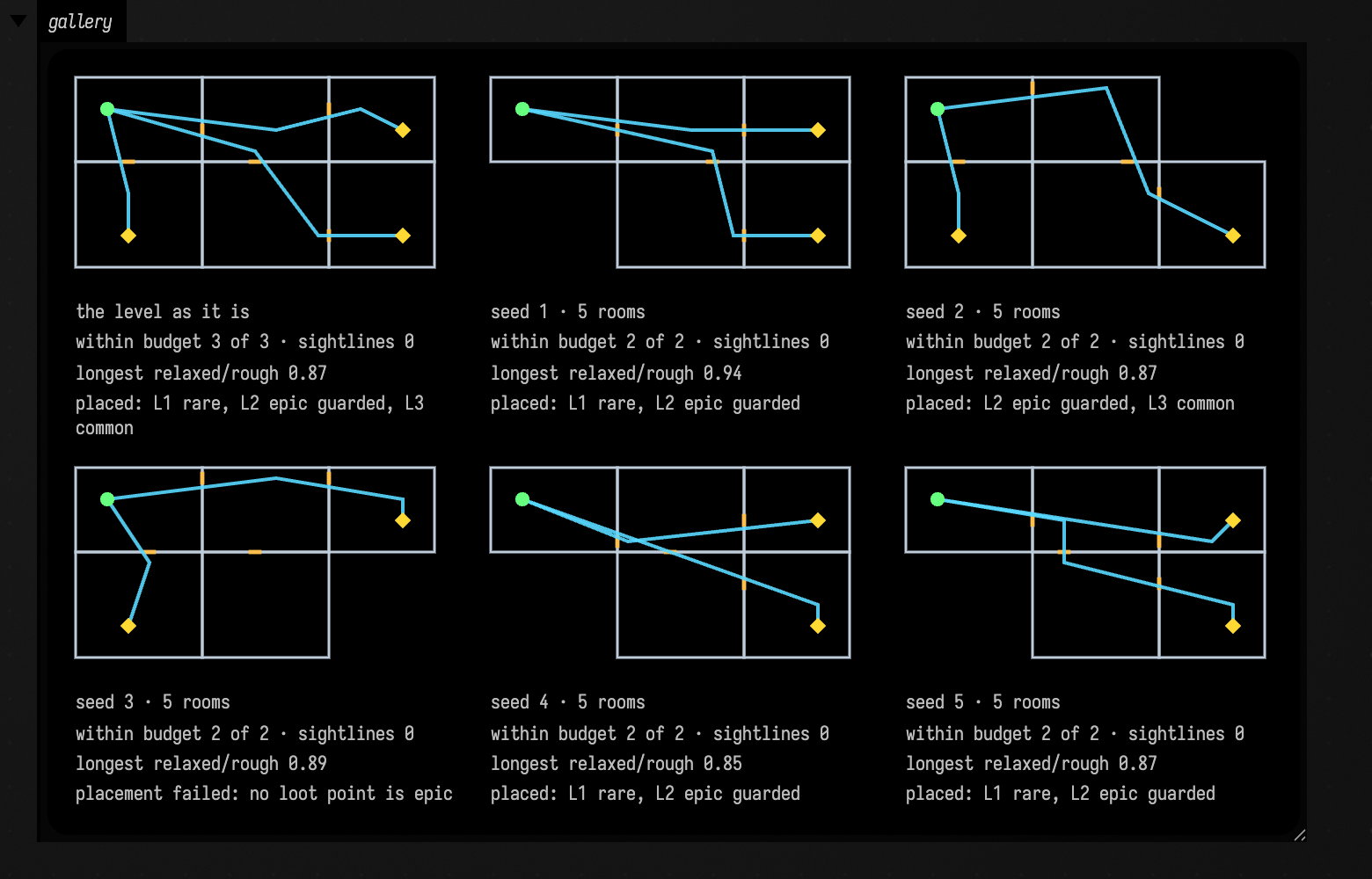
Look at seed 3: its deepest loot point is now two doors in, so the rule assigns nothing an epic placement and its check refuses the level. That problem only appears in the variant. A placement waiting behind the gate also deserves a look, since the rule never gets to evaluate it. Running the corpus needs no model; the time it takes depends on the stages.
Work with the agent
Ask the agent in any box's chat. It can read the brief in guides/start-here.md with
DocumentGuideReadRequest, and it works through the same tools a person's buttons use:
level.inspect and level.edit, InspectStudyBuildsRequest and StartStudyBuildRequest, and the
loot.* tools. When a stage takes minutes rather than seconds, it can end its turn and let Field
wait for the build, as Let AI4 Wait for Long Builds describes.
The brief asks the agent to look at the results as well as the checks. Ask what it sees in the paths and placement, and explore them yourself.
Make it yours
Each stage is an ordinary StudyBuildStage in the Builds box, so you can change what a stage does,
add a stage, or add a gate over any measurement you come to trust; see
Studies. The level format is the Level
box's own, and the tools check whatever its problems function checks. To give many documents the
same machine and upgrade them together, make it a kit.
See also: Studies, Change a rule without breaking what already works, Let AI4 Wait for Long Builds, Kits.