FieldML examples
FieldML is a small typed language for experimenting with values, functions and drawings in Field. Begin with a few numbers and a record, then use functions and pattern matching to build geometry, animate it and call into Kotlin. Keep the FieldML Cheatsheet nearby for the types of names in the prelude.
In a live document, FieldML boxes usually sit under a parent box whose main language is set to FieldML. A run evaluates the box and annotates the last expression inline. print, println, and display are explicit output helpers when you want the value to appear in an output area instead.
A tiny typed expression language
FieldML has integers, floats, booleans, strings, tuples, lists, records, functions, and algebraic data types. Arithmetic keeps Int and Float separate; write 10.0 when you mean a float.
let width = 12
let height = 7

{
  area = width * height
  perimeter = (width + height) * 2
  square = width == height
}
The result is a record:
{area = 84, perimeter = 38, square = false} : {area: Int, perimeter: Int, square: Bool}A record holds a handful of named values without declaring a type for them. Field access uses dot notation:
let point = {
  x = 10.0
  y = 20.0
  label = "seed"
}

(point.label, point.x + point.y)
Functions and pipes
Functions are curried. let add a b = a + b means add takes a, then returns a function that takes b.
let add a b = a + b
let scale amount value = value * amount

10
  |> add 5
  |> scale 3
The pipe operator sends the value on the left into the function on the right. The previous example is the same as scale 3 (add 5 10).
For a one-off transform, write the function inline:
[1, 2, 3]
|> (fun values ->
  match values with
  | [a, b, c] -> a + b + c
  | _ -> 0
)
Helpers that transform a single subject take it last, so they read naturally at the end of a pipe. 7 |> mod 4 is 3, 3.0 |> pow 2.0 is 9, and [1, 2] |> append [3] is [1, 2, 3].
Numbers
Int and Float never mix silently, so conversion is explicit. toFloat and toInt are the two you reach for constantly when a loop counter has to become a coordinate.
let steps = 8

range 0 steps
  |> map (fun i -> toFloat i / toFloat steps)
The usual mathematics is in the prelude: sin cos tan asin acos atan atan2 sqrt exp log floor ceil round abs sign min max clamp pow lerp, plus the constants pi and tau. mod, idiv and fmod cover remainders and integer division.
let wave t = sin (t * tau) * 0.5 + 0.5

linspace 0.0 1.0 5 |> map wave
Prefix - negates numbers and vectors. As in other ML languages it binds looser than application, so f -1.0 is a subtraction. Write f (-1.0) when you mean a negative argument.
Booleans
&& and || combine conditions and both short circuit; not negates one.
let inside x y =
  x > 0.0 && x < 100.0 && y > 0.0 && y < 100.0

(inside 50.0 50.0, inside 150.0 50.0)
Lists and iteration
FieldML has no loop statement. Lists plus range, linspace and tabulate are how you iterate.
range 0 6
  |> filter (fun i -> mod 2 i == 0)
  |> map (fun i -> i * i)
  |> fold (fun total x -> total + x) 0
range start end stops before end; linspace start end count includes both ends, which is usually what a parameter sweep wants. The rest of the list vocabulary is map mapIndexed filter fold length isEmpty head tail nth take drop reverse append concat zip sortBy sum.
let points = linspace 0.0 1.0 3 |> map (fun t -> (t, t * t))

(length points, points |> nth 1)
:: prepends to a list and also matches one, so a pattern can split a list into its head and the rest. That is how recursion over a list is written.
let firstTwo values =
  match values with
  | a :: b :: _ -> a + b
  | a :: [] -> a
  | [] -> 0

(firstTwo [10, 20, 30], 1 :: [2, 3])
Recursion
A function defined with parameters can call itself: let f x = ... has f in scope inside its own body. A plain let x = ... does not, so let x = x + 1 still refers to an outer x.
let countdown n =
  match n with
  | 0 -> []
  | _ -> n :: countdown (n - 1)

countdown 4
FieldML evaluates by walking the tree and does not optimise tail calls, so deep recursion runs out of stack. For long loops prefer range, tabulate, map and fold, which do not grow the stack.
Output taps
print and println write text output and return the value they were given, so they sit in the middle of a pipe without changing what flows through it.
let add a b = a + b

10
  |> add 32
  |> println
Plain function application binds tighter than arithmetic, as in other ML-family languages:
let x = 100

print x * 10
That parses as (print x) * 10, so it prints 100. If the intended printed value is the product, parenthesize it:
let x = 100

print (x * 10)
display writes to a named Field output channel and also returns the displayed value:
{
  status = "ok"
  count = 42
}
|> display "fieldml"
Matching shapes
Pattern matching works over tuples, lists, literals, wildcards, and constructors. Use _ for a fallback case.
let classify point =
  match point with
  | (0, 0) -> "origin"
  | (0, _) -> "y axis"
  | (_, 0) -> "x axis"
  | _ -> "free"

classify (4, 0)
List patterns match exact list shapes:
let sumSmall values =
  match values with
  | [] -> 0
  | [a] -> a
  | [a, b] -> a + b
  | [a, b, c] -> a + b + c
  | _ -> 0

sumSmall [10, 20, 12]
Algebraic data types
type declarations introduce constructors. Constructor names are capitalized, and constructors can carry values.
type Option a = None | Some a

let value = Some 10

match value with
| Some x -> x * 10
| None -> 0
Type parameters make constructors reusable:
type Result a = Err String | Ok a

let payload = { x = 20, y = 22 }
let result = Ok payload

match result with
| Ok p -> p.x + p.y
| Err message -> 0
Constructors can nest, and patterns can unpack the same shape:
type Option a = None | Some a

match Some (Some 42) with
| Some (Some x) -> x
| Some None -> 0
| None -> 0
Returning Field values
FieldML has a small prelude for common Field interop. The fline factory creates an FLine, and path/style helpers return the same line so they compose naturally with pipes.
let lines channel =
  hostTap "afield.ui.visualization.lines" { channel = channel, w = 120.0, h = 80.0 }

fline
  |> moveTo 0.0 0.0
  |> lineTo 120.0 20.0
  |> cubicTo 160.0 90.0 210.0 90.0 260.0 20.0
  |> lineTo 320.0 0.0
  |> stroked true
  |> filled false
  |> color (vec4 1.0 0.55 0.2 1.0)
  |> thickness 2.5
  |> lines "main"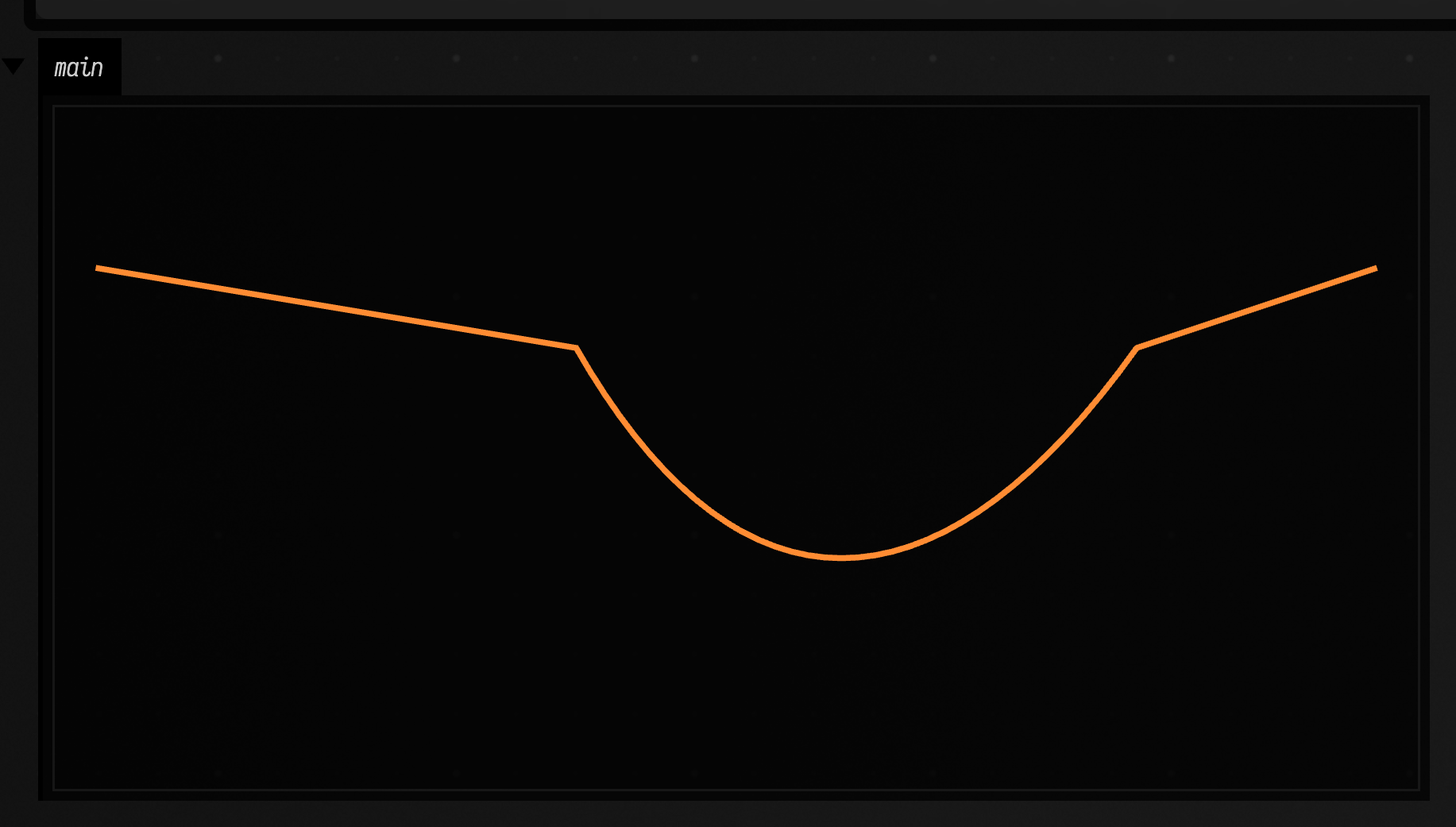
Vector helpers create host values. vec4 is the one that comes up most often, because it is what color takes:
fline
  |> moveTo 0.0 0.0
  |> lineTo 120.0 40.0
  |> color (vec4 0.2 0.85 1.0 1.0)
  |> thickness 4.0
Vector arithmetic
Vec2, Vec3 and Vec4 are ordinary values. They add and subtract component by component, multiply either by another vector or by a Float, and expose .x, .y, .z and .w.
let a = vec2 1.0 2.0
let b = vec2 3.0 4.0

{
  sum = a + b
  scaled = a * 10.0
  halfway = mix a b 0.5
  span = distance a b
  unit = normalize (b - a)
  first = (a + b).x
}dot, vlength, distance, normalize and mix work at any width, on two vectors of the same width; mixing widths is a type error. cross is Vec3 only. polar angle radius builds a Vec2 from an angle in radians and a length, which is where most generated geometry starts.
let ring count radius =
  range 0 count
    |> map (fun i -> polar (tau * toFloat i / toFloat count) radius)

ring 6 10.0 |> length
Drawing generated geometry
draw "channel" line sends an FLine to one of the box's output channels and returns the same line, so it drops into a pipe like the styling helpers. Combined with range, map and fold, geometry can be generated rather than typed out.
let spiral turns count =
  range 0 count
    |> map (fun i ->
      let t = toFloat i / toFloat count in
      polar (t * tau * turns) (20.0 + t * 120.0)
    )
    |> fold (fun line point -> line |> lineToV point) fline

spiral 3.0 200
  |> stroked true
  |> filled false
  |> color (vec4 0.2 0.85 1.0 1.0)
  |> thickness 2.0
  |> draw "main"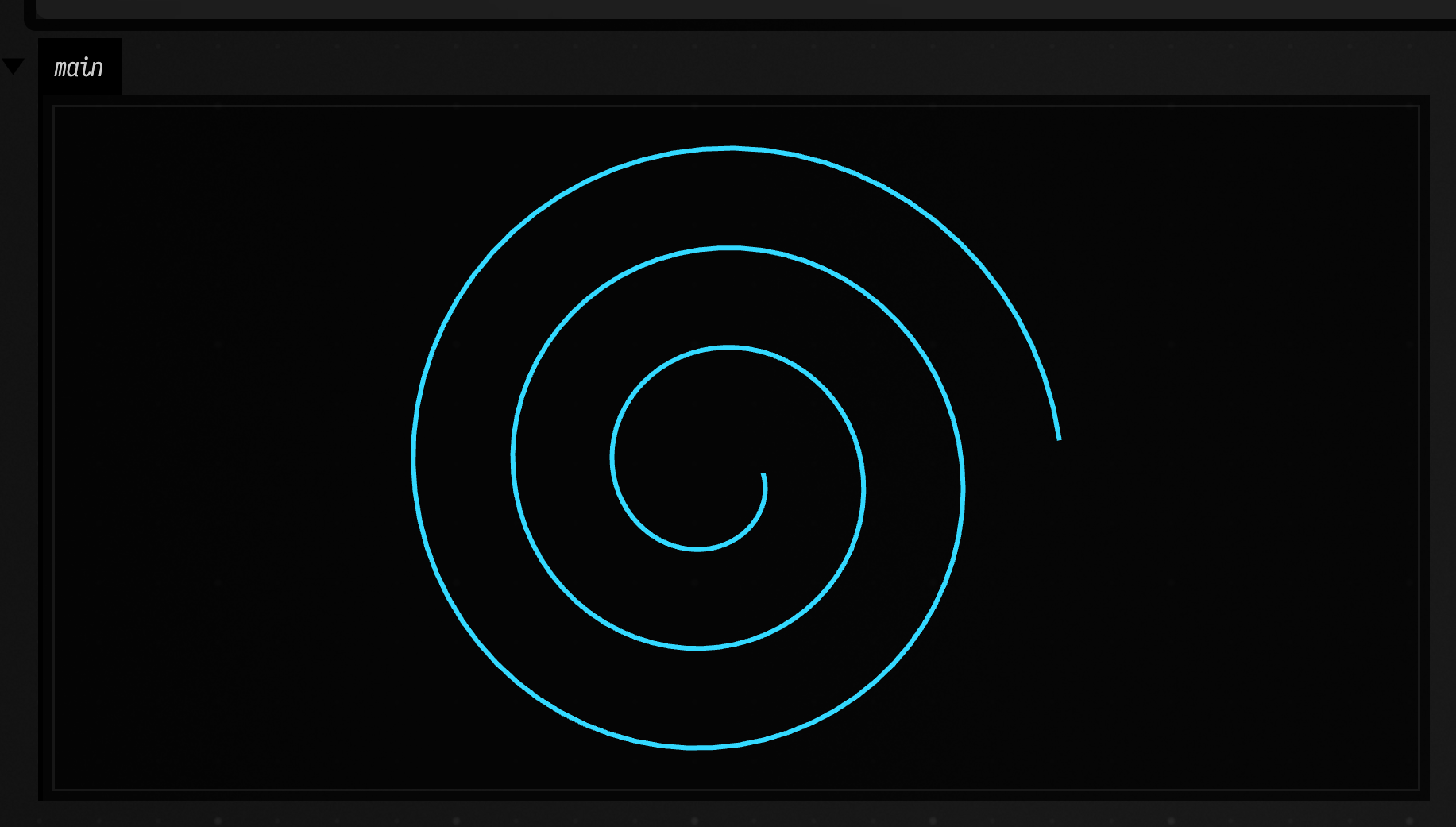
In that fold the accumulator is the line itself. Each step adds one instruction to it, and a list of points comes out as one FLine.
Animation
animate turns a function of time into a running animation. Field steps it once per frame, passing the seconds since the box was launched, until the box is stopped. The function runs for its effects, so draw inside it.
let rose t =
  let petals = 5.0 in
  linspace 0.0 tau 240
    |> map (fun a ->
      let radius = 110.0 * sin (a * petals) * (0.7 + 0.3 * sin (t * 1.5)) in
      polar (a + t * 0.35) radius
    )
    |> fold (fun line point -> line |> lineToV point) fline
    |> stroked true
    |> filled false
    |> color (vec4 1.0 0.55 0.2 1.0)
    |> thickness 2.0
    |> drawSized "main" 320.0 320.0

animate rose
animateFor seconds f is the same thing with a stopping time. Each frame is recomputed from t alone, so there is no state to carry from one to the next.
JVM interop
FieldML values can be passed to Kotlin code as they are. For graphics, the prelude's own helpers (fline, vec2, moveTo, color) are typed and fit in a pipe, so use them first.
For any other Kotlin function, hostTap makes a small FieldML wrapper around it. It finds the function by name, supplies the current box when the function is a Box extension, uses the function's default arguments, and passes the piped value as the data argument. The record names only the arguments you want to change.
let lines channel =
  hostTap "afield.ui.visualization.lines" { channel = channel, w = 120.0, h = 80.0 }

fline
  |> moveTo 0.0 0.0
  |> lineTo 80.0 40.0
  |> lines "main"
The target is named the way Kotlin names it, package plus function: afield.ui.visualization.lines above is the Box.lines(...) extension.
Use hostTap for JVM calls that are effects in the middle of a pipe. It runs the JVM call and returns the original piped value, so downstream FieldML code can continue transforming the same object.
The same wrapper can expose a different part of the Kotlin function without changing the FieldML call shape. Here the wrapper keeps the piped FLine implicit, but opts into Field's fitToSize behavior:
let fitLines channel =
  hostTap "afield.ui.visualization.lines" { channel = channel, w = 180.0, h = 90.0, fitToSize = true }

fline
  |> moveTo 0.0 70.0
  |> lineTo 35.0 20.0
  |> cubicTo 80.0 140.0 180.0 5.0 260.0 70.0
  |> color (vec4 0.2 0.85 1.0 1.0)
  |> thickness 3.0
  |> fitLines "fit"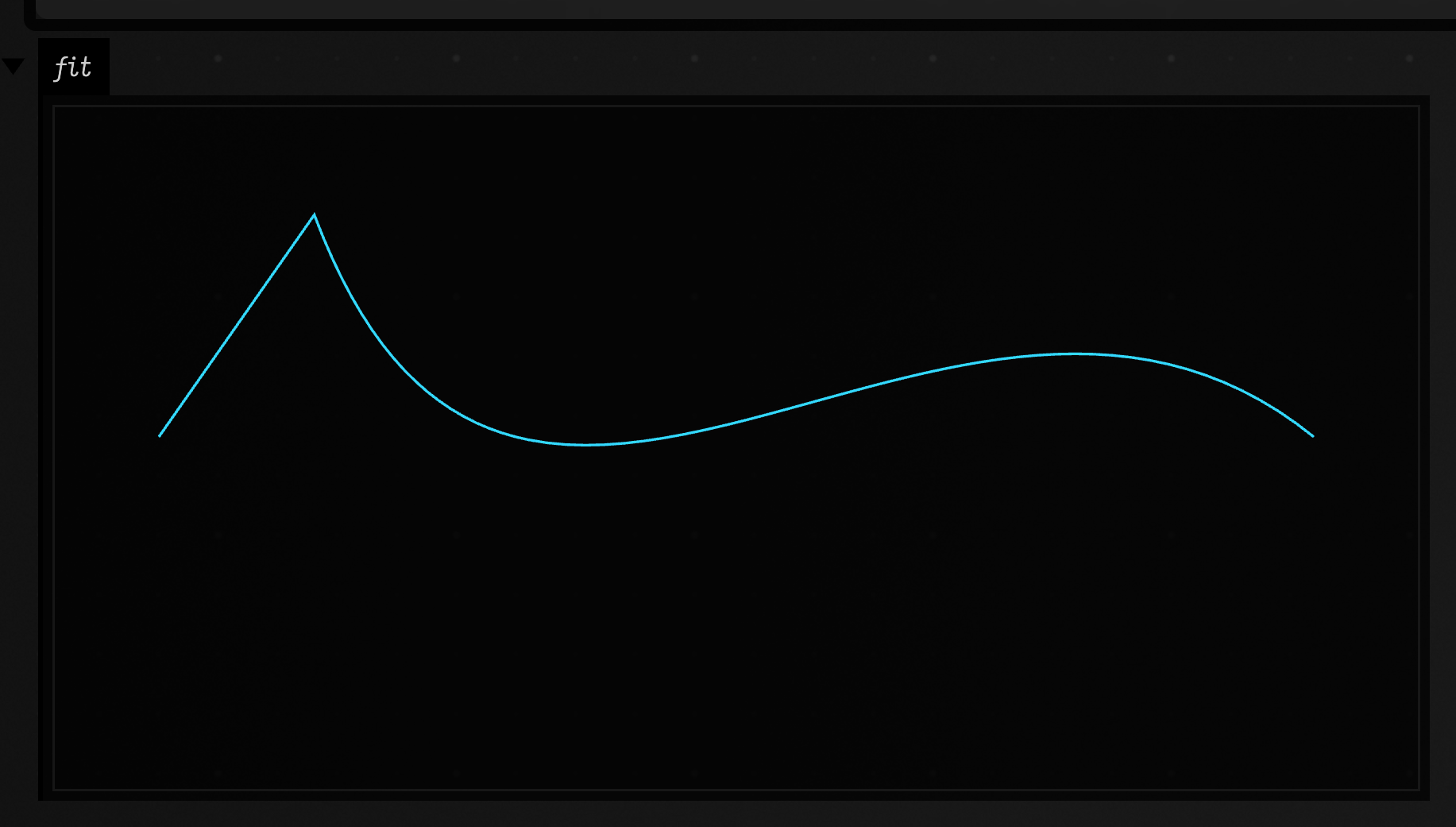
hostTap is not limited to graphics. FieldML records, lists, strings, numbers, and host values can all cross the boundary. This example sends a structured FieldML record into Field's JVM value visualizer:
let viz channel =
  hostTap "afield.ui.visualization.viz" { channel = channel }

{
  label = "run 17"
  samples = [3, 5, 8, 13, 21]
  state = { ok = true, active = 4 }
}
  |> viz "model"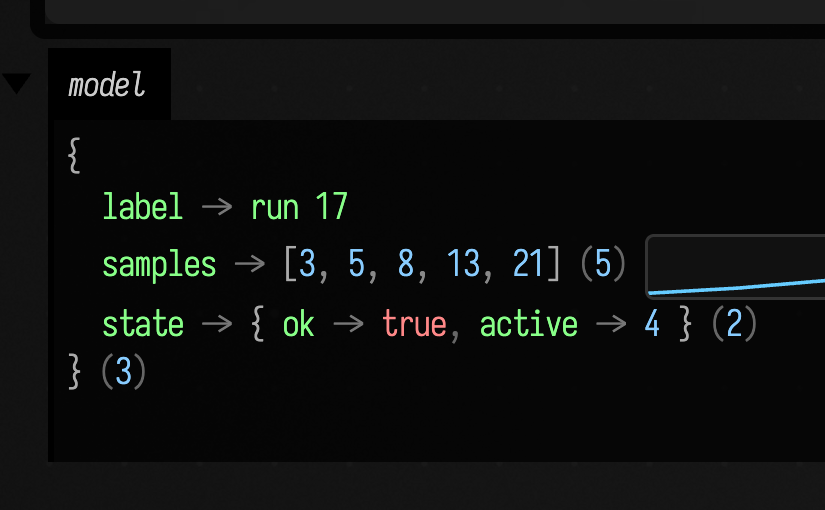
Scalar values work the same way. progressBar wants a name and a numeric value; the wrapper fixes the display text and lets the piped float fill the JVM value parameter:
let progress name =
  hostTap "afield.ui.output.progressBar" { name = name, details = "from FieldML hostTap" }

0.72
  |> progress "interop"
For object construction and ad hoc member access, the lower-level host bridge is still available. It is explicit: resolve a class, construct it, call a method, or read/write a member.
let line =
  hostClass "afield.geometry.path.FLine"
  |> hostNew0

line
  |> hostCall1 "moveTo" (vec2 0.0 0.0)
  |> hostCall1 "lineTo" (vec2 120.0 40.0)
  |> hostCall1 "lineTo" (vec2 200.0 10.0)
For the rare cases where source-indexed lookup is not enough, hostStaticTap and hostStaticCall expose the raw reflective form. hostStaticTap uses hostInput as a placeholder for the piped value and returns that value after the call; hostStaticCall just invokes a static JVM method and returns the JVM result.
let lines channel =
  hostStaticTap "lines"
    (thisBox, [hostInput], channel, 120.0, 80.0, false, false, false, false)
    (hostClass "afield.ui.visualization.SomeSkikoKt")
Use the curated helpers first when they exist, hostTap when the source index knows the Kotlin function, and the raw host bridge only when you need to spell out the JVM ABI yourself.
Things to remember
FieldML is strict and typed. A few rules explain most surprises:
| Rule | Consequence |
|---|---|
| Function application binds tighter than operators | print x * 10 means (print x) * 10; use print (x * 10) for the product. |
Int and Float do not silently mix |
10 + 1.0 is a type error; use toFloat to convert. |
Prefix - binds looser than application |
f -1.0 is a subtraction; write f (-1.0). |
| Single-subject helpers take the subject last | 7 |> mod 4 is 3, and [1] |> append [2] is [1, 2]. |
Only let f x = ... is recursive |
A plain let x = ... refers to an outer x, so shadowing keeps working. |
| Recursion is not tail-call optimised | Deep loops should use range/tabulate with map/fold. |
| Lists are homogeneous | [1, 2, 3] is valid; [1, true] is not. |
| Match branches must agree | Every branch of a match expression has the same result type. |
| The last expression is the result | Leave an FLine, record, list, or scalar at the end of the box to return it to Field. |