AI4's built-in tools
When you chat with AI4 about a box, the model works on your document through tools: it makes boxes, runs them, reads what they printed, looks at what they display, searches Field's tutorials and source. This page lists every tool Field gives a chat without any setup, and shows the common ones at work.
The examples show real calls and their results, starting with an empty document. A model sends
the same arguments and reads the same responses during a chat. Long strings and lists are
shortened here, and box IDs are shown as <uid of Name>.
Your own tools join these when you register them; see Give the AI a tool of your own.
Making and running boxes
The model starts the way you would: it makes a box. This one exports a value for its children.
{
  "name": "Settings",
  "code": "@exported val speed = 2.5\nprintln(\"speed is $speed\")"
}
{
"success": true,
"message": "Created 'Settings'. It has not been run.",
"uid": "<uid of Settings>",
"name": "Settings",
"outputMarker": 0,
"timedOut": false
}A second box, made as a child of the first, reads that value as _speed and draws with it.
{
  "name": "Wave",
  "parent": "Settings",
  "code": "val points = (0..200).joinToString(\" \") { i ->\n    val x = i * 2.0\n    val y = 60 + 40 * Math.sin(i * 0.05 * _speed)\n    \"$x,$y\"\n}\ndisplay(\"main\", \"<svg width='400' height='120'><polyline fill='none' stroke='#3a6ea5' stroke-width='3' points='$points'/></svg>\")\nprintln(\"drew ${points.split(' ').size} points\")"
}
{
"success": true,
"message": "Created 'Wave' under 'Settings'. It has not been run.",
"uid": "<uid of Wave>",
"name": "Wave",
"outputMarker": 0,
"timedOut": false
}Tools take a box's name wherever they take its uid, as long as the name is unique. RunBoxRequest
compiles and runs the code and waits for the verdict.
{
  "box": "Settings"
}
{
"success": true,
"message": "Ran 'Settings' successfully.",
"uid": "<uid of Settings>",
"name": "Settings",
"property": "code",
"stage": "setup-complete",
"stdout": [
"speed is 2.5"
],
"outputMarker": 2,
"timedOut": false
}{
"box": "Wave"
}{
"success": true,
"message": "Ran 'Wave' successfully.",
"uid": "<uid of Wave>",
"name": "Wave",
"property": "code",
"stage": "setup-complete",
"stdout": [
"drew 201 points"
],
"displays": {
"main": "<svg width='400' height='120'><polyline fill='none' stroke='#3a6ea5' stroke-width='3' points='0.0,60.0 2.0,64.9869893354091 4.0,69.89615837018091 6.0,74.6509011634419 8.0,79.17702154416813 10.0,83.4038909176185 12.0,87.26555040093336 14.0,9… (2760 more characters)"
},
"outputMarker": 5,
"timedOut": false
}Reading and looking at output
ReadBoxOutputRequest returns what a box printed or displayed, as text, with a marker the next
call can pass to get only what is new.
{
  "box": "Wave"
}
{
"success": true,
"message": "3 entries from 'Wave'.",
"uid": "<uid of Wave>",
"name": "Wave",
"running": false,
"entries": [
{
"seq": 3,
"kind": "display",
"text": "<svg width='400' height='120'><polyline fill='none' stroke='#3a6ea5' stroke-width='3' points='0.0,60.0 2.0,64.9869893354091 4.0,69.89615837018091 6.0,74.6509011634419 8.0,79.17702154416813 10.0,83.4038909176185 12.0,87.26555040093336 14.0,9… (1760 more characters)",
"channel": "main",
"line": 0
},
{
"seq": 4,
"kind": "out",
"text": "drew 201 points",
"line": 7
},
{
"seq": 5,
"kind": "verdict",
"text": "run: setup-complete",
"line": 0
}
],
"outputMarker": 5,
"timedOut": false
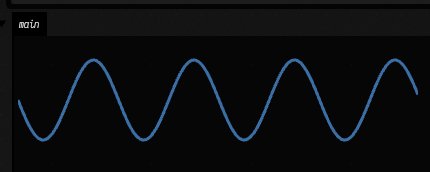
}Text is not always enough: a drawing has to be seen. ViewBoxOutputRequest captures the box's
output area and hands the model the picture.
{
  "box": "Wave",
  "note": "is the sine wave drawn?"
}
{
"success": true,
"message": "Captured the output of 'Wave' (main), 430x172. The picture is attached. This is an independent browser; viewerStates records its geometry view, which may differ from the user's.",
"channels": [
"main"
],
"width": 430,
"height": 172,
"inkFraction": 0.03980530016224987,
"dominantColours": [
"#050505 76.9%",
"#151515 19.1%",
"#3a6ea5 2.4%",
"#203a56 0.7%",
"… 2 more"
]
}This is the picture that came back with it:
Asking where a value comes from
WhyDoesThisResolve answers why a name a box reads resolves where it does, without running
anything. See Why does this value resolve here? for the rules it applies.
{
  "name": "_speed",
  "box": "Wave"
}
{
"summary": "'Wave' reads `_speed` (InheritanceFromContext) from variable `speed` of 'Settings', path 'Wave' → 'Settings' = 2.5; declared by `val Box._speed by InheritanceFromContext<kotlin.Double>()` from the preamble of 'Settings'",
"explanation": {
"box": {
"uid": "<uid of Wave>",
"name": "Wave"
},
"query": "_speed",
"name": "_speed",
"mechanism": "INHERITANCE_FROM_CONTEXT",
"delegate": "InheritanceFromContext",
"found": true,
"supplier": {
"uid": "<uid of Settings>",
"name": "Settings"
},
"matchKind": "VARIABLE",
"matchedName": "speed",
"depth": 1,
"path": [
{
"uid": "<uid of Wave>",
"name": "Wave"
},
{
"uid": "<uid of Settings>",
"name": "Settings"
}
],
"crossesEdges": true,
"value": "2.5",
"valueType": "java.lang.Double",
"ambiguous": false,
"shadowedCount": 1,
"shadowed": [
{
"supplier": {
"uid": "<uid of Settings>",
"name": "Settings"
},
"matchKind": "PROPERTY",
"matchedName": "_speed",
"depth": 1,
"path": [
"<uid of Wave>",
"<uid of Settings>"
],
"value": "2.5"
}
],
"declaration": {
"line": "val Box._speed by InheritanceFromContext<kotlin.Double>() /**/",
"inOwnPreamble": true,
"tag": "<uid of Settings>",
"suppliedBy": {
"uid": "<uid of Settings>",
"name": "Settings"
}
},
"summary": "'Wave' reads `_speed` (InheritanceFromContext) from variable `speed` of 'Settings', path 'Wave' → 'Settings' = 2.5; declared by `val Box._speed by InheritanceFromContext<kotlin.Double>()` from the preamble of 'Settings'"
}
}Trying Kotlin without running the box
CompileKotlinRequest checks code in a box's context and reports diagnostics without running it.
Here the model tries a misspelt name:
{
  "file": "Wave",
  "source": "println(_sped * 2)"
}
{
"success": false,
"diagnostics": [
{
"severity": "ERROR",
"message": "Unresolved reference '_sped'.",
"line": 1,
"column": 19,
"endLine": 1,
"endColumn": 24,
"code": "-1"
}
]
}EvaluateKotlinExpressionRequest evaluates one expression where the box's own values are in scope.
{
  "target": "Wave",
  "expression": "_speed * 2"
}
{
"success": true,
"target": "afield://ai4-tools/<uid of Wave>/code",
"boxUid": "<uid of Wave>",
"boxName": "Wave",
"expression": "_speed * 2",
"valueKind": "primitive",
"type": "Double",
"runtimeType": "Double",
"primitiveValue": 5.0,
"primitiveKind": "Double",
"stringValue": "5.0",
"html": "<div class='value-viz' style='font-family: \"Iosevka Web\", monospace; font-size: 12px; color: #ccc; line-height: 1.4; font-feature-settings: \"calt\" 1, \"dlig\" 1; font-variant-ligatures: contextual;'><span style='color: #8cf;'>5</span></div>",
"message": "Expression evaluated."
}Changing a box
SetBoxPropertyRequest replaces a whole property; it does not run the box.
{
  "box": "Settings",
  "property": "code",
  "value": "@exported val speed = 5.0\nprintln(\"speed is $speed\")"
}
{
"success": true,
"message": "Set code on 'Settings' (52 chars). Not run.",
"uid": "<uid of Settings>",
"name": "Settings",
"property": "code",
"outputMarker": 0,
"timedOut": false
}DocumentSourceReadRequest then shows the difference between the source as it is now and as it last
ran, which is how the model knows the edit has not taken effect yet.
{
  "uid": "{{uid:Settings}}",
  "property": "code"
}
{
"success": true,
"contents": "@exported val speed = 5.0\nprintln(\"speed is $speed\")",
"liveRevision": "5895c4cae7d82ff5965cafb0f16152c5b6e69e653c9de2f567915ea4538b0208",
"executed": {
"uid": "<uid of Settings>",
"property": "code",
"revision": "f0792f1414f6311afbfb1cae76a1b3e72051ca15da07892f09101862c23bdbac",
"mode": "run",
"stage": "setup-complete",
"success": true
},
"message": "Live source inspected; no save or execution performed."
}ListBoxesRequest is the model's map of the document.
{}{
"success": true,
"message": "2 box(es) in ai4-tools.",
"boxes": [
{
"uid": "<uid of Settings>",
"name": "Settings",
"children": [
"Wave"
],
"running": false,
"codeChars": 52,
"lastRunSuccess": true
},
{
"uid": "<uid of Wave>",
"name": "Wave",
"parents": [
"Settings"
],
"running": false,
"codeChars": 309,
"lastRunSuccess": true
}
],
"outputMarker": 0,
"timedOut": false
}Many calls at once
When a step means several similar calls, the model can write them as one short JavaScript
program. Each tool is a function, named without its Request suffix.
{
  "purpose": "run every box and report how each went",
  "code": "const boxes = tools.ListBoxes({}).boxes.filter(b => b.name !== 'root');\nreturn boxes.map(b => ({ name: b.name, success: tools.RunBox({ box: b.name }).success }));"
}
{
"success": true,
"stage": "ok",
"returned": [
{
"name": "Settings",
"success": true
},
{
"name": "Wave",
"success": true
}
],
"totalCalls": 3,
"failedCalls": 0
}Finding out how to do something
TutorialCodeSearchRequest finds worked examples of box code by what they do.
{
  "query": "draw a curve with FLine and show it on the canvas",
  "limit": 2
}
{
"success": true,
"message": "2 tutorial(s). Read a codeFiles entry with AttachmentRequest to see working box code.",
"matches": [
{
"name": "polyvector_explorer",
"description": "Line-drawing vectorization by polyvector fields (Bessmeltsev & Solomon). A generated pencil sketch with a T-junction, a crossing and a wave, vectorized; its field is built once and a slider re-traces it with more or less pruning, drawing th… (160 more characters)",
"boxes": [
"1 - A sketch, re-traced under a slider"
],
"docs": [
"polyvector.md: Explains vectorizing line drawings with polyvector fields."
],
"codeFiles": [
"public/docs/assets/agent_transcripts/polyvector_explorer/pv_sketch_code_.kt",
"public/docs/assets/agent_transcripts/polyvector_explorer/pv_geometry_code_.kt",
"public/docs/assets/agent_transcripts/polyvector_explorer/pv_photograph_code_.kt"
]
},
{
"name": "ai4_paint_studio",
"description": "A studio for AI4 over the paint simulator (afield.graphics.paint). One box registers an agentExtension: twenty paint tools the chat agent can call (stroke, dab, work a region, glaze, draw, hatch, stipple, wait, a fresh canvas or sheet of pa… (160 more characters)",
"boxes": [
"Studio"
],
"docs": [
"ai4_painting.md: Covers AI4 painting with the paint simulator tools this studio registers.",
"paint_canvas.md: Explains the paint canvas the agent's strokes land on."
],
"codeFiles": [
"public/docs/assets/agent_transcripts/ai4_paint_studio/ai4_paint_studio_code_.kt"
]
}
]
}WorkspaceSymbolSearch looks up a declaration and its KDoc.
{
  "query": "FLine",
  "limit": 2
}
{
"matches": [
{
"symbol": "FLine",
"kind": "class",
"locationHint": "src/jvmMain/kotlin/afield/geometry/path/FLine.kt:196",
"filePath": "src/jvmMain/kotlin/afield/geometry/path/FLine.kt",
"line": 196,
"definitionLine": "class FLine : HasProperties {",
"kdoc": "Mutable path composed of move/line/cubic/close instructions.\n\nUse [moveTo], [lineTo], [cubicTo], and [close] to build geometry. Builders return\n[FLine] for chaining; use [here] to access the most recently added [Node] when you\nneed per-inst… (57 more characters)"
}
]
}Keeping track of the work
The checklist belongs to the chat. The model keeps its plan there, and the chat panel shows it.
{
  "operation": "add",
  "text": "make the wave speed a slider"
}
{
"success": true,
"message": "Checklist item added.",
"items": [
{
"id": "1",
"text": "make the wave speed a slider",
"status": "pending"
}
]
}A guide is a Markdown file saved in the document, for anything that should outlast the chat.
{
  "path": "guides/wave.md",
  "contents": "# Wave\n\n`Settings` exports `speed`; `Wave` draws a sine at that speed.\n"
}
{
"success": true,
"message": "Saved [guides/wave.md](field://guide/guides/wave.md)",
"document": "<workspace>/ai4-tools",
"readOnly": false,
"path": "guides/wave.md",
"link": "field://guide/guides/wave.md",
"revision": "5c6eca8c0119990f83f8c00f987cbd886e40ddf99f26723ad8a6ae97344fd59c",
"startLine": 0,
"endLine": 0,
"totalLines": 0,
"truncated": false,
"conflict": false
}{
"query": "speed"
}{
"success": true,
"message": "1 matching lines",
"document": "<workspace>/ai4-tools",
"readOnly": false,
"startLine": 0,
"endLine": 0,
"totalLines": 0,
"truncated": false,
"hits": [
{
"path": "guides/wave.md",
"line": 3,
"text": "`Settings` exports `speed`; `Wave` draws a sine at that speed.",
"heading": "Wave",
"link": "field://guide/guides/wave.md#wave"
}
],
"conflict": false
}Working on Field's own repository
AI4 can also do a coding agent's job on a checkout of Field, outside any document: set
FIELD_AGENT=field (or put field in ~/.afield/agent) and the landing queue's fixer, its huh?,
and tools/docs_notes.py revise ask AI4 instead of claude or codex. A chat never sees these
tools; only a job that names a checkout gets them.
RepoReadFileRequest,RepoListFilesRequestandRepoSearchRequestread the checkout, andRepoPatchFileRequestandRepoWriteFileRequestchange it. Each job lists the paths it may read and the paths it may write, and a file markedDO NOT EDITis refused.RepoRunCommandRequestruns one of the commands the job allows, by name:gradlewith task names and--tests,python-testwith atools/test_*.pyfile,checkwith atools/check_*.pyfile, read-onlygit-status,git-diff,git-logandgit-show, andland-precheck. It is not a shell. Each name has a fixed command line, and its arguments are checked one by one, so--stop,clean, or a;is refused. Each run has a time limit, after which the command and everything it started is stopped (Gradle's shared daemon is left alone). Long output keeps its beginning and its end. The command also refuses to start while a smoke, UI or docs run holds that checkout's verification lock.
The fixer gets the Gradle, Python, check and git commands, so it can reproduce a red, make the
smallest edit, and run the same command again to confirm it. To try it by hand, run
uv run --project . --group backdoor python tools/field_repo_agent.py --root . --write '**' --run fixer --prompt-file prompt.md
in a checkout. The answer goes to stdout, and one line per tool call (with the commands it ran and
their exit codes) goes to stderr.
Every built-in tool
Tools marked * are deferred. The model sees only their names until it asks for their full descriptions, because most chats never need them. The effects column says what a call can touch. On a read-only document, Field refuses every call that changes the document.
Tools marked † end the turn to wait, for your answer or for a long build, so only the chat panel on a box offers them; the editor's inline chats and the document chat do not. None of them has an example here, because each needs a chat that someone resumes.
A few tools appear only in a particular kind of chat, such as one about a RectSL scene. Their pages cover them.
76 tools in 17 namespaces.
graph
Boxes: make, read, change, connect, run, launch, stop, and look at their output.
| Tool | What it does | Effects |
|---|---|---|
ConnectBoxesRequest |
Connect two boxes: child becomes a child of parent (e.g. parent = Settings, child = Plot). |
mutate document |
DeleteBoxRequest |
Delete a box (and anything nested in it) from this Field document. | mutate document |
DisconnectBoxesRequest |
Remove the parent→child connection between two boxes (e.g. parent = Settings, child = Plot). |
mutate document |
GetBoxPropertyRequest |
Read a text property of a box, most often code (e.g. box = Primes, property = code). |
read document |
LaunchBoxRequest |
Launch a box (like the Launch command): run its setup, which may start loops or animations that keep running. | control runtime, execute code |
ListBoxesRequest |
List every box in this Field document. | read document |
NewBoxRequest |
Create a new box in this Field document. | mutate document |
PatchBoxTextRequest |
Edit part of a box's text property in place, without resending the whole text. | mutate document |
ReadBoxOutputRequest |
Read what a box has printed, displayed, or reported since a marker (0 = everything retained). | read document |
RunBoxRequest |
Run a box's code once to completion (like the Run command) and wait for its verdict. | execute code |
SetBoxPropertyRequest |
Replace a whole text property on a box, most often code, e.g. property = code, value = println(1). |
mutate document |
StopBoxRequest |
Stop a running box and everything it launched (e.g. box = Ticker). |
control runtime |
ViewBoxOutputRequest |
Look at what a box SHOWS: capture its output area (the panels its display(...) calls fill) as a picture. | capture image |
kotlin
Compile and evaluate Kotlin in a box's own context without running the box.
| Tool | What it does | Effects |
|---|---|---|
CompileKotlinRequest |
Compile Kotlin for a Field box without running it. | read document |
EvaluateKotlinExpressionRequest |
Evaluate a Kotlin expression in a Field box's existing KotlinInterface/KotlinInterface2 context. | execute code |
ListContentsRequest |
Return full contents for available text properties (code and shaders) in the current Field box and graph-relevant boxes, with file refs, languages, box names, relation labels, and preamble hints. | read document |
ListDefinitionsRequest * |
List all definitions visible from the current Kotlin file, including associated shaders. | read document |
ListKotlinContextVariablesRequest |
List Kotlin REPL context variables currently retained by a Field box's KotlinInterface/KotlinInterface2 without evaluating code. | read document |
source
A box's live, saved and last-run source, and edits to it.
| Tool | What it does | Effects |
|---|---|---|
DocumentBoxNavigateRequest * |
Navigate directly inside the current Field document by box UID. | — |
DocumentSourceExportRequest * |
Export a live graph snapshot; see provenance warnings before publishing. | filesystem write, read document |
DocumentSourcePatchRequest * |
Replace one live text property only if its revision matches the latest DocumentSourceRead. | mutate document |
DocumentSourceReadRequest |
Inspect live, saved and last executed source revisions for an explicit box UID and property. | read document |
states
The document's saved histories and the states in them.
| Tool | What it does | Effects |
|---|---|---|
StateForkRequest |
Create a named branch from an exact saved state in this document, only when the history advertises canFork. | filesystem write, mutate document |
StateListRequest |
List this document's saved histories, or list states in one history. | read document |
StateReadRequest |
Retrieve a saved state by exact ID or unique exact title/name within a history. | read document |
StateShowRequest |
Show a saved history and optionally select a state in the human's AI4 state browser. | read document |
guides
Markdown guides that live in the document and outlast the chat.
| Tool | What it does | Effects |
|---|---|---|
DocumentGuideAppendRequest |
Append text verbatim to a document guide using its latest revision. | mutate document |
DocumentGuideCreateRequest |
Create a new durable Markdown guide in the current document root, docs/ or guides/. | mutate document |
DocumentGuideListRequest |
List durable Markdown guides and handoff notes in the current Field document. | read document |
DocumentGuidePatchRequest |
Patch one exact passage in a document guide. | mutate document |
DocumentGuideReadRequest |
Read a document guide with its disk revision and line numbers. | read document |
DocumentGuideSearchRequest |
Search literal text, case-insensitively, in the current document's Markdown guides. | read document |
memory
The chat's own scratchpad and checklist.
| Tool | What it does | Effects |
|---|---|---|
ChecklistReadRequest |
Read the in-memory checklist for this chat. | agent state |
ChecklistUpdateRequest |
Update the in-memory checklist for this chat. | agent state |
ScratchpadReadRequest |
Read this chat's in-memory scratchpad across turns. | agent state |
ScratchpadUpdateRequest |
Update this chat's in-memory scratchpad. | agent state |
program
One call that runs a short JavaScript program over the other tools.
| Tool | What it does | Effects |
|---|---|---|
ReadToolEvidenceRequest * |
Read back a complete tool result that was too large to keep in the conversation: a tool program's call record names it as evidence (an id starting ai4ev:). |
filesystem read |
RunToolProgramRequest |
Run a short JavaScript program that calls this conversation's other tools as functions and returns one combined result. | — |
search
Field's tutorials and the workspace's files, by what they do.
| Tool | What it does | Effects |
|---|---|---|
TutorialCodeSearchRequest |
Find Field's tutorial code: about 260 worked examples of box code, by what they do, e.g. query = draw FLines, GLSL compute shader on the renderer, slider controls. |
filesystem read |
WorkspaceSearchRequest |
Search saved UTF-8 files for literal text in exactly one scope. | filesystem read |
symbols
Declarations in Field and the workspace, with their KDoc.
| Tool | What it does | Effects |
|---|---|---|
WorkspaceSymbolSearch |
Look up symbols, including extension properties such as String.file. | filesystem read |
retrieval
Natural-language search over Field's source, workspace code and docs.
| Tool | What it does | Effects |
|---|---|---|
SemanticRetrievalRebuildRequest * |
Rebuild Field's native Lucene semantic retrieval index from current source-index declarations and documentation sections. | filesystem read, filesystem write |
SemanticRetrievalSearchRequest |
Search Field's native Lucene semantic retrieval index across Field internals, current workspace code, and documentation. | filesystem read |
SemanticRetrievalStatusRequest * |
Return status for Field's native Lucene semantic retrieval index, including capsule backend, ONNX/vector availability, and available corpora for SemanticRetrievalSearchRequest. | filesystem read |
codeuse
What box code has actually called, from Field's local telemetry.
| Tool | What it does | Effects |
|---|---|---|
CodeUseCallersForSourceLineRequest * |
Given a source path and line inside src/, show recent Field box code snippets that appear to call the enclosing source symbol, with timestamps, compile/eval status, return types, and launch lifecycles. | filesystem read |
CodeUseEarlyDocumentSymbolsRequest * |
Find source symbols used early in a document's observed code-use timeline and then rarely afterward. | filesystem read |
CodeUseHotSymbolsRequest * |
List hot Field source symbols by observed Field box usage. | filesystem read |
CodeUseQueryRequest |
Query Field's local code-use telemetry database. | filesystem read |
CodeUseReferencesForCodeRequest * |
Given Kotlin code, rank the most interesting files/properties/methods inside src/ that the code appears to refer to. | filesystem read |
CodeUseRelatedSourceForCodeRequest * |
Given Field box code, return the most relevant src/ routines with bounded source excerpts, observed call-site frequencies, return/lifecycle summaries, and other Field snippets that called the same routines. | filesystem read |
CodeUseSemanticAnalyzeCodeRequest * |
Given Field box or inline Kotlin code, ask Field's optional semantic K2 sidecar to resolve the code against src/ and enrich the result with local code-use graph evidence: source excerpts, call-site frequencies, timestamps, and peer snippets. | filesystem read |
macros
Saved operation-transcript macros: list, read, write, run, undo.
| Tool | What it does | Effects |
|---|---|---|
MacroListRequest * |
List saved operation-transcript macros available to the current Field document. | read document |
MacroReadRequest * |
Read a saved operation-transcript macro YAML file by name. | read document |
MacroRunRequest * |
Run or undo a saved operation-transcript macro. | execute code, mutate document |
MacroWriteRequest * |
Create or replace a saved operation-transcript macro YAML file in the current Field document. | mutate document |
render
The native render window: capture it, reload its shaders.
| Tool | What it does | Effects |
|---|---|---|
CaptureRenderWindowRequest |
Capture a live Field 4 (Vulkan) render window and attach it as an image, so you can see what a renderer box is actually drawing. | capture image, gpu |
ReloadShadersRequest |
Reload shader modules for the current Field box or target box/file ref. | capture image, control runtime, gpu |
geometry
Geometry views and review notes (see Geometry review).
| Tool | What it does | Effects |
|---|---|---|
InspectGeometryViewRequest * |
Inspect current Three.js geometry in a separate capture browser. | capture image, read document |
ListGeometryViewsRequest |
List live Three.js and custom canvas review views owned by this document, with source boxes, geometry revisions and unresolved note counts. | read document |
ReadGeometryNoteRequest * |
Read one geometry annotation including its original feature/view reference, replies and resolution history. | filesystem read, read document |
ReadGeometryReviewsRequest * |
Read a page of geometry annotation summaries, without opening a browser or acknowledging any note. | filesystem read, read document |
ReplyGeometryNoteRequest * |
Append a durable finding, decision or verification reply to a geometry note without changing its open/resolved status. | filesystem write, mutate document |
ReportGeometryFindingRequest * |
Ask for review of a geometry finding in the existing annotation inbox. | capture image, filesystem write, mutate document, read document |
ReviewGeometryNoteRequest * |
Explicitly resolve a verified geometry note, or reopen it (status: resolved or open). |
filesystem write, mutate document |
StyleGeometryPartsRequest * |
Style named solid parts in an existing document-owned Three.js viewer. | mutate document |
builds
Long-running study builds (see Let AI4 wait for long builds).
| Tool | What it does | Effects |
|---|---|---|
AwaitStudyBuildsRequest * † |
End this turn and let Field wait for build jobs without the model, then resume this conversation with their outcomes. | agent state, filesystem read, read document |
CancelStudyBuildRequest * |
Request cancellation of a specific build. | control runtime, filesystem write, mutate document |
InspectStudyBuildsRequest * |
Inspect a document build runner's stages and paged durable attempt history, or one jobId. | filesystem read, read document |
ListStudyBuildsRequest |
List the live derived-stage build runners in this document. | filesystem read, read document |
PruneStudyBuildsRequest * |
Delete build attempts this document no longer needs, across all of its build runners, to free disk space. | filesystem read, filesystem write, mutate document, read document |
StartStudyBuildRequest * |
Start one derived stage from its current frozen inputs. | control runtime, execute code, filesystem write, mutate document |
WaitStudyBuildRequest * |
Wait up to 900 seconds for an existing build job to finish, streaming real progress into chat without additional model turns. | filesystem read, read document |
kit
The document's kit (see Kits).
| Tool | What it does | Effects |
|---|---|---|
InspectKitRequest * |
Say which kit this document runs and what differs from it. | filesystem read, read document |
core
Housekeeping, and why a name a box reads resolves where it does.
| Tool | What it does | Effects |
|---|---|---|
AskUserQuestionRequest † |
Ask the person a question and end this turn until they answer. | agent state |
Commentary |
Assistant commentary or design notes about the code. | — |
WhyDoesThisResolve |
Explain why a value a box's code reads resolves where it does, without running anything: for a name (an @exported or prop declaration, e.g. _speed, else a plain name as fromContextWithNameOrNull reads it) or a type (as fromContext |
— |