Streaming diffusion
Restyle a rendered texture with a text prompt using StreamDiffusionV2. Try charcoal, ink or barbed wire, or describe an appearance of your own. The source and returned image stay on the GPU, and the result is a Field render-to-texture target (RTT) you can sample in another shader or composite into a scene.
Open the streaming diffusion starting point ↗
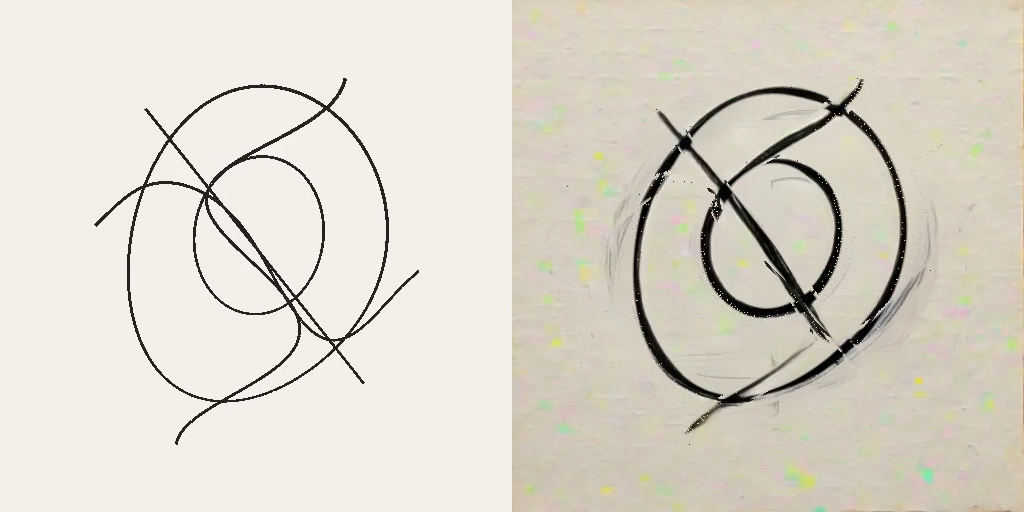
The example draws five rotating curves at 512 × 512. The left panel shows the
current source; the right shows stylized output. The model processes groups of
frames and introduces a causal delay; the motion controls can reproject that
output onto current geometry between results. While it starts, the right panel
shows the source. The example starts with charcoal at strength 0.85 and enables the motion controls.
Open the example
Search for streaming_diffusion under Starting points on Field's welcome
screen, then open an editable copy in your workspace. Run 2 · renderer,
then 3 · spinning curves. Start with the charcoal preset or enter any text in
Prompt override. A blank override uses the selected material preset. Press
Enter or leave the text field to apply your prompt. The controls also let you
adjust strength, pause rotation, and reset the model's state.
For white marks on black paper, set whiteOnBlack = true in the curves box and
run it again. Adapt prompt for white marks on black switches between the
original material prompt and its white-on-black version. A custom prompt takes
precedence over this switch. The input geometry stays the same across prompts.
The model can invent detail and change the shapes; strength controls how much
freedom it has.
Lower strength retains more of the input; higher strength gives the model more
room to add texture, smudges and splatter. Start at 0.45 for restrained marks,
0.60 for texture, and try 0.85–0.90 for expressive ink or charcoal. These are
styling controls, not a guarantee of exact geometry. For narrower marks, use
StreamDiffusionPresets.FINE_INK or FINE_CHARCOAL in the box.
Optional local backend
Local inference currently requires Linux with an NVIDIA CUDA GPU and a Vulkan driver that exports GPU memory and timeline semaphores. The starting point opens on Macs and other platforms; its curves box shows an availability message before attempting any CUDA or Unix-handle setup. Ordinary Field startup and builds do not require Python, TensorRT or model downloads.
Install the backend
Run the following from your Field checkout on Linux. Replace /path/to/sd2 with
an installation directory. This uses the compatible upstream snapshot and Field's
adapter patch; the Python environment is separate from Field's own dependencies.
git clone https://github.com/chenfengxu714/StreamDiffusionV2.git /path/to/sd2
git -C /path/to/sd2 checkout 6961a5cf2045d1dda05a04ef229698bdc04e873a
git -C /path/to/sd2 apply "$PWD/optional/streamdiffusion/upstream/field.patch"
cp optional/streamdiffusion/upstream/local_rtx4090.yaml /path/to/sd2/configs/
uv venv --python 3.10 /path/to/sd2/.venv
uv pip install --python /path/to/sd2/.venv/bin/python torch==2.6.0 torchvision==0.21.0 --index-url https://download.pytorch.org/whl/cu124
uv pip install --python /path/to/sd2/.venv/bin/python -e /path/to/sd2
uv pip install --python /path/to/sd2/.venv/bin/python -r optional/streamdiffusion/upstream/requirements-local.txt -r optional/streamdiffusion/requirements.txt
cp optional/streamdiffusion/upstream/download-models.py /path/to/sd2/
/path/to/sd2/.venv/bin/python /path/to/sd2/download-models.py
The model download includes the Wan encoder, T5 text encoder, distilled causal checkpoint and TAEHV decoder. The recorded setup uses Python 3.10, Torch 2.6 with CUDA 12.4, FlashAttention 2.7.4 and TensorRT 10.9 on Linux x86_64. Allow space for these weights and the TensorRT engine cache. Wan and distilled weights use pinned revisions; the TAEHV download follows its upstream main branch.
Build the small native handle-sharing helper with a JDK containing JNI headers, then set the backend path in the environment used to start Field:
cmake -S native/field-fdpass -B native/field-fdpass/build -DJAVA_HOME=/path/to/jdk
cmake --build native/field-fdpass/build
export FIELD_STREAMDIFFUSION_ROOT=/path/to/sd2
Run Field from its checkout. An existing compatible backend can be reused: install
optional/streamdiffusion/requirements.txt into its environment and set the same
variable. If Field is already running, write the path into
~/.afield/streamdiffusion-root.txt instead and run the box again. Nothing is downloaded
merely by opening the document.
TAEHV is the decoder for this integration. useTensorRT = true is the default;
the first run may build engines. To use the Torch decoder path instead, set
useTensorRT = false in the configuration. view.session.tensorRtActive says whether an
engine actually executed, and view.session.status notes it when TensorRT was requested and is not
running.
Process your own rendered texture
Create a single-layer, single-sample RGBA8 or BGRA8 target, with
colorTransferSrc = true. UNORM and sRGB are both accepted. The source dimensions
must be multiples of 32; start with 512 × 512 and 16 input frames per second.
See Render to texture for creating and displaying targets.
In a box connected beneath your renderer, this wraps an existing source RTT.
The processor schedules the source render and supplies a sampled output target:
import afield.media.video.diffusion.*

val root = StreamDiffusionSupport.configuredRoot()
val config = root?.let {
    StreamDiffusionConfig(
        it,
        prompt = StreamDiffusionPresets.CHARCOAL,
        strength = .45,
        fps = 16,
        useTensorRT = true,
    )
}
val support = StreamDiffusionSupport.probe(renderer, config)
if (support.available) {
    prop<StreamDiffusionView>(diffusion)
    diffusion = StreamDiffusionView(renderer, source, checkNotNull(config))
    prop<RenderToTexture>(stylized) = diffusion.output
} else {
    markdown(support.reason)
}
Sample stylized through the same image and sampler bindings as any other RTT.
Remove the source's separate render-list registration when the processor schedules
it. If your graph already renders it earlier in the same frame, pass
renderSource = false. The caller owns the source; diffusion.close() releases
the worker, shared buffers and output. Construct and close between graphics frames.
The starting point shows how to retain the object in a box property and close it
when its frame loop ends or the box is run again.
Once the session is ready, change material or strength without replacing the RTT:
if (diffusion.session.ready) {
    diffusion.reset(prompt = StreamDiffusionPresets.INK, strength = .85, seed = 0)
}
print(diffusion.session.status)
print(diffusion.session.lastStats)
Reset clears causal history and holds the last valid image during warm-up.
session.status reports loading and errors; session.logFile contains the worker
log. StreamDiffusionSupport.probe checks the platform, selected Vulkan device,
export features, native helper and installation files. The worker then checks
CUDA device matching, packages and model loading. A startup or inference failure
leaves the source or last completed output visible.
Use motion from your renderer
The starting point enables all three motion controls. It generates correspondence from the same ribbon geometry that draws the source, retaining earlier transforms and checking reference object IDs at crossings. Reproject output updates the right panel between model results. History blend mixes preceding stylized results into each new result. Noise advection anchors some of the model's randomness to moving surfaces; changing it resets the model.
The following clips are native Field RTT captures at 512 × 512 with active
TAEHV/TensorRT and the charcoal prompt at strength 0.85. Each has the current source on the left
and processed output on the right. They show successive eight-second intervals of the same rotating
scene; their source poses are not identical. Clip playback is 10 FPS; diffusion requests 16 FPS.
All three enabled — display reprojection, history blend .35, noise advection
.8:
All three disabled after reset — the model's delayed output is held between updates:
The enabled run fills rejected pixels with paper reconstructed from nearby output, so old curve positions do not leave a pale outline. Generated marks beyond the supplied correspondence can still leave trails. The clips show the controls working together; they do not measure how much each one improves temporal stability. With the controls enabled the run presented about 16 FPS once steady; the run data and worker log record the settings, resets, engine loads and chunk timings.
For your own scene, pass a StreamDiffusionMotionProvider to the processor and
opt into the controls. The provider records a GPU correspondence target in the
supplied command buffer:
import afield.graphics.vulkan.device.CommandBuffer
import afield.media.video.diffusion.*

val config = StreamDiffusionConfig(
    checkNotNull(root),
    displayReprojection = true,
    historyBlend = .35,
    noiseAdvection = .8,
)
val motion = object : StreamDiffusionMotionProvider {
    override fun onFrame(frame: StreamDiffusionFrame) {
        // Retain transforms / camera / object state keyed by frame.id and generation.
    }

    override fun record(
        command: CommandBuffer,
        request: StreamDiffusionMotionRequest,
    ): RenderToTexture? {
        // Render current pixels into reference-frame UV coordinates.
        // Return null if this pair's retained geometry is unavailable.
        return renderCorrespondence(command, request.current, request.reference)
    }
}
val diffusion = StreamDiffusionView(renderer, source, config, motion = motion)
renderCorrespondence here stands for your renderer's pass. It must return a
single-layer, single-sample RGBA32F RTT at the source resolution, with a
sampler and colorSampled = true, colorTransferSrc = true. You own that target
and its retained geometry; close them after the processor. The same target can
be reused across calls: each consumer records its work before the next request.
| Channel | Meaning |
|---|---|
| R, G | Absolute normalized UV in the requested reference frame |
| B | Confidence, 0 to 1; zero rejects history |
| A | Reactive rejection, 0 to 1; one rejects history |
Use texture-row coordinates: X right, Y down, pixel centres
((x + .5) / width, (y + .5) / height). Field's negative-height viewport puts
NDC Y = +1 at texture row zero. A backward displacement (dx, dy) in pixels
becomes referenceUV = currentUV + (dx / width, dy / height). Forward flow needs
to be converted into backward correspondence with holes and visibility handled.
The alpha channel is a reactive mask, rather than opacity; ordinary geometry can
use confidence one and reactive zero.
Match the requested frames
onFrame runs after every source draw, including draws that are not accepted by
the model. Retain renderer state under its frame ID; timestamps and generation
are provided too. record can be called several times in one graphics frame,
with different frame pairs:
| Request use | Current → reference |
|---|---|
DISPLAY |
Current source → source frame of the latest resolved result |
HISTORY |
Source frame of a new result → preceding resolved result's source frame |
NOISE |
Newly accepted source → previous accepted source |
A single previous-frame vector buffer usually cannot cover the model's delay. Re-render previous surface positions using retained transforms, or compose backward flow with confidence checks across the requested interval. Match the actual IDs, including skipped input captures. Use depth, object IDs or your G-buffer to reject occlusion, newly revealed surfaces, topology changes and unreliable pixels. Return null for missing retained state; write confidence zero for individual pixels that cannot be matched.
The demo retains 512 display-frame transforms, about 8.5 seconds at 60 FPS. Your retention window should cover your actual model lag. It extends correspondence to a wider ribbon around each curve to carry stylized edges. Its static paper mapping feathers rejection around old ribbons and fills revealed paper using nearby generated paper. This local fill can soften paper texture, and generated mark trails remain possible: it cannot identify every generated splatter pixel as part of a moving surface.
What each control does
Display reprojection samples the delayed stylized result at reference UVs on every Field draw. Rejected pixels show the current source unless your provider supplies a fallback image. Missing correspondence holds the latest resolved result. It improves geometric responsiveness; model inference still has the same causal delay.
A provider can override recordFallback(command, request, source, referenceImage)
to render an image used where confidence or reactivity rejects display history.
It is called immediately after a successful DISPLAY request, with the resolved
stylized reference image borrowed for that call. Return a sampled, single-layer,
single-sample RTT matching the source's dimensions and colour format; you own it.
Return null for the default source fallback. This leaves noise and history
blending unchanged. The demo uses this hook to reconstruct paper from nearby
reference pixels outside old ribbons, so the flat source paper does not show
through as a brighter patch. It is a local approximation and does not predict
new stylized content.
History blending warps the previous resolved result into the new result's frame,
clamps its colours to the fresh result's 3 × 3 neighbourhood, and blends using
historyBlend × confidence × (1 − reactive). Missing or invalid history uses the
fresh result. High blending can soften marks or leave trails; begin near .35.
Noise advection warps a CUDA noise field between accepted source frames and mixes it with fresh noise. Nearest sampling and square-root weights preserve marginal noise variance. The encoder compresses four RGB frames into one temporal latent; the adapter uses the group's ending noise field. This is an experimental spatial approximation, not exact flow through the video VAE. The model has no new learned flow or depth conditioning, and generated marks can move independently of the source geometry.
API defaults are false, 0, 0; supplying no provider retains the original
RGB processing path. Display reprojection and history blending can be changed
live through diffusion.displayReprojection and diffusion.historyBlend.
Change noise through diffusion.reset(noiseAdvection = .8); reset clears noise
history and prevents history blending across model generations. During reset,
the last valid image can still be reprojected while new results warm up.
GPU cost and diagnostics
Display/history passes run on Vulkan. Motion for noise is copied into an additional RGBA32F plane in each shared input slot and imported directly as a CUDA tensor; RGB and motion do not pass through CPU memory. Six float planes add 24 MiB at 512 × 512. Resolved history, display and the invalid-map target add another 7 MiB for RGBA8 output; your motion targets, fallback target, CUDA copies for the current four/five-frame group and retained scene state are additional. Larger resolutions scale these allocations with pixel count.
displayReprojectionRequests, historyBlendRequests and noiseMotionFrames
report requests/maps sent by Field. The worker's noise_motion_frames reports
maps actually consumed by noise advection, and noise_advection reports its
active setting. These are counts only; they say nothing about how good the
correspondence was or how much of the image it covered.
Resolution
Width and height must each be multiples of 32. Rectangular images are accepted; there is no square-image requirement. Resolution is fixed when the processor is created. To resize, close it and create a new processor for the resized source.
The worker accepts dimensions up to 4096 × 4096, but the model has only been run at 512 × 512, on an RTX 4090. Larger images increase GPU memory and computation. Doubling both width and height gives four times the pixels and can cost more than four times the computation. A new resolution may require new TensorRT engines.
Duration, FPS and latency
There is no fixed clip-duration limit. The adapter streams with bounded buffers and a rolling model cache rather than storing the whole video. It has not been tested over runs lasting hours.
fps accepts 1–60 and controls capture and output pacing. It is a requested
sampling rate; available GPU throughput determines whether it can be sustained.
Changing it requires recreating the processor. Field can render at 60 FPS while
diffusion updates at 16 FPS, holding the latest completed image between updates.
The worker collects five frames initially, then processes groups of four. At
16 FPS, four input frames span 250 ms; measured computation takes approximately
186 ms per group at 512 × 512. Collection, the two-step causal pipeline and
output pacing add delay, so end-to-end latency is longer than the 62.5 ms
a 16 FPS frame interval suggests; it has not been measured exactly. Model startup takes tens
of seconds on the recorded machine; initial TensorRT engine building can take
longer. startupTimeoutSeconds defaults to 240 and can be increased.
The model advances through accepted frames. Supplied timestamps identify the source frame; they do not condition the model on elapsed time. Changing the sampling rate, or skipping captures under load, therefore changes the motion seen by the model. The input scene can use its own animation clock independently of diffusion sampling.
Timing and memory
Field captures on an independent FPS grid. When the bounded input queue is full,
it skips captures rather than growing a queue. The worker processes accepted frames
in order; Field keeps displaying the last completed output while it is busy.
capturedFrames, skippedCaptures, presentedFrames, droppedOutputs,
lastSourceFrameId and lastSourceTimeNanos describe that behavior.
The native ink run on an RTX 4090 sustained 16.00 presented FPS at 512 × 512 over an 18-second steady interval. The median four-frame worker chunk took 186 ms. In an earlier run, total GPU memory use (including Field and the rest of the desktop) was about 12.3 GiB. Scene complexity, other GPU workloads and resolution change the available throughput and memory headroom.
The text encoder moves to CPU after initial prompt encoding by default. Later prompt changes can therefore take longer. Per-frame image processing and image transport stay on CUDA and Vulkan. Renderer correspondence can drive the three motion controls above. Depth and other G-buffer data can help your provider construct visibility and confidence; the model does not consume them directly.
Source and recorded run
The editable source is the operation transcript.
The charcoal image and comparison clips are native Field RTT captures, with
TAEHV and active TensorRT. Run data and the
worker log retain settings and engine loads.
The capture uses the starting point's geometry and prompt controls with strict
checkpoint loading. The ink clip
was recorded without the display fill and shows the pale paper outline it
removes. The backend's setup and architecture are in
optional/streamdiffusion/README.md.
See also the graphics starting point and render to texture.