The Semantic Index
Looking for a piece of code but can't remember what you called it? With a semantic model
configured, Field can find indexed code from a description of what it does. Enable semantic
search, choose a model and build the index, then type into the search field on
/welcome. Field searches the index alongside the ordinary workspace
search, which looks through document metadata and box text.
Results from both are merged by document. Semantic hits are labelled, ranked ahead of ordinary matches within each document, and limited to short source previews. Enter opens the first document in the results. If the semantic request fails or runs past the welcome page's short timeout, you still get the ordinary ones.
What the local index contains
A rebuild creates three selectable corpora:
- workspace: current source and text properties saved as their own files (code, shaders and so on, see Editing From Outside Field) found in documents under the configured workspace root, split into box/property and declaration fragments;
- field-internals: declarations from Field's indexed Kotlin source roots;
- documentation: Markdown sections under
public/docs.
The welcome search requests only the workspace corpus. Other clients of
/api/semantic-search/query can request one corpus, several corpora, a workspace
document, a box, or a property.
The index holds the files as they were at the last rebuild, not every earlier version of every box. When the workspace has changed since, Field marks the index stale; rebuild it to pick up the changes.
Ranking and privacy
The index is stored below ~/.afield/semantic-search/. With the feature on,
search always matches words and symbol names. Ranking by meaning is added only
when you have configured a model and tokenizer and they load. Without one, the
results report embedderBackend as disabled, and matching is by words alone.
Indexing and searching happen inside Field on your machine. Downloading a model preset uses the network, but your workspace and source text are never sent to an outside search service.
Managing it
The Semantic search panel sits under the AI section of /welcome:
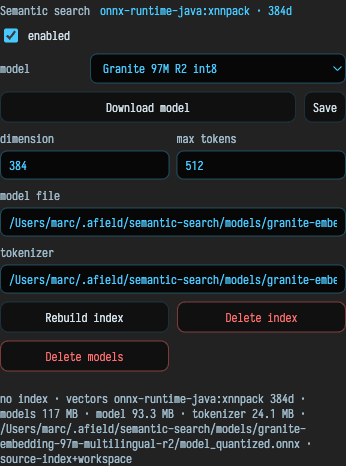
That is where you switch the feature on, pick a model preset and download it, point at a model file and tokenizer by hand, and set the dimension and token limit; Save writes those settings back. Three buttons below them act on the index itself, rebuilding it, deleting it, or deleting the downloaded models. A rebuild runs in a background worker and reports its progress on the page.
Conversational code search is separate
Search Documentation & Code (ctrl/command-shift-D) opens a generated-answer
surface in the documentation pane. It retrieves from the same local corpora as
above, plus the GLSL include libraries for shader questions, writes its answer
from what it found, and lists the paths it used. When nothing matches it says
so instead of answering.
Use the /welcome field to find things in your workspace, and the local
semantic-search API to search Field's source or these docs. Use conversational
search when a written answer helps, and check the paths it cites.