Reading Saved AI4 Chats
Every AI4 chat is saved with its document, including turns you rewound away. When a conversation grows long, you can read it back as a tree and follow its branches. You can also ask an agent to make a lens: a shorter account linked to the parts of the original it describes. The lens viewer shows both side by side, so you can follow a summary back to the conversation.
We'll explore harbour, a saved chat from the Studio in AI4 Paints. The agent
painted a harbour at dusk, turned it into night, then returned to dusk and tried a stormy morning.
The night and an earlier storm attempt remain on rewound branches. The conversation includes 418
tool calls and 16 looks at the canvas. To explore your own chats, point the same code at a document
folder in your workspace.
A chat as a tree
ChatArchive.chats(folder) finds every box in a document folder that has a saved chat. ChatArchive.tree(chat) reads one as a tree of turns. It only reads files, so you can point it at a document that is open in another Field. ChatLogViews.outline(tree) gives the tree as text, the way an agent first sees it. This box shows its header and first turn in an output panel:
import afield.ai.conversation.chatlog.*
import java.io.File
val harbour = File("public/docs/assets/ai4_chat_archive/chats/harbour")
val tree = ChatArchive.tree(ChatArchive.chats(harbour).single())
// The header and the first turn; the whole outline goes on to the second turn and the rewound branches.
val firstTurn = ChatLogViews.outline(tree).substringBefore("\n## Turn 2")
display(
"outline",
"<pre style='margin:8px;max-width:720px;white-space:pre-wrap'>" + firstTurn.replace("<", "<") + "</pre>",
)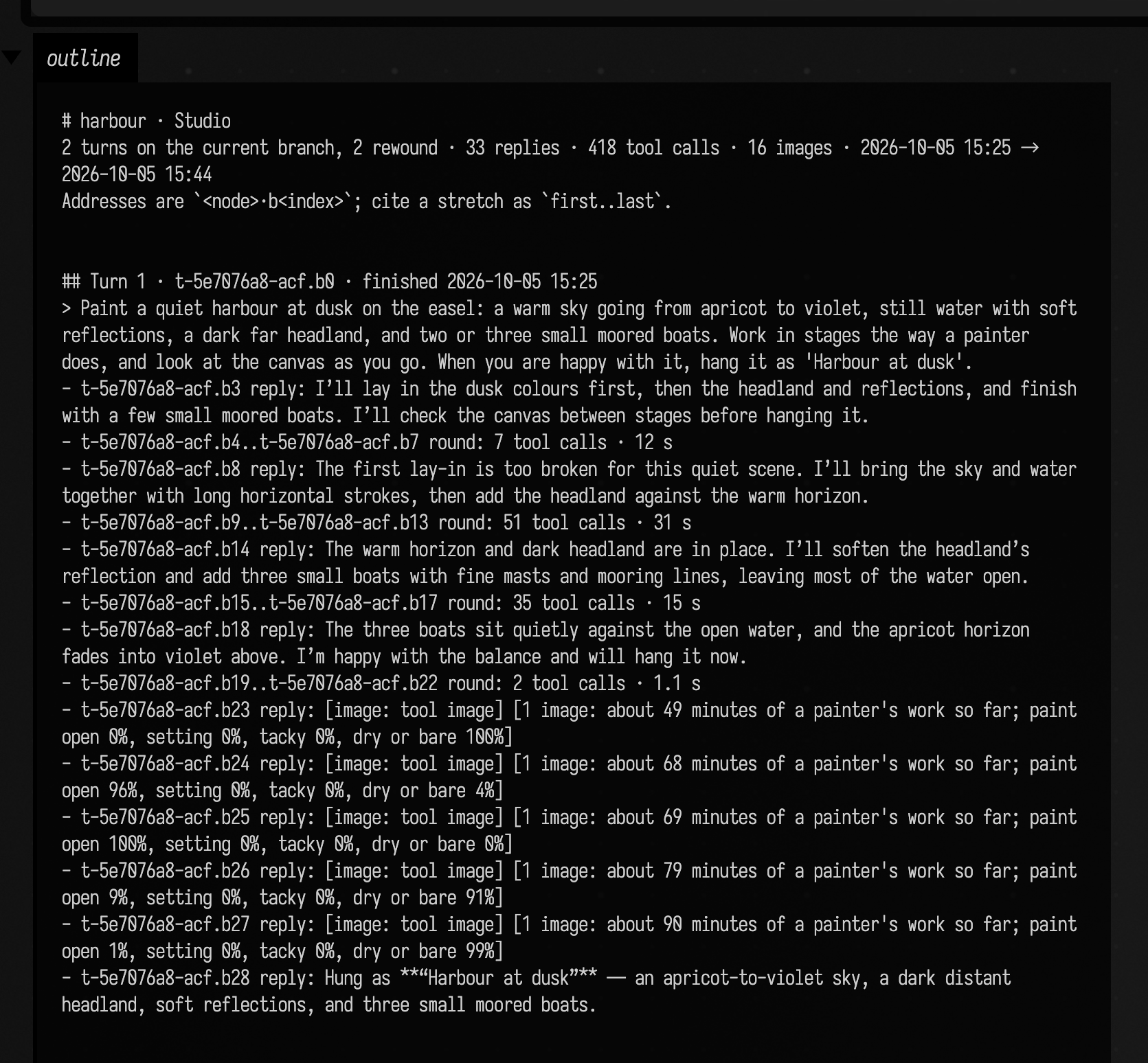
Each block has an address, <turn>.b<index>, such as t-5e7076a8-acf.b8. A turn's id is never reused, so an address stays valid as the chat grows, and blocks on a rewound branch (the night turn, t-23d59848-f38, here) have addresses too. Tool calls are grouped into rounds, one line each, and named by what they do: edit, look, build steps, note. These are the same round lines the chat panel shows.
To read a stretch in full, give ChatLogViews.read its first and last address. detail = "full" includes each tool block's text as well. This box reads the start of the rewound night turn, where a glaze turned the canvas almost black and the agent said so:
import afield.ai.conversation.chatlog.*
import java.io.File
val harbour = File("public/docs/assets/ai4_chat_archive/chats/harbour")
val tree = ChatArchive.tree(ChatArchive.chats(harbour).single())
val page = ChatLogViews.read(tree, "t-23d59848-f38.b3", "t-23d59848-f38.b8", detail = "full")
display("night", "<pre style='margin:8px'>" + page.text.replace("<", "<") + "</pre>")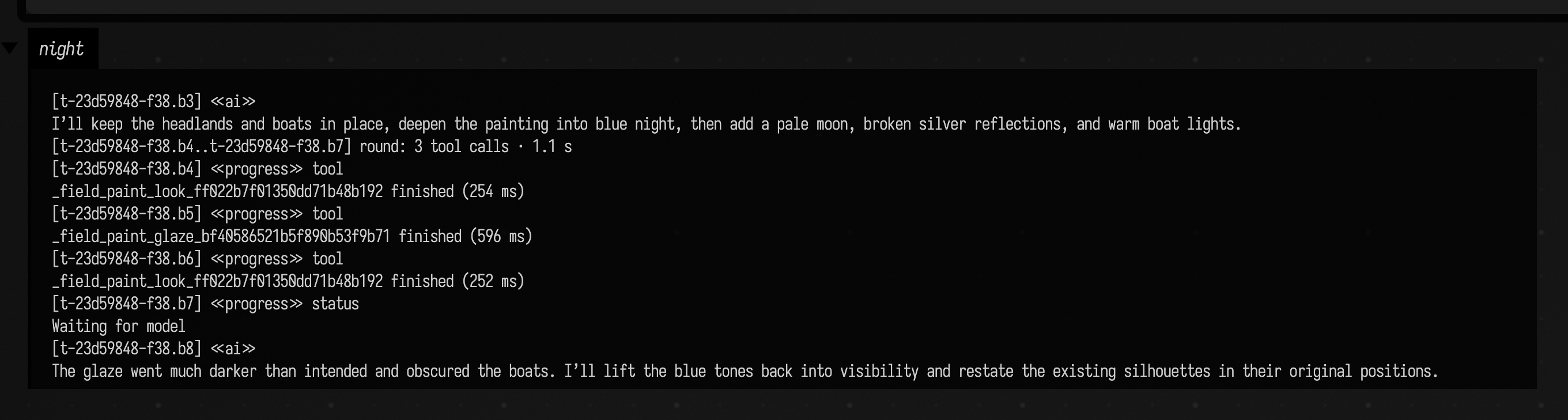
Lenses
A lens is written in the chat's own markup, so the chat panel can draw it. Each block begins with a <<source:first..last>> line naming the stretch it summarizes:
<<ai>>
<<source:t-23d59848-f38.b3..t-23d59848-f38.b21>>
The first glaze turned the canvas almost black. It lifted the blues back, restated the boats and broke the moonlight into short strokes, but stopped before hanging it. This branch was rewound away.
A block can cite several stretches, separated by commas; the storm request in this lens cites
both times it was asked. Pictures can be reused by their ai4img: reference. Field checks that the
addresses exist, but it cannot check whether a summary is accurate. ChatLogViews.lensProblems
lists invalid citations, and lensStats reports coverage and length:
import afield.ai.conversation.chatlog.*
import java.io.File

val assets = File("public/docs/assets/ai4_chat_archive")
val tree = ChatArchive.tree(ChatArchive.chats(File(assets, "chats/harbour")).single())
val lens = File(assets, "lenses/harbour/storyline.md").readText()
val problems = ChatLogViews.lensProblems(tree, lens).ifEmpty { ["none"] }
val stats = ChatLogViews.lensStats(tree, lens).entries.joinToString("\n") { (k, v) -> "$k: $v" }
display("lens", "<pre style='margin:8px'>problems: ${problems.joinToString("; ")}\n$stats</pre>")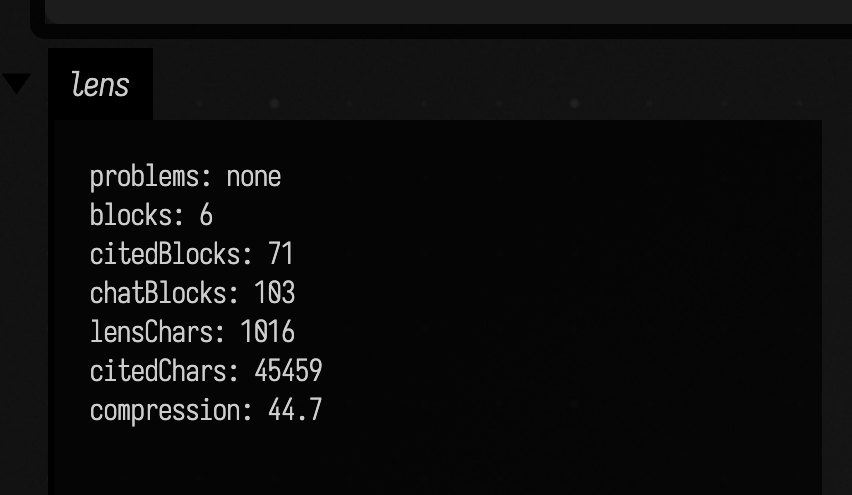
The lens is 1,016 characters standing for 45,459. The 32 blocks it does not cite include the first storm attempt's working, which the lens mentions only through its request.
Letting AI4 write lenses
Lenses are meant to be written by talking to AI4. Run this once in a box, and the document's AI4 agents can read the chats under the folders you name and save lenses:
import afield.ai.conversation.chatlog.*
import java.io.File

registerChatlogTools(File("/path/to/a/workspace"))
The agents get eight tools:
| Tool | What it gives the agent |
|---|---|
chatlog.list |
every chat under those folders, with its turns, replies, tool calls, images and size in tokens |
chatlog.outline |
the outline above; agents are told to start here |
chatlog.read |
a stretch as text, by address, in pages |
chatlog.search |
blocks containing a phrase, optionally only one family of tool calls (notes, design, builds, ...) |
chatlog.images |
each tool picture: what the tool was looking for and what the agent concluded, and optionally the pictures themselves |
lens.write |
saves a lens; it refuses one with an address that doesn't exist and says which |
lens.read, lens.list |
the lenses saved so far |
The archive is only read. Lenses are saved in the registering document's lenses/<chat>/ folder as <name>.md, beside a <name>.json record of the brief and the model that wrote it. Pass lensDir = to save them elsewhere. A chat is named after its document, or <document>/<box name> when the document has more than one chat.
Then ask, in that box's AI4 chat, for the lens you want, for example: "write a storyline lens over harbour: one block per request, keep each finished canvas". The brief is up to you. A lens can follow only the notes and recipe changes, only the failures and how they were fixed, or only the pictures.
The lens viewer
showChatLens(chat, lens) shows a lens beside its chat in the box's lens output channel. The box's document needs to have run registerChatlogTools first, which this box does itself:
import afield.ai.conversation.chatlog.*
import java.io.File

val assets = File("public/docs/assets/ai4_chat_archive")
registerChatlogTools(File(assets, "chats"), lensDir = File(assets, "lenses"))
showChatLens("harbour", "storyline", height = 600)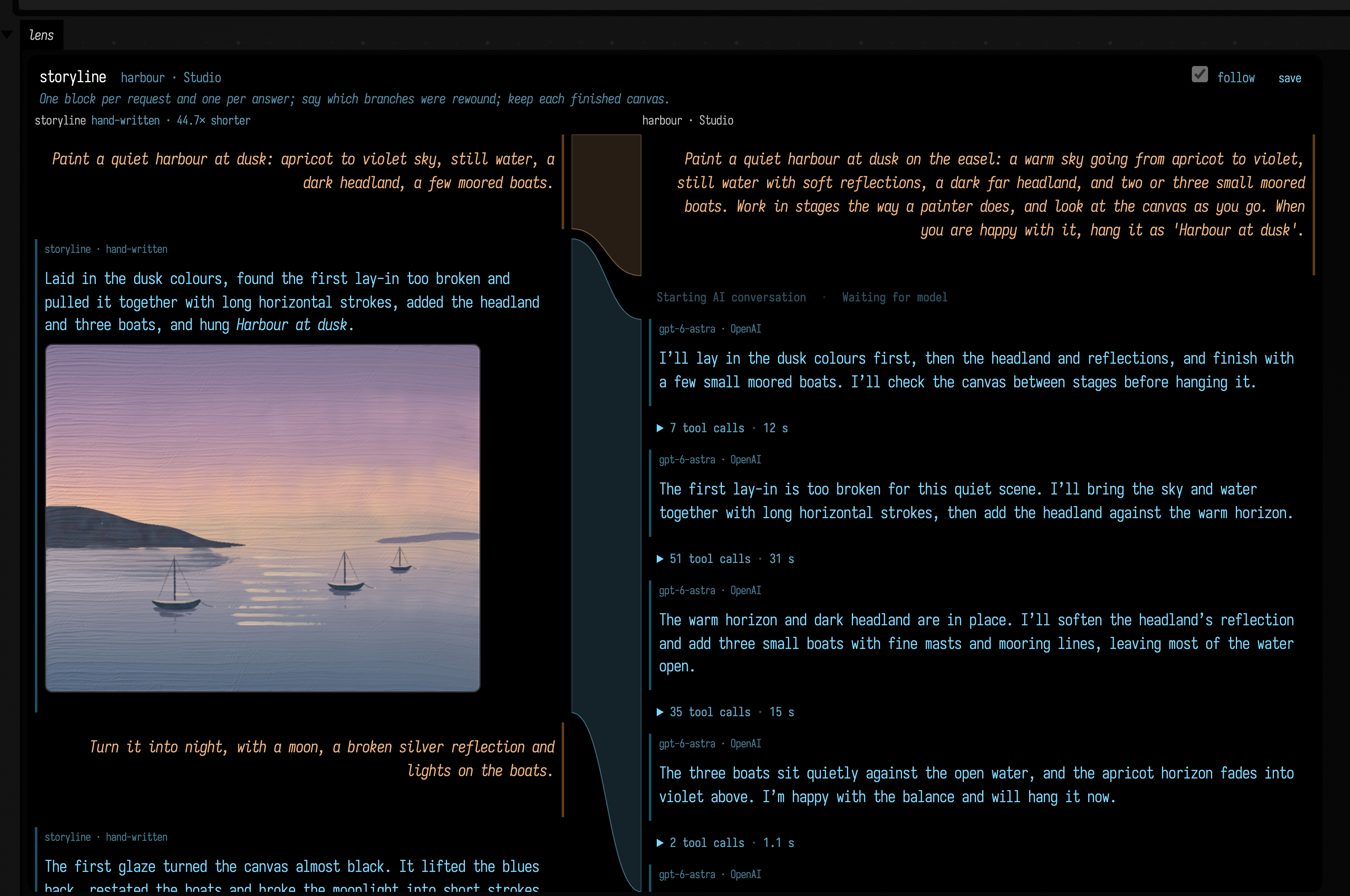
Both columns are drawn by the chat panel's renderer. Each lens block is labelled with the lens and its model. This lens was written by hand for the docs, so its model is hand-written. In the chat column, tool calls fold into round lines. A band that cites a block inside a closed round ends on the round's line.
- Hover over a block or a band to light up both ends.
- Click either end to bring the other end into view.
- With follow checked, the chat scrolls along as you scroll the lens.
- Blocks the lens doesn't cite are dimmer, so the lens also works as a filter.
The viewer fetches chats and pictures from Field over /api/chatlog/lens and /api/chatlog/blob. They answer only for documents that registered a chat archive, and only to the same machine, because chats can hold private work.
How this page was made
The harbour chat is a real AI4 conversation: a live run of the ai4_paint_studio starting point with OpenAI gpt-6-astra on 2026-10-05, a later run than the one whose paintings are on AI4 Paints. It is that document's saved chat with three changes, none to its text: the chat history's inline images are replaced by the same ai4img: references ChatArchive would give them, the 13 tool images are scaled down to 640 px, and the 132 MB of saved canvas states, which only a rewind reads, are left out. Four log paths in progress notes on rewound branches were shortened to ~/.afield/.... The storyline lens was written by hand for this page; its record's statistics are the values lensStats printed in the capture above. The design and the measurements on long chats are in dev_docs/ai/AI4_CHAT_PLAYGROUND_PLAN.md.
The four boxes on this page are also the ai4_chat_archive starting point, which reads the same example chat when Field runs from a checkout.
See also: AI Tool-Use History for the per-call tool logs, and Experimenting with AI4.