AI4 Paints
The Studio is one box that turns the paint simulator, built on alice's
claude-paint, into a place where the AI chat
can paint. The box puts an oil canvas on an easel and gives the agent tools to paint on it. You
open the box's AI panel and ask for a painting, and the agent lays it in, looks at it, corrects it
and hangs it in the box's gallery. The three paintings below came from one conversation with the
Studio. Open the ai4_paint_studio starting point to try
it yourself; it needs an AI provider and the paint library (./gradlew buildPaintNative, see
Paint and pencil from FLines).
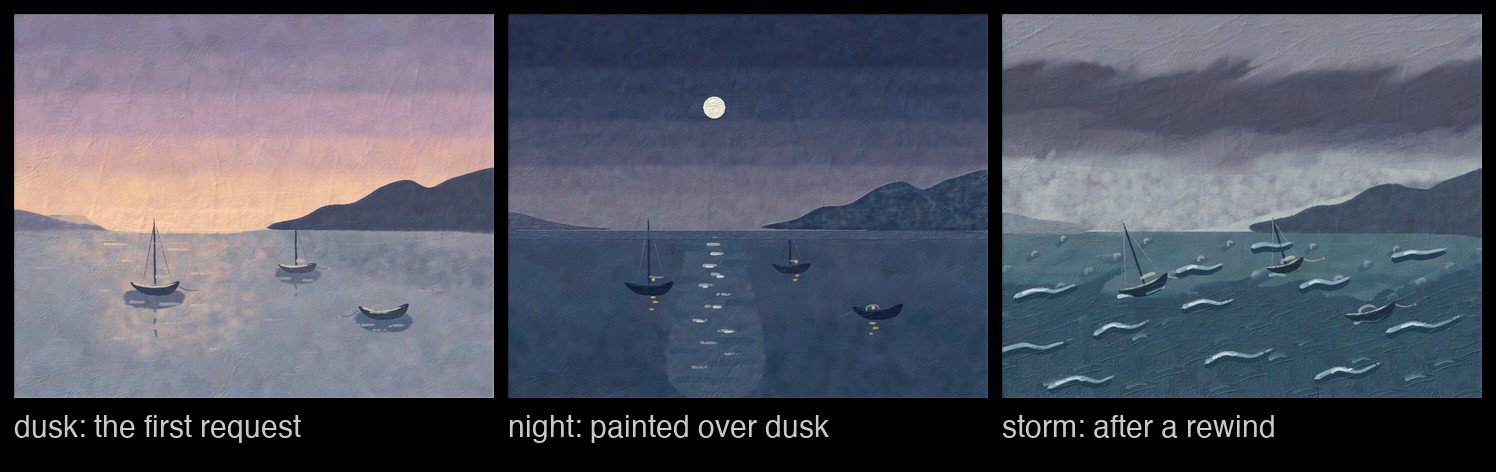
The first request asked for a quiet harbour at dusk; the second turned it into night. Then the
chat was rewound to before the second request, restoring the dusk canvas. A new request painted a
stormy morning over it. The night painting remains on its own branch: /branch brings back both
the conversation and the canvas.
Asking for a painting
Open the Studio box's AI panel and describe what you want. The tools are already there, so you do not need to mention them:
Paint a quiet harbour at dusk on the easel: a warm sky going from apricot to violet, still water with soft reflections, a dark far headland, and two or three small moored boats. Work in stages the way a painter does, and look at the canvas as you go. When you are happy with it, hang it as 'Harbour at dusk'.
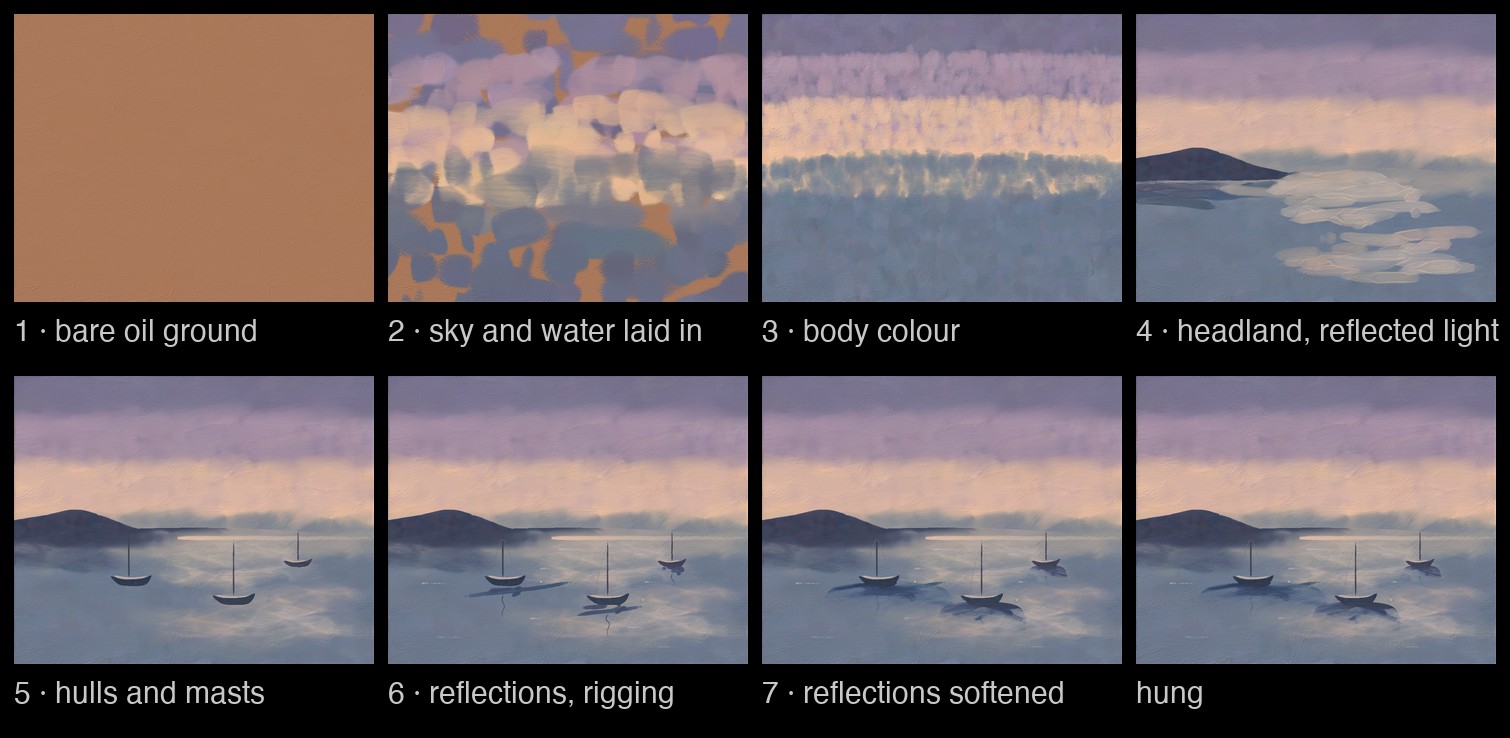
The agent can see the canvas, and it uses that the way a painter steps back from the easel. Each frame below is the canvas as the agent saw it when it looked, and the last is the painting it hung:
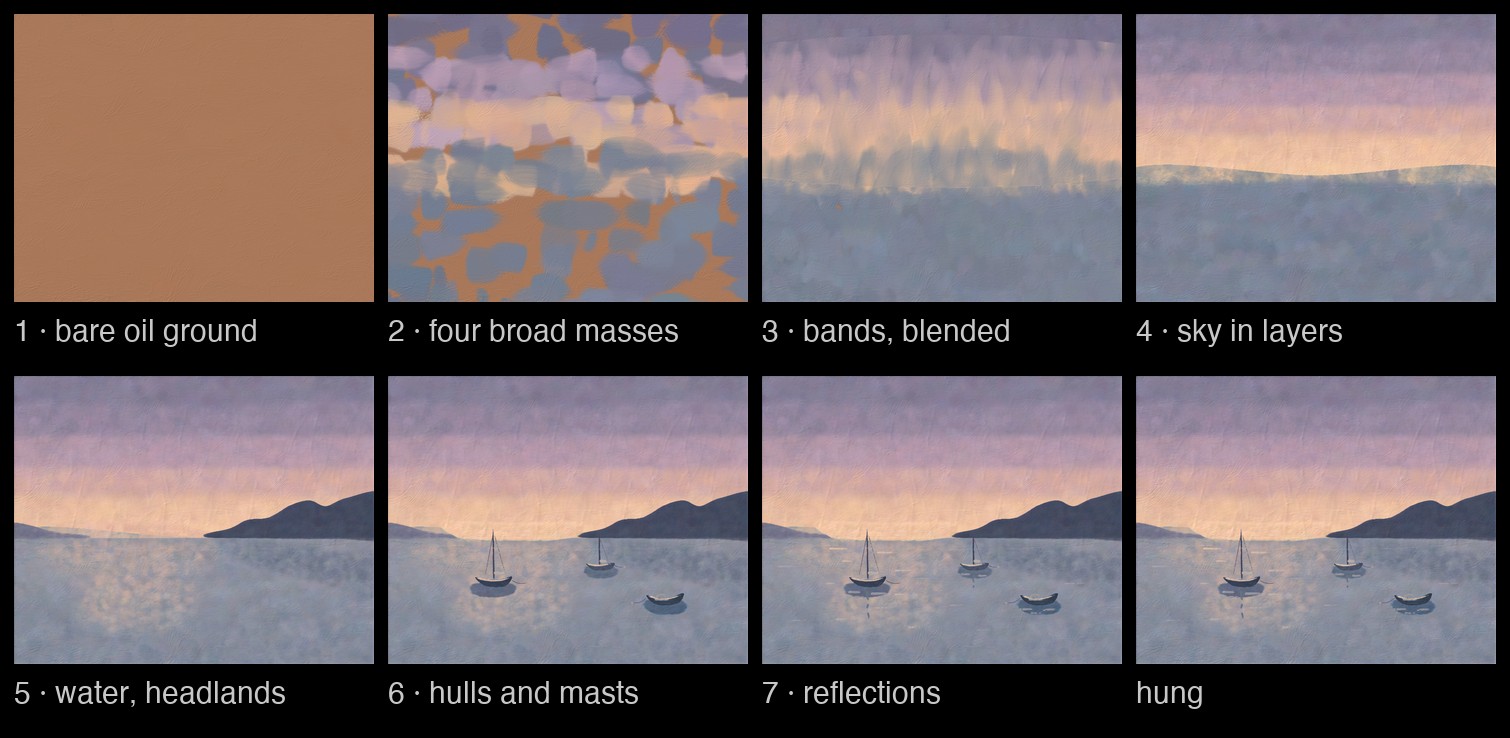
It worked from big shapes to small ones without being told to: four broad masses of colour first, then body colour blended into bands, then the waterline and headlands, then the boats, and the reflections last. Between looks it mostly painted through tool programs, one short program for each stage, such as "lay in four broad dusk colour masses".
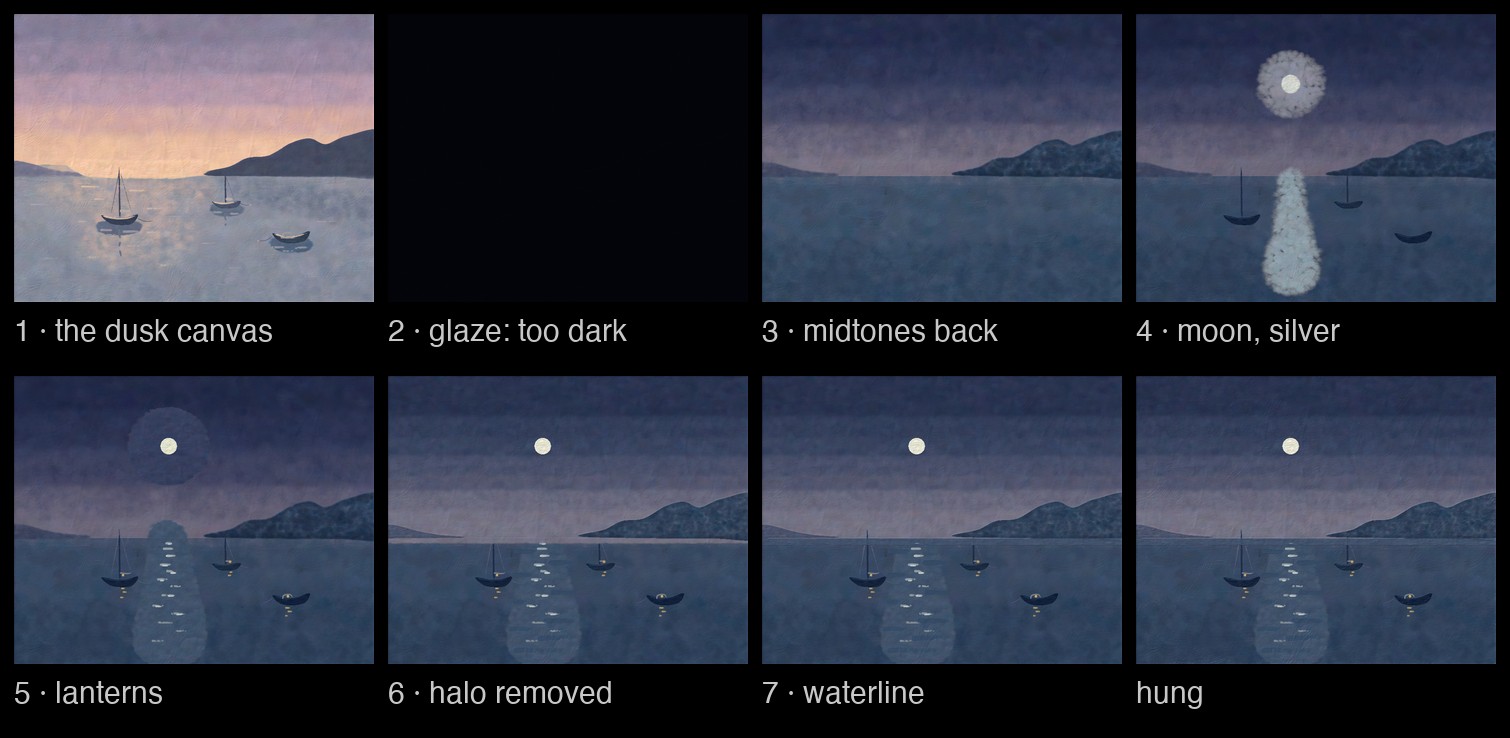
Looking is also how it recovers from a mistake. Turning the dusk into night, it laid a navy glaze over the whole canvas, and the glaze came out almost black. It saw that on the next look and painted the night's midtones back over it:
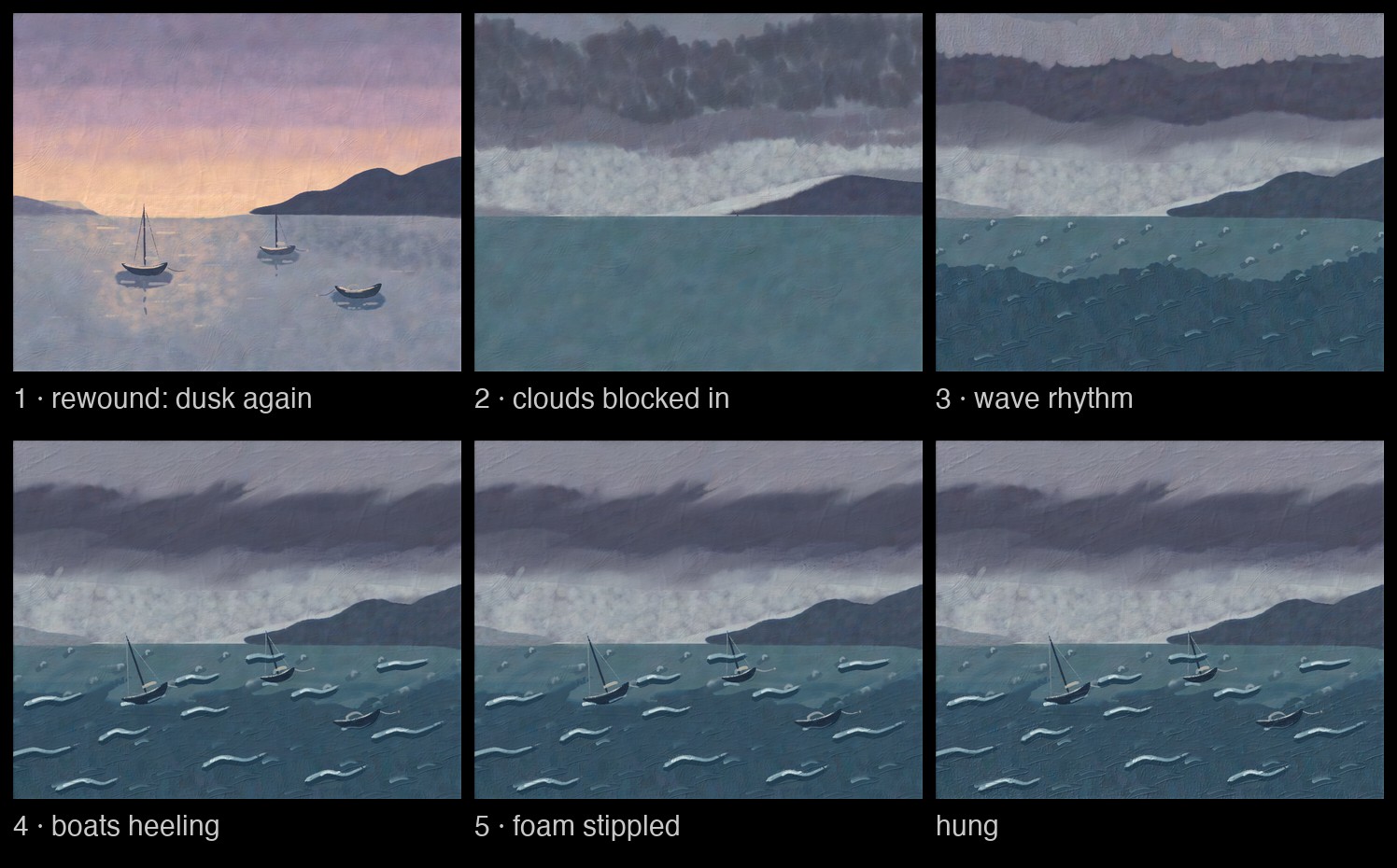
The storm started from the dusk canvas the rewind restored. The first frame is that canvas, and it is identical to the hung dusk painting:
Browsing the saved paintings
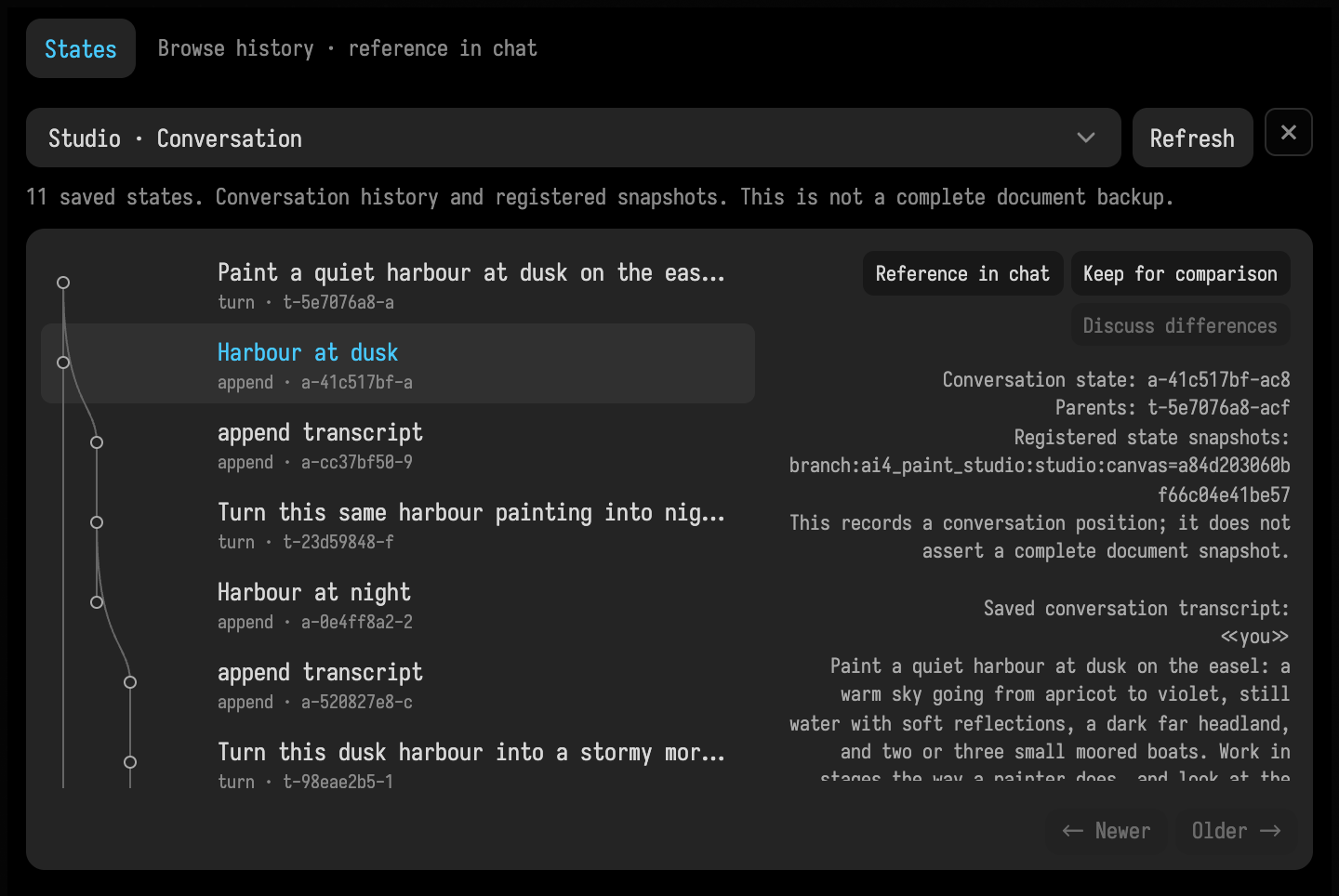
Because the Studio saves its canvas with the conversation (see What the box defines), the AI chat's States tree works here too. Each completed request adds a node with its saved canvas. While the first painting is still being made, the tree is empty: the agent's looks along the way are progress images, not saved states. The open tree updates when a request finishes.
Select an earlier node to see its conversation and which saved canvas it holds. The cyan current circle stays where the conversation is; browsing another node leaves the easel alone. Reference in chat inserts a compact reference so AI4 can retrieve that state's recorded contents when asked. Keep for comparison, followed by Discuss differences on another node, prepares references to both in your draft. The inspector shows saved text and ancestry; it does not reconstruct a canvas preview.
How this picture is made
tools/capture_ai4_painting_states.py restores the saved harbour conversation from
assets/ai4_chat_archive/chats/harbour on a Field it starts, checks the restored chat matches
the saved one, opens States, selects Harbour at dusk, and crops the window to the panel.
It calls no model, so it can be rerun; the docs build cannot, because the conversation itself
came from a paid live run, so the PNG is committed.
For a named alternative, ask AI4 to fork a saved state under a name such as
Harbour at dusk. The fork is saved without switching the easel to it, and AI4 can read it
back later by that exact name. Continue the alternative
with the existing /branches and /branch <number> commands, which restore the
Studio's canvas as well as its conversation. Browsing saved states
describes the tools and how other documents expose their own histories.
Brushes the conversation keeps
A fresh brush comes clean from the palette. A brush the agent keeps (paint_tool, then
paint_load and the tool argument of paint_stroke and paint_dab) stays dirty between
requests: dragged through wet paint, it carries some of that colour into its next stroke, and a
reload mixes into what is left in it unless the agent wipes it. A kept knife keeps its bead and a
kept rag its load. The canvas context tells the agent what each kept tool carries, and /tools shows
it to you.
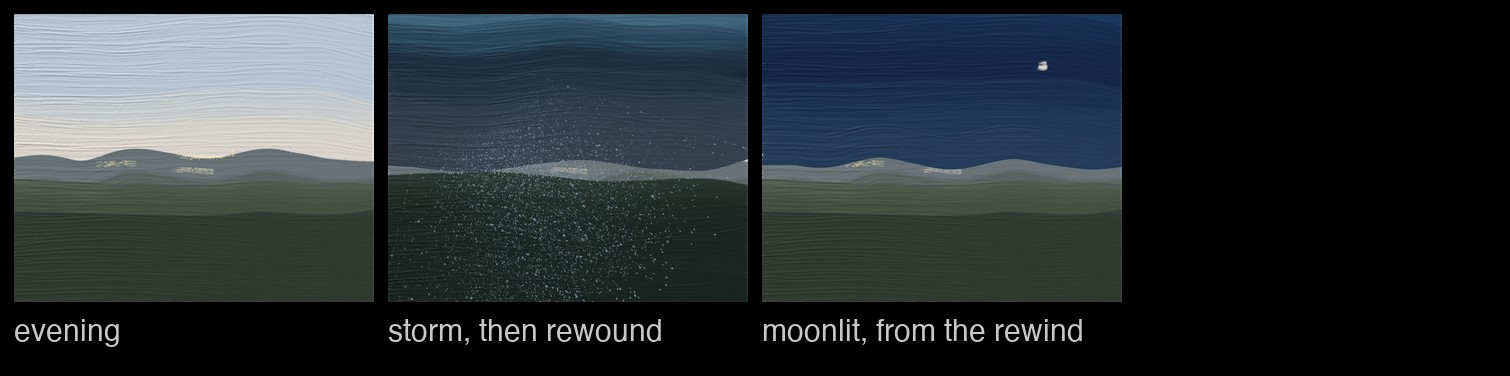
The kept tools belong to the conversation, like the canvas. Here a request asked for an evening landscape painted with a kept sky brush and a kept land brush, a knife and a rag; a second request turned it into a storm, reloading the sky brush without wiping it. Rewound to before the storm, the canvas and all four tools went back to how the evening left them, and a new request for a moonlit night was painted from there, with the sky brush as the evening had left it:
Watercolour, and brushes whose hairs move
On a sheet of paper (paint_fresh with ColdPress, HotPress, Rough, Xuan or Blotting) the
agent paints in watercolour and ink: paint_wash with a watercolour brush,
paint_drop, paint_wet to wet a region, and paint_tilt to tilt the board. The water then
moves on its own, so the agent waits for it (paint_wait with seconds) and can look at where the
paper is still wet (paint_look with map="surface").
A brush kept with paint_tool and moving=true is a brush with moving hairs.
The agent paints with it through paint_gesture, giving the speed, pressure along the stroke, and
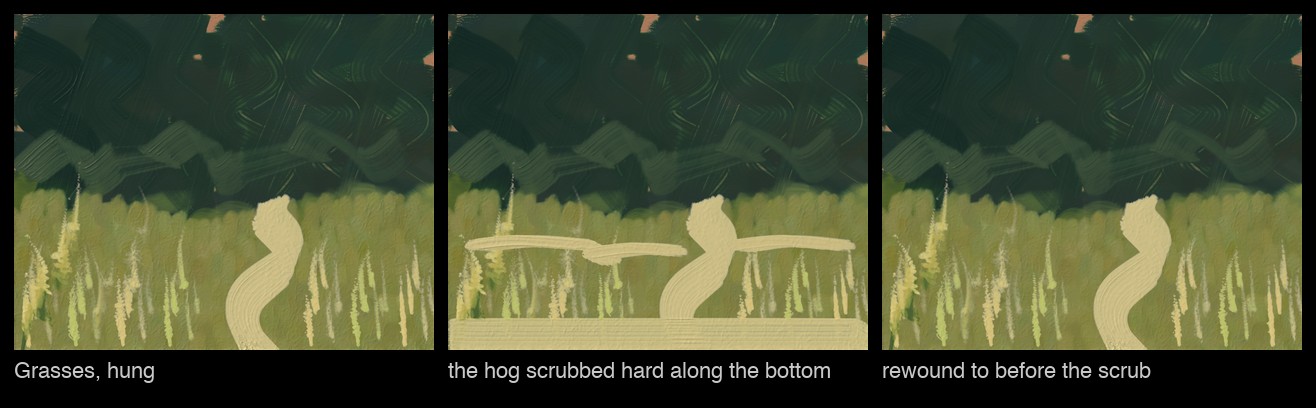
the tilt and roll of the handle, for the marks that depend on the hand. Below, the agent was asked
for grasses at the edge of a wood, scrubbing the wood in with a moving hog flat, flicking the
blades up with a moving rigger and rolling the flat through a path; then to scrub the hog hard
along the bottom edge and lay three light strokes with it. The conversation was then rewound to
before the scrub, and both brushes came back exactly as the grasses had left them.
How the moving-hairs figure was made
One live run on 2026-10-08, OpenAI gpt-6.1-sol, in a fresh Studio, from one backdoor connection:
two requests as real panel turns (agent-task --chat-box Studio) and the rewind as the panel sends
it. The first and middle frames are the PNG paint_hang wrote and the agent's own paint_look after
the second request; the third is its first look after the rewind. A probe box hashed both kept
brushes' state() and the canvas between the steps: after the rewind all three hashed as they had
after the first request (the hog's retained bend back to 0.005 rad from 0.013). The docs build
cannot remake the figure, since that needs a model.
The same request, another model
The Studio works with whichever model the AI chat is set to use. The painting on the left is the dusk
painting above, by OpenAI's gpt-6-astra. The one on the right is the same request in a fresh Studio,
by gpt-6.1-sol:
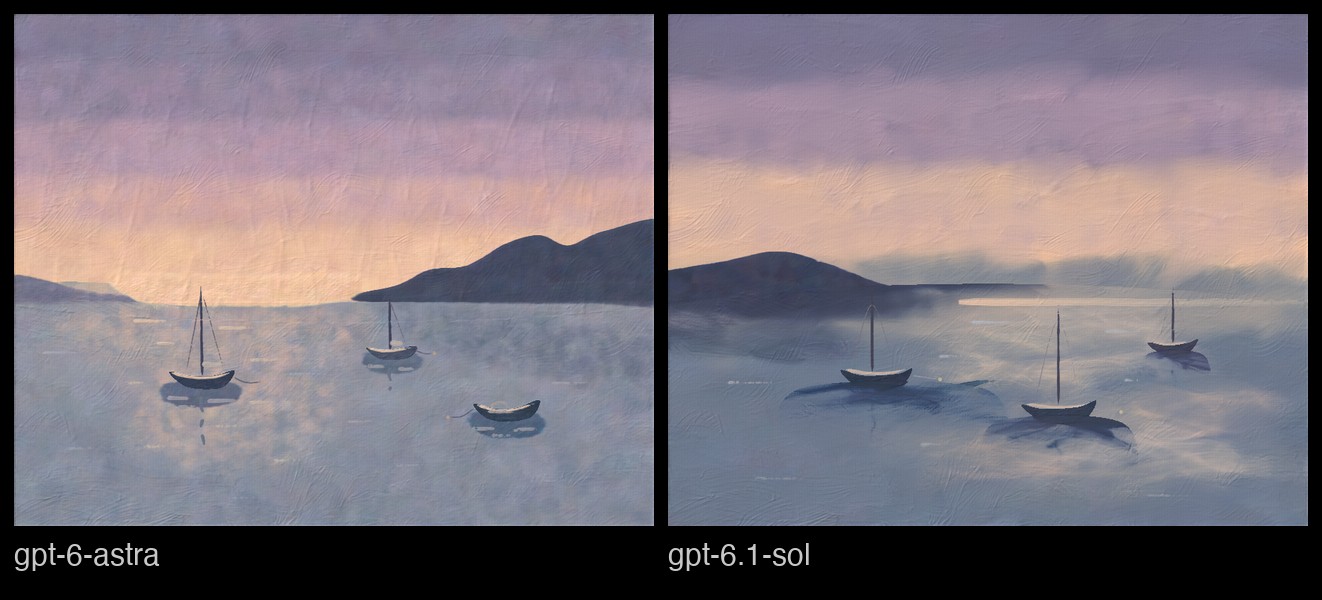
Sol worked the same way, from broad masses to boats and reflections, also in six tool programs, and also took about three minutes. Its painting is mistier. At the fourth look it had laid a few pale patches of reflected light, and by the next look it had worked them into the water:
These commands work in the Studio's chat:
/canvasshows the canvas in the chat./palettelists the tube paints with a swatch of each./toolslists the kept tools and what each one carries./gallerylists the hung paintings, which the box shows in itsgallerypanel./brancheslists the versions of the conversation, and/branch <n>switches to one.
To start a version from an earlier point, use the rewind button on one of your own requests. The conversation, and the canvas and the kept brushes with it, go back to how they were before that request.
A canvas is large
Each saved state of the Studio's canvas is about 28 MB on disk, kept in the document's ai4_blobs/state
folder. Every request that changes the painting adds one; pruneAiStates(dryRun = false) frees all
but the latest three along each branch. The kept tools are small beside it, some 20 kB a request.
What the box defines
All of this is ordinary box code, in one agentExtension block. A tool is an
aiTool, here the one that dabs a loaded brush at a list of points. canvas(),
brushFor(), loadInto(), rad() and done() are small helpers defined above it in the same box:
brushFor takes a kept brush by name, or a fresh one of the kind asked for.
tool("paint.dab") {
    describe("Touch the brush down at points and lift it: dabs, petals, leaves, highlights. One load for all of them.")
    effects(ToolEffect.CONTROL_RUNTIME)
    val points by param<List<Double>>("[x0, y0, x1, y1, ...]")
    val color by param<String?>(
        "#rrggbb, a tube name, or tubes by parts; null dabs a kept tool with what it carries",
        default = null,
    )
    val tool by param<String?>("a kept brush's name to dab with; null for a fresh brush", default = null)
    val brush by
        param<String>("Round, HogFlat, Filbert, Fan, Rigger, Badger or Stippler (a fresh brush)", default = "Round")
    val width by param<Double>("brush width in canvas units", default = 12.0)
    val pressure by param<Double>("harder makes a bigger, fuller mark", default = 0.6)
    val angle by param<Double>("a flat's wide axis, degrees", default = 0.0)
    action {
        val c = canvas()
        val b = brushFor(tool(), brush(), width(), color())
        loadInto(b, color())
        points()
            .chunked(2)
            .filter { it.size == 2 }
            .forEach { c.touch(b, it[0], it[1], pressure = pressure(), angle = rad(angle())) }
        done("${points().size / 2} dab(s)")
    }
}
Colours can be hex values or tube paints mixed by parts, such as
"lead white:4, cadmium yellow:1". The Studio gives the agent tools for strokes, filled regions
with painterly handling (Broad, Body, Detail, Glaze, Scumble, Blend), glazes, pencil,
chalk, hatching and stippling, as well as a knife, rag and spatter.
It can keep and reload a brush, make timed gestures with moving hairs, paint washes and drops, wet or tilt the paper, and wait for paint to dry. Other tools start a fresh surface, hang a painting or age it; the ageing tool is loaded when the agent asks for it.
The agent also needs to know the canvas it is painting on. A context block is text the agent
reads at the start of every request, computed then, so it describes the canvas as it is:
context("canvas") {
    val c = canvas()
    "The canvas on the Studio easel is 1000 units wide and ${c.heightUnits.roundToInt()} tall (aspect ${c.aspect}), " +
        "x to the right, y DOWN from the top edge. ${state()}."
}
state() reports how much of the paint is still wet. A second context block tells the agent how
to paint and which tubes there are. That one never changes, so it is marked
changesOften = false and the providers can cache it.
The canvas follows the conversation because of one more call. branchState hands the canvas to
the chat, which saves it before and after every request and restores it when the conversation
moves. The kept tools have a second branchState of their own, PaintToolbox.save and load:
branchState(
    "canvas",
    save = { canvas().saveState(it.path) },
    restore = { f ->
        replace(f?.let { PaintCanvas.load(it.path) } ?: fresh())
        show()
    },
    onConflict = BranchConflict.RESTORE,
    resumeOnOpen = true,
)
// and so do the kept tools, each bristle's paint and all
branchState(
    "tools",
    save = { tools().save(it) },
    restore = { f -> thisBox.properties["studio.tools"] = f?.let { PaintToolbox.load(it) } ?: PaintToolbox() },
    onConflict = BranchConflict.RESTORE,
    resumeOnOpen = true,
)
restore gets null when the conversation has no saved canvas, which here means starting on a
fresh one (and, for the tools, an empty toolbox). Before restoring, the chat checks whether the canvas changed since the conversation last
saw it, for instance because a tool was run on it from outside the chat. By default a changed state
is left as it is, and the chat says so. The Studio's canvas belongs to the conversation, so it asks
for BranchConflict.RESTORE: the chat restores anyway, after saving the canvas it replaces.
resumeOnOpen = true puts the canvas back where the latest conversation left it when the document
is opened again. Leave both at their defaults for state a person also edits by hand, or that the
document saves itself, such as a design. Agent extensions
has the rest of what agentExtension can add.
How these figures were made
The Astra figures are from one live run on 2026-10-03, OpenAI gpt-6-astra, and the Sol figures
from a second, later that day, gpt-6.1-sol, given only the dusk request in a fresh Studio. In the
first run the three requests were sent as
real panel turns (agent-task --chat-box Studio in tools/field_backdoor.py) and the rewind and
branch switch sent as the panel sends them. The frames are the images the agent's paint_look
calls returned, which the Studio also writes to the document's progress/ folder, and the last
frame of each sheet is the PNG paint_hang wrote. tools/ai4_painting_sheets.py lays them out
on black and adds the captions; it draws nothing on the frames. The docs build cannot remake
them, since that needs a model. Hanging the canvas after the rewind and after the switch back
gave PNGs byte-identical to the hung dusk and night paintings, which is how the restores were
checked.
How the kept-tools figure was made
One live run on 2026-10-08, OpenAI gpt-6.1-sol, in a fresh Studio: the three requests were sent
as real panel turns (agent-task --chat-box Studio), and the rewind as the panel sends it, all
from one backdoor connection. The paintings are the PNGs paint_hang wrote. Between the steps a
probe box hashed every kept tool's state() and the canvas: after the rewind the four tools and
the canvas hashed exactly as they had after the first request, and /branch back to the storm
brought back the storm's hashes. The docs build cannot remake the figure, since that needs a model.