SolidCraft: edit the design, then see the part
Open a parametric design, change a dimension in a box, and see the resulting part. Field's optional SolidCraft binding can open a saved design or build one from code, evaluate its feature tree, and return B-rep measurements or a triangle mesh. You can export STEP, binary STL, or the edited design itself.
The binding lives in afield.geometry.solid.solidcraft, alongside Field's
Manifold mesh-solid API.
Open solidcraft_intro from the welcome screen. Its one box
uses a design bundled with Field: a 40 × 30 mm sketch, an extrusion whose depth is width / 2, a
fillet, and a circular cut that stays 20 mm deep. At width = 40 mm the cut goes through. At
width = 50 mm the part becomes 25 mm deep, so the same cut is blind. Change width in the box
and run it again.
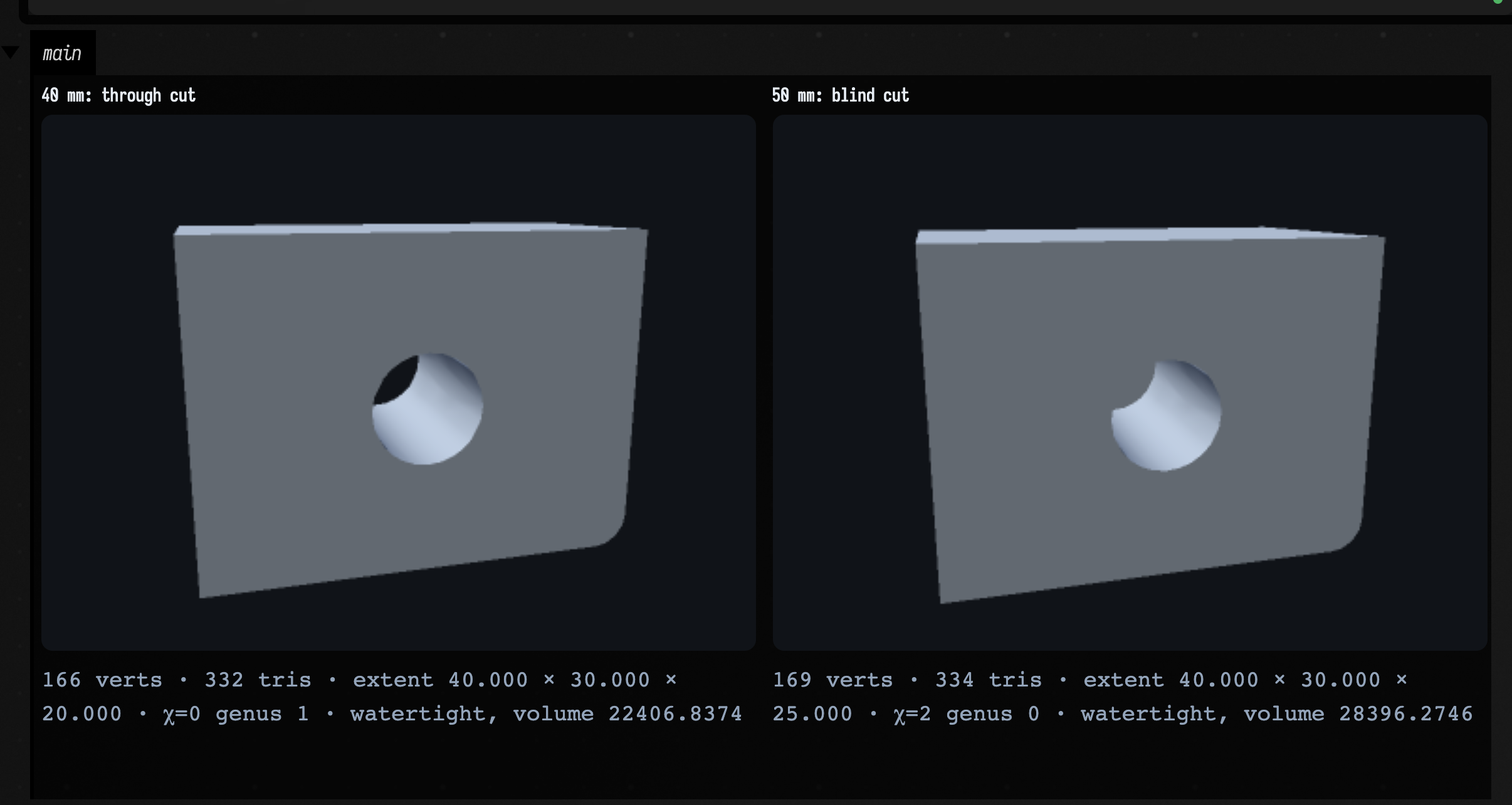
The image is captured from that starting point's code. The display meshes have coincident vertices welded so Field can measure their topology; SolidCraft's own B-rep volume is printed separately. The mesh is a view of the evaluated design, while the design remains editable in Rust.
Install the optional bridge
Select SolidCraft parametric CAD in Field's first-start setup, or reopen setup with
./field.sh --setup. It checks for Git, Python, a C/C++ compiler, and Rust/Cargo 1.95 or newer;
BUILD runs the pinned source build. You can run the same build directly:
./gradlew buildSolidCraftNative
./gradlew smokeSolidCraft
The first build downloads SolidCraft source at a pinned commit and compiles Field's small C ABI
adapter inside that workspace. Ordinary Field compilation and startup do not fetch or load it.
SolidCraftLibrary.describe() reports where Field looked. Set AFIELD_SOLIDCRAFT_LIBRARY or
-Dafield.solidcraft.library to use a library at another path. Restart Field after building it,
then run the starting point. The native library currently needs to be built separately for each
operating system and architecture you use.
Use it in a box
import afield.geometry.solid.solidcraft.SolidCraftDesign
import afield.geometry.solid.solidcraft.SolidCraftLibrary

if (SolidCraftLibrary.isAvailable) {
    SolidCraftDesign.openBundledExample().use { part ->
        part.setParameter("width", "50 mm")
        val body = part.summary().getJSONArray("bodies").getJSONObject(0)
        println("B-rep volume: ${body.getDouble("volume")} mm³")

        val mesh = part.mesh(bodyIndex = 0, tolerance = 0.1)
        showMesh(mesh.toTriMesh().weld())
        println("STEP: ${part.exportStep().size} bytes")
    }
}
SolidCraftDesign.open(path) opens your own .solidcraft file. summary() reports each body's
volume, area, bounds and topology counts. mesh() supplies double-precision positions, triangle
indices and the originating B-rep face ID for each triangle. toTriMesh() copies it into Field's
float mesh format; call .weld() when you want Field's index-based watertightness and genus checks.
Close a design with use { } when done. An invalid parameter edit leaves the preceding design and
evaluation intact.
Calls run in the calling thread. The starting point is a small place to try them.
Build a part from code
solidCraft { } builds a design instead of opening one, from sketches and features written in a
box: lines, arcs, circles, splines and 3D curves, then extrude, revolve, sweep, loft and pipe, and
the surface features that make open sheets — surface sweep, loft, revolve and boundary patch. The
result is a real SolidCraft design, so its parameters stay editable and it exports to STEP or STL
like one opened from a file.
Three parts
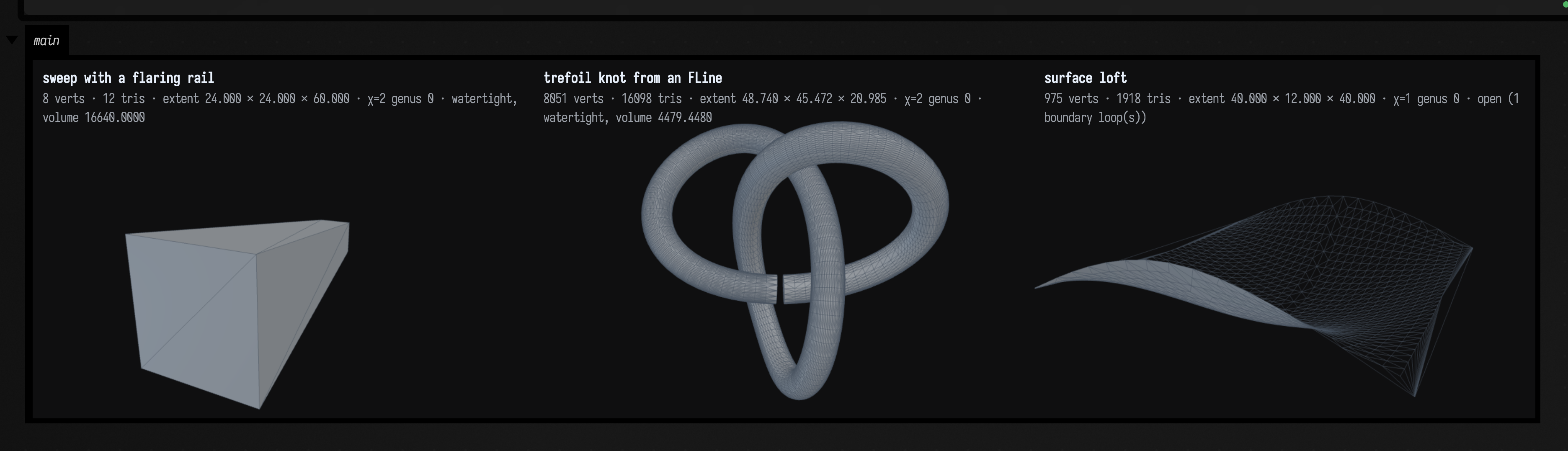
The box below builds three designs and shows their meshes side by side. The first sweeps a square
up a straight path while a guide rail runs from 4 to 12 mm off the path; the rail's default
SCALE fit grows the whole square evenly with it, from 8 mm across to 24. The second draws a trefoil knot as a Field
FLine, turns it into a 3D wire with wire(knot), and sweeps a circle along it into a knotted tube;
planeSquareTo(knot) puts the circle's sketch square to the knot where it starts. The loop stops one
step short of closing: a sweep along a closed path is sewn into a seamless ring only when the profile
comes back unturned, and going round a knot turns it, so SolidCraft refuses the closed knot. The third is a
surface: a loft through three spline sections, which leaves an open, wavy sheet rather than a solid.
import afield.geometry.path.FLine
import afield.geometry.solid.solidcraft.solidCraft
import kotlin.math.PI
import kotlin.math.cos
import kotlin.math.sin

val flared = solidCraft("Flared") {
    val section = sketch("XY") { rectangle(-4.0, -4.0, 4.0, 4.0) }
    val path = sketch("XZ") { line(0.0, 0.0, 0.0, 60.0) }
    val rail = sketch("XZ") { line(4.0, 0.0, 12.0, 60.0) }
    sweep(section, path, rails = [rail])
}

val knot = FLine().moveTo(0, -8, 0)
for (i in 1..239) {
    val t = i / 240.0 * 2 * PI
    knot.lineTo(8 * (sin(t) + 2 * sin(2 * t)), 8 * (cos(t) - 2 * cos(2 * t)), -8 * sin(3 * t))
}
val tube = solidCraft("Trefoil") {
    val section = sketch(planeSquareTo(knot)) { circle(0.0, 0.0, 2.5) }
    sweep(section, sketch("XY") { wire(knot, spacing = 0.5f) })
}

val sheet = solidCraft("Sheet") {
    val a = sketch("XY") { spline(-20.0, 0.0, 0.0, 6.0, 20.0, 0.0) }
    val b = sketch(offsetPlane("XY", "20")) { spline(-20.0, 0.0, 0.0, -6.0, 20.0, 0.0) }
    val c = sketch(offsetPlane("XY", "40")) { spline(-20.0, 0.0, 0.0, 6.0, 20.0, 0.0) }
    surfaceLoft([a, b, c])
}

fun mesh(design: afield.geometry.solid.solidcraft.SolidCraftBuilder) =
    design.open().use { it.mesh(tolerance = 0.05).toTriMesh().weld() }

showMeshGrid(
    "sweep with a flaring rail" to mesh(flared),
    "trefoil knot from an FLine" to mesh(tube),
    "surface loft" to mesh(sheet),
    columns = 3,
)
Each sketch returns a handle that features take: sweep(section, path) sweeps the closed
profiles of section along every curve of path. Drawing calls share endpoints that coincide,
so consecutive lines and splines join into one chain. Lengths and angles are SolidCraft
expressions — "20" in the design's units, "90 deg", or a formula over params — and
open() hands back a SolidCraftDesign: with
param("twist", "90 deg") and sweep(section, path, twist = "twist"),
setParameter("twist", "30 deg") re-evaluates the part.
What a sweep does with its profile
A sweep keeps the profile at the angle it was drawn to the start of the path. Start the path
square to the profile for a tube of the drawn size; for a path from an FLine, draw the profile on
planeSquareTo(line). A path that leaves it 27° off square gives a
section about cos 27° of the drawn one all the way along.
A sweep caps both ends, even when its path closes: where the knot returns to its start, the tube
meets itself at a seam rather than fusing into a ring, and the facts read genus 0, not a torus's
genus 1. For a plain ring, sweep two halves and JOIN the second; the join removes the caps where
they touch. In the SolidCraft version Field pins, that join works on arc paths but fails on a
knot's freeform halves.
import afield.geometry.solid.solidcraft.SolidCraftOperation
import afield.geometry.solid.solidcraft.solidCraft
import kotlin.math.PI
import kotlin.math.cos
import kotlin.math.sin

// The same 8 mm square swept 60 mm, once square to the path and once with the path 27° off.
val square = solidCraft("Square") {
    sweep(sketch("XY") { rectangle(-4.0, -4.0, 4.0, 4.0) }, sketch("XZ") { line(0.0, 0.0, 0.0, 60.0) })
}
val tilt = 27 * PI / 180
val skewed = solidCraft("Skewed") {
    sweep(
        sketch("XY") { rectangle(-4.0, -4.0, 4.0, 4.0) },
        sketch("XZ") { line(0.0, 0.0, 60 * sin(tilt), 60 * cos(tilt)) },
    )
}

// A ring from two half sweeps, the second joined: the join removes the caps where they touch.
val ring = solidCraft("Ring") {
    sweep(sketch("XZ") { circle(20.0, 0.0, 2.5) }, sketch("XY") { arc(0.0, 0.0, 20.0, 0.0, -20.0, 0.0) })
    sweep(
        sketch("XZ") { circle(-20.0, 0.0, 2.5) },
        sketch("XY") { arc(0.0, 0.0, -20.0, 0.0, 20.0, 0.0) },
        operation = SolidCraftOperation.JOIN,
    )
}

fun mesh(design: afield.geometry.solid.solidcraft.SolidCraftBuilder) =
    design.open().use { it.mesh(tolerance = 0.05).toTriMesh().weld() }

showMeshGrid(
    "square to the path" to mesh(square),
    "path 27° off square" to mesh(skewed),
    "two halves, joined" to mesh(ring),
    columns = 3,
)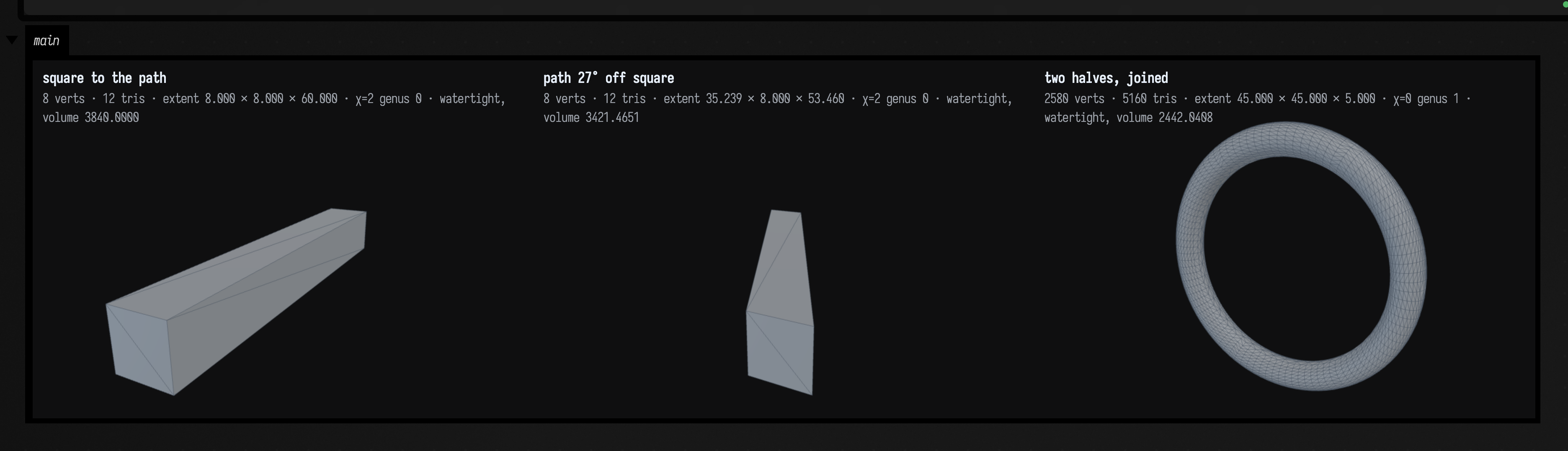
The skewed sweep's volume is 3421, which is 3840 × cos 27°. The joined ring reads genus 1; the single-sweep knot in Three parts reads genus 0.
Guide rails reshape the profile's far side to follow the rail: railFit = SCALE (the default)
grows the whole section evenly, STRETCH only across to the rail. The rails then decide the
profile's turn and size, so a railed sweep takes no twist or scale.
Surfaces
The surface features make open sheets, measured by area rather than volume:
surfaceSweep (with rails, as sweep), surfaceLoft (start/end continuity G0 to G3),
surfaceRevolve, and surfaceBoundary. thicken turns a sheet into a solid.
Boundary patches through two, three or four curves
surfaceBoundary bridges two curves, or spans three or four given in loop order (each ends
where the next begins). crown works only on the two-curve bridge. Draw a bridge's two curves in the
same direction: it joins start to start, so curves running opposite ways fold it over itself.
import afield.geometry.solid.solidcraft.SolidCraftBuilder
import afield.geometry.solid.solidcraft.solidCraft

// A boundary patch between two splines drawn the same way, left to right.
fun patch(name: String, flipSecond: Boolean, thickness: String? = null, body: String = "") = solidCraft(name) {
    val s = sketch("XY") {
        spline(0.0, 0.0, 10.0, -3.0, 20.0, 0.0)
        if (flipSecond) spline(20.0, 20.0, 10.0, 23.0, 0.0, 20.0) else spline(0.0, 20.0, 10.0, 23.0, 20.0, 20.0)
    }
    surfaceBoundary(s, crown = 0.5)
    if (thickness != null) thicken([body], thickness)
}

// thicken names the sheet the way summary() lists it.
val sheetName =
    patch("Sheet", false).open().use { it.summary().getJSONArray("bodies").getJSONObject(0).getString("name") }

// body 0 is the sheet; thicken adds the solid as body 1.
fun mesh(design: SolidCraftBuilder, body: Int = 0) = design.open().use { it.mesh(body, 0.05).toTriMesh().weld() }

showMeshGrid(
    "surfaceBoundary: an open sheet" to mesh(patch("Sheet", false)),
    "thicken by 2" to mesh(patch("Thick", false, "2", sheetName), body = 1),
    "second curve drawn backwards" to mesh(patch("Folded", true)),
    columns = 3,
)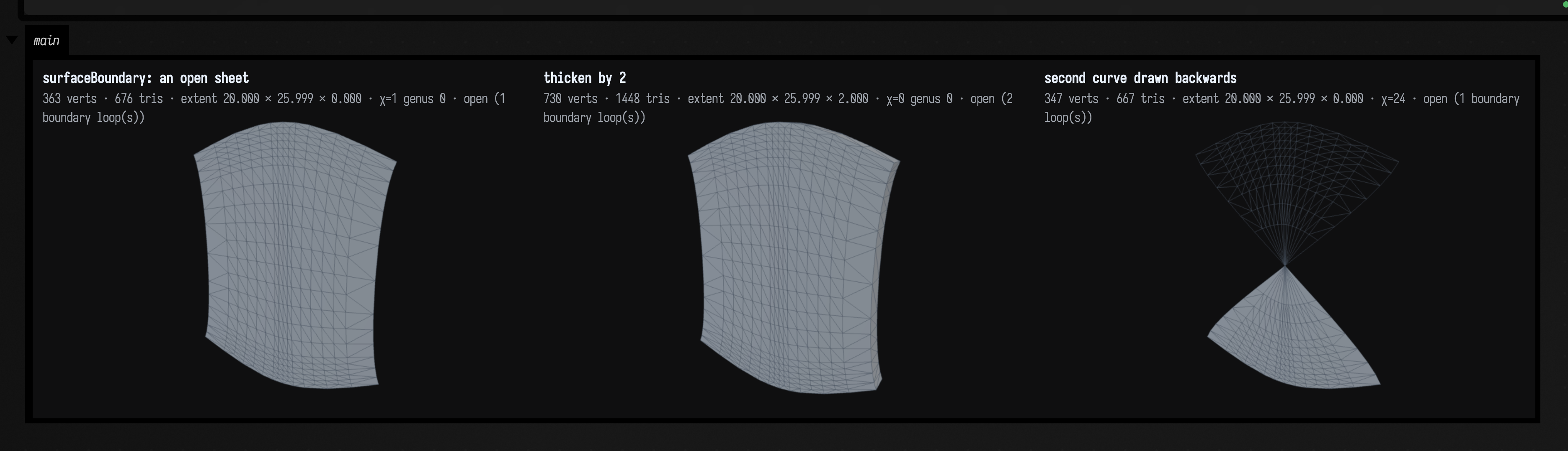
The thickened sheet is 2 deep, though its welded mesh still reports two open boundary loops. Drawing the second curve backwards pinches the patch to a point in the middle.
Any SolidCraft feature the builder does not name — shell, draft, chamfer, pattern, and the rest —
can be added by its JSON fields with feature("shell", JSONObject()...).