Keyframes: capturing, persisting and replaying live state
You push sliders around for twenty minutes and arrive somewhere good. The keyframer lets you keep that look: save it, recall it tomorrow, compare it with another one, and blend smoothly from one look to the next. A look you saved can also be turned back into Kotlin source and pasted into a box.
The words on this page
- A scope (
KeyframeScope) is the list of things you want a look to remember. You tell it which live values to watch, and it reads and writes them for you. - A target is one of those things: a uniform on a shader
Structure, a Kotlin local, a slider, a camera. - A key (
Key) is one saved look: a snapshot of every target in the scope, by name.scope.capture()makes one. Calling the key,key(), writes every value back. - A slot is one named value inside a key, such as
glow@radius. Some APIs call a slot a lane, for example a class that adds several slots at once. - To interpolate is to make a key part of the way between two others:
scope.interpolate(a, b, t)withtfrom 0 to 1. Numbers and vectors ease smoothly. - Code cannot ease that way, so a slot that holds code steps: it keeps the first key's code until
treaches 1, then switches to the second. - A code blend is the exception. When two pieces of code differ only in their numbers, the keyframer can blend those numbers and build the code in between. It is off until you turn it on.
Values over time has a worked example of blending a whole look. The keyframer reference lists every declaration with its KDoc.
What a scope watches
Start by telling a scope what to remember, capturing a key, and writing it back. The simplest
target is a uniform on a Structure. Give each target a name. Everything after the last @ in the
name is the property on the structure. The part before it keeps two passes apart, so a glow pass
and a blur pass can both have a radius.
The example below captures three values, edits two of them and writes them back. It then restores the original key. Read the four panels in order: the captured key, the edit, the live values, and the check that the restore put everything back.
:::static
// Two independent uniform structures, as a glow pass and a blur pass would each have.
val glow = Structure()
val blur = Structure()
glow.bind("radius") { 4.0f }
glow.bind("intensity") { 0.35f }
blur.bind("radius") { 12.0f }

val scope = KeyframeScope()
// The part after the last '@' is the property driven on the structure. Both passes have a
// `radius`; the qualifier is what keeps them apart in the key.
scope.target("glow@radius", glow)
scope.target("glow@intensity", glow)
scope.target("blur@radius", blur)

// The snapshot. Reading only — nothing is written anywhere.
val captured = scope.capture()

// Now fiddle, the way you would with the sketch running, and make it so.
val edited = captured.copy().update {
    this["glow@radius"] = 9.0f
    this["glow@intensity"] = 0.80f
}
edited()

// Read the live structures back to prove the write actually landed — and that it landed on the
// bare property name, not on the qualified key name.
fun live(s: Structure, p: String) = s.bindings[p]?.invoke()?.toString() ?: "{dim:unbound}"
// Read now, while the edit is still applied — the next line puts the old values back.
val liveRows = [
    "glow.radius" to live(glow, "radius"),
    "glow.intensity" to live(glow, "intensity"),
    "blur.radius" to live(blur, "radius"),
    "glow.*glow@radius*" to live(glow, "glow@radius"),
].joinToString("\n") { (k, v) -> "| $k | $v |" }

// Put the original back, and diff to show the scope is exactly where it started.
captured()
val restored = scope.capture()

:::fold render the four panels
markdown(
    "keys",
    """
    #### 1 — capture()
    ${captured.h}

    #### 2 — edited, then applied
    ${captured.diffHtml(edited, "captured", "edited")}

    #### 3 — the live structures, read back

    | binding | value |
    |---------|-------|
    $liveRows

    #### 4 — captured() again, then re-captured
    ~~~
${captured.diffText(restored, "captured", "restored")}
    ~~~
""",
    width = 820,
)
:::endfold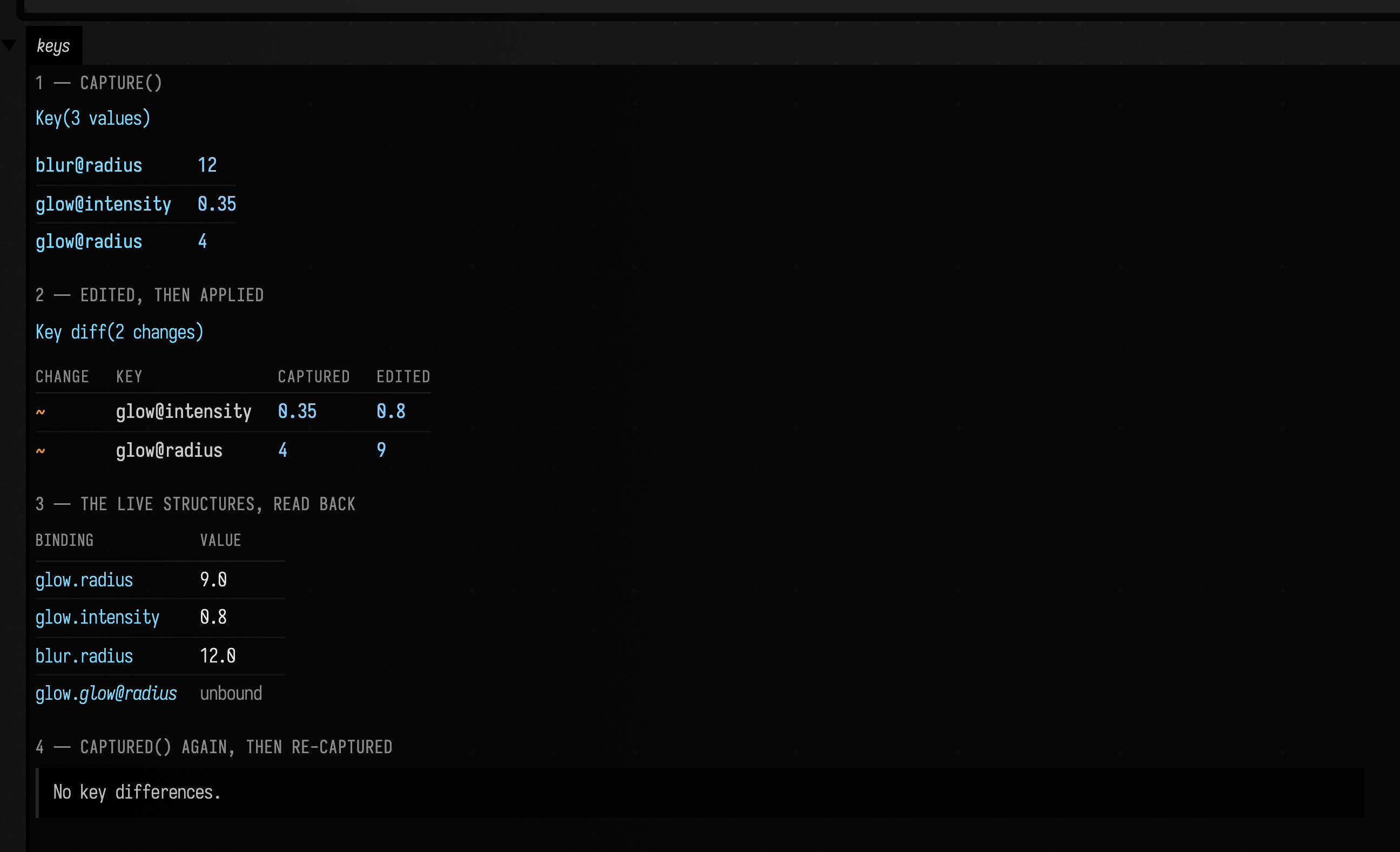
Panel 3 is the one to read carefully. The edited key wrote 9.0 to glow's radius, not to
anything called glow@radius. That name is unbound on the structure, and applying the key does not
create it, because the write goes through the target's bind function, which was built with the
@-stripped property name. The qualifier exists purely so one key can address two structures that
use the same uniform name.
In panel 4, re-applying the original snapshot and re-capturing gives
No key differences. A Key is a complete description of what the scope watches.
Objects that are not shader Structures can join the same system through an explicit getter and
setter. The low-level form remains target(name, get, set), but ordinary locals should use the typed
forms: floatTarget, doubleTarget, booleanTarget, intTarget, vector2Target,
vector3Target, vector4Target, or stringTarget. Their setters validate the loaded value at the
scope boundary, and the vector forms copy mutable vectors in both directions. A saved key never ends
up aliasing a live local.
Boolean and integer locals become float lanes, which is what gives them meaningful interpolation:
a Boolean crosses at 0.5, while an integer rounds and optionally clamps on apply. That suits
controls such as an instance count, which changes CPU-authored geometry but should still travel
smoothly between two looks.
var opacity = 0.25f
var layers = 3

val scope = KeyframeScope().apply {
    floatTarget("outlines.opacity", { opacity }) { opacity = it }
    intTarget("outlines.layers", { layers }, 0..64) { layers = it }
}
One value shared by a local, a control and a key
A normal controlGroup control caches its own visible value, while a keyframe normally drives a
Kotlin local. Registering those independently creates two authorities: recalling a key moves the
picture but leaves the slider behind, and rerunning the box can then restore that stale slider over
the recalled value.
Declaring the local as a delegate of the scope makes the local authoritative and the UI its
writable mirror. The local's name is the key name and the control's label. A hand moving the
control writes the local. A key applying a value writes the same local and moves both the desktop
control and the remote controller. onChange hears both, and assigning the local in code moves
the control without calling it. The programmatic UI update refreshes the box's live rerun cache but
does not emit one document operation per animation frame, and when the box runs again each local
holds the value the control last held from its declaration onward, without calling onChange.
val keys = KeyframeScope()
var gain by keys.slider(0.35f, 0.0..4.0)
var projectedOnly by keys.checkbox(false, label = "projected only")
keys.onChange { name -> println("$name moved: gain $gain, projected only $projectedOnly") }

controlGroup("projected light") { keys.controls() }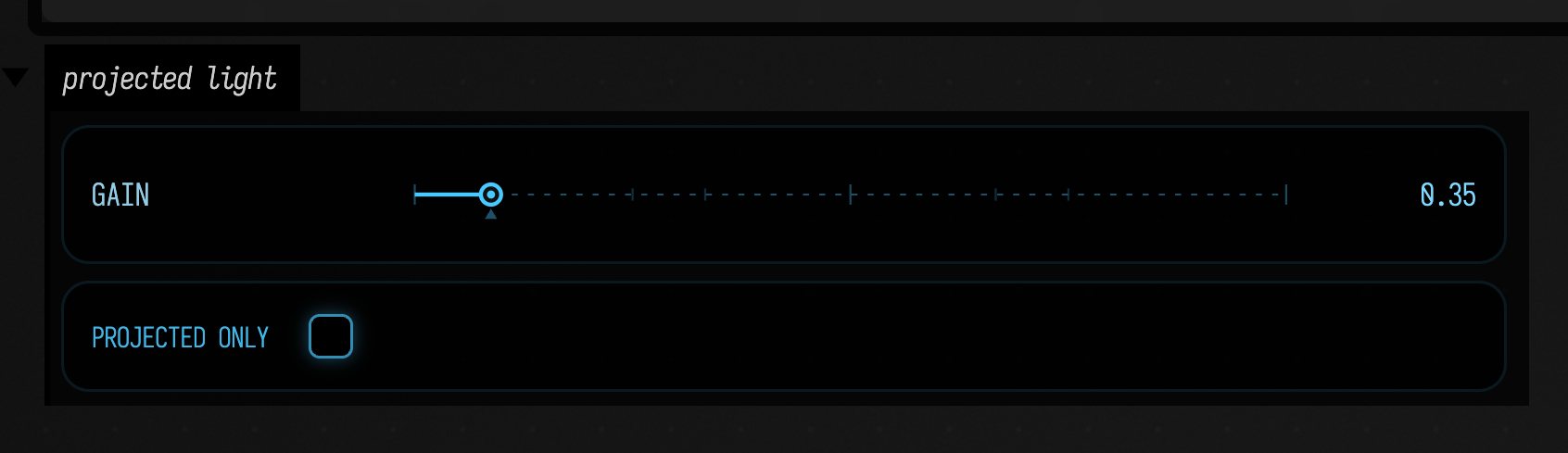
Recalling a saved key moves both controls. This box saves a key at a brighter look, puts the locals back to their defaults, and applies the key:
val keys = KeyframeScope()
var gain by keys.slider(0.35f, 0.0..4.0)
var projectedOnly by keys.checkbox(false, label = "projected only")
keys.onChange { name -> println("$name moved: gain $gain, projected only $projectedOnly") }

controlGroup("projected light") { keys.controls() }

:::fold save a key at a brighter look, then go back to the defaults
gain = 2.5f
projectedOnly = true
val saved = keys.capture()
gain = 0.35f
projectedOnly = false

:::endfold
// Recall the saved key: the slider, the checkbox and both locals follow it.
saved.applyKey()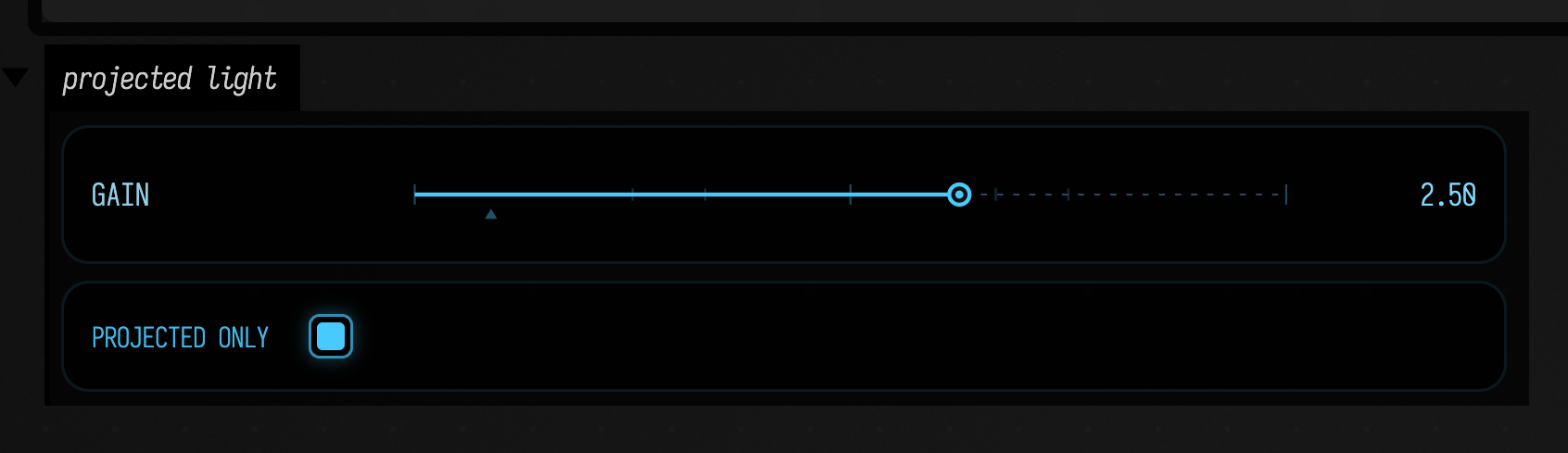
Applying the key calls onChange once per lane, so the box prints gain moved: gain 2.5, projected
only false and then projectedOnly moved: gain 2.5, projected only true. Assigning the locals in
the fold moved the controls without printing anything.
keys.slider(0.4, ...) with a Double gives a Double local; there are also keys.vec2,
keys.color and keys.text. Each is built by an explicit helper — keyframeSlider,
keyframeFloatSlider, keyframeCheckbox, keyframeVec2Control, keyframeColorPicker,
keyframeText — that takes a key name, a label and a get/set pair, for a value that lives in an
object rather than a local. The underlying grouped controls also hand back a ControlValueHandle<T>;
handle.set(value) is the UI-only half of that, for a custom integration that needs it. It never
invokes the control callback, so it cannot start a feedback loop.
A custom class contributes lanes instead of inventing a file format
A score, instrument or simulation can implement KeyframeContributor. Its job is only to register
stable names and live getters/setters. include adds those lanes to an existing scope, alongside
shader structures, locals and controls; the ordinary Key JSON remains the sole persistence format.
class Look : KeyframeContributor {
    var opacity = 1f
    var position = vec(0, 0, 0)

    override fun registerKeyframes(scope: KeyframeScope, prefix: String) = with(scope) {
        floatTarget("$prefix.opacity", { opacity }) { opacity = it }
        vector3Target("$prefix.position", { position }) { position = it }
    }
}

val keys = KeyframeScope(schemaVersion = 2).include(Look(), prefix = "foreground")
Composition-specific choices stay in the contributor: what a lane means, when its setter is queued, whether a zero retires a resource, and how the names are versioned. Field only supplies composition, typed boundaries, interpolation and persistence.
A scope can also drive a running shader's uniforms. scope.target("tint", module.look) targets
the uniform block of a graphics module directly, because that block is a Structure too. To name
one member of a module's block, use target(module, "key@block.member"); there are forms for
compute and mesh modules as well. The same thing, driving a live GPU uniform
shows a key writing a shader's uniform.
capture() reads and writes back either kind of property
A Structure can hold a property two ways: structure.bind("radius") { 4f } installs a
binding, and structure["radius"] = 4f stores a value (and removes any binding). capture()
reads binding-first-then-value (keyframer.kt:572), the same precedence Structure.get
(Structure.kt:188) and the buffer writer (Structure.kt:360) use. Either kind snapshots,
including a child Structure, whose bindings live in the root's map under a dotted path.
Applying a key writes each property back the kind it was: a value as a value, a binding as a binding.
The same thing, driving a live GPU uniform
A key can drive a running shader the same way. Below, a native Vulkan window draws a fan of
white triangles. The shader multiplies them by a vec4 tint uniform. A key blended halfway
between a cool look and a warm one is the only thing that writes that uniform, so the colour you see
comes from the key.
var m = Mesh()
var module = moduleHere()

module += "mainMesh" to m
renderer += module

/*
Fully qualified, and it has to be: a uniform block makes moduleHere() generate a Kotlin class of the
same (capitalised) name straight into this box's preamble, and a declaration in the box beats
any import. The block here is `look`, so the trap would bite anything called `Look`.
*/
val camera = afield.graphics.vulkan.util.Camera()
camera.at = vec(0, 0, 7)
camera.target = vec(0, 0, 0)

module.look.p = camera.p()
module.look.m = camera.m()

// A fan of WHITE triangles. Every colour in the picture comes from the tint, and nothing else.
val N = 48
m.set(3 * N, 1 * N) {
    N {
        val a0 = it / N.toDouble() * Math.PI * 2.0
        val a1 = (it + 0.62) / N.toDouble() * Math.PI * 2.0
        pos.add(
            0.0,
            0.0,
            0.0,
            2.4 * kotlin.math.cos(a0),
            2.4 * kotlin.math.sin(a0),
            0.0,
            2.4 * kotlin.math.cos(a1),
            2.4 * kotlin.math.sin(a1),
            0.0,
        )
        3 { col.add(1, 1, 1, 1) }
        tri.add(0 + 3 * it, 1 + 3 * it, 2 + 3 * it)
    }
}

/*
---- the keyframe part -------------------------------------------------------------------
`module.look` resolves to the block's live uniform Structure (Module.kt:217), so the ordinary
Structure target drives it. This is the overload to use for a module uniform.
*/
val scope = KeyframeScope()
scope.target("tint", module.look)

val cool = scope.Key("tint" to vec(0.20, 0.65, 1.00, 1.0))
val warm = scope.Key("tint" to vec(1.00, 0.50, 0.12, 1.0))

/*
A quarter of the way from cool to warm — NOT the midpoint. These two are nearly
complementary, so t = 0.5 blends to (0.60, 0.575, 0.56): a grey indistinguishable from an
untinted fan, which would make the picture prove nothing. t = 0.25 is (0.40, 0.6125, 0.78).
*/
scope.interpolate(cool, warm, 0.25)()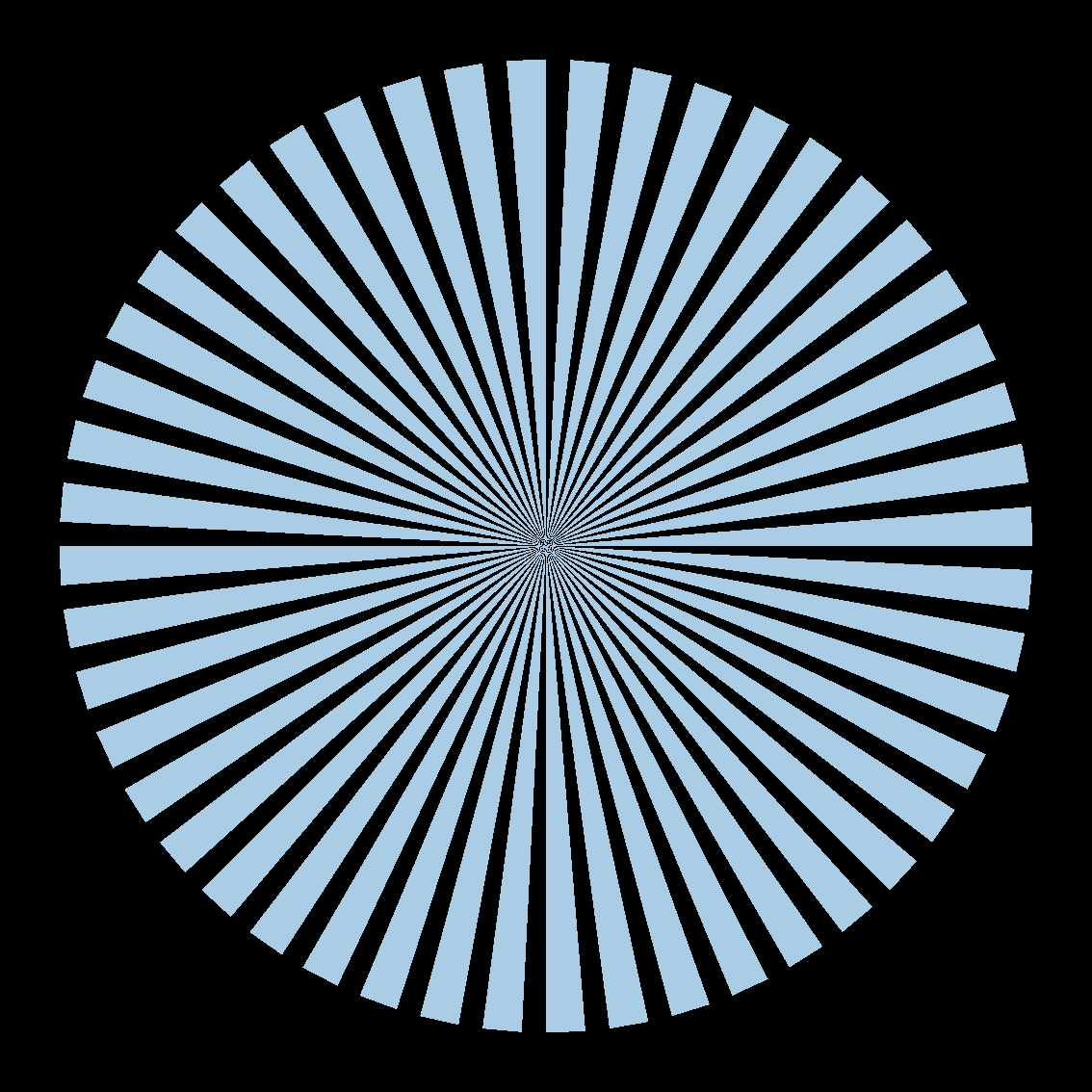
The fan is blue. The mesh colours are all (1, 1, 1, 1); a fan that
is any colour other than white can only have got it from the uniform, and an unwritten uniform
would have left it black.
Checking the capture pixel by pixel
The capture contains precisely two colours: black background, and rgb(170, 205, 229) across all
497,142 fan pixels. The keyframed value is the linear (0.40, 0.6125, 0.78), and sRGB-encoding that
gives (170, 205, 229), to the byte, on all three channels. So the pixels on screen are the
interpolated keyframe and nothing else: not the cool endpoint, not the warm one, not white.
This is the one path no unit test can take: Key.invoke() writing through Structure.bind
into a uniform that a live Vulkan pipeline then reads.
The interpolation, rendered at four values of t
A single still shows the uniform moving, but not the interpolation. Below is the same scene at four
values of t, with two things keyframed at once: the vec4 tint, and the camera as a
CameraPose, sclerped, which is the subject of the next section.
Each frame is a separate native Vulkan window capture. t is the only difference between the four
runs, and everything that moves is a uniform a keyframe wrote.
var m = Mesh()
var module = moduleHere()
module += "mainMesh" to m
renderer += module

val camera = afield.graphics.vulkan.util.Camera()

// The same white fan as above — every colour on screen still comes from the tint alone.
val N = 48
m.set(3 * N, 1 * N) {
    N {
        val a0 = it / N.toDouble() * Math.PI * 2.0
        val a1 = (it + 0.62) / N.toDouble() * Math.PI * 2.0
        pos.add(
            0.0,
            0.0,
            0.0,
            2.4 * kotlin.math.cos(a0),
            2.4 * kotlin.math.sin(a0),
            0.0,
            2.4 * kotlin.math.cos(a1),
            2.4 * kotlin.math.sin(a1),
            0.0,
        )
        3 { col.add(1, 1, 1, 1) }
        tri.add(0 + 3 * it, 1 + 3 * it, 2 + 3 * it)
    }
}

val scope = KeyframeScope()
scope.camera(camera) // a CameraPose target — sclerped, not lerped
scope.target("tint", module.look) // the uniform block's live Structure

/*
Two endpoints. The camera swings about 60 degrees around the fan and lifts, while the tint goes cool to
warm. Poses are read off the camera rather than constructed, so this is exactly what capture()
would have stored. Tint is a literal here rather than a captured value, since there is nothing
to capture from yet — the uniform is untouched until the first key lands on it.
*/
camera.at = vec(0, 0, 3.5)
camera.target = vec(0, 0, 0)
val poseCool = camera.pose()
camera.at = vec(-3.03, 1.0, 1.75)
camera.target = vec(0, 0, 0)
val poseWarm = camera.pose()

val cool = scope.Key("camera" to poseCool, "tint" to vec(0.20, 0.65, 1.00, 1.0))
val warm = scope.Key("camera" to poseWarm, "tint" to vec(1.00, 0.50, 0.12, 1.0))

val t = 0.0
scope.interpolate(cool, warm, t)()

// Applying the key moved the Camera object; the projection uniforms are read off it afterwards.
module.look.p = camera.p()
module.look.m = camera.m()
t = 0 — the cool endpoint, the fan face-on:
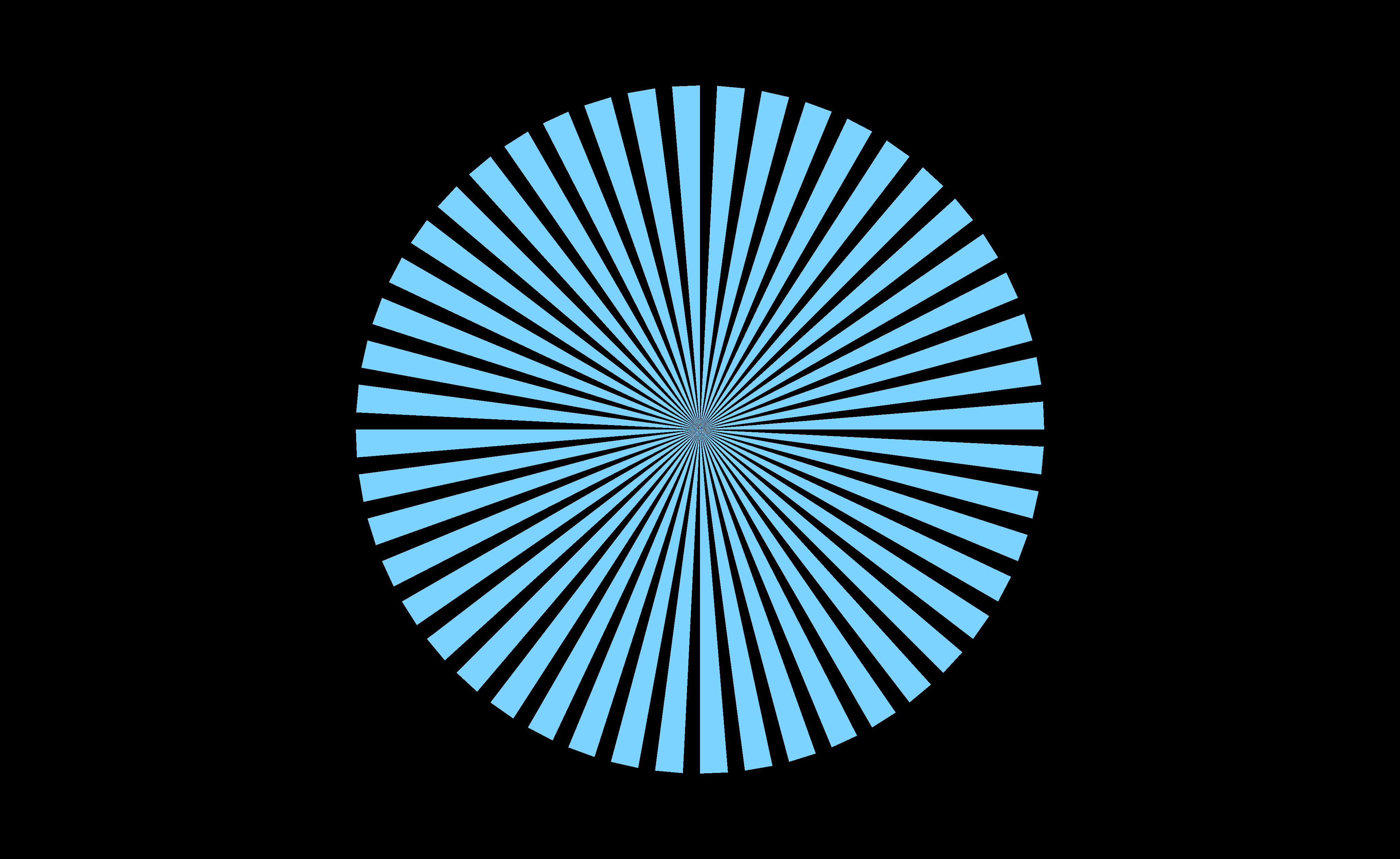
t = 0.333 — the camera has begun to swing and lift, and the tint has warmed:
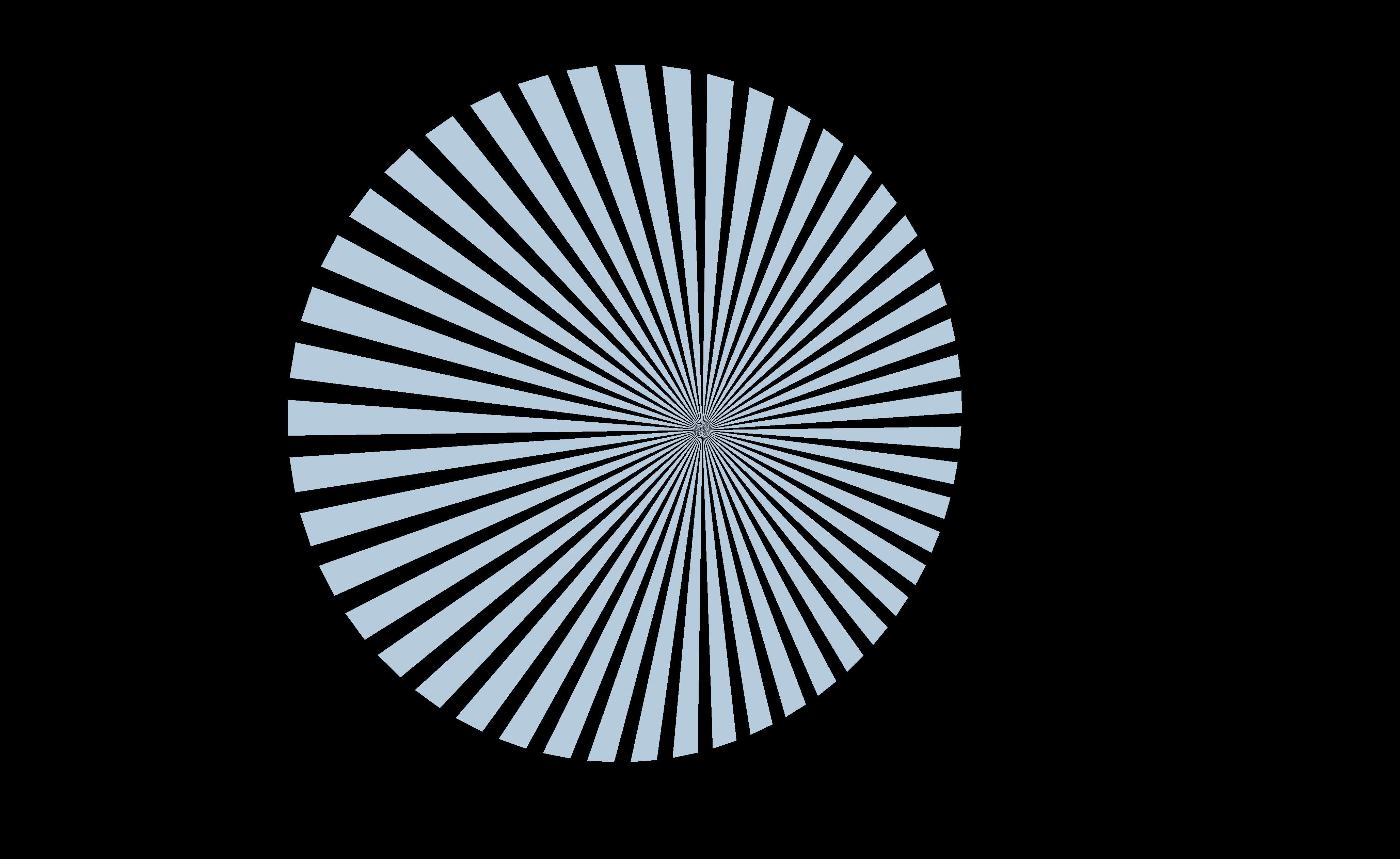
t = 0.666 — further round, and warmer again:
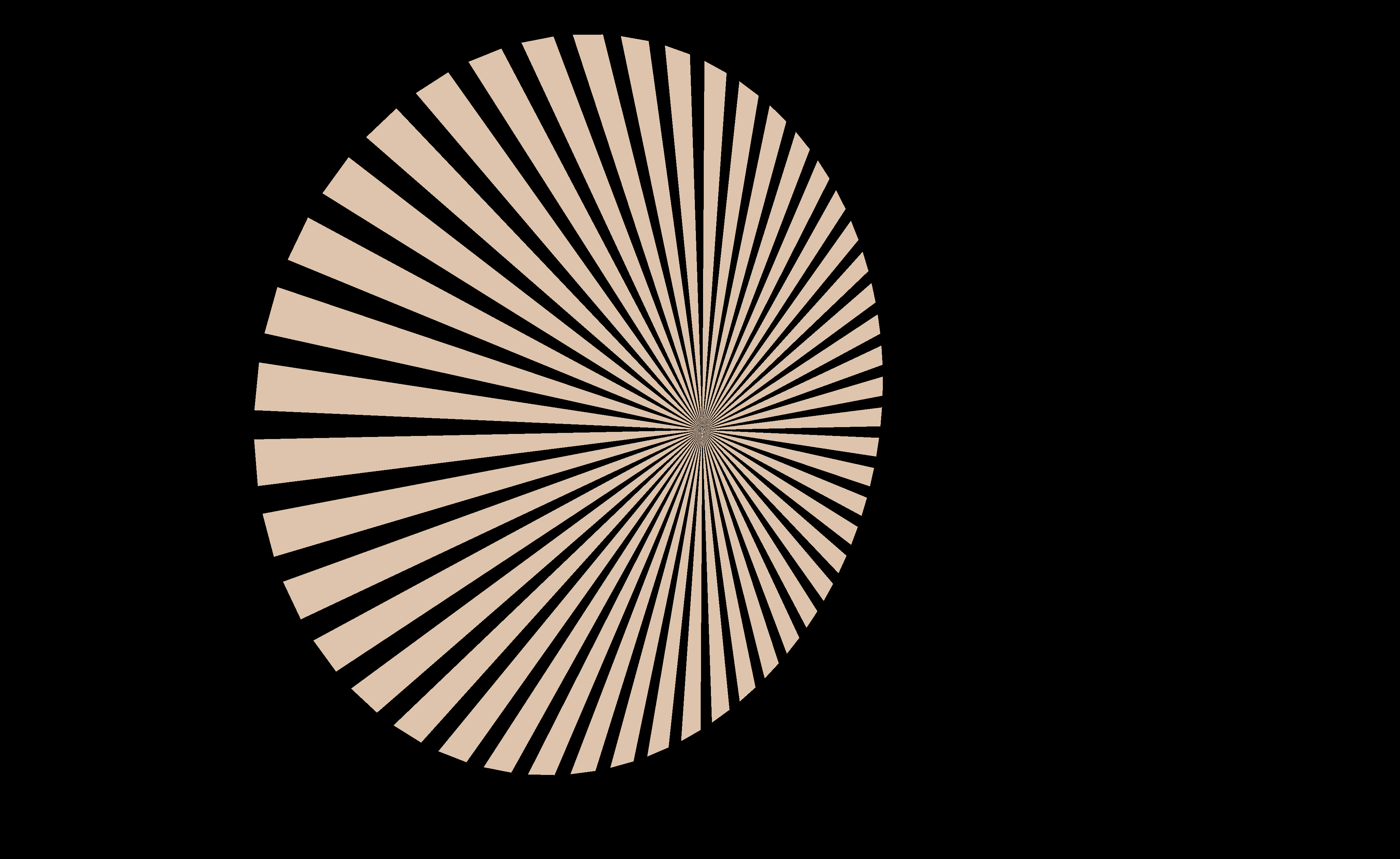
t = 1 — the warm endpoint, the fan nearly edge-on:
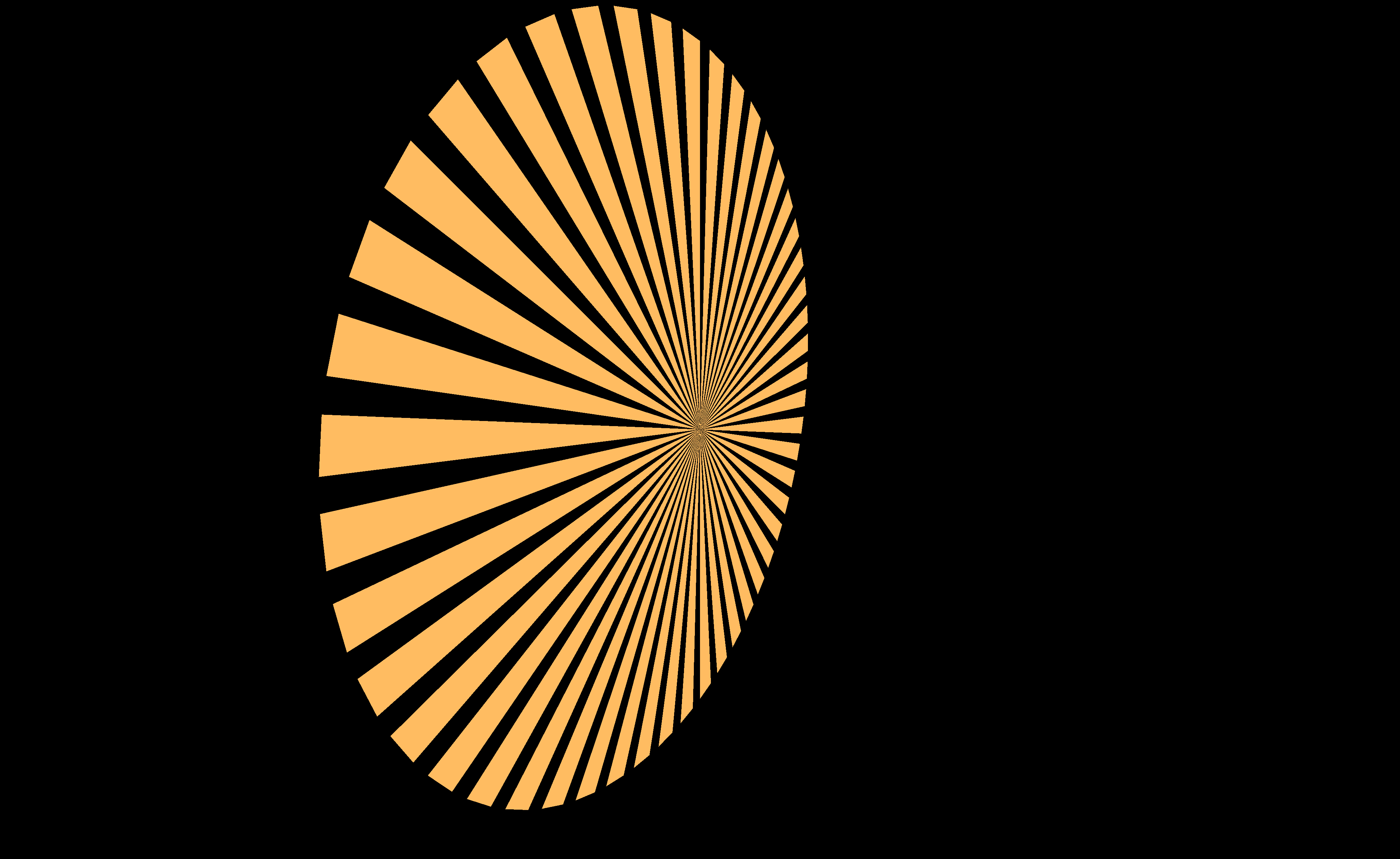
A camera move is a screw motion, not a straight line
You can save camera positions as keys and blend between them. The camera keeps looking at the
subject and keeps its distance, with no look-at code. KeyframeScope.camera adds a Camera as a
target. It stores a CameraPose: the camera's position and rotation as one dual quaternion, plus
the focus distance. The picture below shows why that matters.
Interpolating a dual quaternion is a screw motion (CameraPose.sclerp, CameraPose.kt:45, over
DualQuaternionf.sclerp, DualQuaternionf.kt:158): a rotation and a translation about one axis,
performed together. Interpolating a position is a straight line. Between two cameras that both look
at the same subject, those are very different moves:
:::static
val scope = KeyframeScope()
// Two cameras, both two units up, both looking at the origin, a quarter turn apart.
val a = scope.Key("camera" to CameraPose.lookAt(Vector3f(8f, 2f, 0f), Vector3f(0f, 0f, 0f)))
val b = scope.Key("camera" to CameraPose.lookAt(Vector3f(0f, 2f, 8f), Vector3f(0f, 0f, 0f)))
val pa = (a["camera"] as CameraPose).position
val pb = (b["camera"] as CameraPose).position

val n = 60
fun sclerpAt(t: Double) = (scope.interpolate(a, b, t)["camera"] as CameraPose)
fun lerpAt(t: Double) = Vector3f(pa).lerp(pb, t.toFloat())

// ---- panel 1: plan view, looking down the y axis. World units scaled up to figure units.
val S = 40.0
val screw = fline {
    for (i in 0..n) {
        val p = sclerpAt(i.toDouble() / n).position
        if (i == 0) moveTo(p.x * S, p.z * S) else lineTo(p.x * S, p.z * S)
    }
    color = vec(0.36, 0.84, 1.0, 1.0)
    thickness = 3.0
}
val chord = fline {
    moveTo(pa.x * S, pa.z * S)
    lineTo(pb.x * S, pb.z * S)
    color = vec(1.0, 0.62, 0.26, 1.0)
    thickness = 3.0
}
// Sight lines from the sclerp path to the subject: every one is the same length.
val sight = fline {
    for (i in 0..10) {
        val p = sclerpAt(i / 10.0).position
        moveTo(p.x * S, p.z * S)
        lineTo(0.0, 0.0)
    }
    color = vec(0.36, 0.84, 1.0, 0.22)
    thickness = 1.0
}
// …and from the lerped positions, which are visibly shorter in the middle.
val sightLerp = fline {
    for (i in 0..10) {
        val p = lerpAt(i / 10.0)
        moveTo(p.x * S, p.z * S)
        lineTo(0.0, 0.0)
    }
    color = vec(1.0, 0.62, 0.26, 0.22)
    thickness = 1.0
}
val subject = fline {
    val r = 14.0
    for (i in 0..48) {
        val ang = i / 48.0 * Math.PI * 2.0
        if (i == 0) moveTo(r * kotlin.math.cos(ang), r * kotlin.math.sin(ang))
        else lineTo(r * kotlin.math.cos(ang), r * kotlin.math.sin(ang))
    }
    color = vec(0.95, 0.95, 0.95, 0.9)
    thickness = 2.0
}

// ---- panel 2: distance from the camera to the subject, against t.
fun plotY(d: Double) = 330.0 - (d - 5.5) * 120.0
val dScrew = fline {
    for (i in 0..n) {
        val t = i.toDouble() / n
        if (i == 0) moveTo(0.0, plotY(sclerpAt(t).position.length().toDouble()))
        else lineTo(t * 400.0, plotY(sclerpAt(t).position.length().toDouble()))
    }
    color = vec(0.36, 0.84, 1.0, 1.0)
    thickness = 3.0
}
val dChord = fline {
    for (i in 0..n) {
        val t = i.toDouble() / n
        if (i == 0) moveTo(0.0, plotY(lerpAt(t).length().toDouble()))
        else lineTo(t * 400.0, plotY(lerpAt(t).length().toDouble()))
    }
    color = vec(1.0, 0.62, 0.26, 1.0)
    thickness = 3.0
}

// Every number in the captions is measured here, not asserted from memory.
val rMin = (0..n).minOf { sclerpAt(it.toDouble() / n).position.length() }
val rMax = (0..n).maxOf { sclerpAt(it.toDouble() / n).position.length() }
val worstAim = (0..n).maxOf { sclerpAt(it.toDouble() / n).target.length() }
val lerpMid = lerpAt(0.5).length()
val closer = (1.0 - lerpMid / rMax) * 100.0

showPlaneGrid(
    ("plan view, looking down y\n" +
        "blue: sclerp, a quarter circle. orange: the straight line between the same two positions") to
        [sight, sightLerp, subject, chord, screw],
    ("distance to the subject, over the move\n" +
        "sclerp holds %.4f..%.4f; the straight line dips to %.4f — %.1f%% nearer"
            .format(
                rMin,
                rMax,
                lerpMid,
                closer,
            )) to [dScrew, dChord],
    columns = 2,
    cellWidth = 440,
    cellHeight = 380,
)
:::fold render the aiming-error note
markdown(
    "aim",
    """
    worst-case aiming error along the sclerp path: **%.6f** world units —
    {muted:the subject never leaves the centre of frame.}
"""
        .format(worstAim),
)
:::endfold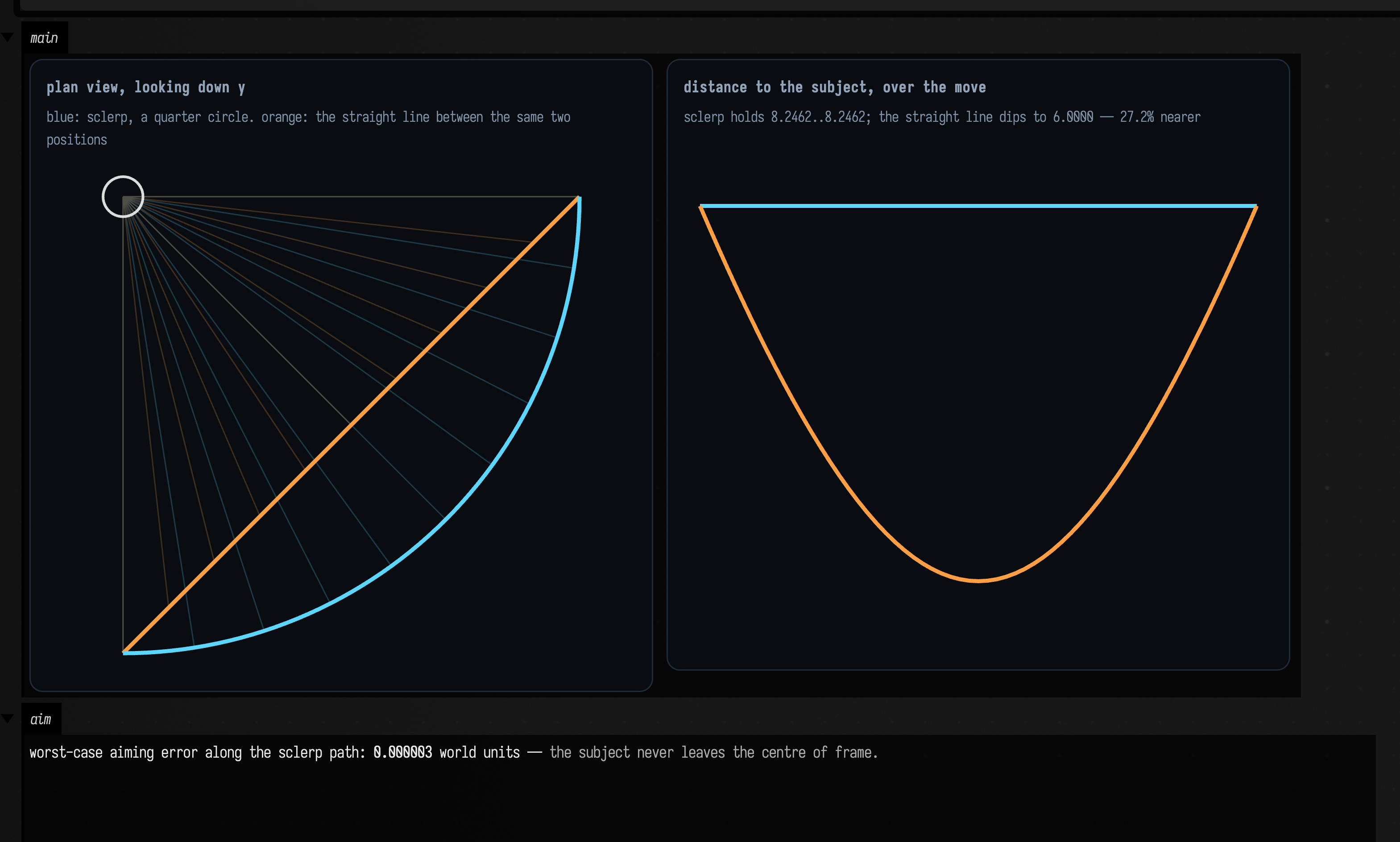
The blue path is a circle, and not approximately: the distance from the camera to the subject is constant at 8.2462 for the entire move, and the height stays at exactly 2.0. Between two poses like that the screw degenerates to a pure rotation about the vertical axis through the subject. The orange path is what you get by lerping the two positions. It cuts the corner, and at the midpoint the camera is 6.0000 away instead of 8.2462, 27.2% nearer. On screen that reads as the subject lunging toward the viewer and retreating again, which is not a move anyone asked for.
The right panel is the same fact plotted, with the aiming error printed underneath it: over the
whole move, the furthest the sclerp path's aim ever strays from the origin is 0.000003 world
units, three millionths, which is Float rounding rather than a wobble. The subject stays framed
for free, with no look-at constraint anywhere in the loop.
Agents: what the test checks
All of this is asserted in aCameraPoseSclerpsItsTransformAndLerpsItsFocusDistance: the constant
distance, the constant height and the aim are each checked at eleven sample points across the
move, and the midpoint figures (8/√2 on each axis for the sclerp, 6.0000 and 27.24% for the
straight line) once each, where they are defined.
The camera target itself needs a renderer
KeyframeScope.camera(camera) takes a live Camera, and Camera's constructor is
Camera(val renderer: Renderer = fromContext()) (Camera.kt:16), which resolves a renderer from
the box context. So the registration is one of the eleven declarations no unit test reaches
(the full list is in dev_docs/KEYFRAMER_COVERAGE.md); the pose arithmetic
above, which is all of the behaviour, is tested.
Saving: every save is history
Save a key to a file, and you can load it again in another session. Every save is also kept as
history, so an earlier look is never lost. saveKey writes the key as readable JSON. It also adds a
numbered copy to a <file>.versions folder beside it, with a manifest of notes and times. Nothing
ever deletes those copies.
What survives the trip is a closed set. KValue.fromAny recognises numbers, Booleans,
vec2/3/4, quaternion, dual quaternion, camera pose, string, StackSL source and source-backed
block. Anything else (a list, a null) is left out, and each one is reported on the
error,keyframer log channel.
:::static
import java.nio.file.Files

val dir = Files.createTempDirectory("keyframer-docs")
val path = dir.resolve("look.json")

val scope = KeyframeScope(schemaVersion = 1)
scope.saveKey(
    path,
    scope.Key(
        "gain" to 0.20f,
        "pos" to Vector3f(1f, 2f, 3f),
        "voice" to stackSLString("saw 110 *"),
    ),
    note = "first pass",
)

scope.saveKey(
    path,
    scope.Key(
        "gain" to 0.65f,
        "pos" to Vector3f(4f, 5f, 6f),
        "voice" to stackSLString("sin 220 * fold"),
    ),
    note = "brighter",
)

// A third save that also carries values the union cannot represent.
val lossy = scope.Key(
    "gain" to 0.90f,
    "enabled" to true, // a Boolean is kept
    "taps" to [1, 2, 3], // a list is not
    "absent" to null, // and neither is a null
)
scope.saveKey(path, lossy, note = "with unsupported values")

val versions = scope.keyVersions(path)
val versionRows =
    versions.joinToString("\n") { v ->
        "| ${v.index} | ${v.file.md} | ${v.note?.md ?: "—"} |"
    }

val reloaded = scope.loadKey(path)
val kept = reloaded.values.keys.sorted().joinToString(", ")
val droppedNames = lossy.values.keys.sorted().filter { it !in reloaded.values.keys }

// An older snapshot loaded into a scope that has since grown a parameter.
val newer = KeyframeScope(schemaVersion = 1)
newer.missingKey("wet", 0.5f) // applies to every file this scope loads
newer.missingKey(1, "mode", "legacy-v1") // only to files stamped schemaVersion = 1
val migrated = newer.loadKey(path, version = 0)

:::fold render the persistence card
/*
Rendered as flat text rather than through `migrated.h`. The Key's own HTML gives a Vector3f the
interactive 3D axis widget, which is lovely in a box and wrong here: it loads asynchronously and
reflowed the card mid-screenshot, so the first capture of this figure came out clipped.
*/
val migratedRows =
    migrated.values.entries
        .sortedBy { it.key }
        .joinToString("\n") { (k, v) ->
            "| ${k.md} | ${v.md} |"
        }

// The width is pinned. A `capture="box"` screenshot clips to the output card, and an
// unpinned card sized by its widest unbreakable line loses everything past the clip.
markdown(
    "persist",
    """
    #### version history after three saves

    | # | file | note |
    |---|------|------|
    $versionRows

    #### third save: what survived

    kept: **$kept**

    left out, and logged: {bad:**${droppedNames.joinToString(", ")}**}

    #### version 0, reloaded into a scope that has since grown a 'wet' parameter (${migrated.values.size} values)

    | name | value |
    |------|-------|
    $migratedRows

    #### version 0 on disk, as written
    ~~~json
${java.nio.file.Files.readString(dir.resolve("look.json.versions").resolve("000000.json"))}
    ~~~
""",
    width = 820,
)
:::endfold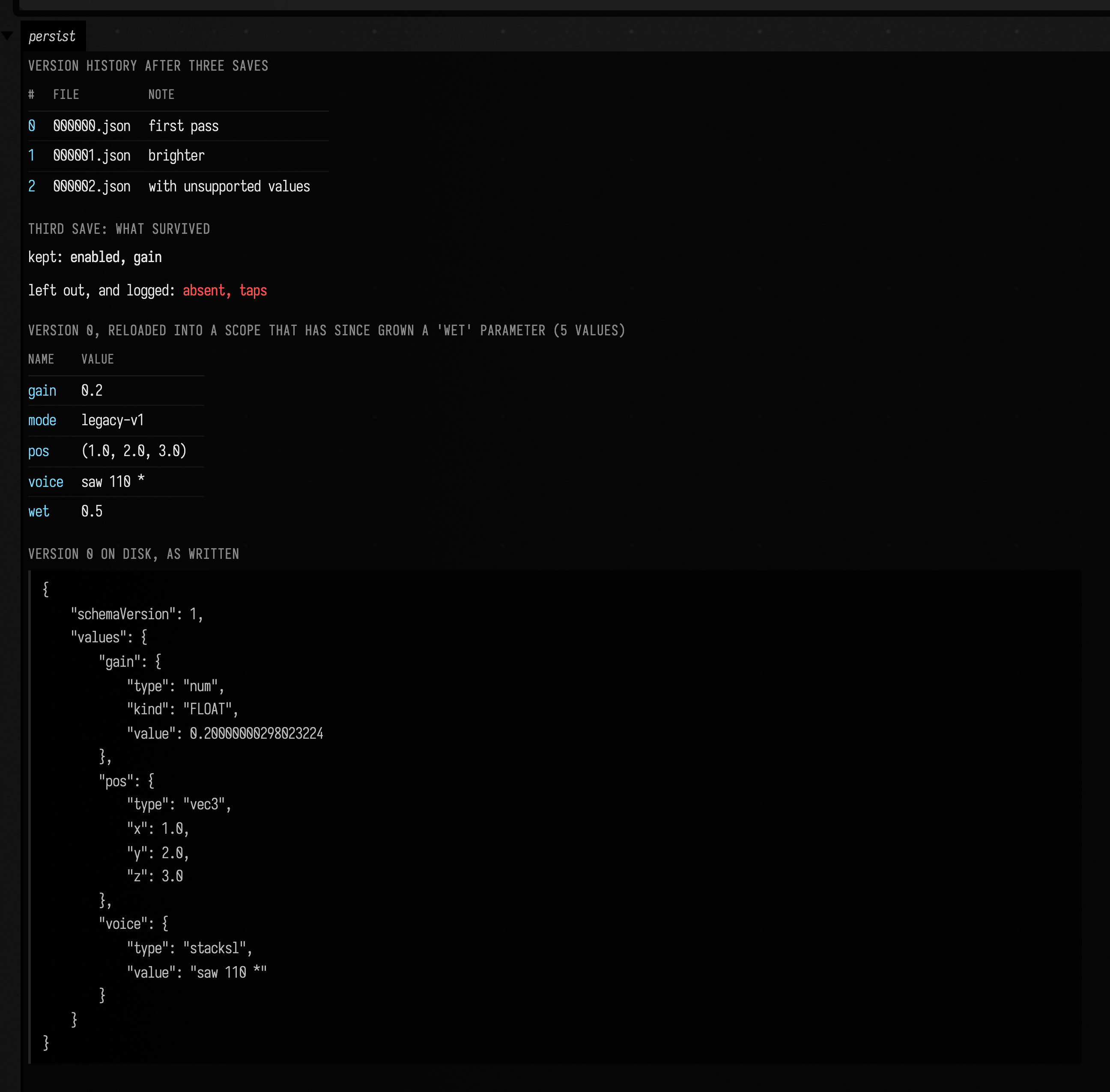
missingKey is how a scope outgrows its own files. Version 0 was written before wet existed;
loading it into a scope that declares missingKey("wet", 0.5f) fills the gap. The schema-qualified
form, missingKey(1, "mode", …), applies only to files stamped with that schemaVersion, and it
is applied after the version-agnostic defaults, so for a matching file it wins. Nothing ever
rejects a file for having a different schema version; the stamp only selects defaults.
A name present in the file always beats a default, even when its value is null.
gain was saved as the Float 0.20f and appears on disk as 0.20000000298023224, because every
number goes over the wire as a Double. The round trip is still exact: "kind": "FLOAT" is carried
alongside, and KValue.toAny uses it to narrow the value back to a Float, recovering 0.2f
precisely.
A Long is stored exactly, as its own "type": "long". A Number that is none of the six kinds,
such as a BigDecimal, is stored as a DOUBLE and comes back a Double.
Version history on disk
<file>.versions holds one numbered JSON file per save, plus a manifest.json carrying the two
things a file name cannot: each version's note and its timestamp. The two can disagree. A manifest
can be truncated by a crash mid-write, hand-edited, cut short by a full disk, or half-synced, and
saveKey writes the numbered file before the manifest row, leaving a window in which a file
exists that no row mentions.
The numbered files win. Because keyVersions returns the union of the two, neither alone can lose a
version:
- A file no row mentions is listed anyway, with the file's own modification time and a note
reading
(recovered from disk; the manifest row for this version was lost). That marker shows up in the history table, saying that the snapshot survived and its note did not. - A row whose file is gone is still listed, because the row is the only surviving evidence that the version existed. Loading it throws rather than returning something else.
saveKeytakes its next number from that union, so it never reuses an index and never overwrites an existing snapshot. That is the same waynextSafeSaveBackup(saving.kt:1906) numbers a document backup: off the directory listing rather than off a side file.
An unreadable manifest is reported on the error,keyframer log channel rather than swallowed, and
the next saveKey moves it aside to manifest.json.corrupt instead of overwriting it. The notes in
a half-written file are still there for you to read.
Agents: tests
One test covers each way the manifest can go
wrong: aCorruptManifestNeitherLosesHistoryNorReusesAVersionIndex,
aCorruptManifestIsRecoveredFromTheFilesAndQuarantinedRatherThanOverwritten,
aVersionFileTheManifestNeverRecordedIsNotOverwritten and
aDeletedManifestStillLeavesTheFilesAsTheHistory, and
theFloatOnDiskNarrowsBackToExactlyTheFloatThatWasSaved pins the Float round trip against the
exact on-disk string. theMarksOfAPre2026_08RenumberingAreNamed pins the error,keyframer
report for a .versions directory damaged by a save from before 2026-08.
Browsing saved keys
To see a folder of saved looks side by side, show it in a keyframe browser.
keyframeBrowser(dir, scope = …) puts the browser in the box's output. It lists every key in the
folder and every slot they hold. For each slot it marks each key's value along the slot's range, so
you can see which values the looks disagree about.
Pass the scope to make the browser live. Apply then writes the selected key back into the
scope's targets. A slot the scope watches but no key holds is marked as never saved. A slot that a
key holds but the scope no longer watches is struck through. Without a scope, the browser only
reads.
The example saves four looks for a glow pass, each with a note, and opens the browser on their folder.
:::static
import java.nio.file.Files

// A fresh private parent keeps this lesson's four keys separate from other boxes and checkouts.
// The leaf name stays readable in the browser header.
val dir = Files.createTempDirectory("keyframer-docs-").resolve("glow-looks")
Files.createDirectories(dir)

// One pass with three uniforms, and a scope that watches them.
val glow = Structure()
val scope = KeyframeScope()
scope.target("glow@radius", glow)
scope.target("glow@intensity", glow)
scope.target("glow@falloff", glow)

// Four looks, each saved as its own key with a note.
[
    Triple("soft", [3f, 0.20f, 1.5f], "first pass"),
    Triple("hot", [9f, 0.80f, 0.6f], "too much"),
    Triple("mid", [6f, 0.50f, 1.0f], "between the two"),
    Triple("wide", [12f, 0.35f, 2.2f], "for the long shot"),
].forEach { (name, v, note) ->
    glow.bind("radius") { v[0] }
    glow.bind("intensity") { v[1] }
    glow.bind("falloff") { v[2] }
    scope.capture().save(dir.resolve(name), note)
}

keyframeBrowser(dir, scope = scope, height = 330)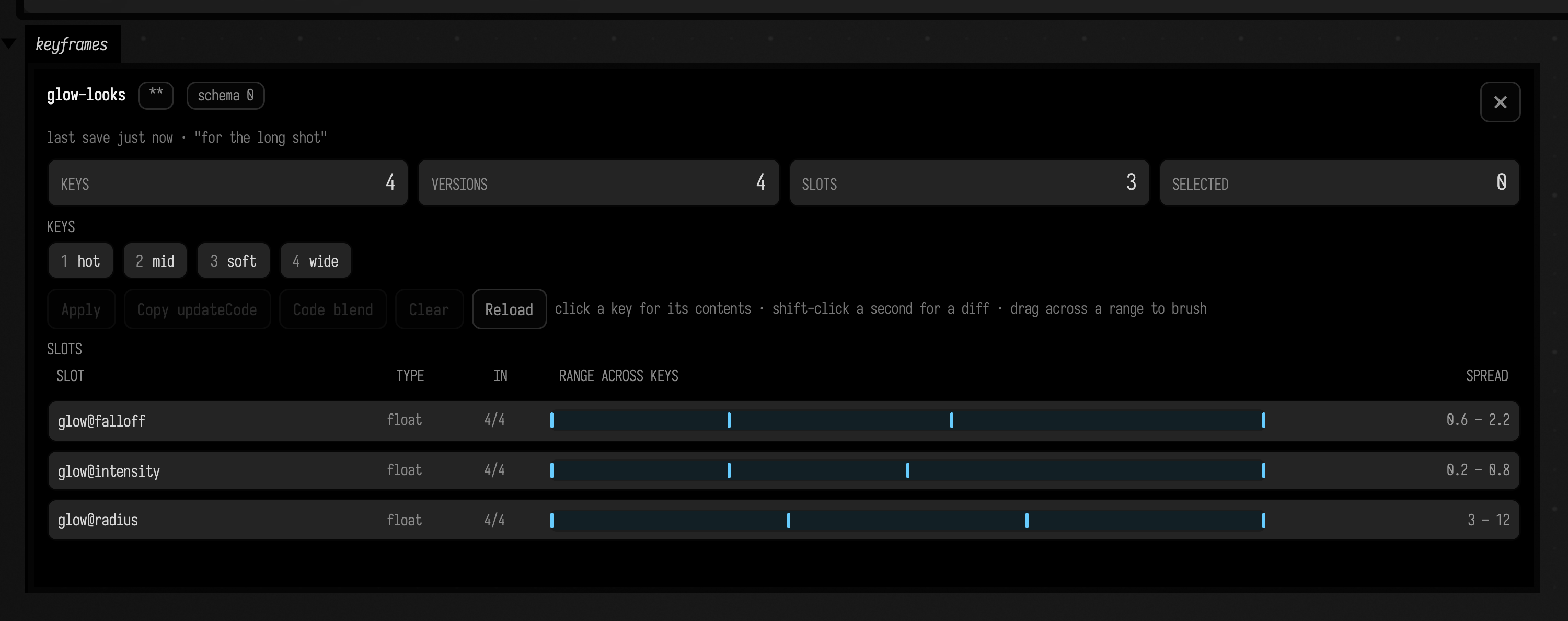
Click a key to read its contents, shift-click a second for a diff of the two, and drag across a slot's range to select the keys whose values fall inside it. Copy updateCode hands you the selected key as source, which is the next section.
A captured look becomes source
When a look is right, you can turn it into code and paste it into the box. Key.updateCode()
writes the key as Kotlin: an update { … } or updateAndApply { … } block, one assignment per
slot, sorted by name. A look you found by moving sliders becomes a change you can commit.
:::static
val scope = KeyframeScope()
val key = scope.Key(
    "gain" to 0.65f, // a Float, and the 'f' suffix matters
    "steps" to 12,
    "seed" to 99L,
    "pos" to Vector3f(1.5f, 0f, -2.25f),
    "spin" to Quaternionf().setAngleAxis(0.7f, 0f, 1f, 0f),
    "voice" to stackSLString("sin 220 * fold"),
    // A source block whose body mentions a '$'. Emitting this as a Kotlin *raw* string would
    // have let the '$' interpolate at paste time; it now falls back to an escaped literal.
    "block" to SourceBackedBlock<Any?>("box-1", "val total = 2\nprintln(\"sum: \$total\")"),
    "notes" to listOf<String>("unsupported", "on purpose"), // typed: a bare [..] has no element type here
)

:::fold render the generated update code
// A multi-line value goes into a fence at column zero, so it arrives byte for byte.
markdown(
    "code",
    """
    ~~~kotlin
${key.updateCode("look")}
    ~~~
""",
)
:::endfold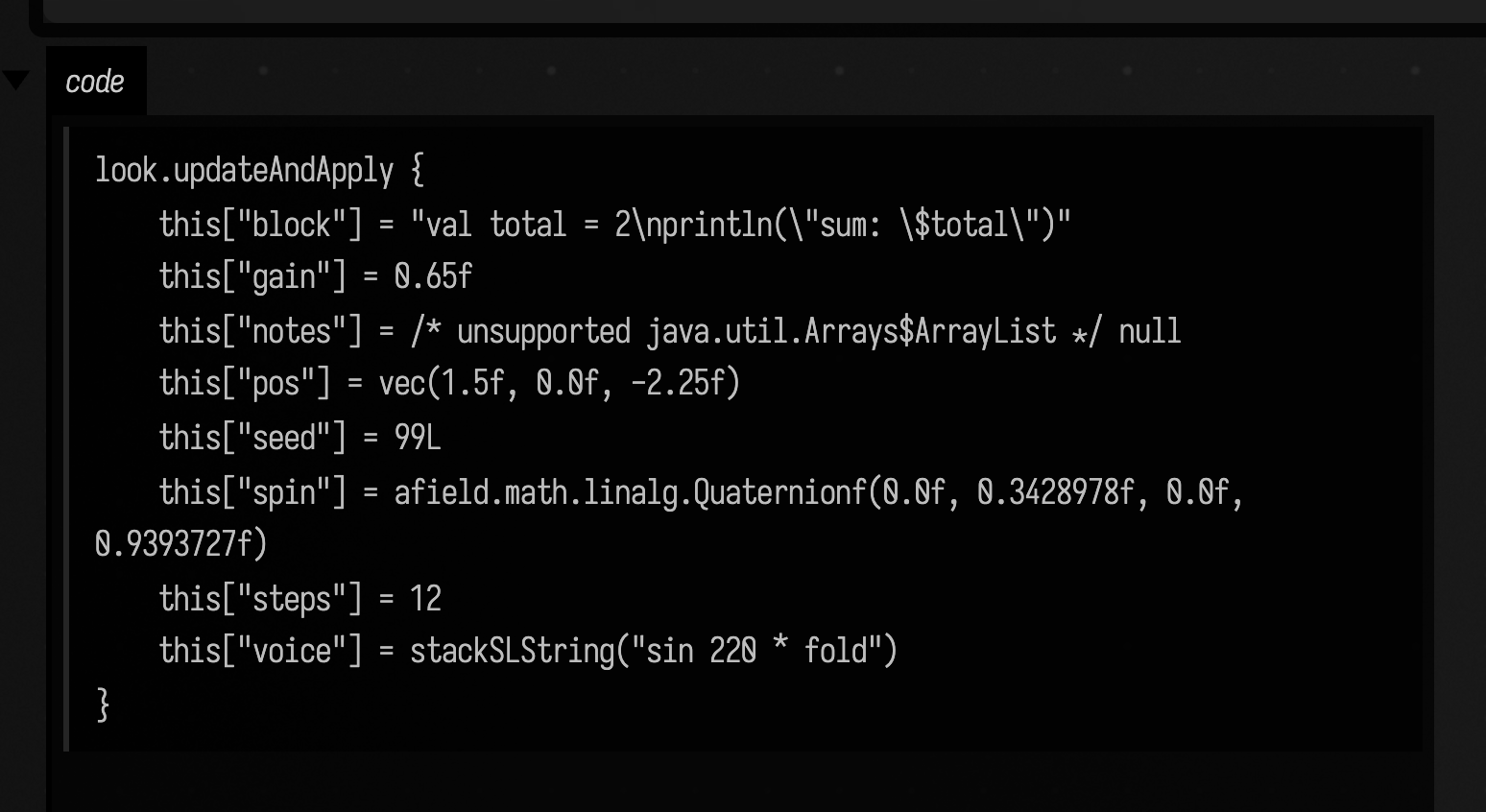
Every literal is chosen so the paste round-trips as the same type, not merely the same number.
0.65f keeps its f, because without it a captured Float comes back as a Double literal and
Key.set does not re-coerce numbers. 99L keeps its L; bytes and shorts get
.toByte() / .toShort(). Vectors come out as vec(…), quaternions and poses as fully-qualified
constructor calls, and StackSL as stackSLString(…) so it stays code rather than decaying to a
string. A value outside that set (the list here) becomes null behind an /* unsupported */
comment: the emitted code still compiles, and nulls that one value.
The escaped \$ in the source block is kotlinRawStringLiteral declining a raw string.
It reaches for one unless the body contains """, ends in a quote, or contains a $. That last
case matters: a raw string still interpolates $name and ${…}, and a block mentioning either
would paste as code that failed to compile or that silently substituted something else,
defeating the exact round trip updateCode exists for. Those bodies get the escaped literal
instead.
copyUpdateCodeToClipboard() is the same string, put on the system clipboard. That one goes
through AWT and replaces whatever the user had copied; on a headless JVM it logs a warning and
only returns the string.
Blending two programs, not just two numbers
A slot can hold code as well as numbers. Two kinds of code can go in a key:
- a StackSL program for a
stack.autoslot.stack.autois a part of a shader written in StackSL, Field's small stack language. StackSL examples introduces it. - a Kotlin
sourceBlock { … }. AsourceBlockis a block of Kotlin that keeps its own source text, so a key can save it and compile it again later. Running code describes it.
By default interpolate steps code: it keeps the first key's code until t reaches 1, then
switches to the second. There is no halfway point between two unrelated programs.
Often the two programs are two looks for one patch, and they differ only in their numbers. Then the
keyframer can do better. The rule is strict: if the two programs differ anywhere except in numbers,
the blend steps. There is no partial blend of the parts that match. Set scope.codeBlend to CodeBlendMode.STATIC or CodeBlendMode.RUNTIME,
and it blends those numbers and builds the program in between.
If you only want to animate a StackSL slot's numbers, you do not need code keys at all.
stackAutoNumbers(module, name) adds one slot per number in the program. A key then changes those
numbers on the GPU without recompiling the shader. Its numbers, live
shows this.
Two sourceBlock keys
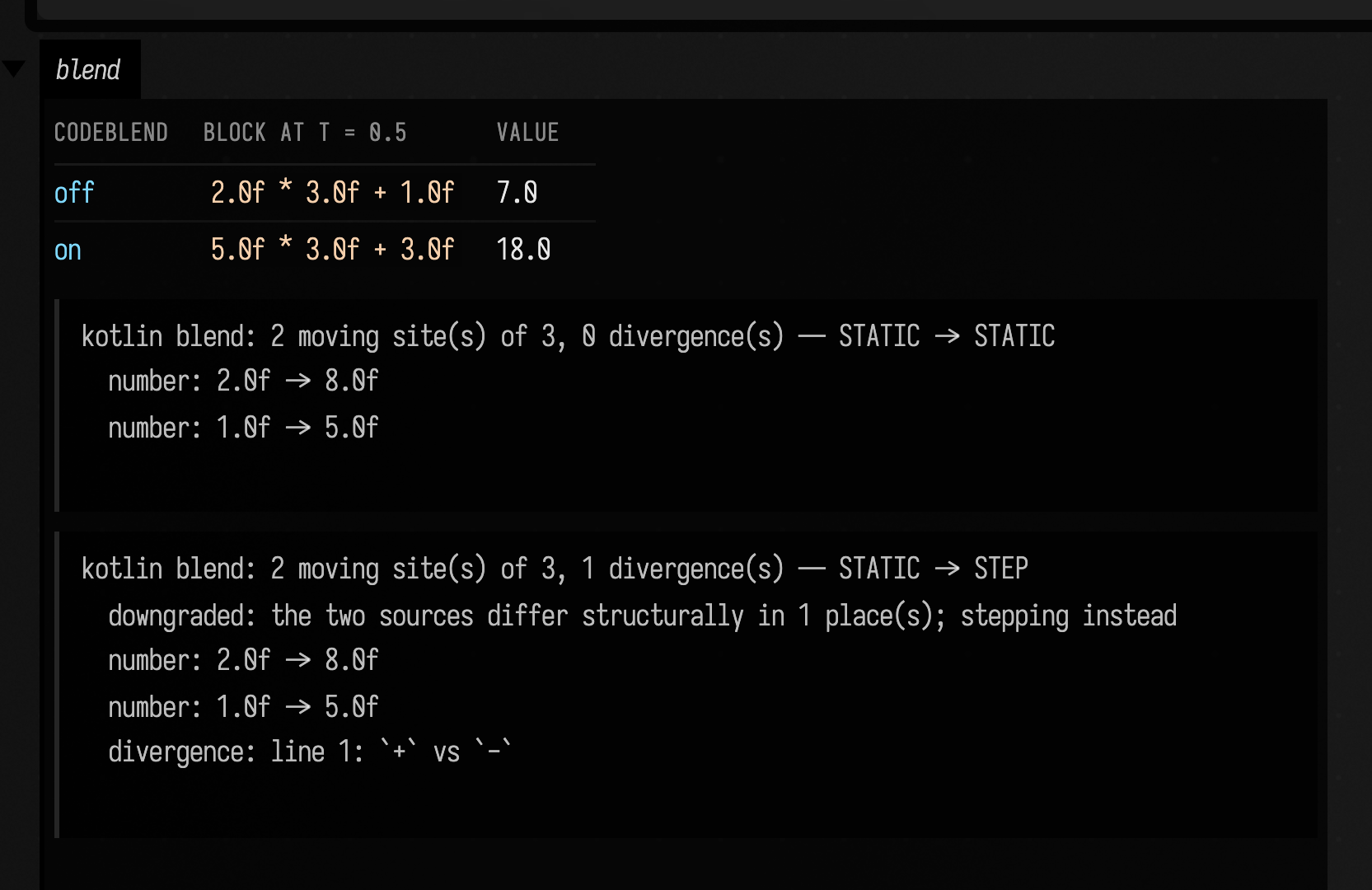
Here two keys each hold a sourceBlock. The two blocks differ in two numbers. The output shows the
key halfway between them twice: first with codeBlend off, then on. Off, it is still the first
block. On, it is a new block whose numbers are halfway, and calling it gives the halfway result.
Below that is the plan, which lists each number that moves. Last is the plan for a third key
whose block also turns a + into a -. That operator is a divergence: a difference that is not
a number. The plan reports it, and the whole slot steps.
val scope = KeyframeScope()
val quiet = scope.Key("level" to sourceBlock { 2.0f * 3.0f + 1.0f })
val loud = scope.Key("level" to sourceBlock { 8.0f * 3.0f + 5.0f })

// codeBlend is off by default: halfway, the key still holds the first block.
val stepped = scope.interpolate(quiet, loud, 0.5).values["level"] as SourceBackedBlock<*>

// With codeBlend on, the numbers that differ are blended into a new block.
scope.codeBlend = CodeBlendOptions(mode = CodeBlendMode.STATIC)
val blended = scope.interpolate(quiet, loud, 0.5).values["level"] as SourceBackedBlock<*>
val plan = scope.codeBlendPlans(quiet, loud).getValue("level")

// A key whose block also changes an operator: `+` becomes `-`. That is not a number, so it steps.
val other = scope.Key("level" to sourceBlock { 8.0f * 3.0f - 5.0f })
val refused = scope.codeBlendPlans(quiet, other).getValue("level")

markdown(
    "blend",
    """
    | codeBlend | block at t = 0.5 | value |
    |---|---|---|
    | off | `${stepped.source}` | ${stepped()} |
    | on | `${blended.source}` | ${blended()} |

    ~~~
${plan.describe()}
    ~~~

    ~~~
${refused.describe()}
    ~~~
""",
)
Two sourceBlock keys blend like two StackSL keys only when all three of these hold:
scope.codeBlendisSTATICorRUNTIME. With the default,STEP, code always steps.- Both blocks were written in the same box. Blocks from two different boxes always step, because the blended block has to be compiled in one box, and neither is the right one.
- The two sources differ only in number literals. Anything else that differs steps the whole slot,
and the plan says
STEPwith the reason.
In every other case you get the first block until t reaches 1, then the second.
A family of curves between two looks
The same works for longer code. Below are two looks for a wave, calm and restless. Each block
builds the wave from a carrier, a ripple, an envelope and an offset. The structure is the same in
both; only the numbers differ. The figure draws the blended wave at five values of t: blue is
calm (t = 0), orange is restless (t = 1), and the three curves between are the blends. Look at how
each curve sits between its neighbours: the frequencies, the decay and the offset all move together.
import kotlin.math.*

// Two looks for one wave, each sampled across one turn: the same terms, different numbers.
val scope = KeyframeScope()
val calm = scope.Key(
    "wave" to
        sourceBlock {
            (0..300).map { i ->
                val x = i * 2 * PI / 300
                val carrier = 0.6 * sin(2.0 * x)
                val ripple = 0.15 * sin(7.0 * x + 0.3)
                val envelope = exp(-0.1 * x)
                (carrier + ripple) * envelope + 0.1
            }
        },
)
val restless = scope.Key(
    "wave" to
        sourceBlock {
            (0..300).map { i ->
                val x = i * 2 * PI / 300
                val carrier = 0.9 * sin(3.0 * x)
                val ripple = 0.4 * sin(11.0 * x + 1.2)
                val envelope = exp(-0.35 * x)
                (carrier + ripple) * envelope + 0.3
            }
        },
)

// Blend with codeBlend on at five values of t, call each blended block, and draw its wave.
scope.codeBlend = CodeBlendOptions(mode = CodeBlendMode.STATIC)
val ts = [0.0, 0.25, 0.5, 0.75, 1.0]
val curves = ts.map { t ->
    val wave = scope.interpolate(calm, restless, t).values["wave"] as SourceBackedBlock<*>
    val ys = wave() as List<*>
    FLine().apply {
        ys.forEachIndexed { i, y ->
            val p = vec(i * 2.5, -(y as Double) * 120)
            if (i == 0) moveTo(p) else lineTo(p)
        }
        thickness = 2.0
        color = vec(0.3 + 0.7 * t, 0.6, 1.0 - 0.7 * t, 1.0)
    }
}
lines(curves, w = 760.0, h = 300.0, fitToSize = true)

val plan = scope.codeBlendPlans(calm, restless).getValue("wave")
markdown("plan", "blue: calm (t = 0) · orange: restless (t = 1)\n\n~~~\n${plan.describe()}\n~~~")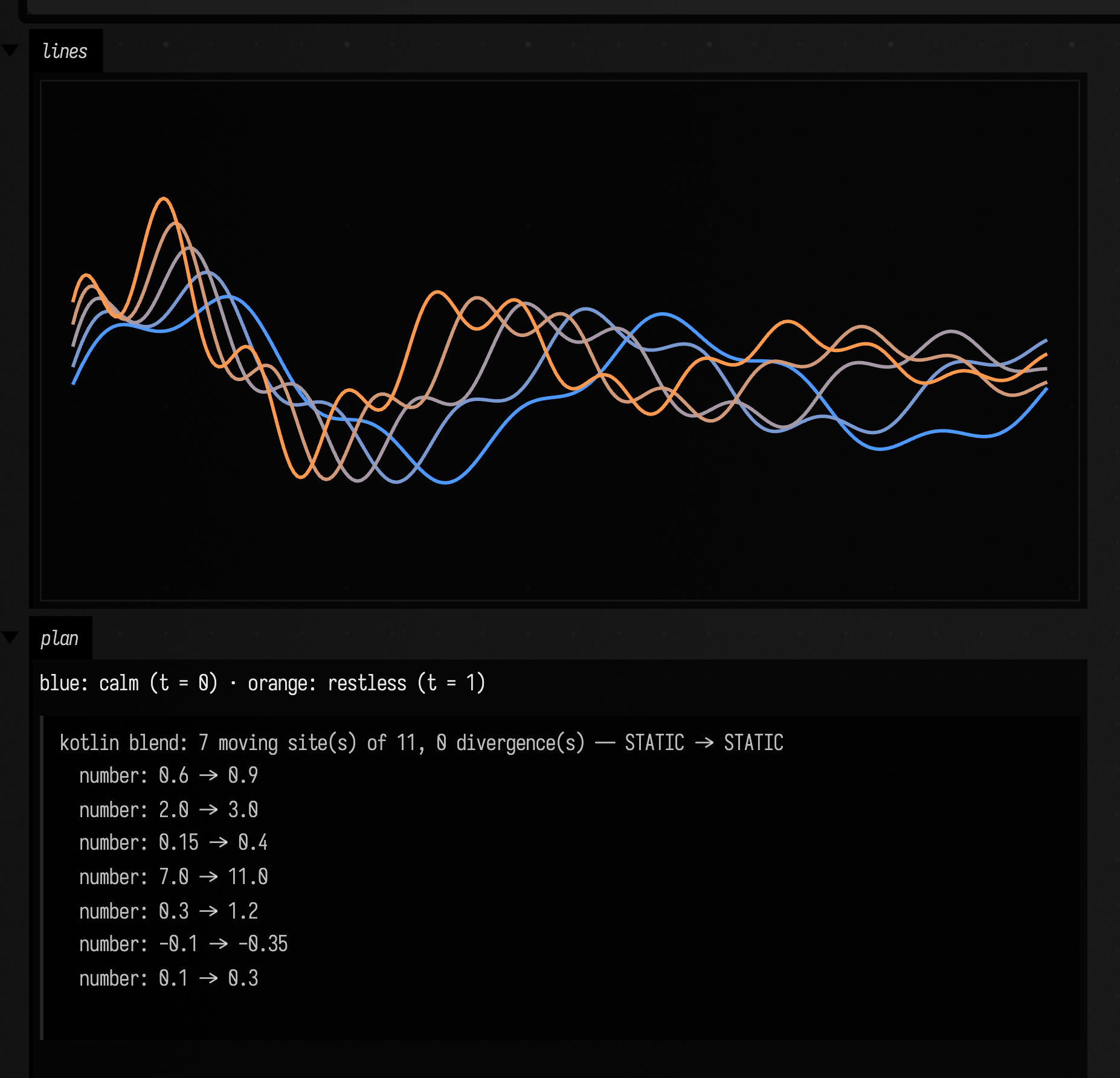
What counts as differing only in numbers
The Kotlin blend compares the two sources token by token. Comments and whitespace are ignored.
A + or - directly in front of a number belongs to the number, so -0.1 against -0.35 is a
number that moves. A + or - between two terms is an operator: an offset written + 0.1 in
one look and - 0.2 in the other is a structural difference, and the whole slot steps. Write
both as +, with a negative number where needed. A vector, quaternion or dual-quaternion
constructor whose arguments are all literals blends as one value, so a rotation turns along the
shorter arc. Hexadecimal, binary and unsigned literals never move.
How the two programs are compared
Here is the plan for two StackSL looks that differ in three numbers. planStackSLCodeBlend makes
the plan without a scope, and describe() lists each number that moves:
val warm = "uv 3.0 * fbm 0.15 + [1.0,0.55,0.2] *"
val cool = "uv 8.0 * fbm 0.45 + [0.2,0.5,1.0] *"

val plan = planStackSLCodeBlend(warm, cool, CodeBlendOptions(mode = CodeBlendMode.RUNTIME))
println(
    plan.describe(),
)

/*
 stacksl blend: 3 moving site(s) of 3, 0 divergence(s) — RUNTIME -> RUNTIME
   number: 3.0 -> 8.0
   number: 0.15 -> 0.45
   vector: [1.0,0.55,0.2] -> [0.2,0.5,1.0]
 */
Both sources are lexed with the language's own tokeniser, the two token streams are aligned on a
longest common subsequence, and a position where the alignment pairs a number with a number becomes
a site. A position it cannot pair is a divergence, and one divergence puts the whole slot
back on the stepping path. fbm against noise is a divergence; 3.0 against 8.0 is a site.
Everything outside a site is copied through byte for byte, so a blended program keeps the left one's comments and layout.
STATIC and RUNTIME
CodeBlendMode.STATIC writes the interpolated numbers into the source: uv 3.0 * fbm and
uv 8.0 * fbm become uv 5.5 * fbm at t = 0.5. It reaches every numeric position, and it costs a
compile for every value of t. Use it to scrub or to step between looks.
CodeBlendMode.RUNTIME emits one program that reads the blend from outside, so it compiles once and
animates for nothing. Each moving literal becomes a push of both endpoints and the builtin mix:
uv 3.0 8.0 ?pc.keyframeBlend .x mix * fbm 0.15 0.45 ?pc.keyframeBlend .x mix + …mix leaves one value on the stack exactly as the literal it replaced did, so the surrounding stack
arithmetic is untouched. Two StackSL forms cannot be rewritten this way, because their grammar wants
a literal in that position: a modifier chain (0.35s3) and a random range (0.2_0.5). A plan
containing one reports runtimeCapable = false, and a RUNTIME request comes back as
effectiveMode == STATIC with downgradeReason saying why.
The push-constant convention
A stack.auto slot cannot declare a uniform of its own, so the blend parameter arrives by
agreement: a vec4 called keyframeBlend in the shader's push-constant block, and a keyframe lane
of the same name for the scope to write.
layout(push_constant) uniform Controls {
    vec4 keyframeBlend;
} pc;
scope.target("keyframeBlend") { module.current.liveUniformStructures["pc"] }
scope.codeBlend = CodeBlendOptions(mode = CodeBlendMode.RUNTIME)interpolate fills that lane with keyframeBlendVector(t) on every blend, and only when a target of
that name is registered. The four components are the same t in four shapes (x raw and
unclamped, y clamped, z smoothstepped, w the complement of y), so a program can read a
different one per number by setting CodeBlendOptions.lane. A block instance called something other
than pc is handled by stackSLRead.
Kotlin has the same two modes and a different transport. Generated source cannot close over a Kotlin value, so a moving literal becomes a call that reads the parameter out of a registry slot addressed by an integer written into the text:
gain * afield.animation.keyframes.kfMix(0.5f, 1.5f, afield.animation.keyframes.keyframeBlendAmount(7, 0))Fully qualified, so it resolves inside a sourceBlock body in a box that imported nothing. The whole call is handed the endpoints
rather than their components, which is what lets a Quaternionf
site slerp and a DualQuaternionf site sclerp instead of drifting through the inside of the sphere
component by component. A literal keeps its type: 0.5f and 1.5f blend to a Float, 1 and 3
to an Int, and a hexadecimal or unsigned literal is left alone.
Seeing what it decided
A blend that stepped looks exactly like a blend that is not working, so the plan is the thing to
read. plan.describe() is the text above; display(plan) renders the same breakdown as a table of
sites with each one's midpoint:
val warm = "uv 3.0 * fbm 0.15 + [1.0,0.55,0.2] *"
val cool = "uv 8.0 * fbm 0.45 + [0.2,0.5,1.0] *"

val plan = planStackSLCodeBlend(warm, cool, CodeBlendOptions(mode = CodeBlendMode.RUNTIME))
display(plan)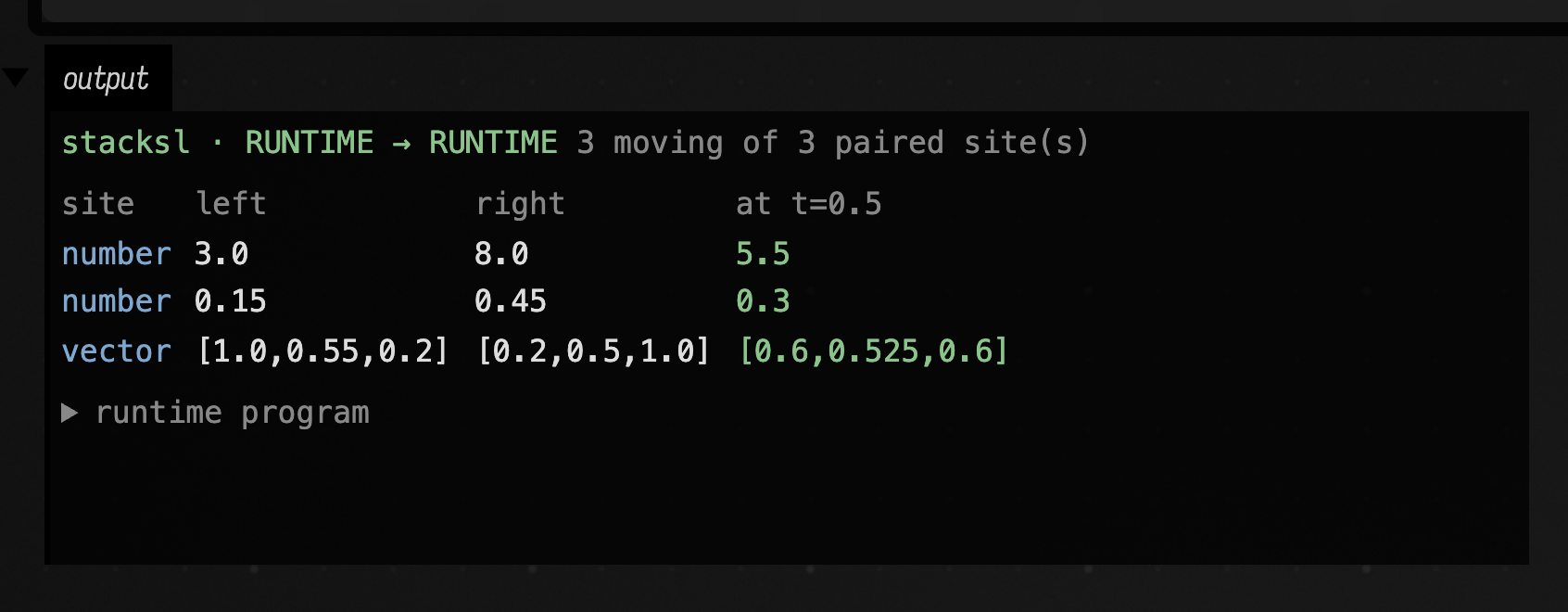
scope.codeBlendPlans(a, b) returns a plan per code slot for a pair
of keys, and the keyframe collection browser's Code blend button does that for the
two keys you have selected there.
The whole feature is a runnable starting point:
keyframe_code_blend blends two looks, renders the
runtime program at five values of the push constant, and compares both ends against the keyframe they are supposed to be.
Where to go next
- Values over time — blending two keys, including code values that step rather than smear.
- Sweeping saved keyframes overnight — treat a directory of saved keys
as a space and let
KeyframeSweeprender blends of them you never tried, each beside the key that produced it.
Agents: test coverage
dev_docs/KEYFRAMER_COVERAGE.md has the public surface of keyframer.kt against its ledger, and
the calls a headless test cannot reach.