Drawing on iPad
Draw with an Apple Pencil, talk about what you are drawing, and keep both on one timeline. Drawing On is Field's optional native iPad head: it records every measured Pencil sample and microphone buffer, displays FLine geometry sent back by Field, and works entirely offline when you want to record somewhere else. Later, upload the recording or turn its save file into a contact sheet with aligned speech clips and transcripts.
Open the Drawing On starting place from Field's Welcome screen and run iPad drawing head. Its plan appears in the box output, so you can edit and try the Field side before connecting an iPad.
Install and connect
On a Mac, run ./field.sh --setup and select Drawing On iPad app / offline reader. The BUILD
step compiles the offline reader with your installed Apple tools and prints the Xcode steps.
The iPad app is signed and installed from Xcode; optional transcription models are supplied separately.
Field’s drawing-head server adapter already ships on every supported Field platform.
The app's Xcode project and build guide
ship in native/field-drawingon/, alongside Field's optional native headset clients. Open
DrawingOn.xcodeproj, choose your iPad and development team, and run the DrawingOn scheme.
The app requires iPadOS 18 or later. Building Field itself requires no Xcode or native app build.
For a physical iPad, start Field with AFIELD_BIND_HOST=0.0.0.0 so it is reachable on your LAN.
Set the app's address to wss://YOUR-FIELD-HOST:9092/drawingon/ws, Field target to ipad, and
enable Stream live. Use the port your Field server is running on. For a simulator on the same
Mac, Field's default loopback mirror is ws://127.0.0.1:19092/drawingon/ws.
A certificate for your Field host
The physical iPad must trust the HTTPS certificate, and the certificate must cover the hostname
in the address. Field's default development certificate covers localhost. Supply your own
keystore with AFIELD_KEYSTORE_PATH, AFIELD_KEYSTORE_PASS, and AFIELD_KEYSTORE_ALIAS.
Drawing On uses normal system certificate validation. Keep Field's browser-origin policy enabled.
Draw, move and talk
The canvas starts black with translucent white ink. Light canvas inverts it. Pressure, tilt, roll, coalesced samples, timing, predictions and estimated-property corrections are recorded; the initial brush draws a simple constant-width line.
Choose freehand, line or circle from the bottom-left tools. Drag a line between its endpoints, or a circle from its centre to its edge. Two fingers pan, rotate and scale together. Two-finger tap undoes; three-finger tap redoes. The menu adds layers and controls visibility and solo. Portrait and landscape use the same drawing coordinates; resizing and view changes record the screen rectangle, visible drawing-space corners and their bounding box.
Record microphone explicitly starts voice capture. Audio and drawing use a common monotonic capture clock. Stopping the microphone, an interruption or backgrounding is recorded. Undo adds a stroke-visibility event; it keeps the measured samples and their original times in the save file. Field's returned geometry has its own reference layer, which you can hide or solo independently.
A plan that draws back
This is the starting place's head box. roomWidth changes the room. pad.publish(...) replaces the
Field reference layer on target ipad; the same FLines are shown locally with lines(...).
The folded callback receives committed input and adds a crosshair when a Pencil stroke ends.
:::static
:::fold imports
import afield.geometry.path.FLine
import afield.graphics.render.color
import afield.io.drawingon.drawingOn
import afield.math.linalg.vec
import afield.ui.visualization.lines
import kotlinx.serialization.json.*
:::endfold

val pad = drawingOn("ipad")
val roomWidth = 400.0
val plan = FLine().moveTo(120, 160).lineTo(120 + roomWidth, 160)
    .lineTo(120 + roomWidth, 460).lineTo(120, 460).lineTo(120, 160)
plan.color = vec(1.0, 1.0, 1.0, 0.45)

fun showPlan(extra: List<FLine> = emptyList()) {
    val drawing = listOf(plan) + extra
    pad.publish(drawing, title = "Studio plan")
    lines(drawing, w = 640.0, h = 520.0)
}
showPlan()

:::fold receive Pencil endpoints and draw back
val endpoints = mutableMapOf<String, Pair<Double, Double>>()
pad.onEvent { event ->
    if (!event.upload) {
        val stroke = event.data["stroke"]?.jsonPrimitive?.contentOrNull
        if (event.type == "stroke.samples" && stroke != null) {
            val last = event.data["samples"]?.jsonArray?.lastOrNull()?.jsonObject
            val x = last?.get("drawingX")?.jsonPrimitive?.doubleOrNull
            val y = last?.get("drawingY")?.jsonPrimitive?.doubleOrNull
            if (x != null && y != null) endpoints[stroke] = x to y
        }
        if (event.type == "stroke.end" && stroke != null) {
            val point = endpoints.remove(stroke)
            if (point != null && event.data["cancelled"]?.jsonPrimitive?.booleanOrNull != true) {
                val (x, y) = point
                val marker = FLine().moveTo(x - 12, y).lineTo(x + 12, y)
                    .moveTo(x, y - 12).lineTo(x, y + 12)
                marker.color = vec(1.0, 1.0, 1.0, 0.8)
                showPlan([marker])
                println("Pencil endpoint ($x, $y) at ${event.time}s")
            }
        }
    }
}
:::endfold
The marker uses the last measured drawing-space point from stroke.samples. It is an example
response, rather than a replay of the human drawing. The complete original event stream,
including subsequent corrections, is retained in the archive. Change the callback to feed your
own geometry or interpretation process.
A target belongs to its owning box. Re-running that box replaces its callback; another box needs a different target name. Desktop selection does not choose what appears on the iPad. Reconnecting receives the latest published reference, and disconnecting leaves the last local reference visible. Publish an empty collection to clear it.
Coordinates and the event stream
The default DrawingOnPlane() maps Field X and Y directly to drawing points, with Y down. The
recorded iPad view transform then pans, rotates and scales the scene. For a Y-up model, pass a
plane with yAxis = [0.0, -1.0, 0.0] and a suitable offset to publish. For a 3D model,
choose explicit independent xAxis and yAxis vectors and an origin. Projection is
dot(position - origin, axis) * scale + offset, recorded with each reference revision.
Returned lines, fills and points use Field's existing AVP Three geometry/buffer format. On the iPad, Metal draws the reference layer and pan, zoom and rotation reuse the uploaded geometry. The native client verifies and saves the displayed geometry. Exported captures include these buffers, so replay works without a running Field server.
pad.onEvent receives event.session, event.time, event.type, event.data, and
event.upload. The last flag distinguishes a saved-capture upload from a live connection.
Callbacks run on Field's main Runloop after durable append. Filter the events you need and keep
expensive transcription or AI work in a separate job. Returned field.* records are ordinary
capture events too; publishing in response to every event would create a feedback loop.
pad.sessions lists recordings received for this target. In its owning box,
pad.readCapture(session) { event -> ... } streams the original JSON, including microphone
buffers and geometry assets. Field stores the append-only archive in WORKSPACE/.drawingon/
and deduplicates retransmitted session/sequence pairs. If your processing must recover from a
server restart, use the archive as its input; the live callback is not a persistent job queue.
The wire format
describes sample fields, audio encoding, viewport transforms and geometry assets.
Scrub and graph a recording
Load an exported save file directly in Field. A capture handle keeps replay controls separate from
the original recording. All geometry returned below is ordinary FLine data.
:::static
:::fold imports
import afield.io.drawingon.readDrawingOn
:::endfold

val recording = readDrawingOn("/path/to/capture.ndjson")
var time = recording.duration

fun redraw() {
    val frame = recording.at(time)
    lines(frame.drawing, w = 640.0, h = 520.0)
}
redraw()
controlGroup {
    slider("capture time", 0.0, maxOf(recording.duration, 0.001), step = 0.01, initialValue = time) {
        time = it
        redraw()
    }
    for (layer in recording.layers) {
        checkbox(layer.name, initialValue = layer.visible) {
            recording.layerVisible(layer.id, it)
            redraw()
        }
    }
}
at(time) reconstructs the human drawing, line/circle tool intent, undo and layer state at that
capture time. Late estimated-property corrections take effect when they were received. Scrubbing
backwards restores the earlier measured state. frame.viewport is another FLine: the recorded
screen footprint in drawing coordinates. frame.transform maps drawing coordinates to display
points, and frame.light records the canvas appearance. Returned Field reference meshes and
transient predictions are separate from this human-ink API.
Layer controls use stable layer IDs, available through recording.layers or frame.layers.
layerVisible(id, true) and layerVisible(id, false) override visibility across scrub positions;
layerVisible(id, null) follows the recording again. solo(id) solos a layer, solo(null) turns
solo off, and resetLayers() restores all recorded visibility and solo choices. These controls
change your Field replay; they do not send commands to the iPad or change its save file.
For live or uploaded data already received by a named head, use pad.capture(session) in the
box that owns pad. Choose a session from pad.sessions. Keep the capture handle and call
recording.refresh() to include newly archived events, then query it again. Refresh reads past
audio and reference buffers without retaining them in the replay model.
To draw new input since a previous capture timestamp, ask for contact and hover separately:
:::static
val since = 2.0
val until = recording.duration
val ink = recording.drawingSince(since, until)
val pointing = recording.hoverSince(since, until)
lines(ink + pointing, w = 640.0, h = 520.0)
Both queries use sample times in seconds and the interval (since, until]. On a completed
recording, save until as the next cursor. For live input, refresh and requery an overlapping
interval to include delayed coalesced samples; merge contact samples by (stroke, id) and hover
samples by sequence. Contact paths remain separate per stroke; hover paths break on
range changes, contact, navigation, layer changes or gaps over 0.25 seconds. Change gap in
hoverSince for a different pause threshold. No segment reaches back across the lower bound.
By default these queries include measured input that was later undone, hidden or cancelled.
Pass visibleOnly = true to restrict them to the scene at until. Local layer overrides also
filter these queries. Corrections to an older sample refine that sample; they do not become new
contact at the correction's receipt time.
The final lambda maps each sample to a point, so the same calls can graph pressure and hover height instead of drawing position:
:::static
val pressure = recording.drawingSince(since, until) {
    vec(it.t * 60, 200 - (it.pressure ?: 0.0) * 150, 0)
}
val height = recording.hoverSince(since, until) {
    vec(it.t * 60, 200 - (it.z ?: 0.0) * 150, 0)
}
lines(pressure + height, w = 640.0, h = 240.0)
Samples expose t, x, y, force, maximumForce, normalized pressure, altitude, azimuth,
roll, and hover z. Missing sensor values are null. sample.data retains the original fields,
and sample.value("radius") reads any numeric field. Measured FLine nodes retain their sample
as node.drawingOnSample (import afield.io.drawingon.drawingOnSample), plus node.properties["t"].
Each path carries drawingOn.layer, drawingOn.stroke for contact, and drawingOn.kind in its
property map. Shape replay constructs the intended circle or straight line; the interval queries
always use the measured Pencil path, so a pressure graph retains every measured point.
Clean up a live sketch
Open the live cleanup example,
paste it into its own Field box, and run it. Set the app's Field target to network and turn
on Stream live. Give the cleanup box roughly sketched walls, an overstroke along part of a
wall, a doorway gap and an arch.
After a pen lift, the lines output shows the fitted FLines in cyan, with points at graph vertices. Nearby tips can share a vertex or join the side of a stroke at a T. Crossing strokes can pass through one another without making a junction. Short hooks or sideways ticks at either end can mark the endpoints of a line, arc or circle. Field can leave those marks out of the fit when the rest of the stroke supports the shape. Draw an arc with a consistent bend. Freehand lines need to stay close to a straight axis, so shallow arcs have room to register.
Slow, curved passages keep their detail as smooth FLines. The fit measures Pencil speed in screen coordinates, so zooming the drawing does not change the timing judgment. The line and circle tools retain their explicit geometry. Undo, corrections and layer visibility update the fit from the recorded strokes. The original Pencil samples remain in the capture.
Pause briefly to see Plan geometry. In a layer with enough evidence for perpendicular axes, Field uses its Ceres solver to align straight edges, with curves anchoring their shared vertices. It can merge straight continuations and keeps safeguards around gaps such as door openings. Label a layer Annotation, Markup or Hatch to dim those strokes in Field and omit them from the returned plan. Repeated short hatch strokes can also be recognized by their spacing. The iPad's reference layer shows the quick fit first and then the plan. Both outputs remain available in Field.
Fit a network from a recording
Use recording.networkAt(time) with a saved or received capture to fit a network at any scrub
time. It works on completed, visible strokes and respects the same layer overrides as ink replay.
This API gives you the basic graph fit. The live example adds the timing rules and the plan pass.
:::static
val graph = recording.networkAt(time)
lines(graph.toFLines(showNodes = true), w = 640.0, h = 400.0)
Each edge has an FLine, two vertex IDs, a layer and the source stroke IDs. Vertices carry XY
coordinates in the drawing plane. Clusters retain the strokes that contributed to each fit.
To draw the result back onto the iPad, call pad.publish(graph.toFLines(), title = "Clean drawing")
in the owning box.
Try the basic fit on these sample strokes. The left side shows the input and the right side shows the network. Two passes along the wall become one fitted wall, the partition joins at a vertex, and the gap before the wall resumes stays open. The lightly wavering arch becomes a smooth curve.
:::static
:::fold imports
import afield.geometry.path.FLine
import afield.graphics.render.color
import afield.graphics.render.thickness
import afield.io.drawingon.DrawingOnNetworkStroke
import afield.io.drawingon.fitDrawingOnNetwork
import afield.math.linalg.vec
import afield.ui.visualization.LinesFraming
import afield.ui.visualization.lines
import kotlin.math.PI
import kotlin.math.cos
import kotlin.math.sin
:::endfold

fun stroke(id: String, vararg xy: Pair<Int, Int>) =
    DrawingOnNetworkStroke(id, "plan", "freehand", xy.map { (x, y) -> vec(x, y, 0) })

val strokes = listOf(
    stroke("wall", 10 to 50, 40 to 51, 80 to 50, 120 to 50),
    stroke("overstroke", 120 to 51, 80 to 50, 40 to 50, 10 to 51),
    stroke("partition", 53 to 12, 53 to 47),
    stroke("after door", 147 to 51, 175 to 50, 215 to 51),
    DrawingOnNetworkStroke("arch", "plan", "freehand", (0..40).map { i ->
        val a = i * PI / 40
        val r = 32 + 0.6 * sin(a * 13)
        vec(115 + r * cos(a), 112 - r * sin(a), 0)
    })
)
val graph = fitDrawingOnNetwork(strokes)
val raw = strokes.map { stroke ->
    FLine().moveTo(stroke.points.first()).apply {
        stroke.points.drop(1).forEach { lineTo(it) }
        color = vec(0.75, 0.75, 0.75, 0.67)
        thickness = 1.5
    }
}
val fitted = graph.toFLines(showNodes = true).map { path ->
    path.transform { it.add(vec(245, 0, 0)) }.apply {
        color = vec(0.3, 0.85, 1.0, 0.95)
        thickness = 2.0
    }
}
lines(raw + fitted, w = 600.0, h = 180.0, fitToSize = true, framing = LinesFraming.Fit)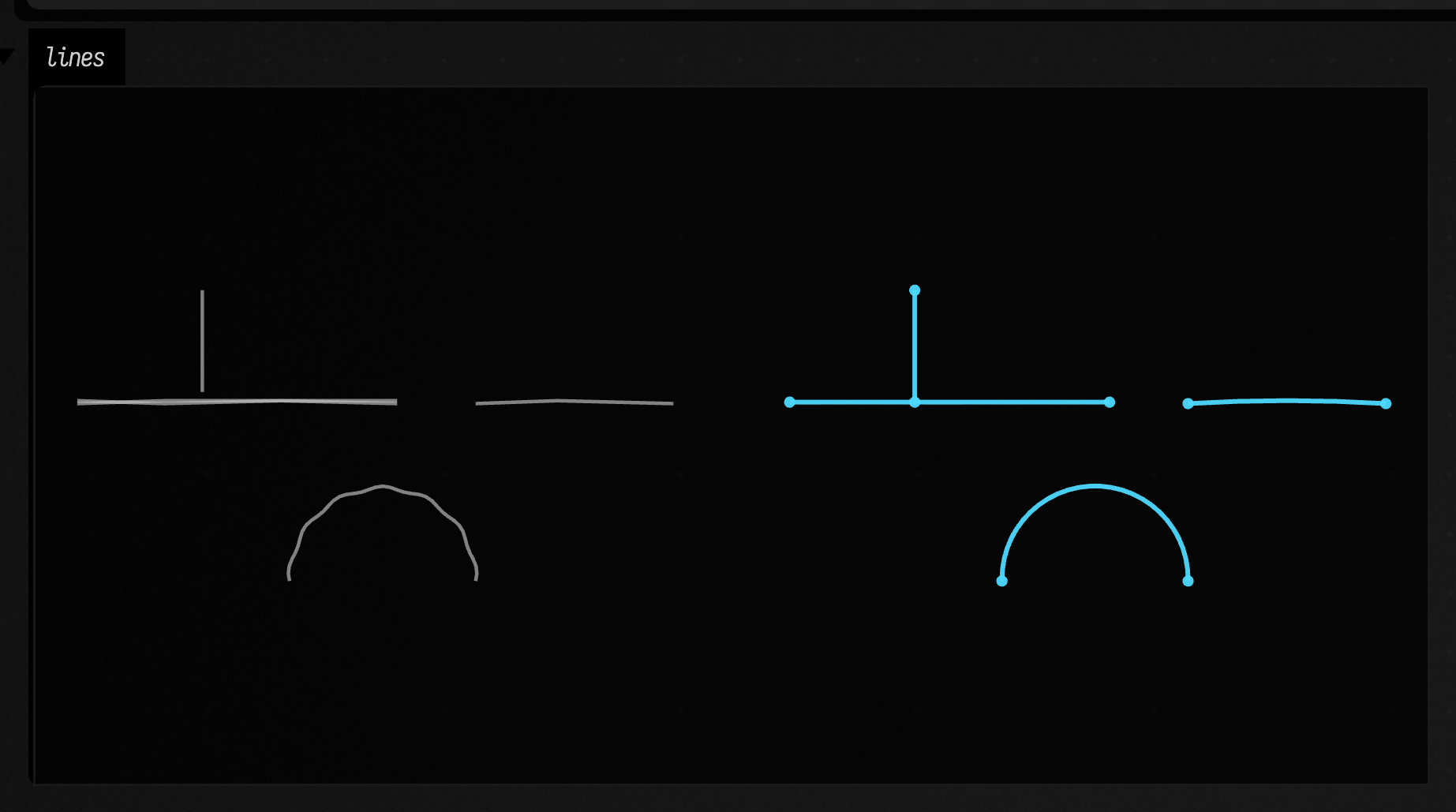
The network workout
adds sliders for fit, retrace and join tolerances. To compare the retrace groups with StrokeStrip,
export them with graph.strokeStripScap(). Field's fit runs on its own. The
curve-network guide
describes the export and the external fitter's requirements.
Record elsewhere, upload later
Leave Stream live off to draw and record voice without a server or network. Give the capture a name and choose Finish capture to save it and start a fresh canvas. Under Saved captures, upload to Field when connected. Transfers resume from the receiver's durable position, and the original stays on the iPad. A saved upload receives no new reference geometry.
Share capture exports a self-contained .ndjson save file, also accessible through Files or
Finder file sharing. It contains undone strokes as well as visible ones, audio, viewport changes,
and received Field references. This is the same input used by the offline reader below.
A contact sheet from a save file
On a Mac, run the reader from the Field checkout. The first invocation compiles it with your installed Xcode command-line tools. Rendering and segmentation use macOS frameworks, with no server, network connection or external model:
native/field-drawingon/tools/offline-review/review capture.ndjson --output capture.review
open capture.review/index.html
The review contains PNG contact sheets, full-size viewport frames, speech-candidate WAVs and a
manifest.json for downstream agents. It reuses the app's replay model, including layer state,
undo, line/circle intent, navigation, appearance and Field reference replacements. It selects
moments around drawing activity and speech; silent drawing remains represented when the
microphone was off. Temporary predicted ink is omitted.
Each frame records its time and sequence cutoff, viewport, transform, visible layers and stroke IDs. Speech clips retain capture-clock offsets and remain separate across recording gaps. The HTML review links the full-size images and plays the audio locally. Its caption interval precedes the snapshot; it does not assert that the drawing stayed unchanged throughout that interval.
Energy-based voice activity detection finds candidate clips before transcription. It can mistake
café noise for speech or miss quiet speech; keep the audio available to your interpretation
process. Tune --vad-threshold, --silence, --interval and --max-frames for your recordings.
The tool reports when its frame cap omits candidate states.
For local transcription, add an installed Whisper CLI and an existing model file. This example uses OpenAI Whisper with a multilingual model and automatic language detection:
native/field-drawingon/tools/offline-review/review capture.ndjson --output spoken.review \
  --stt openai --stt-executable /path/to/whisper --stt-model /path/to/base.pt
Models are supplied by file path; the tool never installs or downloads them. Raw transcription
JSON is preserved, and manifest segments have both clip-local and capture-clock timestamps.
A compatible local whisper.cpp CLI is also supported. See the
offline reader guide
for options, output fields and limitations.
See also Drawing with FLines, Geometry review, and geometry in the headset.