How Field Is Built
Field is written by a few people and a lot of agents, all at once, in many separate checkouts. That only works because the machinery around the code is unusually strict about one thing: a green result has to come from running the real code, now. This page tours that machinery, with emphasis on the parts you can see and use from Field itself, and take into a project of your own:
- documentation whose every figure is a test,
- numbers in prose that are recomputed from the code,
- smoke tests written as annotations next to the code they exercise,
- a landing queue that is the only way onto
main, - documents that are scripts, and scripts that become the Welcome screen's starting points,
- agents that drive Field through the same protocol the browser uses,
- notes you leave on these pages, revised by agents,
- an AI assistant that learns from its own tool use.
For the commands you type day to day, see Building the Docs & Running the Tests
and Landing on main.
Every figure in these docs ran
Almost every image, video and sound on this site is the output of a code block on the same page, executed by a real Field while the site was being built. A block like that is written as an ordinary fence with a few attributes saying what to capture. These are the attributes of the completion example on AI features, which types into the editor and records the popup:
:::static
{data-lang=kotlin capture="ui" region="editor" warm-completion=true
 screenshot="assets/ai-autocomplete.png" wait="0" timeout="90" embed=true hidden=true}
tools/build_zensical_docs.py starts a Field, sends each block to it through
the backdoor, and captures the result: the box's
output panel, the whole window, the editor, a native Vulkan window, a scripted walk through the
UI, a video of any of these, or a WAV rendered by the audio engine. Most pages' examples run
this way. A block that throws, prints an error, or produces an empty or all-black picture fails
the build; expect-error turns that around for the pages that show an error on purpose.
Four modes decide how much is re-run:
FIELD_DOCS_RUNNER_MODE |
What runs |
|---|---|
never |
nothing; the committed captures are used |
incremental |
blocks whose code, options or reachable sources changed |
strict |
the same, and also everything when the capture machinery itself changed |
always |
everything |
What makes incremental trustworthy is what goes into a capture's cache key: the block's own
code and options, a hash of the capture machinery (the hooks file is hashed as a syntax tree, so
editing a comment does not invalidate every capture), and a hash of the source files the code
reaches, found through the generated codebase reference. Edit the
implementation of a stdlib function and the figures that call it are re-captured on the next
build, without anyone having to know which those are.
One rule sits over all of it: a capture runs the real code, or it does not exist. No mocked
output, no image drawn by a stand-in, no hand-edited screenshot. When a capture will not come out,
the fix goes into the code or into the capture system, or the figure is left out with a sentence
saying why. Captures that need special hardware carry a capture-profile (linux-nvidia,
macos-electron) and are kept as committed until a build on that hardware regenerates them.
tools/docs_capture_audit.py answers the question a green build cannot, whether a committed
figure is still true, by re-capturing a page and comparing pixel by pixel against a measured
noise floor:
:::static
uv run --group docs python tools/docs_capture_audit.py --page functions_examples --repeat 2
Inside Field, the docs open in an overlay at /field-docs/, served from your own checkout's build
when there is one and from the published site otherwise.
Numbers in prose are recomputed from the code
A documentation page that says "there are 1029 call sites" is true the day it is written. Here, a number like that carries a marker naming where it comes from. This is the source of a sentence on Where Field's Output Goes:
:::static
are **1029**<!--count:lprintlnChannelCallSites--> places in `src/jvmMain` that call
A test counts lprintlnChannelCallSites from the source tree and fails if the page disagrees.
When main moves, the landing step rewrites every such numeral from its derivation, and a git
merge driver settles them on both sides of a merge, so two branches that each changed the count
never conflict over it.
Three relatives of this run in the same suite, citationGates:
- Citations of the form
path:line#symbolresolve by symbol, so the line number is a hint that can drift without breaking the citation, and a deleted symbol breaks it loudly. - Arithmetic. A number marked with
derive:and an expression has to equal that expression. It catches the sentence whose two inputs are cited correctly and whose sum is wrong. - Claims of impossibility in the developer notes ("there is no way to ...", "X was ruled out")
have to carry a reproducer test, a citation, or a dated
(conjecture, YYYY-MM-DD)marker. An agent reading the notes later can then tell a measured limit from a guess.
These guards read Markdown, which is not on any classpath, so the task declares every page it reads as a Gradle input, and a separate test parses the build file to check that it does. A Markdown-only edit can never be answered with a cached pass about yesterday's text.
Tests live next to what they test
A smoke test is an annotation in a comment beside the code it exercises, or in an HTML comment beside a code block on a docs page. This one sits at the top of the file that builds the starting points:
:::static
/* FIELD_TEST
id: examples.agent-transcripts.materialize
runner: jvm-main
entrypoint: afield.examples.AgentTranscriptMaterializer
tags: [smoke, agents, transcript, docs, welcome, verification]
timeoutSec: 300
expect:
  exitCode: 0
  stdoutContains:
    - "AgentTranscriptMaterializer ok"
*/
tools/run_field_tests.py collects all of these, from Kotlin sources and from docs pages, into a
catalog and runs them against one warm Field. A jvm-main test runs a main() in a child JVM
with the same flags as Field; a backdoor-box test runs a block of box code and can check its
output text, the kinds of events it produced, and regions of its screenshot. The runner watches
disk, power and display while it works, so a laptop that went to sleep mid-run reports "not run"
instead of a failure.
:::static
uv run --project . --group backdoor python tools/run_field_tests.py --tag docs
Run unfiltered, it goes through the tests nobody has run yet first, then the least recently run, so a partial run still makes progress through the whole catalog.
Green means green
A few rules keep a passing result from meaning less than it says:
- Accepted failures live in a register, and the register is checked both ways. A failing test
may be accepted only by an entry in
dev_docs/testing/expected_test_failures.json(or the smoke equivalent) with an exact name, a reason and a document to read. A registered test that starts passing, or stops running, fails the build until its entry is removed. - Tests may not write into the source tree. Every test task is wrapped in a check that snapshots the size and modification time of every tracked file and fails on any change, including a rewrite with identical bytes. Generators opt in by name.
- Every guard's population is written down.
dev_docs/GUARD_CORPORA.mdrecords how many transcripts, pages and test suites each guard scans, regenerated at every landing, so a guard that quietly stops seeing its inputs shows up as a changed row. - Generated files are regenerated, never merged. The reference pages, the starting points, the completion corpus and the derived numbers all use a "keep ours" merge driver, and are rebuilt from both sides' sources after the merge.
A queue is the only way onto main
Nobody, person or agent, merges into main. You commit on a branch and hand it over:
:::static
uv run python tools/land.py enqueue
A single process, the lander, takes up to eight queued branches at a time, merges them, regenerates
the generated files, runs the guards the changed paths select, and fast-forwards main. A git hook
refuses every other attempt to move main. Its live view is a terminal dashboard:
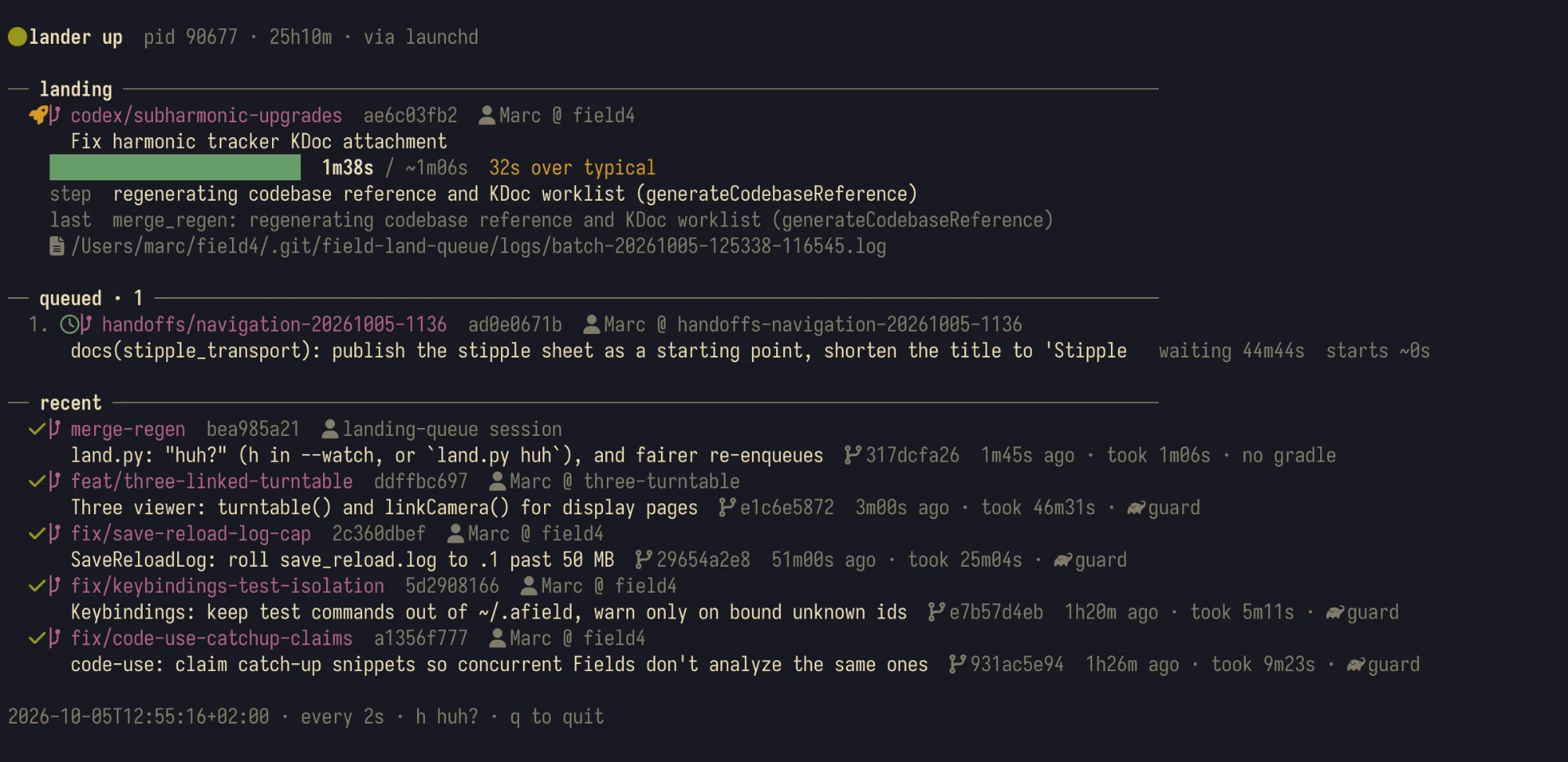
The details that make it pleasant to use:
- Red batches are bisected. When a batch of eight fails, the lander halves it and retries
from the oldest branch on the current
mainuntil the one responsible bounces alone, with the failing test's message attached ("found by bisecting a red batch of 8"). The other seven land. - A bounce explains itself.
land.py minelists every attempt to land the current branch;land.py huhandland.py bouncyhand the queue's logs to an agent and come back with a diagnosis and a fix to paste into the branch's session. - It does not fight you. A branch that touches a file you have uncommitted changes to waits instead of bouncing; a build that goes silent for 30 minutes is killed and retried once.
land.py docrebuilds this site frommainat that point in the queue.
Field's Welcome screen shows what the queue landed as its changelog.
Documents are scripts, and scripts become starting points
A Field document is saved as metadata.edn (What a Document Is on Disk).
Alongside it there is a second format, the operation transcript, which says how to make a
document: create these boxes, connect them, run this one, wait for it. It is plain YAML. This one
creates a single box and runs it:
:::static
name: hello_display
description: Minimal blank-canvas macro that creates one runnable output box.
operations:
  - create:
      box: agent_hello_display
      name: Agent Hello Display
      frame: { x: 80.0, y: 80.0, w: 300.0, h: 100.0 }
      properties:
        code: |
          markdown("main", "hello from OperationTranscript")
  - execute:
      box: agent_hello_display
      property: code
      type: fragment
      code: |
        markdown("main", "hello from OperationTranscript")
  - wait:
      millis: 250
Transcripts are how agents build documents, how docs captures set up a scene, and how a person can replay a construction step by step. They are atomic in the direction that matters: the first failing operation stops the rest, so a box whose prerequisite failed is never launched. Field also records your own edits, moves and launches as a transcript, which you can page through and turn into a macro.
Every transcript in the repository is verified: most are replayed in full and must produce no error output, the rest are built and compiled, and a few are compiled to JavaScript. Most are turned into ready-made documents and committed. With the canonical graphics lessons, they make up the Starting points list on Welcome:
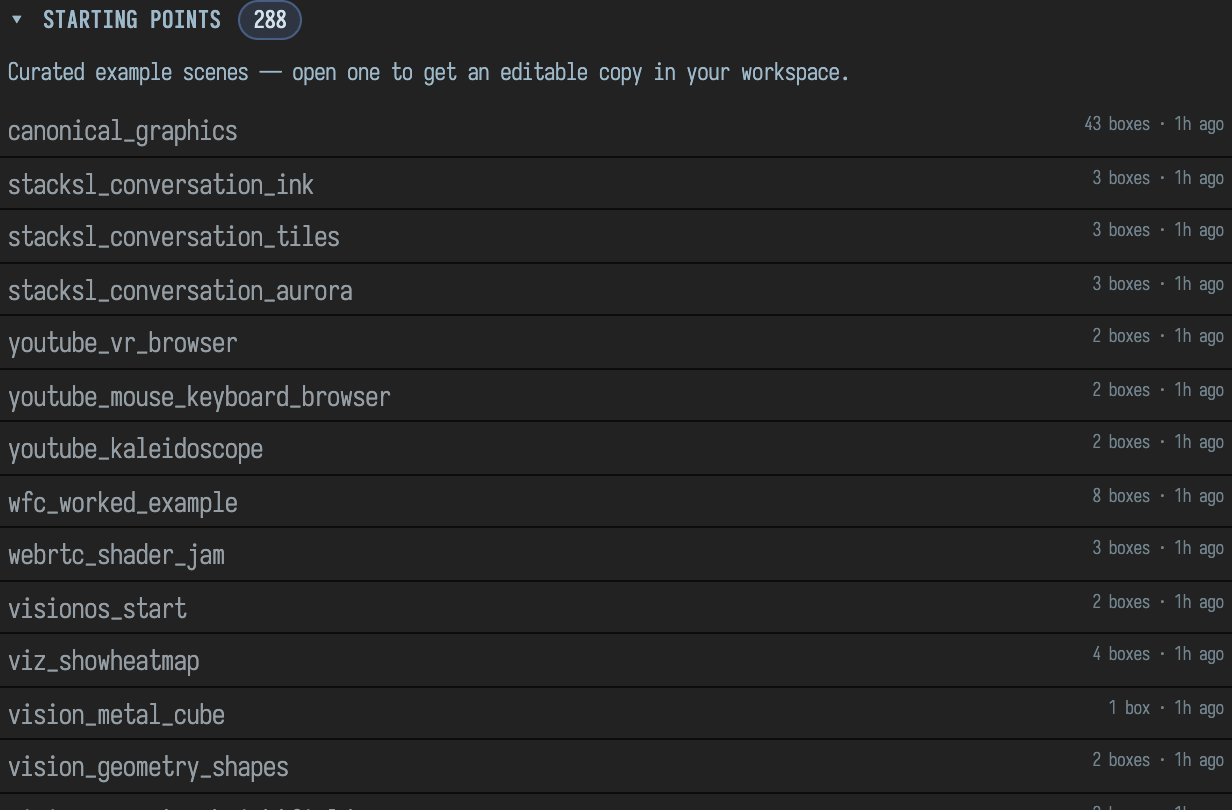
The Agent Transcript Gallery has one entry per transcript, each with an
Open link to its starting point; a guard keeps the gallery and the directory in exact
agreement. Going the other way, afield.examples.DocumentToTranscript turns any saved document
back into a transcript.
Agents drive Field the way the browser does
The browser talks to Field over one WebSocket. tools/field_backdoor.py speaks the same protocol,
plus a set of agent commands, so anything you can do in the UI an agent can do from a terminal,
and capture:
:::static
uv run --project . --group backdoor python tools/field_backdoor.py --json --with-playwright \
  --command 'new-box --name Visual' \
  --command 'run @last --value "display(\"main\", \"<div>hello</div>\")"' \
  --command 'screenshot-box @last /tmp/field-smoke.png'
Its commands cover documents, boxes, connections, running and launching, waiting on output, screenshots and video of a box, the editor or the window, keyboard and mouse input, and Field's own AI agent. A run command answers with the box's own verdict, so an agent learns that its code failed from the reply rather than from reading a screenshot. Two safety rules make it usable by many agents in many checkouts at once:
- It knows which Field it is talking to. It reuses a running Field only if that Field reports this checkout and started after the last change to the sources; otherwise it starts its own on the first free port from 9477 and stops it on exit.
- One verification per checkout. The runners take a lock, and the Gradle build waits on it, so two builds never trample each other's compiled classes.
tools/field_mcp.py offers the same reach as an MCP server: tools of its own (snapshot,
outline, read and create boxes, run transcripts and macros, screenshots, a debugger probe that
samples a variable at a source line in the running JVM) plus every tool Field's in-editor AI has,
discovered when it attaches.
Browsing is done by a Playwright that belongs to the Field JVM: one shared, GPU-accelerated Chromium (on macOS through Metal, about two and a half times faster for a full docs build than the software renderer), or Field's own Electron app when a capture needs something only the app shows.
The same harness runs the browser UI regressions (tools/run_ui_regressions.py): the command
palette, Monaco, output panels, controllers, selection, split canvases, the three.js viewer, AI
chat, completion. Each is a list of backdoor commands whose JavaScript assertions must all pass,
and each keeps its last passing and failing screenshots.
Notes on these pages, revised by agents
Reading these docs inside Field, you can select a passage, press Ctrl+Shift+A and leave a note.
Here is one being left on Landing on main; the DOC NOTES panel beside the
page lists it with its state and where it sits in the source:
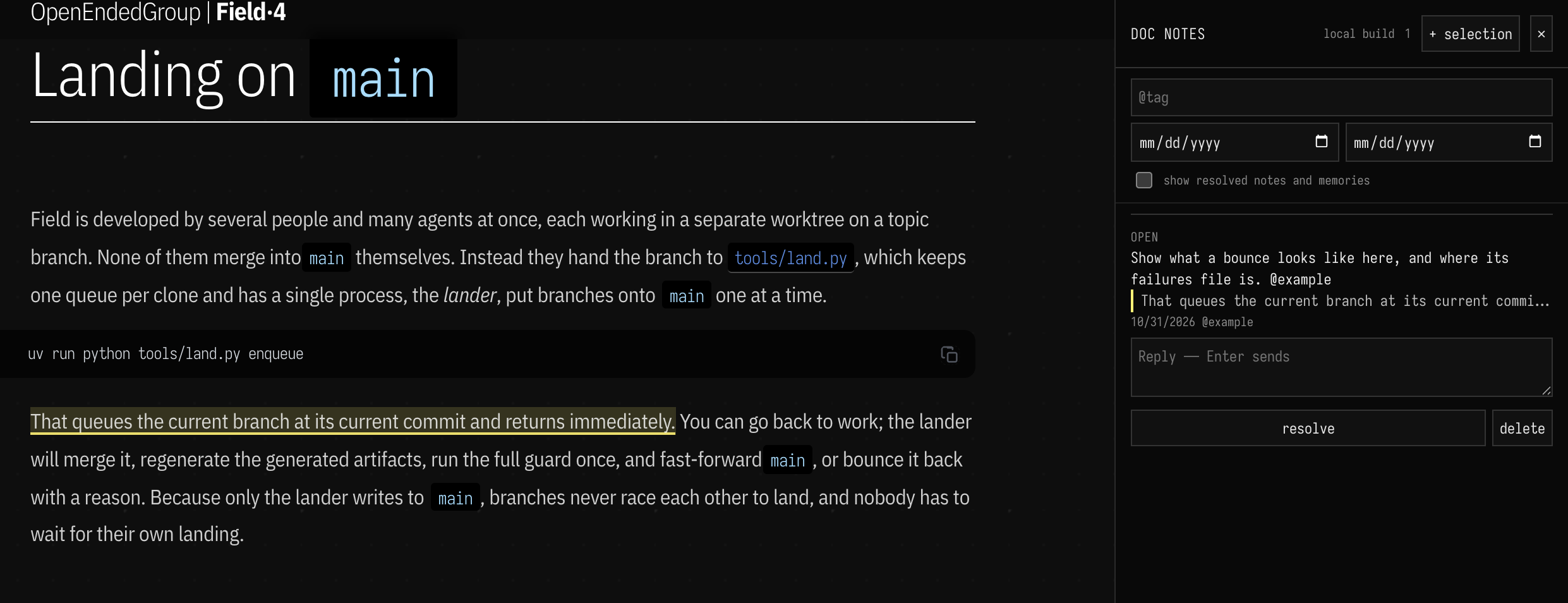
The notes are a revision queue (Notes on the Documentation, Revised by Agents):
- A note remembers which build of the site you were reading, finds your selection in that version
of the page, and from then on follows those lines through
git blame. Edits and moves elsewhere in the page do not lose it. A note on a generated reference page lands on the KDoc in the source file it came from. tools/docs_notes.py revisedivides the notes so that each file belongs to exactly one agent, and runs one agent per group, four at a time. Agents never edit the notes store: they report "resolved", "question" or "remember this about the page", and the harness applies those after checking them. When the agents hit a usage limit, the remaining notes wait for the reset.- A revision pass runs in its own worktree, rebuilds the site there so you can read the result, and lands through the queue. The Revision pass button on Welcome drives the same thing.
- Work bigger than a page becomes a handoff: a short document with the notes it holds, grouped into batches that a separate session picks up.
The Revision pass page, /docs-pass.html, is where a pass is started, watched, reviewed and
landed. It reads the same queue, so the note above is already waiting in it:
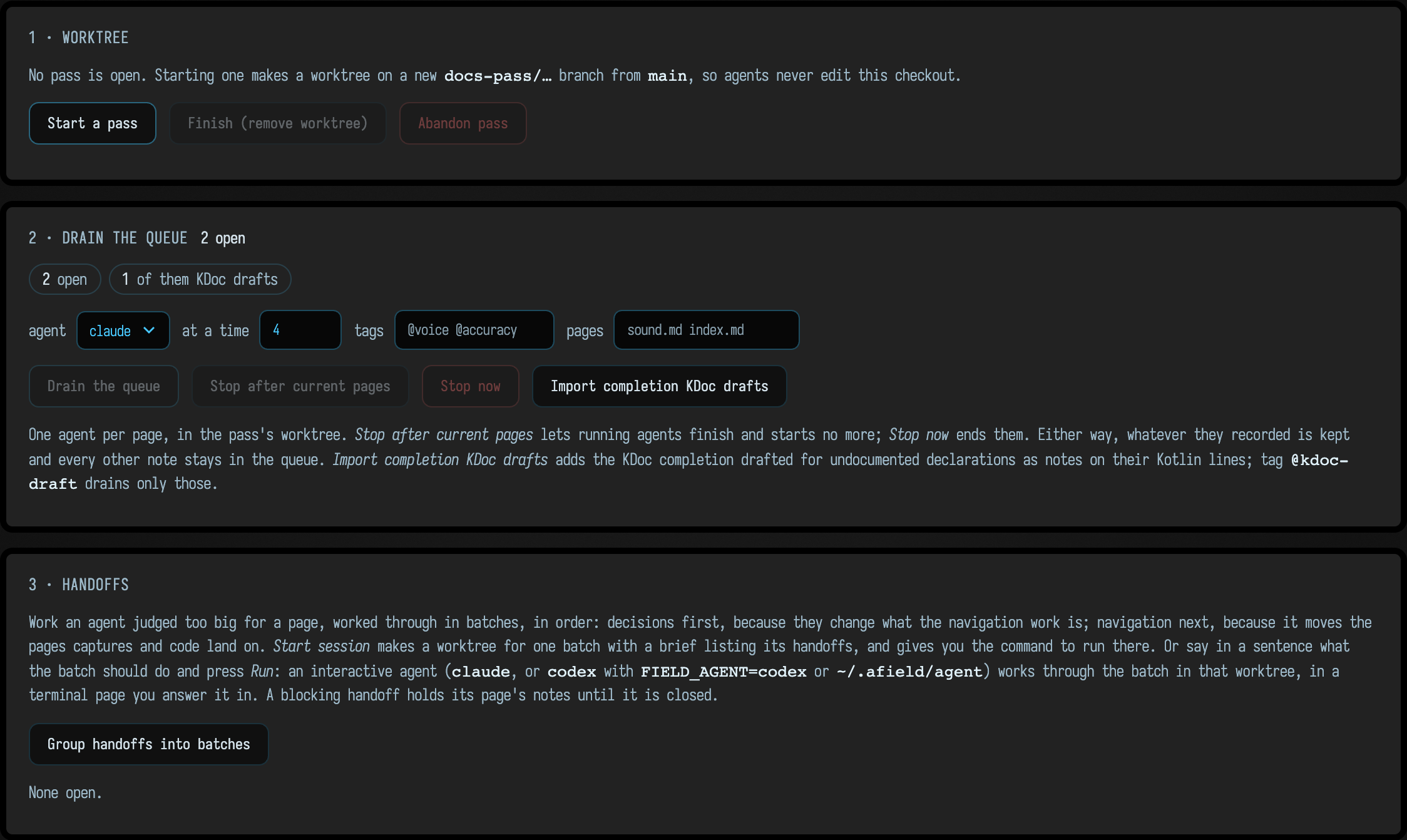
The rules every page agent reads are the distilled notes from earlier passes, and an agent works through the site in navigation order every three hours, three pages at a time, against the same rules.
An assistant that learns from its own tool use
Every session of Field's in-editor AI logs its tool calls (AI tool-use history). The AI panel on Welcome shows these improvement tasks side by side, each with its current state: completion's KDoc drafts waiting for review, the documentation notes, and the tool-use logs:
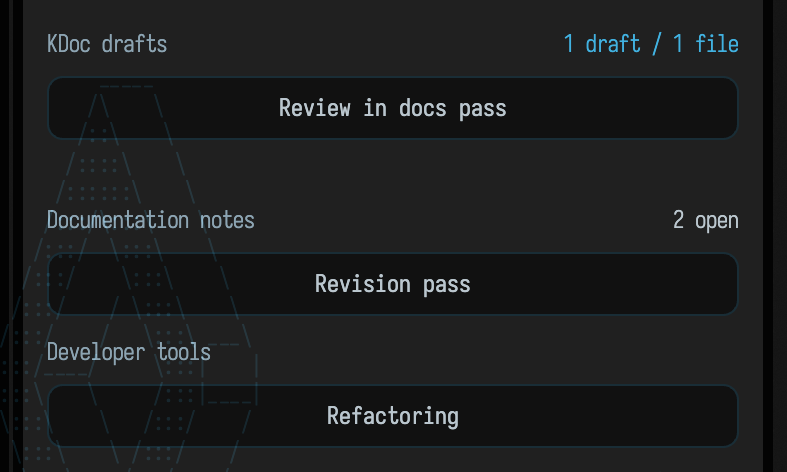
Two things are built on those logs:
- Distilled lessons.
agent-eval --distilfinds tool misuse that recurs across sessions and writes it, mechanically and without a model, into the "Distilled" section of the lessons file that every AI turn with the graph tools is given. A "Curated" section is for people. Seventeen scripted and live evaluation tasks measure whether a lesson helped. - Proposals. The Generate proposal button on Welcome gives a model the recent tool logs and a map of the source tree and asks it for one small improvement, made in its own branch and worktree; Try restarts Field from that worktree so you can use the change before keeping it.
While nobody is looking
Two scheduled agent runs use all of the above every night. One builds three small improvements,
each in its own branch, and a fourth agent reviews them and writes a verdict on each. The other
builds main from clean, fixes any new compiler warnings without suppressing them, and runs the
full gates, the complete docs recapture and the smoke catalog. Both keep their plans and their
memory on branches of their own, never touch main, and leave their work for a person to land.
Ideas worth taking with you
If you build something similar, these are the parts that lift most easily into another project:
- Make the documentation's examples the test suite, and key each capture on the source it reaches.
- Put a derivation next to every number you write in prose.
- Keep accepted failures in a register that fails when an entry stops failing.
- Let one process write
main, and enforce it with a hook rather than a rule. - Bisect red batches rather than landing branches one by one.
- Regenerate generated files after a merge instead of merging them.
- Give agents the same protocol as your UI, and have every verb return the real verdict.