MQTT: sensors, devices and brokers
afield.io.mqtt lets a box publish and subscribe over MQTT, the small publish/subscribe protocol that
ESP32 and Arduino sketches, Node-RED, Home Assistant and TouchDesigner all speak. Messages go to a
broker; anything subscribed to a matching topic (a path such as sensors/kitchen/temp)
receives them. Field includes its own broker, so nothing needs installing to try it.
The mqtt_demo starting point puts the pieces of this page together: one box
plays three pretend sensors, one listens to every temperature, one plots them, and one shows a
retained message.
A sensor feed
This subscribes to every room's temperature and shows the latest one:
import afield.io.mqtt.*

mqtt.subscribe("sensors/+/temp") { topic, message ->
    markdown("**$topic** = ${message.number}")
}

:::fold two rooms report a temperature, and one a humidity the wildcard skips
mqtt.publish("sensors/kitchen/temp", 21.5)
mqtt.publish("sensors/kitchen/humidity", 64)
mqtt.publish("sensors/hall/temp", 18.25)

:::endfold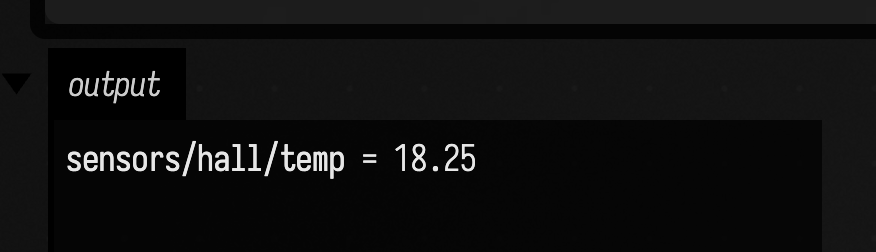
The box publishes three messages to Field's broker after it subscribes. The kitchen temperature
arrives first and is replaced by the hall's; the kitchen humidity does not match sensors/+/temp,
so it never reaches the callback.
+ stands for exactly one level of the topic, so this matches sensors/kitchen/temp and
sensors/hall/temp but not sensors/kitchen/humidity. #, as the last level, matches everything
below: sensors/#.
The callback runs on Field's main loop, like the rest of your box, so it can draw, set sliders and
display output directly. Re-running the box replaces the callback rather than adding a second one.
Stopping the box leaves the subscription in place, so a feed keeps arriving while you work on the
box that uses it; mqtt.unsubscribe() ends it.
Publishing
publish sends text, numbers, bytes, or JSON for a Map or List:
mqtt.publish("lights/stage/level", 0.8)
mqtt.publish("lights/stage/colour", mapOf("r" to 255, "g" to 120, "b" to 0))
mqtt.publish("installation/scene", "dusk", qos = 1, retain = true)
qos = 1 asks the broker to acknowledge the message; Field keeps it and sends it again after a
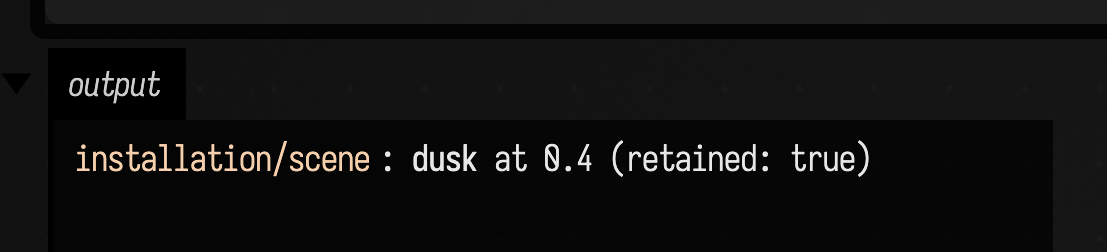
reconnect until it is acknowledged. A retained message stays on the broker, and every later
subscriber receives it immediately: this is how a device that has just booted learns the current
state. Publishing an empty retained message (mqtt.clearRetained(topic)) removes it.
This box publishes a retained scene and then subscribes; the subscription receives it at once, marked as retained:
import afield.io.mqtt.*

mqtt.publish("installation/scene", mapOf("name" to "dusk", "brightness" to 0.4), qos = 1, retain = true)

mqtt.subscribe("installation/#") { topic, message ->
    markdown(
        "`$topic`: **${message.string("name")}** at ${message.number("brightness")} (retained: ${message.retained})",
    )
}
Reading values without a callback
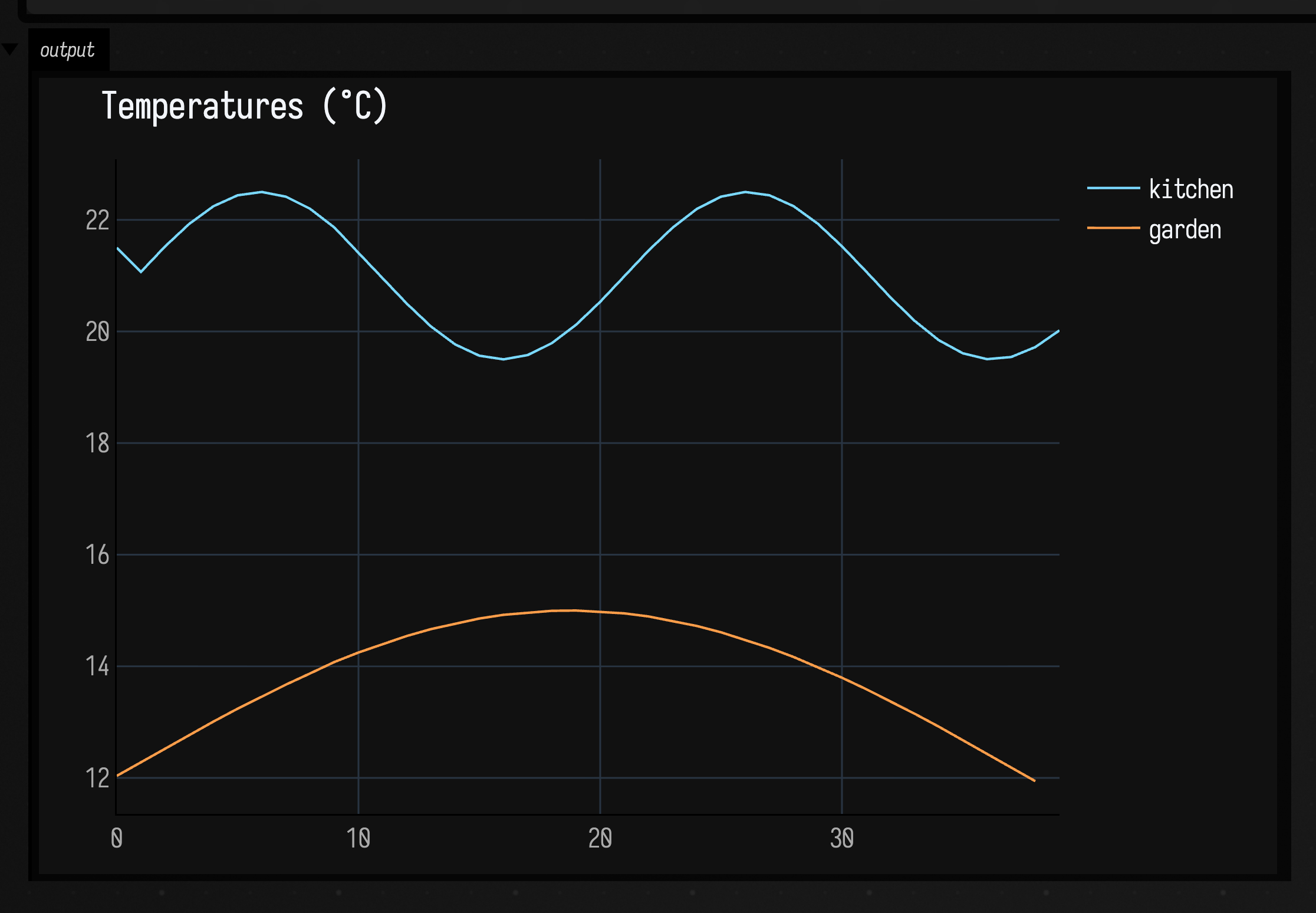
Often you only want the latest value. track subscribes without a callback, and then number,
text and series read what has arrived. Here the same box also plays two sensors for four
seconds, so there is something to plot:
import afield.io.mqtt.*

:::fold two pretend sensors, publishing ten times a second
val start = AnimationClock.nowSeconds()
fun sensors() {
    val t = AnimationClock.nowSeconds() - start
    mqtt.publish("sensors/kitchen/temp", 21.0 + sin(t * 3.0) * 1.5)
    mqtt.publish("sensors/garden/env", mapOf("temp" to 12.0 + sin(t * 0.8) * 3.0, "humidity" to 70))
}

:::endfold

mqtt.track("sensors/#")
loop {
    sensors()
    showSignals(
        "kitchen" to mqtt.series("sensors/kitchen/temp"),
        "garden" to mqtt.series("sensors/garden/env", "temp"),
        title = "Temperatures (°C)",
    )
    if (AnimationClock.nowSeconds() - start > 4.0) end()
    delay(100)
}
series keeps the last 512 numbers on a topic. Many devices send JSON such as
{"temp": 12.5, "humidity": 70}; give a field name (or a dotted path, "env.temp", "values.2")
as the second argument to series or number. On a message itself, message.number("temp"),
message.string("name") and message.json do the same.
Passing messages on to OSC and DMX
toOsc forwards a topic filter to an OSC receiver, such as TouchDesigner, Max or SuperCollider.
A number goes as one float to an address made from the topic (/sensors/kitchen/temp); each
numeric field of a JSON payload goes to its own address (/sensors/garden/env/temp):
mqtt.toOsc("sensors/#", oscClient("127.0.0.1", 7000))toDmx drives one lighting channel from a numeric topic, scaling range to 0–255. The output is
an Art-Net or sACN output from Driving Lights:
import afield.io.dmx.*

val out = artnetOut("192.168.1.50")
mqtt.toDmx("sensors/hall/lux", out, universe = 1, channel = 1, range = 0.0..800.0)
mqtt.toDmx("sensors/garden/env", out, universe = 1, channel = 2, path = "humidity", range = 0.0..100.0)
Both are subscriptions like any other: re-running the box replaces them, and mqtt.unsubscribe()
ends them.
Which broker
mqtt on its own uses Field's built-in broker on port 1883 (or a free port, if something else
already has 1883). It listens only on this machine. To let devices on your network connect to it,
start it bound to every interface before anything uses mqtt, and point the devices at this
machine's address:
mqttBroker(bindAddress = "0.0.0.0")To use a broker that is already running somewhere — Mosquitto, a Home Assistant install, a cloud service — name it:
val home = mqtt("tcp://192.168.1.20:1883", username = "field", password = "secret")
home.subscribe("zigbee2mqtt/+") { topic, message -> print("$topic ${message.text}") }
Setting the environment variable AFIELD_MQTT_URL makes that broker the default for plain mqtt.
Pass will = "field/status" to "offline" and the broker publishes that message, retained, if Field
disappears without disconnecting.
The connection is made once per broker and reconnects by itself, resubscribing, if the broker
restarts or the network drops. print(mqtt) shows its state and message counts.
Not supported
- MQTT 3.1.1 only; MQTT 5 brokers accept 3.1.1 clients, so this matters only for v5-only features.
- No TLS (
mqtts://, port 8883) and no WebSocket transport. - QoS 2 is accepted but delivered as QoS 1: delivery can include duplicates.
- Two subscriptions that overlap without one containing the other, such as
a/+/canda/b/+, receivea/b/ctwice from most brokers. Overlaps where one filter contains the other (a/+anda/#) deliver once. - A subscription inside one you already have (
a/baftera/#) gets its retained messages from what this connection has already seen, not from the broker. - The built-in broker keeps no sessions between connections and has no authentication.
mqttBroker()refuses packets over 1 MiB (MqttBroker(maxPacketSize = ...)raises it). Mosquitto 2.1 also drops a client that sends a 3 MB message unlessmax_packet_sizeis raised in its config.